The Role of Unified Workspaces in Reducing Digital Fatigue for Remote Professionals

Co-Founder and Chief Data Scientist
The shift to remote work has introduced unprecedented flexibility, but it has also birthed a silent productivity killer: digital fatigue. As teams scatter across the globe, collaboration has become synonymous with navigating a labyrinth of disconnected software and disruptive live meetings. However, the architectural shift toward unified, asynchronous-first workspaces is proving to be a critical remedy, offering a centralized hub that reduces cognitive load and streamlines remote operations.
What is digital fatigue and how do unified workspaces reduce it?
Digital fatigue is the mental and physical exhaustion caused by prolonged screen time, constant context switching, and excessive tool usage. Unified workspaces reduce it by centralizing communication, task management, and file sharing into a single interface, minimizing notification overload and eliminating the tension associated with disruptive live calls.
The Hidden Cost of Context Switching and Synchronous Meetings
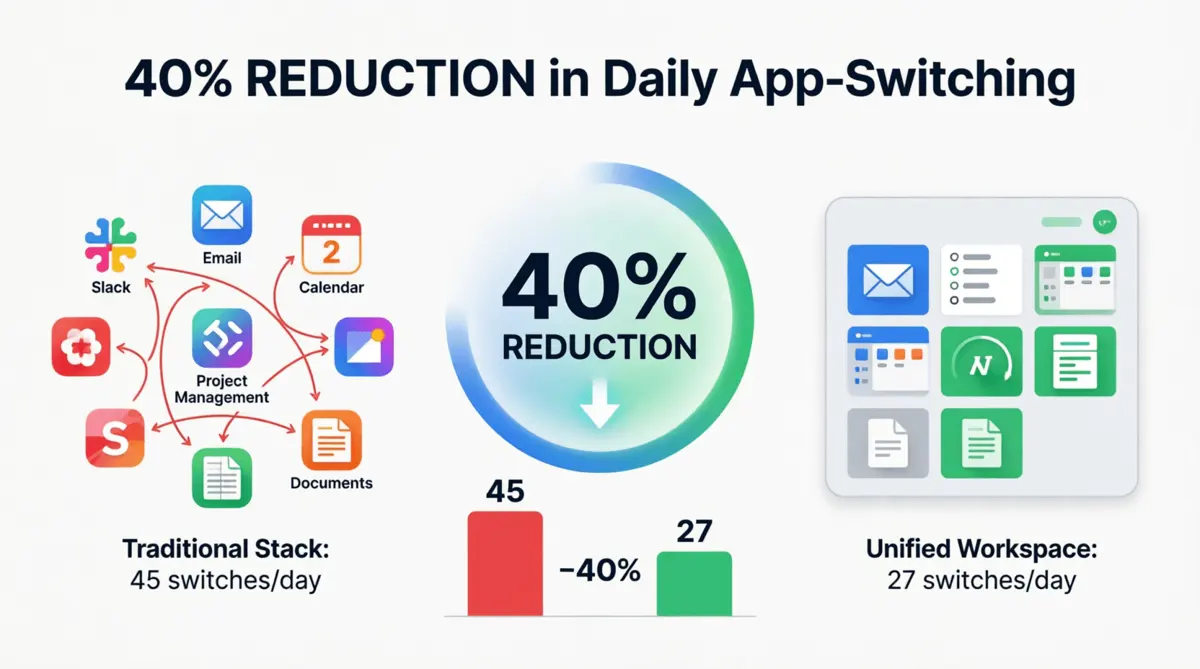
Remote professionals rarely have the luxury of walking over to a colleague's desk for a quick answer. Instead, they rely on a digital mosaic: chat apps for quick messages, separate ticketing systems for tasks, and disjointed document drives for files. Worse, traditional remote setups force employees into synchronous meetings, which break deep work and add immense psychological tension.
Research indicates that it takes an average of 23 minutes and 15 seconds to regain deep focus after an interruption. When a remote worker has to toggle between six different applications and prepare for impromptu sync meetings just to complete a single task, the cognitive cost is staggering. According to a comprehensive Microsoft Work Trend Index report, the rapid shift to digital tools has led to a significant increase in multitasking, with workers finding it increasingly difficult to focus.
Context switching and meeting fatigue deplete the brain's prefrontal cortex, the area responsible for executive functions and decision-making. By the end of the day, remote professionals aren't just physically tired from staring at screens; their cognitive reserves are completely drained. Platforms like remote.team directly address this by providing a unified environment that strips away the need for constant live syncing, replacing it with structured, text-based asynchronous workflows.
The Anatomy of an Asynchronous-First Unified Workspace
To understand how these platforms combat burnout, we must define what makes a workspace truly "unified." It is not simply a chat app with a few integrations; it is an ecosystem where data flows seamlessly without requiring the user to change interfaces or hop on a call to get answers.
A Unified Workspace is a centralized digital environment that aggregates essential work applications—such as asynchronous messaging, task management, and document collaboration—into a single, cohesive user interface, eliminating the need to continuously toggle between standalone software or endure disruptive live meetings.
Key features that mitigate digital exhaustion include:
- Zero-Synchronous-Meeting Architecture: Replacing live calls with structured text threads, task-based comments, and clear status updates, allowing employees to respond on their own schedule without breaking focus.
- Integrated Task and Time Management: Combining to-do lists, project boards, and native time tracking in one place, so workers can log hours and update progress without opening separate utility apps.
- Cross-Functional Search: A universal search bar that queries across all integrated documents, chats, and tasks simultaneously.
- Contextual Task Management: The ability to turn a chat message into an actionable task without leaving the current window or opening a new tab.
Traditional vs. Unified Workspaces: A Comparative Analysis
The transition from a fragmented digital stack to a unified environment represents a paradigm shift in how we view remote infrastructure. The table below highlights the operational differences that directly impact employee well-being.
| Metric | Traditional Fragmented Stack | Unified Async Workspace |
| Daily App Logins | 6 to 10+ separate applications | 1 primary application |
| Notification Sources | Siloed across email, chat, and tools | Centralized, customizable priority feed |
| Information Retrieval | Manual searching across different platforms | Universal, cross-platform search |
| Synchronous Meetings | High reliance on live syncs and screen shares | Eliminated; replaced by async text updates and shared context |
| Cognitive Load | High (constant context switching) | Low (linear, focused workflow) |
How to measure the reduction in digital fatigue
Measuring digital fatigue requires tracking both quantitative software usage metrics and qualitative employee feedback. Organizations can measure the reduction in digital fatigue by tracking the decrease in daily app logins, monitoring the drop in context-switching events, and conducting regular employee surveys on cognitive load and screen-time exhaustion.
Implementing the right infrastructure is only half the battle; measuring its impact is crucial for long-term success. A study by UC Irvine researcher Dr. Gloria Mark demonstrates that constant interruptions significantly elevate stress levels and physical markers of exhaustion. By reducing these interruptions through a unified platform, companies can track specific wellness metrics.
Real-World Metrics to Track
To validate the ROI of a unified workspace regarding employee well-being, remote teams should monitor the following metrics:
- Active Tool Ratio: Calculate the ratio of essential tools used per day. A successful unified workspace implementation should see a 40-50% reduction in the daily use of standalone, disconnected apps.
- Focus Time Metrics: Track the amount of uninterrupted time employees have. Modern platforms offer "focus mode" analytics and time-tracking dashboards that show how many hours a day an employee is actively working without receiving a notification or being pulled into a meeting.
- Synchronous Meeting Reduction: Measure the total hours spent in live syncs. According to
- Self-Reported Burnout Scores: Utilize anonymous pulse surveys focusing specifically on digital exhaustion. Ask employees to rate their screen-time fatigue and communication tension on a scale of 1-10 before and three months after migrating to a unified workspace.
Understanding burnout patterns across different industries can also inform your measurement strategy. Research on teacher burnout challenges reveals that chronic stress manifests similarly across knowledge work sectors, with digital overload being a universal contributor. Similarly, burnout prevention guides emphasize that proactive structural interventions outperform reactive wellness programs.
Strategies for implementing a unified workspace successfully
To successfully implement a unified workspace, remote teams must audit their existing tools, define strict asynchronous communication protocols, execute a phased rollout, and actively gather employee feedback to ensure high adoption rates and minimize transition fatigue.
While the end goal of a unified workspace is to reduce fatigue, the process of migrating to one can temporarily cause it. Change management is critical. Here is a strategic framework for a seamless transition:
1. Conduct a Comprehensive Tech Audit
Before migrating, identify exactly which tools are redundant. If your team uses one app for task management but also tracks progress in spreadsheets, decide on a single source of truth within your new unified workspace. Eliminate zombie apps and, most importantly, eliminate calendar-booking tools that facilitate unnecessary live meetings.
When evaluating team collaboration software options, prioritize platforms that offer deep integration between communication and task management rather than superficial connectors. The goal is to reduce the number of distinct mental models your team must maintain.
2. Establish Clear Asynchronous Boundaries
A unified workspace centralizes work, but without rules, it can become a 24/7 digital leash. Establish "communication charters" that prioritize structured text updates and task comments over live syncing. Define what constitutes an urgent message versus a non-urgent one. Encourage asynchronous communication for cross-timezone teams. You can learn more about structuring these boundaries in the remote.team guide to asynchronous collaboration.
The charter should explicitly state response time expectations. For example: urgent matters require response within 2 hours during working hours, while non-urgent items can wait 24 hours. This removes the anxiety of constant availability and gives employees permission to disconnect.
3. Phased Rollout and Training
Do not force a "rip and replace" strategy overnight. Start by migrating one function at a time—such as moving all internal chat to the new platform—before migrating project management and file storage. Provide sandbox environments where employees can practice using the new async task boards without the pressure of deadlines.
Each phase should include a two-week adjustment period where teams can provide feedback on workflow friction points. This iterative approach prevents the overwhelming sensation that often accompanies major software transitions.
4. Appoint Workspace Champions
Identify tech-savvy team members to act as "workspace champions." These individuals can provide peer-to-peer support, build workflow templates, and help less technically inclined employees navigate the new interface, reducing the frustration that often accompanies new software adoption.
Champions should be empowered to create team-specific customizations that reflect unique departmental workflows while maintaining organizational consistency in core practices.
The Psychological Architecture of Digital Well-being
The psychological impact of a cluttered digital environment mirrors that of a cluttered physical one. When remote professionals cannot find the document they need because it is buried in an unstructured chat channel or a forgotten folder, they experience acute micro-stressors. Add the anxiety of an unexpected live meeting invite, and stress levels skyrocket. Over time, these micro-stressors compound into full-blown digital fatigue.
A unified workspace acts as an organizational anchor. By providing a predictable, structured, and meeting-free environment, it returns a sense of agency to the remote worker. Employees know exactly where to look for information, how to communicate their progress through task statuses, and where to find the resources they need without embarking on a digital scavenger hunt or enduring a tense live conference.
The American Psychological Association (APA) notes that setting boundaries with technology is crucial for mental health. Unified workspaces facilitate these boundaries by allowing employees to "clock out" of a single application, rather than mentally detaching from a dozen different interfaces.
The Neuroscience of Focused Work
Recent neuroscience research reveals that the brain's default mode network—responsible for creative thinking and problem-solving—requires sustained periods of uninterrupted focus to activate effectively. Each context switch forces the brain to disengage from this network and reload task-specific parameters, a process that consumes glucose and generates metabolic waste products associated with mental fatigue.
Unified workspaces protect these critical focus periods by consolidating all work-related stimuli into a single, controllable environment. Instead of monitoring six different notification streams, employees can configure a single priority feed that surfaces only truly urgent items. This reduction in vigilance demands allows the brain to maintain deeper cognitive states for longer periods.
Building Sustainable Digital Habits
The transition to a unified workspace is not merely a technical migration; it is a habit formation challenge. Organizations must recognize that employees have developed coping mechanisms for fragmented tools—bookmarking multiple tabs, setting redundant reminders, maintaining parallel tracking systems. These behaviors, while rational responses to poor tool design, become obstacles to adoption.
Successful implementations address this by providing clear migration paths that demonstrate immediate value. For example, showing an employee how a single search query can retrieve information that previously required checking three different applications creates a "aha moment" that accelerates adoption.
Conclusion
As remote work solidifies its place in the modern professional landscape, the tools we use must evolve from isolated utilities into cohesive ecosystems. Digital fatigue is not a weakness of the remote worker; it is a symptom of a fractured digital infrastructure reliant on constant context switching and synchronous tension.
Unified, asynchronous-first workspaces address the root causes of this exhaustion by eliminating live meetings, centralizing information, and reducing the sheer volume of notifications vying for our attention. For organizations serious about sustaining remote productivity and protecting their employees' mental health, investing in a unified digital environment is no longer just a technical upgrade—it is a fundamental operational necessity.
The evidence is clear: when we design work environments that respect human cognitive limits and prioritize deep focus over constant connectivity, we unlock both higher performance and greater well-being. The future of remote work belongs to platforms that understand this principle and build their architectures accordingly.