
Close vs Salesforce Sales Cloud – 2027 Comparison

Co-Founder and Chief Data Scientist
Close vs Salesforce Sales Cloud Comparison Table of Contents
- What is Close?
- Who is Close for?
- Key Benefits of Close
- What is Salesforce Sales Cloud?
- Who is Salesforce Sales Cloud for?
- Key Benefits of Salesforce Sales Cloud
- Who are Close and Salesforce Sales Cloud best for?
- Close vs Salesforce Sales Cloud Feature Comparison
- Close vs Salesforce Sales Cloud Pricing
- Close Pros and Cons
- Salesforce Sales Cloud Pros and Cons
- How can integrated sales compensation management enhance CRM outcomes?
- Why is data security and compliance essential when using Close or Salesforce Sales Cloud?
- The Role of Workflow Optimization in CRM Platforms
- Verdict – Close vs Salesforce Sales Cloud: Which software is better?
What is Close?
Close is a sales automation tool designed to enhance the closing of deals for sales professionals. Operating as a cloud-based customer relationship management (CRM) system, Close provides various features to support salespeople in effectively managing their leads, monitoring progress, and ultimately securing more deals.
Among its notable features are a lead management system that facilitates tracking from initial contact to closure, a sales pipeline for visualizing the sales process and identifying bottlenecks, a communication platform for staying connected with leads and team members, an automation platform to streamline tasks and improve efficiency, and a reporting platform for tracking progress and identifying areas for enhancement.
Widely adopted across various business scales, including startups, small to medium-sized businesses (SMBs), and enterprises, Close CRM stands out as a preferred choice due to its user-friendly interface, affordability, and effectiveness in driving successful sales outcomes.
Featured CRM Software Products

$9 to $150/user/month
Yes, up to 2 users
E-signature software, call transcription, conversation routing
Editor's Take
HubSpot CRM is a powerful customer relationship management platform designed to help businesses manage their sales, marketing, and customer service efforts in one centralized place. Its user-friendly interface allows teams to track leads, monitor customer interactions, and automate sales pipelines. With built-in tools for email marketing, contact management, and analytics, HubSpot CRM provides deep insights into customer behavior and sales performance. The platform also supports seamless collaboration between marketing and sales teams through real-time updates and integrations with tools like Gmail, Outlook, and Slack. Additionally, its automation features help reduce manual tasks, enabling teams to focus on building relationships and closing deals. HubSpot CRM is scalable, making it ideal for businesses of all sizes, from startups to large enterprises.
Expert Score
In evaluating SaaS software, a comprehensive and structured methodology ensures a fair and accurate comparison across key metrics. This approach focuses on the most critical aspects that affect user experience, functionality, and business value. The following metrics—general features, cost, customer service, integrations, and mobile support—are evaluated to provide a holistic view of each software solution’s strengths and weaknesses. These metrics are selected based on their direct impact on software usability, scalability, and long-term effectiveness for businesses.
1. General Features - scoring weight 40%
This metric evaluates the core functionalities and tools the software offers. It involves assessing the comprehensiveness of the features, their relevance to the target users, and the ease of use. This is important because robust and well-designed features determine the software's overall utility and efficiency in solving user problems.
2. Cost - scoring weight 15%
Cost analysis focuses on pricing models, value for money, and scalability. It's crucial to evaluate whether the software’s features justify its price, considering different plans for small and large organizations. This is vital for businesses to ensure they invest in cost-effective solutions that fit their budget.
3. Customer Service - scoring weight 15%
This evaluates the responsiveness, quality, and availability of customer support, including channels like chat, email, or phone. Good customer service is essential for troubleshooting and ensuring smooth software usage, which reduces downtime and frustration for users.
4. Integrations - scoring weight 15%
This examines how well the software integrates with third-party tools (e.g., CRM, payment systems, collaboration apps). Seamless integrations are key for creating a unified workflow and enhancing productivity by connecting multiple systems, which is crucial for operational efficiency.
5. Mobile Support - scoring weight 15%
Mobile support assesses the software’s functionality and performance on mobile devices, including apps and mobile web versions. With increasing remote work and on-the-go usage, strong mobile support is critical to ensure users can access and utilize the software effectively, regardless of location.

Custom
No
Sales automation, customer service, marketing
Editor's Take
NetSuite CRM is a comprehensive customer relationship management solution designed to support businesses in managing their entire customer lifecycle. It offers a full suite of tools for sales automation, customer service, marketing, and partner management, helping teams improve efficiency and build stronger customer relationships. With real-time visibility into customer interactions, NetSuite CRM enables businesses to track leads, manage opportunities, and forecast sales accurately. Its built-in analytics and reporting features provide deep insights into sales performance and customer behavior. NetSuite CRM integrates seamlessly with NetSuite’s enterprise resource planning (ERP) system, offering a unified platform for managing business operations. This scalability and flexibility make it ideal for growing businesses and enterprises seeking an all-in-one solution for customer relationship management.
Expert Score
In evaluating SaaS software, a comprehensive and structured methodology ensures a fair and accurate comparison across key metrics. This approach focuses on the most critical aspects that affect user experience, functionality, and business value. The following metrics—general features, cost, customer service, integrations, and mobile support—are evaluated to provide a holistic view of each software solution’s strengths and weaknesses. These metrics are selected based on their direct impact on software usability, scalability, and long-term effectiveness for businesses.
1. General Features - scoring weight 40%
This metric evaluates the core functionalities and tools the software offers. It involves assessing the comprehensiveness of the features, their relevance to the target users, and the ease of use. This is important because robust and well-designed features determine the software's overall utility and efficiency in solving user problems.
2. Cost - scoring weight 15%
Cost analysis focuses on pricing models, value for money, and scalability. It's crucial to evaluate whether the software’s features justify its price, considering different plans for small and large organizations. This is vital for businesses to ensure they invest in cost-effective solutions that fit their budget.
3. Customer Service - scoring weight 15%
This evaluates the responsiveness, quality, and availability of customer support, including channels like chat, email, or phone. Good customer service is essential for troubleshooting and ensuring smooth software usage, which reduces downtime and frustration for users.
4. Integrations - scoring weight 15%
This examines how well the software integrates with third-party tools (e.g., CRM, payment systems, collaboration apps). Seamless integrations are key for creating a unified workflow and enhancing productivity by connecting multiple systems, which is crucial for operational efficiency.
5. Mobile Support - scoring weight 15%
Mobile support assesses the software’s functionality and performance on mobile devices, including apps and mobile web versions. With increasing remote work and on-the-go usage, strong mobile support is critical to ensure users can access and utilize the software effectively, regardless of location.

$25 per user per month
14 days
marketing automation, sales automation, no code customization
Editor's Take
CRM Creatio is a comprehensive customer relationship management (CRM) solution designed to streamline and enhance business processes across sales, marketing, and customer service functions. Known for its low-code platform, Creatio allows businesses to customize and automate workflows without requiring extensive technical expertise. This adaptability makes it particularly appealing to organizations seeking to align the software with their specific needs.
The platform's marketing module provides tools for multi-channel campaign management, lead generation, and personalized customer engagement. Its sales module offers functionality for pipeline management, opportunity tracking, and analytics to help teams close deals more efficiently. Additionally, the customer service module supports case management, service level agreement (SLA) monitoring, and omnichannel communication, enabling businesses to provide exceptional customer support.
Creatio stands out with its intuitive interface, robust analytics, and AI-powered tools that provide actionable insights. The low-code development tools allow non-technical users to create applications and automate processes, reducing the dependency on IT teams. Integration capabilities with other software platforms and APIs enhance its utility, making it a versatile choice for businesses of all sizes.
Overall, CRM Creatio is a powerful solution that combines user-friendly design with advanced customization and automation features. Its adaptability and low-code foundation position it as a strong contender for organizations looking to optimize customer relationship management processes while maintaining flexibility for growth and innovation.
Expert Score
In evaluating SaaS software, a comprehensive and structured methodology ensures a fair and accurate comparison across key metrics. This approach focuses on the most critical aspects that affect user experience, functionality, and business value. The following metrics—general features, cost, customer service, integrations, and mobile support—are evaluated to provide a holistic view of each software solution’s strengths and weaknesses. These metrics are selected based on their direct impact on software usability, scalability, and long-term effectiveness for businesses.
1. General Features - scoring weight 40%
This metric evaluates the core functionalities and tools the software offers. It involves assessing the comprehensiveness of the features, their relevance to the target users, and the ease of use. This is important because robust and well-designed features determine the software's overall utility and efficiency in solving user problems.
2. Cost - scoring weight 15%
Cost analysis focuses on pricing models, value for money, and scalability. It's crucial to evaluate whether the software’s features justify its price, considering different plans for small and large organizations. This is vital for businesses to ensure they invest in cost-effective solutions that fit their budget.
3. Customer Service - scoring weight 15%
This evaluates the responsiveness, quality, and availability of customer support, including channels like chat, email, or phone. Good customer service is essential for troubleshooting and ensuring smooth software usage, which reduces downtime and frustration for users.
4. Integrations - scoring weight 15%
This examines how well the software integrates with third-party tools (e.g., CRM, payment systems, collaboration apps). Seamless integrations are key for creating a unified workflow and enhancing productivity by connecting multiple systems, which is crucial for operational efficiency.
5. Mobile Support - scoring weight 15%
Mobile support assesses the software’s functionality and performance on mobile devices, including apps and mobile web versions. With increasing remote work and on-the-go usage, strong mobile support is critical to ensure users can access and utilize the software effectively, regardless of location.

$8/per user/per month
Yes
customizable dashboards, automated follow-ups, advanced analytics
Editor's Take
monday.com Sales CRM is a customizable platform designed to streamline sales processes, enhance team collaboration, and improve pipeline visibility. Its intuitive interface enables users to manage leads, track deals, and automate repetitive tasks with ease. The CRM integrates seamlessly with popular tools like Gmail, Slack, and HubSpot, ensuring a centralized workflow. Features like customizable dashboards, automated follow-ups, and advanced analytics help sales teams stay organized and focused on closing deals. With scalability in mind, monday.com caters to businesses of all sizes, offering flexible pricing plans and robust customer support. It’s an excellent choice for teams seeking efficiency and adaptability.
Expert Score
In evaluating SaaS software, a comprehensive and structured methodology ensures a fair and accurate comparison across key metrics. This approach focuses on the most critical aspects that affect user experience, functionality, and business value. The following metrics—general features, cost, customer service, integrations, and mobile support—are evaluated to provide a holistic view of each software solution’s strengths and weaknesses. These metrics are selected based on their direct impact on software usability, scalability, and long-term effectiveness for businesses.
1. General Features - scoring weight 40%
This metric evaluates the core functionalities and tools the software offers. It involves assessing the comprehensiveness of the features, their relevance to the target users, and the ease of use. This is important because robust and well-designed features determine the software’s overall utility and efficiency in solving user problems.
2. Cost - scoring weight 15%
Cost analysis focuses on pricing models, value for money, and scalability. It’s crucial to evaluate whether the software’s features justify its price, considering different plans for small and large organizations. This is vital for businesses to ensure they invest in cost-effective solutions that fit their budget.
3. Customer Service - scoring weight 15%
This evaluates the responsiveness, quality, and availability of customer support, including channels like chat, email, or phone. Good customer service is essential for troubleshooting and ensuring smooth software usage, which reduces downtime and frustration for users.
4. Integrations - scoring weight 15%
This examines how well the software integrates with third-party tools (e.g., CRM, payment systems, collaboration apps). Seamless integrations are key for creating a unified workflow and enhancing productivity by connecting multiple systems, which is crucial for operational efficiency.
5. Mobile Support - scoring weight 15%
Mobile support assesses the software’s functionality and performance on mobile devices, including apps and mobile web versions. With increasing remote work and on-the-go usage, strong mobile support is critical to ensure users can access and utilize the software effectively, regardless of location.

$7 per user per month billed annually
15 days
lead generation, sales pipeline management, workflow automation
Editor's Take
Zoho CRM is a flexible and comprehensive customer relationship management platform designed to help businesses manage and grow their customer relationships effectively. With tools for lead generation, sales pipeline management, workflow automation, and analytics, Zoho CRM is suitable for businesses of all sizes across a variety of industries.
Zoho CRM enables teams to streamline sales processes by capturing leads from multiple channels, tracking interactions, and managing every stage of the sales cycle. The platform offers customizable dashboards and reports, providing insights into sales performance and customer behaviors to help make data-driven decisions. With powerful automation features, Zoho CRM allows businesses to set up workflows for routine tasks like follow-ups, lead scoring, and email notifications, reducing manual work and enhancing productivity. The platform integrates with popular tools, including the Zoho suite, Microsoft 365, and G Suite, enabling a seamless connection across teams.
For businesses aiming to improve customer engagement, close deals faster, and enhance team collaboration, Zoho CRM delivers a scalable, user-friendly solution to drive sales and customer satisfaction.
Expert Score
In evaluating SaaS software, a comprehensive and structured methodology ensures a fair and accurate comparison across key metrics. This approach focuses on the most critical aspects that affect user experience, functionality, and business value. The following metrics—general features, cost, customer service, integrations, and mobile support—are evaluated to provide a holistic view of each software solution’s strengths and weaknesses. These metrics are selected based on their direct impact on software usability, scalability, and long-term effectiveness for businesses.
1. General Features - scoring weight 40%
This metric evaluates the core functionalities and tools the software offers. It involves assessing the comprehensiveness of the features, their relevance to the target users, and the ease of use. This is important because robust and well-designed features determine the software's overall utility and efficiency in solving user problems.
2. Cost - scoring weight 15%
Cost analysis focuses on pricing models, value for money, and scalability. It's crucial to evaluate whether the software’s features justify its price, considering different plans for small and large organizations. This is vital for businesses to ensure they invest in cost-effective solutions that fit their budget.
3. Customer Service - scoring weight 15%
This evaluates the responsiveness, quality, and availability of customer support, including channels like chat, email, or phone. Good customer service is essential for troubleshooting and ensuring smooth software usage, which reduces downtime and frustration for users.
4. Integrations - scoring weight 15%
This examines how well the software integrates with third-party tools (e.g., CRM, payment systems, collaboration apps). Seamless integrations are key for creating a unified workflow and enhancing productivity by connecting multiple systems, which is crucial for operational efficiency.
5. Mobile Support - scoring weight 15%
Mobile support assesses the software’s functionality and performance on mobile devices, including apps and mobile web versions. With increasing remote work and on-the-go usage, strong mobile support is critical to ensure users can access and utilize the software effectively, regardless of location.

By quote
Yes
Lead Management, Contact Management, Workflow Automation
Editor's Take
Salesforce CRM is a leading customer relationship management platform known for its robust functionality, scalability, and extensive customization options, making it suitable for businesses of all sizes, from startups to large enterprises. Built to streamline sales, marketing, customer service, and analytics, Salesforce CRM empowers teams to manage customer interactions, optimize workflows, and drive growth from a single, cloud-based platform.
Salesforce CRM provides a complete view of customer data, enabling teams to track interactions, manage leads, and automate tasks throughout the sales pipeline. With powerful tools for reporting and analytics, Salesforce offers insights into sales performance, customer trends, and campaign effectiveness, allowing teams to make data-driven decisions. The platform’s automation capabilities reduce manual workloads with customizable workflows, automated follow-ups, and lead scoring, ensuring a smooth customer journey. Integrations with thousands of third-party applications, along with its own suite of services, make Salesforce a highly adaptable solution for businesses looking to connect their CRM with other tools.
For organizations focused on enhancing customer engagement, improving team efficiency, and scaling their operations, Salesforce CRM delivers a powerful and versatile solution tailored to support long-term business growth.
Expert Score
In evaluating SaaS software, a comprehensive and structured methodology ensures a fair and accurate comparison across key metrics. This approach focuses on the most critical aspects that affect user experience, functionality, and business value. The following metrics—general features, cost, customer service, integrations, and mobile support—are evaluated to provide a holistic view of each software solution’s strengths and weaknesses. These metrics are selected based on their direct impact on software usability, scalability, and long-term effectiveness for businesses.
1. General Features - scoring weight 40%
This metric evaluates the core functionalities and tools the software offers. It involves assessing the comprehensiveness of the features, their relevance to the target users, and the ease of use. This is important because robust and well-designed features determine the software's overall utility and efficiency in solving user problems.
2. Cost - scoring weight 15%
Cost analysis focuses on pricing models, value for money, and scalability. It's crucial to evaluate whether the software’s features justify its price, considering different plans for small and large organizations. This is vital for businesses to ensure they invest in cost-effective solutions that fit their budget.
3. Customer Service - scoring weight 15%
This evaluates the responsiveness, quality, and availability of customer support, including channels like chat, email, or phone. Good customer service is essential for troubleshooting and ensuring smooth software usage, which reduces downtime and frustration for users.
4. Integrations - scoring weight 15%
This examines how well the software integrates with third-party tools (e.g., CRM, payment systems, collaboration apps). Seamless integrations are key for creating a unified workflow and enhancing productivity by connecting multiple systems, which is crucial for operational efficiency.
5. Mobile Support - scoring weight 15%
Mobile support assesses the software’s functionality and performance on mobile devices, including apps and mobile web versions. With increasing remote work and on-the-go usage, strong mobile support is critical to ensure users can access and utilize the software effectively, regardless of location.
Who is Close for?
Close is a CRM platform for sales teams with less than a hundred members. It is designed to help salespeople close more deals by providing them with various tools to automate their workflow, track their progress, and communicate with their leads and customers. When it comes to Close vs Salesforce Sales Cloud comparison in terms of target clients, Close is intended for small businesses to small-scale enterprises. Still, it is particularly well-suited for startups and small businesses. It is also a good choice for businesses in SaaS, ecommerce, and professional service industries, but it is not ideal for those that need CRM with accounting for small business.
Key Benefits of Close
Close offers various benefits and here are the most important ones:
- Highly customizable. Users can tailor Close to align precisely with their unique needs and preferences, ensuring the platform is optimized to suit individual workflows and requirements.
- Free AI-powered sales tools. Users gain access to a suite of free AI-enhanced tools and calculators that empower them to craft compelling sales emails, master impactful subject lines, and achieve their sales goals with precision.
- Increased productivity. Close can help salespeople double their revenue by automating tasks, providing real-time insights, and helping them stay organized.
- Improved communication. Close can help salespeople improve their communication with leads and customers by providing a centralized platform for all communication.
What is Salesforce Sales Cloud?
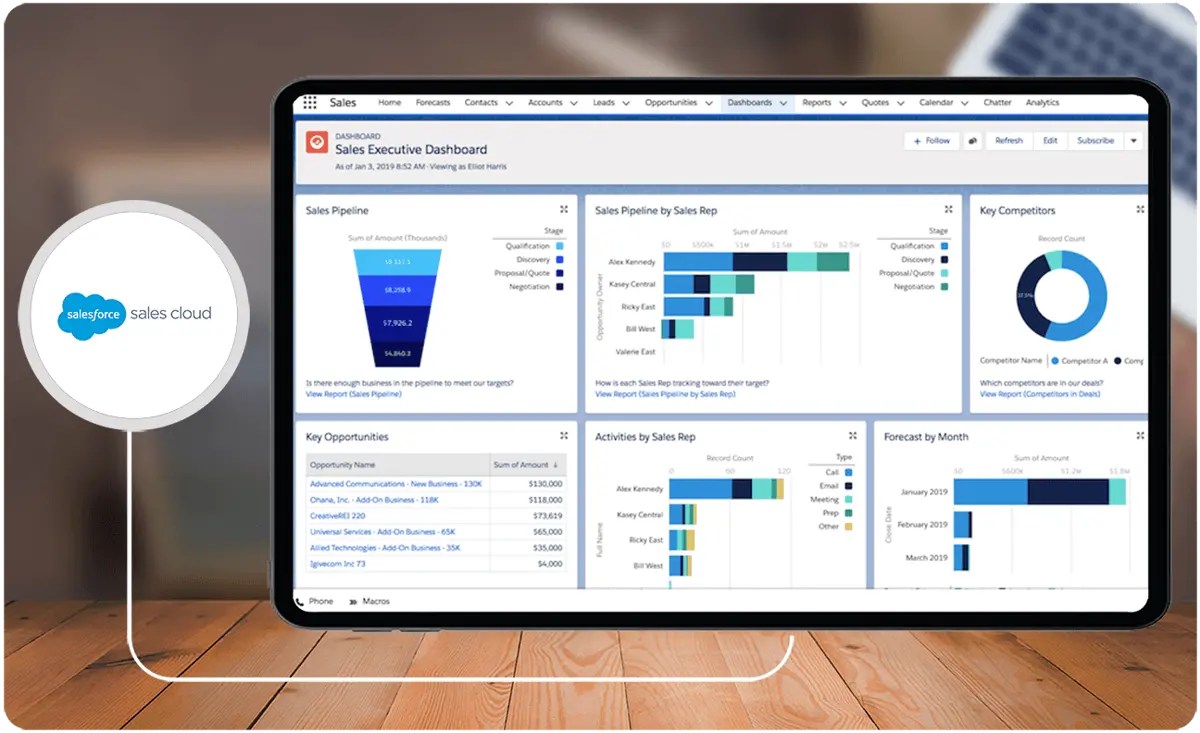
One of Salesforce’s core sales products, Salesforce Sales Cloud is a robust solution for businesses aiming to fortify revenue growth through advanced sales force automation. Offering diverse features, it expedites deal closures by incorporating guided selling and AI-driven insights, providing visibility into sales pipelines and forecasts for predicting future revenue.
A product of one of the best CRM systems for small business and large enterprises, Salesforce Sales Cloud prioritizes enhancing representative productivity, offering comprehensive insights across the sales cycle, and automating processes on a unified platform. From activity and lead management to forecasting, pipeline management, and collaborative CRM accessibility, Salesforce Sales Cloud provides a comprehensive solution tailored to drive sales efficiency and foster collaboration across teams.
Who is Salesforce Sales Cloud for?
Salesforce Sales Cloud is designed to serve a diverse clientele, including large enterprises with complex sales processes, small and medium-sized businesses seeking streamlined solutions, individual sales professionals, and companies across various industries emphasizing customer relationship management. It is particularly beneficial for businesses with intricate sales cycles, those prioritizing technological innovation, and those with a global presence. The platform's versatility and comprehensive features suit various clients in different sectors and sizes. You can also use this as a point of comparison for Salesforce Sales Cloud alternatives.
Key Benefits of Salesforce Sales Cloud
Below are the core benefits of Salesforce Sales Cloud:
- Comprehensive customer information. The platform provides a centralized account and contact management repository, ensuring a comprehensive view of customer information.
- Enhanced collaboration. The platform fosters collaboration among sales team members through communication tools and information-sharing features.
- Workflow automation. Automation features reduce manual effort by streamlining repetitive tasks, enhancing operational efficiency.
- Generative AI. AI capabilities provide insights, suggestions, and predictive analytics, aiding sales teams in making informed decisions and improving overall performance.
- Extensive integration capabilities. Salesforce Sales Cloud seamlessly integrates with other Salesforce products and third-party applications, ensuring a unified sales and customer management ecosystem.
Who are Close and Salesforce Sales Cloud best for?
An essential part of our Close vs Salesforce Sales Cloud guide is determining the types of businesses and/or users either is suited for.
- Close is an ideal option for small and growing businesses with less than 100 people in their sales teams, as it is more affordable and easier to use and set up. On the other hand, Salesforce Sales Cloud is a more robust and scalable CRM than Close, and it is better suited for businesses with complex sales processes, such as large enterprises. But if you want a perfect mix of both, you may want to check Close alternatives.
- Close is a powerful CRM suitable for businesses with simpler needs, offering essential features for lead management and sales progress tracking. In contrast, Salesforce Sales Cloud is recommended for businesses requiring a comprehensive CRM with an extensive feature set, including sales forecasting, opportunity management, and robust customer support tools.
Close vs Salesforce Sales Cloud Feature Comparison
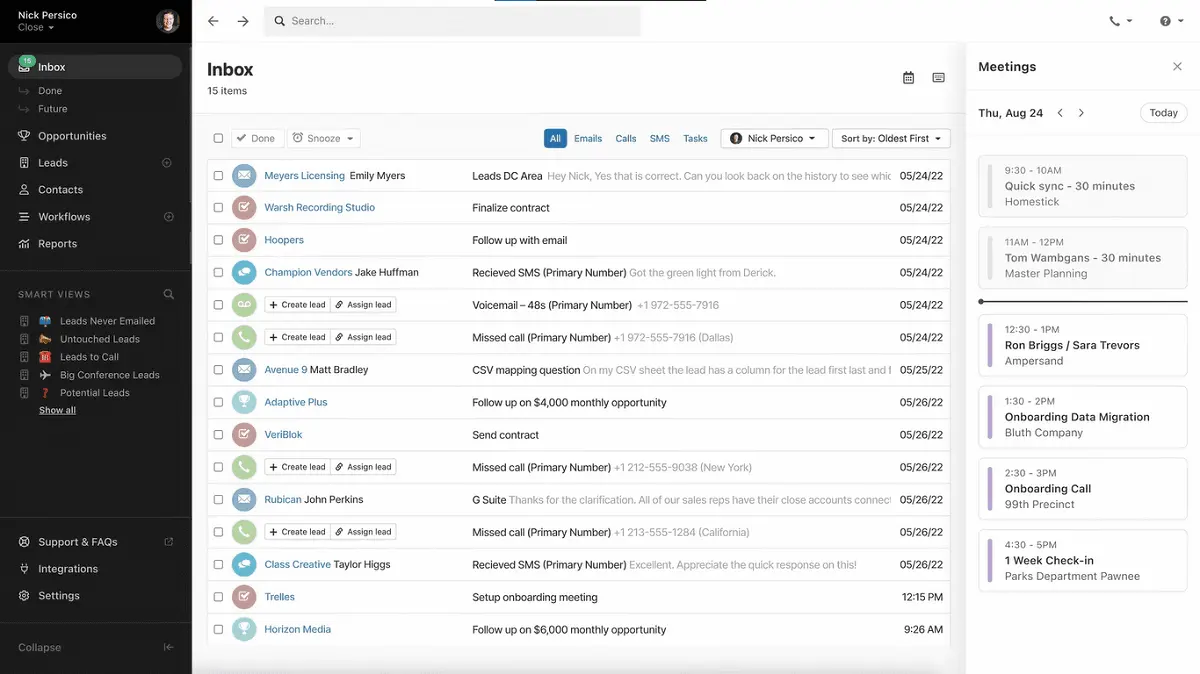
In this section of our Close vs Salesforce Sales Cloud guide, we will delve into a comprehensive feature comparison, examining the essentials identified by our research team to explore and highlight the strengths and distinctions of these two leading platforms.
Sales Automation
One of the important features that need to be examined in our Close vs Salesforce Sales Cloud comparison is sales automation tools. Close provides a user-friendly platform with pre-built and customizable workflows tailored for email, call, task, and SMS automation. While Close does not have built-in automation for its workflow process, this tool can be easily integrated via Zapier. Furthermore, notable features such as the Power Dialer and Predictive Dialer enhance efficiency through automated calling. In contrast, Salesforce Sales Cloud offers full customization through Flow, enabling users to construct intricate automation processes that align with various stages of the sales pipeline.
Lead, Account, Contact and Opportunity Management
Close provides fundamental management capabilities, allowing users to handle leads, accounts, contacts, and opportunities. While it offers customization options for fields and views, it focuses on providing a straightforward approach. On the other hand, Salesforce Sales Cloud has more comprehensive features, encompassing advanced lead scoring, opportunity forecasting, and tools for visualizing the sales pipeline. When it comes to the features in our Close vs Salesforce Sales Cloud comparison, the latter excels in offering more sophisticated and in-depth management functionalities, catering to businesses seeking advanced tools for optimizing their sales processes.
Sales Engagement
Regarding sales engagement features, Close excels in multi-channel engagement by seamlessly integrating email, calling, SMS, and social media. It enhances communication with advanced features like call assistant, email, and calendar sync, providing a comprehensive platform for effective engagement. Meanwhile, Salesforce Sales Cloud has Lightning Email and Lightning Tasks features to facilitate seamless buyer interaction. Furthermore, the platform also utilizes its AI-powered activity capture function to automatically log touchpoints to enhance engagement insights.
Collaboration
Collaboration is another feature explored in our Close vs Salesforce Sales Cloud comparison. Close facilitates real-time data sharing and team communication by seamlessly integrating with Slack. This integration enhances collaboration efficiency for teams using Close. Conversely, Salesforce Sales Cloud emphasizes collaboration through its internal team communication platform, Chatter. It also provides shared dashboards and Kanban views, fostering improved visibility and knowledge sharing among team members.
Built-in AI
Close's AI is primarily centered around free AI-enhanced tools and calculators, which aid in crafting impactful sales emails, optimizing subject lines, and achieving sales goals. While limited, these tools provide valuable support for sales teams. On the other hand, Salesforce Sales Cloud has Salesforce Einstein, which represents a comprehensive AI solution embedded within the CRM platform, providing an array of functionalities to enhance various aspects of the sales process.
Reporting and Analytics
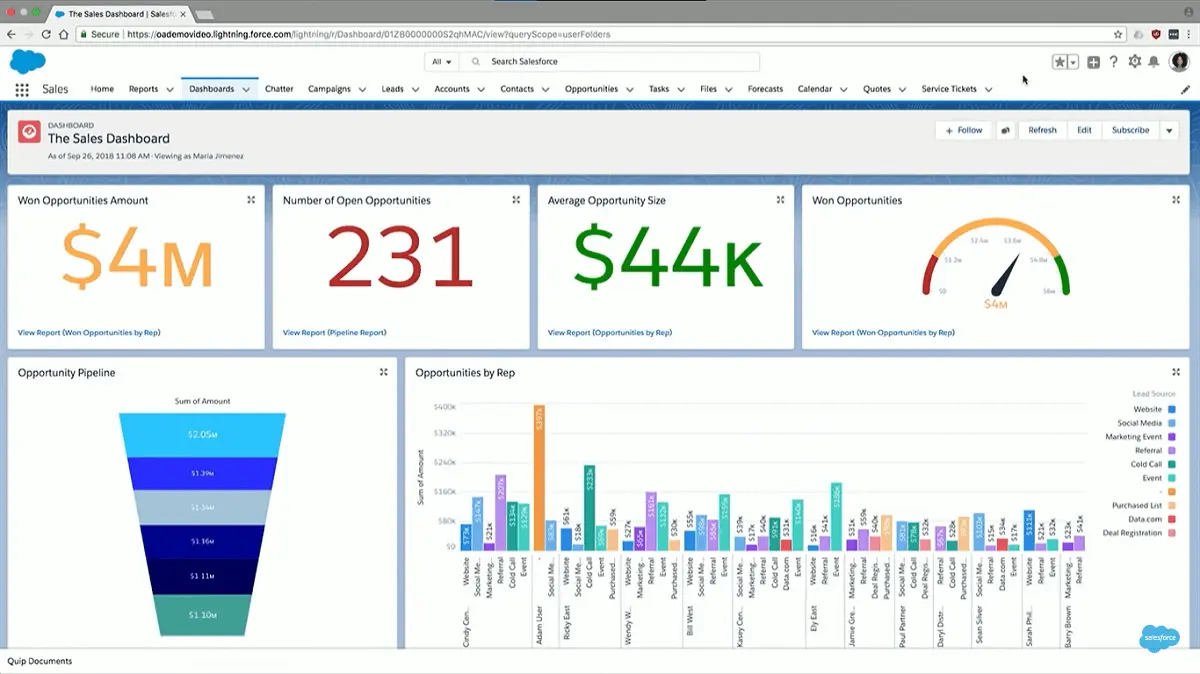
In terms of reporting and analytics features, Close provides essential reporting elements such as basic activity reports, dashboards, and opportunity funnel reports. Additionally, it offers customization options with custom graphs and detailed email template/workflow performance reports, enabling deeper analysis of sales activities. On the other hand, Salesforce Sales Cloud stands out with its comprehensive reporting and analytics suite, Einstein Analytics. This advanced toolset includes features like sales forecasting, insights into pipeline growth, and tools for optimizing revenue.
Security
Both Close and Salesforce Sales Cloud prioritize robust security features for data protection. Close implements measures such as role-based permissions, lead visibility controls, two-factor authentication, Google SSO, and compliance with SOC 2 Type 2, GDPR, and CCPA standards. On the other hand, Salesforce Sales Cloud offers advanced security features, including role-based access control and field-level security, along with compliance with SOC 2 Type 2 and GDPR standards.
Integration Capabilities
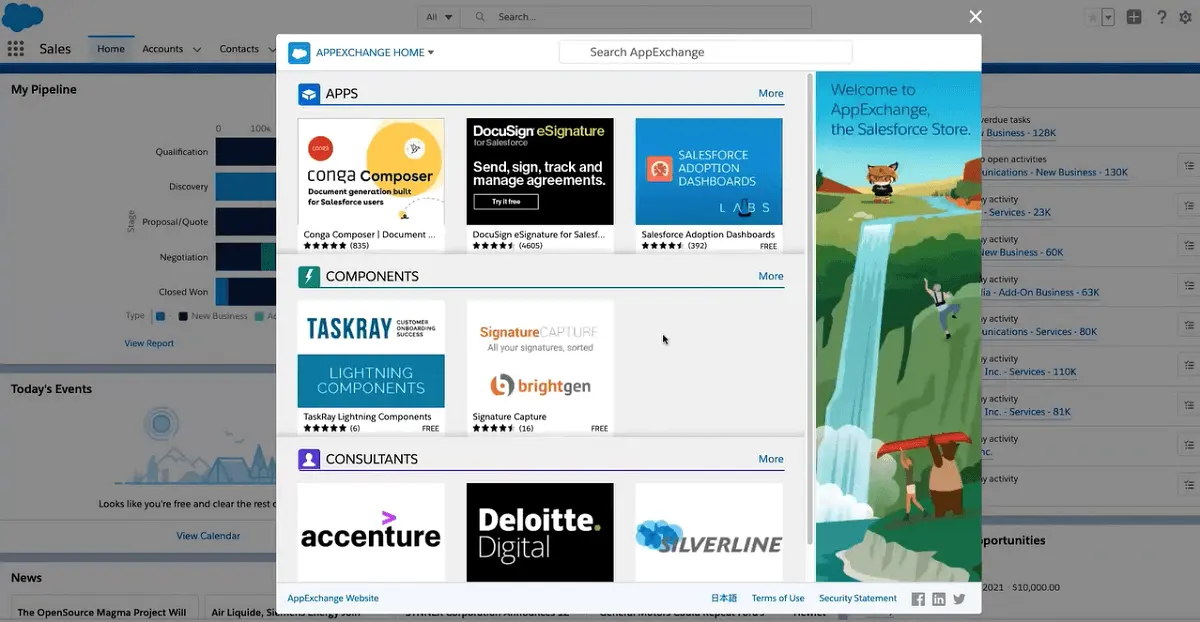
In terms of integration capabilities, our Close vs Salesforce Sales Cloud comparison presents each platform’s range. Close can integrate with over 100 apps, including popular tools like Zoom, Segment, Zapier, Calendly, and some of the best customer support software systems. This diverse range facilitates seamless connections and enhances overall workflow efficiency. Meanwhile, Salesforce Sales Cloud extends its integration capabilities by leveraging the broader Salesforce ecosystem. It also offers access to over 2,000 third-party apps through AppExchange, including payroll processing software. This extensive integration ecosystem allows users to customize and tailor their CRM experience according to specific business needs.
Close vs Salesforce Sales Cloud Pricing
An essential aspect of the Close vs Salesforce Sales Cloud comparison involves examining their required financial investment. Below is an overview of Close vs Salesforce Sales Cloud pricing plans:
Close Pricing Plans
Close offers three pre-packaged plans to cater to varying business needs. The Startup plan, priced at $59 per month, is designed for a single user and includes a maximum of five workflows. It encompasses standard leads, contacts, opportunities management, features like email and calendar sync, Zapier integration, and the Power Dialer. The Professional plan, priced at $329 per month, supports up to three users and builds upon the Startup plan by offering additional workflows, multiple pipelines, and custom activities. Lastly, the Enterprise plan, accommodating up to five users, provides more workflows and extends customization capabilities beyond the previous plans.
Salesforce Sales Cloud Pricing Plans
In the context of our Close vs Salesforce Sales Cloud comparison, Salesforce Sales Cloud presents a more intricate pricing structure. The platform offers five plans, each billed on a per-user, per-month basis, with additional features incurring separate charges. The entry-level plan, Starter, is the most budget-friendly, starting at $25 per user per month. Following this, the Professional plan is available at a cost as low as $80, while the Enterprise plan is priced starting at $165 per user per month. For more advanced functionalities, Sales Cloud's top-tier plans, Unlimited and Unlimited+, are available at $300 and $500 per user per month, respectively.
Close Pros and Cons
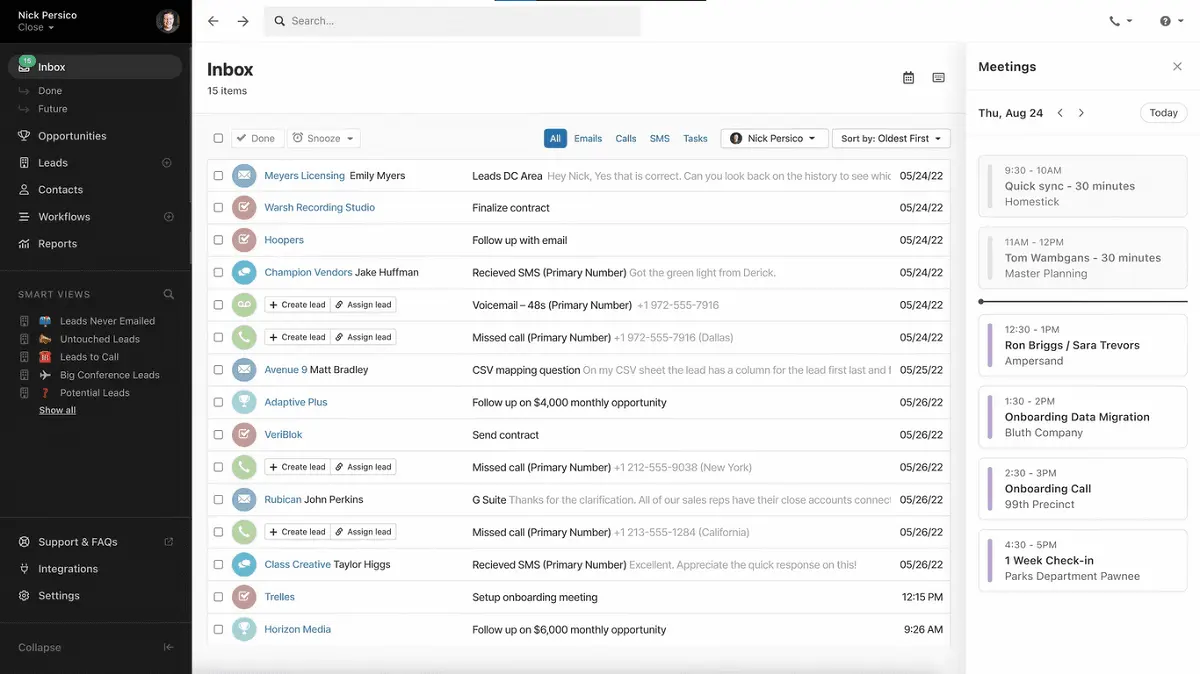
Our Close vs Salesforce Sales Cloud comparison won’t be complete without examining each platform’s pros and cons, and below are Close's advantages and disadvantages.
Pros
- Simplicity and affordability. Close is an ideal choice for small businesses and startups due to its simplicity and affordability, offering a user-friendly CRM solution.
- Comprehensive communication tools. Close excels in communication with features like email integration, calling, SMS, and social media, including automation tools like Power Dialer and Predictive Dialer.
- Integration flexibility. Close's integration capabilities connect with over 100 apps, providing a flexible and customized workflow tailored to specific business needs.
Cons
- Lack of advanced AI. Close has limitations, including the absence of advanced AI technology, which can impact automation and insights.
- Limited workflow complexity. The workflow tool in Close is less suitable for complex processes, making it less ideal for businesses with intricate sales pipelines.
Salesforce Sales Cloud Pros and Cons
Pros
- Versatile and robust. Suitable for businesses of all sizes, Salesforce Sales Cloud is a versatile and robust platform.
- Advanced automation. Offers advanced automation capabilities, facilitating the creation of intricate processes across the sales pipeline.
- Reporting and analytics excellence. Excels in reporting and analytics, leveraging Einstein AI for sales forecasting and revenue optimization insights.
- Emphasis on team collaboration. Prioritizes team collaboration through various channels.
Cons
- Can be very expensive. The platform can be costly, particularly with additional charges for some of its extensions.
- Learning curve. The complexity of the Salesforce ecosystem may pose a challenge for new users, requiring a steeper learning curve compared to simpler solutions like Close.
How can integrated sales compensation management enhance CRM outcomes?
Integrating effective sales compensation management within your CRM strategy can streamline performance tracking and ensure alignment between sales incentives and company objectives. This integration minimizes manual errors in commission calculations and accelerates the reconciliation of sales performance data, allowing for more accurate and timely decision-making. By connecting compensation processes directly with CRM data, organizations can create transparent benchmarks that reward high performance and foster a data-driven sales culture. Leveraging dedicated sales compensation software further refines this process by ensuring that compensation metrics are seamlessly incorporated into overall sales analytics, ultimately driving strategic growth and operational efficiency.
Why is data security and compliance essential when using Close or Salesforce Sales Cloud?
For any CRM system, ensuring data security and compliance is crucial due to the sensitive nature of customer information. Sales teams need a CRM platform that not only drives performance but also prioritizes the protection of customer data. Close and Salesforce Sales Cloud both integrate robust security measures, making them reliable choices for businesses handling high volumes of client data. Here’s why data security matters and how these platforms deliver:
- Customer Trust: By enforcing strong security protocols, these CRMs help businesses maintain trust, ensuring clients their data is handled responsibly.
- Regulatory Compliance: Compliance with regulations like GDPR and SOC 2 protects businesses from legal repercussions and costly fines.
- Risk Mitigation: Data breaches can result in substantial financial loss. Security features like two-factor authentication, role-based access control, and audit trails reduce the risk of unauthorized access.
The Role of Workflow Optimization in CRM Platforms
Effective workflow optimization is a cornerstone of customer relationship management (CRM) platforms, offering businesses the ability to streamline operations and improve productivity. For instance, Close simplifies workflow management through features like its Power Dialer and pre-built integrations via Zapier, which address automation needs without requiring advanced technical expertise. On the other hand, Salesforce Sales Cloud uses its robust platform, Salesforce Flow, to enable businesses to customize complex workflows tailored to diverse sales processes.
Incorporating workflow optimization tools can have a transformative impact on an organization’s operational efficiency. Businesses can automate repetitive tasks, improve team collaboration, and ensure seamless communication with clients. These functionalities become even more critical when selecting complementary software solutions, such as procurement software, to enhance resource allocation and cost efficiency across multiple departments. Organizations looking to refine their end-to-end processes would benefit from leveraging tools that integrate seamlessly within their CRM environment.
Ultimately, understanding how each CRM platform approaches workflow optimization provides valuable insight for businesses to align their operational goals with a solution that meets their specific needs. By integrating automation and efficiency-focused tools effectively, companies can create a streamlined workflow that enhances both internal operations and client interactions.
Verdict – Close vs Salesforce Sales Cloud: Which software is better?
We have finally reached the verdict of our Close vs Salesforce Cloud comparison article. When assessing the overall capabilities and versatility for businesses of all sizes, Salesforce Sales Cloud emerges as the superior choice. Its extensive features, scalability, and powerful automation tools make it a robust solution for companies with diverse and complex needs. However, Close stands out as an ideal option for businesses with smaller sales teams, particularly those comprising less than 100 people, and who prioritize cost-effectiveness without compromising essential functionalities. Close's user-friendly interface, affordability, and focused features cater to the specific requirements of smaller-scale enterprises, providing a more streamlined and budget-friendly CRM solution.
Key Insights
- Close Overview:
- Close is a cloud-based CRM and sales automation tool designed to help sales teams close more deals efficiently.
- It includes features such as lead management, sales pipeline visualization, communication tools, automation, and reporting.
- Suitable for small businesses, startups, and SMBs, especially in industries like SaaS, e-commerce, and professional services.
- Who Uses Close:
- Ideal for sales teams with less than 100 members.
- Benefits startups, small businesses, and industries that prioritize streamlined sales processes and effective lead management.
- Key Benefits of Close:
- Highly customizable to fit unique workflows and requirements.
- Provides free AI-powered sales tools for email optimization and sales goal achievement.
- Increases productivity by automating tasks and offering real-time insights.
- Enhances communication with centralized communication platforms for leads and team members.
- Salesforce Sales Cloud Overview:
- Salesforce Sales Cloud is a comprehensive CRM solution designed to enhance revenue growth through advanced sales force automation.
- Offers features like guided selling, AI-driven insights, sales pipeline visibility, forecasting, and collaborative tools.
- Who Uses Salesforce Sales Cloud:
- Designed for diverse clientele, including large enterprises with complex sales processes, SMBs, individual sales professionals, and companies across various industries.
- Ideal for businesses with intricate sales cycles and those prioritizing technological innovation.
- Key Benefits of Salesforce Sales Cloud:
- Centralized customer information repository.
- Enhanced collaboration among sales team members.
- Workflow automation for operational efficiency.
- AI capabilities for insights, suggestions, and predictive analytics.
- Extensive integration capabilities with Salesforce products and third-party applications.
- Comparison Highlights:
- Sales Automation: Close offers customizable workflows for email, call, task, and SMS automation; Salesforce Sales Cloud provides full customization through Flow.
- Lead Management: Close offers fundamental management capabilities; Salesforce Sales Cloud provides advanced lead scoring, opportunity forecasting, and sales pipeline visualization.
- Sales Engagement: Close integrates multiple communication channels; Salesforce Sales Cloud includes Lightning Email and Tasks for buyer interaction.
- Collaboration: Close integrates with Slack for team communication; Salesforce Sales Cloud uses Chatter and shared dashboards.
- AI: Close offers basic AI tools; Salesforce Sales Cloud features Salesforce Einstein for comprehensive AI support.
- Reporting and Analytics: Close provides essential reporting and customization; Salesforce Sales Cloud offers advanced tools like Einstein Analytics.
- Security: Both prioritize robust security features with compliance standards.
- Integration Capabilities: Close integrates with over 100 apps; Salesforce Sales Cloud connects with over 2,000 third-party apps through AppExchange.
Other Things You Should Know About Close – Salesforce Sales Cloud Comparison
Salesforce Sales Cloud is designed to streamline the sales process, focusing on managing leads, opportunities, and sales forecasts. In contrast, Salesforce Service Cloud enhances customer service and support, prioritizing efficient handling of customer inquiries and cases. The distinction lies in their respective focuses, with Sales Cloud optimizing sales workflows and Service Cloud addressing customer support and service management.
Close is designed to significantly enhance sales team productivity by providing an all-in-one solution that eliminates the need for additional sales email tools or calling products. It is engineered for scalability, efficiently managing a high volume of leads.
Implementing Salesforce Sales Cloud offers enhanced management of business processes and company development. It helps secure more deals, expedite deal closures, and facilitate quicker decision-making, optimizing sales processes and contributing to overall business growth and success.
Close CRM is a preferred solution for sales teams, empowering them to efficiently oversee their pipelines and daily tasks. Users value its feature-rich capabilities and user-friendly interface, which simplifies organizing leads and opportunities.
Close offers three pricing plans: Startup at $59 per month for a single user, Professional at $329 per month for up to three users, and Enterprise for up to five users, providing additional workflows and customization capabilities.
Salesforce Sales Cloud offers five plans: Starter at $25 per user per month, Professional at $80 per user per month, Enterprise at $165 per user per month, Unlimited at $300 per user per month, and Unlimited+ at $500 per user per month.


