2027 How Online Quizzes and Assignments Usually Work

Co-Founder and Chief Data Scientist
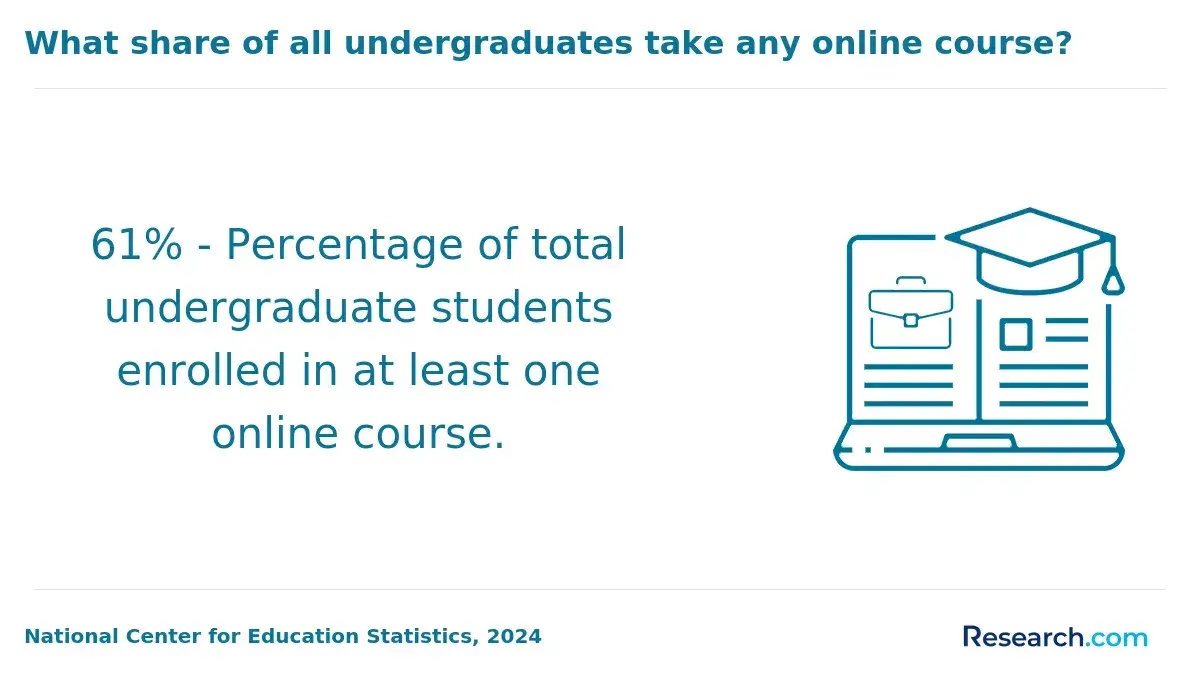
Online quizzes and assignments can feel unclear if you are new to virtual classes: Are tests timed, who grades your work, and what happens if technology fails? The National Center for Education Statistics reported in 2024 that 61% of U.S. undergraduates were enrolled in at least one distance education course in fall 2021, showing how common these formats have become.
This guide is for students comparing online, hybrid, or accelerated courses. You will learn how assessments usually work, what policies to check, and how to avoid mistakes that can hurt your grade.
Key Things You Should Know
- Online quizzes are usually delivered through a learning management system, and objective questions are often auto-graded while essays, projects, labs, and discussion posts are graded by instructors using rubrics.
- Most online courses combine several grade categories, such as weekly quizzes, assignments, discussions, exams, and projects, so one missed item may matter less or more depending on the syllabus weight.
- Because NCES reported in 2024 that 61% of U.S. undergraduates took at least one distance education course in fall 2021, students should treat online assessment rules as a core college-readiness skill, not a niche issue.
What are online quizzes and assignments in college courses?
Online quizzes and assignments are course assessments completed through the internet rather than handed in during a physical class meeting. They may be fully asynchronous, meaning you complete them on your own schedule before a deadline, or they may happen during a scheduled live class session.
In most college courses, the instructor posts instructions, readings, due dates, grading criteria, and submission links inside a learning management system. A quiz might check whether you understood a chapter, watched a lecture, or can apply a formula.
An assignment might ask you to write a paper, solve a case study, record a presentation, participate in a discussion board, upload a lab report, or complete a project file.
The key difference from in-person coursework is not usually the academic standard; it is the workflow. You must read instructions carefully, manage deadlines, upload the correct file type, and confirm that your submission actually went through.
Students comparing online graduate study, including those researching the easiest master's degree to get, should still expect structured assessments, instructor feedback, and documented academic expectations.
The table below summarizes the most common online assessment formats and what they are meant to measure. Use it to understand why a course may include several types of graded work instead of relying only on exams.
| Assessment type | Common purpose | What students should check |
| Quiz | Measures reading comprehension, lecture understanding, vocabulary, formulas, or basic application | Time limit, number of attempts, allowed materials, and feedback settings |
| Written assignment | Measures analysis, research, argumentation, citation, and communication skills | Rubric, citation style, file format, word count, and plagiarism policy |
| Discussion post | Measures participation, reflection, peer interaction, and applied thinking | Initial post deadline, reply requirements, quality expectations, and late policy |
| Project or presentation | Measures synthesis, planning, professional communication, and applied problem-solving | Milestones, group rules, technology requirements, and grading criteria |
| Exam | Measures broader mastery across modules, units, or the full course | Proctoring rules, open-book status, time window, and technical requirements |
How do online quizzes and assignments get graded?
Online grading depends on the type of work. Multiple-choice, true-or-false, matching, fill-in-the-blank, and some numerical questions can be graded automatically by the course platform. Written responses, projects, presentations, discussion posts, lab reports, and complex problem-solving usually require instructor or teaching-assistant review.
Students should pay close attention to the grading method because it affects how they prepare. Auto-graded quizzes reward accuracy, pacing, and careful reading. Rubric-based assignments reward planning, evidence, formatting, and alignment with the instructor's expectations.
The following table shows how grading usually works across common online assessment types. It can help you estimate whether you need to focus more on speed, depth, formatting, or revision.
| Grading method | Usually used for | What it means for the student |
| Automatic scoring | Objective quizzes and exams | Your score may appear immediately, but you may not see correct answers until the quiz window closes |
| Rubric-based grading | Essays, discussions, projects, presentations, and case studies | The rubric is your checklist; missing one criterion can reduce the score even if the work is generally strong |
| Manual instructor grading | Complex calculations, open-ended responses, coding, labs, and creative work | Feedback may take longer, and partial credit may be possible depending on the instructor |
| Peer review | Drafts, group projects, presentations, and writing workshops | Your grade may include both your submitted work and the quality of feedback you give classmates |
| Completion grading | Practice quizzes, reflections, check-ins, and low-stakes activities | The main goal is participation, but late or missing work can still lower your course average |
One common mistake is assuming that "submitted" means "correctly submitted." Always reopen the assignment page after uploading a file, check the preview if available, and keep a copy of the confirmation receipt or timestamp. If the wrong file is uploaded, many instructors will apply the normal late policy unless the syllabus says otherwise.
What tools do students use for online quizzes and assignments?
Most students use a mix of course platforms, productivity tools, communication tools, and verification tools. The exact setup varies by school, but the workflow is usually similar: log in, review the module, complete the work, submit it, and monitor feedback.
The tools below are common in online courses. Knowing their purpose helps you avoid technology surprises during a timed quiz or major assignment.
- Learning management systems such as Canvas, Blackboard, Brightspace, or Moodle are used to post lessons, quizzes, assignments, grades, rubrics, feedback, and announcements.
- Video platforms such as Zoom, Microsoft Teams, or built-in lecture tools are used for live sessions, recorded lectures, office hours, presentations, and group meetings.
- Document tools such as Microsoft Word, Google Docs, spreadsheets, PDF converters, and presentation software are used to create and upload assignments in required formats.
- Academic integrity tools may include plagiarism detection, browser lockdown software, identity verification, webcam proctoring, or question-randomization features.
- Library and research tools include databases, citation managers, e-books, tutoring portals, and writing-center submission systems.
If you are comparing programs before applying, ask whether the school provides software licenses, 24/7 help desk access, mobile app support, and online library access. Students who want to apply broadly while limiting upfront costs may also compare no application fee online colleges, but technology support and assessment policies should still be part of the decision.
How do deadlines and due dates work in online classes?
Deadlines in online classes are usually controlled by the course platform and the syllabus. A quiz may open on Monday and close Sunday night, while an assignment may have a single due date, staged milestones, or separate deadlines for initial posts and replies.
Time zones matter. Many colleges use the institution's local time zone, not the student's. If you live in another state, a deadline listed as 11:59 p.m. may close earlier than expected from your perspective. This is one of the most common avoidable problems in online coursework.
Deadline policies usually fall into a few categories. Review them before the first week ends because they determine how much flexibility you really have.
- Hard deadline: The system closes submissions automatically after the due date unless the instructor grants an extension.
- Late-penalty deadline: The assignment remains open, but points are deducted for each day or time period that is late.
- Grace period: The instructor allows a short buffer, often for minor delays, but may not advertise it as a substitute for planning.
- Rolling deadline: Work is due within a sequence of modules, often used in self-paced or competency-based courses.
- Discussion deadline: Initial posts and peer replies may have different due dates to allow real interaction.
The financial stakes are real because repeating a failed or withdrawn course can add cost and delay progress. College Board's 2024 Trends in College Pricing reported average published tuition and fees of $11,610 for in-state students at public four-year institutions in 2024-25. That annual figure does not tell you the cost of one missed quiz, but it shows why protecting completion and course grades matters.
Accelerated courses require extra caution because deadlines arrive faster. If you are comparing the best accelerated bachelor's degree online, look for calendars that show weekly workload, quiz frequency, assignment windows, and whether courses overlap.
Are online quizzes usually timed or open-book?
Online quizzes may be timed, untimed, open-book, closed-book, or somewhere in between. There is no universal rule. The instructor decides based on the course level, learning objectives, accreditation expectations, and academic integrity concerns.
Open-book does not always mean easy. In many online courses, open-book quizzes ask application questions that require you to understand the material rather than search for a definition. Timed quizzes may be designed to encourage steady studying and reduce answer-sharing, but they can also create pressure for students with slow internet, disabilities, test anxiety, or unfamiliar software.
Before the first quiz, check the following settings because they shape your strategy and your risk of accidental policy violations:
- Time limit: Find out whether the timer starts when you open the quiz and whether it continues if you disconnect.
- Availability window: Distinguish the total window to start the quiz from the amount of time allowed once you begin.
- Attempts: Check whether you get one attempt, multiple attempts, or a practice version before the graded quiz.
- Materials allowed: Confirm whether notes, textbook, calculator, formula sheet, websites, AI tools, or collaboration is permitted.
- Navigation rules: Some quizzes allow backtracking, while others show one question at a time and lock previous answers.
- Feedback timing: Correct answers may appear immediately, after the due date, or only after instructor review.
Cost-conscious students comparing a cheap bachelor degree online should not evaluate tuition alone. A low-cost program is more workable when assessment rules, proctoring requirements, disability accommodations, and course pacing match your life and technology access.
What types of assignments appear in online courses?
Online courses use more than quizzes. Many instructors intentionally combine different assignments so students can demonstrate knowledge through writing, discussion, problem-solving, practice, collaboration, and applied projects.
The assignment types below are common across general education, business, healthcare, education, technology, social science, and graduate courses. The mix depends on the subject and the course level.
- Reading responses that ask students to summarize, critique, or apply assigned materials.
- Discussion boards that require an original post and meaningful replies to classmates.
- Research papers that require credible sources, citations, drafts, and revision.
- Case studies that ask students to analyze a scenario and recommend a decision.
- Problem sets that involve calculations, formulas, coding, accounting entries, or data interpretation.
- Labs or simulations that use virtual software, home lab kits, recorded demonstrations, or data reports.
- Group projects that require planning, shared documents, peer communication, and final deliverables.
- Recorded presentations that require slides, narration, visual evidence, and sometimes peer questions.
- Portfolios that collect multiple artifacts to show progress across a course or program.
Students should also check whether a course includes placements, background checks, licensure-related experiences, or fieldwork. This is especially important for learners choosing programs around legal or employment barriers; resources on degrees felons can get can help frame questions about program fit, but each school and employer may apply different requirements.
How do instructors prevent cheating on online quizzes?
Instructors prevent cheating through course design, technology, and clear academic integrity rules. The goal is not only to catch misconduct but also to make honest work easier to verify.
Common methods include randomized questions, question banks, time limits, one-question-at-a-time navigation, plagiarism detection, browser lockdown tools, webcam proctoring, ID verification, oral follow-up questions, unique prompts, and assignments tied to personal reflection or course-specific data.
In writing-heavy courses, instructors may compare drafts, source quality, citation patterns, and changes in writing style.
Generative AI has changed this area quickly. Many instructors now specify whether AI tools can be used for brainstorming, outlining, editing, coding support, or not at all. The safest approach is to treat AI rules like calculator rules: if the syllabus does not clearly allow it, ask before using it on graded work.
Students should understand both the academic and privacy trade-offs. Proctoring may protect exam integrity, but it can require a webcam, a government ID, a quiet room, browser permissions, and a reliable computer. If those requirements create barriers, contact the instructor or disability/accessibility office before the assessment date rather than after a failed attempt.
Avoid these academic integrity mistakes because they often happen unintentionally:
- Using notes, websites, AI tools, or another person's help when the quiz instructions do not allow them.
- Sharing screenshots, answers, prompts, or question wording with classmates after finishing a quiz.
- Submitting group-created work for an individual assignment without permission.
- Reusing a paper from another class without approval, even if you wrote it yourself.
- Waiting until after a proctored exam begins to test the webcam, microphone, browser, or identity check.
What help can students get during online quizzes and assignments?
Students can usually get help with online quizzes and assignments, but the type of help must follow course rules. Asking for clarification is allowed; asking someone to complete graded work for you is not.
The most useful support options are usually available before the deadline. Use them early, especially if the assignment is worth a large share of the grade.
- Instructor office hours can clarify expectations, quiz scope, rubric language, missed deadlines, and confusing feedback.
- Teaching assistants can answer procedural questions, explain common errors, and guide students through course tools.
- Writing centers can help with thesis statements, organization, citation, grammar, and revision without writing the paper for you.
- Tutoring centers can help with concepts, practice problems, study strategies, and test preparation.
- Library staff can help students find credible sources, use databases, and avoid weak or inappropriate references.
- Technology help desks can troubleshoot login issues, browser problems, file uploads, proctoring software, and platform errors.
- Disability services can coordinate approved accommodations such as extended time, alternative formats, or assistive technology.
When you need help, be specific. Instead of writing "I don't understand the assignment," include the course name, assignment title, deadline, the instruction that confused you, what you already tried, and a screenshot if technology is involved. This makes it easier for staff to respond before the due date.
If a technical failure happens during a quiz, document it immediately. Take a screenshot, note the time, save error messages, contact the help desk, and email the instructor with the ticket number. Instructors are more likely to help when there is a clear record of the problem.
How do online quiz grades affect final course grades?
Online quiz grades affect final course grades according to the weighting system in the syllabus. A quiz average worth 10% of the course has a different impact from a quiz category worth 30%. Assignments, exams, discussions, labs, projects, and participation may all be separate categories.
The table below uses a simple hypothetical course structure to show why students should focus on weighted categories, not just the number of assignments. The exact weights in your course may be different.
| Grade category | Hypothetical weight | What the weight means |
| Weekly quizzes | 15% | Low individual quiz scores may be recoverable, but repeated missed quizzes can drag down the average |
| Written assignments | 25% | Rubric-based work may have a larger effect than a short quiz, so drafts and feedback matter |
| Discussion participation | 10% | Small weekly points can add up, especially when posts and replies have separate deadlines |
| Midterm and final exams | 30% | Major exams can heavily influence the final grade, especially if retakes are not allowed |
| Final project | 20% | Long-term planning matters because one late or incomplete project can significantly affect the course result |
Many online platforms show a running grade, but it may be misleading if future assignments are not entered yet or if the instructor uses weighted categories. Always compare the gradebook with the syllabus. If the numbers do not match, ask the instructor how the course grade is calculated.
Grades can also affect financial aid, academic standing, prerequisites, transfer eligibility, and graduation timelines. Federal aid rules require schools to maintain satisfactory academic progress policies, but exact GPA, completion-rate, warning, probation, and appeal procedures vary by institution. If your quiz or assignment performance is putting you at risk, contact advising before the withdrawal deadline.
How should students prepare for online quizzes and assignments?
Preparing for online quizzes and assignments is partly academic and partly logistical. Strong students do both: they study the material and remove avoidable problems before the deadline.
Use the steps below at the start of each online course. They are designed to prevent the most common failures: missed deadlines, misunderstood instructions, weak submissions, and technology issues.
- Read the syllabus and identify every graded category, late policy, quiz rule, proctoring requirement, and major assignment deadline.
- Enter deadlines into a calendar with reminders at least 48 hours before each due date and a second reminder on the day the work is due.
- Open each module early so you can see whether quizzes require readings, videos, practice problems, lockdown browsers, or special files.
- Download rubrics and assignment instructions before writing so your work directly matches the grading criteria.
- Test required technology before timed assessments, including browser compatibility, internet connection, webcam, microphone, file upload, and PDF conversion.
- Create a folder system for each course so drafts, sources, screenshots, feedback, and submitted files are easy to find.
- Study in short sessions across the week instead of relying on open-book searching during the quiz.
- Submit major assignments early enough to fix upload errors, file corruption, or accidental wrong-file submissions.
- Review feedback after each graded item and turn recurring mistakes into a checklist for the next assignment.
- Ask for help before the deadline if you are confused, behind, or affected by work, health, caregiving, disability, or technology barriers.
The biggest red flag is choosing an online course because it seems easier without checking the assessment design. Online classes can be flexible, but they often require more self-management than in-person courses. A good fit is not the course with the fewest quizzes; it is the course whose pacing, support, technology, and grading style match how you realistically study.
Other Things You Should Know About
Not necessarily. Online quizzes may feel harder if they are timed, randomized, or application-based, but the difficulty depends on the instructor, course level, allowed materials, and how well you prepare.
Often, yes. Learning management systems may record logins, quiz start times, submissions, file uploads, page activity, and timestamps. The exact data available depends on the platform and school policy.
Contact the help desk and instructor immediately, document the issue, and provide screenshots or ticket numbers if possible. Whether you receive another attempt depends on the syllabus, platform logs, and instructor policy.
Some are, but policies vary. A course may use automatic zeroes, daily point deductions, short grace periods, or instructor-approved extensions. Always check the syllabus before assuming late work is allowed.
References
- How to Prepare for Online Tests https://www.theamericanacademy.com/blogs/articles/tips-for-smooth-test-taking-preparations
- Coursera Help Center https://www.coursera.support/s/article/learner-000001563
- How To Use Quizzes In Your Online Courses - Artsy Course Experts https://artsycourseexperts.com/how-to-use-quizzes-in-your-online-courses/
- Does Removing Quizzes Impact Student Performance in an Online Course? - OJDLA https://ojdla.com/articles/does-removing-quizzes-impact-student-performance-in-an-online-course
- 20 Tools to Help Teachers Create an Online Assessment https://www.inspiredinstruction.com/post/tools-to-create-online-assessment
- Online tests. Is "open book" cheating? https://community.babycenter.com/post/a41983417/online_tests._is_open_book_cheating
- Online Course: Grading - Settings: Online Courses https://support.smarteru.com/docs/online-course-grading
- 15+ Smart Online Assessment Tools Powered by AI (2026 Update) | Edcafe AI https://www.edcafe.ai/blog/ai-online-assessment-tools
- 25 Helpful Tips For Online Classes That Will Get You Through Any Course https://www.homeworkhelpglobal.com/ca/blog/study-tips-for-online-classes/
- Assignments in the Online Course: How Much is Too Much? - The Cengage Blog https://blog.cengage.com/assignments-online-course/