Dynamics 365 Sales vs HubSpot Sales Hub – 2027 Comparison

Co-Founder and Chief Data Scientist
Dynamics 365 Sales vs HubSpot Sales Hub Comparison Table of Contents
- What is Dynamics 365 Sales?
- Who is Dynamics 365 Sales for?
- Key Benefits of Dynamics 365 Sales
- What is HubSpot Sales Hub?
- Who is HubSpot Sales Hub for?
- Key Benefits of HubSpot Sales Hub
- Who are Dynamics 365 Sales and HubSpot Sales Hub best for?
- Dynamics 365 Sales vs HubSpot Sales Hub Feature Comparison
- Dynamics 365 Sales vs HubSpot Sales Hub Pricing
- Dynamics 365 Sales Pros and Cons
- Hubspot Sales Hub Pros and Cons
- Is the implementation process straightforward and well-supported?
- Integration Capabilities and Ecosystem Support
- What are the customization and scalability options in Dynamics 365 Sales and HubSpot Sales Hub?
- Verdict – Dynamics 365 vs Hubspot Sales Hub: Which software is better?
What is Dynamics 365 Sales?
Dynamics 365 Sales is a multifunctional sales CRM that gives managers a full view of a company's sales process and provides smart functionalities to raise customer engagement and conversions. Designed for companies of all sizes from various industries, the platform offers solutions for pipeline management, automated data syncing, workflow management and automation, automated workflow recommendations, and communication summaries.
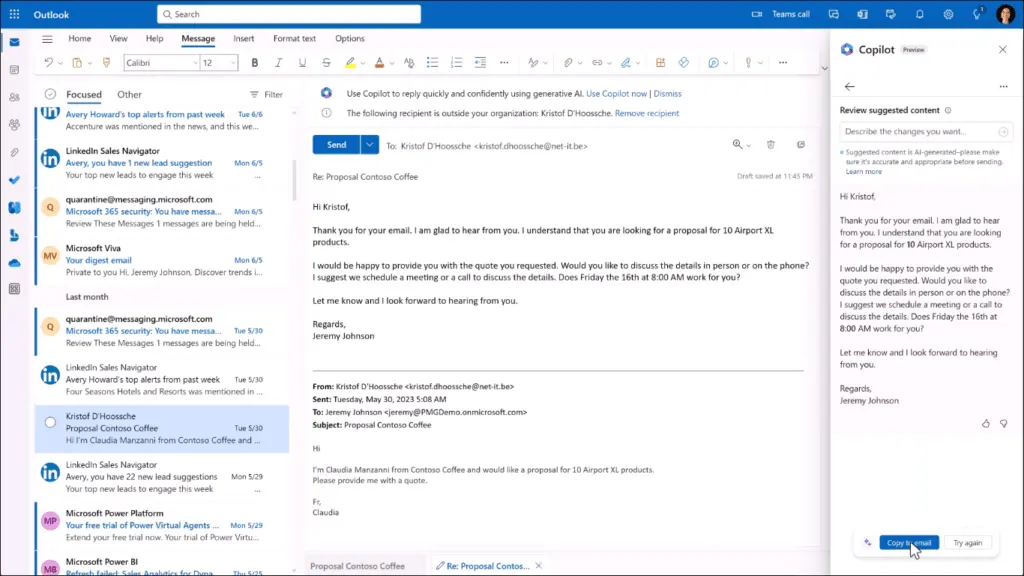
With the help of Microsoft Sales Copilot, an AI-powered tool, Dynamics 365 Sales can summarize each correspondence with a lead, customer, or any other contact type. After this, it goes on to recommend actions to users, such as sending an email or responding to certain queries, which keeps sales teams on the same page with multiple customers at all times. The AI detects human emotion and sentiment so sales personnel can communicate with empathy. Besides workflow recommendations, Copilot can provide sales forecasts and quantify sales performance with actionable data, like the top ERP systems.
For complex operations, Dynamics 365 Sales enables users to digitize and automate their sales workflow, accounting for the activities to be performed and the people responsible for each stage. This allows managers to customize the experiences of different types of customers. The platform can also connect multiple communication channels, foster collaboration through a set of tools, and help sales teams properly respond to customer feedback.
Featured Sales Software Products

$69 per month
Demo available
Online ordering, delivery management, inventory tracking
Editor's Take
Toast is an all-in-one point of sale (POS) and restaurant management platform designed specifically for the foodservice industry. It offers a comprehensive suite of tools to help restaurants streamline operations, from order taking and payment processing to inventory management, staff scheduling, and customer engagement. Toast’s cloud-based platform supports both front-of-house and back-of-house operations, making it easy for restaurant owners to manage everything from one central system.
Key features include customizable POS hardware, online ordering, delivery management, inventory tracking, and real-time reporting and analytics. Toast also offers tools for loyalty programs, marketing, and customer feedback, helping restaurants build stronger relationships with their customers. The platform integrates seamlessly with third-party delivery services and accounting software, enhancing efficiency and profitability.
For restaurants looking to improve operational efficiency, enhance customer experiences, and grow their business, Toast provides an intuitive, all-in-one solution tailored to the unique needs of the foodservice industry.
Expert Score
In evaluating SaaS software, a comprehensive and structured methodology ensures a fair and accurate comparison across key metrics. This approach focuses on the most critical aspects that affect user experience, functionality, and business value. The following metrics—general features, cost, customer service, integrations, and mobile support—are evaluated to provide a holistic view of each software solution’s strengths and weaknesses. These metrics are selected based on their direct impact on software usability, scalability, and long-term effectiveness for businesses.
1. General Features - scoring weight 40%
This metric evaluates the core functionalities and tools the software offers. It involves assessing the comprehensiveness of the features, their relevance to the target users, and the ease of use. This is important because robust and well-designed features determine the software’s overall utility and efficiency in solving user problems.
2. Cost - scoring weight 15%
Cost analysis focuses on pricing models, value for money, and scalability. It’s crucial to evaluate whether the software’s features justify its price, considering different plans for small and large organizations. This is vital for businesses to ensure they invest in cost-effective solutions that fit their budget.
3. Customer Service - scoring weight 15%
This evaluates the responsiveness, quality, and availability of customer support, including channels like chat, email, or phone. Good customer service is essential for troubleshooting and ensuring smooth software usage, which reduces downtime and frustration for users.
4. Integrations - scoring weight 15%
This examines how well the software integrates with third-party tools (e.g., CRM, payment systems, collaboration apps). Seamless integrations are key for creating a unified workflow and enhancing productivity by connecting multiple systems, which is crucial for operational efficiency.
5. Mobile Support - scoring weight 15%
Mobile support assesses the software’s functionality and performance on mobile devices, including apps and mobile web versions. With increasing remote work and on-the-go usage, strong mobile support is critical to ensure users can access and utilize the software effectively, regardless of location.

$8/per user/per month
Yes
customizable dashboards, automated follow-ups, advanced analytics
Editor's Take
monday.com Sales CRM is a customizable platform designed to streamline sales processes, enhance team collaboration, and improve pipeline visibility. Its intuitive interface enables users to manage leads, track deals, and automate repetitive tasks with ease. The CRM integrates seamlessly with popular tools like Gmail, Slack, and HubSpot, ensuring a centralized workflow. Features like customizable dashboards, automated follow-ups, and advanced analytics help sales teams stay organized and focused on closing deals. With scalability in mind, monday.com caters to businesses of all sizes, offering flexible pricing plans and robust customer support. It’s an excellent choice for teams seeking efficiency and adaptability.
Expert Score
In evaluating SaaS software, a comprehensive and structured methodology ensures a fair and accurate comparison across key metrics. This approach focuses on the most critical aspects that affect user experience, functionality, and business value. The following metrics—general features, cost, customer service, integrations, and mobile support—are evaluated to provide a holistic view of each software solution’s strengths and weaknesses. These metrics are selected based on their direct impact on software usability, scalability, and long-term effectiveness for businesses.
1. General Features - scoring weight 40%
This metric evaluates the core functionalities and tools the software offers. It involves assessing the comprehensiveness of the features, their relevance to the target users, and the ease of use. This is important because robust and well-designed features determine the software’s overall utility and efficiency in solving user problems.
2. Cost - scoring weight 15%
Cost analysis focuses on pricing models, value for money, and scalability. It’s crucial to evaluate whether the software’s features justify its price, considering different plans for small and large organizations. This is vital for businesses to ensure they invest in cost-effective solutions that fit their budget.
3. Customer Service - scoring weight 15%
This evaluates the responsiveness, quality, and availability of customer support, including channels like chat, email, or phone. Good customer service is essential for troubleshooting and ensuring smooth software usage, which reduces downtime and frustration for users.
4. Integrations - scoring weight 15%
This examines how well the software integrates with third-party tools (e.g., CRM, payment systems, collaboration apps). Seamless integrations are key for creating a unified workflow and enhancing productivity by connecting multiple systems, which is crucial for operational efficiency.
5. Mobile Support - scoring weight 15%
Mobile support assesses the software’s functionality and performance on mobile devices, including apps and mobile web versions. With increasing remote work and on-the-go usage, strong mobile support is critical to ensure users can access and utilize the software effectively, regardless of location.

$9 to $150 per user per month
Yes, for up to two users
E-signature software, call transcription, conversation routing
Editor's Take
Expert Score
In evaluating SaaS software, a comprehensive and structured methodology ensures a fair and accurate comparison across key metrics. This approach focuses on the most critical aspects that affect user experience, functionality, and business value. The following metrics—general features, cost, customer service, integrations, and mobile support—are evaluated to provide a holistic view of each software solution’s strengths and weaknesses. These metrics are selected based on their direct impact on software usability, scalability, and long-term effectiveness for businesses.
1. General Features - scoring weight 40%
This metric evaluates the core functionalities and tools the software offers. It involves assessing the comprehensiveness of the features, their relevance to the target users, and the ease of use. This is important because robust and well-designed features determine the software’s overall utility and efficiency in solving user problems.
2. Cost - scoring weight 15%
Cost analysis focuses on pricing models, value for money, and scalability. It’s crucial to evaluate whether the software’s features justify its price, considering different plans for small and large organizations. This is vital for businesses to ensure they invest in cost-effective solutions that fit their budget.
3. Customer Service - scoring weight 15%
This evaluates the responsiveness, quality, and availability of customer support, including channels like chat, email, or phone. Good customer service is essential for troubleshooting and ensuring smooth software usage, which reduces downtime and frustration for users.
4. Integrations - scoring weight 15%
This examines how well the software integrates with third-party tools (e.g., CRM, payment systems, collaboration apps). Seamless integrations are key for creating a unified workflow and enhancing productivity by connecting multiple systems, which is crucial for operational efficiency.
5. Mobile Support - scoring weight 15%
Mobile support assesses the software’s functionality and performance on mobile devices, including apps and mobile web versions. With increasing remote work and on-the-go usage, strong mobile support is critical to ensure users can access and utilize the software effectively, regardless of location.

$7 per user per month billed annually
15 days
lead generation, sales pipeline management, workflow automation
Editor's Take
Zoho CRM is a flexible and comprehensive customer relationship management platform designed to help businesses manage and grow their customer relationships effectively. With tools for lead generation, sales pipeline management, workflow automation, and analytics, Zoho CRM is suitable for businesses of all sizes across a variety of industries.
Zoho CRM enables teams to streamline sales processes by capturing leads from multiple channels, tracking interactions, and managing every stage of the sales cycle. The platform offers customizable dashboards and reports, providing insights into sales performance and customer behaviors to help make data-driven decisions. With powerful automation features, Zoho CRM allows businesses to set up workflows for routine tasks like follow-ups, lead scoring, and email notifications, reducing manual work and enhancing productivity. The platform integrates with popular tools, including the Zoho suite, Microsoft 365, and G Suite, enabling a seamless connection across teams.
For businesses aiming to improve customer engagement, close deals faster, and enhance team collaboration, Zoho CRM delivers a scalable, user-friendly solution to drive sales and customer satisfaction.
Expert Score
In evaluating SaaS software, a comprehensive and structured methodology ensures a fair and accurate comparison across key metrics. This approach focuses on the most critical aspects that affect user experience, functionality, and business value. The following metrics—general features, cost, customer service, integrations, and mobile support—are evaluated to provide a holistic view of each software solution’s strengths and weaknesses. These metrics are selected based on their direct impact on software usability, scalability, and long-term effectiveness for businesses.
1. General Features - scoring weight 40%
This metric evaluates the core functionalities and tools the software offers. It involves assessing the comprehensiveness of the features, their relevance to the target users, and the ease of use. This is important because robust and well-designed features determine the software's overall utility and efficiency in solving user problems.
2. Cost - scoring weight 15%
Cost analysis focuses on pricing models, value for money, and scalability. It's crucial to evaluate whether the software’s features justify its price, considering different plans for small and large organizations. This is vital for businesses to ensure they invest in cost-effective solutions that fit their budget.
3. Customer Service - scoring weight 15%
This evaluates the responsiveness, quality, and availability of customer support, including channels like chat, email, or phone. Good customer service is essential for troubleshooting and ensuring smooth software usage, which reduces downtime and frustration for users.
4. Integrations - scoring weight 15%
This examines how well the software integrates with third-party tools (e.g., CRM, payment systems, collaboration apps). Seamless integrations are key for creating a unified workflow and enhancing productivity by connecting multiple systems, which is crucial for operational efficiency.
5. Mobile Support - scoring weight 15%
Mobile support assesses the software’s functionality and performance on mobile devices, including apps and mobile web versions. With increasing remote work and on-the-go usage, strong mobile support is critical to ensure users can access and utilize the software effectively, regardless of location.

$7/user/month
15 days
Pipeline Management, Email Integration, Task Tracking
Editor's Take
Bigin is a lightweight CRM by Zoho, tailored for small businesses and startups to manage sales pipelines efficiently. It provides tools for deal tracking, email integration, and task management, ensuring a simple yet effective approach to sales. The platform offers customizable pipelines, real-time notifications, and seamless integrations with other Zoho apps. Its user-friendly design makes it accessible for teams with minimal CRM experience, helping them streamline sales processes without complexity.
Expert Score
In evaluating SaaS software, a comprehensive and structured methodology ensures a fair and accurate comparison across key metrics. This approach focuses on the most critical aspects that affect user experience, functionality, and business value. The following metrics—general features, cost, customer service, integrations, and mobile support—are evaluated to provide a holistic view of each software solution’s strengths and weaknesses. These metrics are selected based on their direct impact on software usability, scalability, and long-term effectiveness for businesses.
1. General Features - scoring weight 40%
This metric evaluates the core functionalities and tools the software offers. It involves assessing the comprehensiveness of the features, their relevance to the target users, and the ease of use. This is important because robust and well-designed features determine the software's overall utility and efficiency in solving user problems.
2. Cost - scoring weight 15%
Cost analysis focuses on pricing models, value for money, and scalability. It's crucial to evaluate whether the software’s features justify its price, considering different plans for small and large organizations. This is vital for businesses to ensure they invest in cost-effective solutions that fit their budget.
3. Customer Service - scoring weight 15%
This evaluates the responsiveness, quality, and availability of customer support, including channels like chat, email, or phone. Good customer service is essential for troubleshooting and ensuring smooth software usage, which reduces downtime and frustration for users.
4. Integrations - scoring weight 15%
This examines how well the software integrates with third-party tools (e.g., CRM, payment systems, collaboration apps). Seamless integrations are key for creating a unified workflow and enhancing productivity by connecting multiple systems, which is crucial for operational efficiency.
5. Mobile Support - scoring weight 15%
Mobile support assesses the software’s functionality and performance on mobile devices, including apps and mobile web versions. With increasing remote work and on-the-go usage, strong mobile support is critical to ensure users can access and utilize the software effectively, regardless of location.
Who is Dynamics 365 Sales for?
This Dynamics 365 Sales vs HubSpot Sales Hub comparison recognizes that Dynamics 365 Sales has the flexibility to cater to businesses of all scales. After all, it unifies a CRM system, a sales management platform, and a business intelligence tool into one application. It also has a built-in optimized and automated workflow that small and midsized operations can follow, while large enterprises and companies with complex operations can customize workflows. Any sales-oriented organization will find a lot of value in the intuitive features of Dynamics 365 Sales.
In addition, Dynamics 365 Sales is part of the Microsoft Dynamics 365 suite, which has specific solutions by need and industry. Aside from sales, the suite has specific tools for supply chains, finance, and service-based operations. It also presents tailored solutions for retail, manufacturing, healthcare, and financial services. But if we are to identify its primary users, it would most likely be midsized firms and large enterprises.
Key Benefits of Dynamics 365 Sales
- Shortens the sales cycle
- Minimizes routine tasks
- Automates sales and marketing workflows
- Summarizes multichannel communications
- Helps set and manage sales pipelines
- Recommends upcoming workflow activities
- Provides accurate sales forecasts
What is HubSpot Sales Hub?
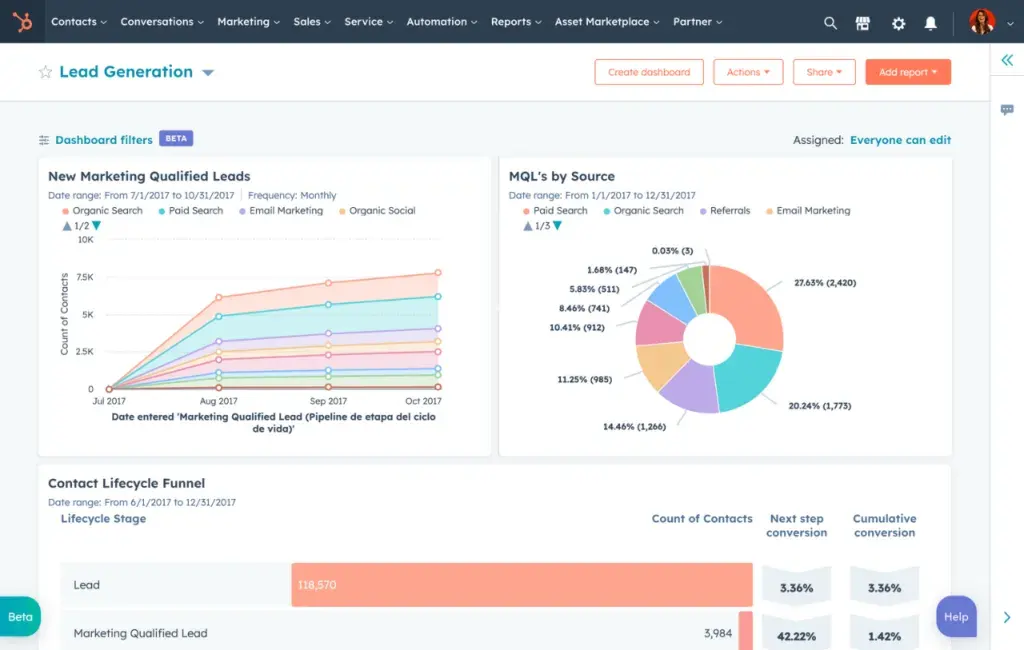
HubSpot Sales Hub is an end-to-end sales CRM system that aids organizations of all sizes in organizing their contacts, tracking and managing leads, and simulating and automating their sales and communication workflows. The software presents comprehensive solutions for lead management, lead scoring, sales automation, pipeline management, communication tracking, and sales forecasting.
To enhance communication, HubSpot Sales Hub consolidates lead and prospecting activities, updates, and profiles on one page. Communication tools are provided so the sales team can reach any leads and prospects at any given time. Equipped with monitoring capabilities like contract tracking software, HubSpot Sales Hub can track emails, documents, and calls so that agents can pick up where they left off with the company's contacts. It also enables managers to digitize deal pipelines to monitor the team's progress with each lead.
Managers can use HubSpot Sales Hub to simulate and automate sales workflows. The platform can automatically carry out digital tasks, consolidate repetitive tasks, and eliminate redundant steps in a workflow. In addition, the software has a Playbooks feature, with which teams can consolidate strategies, notes, and competitor analyses. Moreover, Hubspot Sales Hub supports and accepts different payment types.
Who is HubSpot Sales Hub for?
This Dynamics 365 Sales vs HubSpot Sales Hub guide notes that HubSpot Sales Hub works for businesses of all sizes. It has a generous free plan that includes tools for contact management, deal pipeline management, providing quotes, and meeting scheduling. Meanwhile, its Starter plan carries the tools for sales automation, receiving payments, and queueing tasks. This gives microbusinesses, small businesses, and midsized firms the solutions they need to optimize sales, which suggests that they are the platform's primary users.
However, HubSpot Sales Hub packs its upper-tier plans with sophisticated features that will inject efficiency into the operations of large enterprises and organizations with complex operations. The tools for lead management, predictive lead scoring, forecasting, planning, and conversation intelligence can help enterprises grow even further. Consider these when you investigate a range of HubSpot Sales Hub alternatives to make an informed decision on the best-fit platform for your institution.
Key Benefits of HubSpot Sales Hub
- Tracks emails, calls, and documents
- Automates sales and marketing workflows
- Provides reliable sales forecasts
- Consolidates lead and prospecting activities and updates in one location
- Offers customizable templates for different types of emails
- Helps set and manage sales pipelines
- Quantifies sales performance and communication with data
Who are Dynamics 365 Sales and HubSpot Sales Hub best for?
For this section of the Dynamics 365 Sales vs HubSpot Sales Hub comparison, our software team assessed how each software would suit the operations of organizations of different scales and individual users such as freelancers and some microbusinesses. Both platforms offer multiple pricing plans designed to address the needs and goals of organizations based on their size.
Freelancers and Microbusiness Owners
- The cheapest plan of Dynamics 365 Sales, which starts at $65 per user per month, could be out of reach financially for the smallest operations.
- HubSpot has a generous free plan that includes functionalities from the software's various solutions, including Sales Hub and tools for CMS, marketing, and commerce.
- HubSpot Sales Hub has the advantage here.
Small Businesses
- The Dynamics 365 Sales Professional plan, the platform's cheapest plan, includes plenty of sales features, which include tools for lead management, marketing lists, billing, and invoicing. However, at $65 per user per month, it could be too expensive for small businesses. It also doesn't come with Microsoft Copilot, which has a separate subscription fee ($40/user/month) unless one goes for a higher plan.
- HubSpot Sales Hub's low-tier plans can't compete with the depth of sales CRM features of Dynamics 365 Sales's basic plan. However, the platform's Free and Starter plans already include key functionalities like sales automation, contact management, pipeline management, and payments. With the Starter plan at $18 per month for two users and $9 per month per additional user, a small business will already have the major features it needs.
- HubSpot Sales Hub has the advantage here.
Midsized Firms
- Interestingly, Dynamics 365 Sales has a more affordable mid-level plan at $95 per user per month. It includes all of the platform's key functionalities (but with limits to some) and several functionalities not often found in sales CRM systems. For instance, it offers competitor management, partner relationship management, and business card scanning tools.
- HubSpot Sales Hub's mid-level plan also offers a generous toolset with many key features considered essential for midsized organizations, like lead management tools, prospecting workspaces, and sales forecasting. Its unique features include call transcription, coaching, and account-based marketing automation tools. However, the Professional Plan is priced at $450 per month for five users and $90 per month per additional user, which is quite expensive.
- Dynamics 365 Sales has the advantage here.
Large Enterprises
- For enterprises, Dynamics 365 Sales offers customizable intelligence and sales acceleration solutions to go along with the premium features in its mid-level plan. It also provides higher limits to serve the needs of large enterprises. Its Premium plan is priced at $135 per user per month.
- For enterprises, Hubspot Sales Hub fills the functionality gaps in its mid-level plan with features like conversation intelligence, recurring revenue tracking, and predictive lead scoring. Its Enterprise plan starts at $1,500 per month for 10 users and charges $150 per month per additional user.
- There is no clear advantage here for the two platforms since both have expansive toolsets and offer premium sales intelligence.
Dynamics 365 Sales vs HubSpot Sales Hub Feature Comparison
Modern CRM systems tend to share many key features since they aim to improve contact management and raise sales. As such, our software team opted to focus on the shared Dynamics 365 Sales vs HubSpot Sales Hub functionalities for this section and see how they compare.
Lead Management
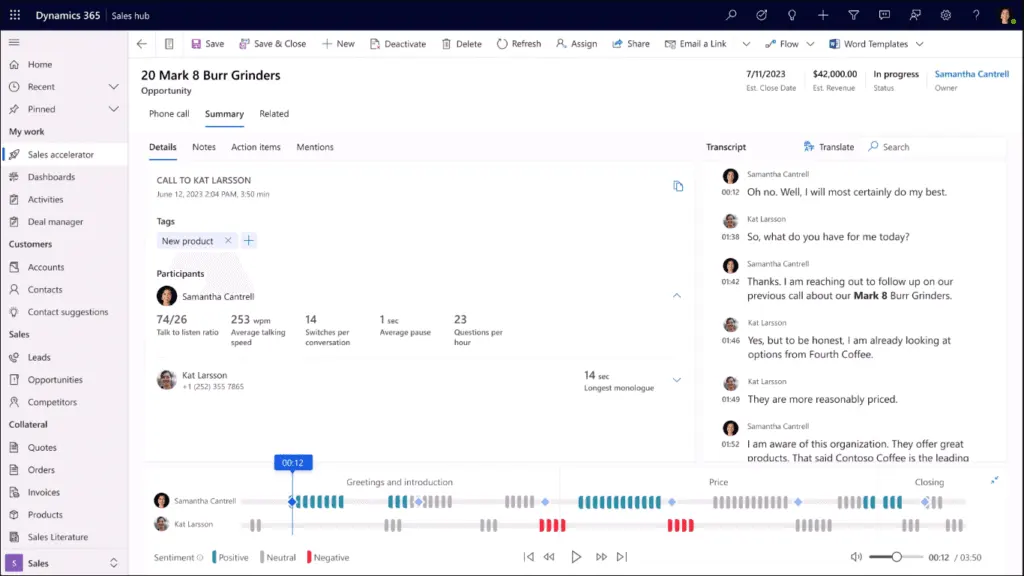
Both Dynamics 365 Sales and HubSpot Sales Hub have features that consolidate communication with leads, prospects, and other contacts. In the case of Dynamics 365, it leverages Microsoft Sales Copilot to populate detailed communication summaries backed with key customer data to keep sales teams on track with every interaction. With its built-in call function, users can call their contacts anytime besides sending email. The data pulled by Copilot can be used as a reference during phone calls.
HubSpot Sales Hub has a similar approach to lead management and leverages AI to enhance communications. It unifies lead and prospect information in one location, along with email replies, relevant sales activities, outstanding tasks, and deal sequences. In addition, the application automatically updates the statuses of prospects, offers task management tools, and documents lead stages to make lead management fully systematized. Moreover, it uses AI to quantify emails, customer interactions, and voice data.
While HubSpot Sales Hub offers more features, including tools for task management, Dynamics 365 Sales affords more convenience to users thanks to Microsoft Sales Copilot's ability to automate pipelines, recommend succeeding steps in pipelines, populate summaries, and process more data from voice communications.
Workflow Automation
This Dynamics 365 Sales vs HubSpot Sales Hub comparison sees another commonality between the two platforms: sales workflow automation. Dynamics 365 Sales enables users to digitize and enhance sales pipelines that account for activity prioritization. The platform automatically performs tasks and intelligently gives recommendations as to what sales agents should do next through the entire pipeline, on top of providing communication summaries, customer data, and a tool for placing voice calls. Users can also digitize and automate their workflows based on an organization's best practices.
On the other hand, HubSpot Sales Hub offers a detailed approach to workflow automation, providing four general categories for each sequence: automated email, manual email task, call task, and general task. The inclusion of a “general task" entry allows users to automate workflows outside of sales and contact management. Sales teams can refer to a sequence summary page to check the number of steps or sequences, the workflow duration, and the level of automation applied. They can also run A/B tests and incorporate up to 50 prospects into the workflow.
Regarding the Dynamics 365 Sales vs HubSpot Sales Hub comparison, Dynamics 365 Sales may offer convenience within automated pipelines, but HubSpot Sales Hub grants more flexibility with its workflow creation tools. It presents a more thorough approach to creating workflow sequences by properly classifying each step, providing workflow summaries, and empowering sales teams to run tests.
AI Tools
Many of Dynamics 365 Sales's major functionalities are enhanced by the AI-powered Microsoft Sales Copilot. The intelligence app collects a multitude of information to produce detailed email summaries, meeting summaries, customer relationship histories, customer data, and comprehensive voice call data. It also helps recommend one's succeeding courses of action in a pipeline. Simply put, Copilot is one of the biggest advantages of Dynamics 365 Sales over other sales CRM platforms.
HubSpot Sales Hub is equipped with conversation intelligence tools that enable the platform to record calls, gather voice data, transcribe voice messages, track mentioned terms within calls, find coaching opportunities, and trigger workflows. In addition, HubSpot has a free conversational CRM bot called Chatspot that can summarize CRM data, add contacts, create reports, and personalize messages. It can be used in conjunction with Sales Hub.
Concerning the Dynamics 365 Sales vs HubSpot Sales Hub comparison, Dynamics 365 Sales has the more sophisticated AI tools. Microsoft Sales Copilot offers more data gathering and processing depth as it quantifies talk-to-listen ratios, customer sentiment, and competitor mentions. It also enriches pipelines with detailed summaries and useful customer-related data, which can serve as references when communicating with contacts. HubSpot offers unique AI-powered features, like call transcription and a chatbot that performs CRM functions, but Copilot can also perform some of these and brings more to the table overall.
Sales Tools
Besides lead management and sales automation, Dynamics 365 Sales is equipped with an array of tools that can help increase sales. The platform has solutions for billing, invoicing, payments, competitor management, partner relationship management, voice calls, and seamless integration with other Microsoft 365 applications. In addition, it has a Sales Playbook feature that enables managers to compile strategies and best practices, which can be turned into automated workflows. Its built-in AI can analyze sales pipelines and provide insights to improve sales processes.
Meanwhile, HubSpot Sales Hub offers email templates, list segmentation, a payment solution, integrations with payment gateways, a meeting scheduler, a billing solution, an invoicing solution, a voice call solution, video messaging, and a prospecting workspace, among many others. Additionally, it has a Playbook feature that allows managers to store scripts, strategies, and positioning guides. Moreover, Hubspot Sales Hub has tools for task management and trackers for contacts, calls, and documents.
In lieu of the Dynamics 365 Sales vs HubSpot Sales Hub comparison, the functionalities of Dynamics 365 Sales appear to be more sales-oriented. At the same time, HubSpot Sales Hub's toolset is bigger, allows users to do more, and potentially extends to other business areas and departments. Sales-oriented companies can even use sales Hub as a project management solution.
Forecasting and Reporting
Dynamics 365 Sales leverages AI to provide accurate projections for several sales areas. These include performance tracking, matching performance with goals, sales and sales performance trends, and revenues over time. It can also produce various reports that reflect an organization's sales and marketing performance. With Dynamics 365 providing full visibility of an organization's sales operations, managers can quickly make the necessary adjustments after digesting the reports.
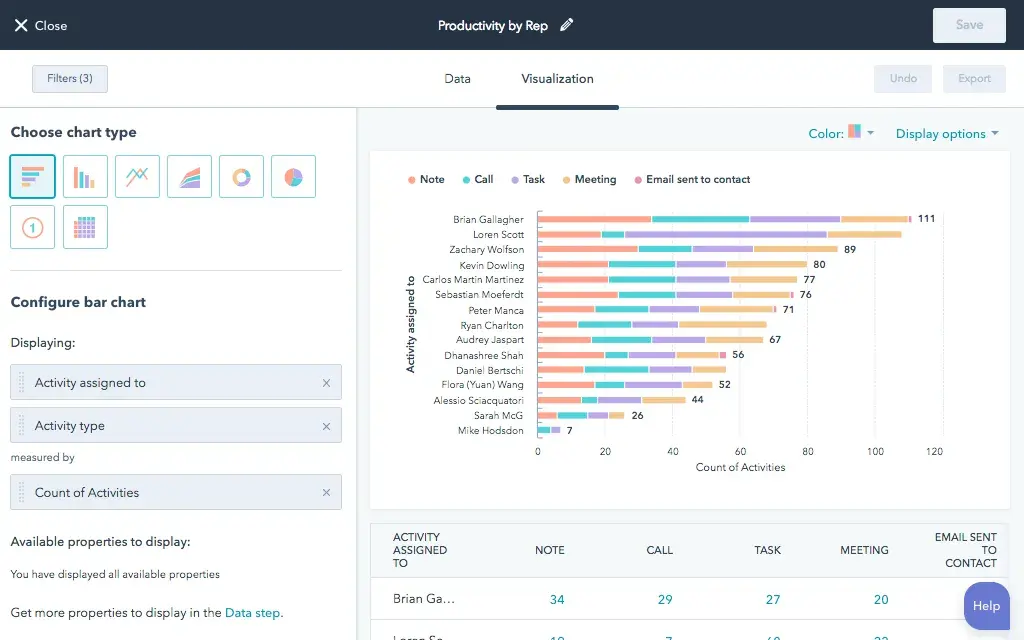
HubSpot Sales Hub works similarly. It provides forecasting solutions for multiple pipelines, matching sales with goals, sales performance, sales performance trends, revenues over time, deal commitments, and the likelihood of closing deals. Reporting is one of the platform's strongest suits. HubSpot has a library of customizable prebuilt reports that reflect sales and marketing performance. It also enables managers to create custom reports based on key metrics. Moreover, its reporting tools offer full visibility of a company's workflows so adjustments can be made at any time.
In terms of forecasting, Dynamics 365 Sales and HubSpot Sales Hub both have powerful AI engines that can give accurate projections for various sales and marketing areas. Although HubSpot offers more, Dynamics 365 Sales's more sophisticated AI evens things out. The difference here lies in the reporting capabilities, one of Sales Hub's strongest points. It has a more comprehensive approach to reporting, offers customizable reports, and affords better visibility.
Dynamics 365 Sales vs HubSpot Sales Hub Pricing
In this Dynamics 365 Sales vs HubSpot Sales Hub comparison, our software team tackles the different pricing plans offered by the two platforms. Dynamics 365 Sales generally has slightly cheaper plans, but HubSpot has a generous free plan that suits the needs of smaller operations. Both systems offer a free trial—30 days for Dynamics and 14 for HubSpot—to allow customers to try their best features to gain conversions.
Dynamics 365 Sales Pricing
Professional – $65/user/month
- Sales execution
- Microsoft 365 integration
- Customization and extensibility
- Reporting and analysis
Enterprise – $95/user/month
- Everything in Professional
- Microsoft Sales Copilot
- Contextual insights
- Sales accelerator
- Conversation intelligence
Premium – $135/user/month
- Everything in Enterprise
- Predictive forecasting
- Relationship analytics
- Connection insights
- Notes analysis
Microsoft Relationship Sales – $162/user/month
- Everything in Enterprise
- LinkedIn sales navigator
Microsoft Sales Copilot – $40/user/month
- Included in Enterprise and higher plans at no additional cost
- Sold as an add-on for Professional plan subscribers
HubSpot Sales Hub Pricing
Free
- Contact management
- Deal pipeline
- Quotes
- Live chat
- Meeting scheduling
Starter – $18/2 users/month and $9/additional user/month for annual billings; $20/2 users/month and $10/additional user/month for monthly billings
- Everything in Free
- Sales automation
- Goals
- Sales content analytics
- Payments
- Task queues
Professional – $450/5 users/month and $90/additional user/month for annual billings; $500/5 users/month and $100/additional user/month for monthly billings
- Everything in Starter
- Prospecting & lead management
- Sequences
- Forecasting
- Custom reporting & sales analytics
- Playbooks
Enterprise – $1,500/10 users/month and $150/additional user/month
- Everything in Professional
- Custom objects
- Predictive lead scoring
- Conversation intelligence
- Recurring revenue tracking
- Deal journey analytics
Pricing Comparison
HubSpot Sales Hub, with its generous free and basic plans that offer basic solutions for sales, marketing, and e-commerce, clearly targets small businesses and smaller operations and would be the likely choice for organizations of these scales. Dynamics 365 Sales also offers a lot of value for its Professional plan. Still, with limited workflow automation features and Microsoft Sales Copilot as a $40 add-on per user, the rates could significantly raise the overhead costs of smaller operations for a platform with possible gaps in functionality.
In terms of midsized organizations, the two sales CRM platforms have similar offerings and excel with their key features. HubSpot's Premium plan offers sales forecasting at this level, which is only available in Dynamics 365's highest plan, Premium, but Dynamics counters this with its seamless Microsoft 365 integration, the inclusion of Microsoft Sales Copilot, and a more affordable mid-level plan, priced at $95/user/month.
When it comes to their highest plans, the two platforms are a virtual match for one another. While Dynamics 365 Sales offers a cheaper plan, HubSpot Sales Hub provides a slightly more expansive toolset, even matching Microsoft Sales Copilot with its own AI-powered conversation intelligence functionalities. However, Dynamics 365's integration with Microsoft 365 vastly expands its capabilities to possibly streamline work in departments outside of sales. Ultimately, it boils down to an enterprise's needs and how much it is willing to allocate for a sales CRM system.
Dynamics 365 Sales Pros and Cons
Like top accounting software, Dynamics 365 Sales goes beyond the scope of its classification as a CRM and furnishes solutions that can help organizations in other business areas, especially in sales, marketing, and communications. Its functionalities enable sales teams to nurture relationships, raise engagement, improve productivity, and increase sales. To further understand what it brings to the table, our software team highlights the strong and weak points of the application in this Dynamics 365 Sales vs HubSpot Sales Hub feature.
Dynamics 365 Sales Pros
- Streamlined Sales Pipelines. Dynamics 365 Sales has a built-in workflow that connects sales with contact management. Microsoft Sales Copilot presents sales data and recommends succeeding actions after interacting with leads, customers, and other contacts. For complex operations, the software allows managers to digitize and automate their sales workflows to optimize the sales process.
- Detailed Summaries of Customer Data. One of the strongest points of Dynamics 365 Sales is its ability to summarize every interaction and supply relevant data, which can serve as a reference for succeeding conversations. It provides information regarding previous meetings, notes, and email history. The platform also summarizes phone calls and provides information regarding talk-to-listen ratios, competitor mentions, and customer sentiment.
- Accurate Sales Forecasts. Dynamics 365 Sales leverages AI to generate sales forecasts based on sales and communication trends and data. It also identifies potential risks and opportunities organizations can bank on to grow their business in the long run.
- Microsoft 365 Integration. As a Microsoft product, Dynamics 365 Sales seamlessly integrates with widely used applications like Outlook, Teams, Excel, Exchange, and OneDrive to improve data flow and indirectly expand the platform's capabilities. This minimizes human error and enlarges the data field that Microsoft Sales Copilot can process and analyze to generate insights and forecasts.
- Dependable Trackers. With the help of AI, Dynamics 365 can track individual and team sales performance, customer responses to marketing campaigns, conversations with contacts, relationships with contacts, and company sales. Given the volume of information the platform can pull, managers can form robust data-driven strategies or considerably enhance existing campaigns.
Dynamics 365 Sales Cons
- Slow Speed. Dynamics 365 Sales is loaded with functionalities and AI-powered solutions. This tends to compromise processing speed and cause lags in the functionalities.
- Complex Functionalities. New users and non-tech-savvy individuals will likely have trouble leveraging the functionalities, given their relatively steep learning curve. They might need to view tutorials to learn how to make each feature work.
- Integration Issues. Dynamics 365 Sales cleanly integrates with other Microsoft 365 products, but the same cannot be said for some applications not developed by Microsoft. Compatibility issues tend to arise.
Hubspot Sales Hub Pros and Cons
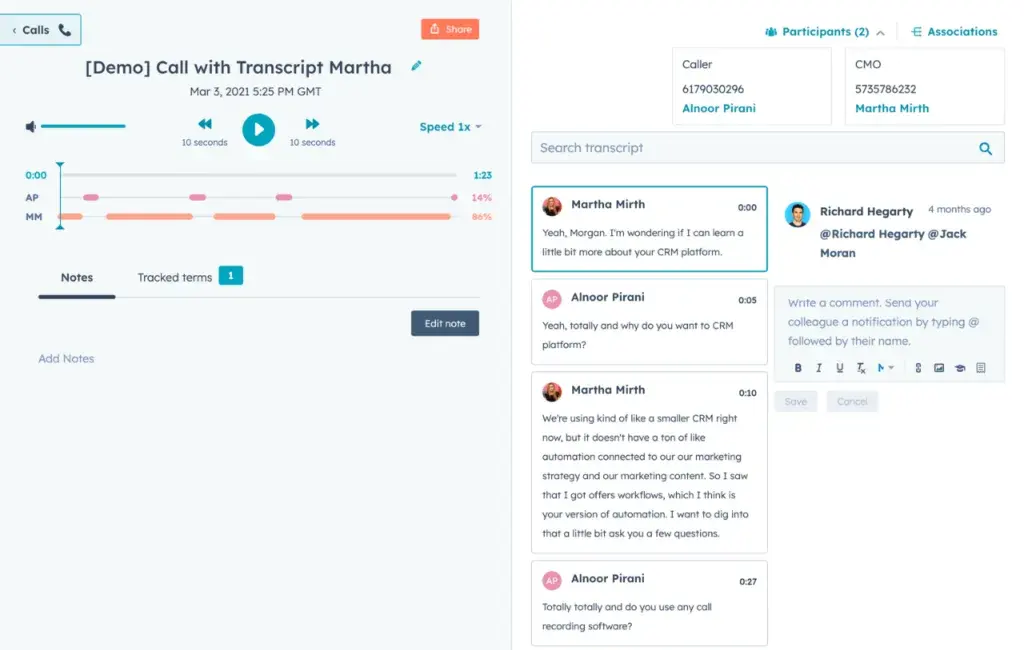
Similar to the leading construction project software systems, HubSpot Sales Hub adds a wealth of solutions outside its intended function as a CRM to become a flexible business tool. It empowers sales teams to close deals painlessly with integrated tools for lead management, contact management, communication tracking, and conversation intelligence. It can also enhance workflows through digitalization and automation, which minimizes redundant steps in the business process and hastens digital tasks, reducing the likelihood of human error.
Our software team illustrated the advantages and disadvantages of using the application for this Dynamics 365 vs HubSpot Sales Hub comparison.
HubSpot Sales Hub Pros
- Optimized Sales Workflows. HubSpot Sales Hub enables managers to digitize and automate the workflows that comprise an organization's sales and marketing operations, accounting for lead and customer communications. Users can create and automate tasks, set the actions surrounding new deals, and rotate leads. The software allows teams to run A/B tests on the interface to ensure that the workflows are working as intended.
- Reliable Trackers. This Dynamics 365 Sales vs HubSpot Sales Hub comparison notes the latter's ability to monitor various information, including documents, emails, phone calls, sales deals, sales performance, and recurring revenue. The platform's array of trackers ensures data accuracy when generating reports, communicating with contacts, or scoring leads.
- Efficient Lead Management. HubSpot Sales Hub consolidates all sales and lead-related activities in one location, allowing sales teams to be on the same page as their contacts. It also has a prospecting workspace that populates all the relevant information regarding each prospect. Moreover, the platform has an interactive calendar where sales teams can plot important upcoming activities and set automatic notifications.
- Generous Free Plan. At no cost, HubSpot Sales Hub provides solutions for contact management, deal pipeline management, sales quotations, meeting scheduling, and live chat. These functionalities align with the high-priority needs of small businesses, microbusinesses, proprietorships, and some midsized firms. Organizations can avail of HubSpot's free plans for other products to thoroughly streamline their operations.
- Conversation Intelligence and Forecasting. HubSpot Sales Hub leverages AI to quantify customer interactions, voice calls, emails, sales performance, and performance patterns into actionable data. It also records calls for reference, analyzes trends and historical data to give accurate forecasts, and integrates with third-party communication applications to expand the data it can process.
HubSpot Sales Hub Cons
- Slow Speed. To maintain its expansive toolset, HubSpot Sales Hub tends to sacrifice processing speed, sometimes resulting in laggy functionalities.
- Pricey Plans. While HubSpot Sales Hub has a generous free plan and a high-value entry-level plan, its mid-level and premium plans are quite expensive. Organizations with limited budgets could go for cheaper platforms with similar offerings.
- Complex Functionalities. There is a learning curve to some of HubSpot Sales Hub's more sophisticated functionalities, which could require new users to spend time digesting video tutorials.
Is the implementation process straightforward and well-supported?
When introducing a new CRM solution, the efficiency of the implementation process and the availability of training resources play a pivotal role in realizing its full potential. Dynamics 365 Sales offers comprehensive onboarding support through its network of certified partners and detailed implementation guides that facilitate custom deployments. In contrast, HubSpot Sales Hub provides extensive digital learning resources—such as webinars, tutorials, and an active user community—to ensure a smooth transition and fast user adoption. Both platforms emphasize minimizing downtime and expediting user proficiency, which is critical for leveraging extensive CRM systems without compromising operational efficiency.
Integration Capabilities and Ecosystem Support
Integration capabilities and ecosystem support are crucial considerations for businesses looking to enhance operational efficiency and foster collaboration across departments. Both Dynamics 365 Sales and HubSpot Sales Hub offer integration solutions, but their approaches cater to different organizational needs.
Dynamics 365 Sales seamlessly integrates with the Microsoft ecosystem, providing a significant advantage for organizations already using Microsoft products like Teams, Outlook, or SharePoint. Through this integration, users can streamline workflows by combining communication, documentation, and analytics tools within a familiar environment. Additionally, Dynamics 365 Sales offers APIs and built-in connectors, enabling it to integrate with other third-party applications in industries like finance, healthcare, and retail. This level of interoperability is particularly beneficial for larger enterprises with complex operations requiring custom solutions.
HubSpot Sales Hub, on the other hand, thrives in fostering a versatile ecosystem suitable for businesses of all sizes. It integrates effortlessly with a wide range of third-party applications, such as Shopify, Slack, and Salesforce, making it an attractive solution for teams operating across diverse tools and platforms. The HubSpot App Marketplace further broadens its utility, offering over 1,000 app integrations that boost productivity and collaboration. This makes HubSpot a more flexible choice for businesses seeking scalable integration options without vendor lock-in.
When evaluating integration capabilities, organizations must consider their existing ecosystems and operational scope. Dynamics 365 Sales stands out for enterprises deeply embedded in Microsoft’s infrastructure, offering robust and centralized solutions to optimize sales and communication. Meanwhile, HubSpot Sales Hub's flexibility and extensive app marketplace provide the adaptability small to midsized firms often prioritize, ensuring tools scale in tandem with business growth. If you're unsure which CRM aligns with your integration needs, exploring an extensive range of options on this sales software list can guide the decision-making process.
What are the customization and scalability options in Dynamics 365 Sales and HubSpot Sales Hub?
While both Dynamics 365 Sales and HubSpot Sales Hub offer powerful sales tools, their customization and scalability options play a crucial role in determining their suitability for various business types and growth stages. This section explores how each platform supports tailored user experiences and adapts to growing organizational needs.
- Customization Flexibility
- Dynamics 365 Sales: Offers extensive customization options, allowing users to create custom workflows, configure sales stages, and develop personalized dashboards. Users can integrate third-party applications and develop custom applications using Microsoft’s Power Platform, enhancing workflows for specific departmental needs.
- HubSpot Sales Hub: Known for its user-friendly customization, HubSpot offers drag-and-drop customization for pipelines, customizable email templates, and automation triggers. However, advanced customization, such as custom objects and more detailed workflows, is available only in higher-tier plans.
- Scalability for Growing Organizations
- Dynamics 365 Sales: Designed to handle complex sales operations, Dynamics 365 is well-suited for medium to large enterprises. With seamless integration into the Microsoft ecosystem, it scales alongside business growth, allowing companies to expand usage across departments without compromising performance.
- HubSpot Sales Hub: HubSpot provides an affordable starting point for small businesses with its free and lower-tier plans and offers scalability for growing organizations through its mid- and high-tier plans. Its modular approach allows companies to add new features, such as marketing or service tools, as needs evolve.
- Role-Based Permissions and Security
- Dynamics 365 Sales: Offers robust role-based access controls and compliance with Microsoft’s security protocols, making it ideal for organizations requiring stringent data security and privacy standards across multiple regions.
- HubSpot Sales Hub: While HubSpot also provides role-based permissions, its security features are more standardized across plans, focusing on data integrity and user access management.
- Custom Reporting and Analytics
- Dynamics 365 Sales: Users can create tailored reports with advanced analytics, drawing data from multiple sources within the Microsoft ecosystem to offer in-depth insights for sales forecasting and performance metrics.
- HubSpot Sales Hub: Provides customizable reports and dashboards, although advanced reporting tools are limited to premium plans. HubSpot’s reporting library allows managers to configure reports based on sales KPIs, deal stages, and communication metrics.
Verdict – Dynamics 365 vs Hubspot Sales Hub: Which software is better?
This Dynamics 365 Sales vs HubSpot SalesHub comparison sees both platforms excelling at their core features and granting users several ways to streamline their sales pipelines and communication workflows. Both are superb choices for any organization. However, if we pick between the two, both platforms appear ideal for certain types of operations.
Small businesses, smaller midsized firms, and companies with relatively small operations will find great value in using HubSpot Sales Hub. The software has a feature-rich free plan, carrying crucial functionalities like solutions for deal pipelines, contact management, billing, meeting scheduling, and live chat. Small business owners or managers can also leverage HubSpot's free AI assistant, ChatSpot, which can add contacts to Sales Hub and gather and process data to provide sales intelligence. Availing of the Starter plan, which is $18/2 users/month, gives users access to sales automation, payments, and analytics solutions. These are more than enough to streamline small businesses' sales flows, communications, and marketing operations.
Dynamics 365 Sales's Professional plan offers more, but its capabilities may be beyond the capacity of smaller operations. At $65/user/month, the plan is too expensive compared to HubSpot Sales Hub's lower-tier plans, and to avail of Dynamics 365's competitive advantage, Microsoft Sales Copilot, an organization has to pay an extra $40 per month. Clearly, HubSpot Sales Hub is the better choice for small businesses.
For mid-sized firms, Dynamics 365 Sales provides the better deal, with Microsoft Sales Copilot being part of the Enterprise plan, which is cheaper than Sales Hub's Professional plan, its mid-level package. Although Sales Hub provides customizable workflow sequences, sales forecasting, lead management, and prospecting solutions at this level, Microsoft's Sales Copilot and its connectivity with the Dynamics platform optimize sales and communications workflows better. It provides comprehensive summaries, recommends pipeline actions, transcribes and quantifies voice calls, and analyzes seller behavior.
For enterprises, picking between the two sales CRM applications depends on the user's goals. Organizations that prefer a sales-forward platform that affords users streamlined communications with superior intelligence should go with Dynamics 365 Sales. The platform's automated pipelines, combined with Sales Copilot's ability to produce actionable insights across multiple communication channels, can improve sales and marketing teams' coordination, organization, and performance.
On the other hand, enterprises aiming to streamline complex workflows, eliminate data silos, and enhance data flow between departments are more likely to find HubSpot Sales Hub more appealing. Its flexible workflow-creation tools can digitize and automate the operations of any company department. Furthermore, its robust reporting can underscore the strengths, shortcomings, and possible opportunities of an organization's sales and marketing initiatives.
Key Insights
- Comprehensive Sales Management: Dynamics 365 Sales offers a complete view of the sales process, providing tools for pipeline management, automated data syncing, and workflow automation. It leverages AI-powered insights to enhance customer engagement and sales performance.
- AI-Powered Tools: The integration of Microsoft Sales Copilot in Dynamics 365 Sales allows for detailed communication summaries, sentiment analysis, and actionable recommendations. This AI tool enhances decision-making by providing accurate sales forecasts and performance metrics.
- Versatile User Base: Dynamics 365 Sales caters to businesses of all sizes, from small and midsized firms to large enterprises. It offers customizable workflows and scalable solutions, making it suitable for various industries, including retail, manufacturing, healthcare, and financial services.
- Workflow Automation: Both Dynamics 365 Sales and HubSpot Sales Hub excel in workflow automation. Dynamics 365 Sales offers automated recommendations and activity prioritization, while HubSpot Sales Hub provides detailed workflow sequences and task automation, including A/B testing capabilities.
- Integration and Flexibility: Dynamics 365 Sales seamlessly integrates with Microsoft 365 applications, enhancing its functionality across sales, marketing, and communication channels. HubSpot Sales Hub, on the other hand, offers extensive integration with various third-party tools, providing a flexible solution for diverse business needs.
- Reporting and Forecasting: Dynamics 365 Sales and HubSpot Sales Hub both offer robust reporting and forecasting capabilities. HubSpot Sales Hub provides a comprehensive library of customizable reports, while Dynamics 365 Sales uses AI to deliver precise sales forecasts and detailed performance analysis.
Other Things You Should Know About Dynamics 365 Sales & HubSpot Sales Hub
HubSpot Sales Hub is used to streamline sales processes, track deals, enhance communications with leads and customers, and manage an organization's contacts. The software system offers solutions for sales automation, email tracking, call tracking and transcription, pipeline management, workflow management, and AI-powered business intelligence to increase sales and improve sales teams' performance.
Dynamics 365 Sales is a multifunctional sales CRM that optimizes deal pipelines, sales and marketing workflows, and communication with an organization's contacts through AI-powered solutions. The application enables users to digitize sales pipelines and always be on the same page as customers and leads, as it leverages an AI tool to generate detailed communication summaries, present relevant customer data, and recommend each logical step in a deal pipeline.
Dynamics 365 Sales is a sales-oriented CRM that helps businesses organize contacts, accelerate sales, and enhance communications. Through its connectivity with an AI-powered tool, Microsoft Sales Copilot, the platform can generate detailed meeting and communication summaries and actionable customer data, and recommend pipeline activities per contact.
Given its feature-rich low-tier plans, HubSpot Sales Hub is a worthwhile option for smaller operations. However, an advanced sales-oriented CRM with sophisticated AI solutions like Dynamics 365 Sales outperforms it in streamlining sales and deal pipelines and optimizing communications with contacts. This is why larger organizations tend to favor Dynamics 365 Sales.
Dynamics 365 Sales is best suited for midsized firms and large enterprises. It offers comprehensive sales management tools, AI-driven insights, and seamless integration with Microsoft 365 applications, making it ideal for complex sales operations and organizations looking to enhance their sales workflows and customer engagement strategies.
The key benefits of using Dynamics 365 Sales include shortening the sales cycle, minimizing routine tasks, automating sales and marketing workflows, summarizing multichannel communications, managing sales pipelines, recommending workflow activities, and providing accurate sales forecasts through AI-driven insights.
Dynamics 365 Sales improves sales performance by leveraging AI to provide actionable insights, detailed communication summaries, and sentiment analysis. It helps sales teams stay organized, prioritize activities, and follow up on leads and customers efficiently, leading to increased engagement and higher conversion rates.