ActiveCampaign for Sales vs Salesforce Sales Cloud – 2027 Comparison

Co-Founder and Chief Data Scientist
ActiveCampaign for Sales vs Salesforce Sales Cloud Table of Contents
- What is ActiveCampaign for Sales?
- Who is ActiveCampaign for Sales for?
- Key Benefits of ActiveCampaign for Sales
- What is Salesforce Sales Cloud?
- Who is Salesforce Sales Cloud for?
- Key Benefits of Salesforce Sales Cloud
- Who are ActiveCampaign for Sales and Salesforce Sales Cloud best for?
- ActiveCampaign for Sales vs Salesforce Sales Cloud Feature Comparison
- ActiveCampaign for Sales vs Salesforce Sales Cloud Pricing
- Implementation and Scalability Considerations
- Salesforce Sales Cloud Pros and Cons
- How does each platform handle customer support and training resources?
- How do these platforms integrate with business intelligence tools?
What is ActiveCampaign for Sales?
ActiveCampaign for Sales is a cohesive CRM and a sales engagement product. Its main features include a database, sales automation, lead scoring, and e-commerce management. Moreover, it utilizes automation controls to edit workflows that accelerate operations. While separate from ActiveCampaign’s Email and Marketing tools, bundles of the two are available for various types of users.
Featured CRM Software Products

$9 to $150/user/month
Yes, up to 2 users
E-signature software, call transcription, conversation routing
Editor's Take
HubSpot CRM is a powerful customer relationship management platform designed to help businesses manage their sales, marketing, and customer service efforts in one centralized place. Its user-friendly interface allows teams to track leads, monitor customer interactions, and automate sales pipelines. With built-in tools for email marketing, contact management, and analytics, HubSpot CRM provides deep insights into customer behavior and sales performance. The platform also supports seamless collaboration between marketing and sales teams through real-time updates and integrations with tools like Gmail, Outlook, and Slack. Additionally, its automation features help reduce manual tasks, enabling teams to focus on building relationships and closing deals. HubSpot CRM is scalable, making it ideal for businesses of all sizes, from startups to large enterprises.
Expert Score
In evaluating SaaS software, a comprehensive and structured methodology ensures a fair and accurate comparison across key metrics. This approach focuses on the most critical aspects that affect user experience, functionality, and business value. The following metrics—general features, cost, customer service, integrations, and mobile support—are evaluated to provide a holistic view of each software solution’s strengths and weaknesses. These metrics are selected based on their direct impact on software usability, scalability, and long-term effectiveness for businesses.
1. General Features - scoring weight 40%
This metric evaluates the core functionalities and tools the software offers. It involves assessing the comprehensiveness of the features, their relevance to the target users, and the ease of use. This is important because robust and well-designed features determine the software's overall utility and efficiency in solving user problems.
2. Cost - scoring weight 15%
Cost analysis focuses on pricing models, value for money, and scalability. It's crucial to evaluate whether the software’s features justify its price, considering different plans for small and large organizations. This is vital for businesses to ensure they invest in cost-effective solutions that fit their budget.
3. Customer Service - scoring weight 15%
This evaluates the responsiveness, quality, and availability of customer support, including channels like chat, email, or phone. Good customer service is essential for troubleshooting and ensuring smooth software usage, which reduces downtime and frustration for users.
4. Integrations - scoring weight 15%
This examines how well the software integrates with third-party tools (e.g., CRM, payment systems, collaboration apps). Seamless integrations are key for creating a unified workflow and enhancing productivity by connecting multiple systems, which is crucial for operational efficiency.
5. Mobile Support - scoring weight 15%
Mobile support assesses the software’s functionality and performance on mobile devices, including apps and mobile web versions. With increasing remote work and on-the-go usage, strong mobile support is critical to ensure users can access and utilize the software effectively, regardless of location.

$25 per user per month
14 days
marketing automation, sales automation, no code customization
Editor's Take
CRM Creatio is a comprehensive customer relationship management (CRM) solution designed to streamline and enhance business processes across sales, marketing, and customer service functions. Known for its low-code platform, Creatio allows businesses to customize and automate workflows without requiring extensive technical expertise. This adaptability makes it particularly appealing to organizations seeking to align the software with their specific needs.
The platform's marketing module provides tools for multi-channel campaign management, lead generation, and personalized customer engagement. Its sales module offers functionality for pipeline management, opportunity tracking, and analytics to help teams close deals more efficiently. Additionally, the customer service module supports case management, service level agreement (SLA) monitoring, and omnichannel communication, enabling businesses to provide exceptional customer support.
Creatio stands out with its intuitive interface, robust analytics, and AI-powered tools that provide actionable insights. The low-code development tools allow non-technical users to create applications and automate processes, reducing the dependency on IT teams. Integration capabilities with other software platforms and APIs enhance its utility, making it a versatile choice for businesses of all sizes.
Overall, CRM Creatio is a powerful solution that combines user-friendly design with advanced customization and automation features. Its adaptability and low-code foundation position it as a strong contender for organizations looking to optimize customer relationship management processes while maintaining flexibility for growth and innovation.
Expert Score
In evaluating SaaS software, a comprehensive and structured methodology ensures a fair and accurate comparison across key metrics. This approach focuses on the most critical aspects that affect user experience, functionality, and business value. The following metrics—general features, cost, customer service, integrations, and mobile support—are evaluated to provide a holistic view of each software solution’s strengths and weaknesses. These metrics are selected based on their direct impact on software usability, scalability, and long-term effectiveness for businesses.
1. General Features - scoring weight 40%
This metric evaluates the core functionalities and tools the software offers. It involves assessing the comprehensiveness of the features, their relevance to the target users, and the ease of use. This is important because robust and well-designed features determine the software's overall utility and efficiency in solving user problems.
2. Cost - scoring weight 15%
Cost analysis focuses on pricing models, value for money, and scalability. It's crucial to evaluate whether the software’s features justify its price, considering different plans for small and large organizations. This is vital for businesses to ensure they invest in cost-effective solutions that fit their budget.
3. Customer Service - scoring weight 15%
This evaluates the responsiveness, quality, and availability of customer support, including channels like chat, email, or phone. Good customer service is essential for troubleshooting and ensuring smooth software usage, which reduces downtime and frustration for users.
4. Integrations - scoring weight 15%
This examines how well the software integrates with third-party tools (e.g., CRM, payment systems, collaboration apps). Seamless integrations are key for creating a unified workflow and enhancing productivity by connecting multiple systems, which is crucial for operational efficiency.
5. Mobile Support - scoring weight 15%
Mobile support assesses the software’s functionality and performance on mobile devices, including apps and mobile web versions. With increasing remote work and on-the-go usage, strong mobile support is critical to ensure users can access and utilize the software effectively, regardless of location.

$8/per user/per month
Yes
customizable dashboards, automated follow-ups, advanced analytics
Editor's Take
monday.com Sales CRM is a customizable platform designed to streamline sales processes, enhance team collaboration, and improve pipeline visibility. Its intuitive interface enables users to manage leads, track deals, and automate repetitive tasks with ease. The CRM integrates seamlessly with popular tools like Gmail, Slack, and HubSpot, ensuring a centralized workflow. Features like customizable dashboards, automated follow-ups, and advanced analytics help sales teams stay organized and focused on closing deals. With scalability in mind, monday.com caters to businesses of all sizes, offering flexible pricing plans and robust customer support. It’s an excellent choice for teams seeking efficiency and adaptability.
Expert Score
In evaluating SaaS software, a comprehensive and structured methodology ensures a fair and accurate comparison across key metrics. This approach focuses on the most critical aspects that affect user experience, functionality, and business value. The following metrics—general features, cost, customer service, integrations, and mobile support—are evaluated to provide a holistic view of each software solution’s strengths and weaknesses. These metrics are selected based on their direct impact on software usability, scalability, and long-term effectiveness for businesses.
1. General Features - scoring weight 40%
This metric evaluates the core functionalities and tools the software offers. It involves assessing the comprehensiveness of the features, their relevance to the target users, and the ease of use. This is important because robust and well-designed features determine the software’s overall utility and efficiency in solving user problems.
2. Cost - scoring weight 15%
Cost analysis focuses on pricing models, value for money, and scalability. It’s crucial to evaluate whether the software’s features justify its price, considering different plans for small and large organizations. This is vital for businesses to ensure they invest in cost-effective solutions that fit their budget.
3. Customer Service - scoring weight 15%
This evaluates the responsiveness, quality, and availability of customer support, including channels like chat, email, or phone. Good customer service is essential for troubleshooting and ensuring smooth software usage, which reduces downtime and frustration for users.
4. Integrations - scoring weight 15%
This examines how well the software integrates with third-party tools (e.g., CRM, payment systems, collaboration apps). Seamless integrations are key for creating a unified workflow and enhancing productivity by connecting multiple systems, which is crucial for operational efficiency.
5. Mobile Support - scoring weight 15%
Mobile support assesses the software’s functionality and performance on mobile devices, including apps and mobile web versions. With increasing remote work and on-the-go usage, strong mobile support is critical to ensure users can access and utilize the software effectively, regardless of location.

$7 per user per month billed annually
15 days
lead generation, sales pipeline management, workflow automation
Editor's Take
Zoho CRM is a flexible and comprehensive customer relationship management platform designed to help businesses manage and grow their customer relationships effectively. With tools for lead generation, sales pipeline management, workflow automation, and analytics, Zoho CRM is suitable for businesses of all sizes across a variety of industries.
Zoho CRM enables teams to streamline sales processes by capturing leads from multiple channels, tracking interactions, and managing every stage of the sales cycle. The platform offers customizable dashboards and reports, providing insights into sales performance and customer behaviors to help make data-driven decisions. With powerful automation features, Zoho CRM allows businesses to set up workflows for routine tasks like follow-ups, lead scoring, and email notifications, reducing manual work and enhancing productivity. The platform integrates with popular tools, including the Zoho suite, Microsoft 365, and G Suite, enabling a seamless connection across teams.
For businesses aiming to improve customer engagement, close deals faster, and enhance team collaboration, Zoho CRM delivers a scalable, user-friendly solution to drive sales and customer satisfaction.
Expert Score
In evaluating SaaS software, a comprehensive and structured methodology ensures a fair and accurate comparison across key metrics. This approach focuses on the most critical aspects that affect user experience, functionality, and business value. The following metrics—general features, cost, customer service, integrations, and mobile support—are evaluated to provide a holistic view of each software solution’s strengths and weaknesses. These metrics are selected based on their direct impact on software usability, scalability, and long-term effectiveness for businesses.
1. General Features - scoring weight 40%
This metric evaluates the core functionalities and tools the software offers. It involves assessing the comprehensiveness of the features, their relevance to the target users, and the ease of use. This is important because robust and well-designed features determine the software's overall utility and efficiency in solving user problems.
2. Cost - scoring weight 15%
Cost analysis focuses on pricing models, value for money, and scalability. It's crucial to evaluate whether the software’s features justify its price, considering different plans for small and large organizations. This is vital for businesses to ensure they invest in cost-effective solutions that fit their budget.
3. Customer Service - scoring weight 15%
This evaluates the responsiveness, quality, and availability of customer support, including channels like chat, email, or phone. Good customer service is essential for troubleshooting and ensuring smooth software usage, which reduces downtime and frustration for users.
4. Integrations - scoring weight 15%
This examines how well the software integrates with third-party tools (e.g., CRM, payment systems, collaboration apps). Seamless integrations are key for creating a unified workflow and enhancing productivity by connecting multiple systems, which is crucial for operational efficiency.
5. Mobile Support - scoring weight 15%
Mobile support assesses the software’s functionality and performance on mobile devices, including apps and mobile web versions. With increasing remote work and on-the-go usage, strong mobile support is critical to ensure users can access and utilize the software effectively, regardless of location.

By quote
Yes
Lead Management, Contact Management, Workflow Automation
Editor's Take
Salesforce CRM is a leading customer relationship management platform known for its robust functionality, scalability, and extensive customization options, making it suitable for businesses of all sizes, from startups to large enterprises. Built to streamline sales, marketing, customer service, and analytics, Salesforce CRM empowers teams to manage customer interactions, optimize workflows, and drive growth from a single, cloud-based platform.
Salesforce CRM provides a complete view of customer data, enabling teams to track interactions, manage leads, and automate tasks throughout the sales pipeline. With powerful tools for reporting and analytics, Salesforce offers insights into sales performance, customer trends, and campaign effectiveness, allowing teams to make data-driven decisions. The platform’s automation capabilities reduce manual workloads with customizable workflows, automated follow-ups, and lead scoring, ensuring a smooth customer journey. Integrations with thousands of third-party applications, along with its own suite of services, make Salesforce a highly adaptable solution for businesses looking to connect their CRM with other tools.
For organizations focused on enhancing customer engagement, improving team efficiency, and scaling their operations, Salesforce CRM delivers a powerful and versatile solution tailored to support long-term business growth.
Expert Score
In evaluating SaaS software, a comprehensive and structured methodology ensures a fair and accurate comparison across key metrics. This approach focuses on the most critical aspects that affect user experience, functionality, and business value. The following metrics—general features, cost, customer service, integrations, and mobile support—are evaluated to provide a holistic view of each software solution’s strengths and weaknesses. These metrics are selected based on their direct impact on software usability, scalability, and long-term effectiveness for businesses.
1. General Features - scoring weight 40%
This metric evaluates the core functionalities and tools the software offers. It involves assessing the comprehensiveness of the features, their relevance to the target users, and the ease of use. This is important because robust and well-designed features determine the software's overall utility and efficiency in solving user problems.
2. Cost - scoring weight 15%
Cost analysis focuses on pricing models, value for money, and scalability. It's crucial to evaluate whether the software’s features justify its price, considering different plans for small and large organizations. This is vital for businesses to ensure they invest in cost-effective solutions that fit their budget.
3. Customer Service - scoring weight 15%
This evaluates the responsiveness, quality, and availability of customer support, including channels like chat, email, or phone. Good customer service is essential for troubleshooting and ensuring smooth software usage, which reduces downtime and frustration for users.
4. Integrations - scoring weight 15%
This examines how well the software integrates with third-party tools (e.g., CRM, payment systems, collaboration apps). Seamless integrations are key for creating a unified workflow and enhancing productivity by connecting multiple systems, which is crucial for operational efficiency.
5. Mobile Support - scoring weight 15%
Mobile support assesses the software’s functionality and performance on mobile devices, including apps and mobile web versions. With increasing remote work and on-the-go usage, strong mobile support is critical to ensure users can access and utilize the software effectively, regardless of location.

$7/user/month
15 days
Pipeline Management, Email Integration, Task Tracking
Editor's Take
Bigin is a lightweight CRM by Zoho, tailored for small businesses and startups to manage sales pipelines efficiently. It provides tools for deal tracking, email integration, and task management, ensuring a simple yet effective approach to sales. The platform offers customizable pipelines, real-time notifications, and seamless integrations with other Zoho apps. Its user-friendly design makes it accessible for teams with minimal CRM experience, helping them streamline sales processes without complexity.
Expert Score
In evaluating SaaS software, a comprehensive and structured methodology ensures a fair and accurate comparison across key metrics. This approach focuses on the most critical aspects that affect user experience, functionality, and business value. The following metrics—general features, cost, customer service, integrations, and mobile support—are evaluated to provide a holistic view of each software solution’s strengths and weaknesses. These metrics are selected based on their direct impact on software usability, scalability, and long-term effectiveness for businesses.
1. General Features - scoring weight 40%
This metric evaluates the core functionalities and tools the software offers. It involves assessing the comprehensiveness of the features, their relevance to the target users, and the ease of use. This is important because robust and well-designed features determine the software's overall utility and efficiency in solving user problems.
2. Cost - scoring weight 15%
Cost analysis focuses on pricing models, value for money, and scalability. It's crucial to evaluate whether the software’s features justify its price, considering different plans for small and large organizations. This is vital for businesses to ensure they invest in cost-effective solutions that fit their budget.
3. Customer Service - scoring weight 15%
This evaluates the responsiveness, quality, and availability of customer support, including channels like chat, email, or phone. Good customer service is essential for troubleshooting and ensuring smooth software usage, which reduces downtime and frustration for users.
4. Integrations - scoring weight 15%
This examines how well the software integrates with third-party tools (e.g., CRM, payment systems, collaboration apps). Seamless integrations are key for creating a unified workflow and enhancing productivity by connecting multiple systems, which is crucial for operational efficiency.
5. Mobile Support - scoring weight 15%
Mobile support assesses the software’s functionality and performance on mobile devices, including apps and mobile web versions. With increasing remote work and on-the-go usage, strong mobile support is critical to ensure users can access and utilize the software effectively, regardless of location.
Who is ActiveCampaign for Sales for?
ActiveCampaign stands out as an ideal solution for various industries, including real estate, e-commerce, entertainment and events, agencies, travel and hospitality, healthcare, fitness and nutrition, education, and technology. While it is one of the best software for small business groups, it can also cater to the needs of enterprises, making it a dynamic choice for organizations of different backgrounds and sizes.
Key Benefits of ActiveCampaign for Sales
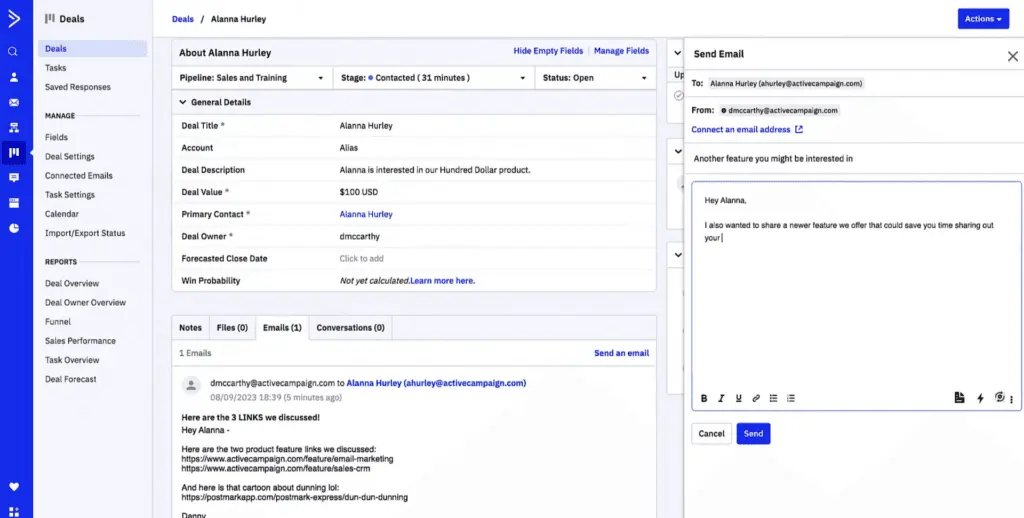
Knowing the advantages of ActiveCampaign for Sales vs Salesforce Sales Cloud can shed some light on specific considerations you may be seeking for your company and help you choose the product that matches your needs. Thus, here are some of ActiveCampaign’s top benefits:
- Organized pipelines. Its drag-and-drop capabilities make it easy to move pipelines along stages. You can also configure pipelines according to buyer types, which helps in managing and streamlining tasks more precisely. In addition, it allows you to automate actions, thus expediting sequences and processes.
- Smart predictions. Avoid wasting time on guessing possible leads by utilizing ActiveCampaign’s smart probability system. You get insights on deals that are more likely to close, contacts that are more prone to clicking a link, or the right time to hand off leads. You can also set up which win aspects you want to get predictions on to help you gain insights promptly.
- Inbox integration. It allows you to work on your CRM right within your Gmail or Outlook dashboard. For instance, you can create contacts or assign tasks without leaving your inbox, eliminating the hassle of switching tabs. You can also update deals or contact information easily, creating smooth workspaces across platforms.
What is Salesforce Sales Cloud?
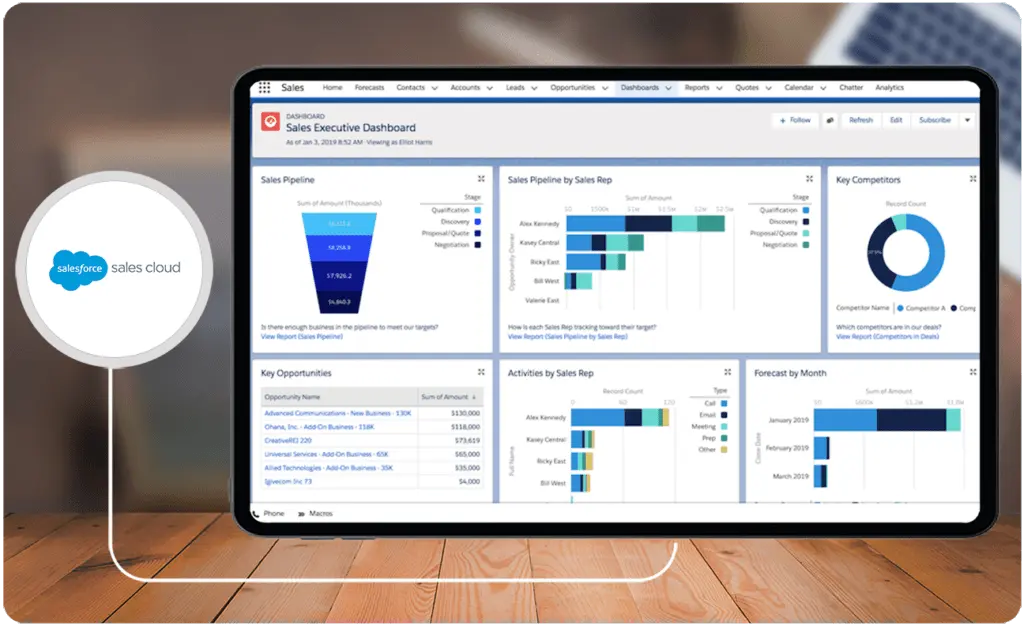
Salesforce Sales Cloud is a software that uses CRM, data, and AI not only to store and organize information about your customers but also to track business preferences, create marketing campaigns, manage team tasks, and boost revenue. As one of Salesforce's many software solutions, the Sales Cloud focuses on various functions like sales automation, engagement, performance management, and analytics. It also features tools for lead management, forecasting, process automation, and collaboration. The vendor has standalone products for customer service, marketing, and commerce, and it also offers an all-in-one CRM suite, Customer 360, that combines these solutions. If you want something more compact, check the best Salesforce Sales Cloud alternatives.
Who is Salesforce Sales Cloud for?
Whether you are looking for an ecommerce software platform or a team management system, you can take advantage of Salesforce Sales Cloud’s comprehensive software, which creates versatile workspaces that can be tailored to various business types and industries. Some of its loyal customers come from retail, media, manufacturing, healthcare and life services, energy and utilities, consumer goods, financial services, public sector, nonprofits, automotive, and communication.
Key Benefits of Salesforce Sales Cloud
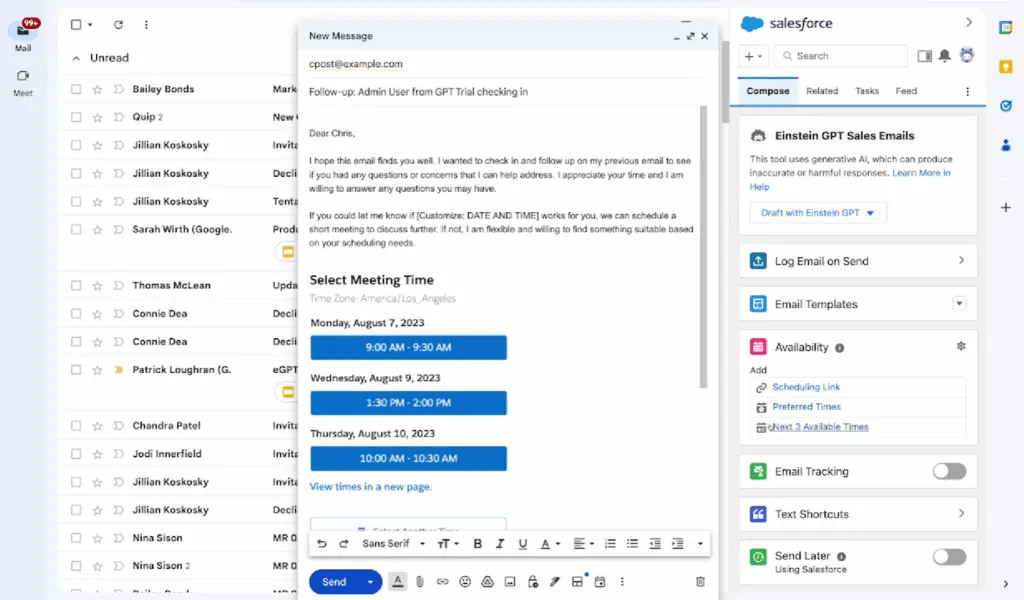
When comparing ActiveCampaign for Sales vs Salesforce Sales Cloud, it is helpful to identify the main benefits that each platform brings to the table. Doing so can aid you in selecting the best product to use.
- Robust platform. From tracking leads and creating marketing campaigns to personalizing content and providing revenue insights, it delivers an ecosystem that helps each department to work cohesively. Moreover, its extensive library features knowledge bases, scripts, coaching videos, and other resources to assist not only your agents but also your customers.
- 360-degree view. Offering a holistic perspective on customer interactions, Salesforce enables you to gain valuable insights on engagements and leads. Moreover, it spans beyond sales, monitoring team performances, marketing efforts, and customer service touchpoints.
- Streamlined processes. With pre-built templates and automated tasks, you can save time and perform more impactful activities. Its AI-ready workflows also allow you to adopt proactive processes, hands-free.
Who are ActiveCampaign for Sales and Salesforce Sales Cloud best for?
In understanding ActiveCampaign for Sales vs Salesforce Sales Cloud, prospective users must keep in mind that both products cater to a wide range of business types and sizes. However, due to ActiveCampaign’s and Salesforce’s capabilities, the following user groups could derive maximum benefits from them as these align most closely with their requirements.
ActiveCampaign for Sales is ideal for:
- Small to midsized businesses
- Digital or social media companies
- Agencies focused on email marketing and analytics
Salesforce Sales Cloud is ideal for:
- Entrepreneurs and e-commerce businesses
- Small businesses to enterprises
- Customer support services
ActiveCampaign for Sales vs Salesforce Sales Cloud Feature Comparison
As we dive deeper into our team’s comprehensive ActiveCampaign for Sales vs Salesforce Sales Cloud comparison, we highlight the main features of both products. Whether you are a small business or an enterprise, checking out our team’s analysis of the software features can assist you in picking the top CRM solution for your organization.
Sales AI and Automation
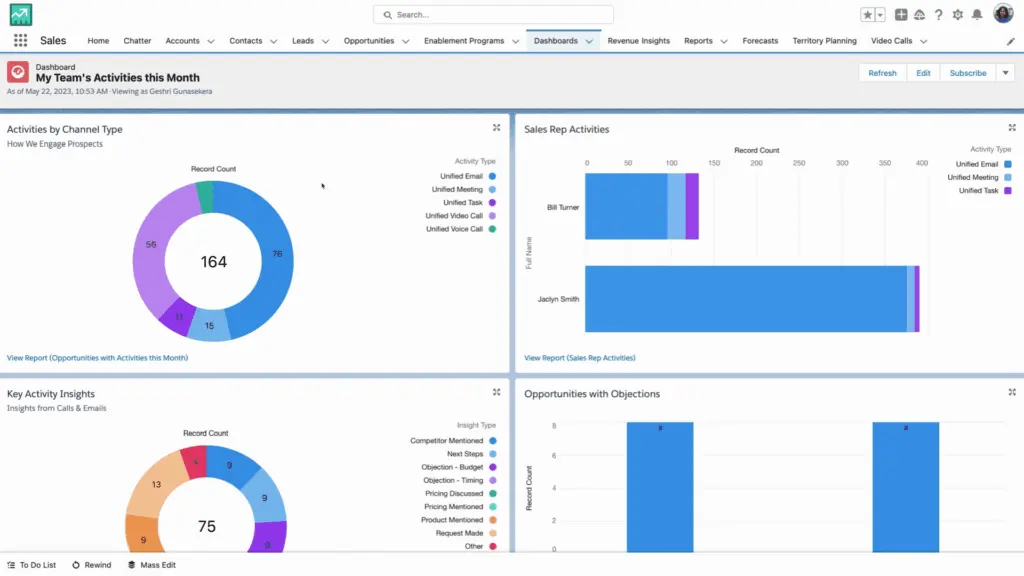
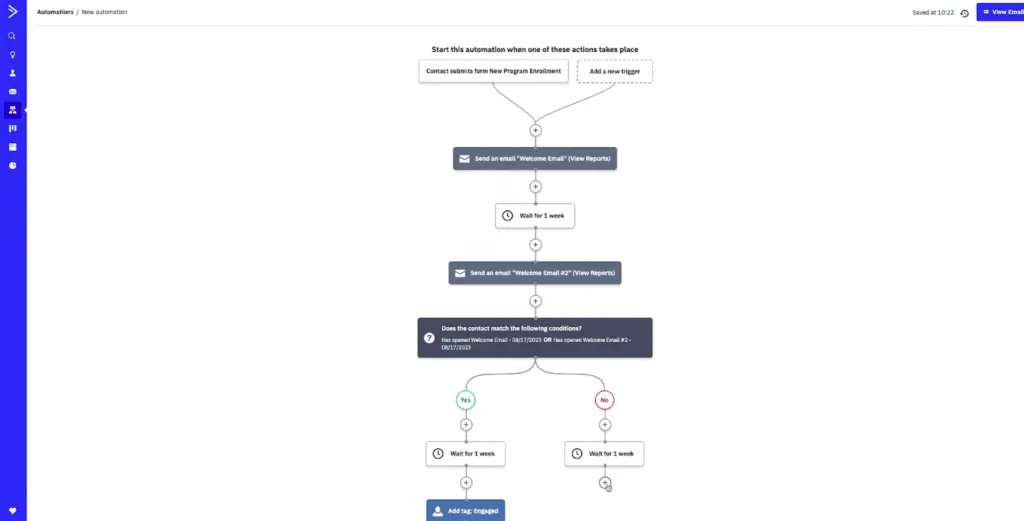
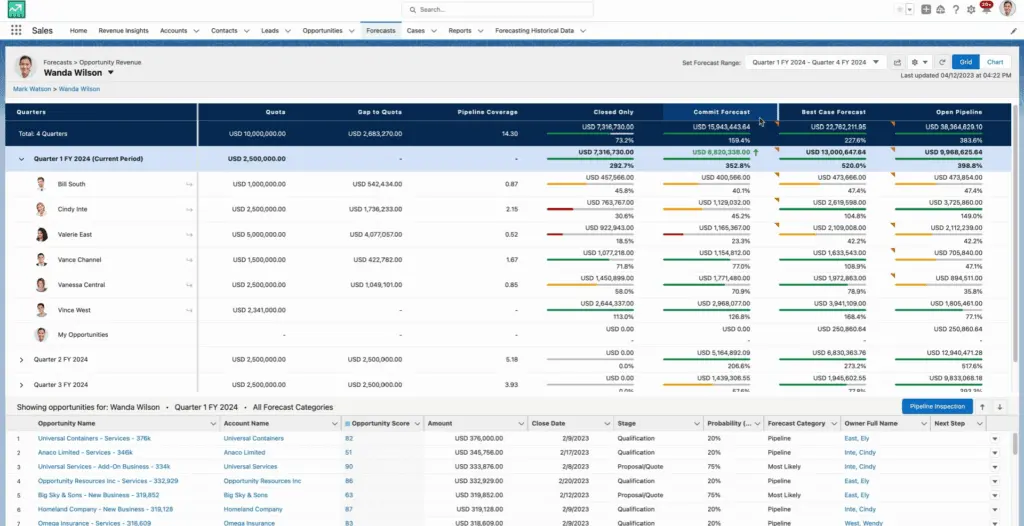
Both ActiveCampaign and Salesforce utilize AI and automation to streamline tasks, eliminate manual inputs, and generate data-driven insights. ActiveCampaign for Sales, for instance, uses split automation to test two different workflow versions. This A/B testing technique enables you to arrive at the most efficient operation sequence. Meanwhile, Salesforce Sales Cloud uses Einstein, its native CRM AI, in every aspect of its platform. It consolidates data, makes daily decisions, or suggests actions to accelerate deals, empowering you to work more quickly and efficiently.
Sales Engagement
ActiveCampaign for Sales employs automation to ensure that your marketing and sales teams are on the same page about jumping in to engage with customers. It also uses customer data to know when to connect users with other departments when closing sales. This may be a capability you could not find in ActiveCampaign for Sales alternatives. On the other hand, Salesforce Sales Cloud uses AI to provide recommendations on the next best steps or practices. It analyzes consumer data and behavior from your calls, notes, and previous engagements with your customers and helps you focus on the ones that are more likely to convert.
Personalization and Customization
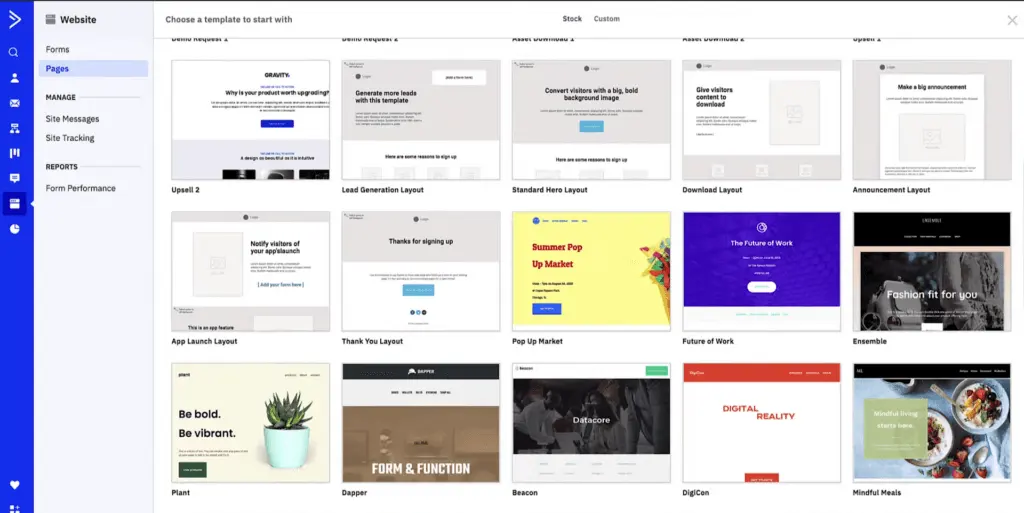
Every customer values a personal touch in any interaction, which is why ActiveCampaign for Sales enables you to send one-on-one emails with personalized tags to your clients. Your forms can also be tailored according to your needs, and you have a variety of options to customize dashboard fields. Meanwhile, Salesforce Sales Cloud makes use of personalized learning experiences, from onboarding to every milestone, motivating users to maintain engagement. Moreover, it allows you to configure various aspects of its interface and controls to make the platform match your company’s requirements.
ActiveCampaign for Sales vs Salesforce Sales Cloud Pricing
One of the most crucial factors when comparing ActiveCampaign for Sales vs Salesforce Sales Cloud is pricing. This significantly influences your decision since your budget can either limit or expand the options available to you. Therefore, you must deliberate which among the subscription tiers best fits your organization’s goals and financial constraints.
ActiveCampaign for Sales (CRM + Sales Engagement)
- Plus: $19/month (one user seat only; additional user seat: $19-$23/month)
- Professional: $49/month (one user seat only; additional user seat: $49-$59/month)
- Enterprise: By quotation
- Marketing Automation + Sales CRM Bundles: $93-$386/month or by quotation
Salesforce Sales Cloud Pricing
- Starter: $25/user/month
- Professional: $80/user/month
- Enterprise: $165/user/month
- Unlimited: $330/user/month
Implementation and Scalability Considerations
When comparing ActiveCampaign for Sales and Salesforce Sales Cloud, understanding their implementation timelines and scalability potential is essential for businesses planning long-term growth.
ActiveCampaign for Sales is renowned for its ease of implementation. Its intuitive user interface and straightforward configuration setup enable smaller teams to quickly onboard the system without significant technical expertise. This quick deployment makes it a practical choice for businesses seeking rapid integration with minimal disruptions to their daily operations. On the scalability front, while ActiveCampaign is ideal for startups and small enterprises, it offers features and pricing tiers that can adapt as a business grows, albeit to a certain limit in complexity.
On the other hand, Salesforce Sales Cloud, while more feature-rich, often requires a lengthier implementation timeline, including potential customization needs and staff training. This software is highly scalable, accommodating the sophisticated demands of enterprises as they expand. Yet, smaller organizations may face challenges navigating its advanced features. Salesforce's comprehensive ecosystem is well-suited for companies planning significant growth and requiring integrations across multiple departments.
For businesses that deal with invoice workflows, integrating CRM with high-performing invoicing software can enhance financial visibility and streamline billing processes, helping to align sales and accounting operations. You can explore the top options for invoicing software to further optimize these workflows.
Ultimately, the choice between ActiveCampaign and Salesforce will depend not only on the current size and technological maturity of an organization but also on its growth trajectory and in-house technical capabilities.
ActiveCampaign for Sales Pros and Cons
In this section of our team’s ActiveCampaign for Sales vs Salesforce Sales Cloud comparison, we pinpoint a few pros and cons of using each software to further help you decide which solution is best for your institution. Understanding these factors can solidify your choice between the two products, thus narrowing your options for the best CRM.
ActiveCampaign for Sales Pros
- User-friendly interface. Many users cite that ActiveCampaign’s easy-to-navigate UI enabled them to learn and master the platform quickly. This facilitates a low learning curve and contributes to the platform’s appeal to various types of users.
- Spot-on lead management. Because of its intuitive dashboard and straightforward automation controls, users find information about their contacts more quickly. Lead progress is also easy to monitor since all actions and pertinent data are within your reach.
ActiveCampaign for Sales Cons
- Separate bundles. ActiveCampaign for Sales, though comprehensive, features mainly CRM solutions, sales automation tools, and tracking and reporting. It has a separate product for its email and marketing automation and campaign management, pushing customers to get a more expensive bundle that includes both.
- Slow loading time. Several users admit that they experienced slow refresh rates and loading times. Bugs and its overall functionality can still be improved to avoid these hiccups.
Salesforce Sales Cloud Pros and Cons
Before you decide between ActiveCampaign for Sales vs Salesforce Sales Cloud, you must also weigh the opportunities and obstacles that await you when navigating these products. In this section, we focus on the positive and negative considerations of using Salesforce Sales Cloud.
Salesforce Sales Cloud Pros
- Collaborative environment. You can easily assign roles and permissions not only to increase security but also to foster collaboration in various projects. Moreover, its shared database creates a centralized hub for teams to access updated information, contribute to pipelines, or assign members to new tasks.
- AI-powered software. As technology continues to evolve, leveraging systems like AI and automation certainly becomes imperative for any business. Through these innovations, Salesforce enhances productivity, expedites processes, and provides insights that enable you to stay ahead.
Salesforce Sales Cloud Cons
- Steep learning curve. Unfortunately, because Salesforce has a variety of functions and features, it could take a while for users to explore the platform independently. Some users might also feel overwhelmed by the vast capabilities that the product offers.
- Expensive plans. While Salesforce’s pricing structure is fair given its robust features, it may pose a challenge for smaller organizations, like startups or microbusinesses with limited budgets and a handful of employees. The potential cost constraints might deter them from accessing Salesforce’s otherwise flexible and powerful services.
How does each platform handle customer support and training resources?
When choosing a CRM solution, evaluating customer support and training resources is essential for long-term success. Here’s a closer look at the support and training features offered by ActiveCampaign for Sales and Salesforce Sales Cloud:
- ActiveCampaign for Sales:
- Provides a comprehensive knowledge base with video tutorials and how-to guides to help new users get started.
- Offers live chat support and email assistance for technical issues or questions, with priority support for higher-tier plans.
- Includes a community forum where users can share insights, solutions, and tips.
- Access to on-demand webinars and documentation designed to walk users through setup and feature utilization.
- Salesforce Sales Cloud:
- Salesforce offers Trailhead, a structured, interactive learning platform with modules and trails for various skill levels, helping users achieve CRM proficiency.
- Dedicated account managers are available to enterprise-level users, offering guidance on maximizing Salesforce’s potential.
- Extensive support options, including phone, live chat, and a developer community for technical questions and advanced use cases.
- Access to a partner network for custom implementation and advanced training sessions.
Selecting a CRM with robust support and training resources ensures that teams can effectively use the platform and receive assistance when needed, ultimately leading to better adoption and productivity.
How do these platforms integrate with business intelligence tools?
Both CRM platforms offer mechanisms to enhance data-driven decision-making through integration with external analytics systems. ActiveCampaign for Sales, through its flexible API and automation features, enables users to connect with third-party reporting tools that consolidate sales data and customer interactions. In contrast, Salesforce Sales Cloud leverages native analytics capabilities alongside a robust partner ecosystem, allowing organizations to merge CRM data with broader operational metrics. This integration with business intelligence solutions empowers companies to generate unified dashboards, real-time insights, and strategic forecasts essential for optimizing sales performance and driving business growth.
Verdict – ActiveCampaign for Sales vs Salesforce Sales Cloud: Which software is better?
In this guide, our team provided an extensive comparison of ActiveCampaign for Sales vs Salesforce Sales Cloud to help you make more informed decisions. We analyzed the two products’ pricing plans, main features, pros and cons, and clientele to provide an overview of what they can offer.
Both offer unique capabilities; therefore, the two platforms are designed to meet distinct needs. On one hand, if you wish to use a CRM platform that is user-friendly, straightforward, and utilizes tools for sales automation, email/social media marketing, easy engagement, and lead management, then ActiveCampaign is the right solution for you. Keep in mind, though, that its marketing tools come separately (ActiveCampaign for Marketing) or as a slightly pricier part of a bundle.
On the other hand, if you want to be hands-on with the nitty-gritty of sales planning, enablement, revenue optimization, or performance management and want to take advantage of intelligent systems in analytics, reports, and actionable insights, then Salesforce Sales Cloud is your best option. However, remember that with many versatile and robust features comes a high learning curve, extending the time before you can master its UI.
In addition, ActiveCampaign for Sales attracts more entrepreneurs or small businesses, but its plans extend to enterprises as well. In the same manner, Salesforce Sales Cloud is more appropriate for midsized businesses to enterprises, yet it also offers small businesses friendlier solutions. If you are a midsized business that aims to scale up or wants to obtain the best customer support software, then you can opt for Salesforce Sales Cloud.
By knowing your organization’s needs and requirements and matching them with our comprehensive review of ActiveCampaign for Sales vs Salesforce Sales Cloud, you can make wiser decisions that can yield consistent results in the long run.
Key Insights
- Targeted Use: ActiveCampaign for Sales is designed for various industries, particularly benefiting small to midsized businesses, digital or social media companies, and agencies focused on email marketing. In contrast, Salesforce Sales Cloud is versatile, catering to businesses of all sizes, including large enterprises, and is widely used across diverse industries such as retail, healthcare, manufacturing, and financial services.
- Automation and AI: Both platforms excel in automation and AI capabilities. ActiveCampaign offers intuitive sales automation and lead scoring, while Salesforce Sales Cloud utilizes its Einstein AI to provide comprehensive data-driven insights, forecasts, and recommendations.
- Integration and Customization: ActiveCampaign integrates well with email platforms like Gmail and Outlook, allowing seamless CRM operations within these environments. Salesforce Sales Cloud offers extensive customization options and integrates with a wide range of other Salesforce products and third-party applications, providing a holistic CRM ecosystem.
- User Experience: ActiveCampaign is known for its user-friendly interface and straightforward navigation, making it accessible for users with varying technical skills. Salesforce Sales Cloud, though feature-rich, has a steeper learning curve due to its extensive functionalities, requiring more time for users to become proficient.
- Pricing Considerations: ActiveCampaign for Sales is relatively cost-effective, especially for small businesses, with its base plan starting at $19/month. Salesforce Sales Cloud, with its robust features, has higher pricing tiers, which might be challenging for smaller businesses but offer great value for larger enterprises with more complex needs.
Other Things You Should Know About ActiveCampaign for Sales - Salesforce Sales Cloud Comparison
ActiveCampaign for Sales is a cohesive CRM and sales engagement platform that includes features like sales automation, lead scoring, e-commerce management, and email marketing integration.
It is ideal for small to midsized businesses, digital or social media companies, and agencies focused on email marketing and analytics.
Key benefits include organized pipelines with drag-and-drop capabilities, smart predictions for lead scoring, and seamless inbox integration with Gmail and Outlook.
Salesforce Sales Cloud is a comprehensive CRM solution that uses AI to enhance sales automation, customer engagement, performance management, and analytics.
It is used by businesses of all sizes across various industries, including retail, healthcare, manufacturing, financial services, and more.
Key benefits include a robust platform with extensive features, a 360-degree view of customer interactions, and streamlined processes with AI-powered workflows.
How does the pricing of ActiveCampaign for Sales compare to Salesforce Sales Cloud?
Pros include a user-friendly interface and efficient lead management. Cons include separate bundles for marketing tools and occasional slow loading times.
Pros include a collaborative environment and powerful AI capabilities. Cons include a steep learning curve and higher pricing plans that might not be suitable for smaller businesses.
ActiveCampaign for Sales is generally more suitable for small businesses due to its user-friendly interface and lower cost. However, Salesforce Sales Cloud offers scalable solutions that can also benefit small businesses looking to grow.
Salesforce Sales Cloud offers more advanced AI capabilities through its Einstein AI, providing deep insights, forecasts, and actionable recommendations across various business functions.