Digital Footprint Management for Job Seekers: All You Need To Know

Co-Founder and Chief Data Scientist
Your online presence can help you get noticed, shortlisted, or quietly screened out before an interview ever happens. Recruiters, hiring managers, clients, graduate schools, and professional contacts often form an opinion from search results, social profiles, portfolios, comments, public photos, and credentials long before they meet you. That means your digital footprint is now part of your career reputation, not separate from it.
This guide is for students, job seekers, career changers, working professionals, freelancers, and anyone building a public professional identity online. You will learn what a digital footprint includes, why employers review it, how to audit and improve it, how to separate personal and professional content, and how to use education, networking, and security habits to make your online presence work in your favor. If you are actively searching for a job, your digital footprint should support your application rather than contradict what appears on your resume.
A strong digital footprint does not mean pretending to be flawless. It means making sure the public information attached to your name is accurate, professional, useful, and aligned with the opportunities you want. For a general definition, you can also review this explanation of what a digital footprint is.

Quick Answer: What Is a Digital Footprint and Why Does It Matter?
A digital footprint is the collection of information connected to you online. It includes content you intentionally publish, such as LinkedIn posts, portfolios, comments, photos, videos, and professional profiles, as well as information created passively through browsing activity, data collection, search results, tags, mentions, and old accounts.
It matters because employers and professional contacts often use online information to assess judgment, communication style, credibility, qualifications, and cultural fit. A polished digital presence can support your candidacy, while outdated, careless, offensive, inconsistent, or unsecured content can damage trust. The goal is not to erase your personality; it is to make your public online identity match the professional story you want people to see.
What Is a Digital Footprint?
The phrase digital footprint refers to the trail of online information associated with a person. Every public profile, uploaded image, shared article, forum comment, professional biography, tagged post, review, username, and search result can become part of that trail.
Think of it as your searchable reputation. Some parts are easy to control, such as a LinkedIn headline or a personal website. Other parts are harder to manage, such as archived posts, screenshots, old accounts, public records, third-party data, cached pages, and content others have posted about you.
Most digital footprints include two broad categories: active data and passive data.
| Type of digital footprint | What it includes | How much control you usually have | Career impact |
| Active data | Posts, comments, photos, videos, profile details, resumes, portfolios, blogs, reviews, public opinions, and shared content you choose to publish | Moderate to high, because you can often edit, delete, archive, or update it | Shows your communication style, judgment, expertise, interests, professionalism, and consistency |
| Passive data | Search history signals, cookies, account activity, location data, IP-linked activity, data collected by websites, tags, mentions, and information gathered by third parties | Lower, because much of it is collected automatically or stored outside your direct control | Can affect privacy, advertising profiles, background research, and what appears when others search for you |
Active Data
Active data is the information you knowingly place online. Examples include a professional bio, a LinkedIn update, a GitHub repository, a TikTok video, a portfolio case study, a comment on an industry discussion, or a photo you upload to a public account. Because you created or shared it, you usually have at least some ability to revise it, remove it, or make it private.
Passive Data
Passive data is information collected as you use websites, search engines, apps, and online services. It can include browsing behavior, cookies, device identifiers, account activity, location signals, and data tied to an IP address. This type of data may be used to personalize content, target advertising, analyze behavior, or be shared with third parties. Because it is collected in the background, it is often easier to overlook.
Why Your Digital Footprint Matters for Jobs, School, and Professional Reputation
Your online activity is often treated as evidence of how you communicate, solve problems, handle disagreement, participate in communities, and represent yourself. A hiring manager may not expect perfection, but they may look for red flags such as discriminatory comments, reckless disclosures, unprofessional language, exaggerated credentials, or inconsistencies between your online profiles and your application materials.
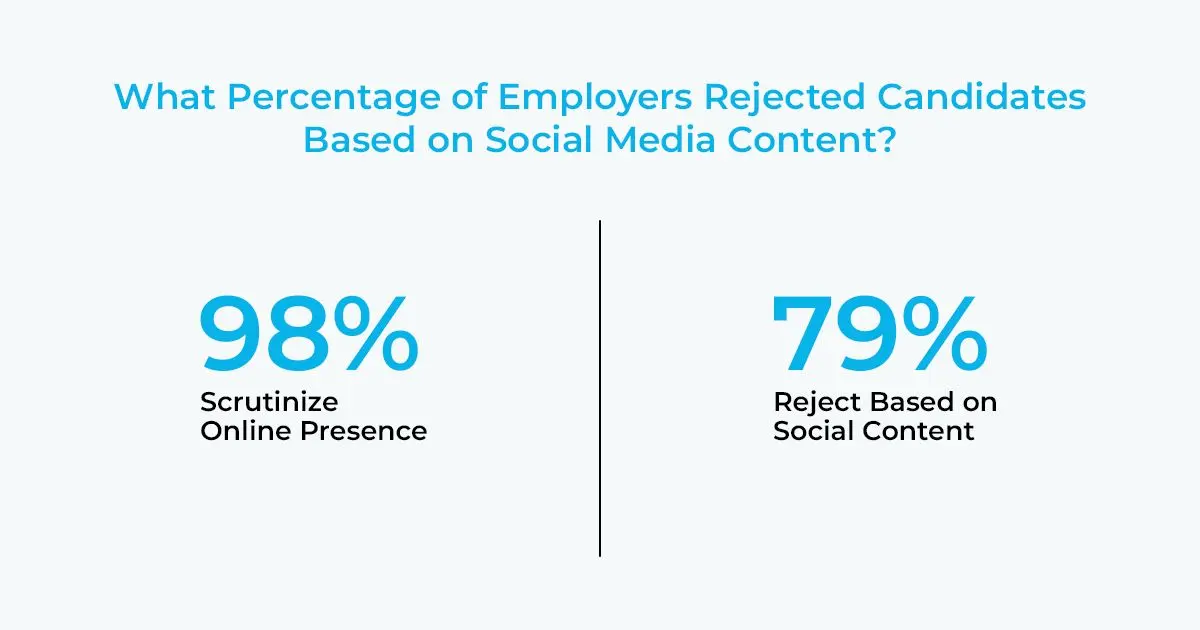
According to a recruitment survey conducted in 2020, 98% employers scrutinize the online presence of candidates. In the same survey, 79% of them said they rejected candidates based on the content they post on their socials.
Your online reputation can also help you. A clear professional profile, a focused portfolio, thoughtful comments, visible credentials, and evidence of completed projects can make it easier for employers to understand what you bring to the role. As Verizon explains, your digital footprint has a huge impact because it follows you across platforms and can influence how others evaluate your trustworthiness.
A Career Builder survey from 2018 also found that employers prefer to interview people with a strong digital presence rather than someone with no visible presence. That does not mean every candidate needs to become a content creator. It means that having credible, relevant, and easy-to-find information can reduce uncertainty for employers.
What Employers May Look For Online
Employers do not all review candidates the same way. Some only verify LinkedIn and portfolio links. Others search names, review public social profiles, scan professional communities, or compare public claims with application materials. In fields involving public trust, client relationships, communications, education, health, finance, cybersecurity, or leadership, online reputation may carry even more weight.
| What employers may review | Positive signals | Possible concerns |
| LinkedIn or professional profiles | Clear headline, accurate work history, relevant skills, recent activity, recommendations, and a professional photo | Outdated roles, exaggerated claims, missing context, inconsistent dates, or vague descriptions |
| Portfolio, website, or project links | Work samples, case studies, measurable outcomes, code samples, writing clips, designs, research, or presentations | Broken links, unclear ownership of work, low-quality samples, or content unrelated to the target role |
| Public social media | Professional interests, community engagement, creativity, industry awareness, and respectful communication | Harassment, offensive content, confidential information, extreme negativity, or poor judgment |
| Search results | Consistent identity, relevant achievements, public speaking, awards, publications, or credible mentions | Old accounts, embarrassing posts, inaccurate information, duplicate identities, or negative content without context |
| Credentials and education | Verifiable degrees, certificates, licenses, continuing education, and skills training | Unverifiable claims, diploma-mill credentials, expired certifications, or mismatched qualifications |
Benefits of a Strong Digital Presence
Better Visibility in Search and Recruiting
A focused online presence makes it easier for recruiters and professional contacts to find you. A complete profile, relevant keywords, work samples, and a consistent name across platforms can help your strongest materials appear when someone searches for you. A well-prepared LinkedIn profile, for example, can make your expertise easier to understand at a glance; this guide discusses how to attract potential employers using your LinkedIn profile.
Stronger Interview Opportunities
When your online profiles support your resume, employers have more reasons to start a conversation. A portfolio can show proof of skill. A project summary can explain how you think. A professional post can demonstrate industry awareness. These signals do not guarantee an interview, but they can make your application more credible and memorable.
Clearer Personal Brand
Personal branding is the process of shaping how people understand your professional strengths. It is not just a logo, a headline, or a polished photo. It is the repeated pattern of what you talk about, what you build, what you share, how you communicate, and what problems you are known for solving.
More Trust With Clients, Employers, and Peers
A thoughtful online presence can reduce doubt. If someone can see your background, examples of your work, credentials, recommendations, and professional interests, they have more context for deciding whether to contact you. Trust builds faster when your public information is coherent and verifiable.
Potentially Stronger Positioning in Career Conversations
A strong digital footprint may improve how others perceive your expertise, but it should not be viewed as a guaranteed path to higher pay or job offers. Compensation still depends on role requirements, experience, location, market conditions, negotiation, and employer budget. Your online presence is one factor that can support your credibility.
How Education and Credentials Can Strengthen Your Digital Footprint
Professional development can add substance to your online identity when it is relevant to your goals. A certificate, degree, workshop, bootcamp, publication, license, or completed training program can help demonstrate initiative and current skills. The key is to connect credentials to outcomes: what you learned, what you built, and how it applies to your field.
If you need a faster academic pathway, an accelerated aa degree online may be worth comparing with traditional associate degree options, especially if you want to build foundational credentials while continuing to work. If you are exploring bachelor’s-level options, an easiest graduation degree resource can help you compare flexible degree paths, although “easy” should never be the only factor in choosing a program.
Military learners can also use education strategically. Programs designed with service members and veterans in mind may help translate military experience into civilian credentials, strengthen a LinkedIn profile, and show discipline, leadership, and technical preparation. If this applies to you, review options such as the best online college for military students and compare support services, credit for military training, flexibility, and affordability.
Cost matters as well. Working adults often need programs that fit around employment and family responsibilities. A resource on the cheapest online universities for working adults can be useful when comparing tuition, transfer credits, scheduling format, and employer tuition assistance.
How to Audit Your Digital Footprint Step by Step
Improving your online reputation starts with a full review of what already exists. Do not only check the platforms you use today. Old usernames, abandoned accounts, archived images, outdated bios, and forgotten comments can still appear in search results.
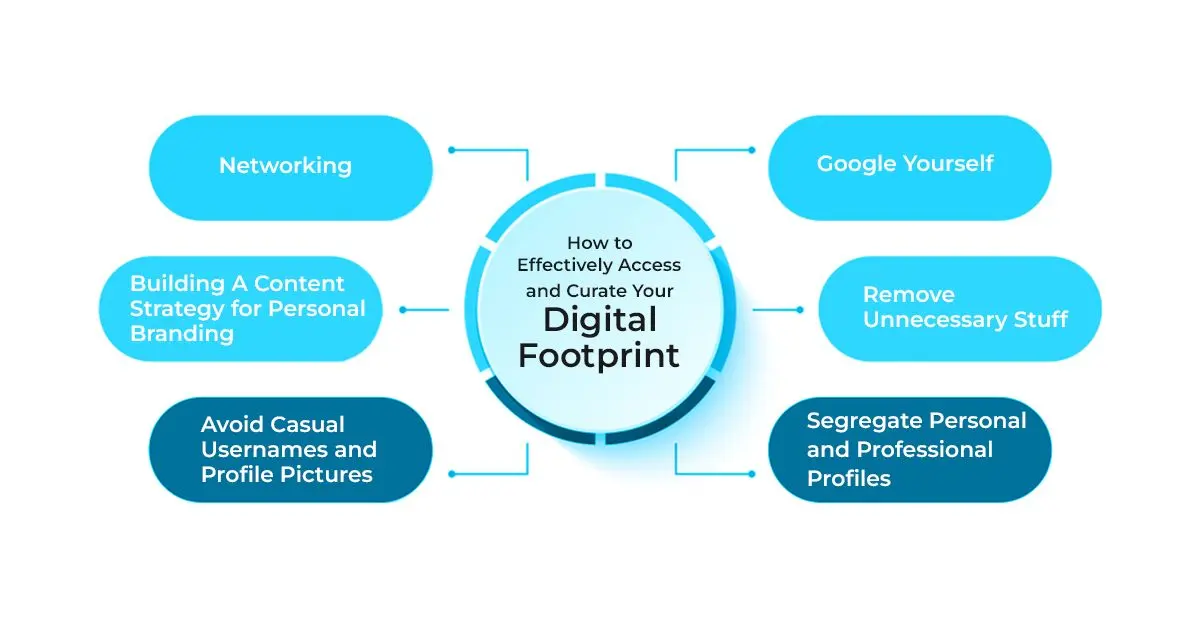
- Search your full name. Use quotation marks around your name, then search variations with your city, school, employer, username, email handle, profession, and former names if relevant.
- Review at least the first several pages of results. Many people stop after the first page, but older profiles and third-party pages may appear deeper in search.
- Check image and video results. Photos, thumbnails, and old uploads can create impressions as quickly as written content.
- List every account you find. Include LinkedIn, Facebook, Instagram, X, TikTok, YouTube, Reddit, GitHub, portfolio sites, school profiles, forums, review platforms, and old blogs.
- Compare your public information with your resume. Job titles, dates, degrees, certifications, and accomplishments should be consistent.
- Identify content to remove, revise, hide, or explain. Prioritize anything offensive, inaccurate, outdated, confidential, misleading, or irrelevant to your professional goals.
- Strengthen the results you want people to see. Update LinkedIn, publish a portfolio, add a professional bio, share useful work samples, and make credentials verifiable.
How to Clean Up Content That Could Hurt Your Reputation
Not every old post needs to be deleted. Some content simply needs better privacy settings or updated context. Start by removing the material most likely to damage trust, then improve the quality of what remains public.
| Problem | What to do | Better long-term habit |
| Old public posts that no longer represent you | Delete, archive, or change the audience settings where possible | Review old content before applying for jobs or graduate programs |
| Unprofessional usernames or profile photos | Use a consistent name, a clear photo, and a handle appropriate for professional contact | Keep personal humor separate from professional visibility |
| Inconsistent work history or credentials | Update dates, titles, school names, certificates, and descriptions across platforms | Revise profiles whenever you update your resume |
| Negative or heated public arguments | Remove unnecessary comments and avoid escalating public disputes | Use respectful language, especially in industry spaces |
| Content posted by someone else | Ask the person or platform to remove or correct it when appropriate | Use tagging controls and review privacy settings regularly |
| Outdated accounts you no longer use | Close, deactivate, or make them private if they add no value | Keep a list of accounts and review them periodically |
How to Separate Personal and Professional Profiles
You do not need to make every part of your life public. In fact, separating personal and professional spaces often makes your digital footprint healthier and easier to manage. Personal accounts can remain private, while professional accounts should be discoverable, accurate, and aligned with your field.
- Use privacy settings intentionally. Limit who can see personal photos, family updates, political arguments, casual jokes, or location-based posts.
- Choose platform roles. For example, LinkedIn may serve as your professional profile, GitHub as your technical portfolio, Instagram as a creative showcase, and Facebook as a private personal network.
- Separate contact information. Use a professional email address for job applications, portfolios, and networking.
- Review tags before they go public. Enable approval settings where platforms allow it.
- Avoid posting confidential information. Never share employer data, client details, private school records, internal documents, or sensitive workplace conversations.
How to Build a Professional Digital Footprint That Stands Out
The best digital footprint is not just clean; it is useful. It helps people understand what you do, what you know, what you have built, and how to contact you. Start with the platforms most relevant to your goals instead of trying to be active everywhere.
1. Define the Professional Story You Want to Tell
Before posting more content, decide what you want to be known for. A student may want to highlight academic projects and internships. A software developer may emphasize code samples and technical problem-solving. A teacher may showcase lesson design and classroom leadership. A marketer may share campaigns, analytics, and writing samples.
2. Build or Update Your Core Profiles
At minimum, many professionals benefit from a current LinkedIn profile, a professional email address, and a portfolio or document hub when work samples are relevant. Your headline, summary, skills, education, and experience should match your target roles.
3. Add Evidence, Not Just Claims
Instead of saying you are “detail-oriented” or “passionate,” show work that proves it. Upload projects, link to publications, summarize case studies, describe measurable contributions, or explain what you learned from a challenge.
4. Create a Simple Content Strategy
A content strategy does not require daily posting. It means sharing with purpose. You might post project updates, lessons learned, industry observations, book summaries, portfolio pieces, conference takeaways, research reflections, or practical tips for beginners in your field.
If you use short-form video or creator platforms professionally, make sure the content supports your goals. Some professionals use TikTok to explain concepts, demonstrate skills, or reach a niche audience. If you are trying to grow an audience there, focus on substance and consistency rather than vanity metrics, even when reading resources about ways to increase organic reach on TikTok.
5. Network With Intent
Networking online is not the same as collecting random connections. Follow people in your field, join relevant groups, comment thoughtfully, ask informed questions, and share useful resources. Professional relationships usually grow from repeated, respectful interactions over time.
Depending on your industry, mainstream platforms such as Instagram, YouTube, Facebook, or TikTok may also function as portfolio spaces. A designer, fitness professional, educator, photographer, entrepreneur, or communications specialist may use visual content to demonstrate skill and build community. If Instagram is part of your professional strategy, prioritize helpful content and real conversation over superficial metrics, even when researching tactics for growing engagement on Instagram.
Online Education, Degrees, and Digital Credibility
Education can strengthen your digital presence when it is relevant, accredited, and clearly connected to your goals. Listing credentials without context is less persuasive than showing what the credential helped you learn or accomplish.
For example, a health, exercise science, wellness, or rehabilitation-focused professional might strengthen a profile by pursuing an online bachelor degree kinesiology if the program fits their career plan. Professionals seeking advanced research, academic, leadership, or expert-level roles may compare a doctoral degree online with other doctoral formats, keeping in mind that speed should be weighed against academic rigor, accreditation, faculty support, and career relevance.
If you are still planning your graduate education, understanding how to get a master's degree can help you evaluate admissions requirements, timelines, program formats, and whether a master’s credential belongs in your long-term professional brand.
| Credential type | When it can help your digital footprint | What to verify first |
| Short course or workshop | You need a quick skill update or proof of continuing learning | Provider reputation, instructor expertise, practical assignments, and relevance to your role |
| Professional certificate | You want to show job-specific skills, tools, or compliance knowledge | Employer recognition, assessment quality, renewal requirements, and portfolio value |
| Associate or bachelor’s degree | You need a formal academic credential for entry-level roles, advancement, or career change | Accreditation, transfer credit, cost, completion time, student support, and career alignment |
| Master’s degree | Your field rewards advanced knowledge, leadership preparation, specialization, or licensure preparation | Admissions requirements, accreditation, faculty expertise, outcomes, and total cost |
| Doctoral degree | You are pursuing research, executive leadership, academia, consulting authority, or advanced professional credibility | Program rigor, dissertation or capstone expectations, faculty mentorship, accreditation, and time commitment |
How to Monitor Your Digital Footprint Over Time
A digital footprint is never finished. Search results change, accounts get breached, platforms update privacy settings, and people may tag or mention you without warning. Build monitoring into your routine so you can respond early.
Use Google Alerts
Set up alerts for your full name, common name variations, professional brand name, portfolio name, and business name if you have one. Google Alerts can notify you when new indexed pages mention those terms.
Use Social Listening and Platform Notifications
Social media monitoring tools can track mentions of your name, brand, username, or selected keywords. Even basic platform notifications can help you notice tags, comments, messages, and public mentions quickly.
Search Manually on a Schedule
Run your own searches before major career events: job applications, interviews, graduate school applications, conference presentations, freelance pitches, promotion cycles, or public launches. Manual review catches issues that automated tools may miss.
How to Secure Your Digital Footprint
Reputation management is not only about content. It is also about security. A compromised account can post spam, expose private messages, leak personal information, or damage professional trust. Basic cybersecurity habits can protect both your privacy and your career identity.
- Use unique passwords. Avoid reusing the same password across email, banking, school, work, and social accounts.
- Turn on multi-factor authentication. Prioritize email, LinkedIn, financial accounts, cloud storage, school portals, and any platform connected to your professional identity.
- Review privacy settings regularly. Platforms change settings and features, so check who can see your posts, contact details, tags, and friend lists.
- Limit personal details in public bios. Avoid exposing your home address, personal phone number, daily routines, or sensitive family information.
- Remove unused app permissions. Revoke access for old apps, quizzes, browser extensions, and third-party tools you no longer trust or use.
- Be cautious with public Wi-Fi. Avoid accessing sensitive accounts on unsecured networks unless you use appropriate protection.
- Watch for impersonation. Search for duplicate profiles using your name, photos, or brand identity.
Current Trends Affecting Digital Footprints
Several developments make digital footprint management more important for students and professionals:
- AI-assisted recruiting. Employers and recruiters increasingly use digital tools to source candidates, review profiles, and identify keywords. This makes consistency across public profiles more important.
- More public portfolios. Many fields now value evidence of work, including writing samples, design portfolios, GitHub repositories, case studies, presentations, and project summaries.
- Blurred personal and professional platforms. People use the same apps for entertainment, networking, learning, and business. This increases the chance that personal content will be viewed in a professional context.
- Growth in online credentials. Degrees, certificates, and digital badges are easier to display, but employers may still look for accreditation, relevance, and proof of skill.
- Higher privacy and security risks. Data breaches, phishing, impersonation, and account takeovers can affect reputation as well as personal safety.
Common Digital Footprint Mistakes to Avoid
| Mistake | Why it causes problems | Better approach |
| Only cleaning up LinkedIn | Employers may find other public accounts, images, comments, or old profiles | Search your name broadly and review all visible platforms |
| Assuming privacy settings hide everything | Screenshots, tags, shared posts, and platform changes can expose content | Post as if public visibility is possible |
| Using different versions of your work history | Inconsistencies can make employers question accuracy | Keep resumes, LinkedIn, portfolios, and bios aligned |
| Posting credentials without verification | Unclear or questionable credentials can weaken trust | List accurate school names, programs, dates, certificates, and links when appropriate |
| Focusing only on removing negative content | A blank or thin online presence may not help you stand out | Add positive evidence such as projects, recommendations, writing, and professional activity |
| Relying on follower counts as proof of credibility | Audience size does not always reflect expertise or judgment | Prioritize relevance, quality, authenticity, and professional value |
| Ignoring security | Hacked accounts can damage reputation quickly | Use strong passwords, multi-factor authentication, and account monitoring |
Questions to Ask Before Posting Anything Publicly
- Would I be comfortable if a recruiter, professor, client, manager, or scholarship committee saw this?
- Does this content support, distract from, or contradict my professional goals?
- Am I sharing someone else’s private information without permission?
- Could this be misunderstood without context?
- Does this post show judgment, expertise, curiosity, creativity, or professionalism?
- Am I reacting emotionally to something that would be better handled privately?
- Would I still want this attached to my name a few years from now?
Practical Checklist: How to Improve Your Digital Footprint This Week
- Search your name, usernames, email handle, and image results.
- Update your LinkedIn headline, photo, summary, education, and current role.
- Remove or hide outdated posts, old accounts, and unprofessional public content.
- Check that your resume, LinkedIn, portfolio, and professional bio tell the same story.
- Add one strong work sample, project description, writing sample, or credential.
- Set up Google Alerts for your name and professional brand.
- Turn on multi-factor authentication for important accounts.
- Review tag approvals and privacy settings on personal social profiles.
- Join one relevant professional group or community and contribute thoughtfully.
- Create a simple monthly reminder to review your search results and profiles.
Key Insights
- Your digital footprint is the searchable record of your online activity, including both content you publish and data collected or displayed by others.
- Employers may review your online presence before deciding whether to interview you; according to a 2020 recruitment survey, 98% employers scrutinize candidates online and 79% rejected candidates based on social content.
- A strong online presence should be accurate, professional, relevant, and consistent with your resume, credentials, and career goals.
- Cleaning up harmful content is only the first step. You also need positive evidence: projects, portfolios, credentials, thoughtful posts, recommendations, and clear contact information.
- Separate personal and professional spaces. Use privacy settings, professional usernames, consistent bios, and careful tagging controls.
- Education and credentials can strengthen credibility when they are relevant, verifiable, and connected to practical skills or career outcomes.
- Monitoring and security matter. Google Alerts, manual searches, strong passwords, multi-factor authentication, and regular privacy reviews help protect your reputation over time.
- Before posting publicly, ask whether the content supports the professional identity you want recruiters, schools, clients, and peers to see.