2027 Digital Front Door vs Patient Portal Strategy

Co-Founder and Chief Data Scientist
A healthcare organization can have a capable patient portal and still make it difficult to find a clinician, book a visit, or get help before signing in. That gap is why leaders are weighing a broader digital front door strategy against further portal investment.
This guide explains what each approach does, where they overlap, and how to prioritize features, integration, privacy, and measurement. It is for healthcare administrators and professionals deciding what to improve next - and whether they need additional training to lead the work.
Key Things You Should Know
- A patient portal primarily supports authenticated, ongoing care; a digital front door also covers the steps before and around a visit, including discovery, scheduling, and navigation.
- Most organizations should connect the two rather than replace a functioning portal. The priority depends on where patients encounter the greatest friction.
- Measure completed access and care tasks - not app downloads alone - and test whether people who need language assistance, accessibility features, or offline help can use the service.
What Is a Digital Front Door Versus a Patient Portal?
A digital front door is the coordinated set of digital ways people find, enter, and navigate care. It may include a public website, clinician search, appointment booking, virtual-visit entry, reminders, online check-in, and links to financial assistance. It is a strategy and service experience, not necessarily one app or vendor product.
A patient portal is typically a secure, authenticated interface connected to an electronic health record (EHR). Patients may use it to view results and visit information, message a care team, request refills, and manage appointments. Available functions depend on the provider and its systems. A portal can be part of the digital front door, but requiring a portal login for every initial task can create an avoidable barrier for new patients.
The distinction also matters for careers: designing access workflows is primarily an administration challenge, while managing records and data standards draws more heavily on health information expertise. Professionals weighing those paths can review health information management and healthcare administration degree differences.
How Do Digital Front Doors and Patient Portals Differ in Healthcare?
The comparison below separates the main purpose of each approach. A particular organization may offer some functions in both places; what matters is whether patients can complete a task without confusion or duplicate work.
| Decision factor | Digital front door | Patient portal |
| Primary purpose | Help people discover, access, and navigate services across the care journey | Help identified patients manage information and interactions tied to their care |
| Typical entry point | Public website, search result, mobile experience, or outreach message | Secure login or linked app |
| Typical tasks | Find appropriate care, check availability, book, prepare, and get directions | Review results, communicate with a care team, and manage ongoing care |
| Main failure to watch for | Attractive entry points that do not connect to real availability or staff workflows | Useful records that are difficult to access or do not help a new patient enter care |
A reliable record connection depends on data governance as well as interface design. Staff seeking deeper preparation for that work can examine CAHIIM-accredited health information management study options; programmatic accreditation is an education consideration, not a certification of a provider's portal security.
What Features Should a Digital Front Door Strategy Include?
Start with the tasks patients need to finish, not a list of software features. A useful front door presents accurate care options and carries information forward so patients do not repeatedly explain their needs.
For many organizations, the core capabilities are:
- Care navigation: Plain-language descriptions of services, locations, hours, and how to get urgent help, without implying that a search tool provides a diagnosis.
- Scheduling: Availability that reflects actual appointment rules, with clear alternatives when self-scheduling is not appropriate.
- Visit preparation: Accessible instructions, forms, reminders, and directions that work across devices.
- Human assistance: A visible route to a person when digital steps fail or a patient's situation does not fit the workflow.
Leaders should test each capability against a real scenario, such as a new patient seeking a specialist referral. Early-career administrators who want to study access operations while working can compare online health administration degree start schedules alongside the practical scheduling demands of their jobs.
A portal is most valuable when it helps patients act on their care, not merely view information. Results may prompt a question; a visit summary may clarify the next step; a refill request may avoid a phone call. Those benefits depend on understandable content, appropriate response processes, and a clear explanation of when messaging is unsuitable for urgent needs.
Portal engagement is not synonymous with frequent logins. A patient who checks a result once and understands the plan may have completed a meaningful task. Conversely, repeated logins can indicate confusion. Teams should examine whether messages reach the right staff, whether response expectations are clear, and whether patients can get help without an account.
Professionals entering healthcare from another field can bring service-design or operations experience, but they need to learn clinical workflows before redesigning them. Those considering graduate preparation can explore MHA options before gaining healthcare experience while seeking opportunities to observe how portal work reaches care teams.
Integration should let a patient move from an initial task to ongoing care without losing context. That requires more than placing a portal button on a website: scheduling rules, identity matching, consent, EHR data, contact-center processes, and staff responsibilities must work together.
A sensible sequence is to map one patient journey, identify where information is re-entered or lost, and define which system owns each task. Then test the handoff with patients and frontline staff before expanding it. For example, an appointment booked publicly should appear correctly in the clinical schedule; subsequent authenticated tasks can move into the portal when identity verification is needed. Integration must also preserve a phone or in-person route.
Leaders responsible for this cross-functional work may benefit from formal operations training, but a degree is not a prerequisite to fixing a handoff. Professionals comparing longer-term management preparation can review health administration master's degrees offered online and assess whether the curriculum includes information systems, operations, and change management.
In the United States, HIPAA obligations generally apply when a healthcare provider or health plan is a covered entity and to vendors acting as its business associates. Leaders should determine which organization controls each tool and what protected health information it handles; a public page, authenticated portal, and independent consumer app may have different legal relationships.
HIPAA is not the only relevant law: some consumer health technologies may instead be subject to Federal Trade Commission requirements and applicable state laws.
Security planning should cover access controls, appropriate authentication, vendor agreements when required, data minimization, incident response, and review of website tracking technologies. Patients also need an understandable explanation of where their information goes. Accessibility and language needs belong in the design review, not only the final compliance check. Legal and security teams should assess particular tools and jurisdictions before deployment.
Graduate program accreditation should not be confused with a privacy credential. Someone considering selecting an online CAHME-accredited graduate program should still examine its actual coursework in health law, information governance, and risk management.
Choose measures that reveal whether patients complete useful tasks and whether the organization can deliver on them. Counts of visits, downloads, or registered accounts describe reach but do not establish better access.
The following measures distinguish an appealing interface from a functioning service:
| Measure | What it helps reveal | Interpretation limit |
| Appointment completion after an online search | Whether discovery leads to a usable booking | Some patients appropriately book by phone instead |
| Abandoned scheduling attempts | Where availability, rules, or interface steps create friction | Abandonment alone does not identify the cause |
| Portal task completion | Whether patients can finish a specific action, such as finding instructions | More logins do not necessarily mean better understanding |
| Support requests and staff rework | Whether digital tasks shift effort elsewhere | Initial increases may reflect greater awareness of support |
Review results by service line and, where appropriate and lawfully collected, by accessibility or language needs. Pair analytics with patient and staff feedback. If an organization is funding staff development to improve measurement, a healthcare administration degree affordability guide can help compare education costs; training should still be tied to a defined capability gap.
The hardest problems are often operational. A scheduling tool cannot offer dependable access if appointment templates are inconsistent. A navigation tool can send patients to the wrong place if service descriptions are outdated. New channels may also increase work for staff when messages, forms, or bookings require manual reconciliation.
Organizations should budget for workflow redesign, accessibility testing, integration maintenance, vendor oversight, staff training, and patient support - not just software. They should also define who updates content and who resolves errors after launch. For executives considering advanced education to lead large-scale change, healthcare administration doctoral costs beyond advertised tuition are a separate investment decision; a doctorate is not required to manage a digital front door project.
Leading digital access work calls for process mapping, budgeting, vendor evaluation, data interpretation, privacy awareness, and communication with clinical and technical teams. Start with the skill your next role requires: a scheduler improving booking rules may need workflow and analytics training, while an administrator overseeing multiple sites may need broader financial and change-management experience.
An MHA can offer healthcare-specific management preparation; an MBA may fit someone seeking broader business leadership skills. Neither substitutes for experience working with patients, clinicians, and health information systems. Short courses, employer training, and supervised projects may be more direct when the gap is narrow. Before enrolling, compare tuition for healthcare administration master's programs against the skills and responsibilities the program would help you develop.
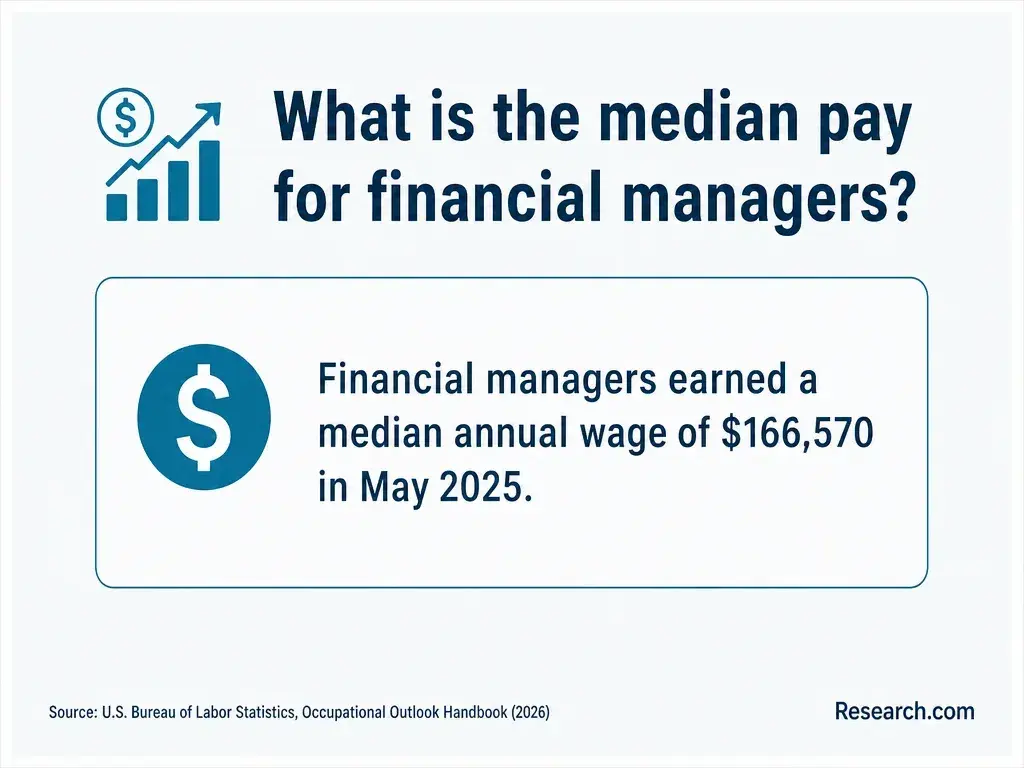
For context, the U.S. Bureau of Labor Statistics reports a median annual wage of $126,520 for management occupations in May 2025. That broad occupational figure is not a salary estimate for digital front door specialists or a projected return on a graduate degree; role, experience, and employer matter.
How Should Organizations Choose a Digital Front Door or Portal Strategy?
Choose the next investment based on the failed patient task. If people cannot find appropriate care or secure an appointment, prioritize front door access and scheduling. If established patients struggle to understand results, communicate with teams, or manage follow-up, improve portal workflows. If both problems occur, design the handoff between them rather than buying two disconnected experiences.
A practical decision process is:
- Identify a high-impact patient journey and establish where it breaks, using staff observations and patient feedback alongside usage data.
- Check whether the cause is a policy, staffing, content, integration, accessibility, or software problem before selecting a product.
- Pilot a change, measure completed tasks and staff rework, and retain a workable nondigital route.
- Expand only after assigning long-term ownership for performance, privacy, content, and support.
For professionals preparing to lead such decisions, an accelerated degree may suit a defined career need but can compress the time available for applied learning. Compare 12-month health administration graduate degree options with employer training and project experience before committing. The best organizational strategy and the best education path both start with a specific problem to solve.
Other Things You Should Know About Healthcare Administration
Caregivers should ask the provider about authorized proxy access rather than share passwords. Available access and what information a proxy can see may depend on the patient's age, consent, and applicable law.
Digital access should not depend on owning one. Organizations can offer browser-based services where feasible and maintain phone or in-person help for scheduling and care questions.
It should not present itself as a substitute for clinical assessment. Organizations need clear escalation instructions and human review of what the chatbot says about symptoms or urgent care.
An accountable operational leader should coordinate patient access, clinical teams, IT, privacy, and the contact center. Assign specific owners for scheduling rules, content, technical integration, and ongoing support.
- Interoperability Framework | cms.gov https://www.cms.gov/initiatives/health-technology-ecosystem/overview/interoperability-framework
- Digital Transformation in Healthcare: Technology Acceptance and Its Applications | nih.gov https://pmc.ncbi.nlm.nih.gov/articles/PMC9963556/
- Designing for Demographics: Optimizing the Usability... - NCBI https://www.ncbi.nlm.nih.gov/books/NBK625341
- Governance Pathways for Driving Digital Health Transformation | jhu.edu https://publichealth.jhu.edu/center-for-global-digital-health-innovation/governance-pathways-for-driving-digital-transformation-in-primary-healthcare
- Use and Experiences with Patient Portals Among Older Adults | umich.edu https://ihpi.umich.edu/national-poll-healthy-aging/national-findings/use-and-experiences-patient-portals-among-older
- The Digital Front Door: Meeting Key Patient Engagement Needs - FQHC Associates https://www.fqhc.org/blog/2022/4/19/the-digital-front-door-meeting-key-patient-engagement-needs
- What Is a Digital Front Door in Healthcare | Zymr https://www.zymr.com/blog/digital-front-door-healthcare
- What Is a Digital Front Door in Healthcare? A Guide for Health System Leaders - Blog | Commure https://www.commure.com/blog/what-is-a-digital-front-door-in-healthcare-a-guide-for-health-system-leaders
- The Evolution of Digital Front Door Solutions in Healthcare | Mindbowser https://www.mindbowser.com/digital-front-door-healthcare-evolution/
- Virtuoso: Healthcare Access & Patient Engagement | Orion Health https://orionhealth.com/us/virtuoso/