Docebo vs Learning Pool Suite – 2027 Comparison

Co-Founder and Chief Data Scientist
Docebo vs Learning Pool Suite Comparison Table of Contents
- What is Docebo?
- Who is Docebo for?
- Key Benefits of Docebo
- What is Learning Pool Suite?
- Who is Learning Pool Suite for?
- Key Benefits of Learning Pool Suite
- Who are Docebo and Learning Pool Suite best for?
- Docebo vs Learning Pool Suite Feature Comparison
- Docebo vs Learning Pool Suite Pricing
- Docebo Pros and Cons
- Learning Pool Suite Pros and Cons
- Scalability and Integration Capabilities of LMS Platforms
- How do implementation and support services enhance the LMS experience?
- How do Docebo and Learning Pool Suite support compliance and regulatory training requirements?
- Verdict – Docebo vs Learning Pool Suite: Which software is better?
What is Docebo?
Before beginning our Docebo vs Learning Pool Suite comparison, let's have an overview of both products first.
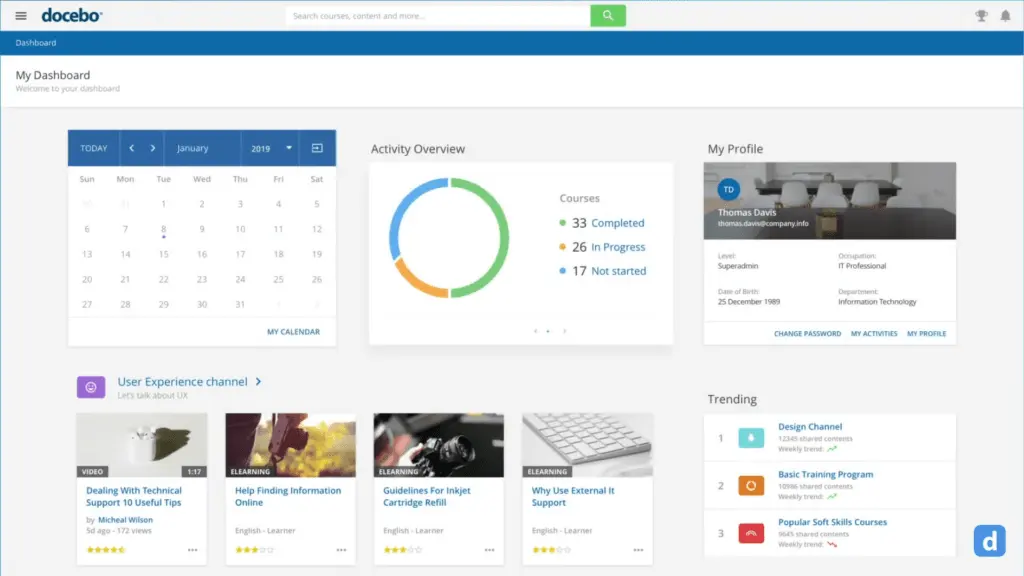
Docebo empowers organizations to deliver impactful learning experiences. It simplifies training processes, boosts employee skill development, and fosters continuous learning. Docebo offers an intuitive interface for casual users and a comprehensive suite of features suitable for companies of all sizes and industries. Its main modules include an LMS platform that centralizes training content creation, management, and delivery. This platform offers customizable branding, social learning, mobile compatibility, analytics, gamification, and integrations with third-party tools.
Docebo's solutions cater to diverse needs. It aids businesses in upskilling their workforce by facilitating the creation and distribution of training content. The platform also supports compliance training through efficient tracking and reporting. Furthermore, Docebo extends its capabilities to external training, allowing companies to effectively educate partners, customers, and stakeholders. With its user-centric design, versatility, and comprehensive features, Docebo remains a powerful solution for cultivating a culture of learning and development.
Featured LMS Software Providers

$4.08 per user per month
(billed annually)
30 days
Yes
Editor's Take
iSpring LMS is a user-friendly learning management system (LMS) tailored for businesses and educators to deliver eLearning content efficiently. It offers features like course creation, quizzes, learning paths, and progress tracking. iSpring LMS supports various content types, including video lectures and interactive modules, and integrates with the iSpring Suite authoring tool for seamless content development. Pros include a straightforward interface, mobile-friendly access, and powerful reporting tools. However, customization options can be limited, and pricing may be high for smaller organizations. It is ideal for corporate training, employee development, and onboarding, providing a reliable platform for scalable eLearning.
Expert Score
In evaluating SaaS software, a comprehensive and structured methodology ensures a fair and accurate comparison across key metrics. This approach focuses on the most critical aspects that affect user experience, functionality, and business value. The following metrics—general features, cost, customer service, integrations, and mobile support—are evaluated to provide a holistic view of each software solution’s strengths and weaknesses. These metrics are selected based on their direct impact on software usability, scalability, and long-term effectiveness for businesses.
1. General Features - scoring weight 40%
This metric evaluates the core functionalities and tools the software offers. It involves assessing the comprehensiveness of the features, their relevance to the target users, and the ease of use. This is important because robust and well-designed features determine the software's overall utility and efficiency in solving user problems.
2. Cost - scoring weight 15%
Cost analysis focuses on pricing models, value for money, and scalability. It's crucial to evaluate whether the software’s features justify its price, considering different plans for small and large organizations. This is vital for businesses to ensure they invest in cost-effective solutions that fit their budget.
3. Customer Service - scoring weight 15%
This evaluates the responsiveness, quality, and availability of customer support, including channels like chat, email, or phone. Good customer service is essential for troubleshooting and ensuring smooth software usage, which reduces downtime and frustration for users.
4. Integrations - scoring weight 15%
This examines how well the software integrates with third-party tools (e.g., CRM, payment systems, collaboration apps). Seamless integrations are key for creating a unified workflow and enhancing productivity by connecting multiple systems, which is crucial for operational efficiency.
5. Mobile Support - scoring weight 15%
Mobile support assesses the software’s functionality and performance on mobile devices, including apps and mobile web versions. With increasing remote work and on-the-go usage, strong mobile support is critical to ensure users can access and utilize the software effectively, regardless of location.

Free; $89 per month
(billed annually)
Demo available
Yes
Editor's Take
TalentLMS is a cloud-based learning management system designed for businesses of all sizes to deliver effective training programs. Key features include course management, quizzes, gamification, and reporting tools. The platform supports a variety of content types, including video and presentations, and integrates with popular tools like Zoom and Salesforce. Pros include an intuitive interface, customizable branding, and a free tier for small teams. However, advanced reporting and customization options are limited in lower-tier plans. TalentLMS is ideal for corporate training, employee onboarding, and compliance programs, offering scalability and flexibility to suit different learning needs.
Expert Score
In evaluating SaaS software, a comprehensive and structured methodology ensures a fair and accurate comparison across key metrics. This approach focuses on the most critical aspects that affect user experience, functionality, and business value. The following metrics—general features, cost, customer service, integrations, and mobile support—are evaluated to provide a holistic view of each software solution’s strengths and weaknesses. These metrics are selected based on their direct impact on software usability, scalability, and long-term effectiveness for businesses.
1. General Features - scoring weight 40%
This metric evaluates the core functionalities and tools the software offers. It involves assessing the comprehensiveness of the features, their relevance to the target users, and the ease of use. This is important because robust and well-designed features determine the software’s overall utility and efficiency in solving user problems.
2. Cost - scoring weight 15%
Cost analysis focuses on pricing models, value for money, and scalability. It’s crucial to evaluate whether the software’s features justify its price, considering different plans for small and large organizations. This is vital for businesses to ensure they invest in cost-effective solutions that fit their budget.
3. Customer Service - scoring weight 15%
This evaluates the responsiveness, quality, and availability of customer support, including channels like chat, email, or phone. Good customer service is essential for troubleshooting and ensuring smooth software usage, which reduces downtime and frustration for users.
4. Integrations - scoring weight 15%
This examines how well the software integrates with third-party tools (e.g., CRM, payment systems, collaboration apps). Seamless integrations are key for creating a unified workflow and enhancing productivity by connecting multiple systems, which is crucial for operational efficiency.
5. Mobile Support - scoring weight 15%
Mobile support assesses the software’s functionality and performance on mobile devices, including apps and mobile web versions. With increasing remote work and on-the-go usage, strong mobile support is critical to ensure users can access and utilize the software effectively, regardless of location.

Custom
14 days
Course creation, customizable learning paths, automated assessments
Editor's Take
SkyPrep is an intuitive Learning Management System (LMS) designed to streamline online training and onboarding for businesses, educational institutions, and non-profits. Known for its user-friendly interface, SkyPrep makes it easy for administrators to create, manage, and deliver training content while providing learners with a seamless, engaging experience. Key features include course creation tools, customizable learning paths, automated assessments, and reporting capabilities, enabling organizations to tailor training programs to individual or group needs.
One of SkyPrep’s strengths is its ability to support a range of media, including videos, presentations, and quizzes, making it versatile for various training formats. Its analytics and reporting tools offer valuable insights into learner progress, course completion rates, and knowledge gaps, empowering administrators to refine training content and improve learning outcomes.
The platform also integrates with popular software like Google Workspace, Salesforce, and Zoom, enhancing collaboration and accessibility for remote teams. With features like automated notifications, compliance tracking, and gamification, SkyPrep helps organizations keep learners engaged while ensuring that critical training requirements are met.
SkyPrep offers scalable pricing plans to fit small teams, growing businesses, and large enterprises, making it a cost-effective solution for organizations looking to simplify training and boost team performance. Overall, SkyPrep is an effective LMS choice for organizations that prioritize ease of use, customizability, and a comprehensive suite of learning management tools.
Expert Score
In evaluating SaaS software, a comprehensive and structured methodology ensures a fair and accurate comparison across key metrics. This approach focuses on the most critical aspects that affect user experience, functionality, and business value. The following metrics—general features, cost, customer service, integrations, and mobile support—are evaluated to provide a holistic view of each software solution’s strengths and weaknesses. These metrics are selected based on their direct impact on software usability, scalability, and long-term effectiveness for businesses.
1. General Features - scoring weight 40%
This metric evaluates the core functionalities and tools the software offers. It involves assessing the comprehensiveness of the features, their relevance to the target users, and the ease of use. This is important because robust and well-designed features determine the software’s overall utility and efficiency in solving user problems.
2. Cost - scoring weight 15%
Cost analysis focuses on pricing models, value for money, and scalability. It’s crucial to evaluate whether the software’s features justify its price, considering different plans for small and large organizations. This is vital for businesses to ensure they invest in cost-effective solutions that fit their budget.
3. Customer Service - scoring weight 15%
This evaluates the responsiveness, quality, and availability of customer support, including channels like chat, email, or phone. Good customer service is essential for troubleshooting and ensuring smooth software usage, which reduces downtime and frustration for users.
4. Integrations - scoring weight 15%
This examines how well the software integrates with third-party tools (e.g., CRM, payment systems, collaboration apps). Seamless integrations are key for creating a unified workflow and enhancing productivity by connecting multiple systems, which is crucial for operational efficiency.
5. Mobile Support - scoring weight 15%
Mobile support assesses the software’s functionality and performance on mobile devices, including apps and mobile web versions. With increasing remote work and on-the-go usage, strong mobile support is critical to ensure users can access and utilize the software effectively, regardless of location.

Editor's Take
Absorb is a comprehensive learning management system designed to deliver, track, and manage online training for businesses of all sizes. Known for its modern, user-friendly interface, Absorb offers a flexible solution for employee training, compliance, and certification programs. The platform supports a wide range of learning formats, including eLearning, instructor-led training, and blended learning, making it adaptable to different training needs.
Key features include a robust course builder, automated reporting and analytics, mobile accessibility, and advanced integrations with third-party systems like HR and CRM software. Absorb also offers a highly customizable interface, allowing businesses to tailor the platform to reflect their branding and specific workflows.
With its scalability, ease of use, and strong focus on learner engagement and tracking, Absorb is an ideal solution for organizations looking to enhance their learning and development initiatives while maintaining control and flexibility over their training programs.
Expert Score
In evaluating SaaS software, a comprehensive and structured methodology ensures a fair and accurate comparison across key metrics. This approach focuses on the most critical aspects that affect user experience, functionality, and business value. The following metrics—general features, cost, customer service, integrations, and mobile support—are evaluated to provide a holistic view of each software solution’s strengths and weaknesses. These metrics are selected based on their direct impact on software usability, scalability, and long-term effectiveness for businesses.
1. General Features - scoring weight 40%
This metric evaluates the core functionalities and tools the software offers. It involves assessing the comprehensiveness of the features, their relevance to the target users, and the ease of use. This is important because robust and well-designed features determine the software’s overall utility and efficiency in solving user problems.
2. Cost - scoring weight 15%
Cost analysis focuses on pricing models, value for money, and scalability. It’s crucial to evaluate whether the software’s features justify its price, considering different plans for small and large organizations. This is vital for businesses to ensure they invest in cost-effective solutions that fit their budget.
3. Customer Service - scoring weight 15%
This evaluates the responsiveness, quality, and availability of customer support, including channels like chat, email, or phone. Good customer service is essential for troubleshooting and ensuring smooth software usage, which reduces downtime and frustration for users.
4. Integrations - scoring weight 15%
This examines how well the software integrates with third-party tools (e.g., CRM, payment systems, collaboration apps). Seamless integrations are key for creating a unified workflow and enhancing productivity by connecting multiple systems, which is crucial for operational efficiency.
5. Mobile Support - scoring weight 15%
Mobile support assesses the software’s functionality and performance on mobile devices, including apps and mobile web versions. With increasing remote work and on-the-go usage, strong mobile support is critical to ensure users can access and utilize the software effectively, regardless of location.

$8 per user per month
30 days
Yes
Editor's Take
360Learning is an AI-driven enterprise LMS that closes skills gaps by capturing internal expertise with collaborative learning Academies. Legacy systems force L&D teams to choose between scale and relevance. 360Learning eliminates this trade-off. Using agentic AI, it transforms the expertise that runs your business into scalable learning for your entire organization—upskilling employees, customers, and partners from one platform.
The platform merges enterprise LMS and LXP capabilities, including agentic automation, adaptive coaching, a multimodal AI content builder, and the market’s #1 rated mobile app. Its ecosystem of 50+ partners includes an SAP Silver Partnership and Workday Design Partnership, ensuring learning connects to your broader business strategy.
Over 2,500 companies, including Heineken, Equinox, Michelin, Merlin, and Cisco, trust 360Learning as their enterprise LMS. Rated #1 AI LMS by eLearning Industry and backed by dedicated implementation, support, and services teams, 360Learning helps L&D become a growth lever, not a cost center.
360Learning, founded in 2013, has raised $240 million and operates teams across North America and Europe.
Expert Score
In evaluating SaaS software, a comprehensive and structured methodology ensures a fair and accurate comparison across key metrics. This approach focuses on the most critical aspects that affect user experience, functionality, and business value. The following metrics—general features, cost, customer service, integrations, and mobile support—are evaluated to provide a holistic view of each software solution’s strengths and weaknesses. These metrics are selected based on their direct impact on software usability, scalability, and long-term effectiveness for businesses.
1. General Features - scoring weight 40%
This metric evaluates the core functionalities and tools the software offers. It involves assessing the comprehensiveness of the features, their relevance to the target users, and the ease of use. This is important because robust and well-designed features determine the software's overall utility and efficiency in solving user problems.
2. Cost - scoring weight 15%
Cost analysis focuses on pricing models, value for money, and scalability. It's crucial to evaluate whether the software’s features justify its price, considering different plans for small and large organizations. This is vital for businesses to ensure they invest in cost-effective solutions that fit their budget.
3. Customer Service - scoring weight 15%
This evaluates the responsiveness, quality, and availability of customer support, including channels like chat, email, or phone. Good customer service is essential for troubleshooting and ensuring smooth software usage, which reduces downtime and frustration for users.
4. Integrations - scoring weight 15%
This examines how well the software integrates with third-party tools (e.g., CRM, payment systems, collaboration apps). Seamless integrations are key for creating a unified workflow and enhancing productivity by connecting multiple systems, which is crucial for operational efficiency.
5. Mobile Support - scoring weight 15%
Mobile support assesses the software’s functionality and performance on mobile devices, including apps and mobile web versions. With increasing remote work and on-the-go usage, strong mobile support is critical to ensure users can access and utilize the software effectively, regardless of location.
Who is Docebo for?
Docebo is designed to serve a wide range of industries, including but not limited to corporate enterprises, healthcare, education, retail, manufacturing, and technology. It caters to various user types, such as corporate trainers, human resource professionals, educators, administrators, and training managers, enabling them to effectively deliver and manage learning experiences, whether for employee development, compliance training, partner education, or customer training.
Key Benefits of Docebo
- Streamlines training processes and centralizes learning content management.
- Enhances employee skill development and fosters a culture of continuous learning.
- Provides customizable branding and themes for a consistent learning experience.
- Facilitates social learning, collaboration, and knowledge-sharing among users.
- Supports mobile learning, enabling access to training content on various devices.
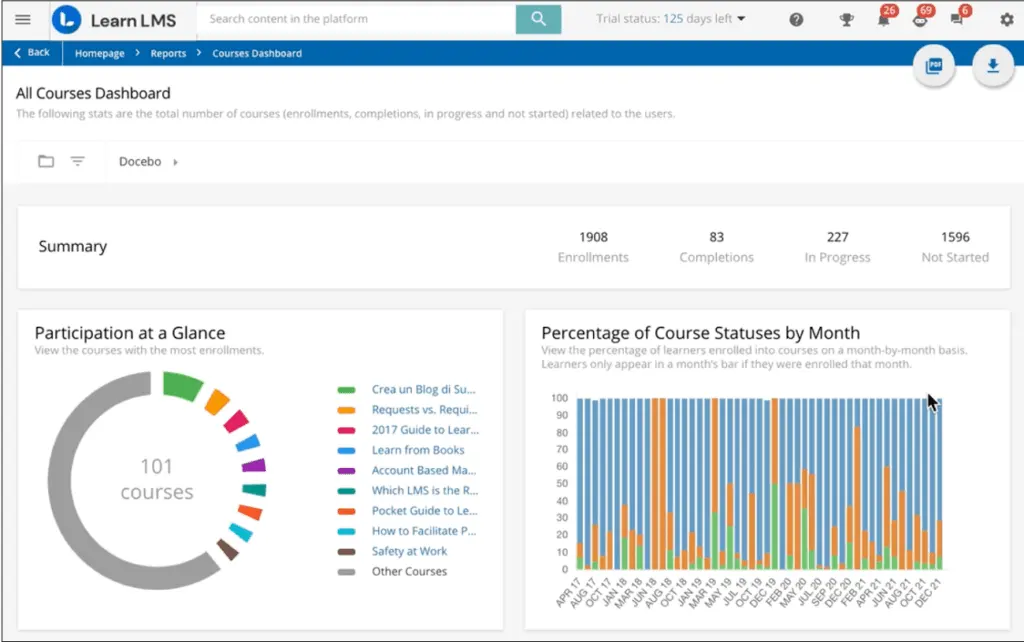
- Offers robust analytics and reporting tools for tracking learner progress and course effectiveness.
- Incorporates gamification elements to increase engagement and motivation.
- Integrates with third-party tools and systems for seamless workflow integration.
What is Learning Pool Suite?
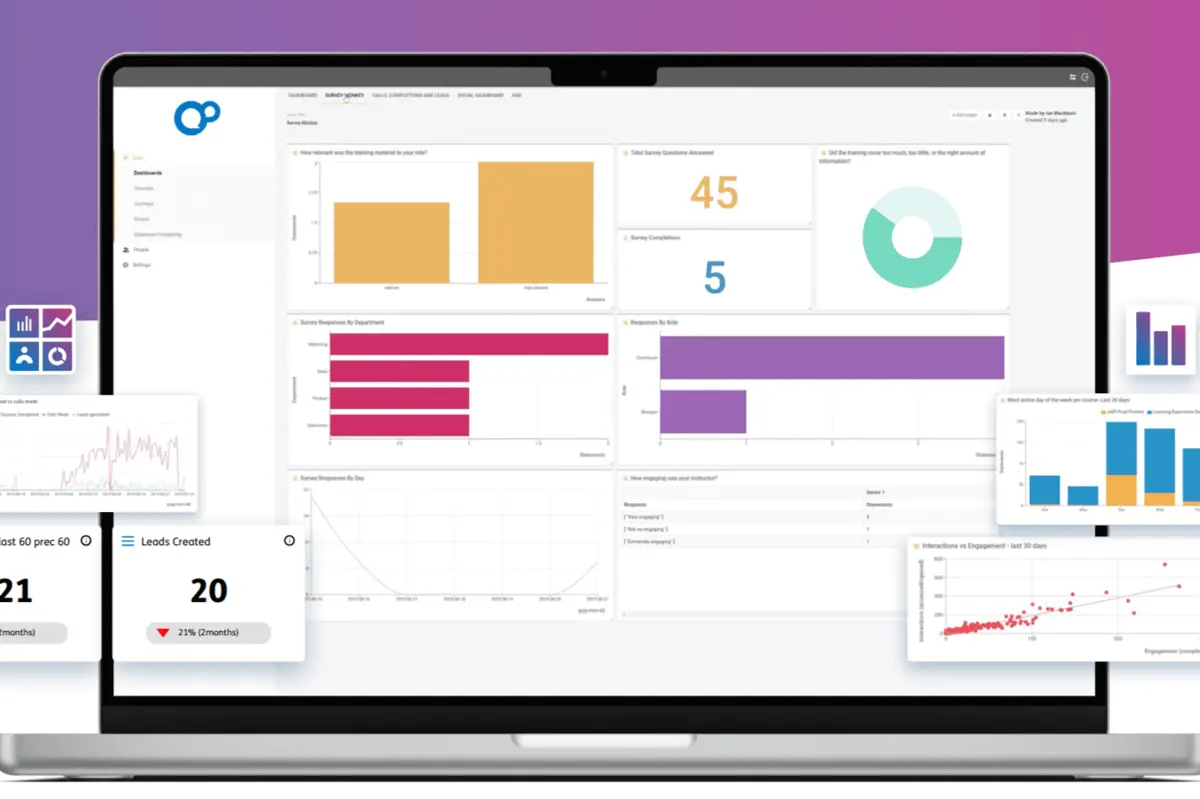
Learning Pool Suite encompasses a range of solutions aimed at addressing various learning and training needs. Their main products include LMS (Learning Management System), LXP (Learning Experience Platform), and LRS (Learning Record Store). The LMS is a centralized hub for managing and delivering training content, while the LXP focuses on creating engaging and personalized learning experiences. The LRS, on the other hand, facilitates the collection and analysis of learning data, helping organizations gain valuable insights into their learners' progress and performance. These interconnected products contribute to a holistic approach to learning management and development.
Learning Pool Suite caters to a diverse set of solutions. You will find it consistent in this area by reading through our Docebo vs Learning Pool Suite comparison of features below. The LMS assists organizations in employee training and development, offering features that streamline content creation, delivery, and tracking. The platform also supports compliance training, ensuring employees receive the required courses and certifications.
Who is Learning Pool Suite for?
A SaaS based LMS, Learning Pool Suite caters to corporate enterprises, government agencies, educational institutions, healthcare providers, and more, making it suitable for a diverse range of learning and development needs. Whether for employee training, compliance, onboarding, or fostering a culture of continuous learning, Learning Pool Suite is a versatile solution to enhance learning experiences and drive organizational growth.
Key Benefits of Learning Pool Suite
- Offers a comprehensive suite of products for a holistic approach to learning management.
- Enables organizations to create engaging and personalized learning experiences for employees.
- Streamlines content creation, delivery, and tracking, enhancing training efficiency.
- Supports compliance training by ensuring employees receive required courses and certifications.
- Facilitates effective onboarding of new hires, helping them acquire essential skills quickly.
- Enhances engagement and knowledge retention through personalized learning paths.
- Fosters collaboration and social learning, promoting knowledge-sharing and continuous improvement.
- Provides insights into learner progress and performance through data collection and analysis.
- Adapts to various industries and organization sizes, catering to diverse learning needs.
Who are Docebo and Learning Pool Suite best for?
Pitching Docebo vs Learning Pool Suite doesn't mean one is better than the other. Rather, we want to see what particular areas where each excels.
Both are excellent for:
- Training Managers
- HR Teams
- Educators and Instructors
- Compliance Officers
- External Stakeholders
- Organizational Leaders
Where Docebo excel more:
- Administrators
- Remote and Mobile Learners
Where Learning Pool excels more:
- Learning and Development Professionals
- Content Developers
Docebo vs Learning Pool Suite Feature Comparison
Feature Set
When comparing Docebo vs Learning Pool Suite, we find the latter offering a slightly more comprehensive range of features. It comprises a well-rounded set of tools, including an LMS, Learning Experience Platform (LXP), and Learning Record Store (LRS). These components collectively cover content creation, management, delivery, and data tracking, contributing to a holistic learning ecosystem. Learning Pool Suite's robust analytics, customizable dashboards, and advanced reporting capabilities provide deep insights into learner progress and course effectiveness, enhancing its comprehensive nature.
While Docebo also boasts a rich feature set like other Docebo alternatives, Learning Pool Suite's advantage lies in its multi-faceted approach to learning management. By seamlessly integrating an LMS, LXP, and LRS, Learning Pool Suite can address a diverse range of learning needs, from engaging content creation to data-driven decision-making.
Site Management
As excellent training platforms for employees, both Docebo and Learning Pool Suite offer intuitive site management features that empower organizations to efficiently administer their learning platforms. Docebo shines with advanced tools such as arranging users in an organizational structure using branches or cross-hierarchical groups, facilitating a well-organized learning environment aligned with company hierarchies. Additionally, Docebo's mass import and CSV editing capabilities streamline user management tasks, making them ideal for handling bulk user updates. Notably, the platform's user profile merging and duplicate elimination feature ensures data accuracy and cleanliness.
Learning Pool Suite also offers robust site management features, including roles and permissions, customizable dashboards, admin and team reporting, child organizations for segmentation, and xAPI management for comprehensive tracking. However, Docebo gains a slight edge due to its emphasis on managing mobile and social learning, enhancing the overall learning experience.
Content Management
While Docebo's content management system is robust in terms of pre-made offerings, Learning Pool has a slight edge due to its feature-rich content management module. This makes the latter a reliable cloud based training software. Learning Pool Suite's content management capabilities encompass resource management libraries, image editing tools, and a rapid authoring feature that empowers content creation without requiring extensive technical skills. Moreover, Learning Pool Suite's innovative approach to content design, such as gamification and story-driven scenarios, elevates engagement and knowledge application.
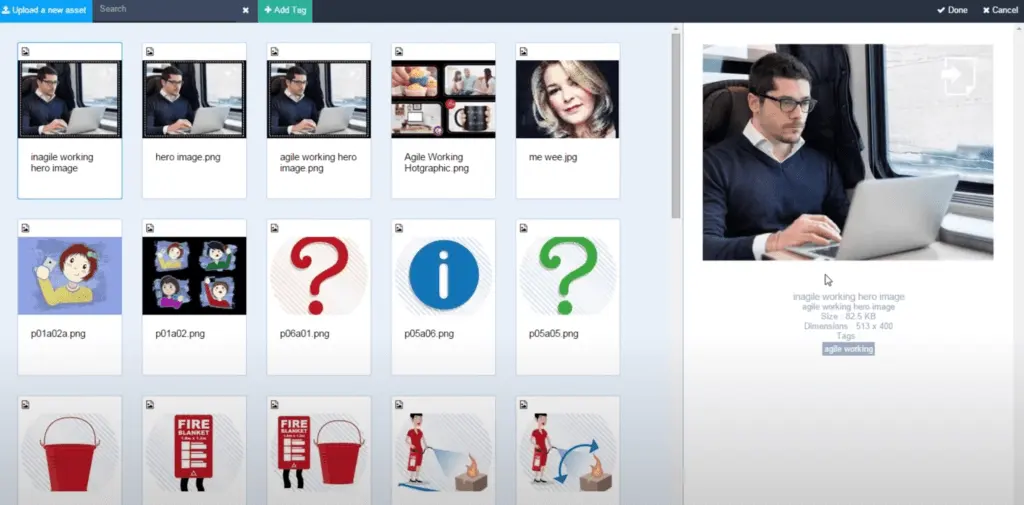
On the other hand, Docebo features a content management system that primarily offers ready-made content, boasting an extensive library with over 20,000 courses and programs from renowned publishers worldwide. The platform utilizes machine learning-driven curation to enhance efficiency and engagement, saving users time and promoting continuous learning. Docebo also provides pre-curated content lists, simplifying the process of selecting relevant learning materials.
Mobile Learning
This aspect in our Docebo vs Learning Pool Suite comparison is important if you have remote learners (a trend now). On this note, Docebo edges out Learning Pool Suite in mobile learning due to its dedicated focus on delivering an optimal mobile experience. Docebo offers native mobile apps for iOS and Android that provide intuitive navigation, responsive design for various screen sizes, and offline access. This ensures users can comfortably engage with content, even on the go and in areas with limited connectivity. Docebo's interface is tailored for mobile interactions, making it easier for learners to navigate and interact with course materials seamlessly. Additionally, the platform's integration of push notifications keeps learners engaged by notifying them of new content and updates.
While Learning Pool Suite does offer mobile compatibility, Docebo's native mobile apps, responsive design, offline access, and user-friendly interface give it a competitive edge in mobile learning, an LMS small business can leverage. Learning Pool Suite's mobile capabilities, though comprehensive, might rely more on responsive web design and lack the same level of emphasis on native apps and optimized mobile experiences that Docebo offers.
E-Commerce, Marketplace
Docebo is a better fit for online course sellers because its built-in e-commerce feature enables organizations to sell courses and training materials seamlessly. This eliminates the need for external integrations and simplifies the purchasing process for both learners and administrators. Unlike Docebo, Learning Pool Suite lacks a native e-commerce module or marketplace for selling learning content directly through the platform. This means that organizations using Learning Pool Suite may need to rely on third-party solutions or external systems to establish an e-commerce presence, potentially introducing complexities and additional integration challenges.
Comparison of Other Key LMS Features
- Tailored Branding: Both Learning Pool Suite and Docebo offer customizable branding and white-labeling options, enabling organizations to create unique learning environments for different external partners.
- Multi-Portal Support: Different partner entities can have their own dedicated portals with distinct content, branding, and access controls within a single Docebo instance.
- Advanced Reporting: Learning Pool Suite offers more extensive reporting and analytics capabilities, allowing organizations to gain deep insights into learner progress, course effectiveness, and overall training performance.
- Responsive Design: Docebo's responsive interface ensures training content is more accessible and user-friendly across various devices, from desktops to smartphones.
- Rich Media Integration: Both Docebo and Learning Pool Suite feature seamless integration of rich media formats like videos, interactive elements, and simulations, facilitating the development of dynamic and interactive training materials.
Docebo vs Learning Pool Suite Pricing
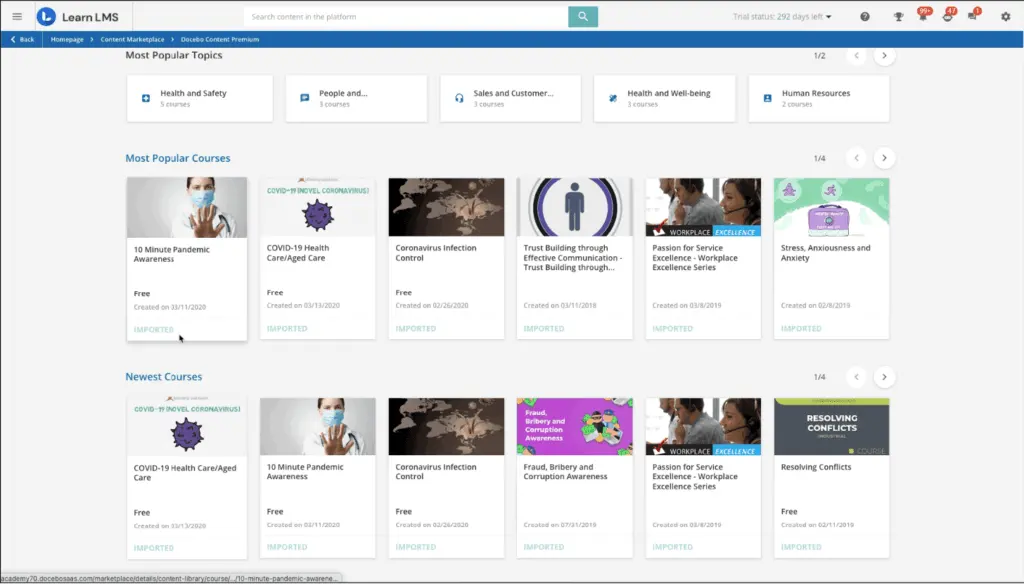
No Docebo vs Learning Pool Suite comparison is complete without discussing cost. Both Docebo and Learning Pool Suite provide custom pricing plans that cater to an organization's specific needs. While Docebo's plans emphasize flexibility and scalability, Learning Pool Suite's model centers around planning comprehensive packages to suit a variety of learning components.
Docebo's approach offers easy-to-understand, flexible, and scalable plans, ensuring that organizations pay for the features that align precisely with their requirements, promoting adaptability and growth. Learning Pool Suite similarly offers customized pricing through a quotation process. It allows organizations to design packages tailored to their learning needs, whether that involves an LMS, e-learning content, responsive authoring tools, or advanced learning experience platforms.
Docebo Pros and Cons
Cons
- Comprehensive User Privilege Control: Offers a range of options to manage user privilege levels and administrative tasks efficiently.
- Intuitive User Experience: Provides an intuitive interface, making navigation and interaction seamless for learners and administrators.
- Customizable User Pages and Dashboards: Allows easy creation of multiple user pages, dashboards, and menus for a tailored learning experience.
- Diverse Learning Features: Offers a variety of e-learning features, allowing management of different types of content and courses for a versatile learning environment.
- Expert Services: Strong expertise in services, aiding in effective implementation and support.
- Robust User Management: Offers powerful user management functionality for streamlined administration.
- Localization Capabilities: Equipped with a powerful localization tool to accommodate global audiences effectively.
Pros
- Video Size Limitation: Limitation on publishing training videos exceeding a certain size.
- Reporting Challenges: Generating reports in Excel or CSV may require manual adjustments.
- Slow Product Updates: Updates to the product might be slower than desired.
- Limited Admin Permission Options: Offers limited options for admin permissions, potentially restricting fine-grained control.
Learning Pool Suite Pros and Cons
Pros
- Rich Toolset: Offers an extensive range of tools and intricate features.
- Clear and User-Friendly Modules: Modules are well-structured and easy to comprehend.
- Responsive Support: The Account Manager and support team respond promptly to inquiries.
- Customization Flexibility: Allows customization of both content and the LMS, catering to specific needs.
- Smooth Implementation: The implementation process is reported to be smooth and efficient.
Cons
- Fragmented Tools: Some users find that the tools don't always integrate seamlessly, leading to a lack of cohesion.
- Design Challenges: Making design changes and creating custom pages might be challenging.
- Cost Consideration: Cost is mentioned as a downside for some users.
Scalability and Integration Capabilities of LMS Platforms
When evaluating an LMS platform like Docebo or Learning Pool Suite for enterprise needs, scalability and integration often emerge as critical factors. Both platforms are designed to scale based on organizational requirements, but their approach to accommodating growth and integrating with other systems reveals subtle differences that may influence your choice.
Docebo focuses on providing a highly modular structure, allowing organizations to add or remove functionalities as needed. This flexibility ensures that companies can scale their operations without overcommitting to features that may not align with their immediate needs. Moreover, Docebo integrates seamlessly with third-party tools like CRMs, HR systems, and collaborative software, fostering a connected ecosystem for enterprises. Its strong API capabilities also enable custom integrations, making it an agile solution for large organizations operating in diverse technological landscapes.
Learning Pool Suite also supports scalability but places a stronger emphasis on offering a prestructured suite of tools that cater to comprehensive learning ecosystems. Its integration capabilities extend to xAPI and SCORM-compliant systems, facilitating smooth data tracking and reporting. While the platform provides integration options, there is less emphasis on custom API flexibility compared to Docebo, which may require additional considerations for organizations with highly specific integration demands.
For businesses evaluating LMS platforms with a focus on scalability, integration, and long-term adaptability, comparing industry-leading knowledge management software can also provide deeper insights into the architectures compatible with advanced learning environments. Platforms in this category often complement LMS functionalities by streamlining content management and supporting collaborative learning processes. Learn more about the best options in knowledge management to enhance your enterprise’s training strategies.
In conclusion, your choice between Docebo and Learning Pool Suite may ultimately depend on the degree of customization and systems connectivity required to meet your organizational objectives.
How do implementation and support services enhance the LMS experience?
Timely customer support, streamlined onboarding processes, and tailored training resources play a pivotal role in maximizing an LMS investment. Evaluating the quality of technical assistance and the availability of proactive support—ranging from comprehensive documentation and live help to community forums and customized training sessions—can determine the pace at which an organization realizes long-term benefits. Additionally, for businesses seeking to integrate financial workflows alongside LMS capabilities, exploring complementary solutions such as small business accounting software may further streamline overall digital transformation efforts.
How do Docebo and Learning Pool Suite support compliance and regulatory training requirements?
Both Docebo and Learning Pool Suite offer robust features to support compliance and regulatory training, critical for organizations in regulated industries, such as healthcare, finance, and manufacturing. These features help ensure that employees are up-to-date with mandatory training, certifications, and industry standards.
- Automated Compliance Tracking and Reporting:
- Docebo provides automated tracking of compliance training, including monitoring completion rates, deadlines, and certifications. The system can generate compliance reports that track employee progress and identify areas where additional training may be required.
- Learning Pool Suite offers similar tracking capabilities through its Learning Record Store (LRS), which stores and analyzes learner data, helping administrators keep an accurate record of compliance training statuses. This feature ensures that managers can proactively address any training gaps.
- Certification and Recertification Management:
- Both platforms support certification programs with built-in functionality for issuing, tracking, and renewing certifications. Docebo includes options for certification expiry alerts and automated recertification reminders, ensuring employees renew credentials on time.
- Learning Pool Suite also supports certification tracking and automates recertification processes, allowing organizations to maintain compliance without manual oversight.
- Audit-Ready Documentation:
- Docebo’s analytics and reporting tools provide audit-ready documentation, compiling records of completed training sessions, assessments, and certifications. This capability simplifies the process of preparing for external audits, as all compliance-related data is stored and organized within the platform.
- Learning Pool Suite’s reporting tools allow for a similar level of documentation, producing records that can be accessed or printed for compliance audits. This can be especially valuable for industries where proof of training completion is regularly required by regulatory bodies.
- Customizable Compliance Training Modules:
- Docebo allows organizations to create custom compliance courses and integrate them into the platform, with tools that enable multimedia content, quizzes, and real-time assessments tailored to specific regulatory requirements.
- Learning Pool Suite provides rapid authoring tools for developing compliance modules, allowing organizations to quickly produce and update training materials as regulations change. It also includes scenario-based training options, enhancing engagement and understanding in compliance topics.
- Data Security and Privacy:
- Since data security is critical for compliance, both platforms prioritize secure data management. Docebo offers GDPR and CCPA compliance features, ensuring organizations can manage employee data in a manner that meets legal standards.
- Learning Pool Suite also includes GDPR-compliant features, with configurable user access and permissions that ensure only authorized personnel can access sensitive compliance records.
Verdict – Docebo vs Learning Pool Suite: Which software is better?
So, who wins in our Docebo vs Learning Pool Suite comparison? It depends on your requirement. Both platforms offer robust solutions for e-learning and training management, but each shines in distinct areas. Docebo excels in delivering an intuitive mobile learning experience, catering to the preferences of modern learners who engage with content through mobile devices. Its native mobile apps, responsive design, and seamless interface provide learners with a user-friendly and engaging journey, while also standing out in providing a comprehensive external partner training solution and versatile site management features.
On the other hand, Learning Pool Suite demonstrates strength in content management with an extensive toolset for resource organization, image editing, and rapid authoring. Its innovative content design approach through gamification and story-driven scenarios enhances learner engagement and active knowledge application. Learning Pool Suite also offers a broad range of learning-related components, making it well-suited for organizations seeking a holistic learning ecosystem like other Learning Pool Suite alternatives.
Key Insights
- Diverse User Base: Both Docebo and Learning Pool Suite cater to a wide range of industries, including corporate enterprises, healthcare, education, retail, manufacturing, and technology. They serve various user types, such as corporate trainers, HR professionals, educators, administrators, and training managers.
- Comprehensive Features: Docebo and Learning Pool Suite offer extensive features for learning management. Docebo excels in mobile learning and external partner training, while Learning Pool Suite shines in content management and analytics.
- Customization and Integration: Both platforms provide customizable branding and themes. Docebo stands out with its AI-powered learning suite and seamless integration with third-party tools, while Learning Pool Suite integrates LMS, LXP, and LRS for a holistic learning experience.
- Mobile Learning: Docebo offers a superior mobile learning experience with native apps for iOS and Android, providing offline access and push notifications. Learning Pool Suite also supports mobile learning but relies more on responsive web design.
- E-Commerce Capabilities: Docebo includes built-in e-commerce features for selling courses directly through the platform, making it a better fit for online course sellers compared to Learning Pool Suite.
- Pricing Flexibility: Both platforms offer customized pricing plans based on organizational needs. Docebo emphasizes flexibility and scalability, while Learning Pool Suite focuses on comprehensive packages.
- Content Management: Learning Pool Suite has a slight edge in content management due to its resource management libraries, rapid authoring, and innovative content design through gamification and story-driven scenarios.
Other Things You Should Know About Docebo vs Learning Pool Suite
Docebo Learning Suite is a comprehensive e-learning platform that offers a range of tools for organizations to create, manage, and deliver effective training and learning experiences. It includes features such as content creation, user management, analytics, and external partner training capabilities to cater to diverse learning needs.
Yes, Docebo offers an LXP (Learning Experience Platform) as part of its suite of e-learning solutions. The Docebo Learning Suite includes both traditional LMS (Learning Management System) features and LXP capabilities, providing organizations with a comprehensive platform for managing and enhancing their learning and training initiatives.
Learning Pool Suite is an excellent LMS choice for large organizations with a substantial number of employees due to its scalability, comprehensive features, and customization options. The suite's ability to handle a high volume of users and courses, coupled with its content management tools and versatile architecture, caters effectively to the diverse learning needs of a larger workforce.
Yes, Docebo operates as a SaaS (Software as a Service) company. Its e-learning platform, including the Docebo Learning Suite, is delivered to customers as a cloud-based service, allowing organizations to access and utilize the platform's features and functionalities without the need for on-premises installations or infrastructure.
Both Docebo and Learning Pool Suite are beneficial for industries such as corporate enterprises, healthcare, education, retail, manufacturing, and technology. They cater to various learning and training needs, including employee development, compliance training, partner education, and customer training.
Docebo streamlines training processes, enhances employee skill development, provides customizable branding, supports social learning and collaboration, offers robust analytics and reporting tools, incorporates gamification elements, and integrates with third-party tools for seamless workflow integration.
Learning Pool Suite offers a comprehensive suite of products for learning management, enables engaging and personalized learning experiences, streamlines content creation and delivery, supports compliance training, facilitates effective onboarding, enhances engagement through personalized learning paths, fosters collaboration and social learning, provides insights through data collection and analysis, and adapts to various industries and organization sizes.
Docebo offers a superior mobile learning experience with native apps for iOS and Android, providing offline access, push notifications, and a user-friendly interface. Learning Pool Suite supports mobile learning through responsive web design, but Docebo's dedicated mobile apps give it a competitive edge in this aspect.
Both Docebo and Learning Pool Suite provide customized pricing plans based on organizational needs. Docebo's plans emphasize flexibility and scalability, ensuring organizations pay for the features that align precisely with their requirements. Learning Pool Suite's model centers around planning comprehensive packages to suit a variety of learning components.
Docebo is a better fit for online course sellers due to its built-in e-commerce feature that enables organizations to sell courses and training materials seamlessly through the platform, eliminating the need for external integrations and simplifying the purchasing process for both learners and administrators.