Zendesk Sell vs Zoho CRM – 2027 Comparison

Co-Founder and Chief Data Scientist
Zendesk Sell vs Zoho CRM Table of Contents
- What is Zendesk Sell?
- Who is Zendesk Sell for?
- Key Benefits of Zendesk Sell
- What is Zoho CRM?
- Who is Zoho CRM for?
- Key Benefits of Zoho CRM
- Who are Zendesk Sell and Zoho CRM best for?
- Zendesk Sell vs Zoho CRM Feature Comparison
- Zendesk Sell vs Zoho CRM Pricing
- Zendesk Sell Pros and Cons
- Zoho CRM Pros and Cons
- How does integrating CRM with cloud accounting improve financial workflows?
- Enhancing Workflow with a Document Management System
- How do Zendesk Sell and Zoho CRM handle customer support and user assistance?
- Verdict Zendesk Sell vs Zoho CRM: Which software is better?
What is Zendesk Sell?
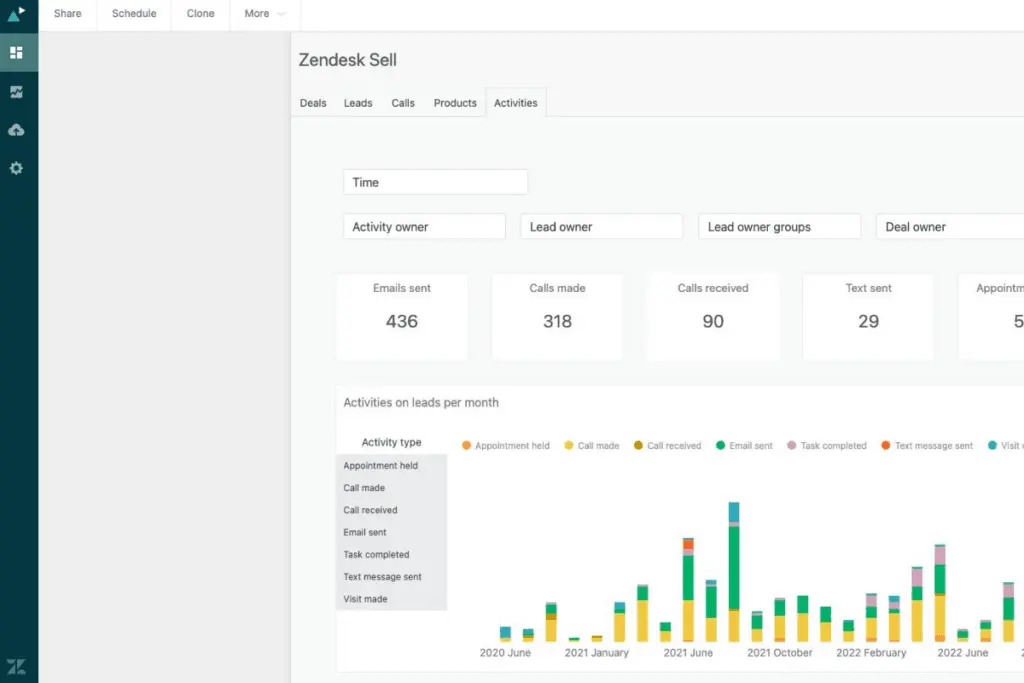
Zendesk Sell is a sales automation platform that enhances sales team productivity and pipeline visibility. It’s part of the Zendesk suite, integrating with other Zendesk products for a comprehensive CRM and support ecosystem. Its features include lead and deal tracking, email integration, and advanced analytics, crucial for building and maintaining customer relationships.
Zendesk Sell’s user-centric design and collaborative communication make it a formidable contender in the Zendesk Sell vs Zoho CRM comparison. This sales pipeline management solution has extensive metrics and attributes. These include total leads and deals, deal win likelihood, and deal value and win likelihood forecasts.
The platform also provides lead names, IDs, creator groups, sales funnel status, industry, and source. Zendesk Sell’s strong data capability makes it a top CRM tool, especially compared to Zoho CRM this year.
Featured CRM Software Products

$9 to $150/user/month
Yes, up to 2 users
E-signature software, call transcription, conversation routing
Editor's Take
HubSpot CRM is a powerful customer relationship management platform designed to help businesses manage their sales, marketing, and customer service efforts in one centralized place. Its user-friendly interface allows teams to track leads, monitor customer interactions, and automate sales pipelines. With built-in tools for email marketing, contact management, and analytics, HubSpot CRM provides deep insights into customer behavior and sales performance. The platform also supports seamless collaboration between marketing and sales teams through real-time updates and integrations with tools like Gmail, Outlook, and Slack. Additionally, its automation features help reduce manual tasks, enabling teams to focus on building relationships and closing deals. HubSpot CRM is scalable, making it ideal for businesses of all sizes, from startups to large enterprises.
Expert Score
In evaluating SaaS software, a comprehensive and structured methodology ensures a fair and accurate comparison across key metrics. This approach focuses on the most critical aspects that affect user experience, functionality, and business value. The following metrics—general features, cost, customer service, integrations, and mobile support—are evaluated to provide a holistic view of each software solution’s strengths and weaknesses. These metrics are selected based on their direct impact on software usability, scalability, and long-term effectiveness for businesses.
1. General Features - scoring weight 40%
This metric evaluates the core functionalities and tools the software offers. It involves assessing the comprehensiveness of the features, their relevance to the target users, and the ease of use. This is important because robust and well-designed features determine the software's overall utility and efficiency in solving user problems.
2. Cost - scoring weight 15%
Cost analysis focuses on pricing models, value for money, and scalability. It's crucial to evaluate whether the software’s features justify its price, considering different plans for small and large organizations. This is vital for businesses to ensure they invest in cost-effective solutions that fit their budget.
3. Customer Service - scoring weight 15%
This evaluates the responsiveness, quality, and availability of customer support, including channels like chat, email, or phone. Good customer service is essential for troubleshooting and ensuring smooth software usage, which reduces downtime and frustration for users.
4. Integrations - scoring weight 15%
This examines how well the software integrates with third-party tools (e.g., CRM, payment systems, collaboration apps). Seamless integrations are key for creating a unified workflow and enhancing productivity by connecting multiple systems, which is crucial for operational efficiency.
5. Mobile Support - scoring weight 15%
Mobile support assesses the software’s functionality and performance on mobile devices, including apps and mobile web versions. With increasing remote work and on-the-go usage, strong mobile support is critical to ensure users can access and utilize the software effectively, regardless of location.

$25 per user per month
14 days
marketing automation, sales automation, no code customization
Editor's Take
CRM Creatio is a comprehensive customer relationship management (CRM) solution designed to streamline and enhance business processes across sales, marketing, and customer service functions. Known for its low-code platform, Creatio allows businesses to customize and automate workflows without requiring extensive technical expertise. This adaptability makes it particularly appealing to organizations seeking to align the software with their specific needs.
The platform's marketing module provides tools for multi-channel campaign management, lead generation, and personalized customer engagement. Its sales module offers functionality for pipeline management, opportunity tracking, and analytics to help teams close deals more efficiently. Additionally, the customer service module supports case management, service level agreement (SLA) monitoring, and omnichannel communication, enabling businesses to provide exceptional customer support.
Creatio stands out with its intuitive interface, robust analytics, and AI-powered tools that provide actionable insights. The low-code development tools allow non-technical users to create applications and automate processes, reducing the dependency on IT teams. Integration capabilities with other software platforms and APIs enhance its utility, making it a versatile choice for businesses of all sizes.
Overall, CRM Creatio is a powerful solution that combines user-friendly design with advanced customization and automation features. Its adaptability and low-code foundation position it as a strong contender for organizations looking to optimize customer relationship management processes while maintaining flexibility for growth and innovation.
Expert Score
In evaluating SaaS software, a comprehensive and structured methodology ensures a fair and accurate comparison across key metrics. This approach focuses on the most critical aspects that affect user experience, functionality, and business value. The following metrics—general features, cost, customer service, integrations, and mobile support—are evaluated to provide a holistic view of each software solution’s strengths and weaknesses. These metrics are selected based on their direct impact on software usability, scalability, and long-term effectiveness for businesses.
1. General Features - scoring weight 40%
This metric evaluates the core functionalities and tools the software offers. It involves assessing the comprehensiveness of the features, their relevance to the target users, and the ease of use. This is important because robust and well-designed features determine the software's overall utility and efficiency in solving user problems.
2. Cost - scoring weight 15%
Cost analysis focuses on pricing models, value for money, and scalability. It's crucial to evaluate whether the software’s features justify its price, considering different plans for small and large organizations. This is vital for businesses to ensure they invest in cost-effective solutions that fit their budget.
3. Customer Service - scoring weight 15%
This evaluates the responsiveness, quality, and availability of customer support, including channels like chat, email, or phone. Good customer service is essential for troubleshooting and ensuring smooth software usage, which reduces downtime and frustration for users.
4. Integrations - scoring weight 15%
This examines how well the software integrates with third-party tools (e.g., CRM, payment systems, collaboration apps). Seamless integrations are key for creating a unified workflow and enhancing productivity by connecting multiple systems, which is crucial for operational efficiency.
5. Mobile Support - scoring weight 15%
Mobile support assesses the software’s functionality and performance on mobile devices, including apps and mobile web versions. With increasing remote work and on-the-go usage, strong mobile support is critical to ensure users can access and utilize the software effectively, regardless of location.

$8/per user/per month
Yes
customizable dashboards, automated follow-ups, advanced analytics
Editor's Take
monday.com Sales CRM is a customizable platform designed to streamline sales processes, enhance team collaboration, and improve pipeline visibility. Its intuitive interface enables users to manage leads, track deals, and automate repetitive tasks with ease. The CRM integrates seamlessly with popular tools like Gmail, Slack, and HubSpot, ensuring a centralized workflow. Features like customizable dashboards, automated follow-ups, and advanced analytics help sales teams stay organized and focused on closing deals. With scalability in mind, monday.com caters to businesses of all sizes, offering flexible pricing plans and robust customer support. It’s an excellent choice for teams seeking efficiency and adaptability.
Expert Score
In evaluating SaaS software, a comprehensive and structured methodology ensures a fair and accurate comparison across key metrics. This approach focuses on the most critical aspects that affect user experience, functionality, and business value. The following metrics—general features, cost, customer service, integrations, and mobile support—are evaluated to provide a holistic view of each software solution’s strengths and weaknesses. These metrics are selected based on their direct impact on software usability, scalability, and long-term effectiveness for businesses.
1. General Features - scoring weight 40%
This metric evaluates the core functionalities and tools the software offers. It involves assessing the comprehensiveness of the features, their relevance to the target users, and the ease of use. This is important because robust and well-designed features determine the software’s overall utility and efficiency in solving user problems.
2. Cost - scoring weight 15%
Cost analysis focuses on pricing models, value for money, and scalability. It’s crucial to evaluate whether the software’s features justify its price, considering different plans for small and large organizations. This is vital for businesses to ensure they invest in cost-effective solutions that fit their budget.
3. Customer Service - scoring weight 15%
This evaluates the responsiveness, quality, and availability of customer support, including channels like chat, email, or phone. Good customer service is essential for troubleshooting and ensuring smooth software usage, which reduces downtime and frustration for users.
4. Integrations - scoring weight 15%
This examines how well the software integrates with third-party tools (e.g., CRM, payment systems, collaboration apps). Seamless integrations are key for creating a unified workflow and enhancing productivity by connecting multiple systems, which is crucial for operational efficiency.
5. Mobile Support - scoring weight 15%
Mobile support assesses the software’s functionality and performance on mobile devices, including apps and mobile web versions. With increasing remote work and on-the-go usage, strong mobile support is critical to ensure users can access and utilize the software effectively, regardless of location.

$7 per user per month billed annually
15 days
lead generation, sales pipeline management, workflow automation
Editor's Take
Zoho CRM is a flexible and comprehensive customer relationship management platform designed to help businesses manage and grow their customer relationships effectively. With tools for lead generation, sales pipeline management, workflow automation, and analytics, Zoho CRM is suitable for businesses of all sizes across a variety of industries.
Zoho CRM enables teams to streamline sales processes by capturing leads from multiple channels, tracking interactions, and managing every stage of the sales cycle. The platform offers customizable dashboards and reports, providing insights into sales performance and customer behaviors to help make data-driven decisions. With powerful automation features, Zoho CRM allows businesses to set up workflows for routine tasks like follow-ups, lead scoring, and email notifications, reducing manual work and enhancing productivity. The platform integrates with popular tools, including the Zoho suite, Microsoft 365, and G Suite, enabling a seamless connection across teams.
For businesses aiming to improve customer engagement, close deals faster, and enhance team collaboration, Zoho CRM delivers a scalable, user-friendly solution to drive sales and customer satisfaction.
Expert Score
In evaluating SaaS software, a comprehensive and structured methodology ensures a fair and accurate comparison across key metrics. This approach focuses on the most critical aspects that affect user experience, functionality, and business value. The following metrics—general features, cost, customer service, integrations, and mobile support—are evaluated to provide a holistic view of each software solution’s strengths and weaknesses. These metrics are selected based on their direct impact on software usability, scalability, and long-term effectiveness for businesses.
1. General Features - scoring weight 40%
This metric evaluates the core functionalities and tools the software offers. It involves assessing the comprehensiveness of the features, their relevance to the target users, and the ease of use. This is important because robust and well-designed features determine the software's overall utility and efficiency in solving user problems.
2. Cost - scoring weight 15%
Cost analysis focuses on pricing models, value for money, and scalability. It's crucial to evaluate whether the software’s features justify its price, considering different plans for small and large organizations. This is vital for businesses to ensure they invest in cost-effective solutions that fit their budget.
3. Customer Service - scoring weight 15%
This evaluates the responsiveness, quality, and availability of customer support, including channels like chat, email, or phone. Good customer service is essential for troubleshooting and ensuring smooth software usage, which reduces downtime and frustration for users.
4. Integrations - scoring weight 15%
This examines how well the software integrates with third-party tools (e.g., CRM, payment systems, collaboration apps). Seamless integrations are key for creating a unified workflow and enhancing productivity by connecting multiple systems, which is crucial for operational efficiency.
5. Mobile Support - scoring weight 15%
Mobile support assesses the software’s functionality and performance on mobile devices, including apps and mobile web versions. With increasing remote work and on-the-go usage, strong mobile support is critical to ensure users can access and utilize the software effectively, regardless of location.

By quote
Yes
Lead Management, Contact Management, Workflow Automation
Editor's Take
Salesforce CRM is a leading customer relationship management platform known for its robust functionality, scalability, and extensive customization options, making it suitable for businesses of all sizes, from startups to large enterprises. Built to streamline sales, marketing, customer service, and analytics, Salesforce CRM empowers teams to manage customer interactions, optimize workflows, and drive growth from a single, cloud-based platform.
Salesforce CRM provides a complete view of customer data, enabling teams to track interactions, manage leads, and automate tasks throughout the sales pipeline. With powerful tools for reporting and analytics, Salesforce offers insights into sales performance, customer trends, and campaign effectiveness, allowing teams to make data-driven decisions. The platform’s automation capabilities reduce manual workloads with customizable workflows, automated follow-ups, and lead scoring, ensuring a smooth customer journey. Integrations with thousands of third-party applications, along with its own suite of services, make Salesforce a highly adaptable solution for businesses looking to connect their CRM with other tools.
For organizations focused on enhancing customer engagement, improving team efficiency, and scaling their operations, Salesforce CRM delivers a powerful and versatile solution tailored to support long-term business growth.
Expert Score
In evaluating SaaS software, a comprehensive and structured methodology ensures a fair and accurate comparison across key metrics. This approach focuses on the most critical aspects that affect user experience, functionality, and business value. The following metrics—general features, cost, customer service, integrations, and mobile support—are evaluated to provide a holistic view of each software solution’s strengths and weaknesses. These metrics are selected based on their direct impact on software usability, scalability, and long-term effectiveness for businesses.
1. General Features - scoring weight 40%
This metric evaluates the core functionalities and tools the software offers. It involves assessing the comprehensiveness of the features, their relevance to the target users, and the ease of use. This is important because robust and well-designed features determine the software's overall utility and efficiency in solving user problems.
2. Cost - scoring weight 15%
Cost analysis focuses on pricing models, value for money, and scalability. It's crucial to evaluate whether the software’s features justify its price, considering different plans for small and large organizations. This is vital for businesses to ensure they invest in cost-effective solutions that fit their budget.
3. Customer Service - scoring weight 15%
This evaluates the responsiveness, quality, and availability of customer support, including channels like chat, email, or phone. Good customer service is essential for troubleshooting and ensuring smooth software usage, which reduces downtime and frustration for users.
4. Integrations - scoring weight 15%
This examines how well the software integrates with third-party tools (e.g., CRM, payment systems, collaboration apps). Seamless integrations are key for creating a unified workflow and enhancing productivity by connecting multiple systems, which is crucial for operational efficiency.
5. Mobile Support - scoring weight 15%
Mobile support assesses the software’s functionality and performance on mobile devices, including apps and mobile web versions. With increasing remote work and on-the-go usage, strong mobile support is critical to ensure users can access and utilize the software effectively, regardless of location.

$7/user/month
15 days
Pipeline Management, Email Integration, Task Tracking
Editor's Take
Bigin is a lightweight CRM by Zoho, tailored for small businesses and startups to manage sales pipelines efficiently. It provides tools for deal tracking, email integration, and task management, ensuring a simple yet effective approach to sales. The platform offers customizable pipelines, real-time notifications, and seamless integrations with other Zoho apps. Its user-friendly design makes it accessible for teams with minimal CRM experience, helping them streamline sales processes without complexity.
Expert Score
In evaluating SaaS software, a comprehensive and structured methodology ensures a fair and accurate comparison across key metrics. This approach focuses on the most critical aspects that affect user experience, functionality, and business value. The following metrics—general features, cost, customer service, integrations, and mobile support—are evaluated to provide a holistic view of each software solution’s strengths and weaknesses. These metrics are selected based on their direct impact on software usability, scalability, and long-term effectiveness for businesses.
1. General Features - scoring weight 40%
This metric evaluates the core functionalities and tools the software offers. It involves assessing the comprehensiveness of the features, their relevance to the target users, and the ease of use. This is important because robust and well-designed features determine the software's overall utility and efficiency in solving user problems.
2. Cost - scoring weight 15%
Cost analysis focuses on pricing models, value for money, and scalability. It's crucial to evaluate whether the software’s features justify its price, considering different plans for small and large organizations. This is vital for businesses to ensure they invest in cost-effective solutions that fit their budget.
3. Customer Service - scoring weight 15%
This evaluates the responsiveness, quality, and availability of customer support, including channels like chat, email, or phone. Good customer service is essential for troubleshooting and ensuring smooth software usage, which reduces downtime and frustration for users.
4. Integrations - scoring weight 15%
This examines how well the software integrates with third-party tools (e.g., CRM, payment systems, collaboration apps). Seamless integrations are key for creating a unified workflow and enhancing productivity by connecting multiple systems, which is crucial for operational efficiency.
5. Mobile Support - scoring weight 15%
Mobile support assesses the software’s functionality and performance on mobile devices, including apps and mobile web versions. With increasing remote work and on-the-go usage, strong mobile support is critical to ensure users can access and utilize the software effectively, regardless of location.
Who is Zendesk Sell for?
Zendesk Sell targets data-driven, efficient sales teams. This modern CRM helps teams boost productivity, pipeline visibility, and revenue. Its design streamlines sales processes from lead generation to deal closure with less busy work and more strategy.
The platform also improves customer experiences. Zendesk Sell allows sales representatives to offer personalized, conversational experiences from anywhere, meeting evolving customer expectations by providing a complete view of prospects and customers throughout their buying journey.
It can also integrate with existing tech stacks and be customized with Zendesk Sunshine custom objects, making it useful for startups and large enterprises.
Key Benefits of Zendesk Sell
Zendesk Sell, a comprehensive CRM solution, offers several key benefits. Here is a summary of its main advantages that will help you make informed decisions when considering Zendesk Sell vs Zoho CRM:
- Enhanced Productivity: Streamlines sales processes, thus reducing busy work and focusing on strategic tasks.
- Full Pipeline Visibility: Offers real-time tracking and analysis, helping avoid end-of-quarter surprises.
- Personalized Customer Experiences: Provides insights into the customer journey, enabling personalized interactions.
- Data-Driven Sales Teams: Facilitates building teams that leverage data for better decision-making.
- Integration and Customization: It easily integrates with existing tech stacks and allows customization to meet specific business needs.
- Comprehensive Feature Set: Includes contact and deal management, activity tracking, and lead generation, all on one platform.
What is Zoho CRM?
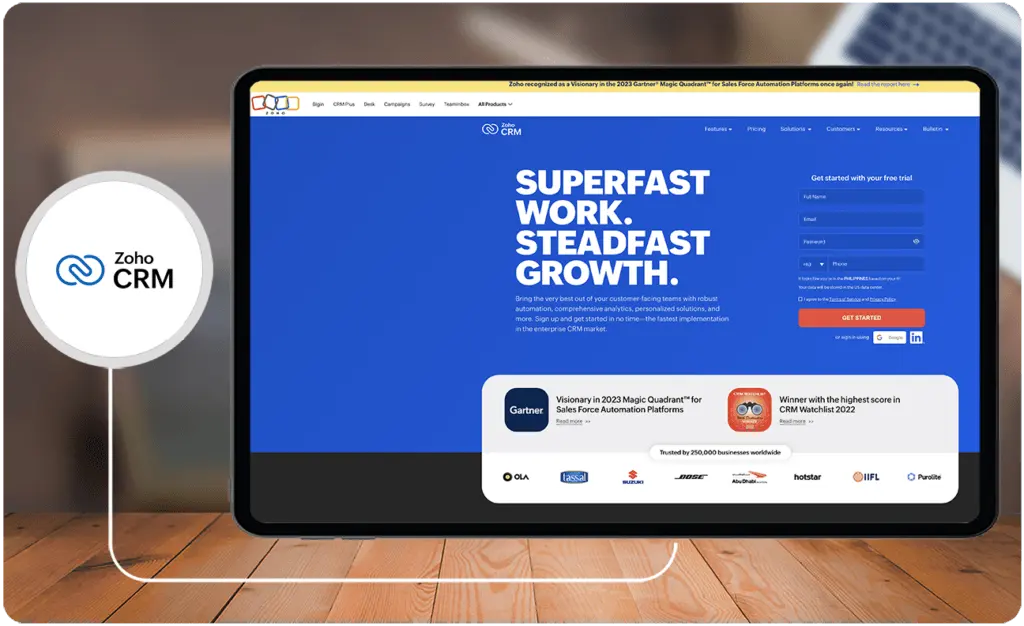
Zoho CRM is a versatile customer relationship management platform that caters to businesses of all sizes. This integrated system manages sales, marketing, and customer support. The user-friendly interface, extensive customization options, and robust automation capabilities of Zoho CRM streamline business processes and boost team productivity.
In Zendesk Sell vs Zoho CRM, the latter distinguishes itself with its wide range of features, including lead and contact management, sales automation, analytics, and omnichannel communication. This makes it one of the best customer service tools for businesses that want an all-in-one CRM solution that manages sales, customer service, and marketing.
Who is Zoho CRM for?
Zoho CRM is a versatile CRM platform suitable for a wide range of users and industries. Its customizable features make it ideal for both startups and large enterprises. It is used across various sectors like real estate, healthcare, and more, demonstrating its adaptability to different industry needs.
The platform is instrumental for B2B companies in managing business deals and synchronizing with stakeholders, while B2C companies benefit from its direct solutions, like lead management.
Additionally, it serves small and medium businesses, offering them a competitive edge with accessible technology. For larger enterprises, especially those with dispersed operations, Zoho CRM’s advanced features, like workflow management, are invaluable, streamlining tasks and enhancing customer engagement.
Key Benefits of Zoho CRM
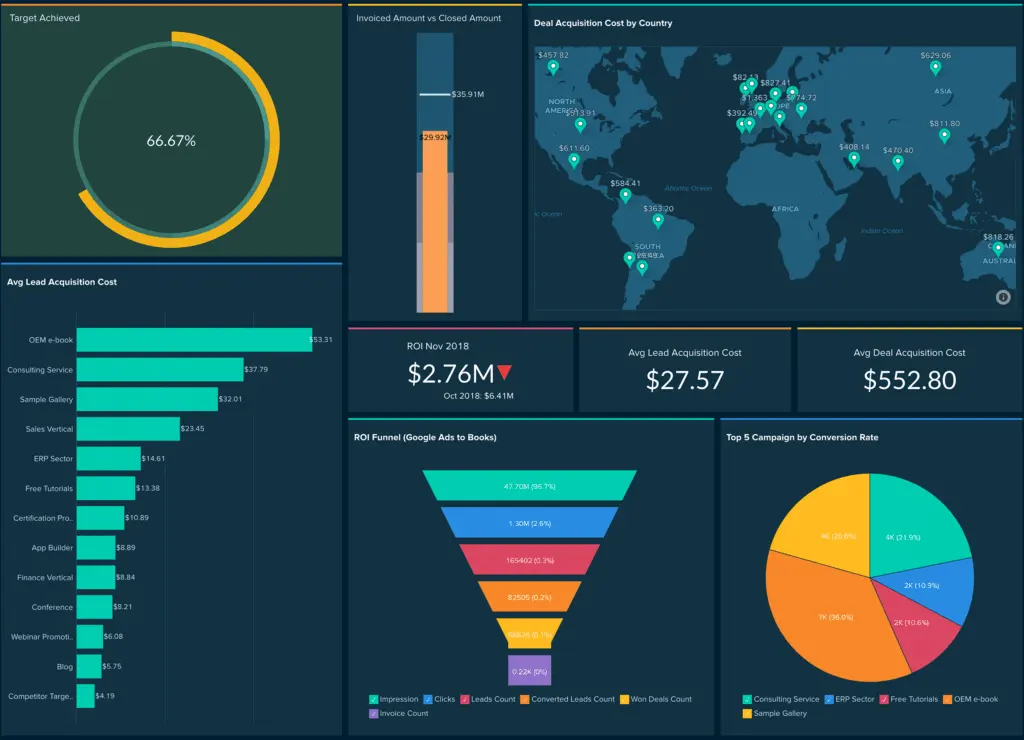
Zoho CRM’s unique benefits are tailored to various business needs. Here are the key advantages of Zoho CRM:
- Affordability: Particularly cost-effective for small to medium-sized businesses.
- Customization and Integration: Highly customizable with numerous integration options for various business applications.
- User-Friendly Interface: Known for its straightforward and easy-to-navigate interface.
- Robust Sales and Marketing Tools: Offers comprehensive sales automation and marketing tools, aiding in effective lead management and customer engagement.
- Mobile Accessibility: Provides a functional mobile app, facilitating CRM access on the go.
- Diverse Industry Application: Suitable for a wide range of industries, from healthcare to real estate, due to its versatile feature set.
Who are Zendesk Sell and Zoho CRM best for?
Effective CRM selection is crucial for business success. CRM systems increase conversion rates and productivity by 300% (Cawley, 2023), so knowing which platform is best is crucial. The Zendesk Sell vs. Zoho CRM comparison made with the help of Research.com experts shows that each has strengths for different user groups and industries:
- Startups and Small Businesses: Zendesk Sell is a simple CRM solution for startups and small businesses. Teams with little CRM experience can use its simple interface and functionality.
- Complex Sales Processes: Zoho CRM excels at complex sales processes and diverse customer interactions. It supports complex sales cycles and large operations with its advanced features.
- Industries Focused on Customer Service: Retail and hospitality companies may benefit from Zoho CRM’s extensive customer service features.
- Data-Driven Sales Teams: Sales teams that use data analytics and detailed reporting will benefit from Zendesk Sell’s metrics and insights.
- Teams Needing High Customization: Zoho CRM’s extensive customization options make it ideal for businesses with specific workflow needs, or that need to integrate with many third-party apps.
- Companies Focusing on Mobile CRM: Zendesk Sell’s mobile support may benefit mobile-focused teams.
Zendesk Sell and Zoho CRM offer powerful lead management and customer engagement tools in modern sales environments where inbound sales are outpacing outbound. Using these tools with business intelligence apps allows for more enhanced solutions. You can also find such features in the best Zendesk Sells alternatives.
Zendesk Sell vs Zoho CRM Feature Comparison
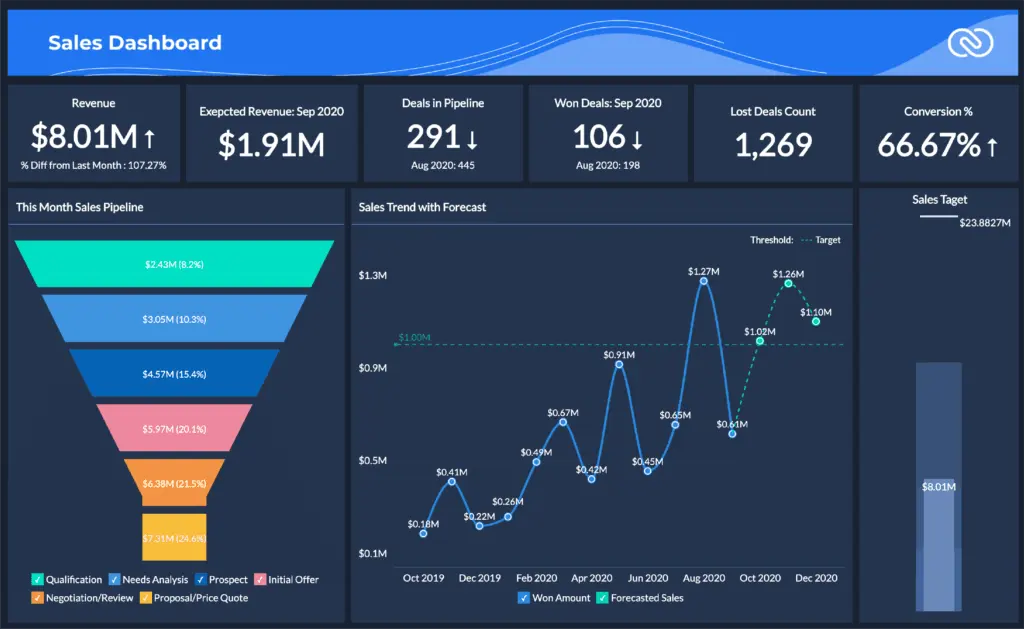
CRM revenues are expected to exceed $80 billion by 2025. Businesses want CRMs that boost sales, are affordable, and have a good ROI (Admin Wingmate, 2023). This trend emphasizes the importance of choosing the right CRM, with mobile CRM solutions helping companies meet 65% of sales quotas. Let’s compare the key features of Zendesk Sell vs Zoho CRM:
User Interface and Usability
Zendesk Sell offers a streamlined, intuitive interface, particularly beneficial for smaller teams or those new to CRM software. While also user-friendly, Zoho CRM provides a more comprehensive range of customization options that can suit larger businesses or those with specific workflow requirements.
Customization and Integration
Zoho CRM shines in terms of customization and integration, offering extensive options to tailor the system to various business needs and seamless integration with a wide range of apps and services. Zendesk Sell, while offering integration capabilities, focuses more on providing a straightforward, out-of-the-box solution with less emphasis on extensive customization.
Mobile CRM Capabilities
Zendesk Sell and Zoho CRM offer mobile CRM capabilities. The same can be said for Zoho CRM alternatives. Still, Zendesk Sell has a more robust mobile interface, aligning with the increasing demand for mobile CRM solutions that enable businesses to reach their sales targets more effectively.
Sales and Marketing Automation
Zoho CRM offers a broad spectrum of sales and marketing automation tools ideal for large-scale operations and complex sales processes. Zendesk Sell provides essential automation features but focuses more on streamlining and simplifying the sales process, which may suit smaller teams.
Data Analytics and Reporting
Zendesk Sell provides detailed sales analytics and reporting features, catering to data-driven sales teams. Zoho CRM also offers comprehensive analytics with a broader focus that includes marketing and customer service metrics, making it a versatile choice for businesses requiring a holistic view of their operations.
Zendesk Sell vs Zoho CRM Pricing
The Zendesk Sell vs Zoho CRM pricing comparison reveals that Boht solutions offer tiered pricing plans, but their approach to features and scalability varies.
Zendesk Sell Pricing
- Sell Team: Priced at $19 per agent per month, this plan is designed for smaller teams and offers basic CRM functionalities.
- Sell Growth: At $55 per agent per month, this plan targets growing businesses needing more advanced features.
- Sell Professional: For $115 per agent per month, it provides comprehensive tools for larger sales teams.
- Sell Enterprise: Starting at $169 per agent per month, this plan offers extensive customization and unlimited pipelines for large enterprises.
Zoho CRM Pricing
- Standard: Billed annually at US$14 per agent per month, suitable for businesses needing basic CRM tools.
- Professional: Priced at US$23 per agent per month, it offers improved customer acquisition and growth features.
- Enterprise: At US$40 per agent per month, it’s designed for managing global customer experience operations.
- Ultimate: The most comprehensive plan at US$52 per agent per month caters to businesses needing the full range of CRM capabilities
Zendesk Sell Pros and Cons
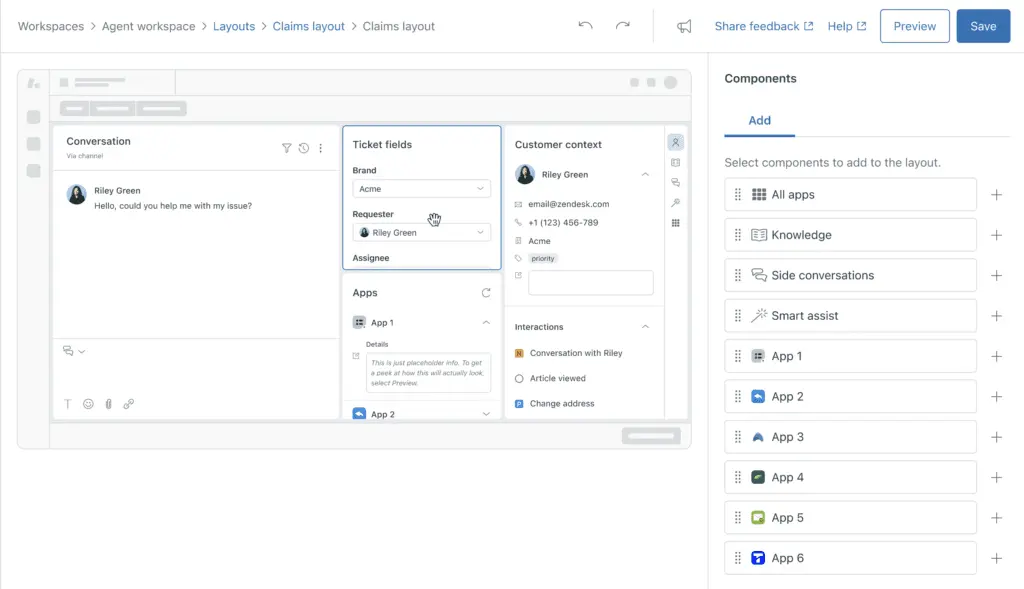
Zendesk Sell, a key player in the CRM market, offers a range of features that cater to various business needs. As CRM systems continue to be vital for sales acceleration and providing solid ROI (Admin Wingmate, 2023), it’s important to weigh the advantages and disadvantages of Zendesk Sell:
Pros
- Lead Scoring and Management: Efficient handling of leads is a standout feature.
- Pipeline Management and Visibility: Offers excellent oversight of the sales pipeline.
- User-Friendly Mobile App: The iOS and Android-compatible app enhances on-the-go accessibility
- Easy Integration: Zendesk Sell integrates well with other systems, enhancing its utility.
- Ease of Use: Generally, the platform is not too confusing to navigate and learn
- Creative Design and Layout: Although basic, it provides a clean layout and multiple views for ease of use
Cons
- Learning Curve: Some users may find a slight learning curve initially.
- Higher Cost for Advanced Features: Advanced functionalities come at a higher price point.
- Lack of a Built-In Marketing Automation Tool: Users must rely on external marketing automation tools.
- Customer Support Challenges: There have been difficulties in contacting customer support and issues with account management
Zoho CRM Pros and Cons
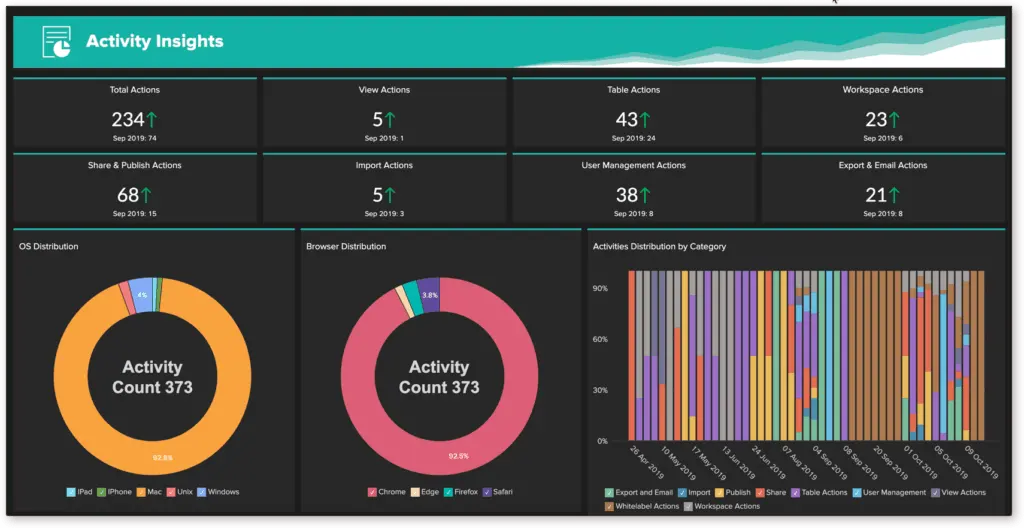
As CRM systems become increasingly vital for businesses looking to streamline sales and customer management, understanding the strengths and limitations of platforms like Zoho CRM is crucial. Below are the pros and cons of Zoho CRM.
Pros
- Affordable with Advanced Sales Features: Zoho CRM is known for its affordability while offering advanced sales features, making it a great option for businesses looking for a cost-effective CRM solution
- Ease of Setup and Use: It is simple to set up and use, making it ideal for small to medium-sized teams. The step-by-step guide simplifies the process, and the user-friendly interface requires minimal training
- Customization and Integration: Offers a high level of customization capabilities and facilitates easy integration with other systems, making it versatile for different business needs
- Mobile App: The mobile app is user-friendly and functional, allowing for seamless work on the go, even offline
Cons
- Limited Features in Free and Budget Versions: The free and lower-tier plans offer limited features, pushing users towards paid plans for full functionality
- Inconsistent Customer Support: Some users have reported issues with customer support, including long wait times and challenges in resolving simple queries
- User Interface: While user-friendly, the interface has been noted to be less visually appealing and could benefit from more aesthetic customization
How does integrating CRM with cloud accounting improve financial workflows?
Integrating CRM systems with cloud accounting solutions creates a unified platform where sales and finance data are seamlessly synchronized. This linkage eliminates manual data transfers, minimizes errors, and accelerates processes such as billing, invoicing, and reconciliation. Real-time access to financial metrics aligned with customer interactions supports faster, data-driven decision-making and enhances overall operational efficiency.
Enhancing Workflow with a Document Management System
A well-integrated CRM solution can dramatically improve business operations, but pairing it with a robust document management system amplifies efficiency even further. Both Zendesk Sell and Zoho CRM users can benefit from seamless document organization, centralization, and sharing capabilities. Document management systems help reduce administrative burdens by organizing customer proposals, contracts, and related documentation in a single secure platform accessible to authorized team members.
For example, integrating such a system with Zoho CRM's customization options can enable automated file management based on sales stages or customer type. Similarly, Zendesk Sell users can link documents directly to corresponding leads or deals for quick reference, minimizing interruptions in the sales process. Businesses looking to optimize their workflows further should consider exploring solutions ranked among the best document management software to ensure compatibility with their chosen CRM.
With the right document management tool, businesses can ensure data security, streamline compliance processes, and foster team collaboration, making it an invaluable addition to their CRM ecosystem.
How do Zendesk Sell and Zoho CRM handle customer support and user assistance?
When selecting a CRM, the quality and accessibility of customer support are crucial, especially for businesses that may need onboarding assistance, technical troubleshooting, or ongoing guidance. Here’s how Zendesk Sell and Zoho CRM compare in terms of customer support:
- Support Availability:
- Zendesk Sell: Provides 24/7 support through multiple channels, including email, chat, and phone, but the availability of certain channels may depend on the subscription plan. Higher-tier plans generally have priority access to faster support options.
- Zoho CRM: Offers support via email, chat, and phone for premium plans, with 24/5 availability. Enterprise customers can access more responsive, personalized support options, such as account managers and dedicated customer success managers.
- Onboarding and Training Resources:
- Zendesk Sell: Offers a variety of resources, including a knowledge base, live webinars, and video tutorials to help new users navigate the platform. These resources cover basic functionalities, advanced tools, and integrations, making it relatively easy for teams to self-learn.
- Zoho CRM: Provides an extensive range of training options, including an interactive learning academy, webinars, a comprehensive knowledge base, and an active community forum. Zoho also offers personalized onboarding assistance and consulting for higher-tier customers, which can be valuable for larger teams.
- Community and Support Forums:
- Zendesk Sell: Maintains a community forum where users can exchange tips, best practices, and solutions. This community also allows users to suggest new features and vote on them, which can influence future updates.
- Zoho CRM: Has a highly active community forum and a partner network that can provide additional support and guidance. Zoho’s community often shares tutorials, case studies, and industry-specific use cases that can help businesses maximize their CRM use.
- Troubleshooting and Escalation:
- Zendesk Sell: Offers a streamlined process for escalating issues, especially for users on premium plans. Dedicated account managers are available for enterprise clients to provide personalized troubleshooting and guidance.
- Zoho CRM: Provides a structured escalation process for critical issues, with an option for dedicated support personnel for enterprise users. Zoho’s ticketing system ensures users can track the status of their support requests.
Verdict Zendesk Sell vs Zoho CRM: Which software is better?
The comparison of Zendesk Sell vs Zoho CRM hinges on specific business needs and preferences. Zendesk Sell, with a score of 7.8 out of 10, excels in pipeline management, database management, email tracking, and user-friendliness. It’s tailored for sales-focused businesses needing a comprehensive view of customer interactions and efficient lead management.
Zoho CRM, scoring 8.3 out of 10, stands out for its affordability and suitability for smaller businesses. It offers robust integrations with various applications like QuickBooks and Google Apps and an integrated project management feature. This makes it a great option for small to medium-sized businesses seeking a versatile and cost-effective CRM solution.
Sales-focused Zendesk Sell is ideal for businesses prioritizing sales operations and lead management. However, Zoho CRM is ideal for smaller businesses that need an affordable and integrated CRM system. Your choice should match your company’s size, sales priorities, and budget. For businesses looking to complement their CRM with efficient financial tools, considering options in simple accounting software might be beneficial.
Key Insights
- Comprehensive Sales Automation: Zendesk Sell focuses on enhancing sales team productivity through automated processes and real-time pipeline visibility, making it a strong choice for sales-focused businesses.
- Extensive Customization: Zoho CRM offers extensive customization and integration options, catering to a wide range of industries and business sizes, making it highly adaptable to specific workflow requirements.
- User-Friendly Interfaces: Both Zendesk Sell and Zoho CRM provide user-friendly interfaces. Zendesk Sell is particularly intuitive for smaller teams, while Zoho CRM offers a more comprehensive set of features that may require a bit more navigation but provide greater flexibility.
- Mobile CRM Capabilities: Both platforms offer robust mobile apps, with Zendesk Sell providing a particularly strong mobile interface that supports on-the-go sales management and customer engagement.
- Data-Driven Insights: Zendesk Sell excels in providing detailed sales analytics and reporting, which is crucial for data-driven sales teams. Zoho CRM also offers comprehensive analytics, including marketing and customer service metrics.
- Integration and Scalability: Zoho CRM stands out for its ability to integrate with a wide range of third-party applications and its scalability to handle complex sales processes and large operations. Zendesk Sell integrates well with other Zendesk products, creating a comprehensive support ecosystem.
- Affordability: Zoho CRM is generally more affordable, especially for small to medium-sized businesses, offering a range of pricing plans that provide robust features without a high cost.
References:
- Admin Wingmate. (2023, March 24). CRM buying guide for 2023- Wingmate. Wingmate.
- Cawley, C. (2023, July 17). 51 CRM Statistics 2023. Tech.co.
Other Things You Should Know About Zendesk Sell – Zoho CRM Comparison
Whether Zendesk is better than Zoho depends on specific business needs. Zendesk Sell is preferable for sales-focused CRM with strong sales automation and pipeline management features, while Zoho CRM is ideal for a cost-effective, versatile CRM solution that integrates well with various applications.
Zendesk Sell is used for sales automation, pipeline management, customer relationship management, and sales analytics. It helps sales teams streamline their processes, manage customer interactions, and gain insights from data to improve sales performance.
Yes, Zendesk is a sales CRM. It focuses on enhancing sales processes, customer engagement, and sales team productivity by providing tools for lead and deal tracking, email integration, and advanced analytics.
Zoho CRM is best for small to medium-sized businesses needing a cost-effective, customizable, and integrative CRM solution. It is particularly suitable for industries such as real estate, healthcare, and any business that requires a comprehensive system for managing sales, marketing, and customer support.
The main differences lie in their focus and capabilities. Zendesk Sell is streamlined for sales automation and pipeline management with strong mobile CRM capabilities. Zoho CRM offers extensive customization, integration options, and a broader range of features that support sales, marketing, and customer service, making it more versatile for various business needs.
Yes, Zendesk Sell can integrate with other applications, particularly those within the Zendesk suite. This integration capability allows businesses to create a comprehensive CRM and support ecosystem that enhances customer relationship management and sales processes.
Yes, Zoho CRM supports mobile access. It provides a functional mobile app that allows users to manage their CRM activities on the go, facilitating seamless work and access to customer data from anywhere.
Both platforms offer strong analytics and reporting features, but they cater to different needs. Zendesk Sell focuses on detailed sales analytics and reporting for data-driven sales teams, while Zoho CRM provides a broader range of analytics, including marketing and customer service metrics, making it suitable for businesses requiring a holistic view of their operations.