Auzmor Learn vs Docebo – 2027 Comparison

Co-Founder and Chief Data Scientist
Auzmor Learn vs Docebo Table of Contents
- Who is Auzmor Learn for?
- Key benefits of Auzmor Learn?
- What is Docebo?
- Who is Docebo for?
- Key Benefits of Docebo
- Who are Auzmor Learn and Docebo best for?
- Auzmor Learn vs Docebo Feature Comparison
- Comparing Auzmor Learn and Docebo for Scalability and Enterprise Use
- How do Auzmor Learn and Docebo handle customer support and implementation?
- Auzmor Learn vs Docebo Pricing
- Auzmor Learn Pros and Cons
- Docebo Pros and Cons
- Verdict – Auzmor Learn vs Docebo: Which software is better?
What is Auzmor Learn?
Auzmor Learn is a powerful and scalable learning management system (LMS) that is designed to develop, deliver, and track training programs. These are a crucial aspect of what is learning management system in education. The software offers a range of features and capabilities to enhance the learning experience. Auzmor Learn is also a cloud-based platform which makes it accessible from any device and location.
One of the key benefits of Auzmor Learn is its user-friendly interface. It simplifies the process of creating and managing courses. It also provides a course builder that allows administrators to easily create lessons and customize content. Auzmor Learn offers a library of courses that cover a wide range of topics, providing organizations with the flexibility to offer diverse educational activities.
Featured LMS Software Providers

$4.08 per user per month
(billed annually)
30 days
Yes
Editor's Take
iSpring LMS is a user-friendly learning management system (LMS) tailored for businesses and educators to deliver eLearning content efficiently. It offers features like course creation, quizzes, learning paths, and progress tracking. iSpring LMS supports various content types, including video lectures and interactive modules, and integrates with the iSpring Suite authoring tool for seamless content development. Pros include a straightforward interface, mobile-friendly access, and powerful reporting tools. However, customization options can be limited, and pricing may be high for smaller organizations. It is ideal for corporate training, employee development, and onboarding, providing a reliable platform for scalable eLearning.
Expert Score
In evaluating SaaS software, a comprehensive and structured methodology ensures a fair and accurate comparison across key metrics. This approach focuses on the most critical aspects that affect user experience, functionality, and business value. The following metrics—general features, cost, customer service, integrations, and mobile support—are evaluated to provide a holistic view of each software solution’s strengths and weaknesses. These metrics are selected based on their direct impact on software usability, scalability, and long-term effectiveness for businesses.
1. General Features - scoring weight 40%
This metric evaluates the core functionalities and tools the software offers. It involves assessing the comprehensiveness of the features, their relevance to the target users, and the ease of use. This is important because robust and well-designed features determine the software's overall utility and efficiency in solving user problems.
2. Cost - scoring weight 15%
Cost analysis focuses on pricing models, value for money, and scalability. It's crucial to evaluate whether the software’s features justify its price, considering different plans for small and large organizations. This is vital for businesses to ensure they invest in cost-effective solutions that fit their budget.
3. Customer Service - scoring weight 15%
This evaluates the responsiveness, quality, and availability of customer support, including channels like chat, email, or phone. Good customer service is essential for troubleshooting and ensuring smooth software usage, which reduces downtime and frustration for users.
4. Integrations - scoring weight 15%
This examines how well the software integrates with third-party tools (e.g., CRM, payment systems, collaboration apps). Seamless integrations are key for creating a unified workflow and enhancing productivity by connecting multiple systems, which is crucial for operational efficiency.
5. Mobile Support - scoring weight 15%
Mobile support assesses the software’s functionality and performance on mobile devices, including apps and mobile web versions. With increasing remote work and on-the-go usage, strong mobile support is critical to ensure users can access and utilize the software effectively, regardless of location.

Free; $89 per month
(billed annually)
Demo available
Yes
Editor's Take
TalentLMS is a cloud-based learning management system designed for businesses of all sizes to deliver effective training programs. Key features include course management, quizzes, gamification, and reporting tools. The platform supports a variety of content types, including video and presentations, and integrates with popular tools like Zoom and Salesforce. Pros include an intuitive interface, customizable branding, and a free tier for small teams. However, advanced reporting and customization options are limited in lower-tier plans. TalentLMS is ideal for corporate training, employee onboarding, and compliance programs, offering scalability and flexibility to suit different learning needs.
Expert Score
In evaluating SaaS software, a comprehensive and structured methodology ensures a fair and accurate comparison across key metrics. This approach focuses on the most critical aspects that affect user experience, functionality, and business value. The following metrics—general features, cost, customer service, integrations, and mobile support—are evaluated to provide a holistic view of each software solution’s strengths and weaknesses. These metrics are selected based on their direct impact on software usability, scalability, and long-term effectiveness for businesses.
1. General Features - scoring weight 40%
This metric evaluates the core functionalities and tools the software offers. It involves assessing the comprehensiveness of the features, their relevance to the target users, and the ease of use. This is important because robust and well-designed features determine the software’s overall utility and efficiency in solving user problems.
2. Cost - scoring weight 15%
Cost analysis focuses on pricing models, value for money, and scalability. It’s crucial to evaluate whether the software’s features justify its price, considering different plans for small and large organizations. This is vital for businesses to ensure they invest in cost-effective solutions that fit their budget.
3. Customer Service - scoring weight 15%
This evaluates the responsiveness, quality, and availability of customer support, including channels like chat, email, or phone. Good customer service is essential for troubleshooting and ensuring smooth software usage, which reduces downtime and frustration for users.
4. Integrations - scoring weight 15%
This examines how well the software integrates with third-party tools (e.g., CRM, payment systems, collaboration apps). Seamless integrations are key for creating a unified workflow and enhancing productivity by connecting multiple systems, which is crucial for operational efficiency.
5. Mobile Support - scoring weight 15%
Mobile support assesses the software’s functionality and performance on mobile devices, including apps and mobile web versions. With increasing remote work and on-the-go usage, strong mobile support is critical to ensure users can access and utilize the software effectively, regardless of location.

Custom
14 days
Course creation, customizable learning paths, automated assessments
Editor's Take
SkyPrep is an intuitive Learning Management System (LMS) designed to streamline online training and onboarding for businesses, educational institutions, and non-profits. Known for its user-friendly interface, SkyPrep makes it easy for administrators to create, manage, and deliver training content while providing learners with a seamless, engaging experience. Key features include course creation tools, customizable learning paths, automated assessments, and reporting capabilities, enabling organizations to tailor training programs to individual or group needs.
One of SkyPrep’s strengths is its ability to support a range of media, including videos, presentations, and quizzes, making it versatile for various training formats. Its analytics and reporting tools offer valuable insights into learner progress, course completion rates, and knowledge gaps, empowering administrators to refine training content and improve learning outcomes.
The platform also integrates with popular software like Google Workspace, Salesforce, and Zoom, enhancing collaboration and accessibility for remote teams. With features like automated notifications, compliance tracking, and gamification, SkyPrep helps organizations keep learners engaged while ensuring that critical training requirements are met.
SkyPrep offers scalable pricing plans to fit small teams, growing businesses, and large enterprises, making it a cost-effective solution for organizations looking to simplify training and boost team performance. Overall, SkyPrep is an effective LMS choice for organizations that prioritize ease of use, customizability, and a comprehensive suite of learning management tools.
Expert Score
In evaluating SaaS software, a comprehensive and structured methodology ensures a fair and accurate comparison across key metrics. This approach focuses on the most critical aspects that affect user experience, functionality, and business value. The following metrics—general features, cost, customer service, integrations, and mobile support—are evaluated to provide a holistic view of each software solution’s strengths and weaknesses. These metrics are selected based on their direct impact on software usability, scalability, and long-term effectiveness for businesses.
1. General Features - scoring weight 40%
This metric evaluates the core functionalities and tools the software offers. It involves assessing the comprehensiveness of the features, their relevance to the target users, and the ease of use. This is important because robust and well-designed features determine the software’s overall utility and efficiency in solving user problems.
2. Cost - scoring weight 15%
Cost analysis focuses on pricing models, value for money, and scalability. It’s crucial to evaluate whether the software’s features justify its price, considering different plans for small and large organizations. This is vital for businesses to ensure they invest in cost-effective solutions that fit their budget.
3. Customer Service - scoring weight 15%
This evaluates the responsiveness, quality, and availability of customer support, including channels like chat, email, or phone. Good customer service is essential for troubleshooting and ensuring smooth software usage, which reduces downtime and frustration for users.
4. Integrations - scoring weight 15%
This examines how well the software integrates with third-party tools (e.g., CRM, payment systems, collaboration apps). Seamless integrations are key for creating a unified workflow and enhancing productivity by connecting multiple systems, which is crucial for operational efficiency.
5. Mobile Support - scoring weight 15%
Mobile support assesses the software’s functionality and performance on mobile devices, including apps and mobile web versions. With increasing remote work and on-the-go usage, strong mobile support is critical to ensure users can access and utilize the software effectively, regardless of location.

Editor's Take
Absorb is a comprehensive learning management system designed to deliver, track, and manage online training for businesses of all sizes. Known for its modern, user-friendly interface, Absorb offers a flexible solution for employee training, compliance, and certification programs. The platform supports a wide range of learning formats, including eLearning, instructor-led training, and blended learning, making it adaptable to different training needs.
Key features include a robust course builder, automated reporting and analytics, mobile accessibility, and advanced integrations with third-party systems like HR and CRM software. Absorb also offers a highly customizable interface, allowing businesses to tailor the platform to reflect their branding and specific workflows.
With its scalability, ease of use, and strong focus on learner engagement and tracking, Absorb is an ideal solution for organizations looking to enhance their learning and development initiatives while maintaining control and flexibility over their training programs.
Expert Score
In evaluating SaaS software, a comprehensive and structured methodology ensures a fair and accurate comparison across key metrics. This approach focuses on the most critical aspects that affect user experience, functionality, and business value. The following metrics—general features, cost, customer service, integrations, and mobile support—are evaluated to provide a holistic view of each software solution’s strengths and weaknesses. These metrics are selected based on their direct impact on software usability, scalability, and long-term effectiveness for businesses.
1. General Features - scoring weight 40%
This metric evaluates the core functionalities and tools the software offers. It involves assessing the comprehensiveness of the features, their relevance to the target users, and the ease of use. This is important because robust and well-designed features determine the software’s overall utility and efficiency in solving user problems.
2. Cost - scoring weight 15%
Cost analysis focuses on pricing models, value for money, and scalability. It’s crucial to evaluate whether the software’s features justify its price, considering different plans for small and large organizations. This is vital for businesses to ensure they invest in cost-effective solutions that fit their budget.
3. Customer Service - scoring weight 15%
This evaluates the responsiveness, quality, and availability of customer support, including channels like chat, email, or phone. Good customer service is essential for troubleshooting and ensuring smooth software usage, which reduces downtime and frustration for users.
4. Integrations - scoring weight 15%
This examines how well the software integrates with third-party tools (e.g., CRM, payment systems, collaboration apps). Seamless integrations are key for creating a unified workflow and enhancing productivity by connecting multiple systems, which is crucial for operational efficiency.
5. Mobile Support - scoring weight 15%
Mobile support assesses the software’s functionality and performance on mobile devices, including apps and mobile web versions. With increasing remote work and on-the-go usage, strong mobile support is critical to ensure users can access and utilize the software effectively, regardless of location.

$8 per user per month
30 days
Yes
Editor's Take
360Learning is an AI-driven enterprise LMS that closes skills gaps by capturing internal expertise with collaborative learning Academies. Legacy systems force L&D teams to choose between scale and relevance. 360Learning eliminates this trade-off. Using agentic AI, it transforms the expertise that runs your business into scalable learning for your entire organization—upskilling employees, customers, and partners from one platform.
The platform merges enterprise LMS and LXP capabilities, including agentic automation, adaptive coaching, a multimodal AI content builder, and the market’s #1 rated mobile app. Its ecosystem of 50+ partners includes an SAP Silver Partnership and Workday Design Partnership, ensuring learning connects to your broader business strategy.
Over 2,500 companies, including Heineken, Equinox, Michelin, Merlin, and Cisco, trust 360Learning as their enterprise LMS. Rated #1 AI LMS by eLearning Industry and backed by dedicated implementation, support, and services teams, 360Learning helps L&D become a growth lever, not a cost center.
360Learning, founded in 2013, has raised $240 million and operates teams across North America and Europe.
Expert Score
In evaluating SaaS software, a comprehensive and structured methodology ensures a fair and accurate comparison across key metrics. This approach focuses on the most critical aspects that affect user experience, functionality, and business value. The following metrics—general features, cost, customer service, integrations, and mobile support—are evaluated to provide a holistic view of each software solution’s strengths and weaknesses. These metrics are selected based on their direct impact on software usability, scalability, and long-term effectiveness for businesses.
1. General Features - scoring weight 40%
This metric evaluates the core functionalities and tools the software offers. It involves assessing the comprehensiveness of the features, their relevance to the target users, and the ease of use. This is important because robust and well-designed features determine the software's overall utility and efficiency in solving user problems.
2. Cost - scoring weight 15%
Cost analysis focuses on pricing models, value for money, and scalability. It's crucial to evaluate whether the software’s features justify its price, considering different plans for small and large organizations. This is vital for businesses to ensure they invest in cost-effective solutions that fit their budget.
3. Customer Service - scoring weight 15%
This evaluates the responsiveness, quality, and availability of customer support, including channels like chat, email, or phone. Good customer service is essential for troubleshooting and ensuring smooth software usage, which reduces downtime and frustration for users.
4. Integrations - scoring weight 15%
This examines how well the software integrates with third-party tools (e.g., CRM, payment systems, collaboration apps). Seamless integrations are key for creating a unified workflow and enhancing productivity by connecting multiple systems, which is crucial for operational efficiency.
5. Mobile Support - scoring weight 15%
Mobile support assesses the software’s functionality and performance on mobile devices, including apps and mobile web versions. With increasing remote work and on-the-go usage, strong mobile support is critical to ensure users can access and utilize the software effectively, regardless of location.
Who is Auzmor Learn for?
Auzmor Learn is a scalable, user-friendly LMS designed to serve diverse users and industries. It simplifies course creation and management for businesses and organizations. Based on our analysis of the product, the software generally caters to organizations prioritizing compliance training by offering more comprehensive post-course statistics compared to other Auzmor Learn alternatives to analyze training effectiveness.
Key benefits of Auzmor Learn?
- Custom Training Programs
- User-Friendly Interface
- Diverse Course Library
- Scalable Cloud-Based Platform
- Detailed Post-Course Statistics
- Compliance Training Solutions
What is Docebo?
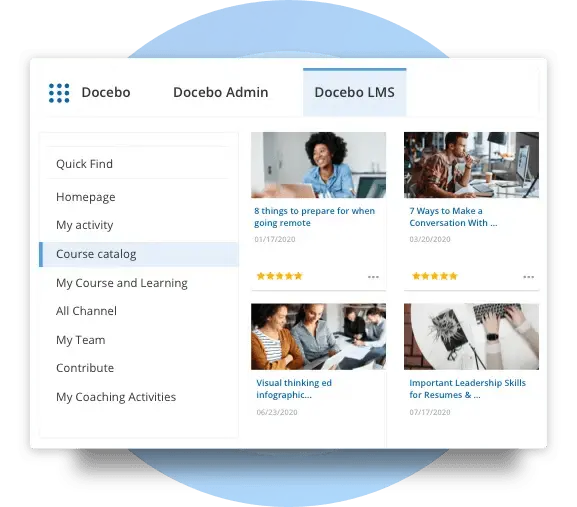
Docebo is a cloud-based learning platform that offers a comprehensive suite of products to support the entire learning process, from development to delivery. Docebo's multi-product learning suite is AI-powered. It is designed to enable enterprises around the world to tackle any learning challenge and create a true learning culture within their organization. It is equipped with the necessary tools and resources that allow users to deliver more personalized and scalable learning programs to several internal and external learners.
Who is Docebo for?
We looked into the features and capabilities of Docebo and it is one of the learning management system examples primarily designed for enterprises, especially those with 500-10,000 employees. It offers features like content creation, course management, and reporting, that are compatible with SCORM 1.2, 2004, and Tin Can. We also learned that Docebo, as an LMS, aims to redefine how enterprises use technology to manage content and gauge the impact of their learning initiatives.
Key benefits of Docebo?
- Comprehensive Employee Benefits
- Flexible Work Schedule and Remote Work Program
- Effective ILT-Classroom Features
- Easy File Uploading and Converting
- Powerful Integrations with Popular Software
- Cost and Time Savings
Who are Auzmor Learn and Docebo best for?
Auzmor Learn:
- Small, medium, and large businesses that need to manage, track, and deliver training to their employees
- Learners who require access to diverse educational activities
- Organizations that prioritize compliance training
- Industries such as healthcare, finance, manufacturing, retail, and technology

Docebo:
- Enterprises of all sizes that require a learning management system to create, manage, and deliver training content
- Organizations that prioritize technology-driven learning solutions
- Industries such as healthcare, finance, manufacturing, retail, and technology
- Organizations that require effective instructor-led training (ILT) and classroom features
- Organizations that require powerful integrations with popular software applications
Auzmor Learn vs Docebo Feature Comparison
Course Creation and Management
Auzmor Learn offers a course builder that allows administrators to easily create lessons and customize content to meet specific training needs. Docebo, meanwhile, provides easy file uploading and converting capabilities. We tried both platforms and they both offer features for creating and managing courses. But in this Auzmor Learn vs Docebo guide, we determined that Auzmor Learn's course builder is more user-friendly and customizable compared to Docebo's.
Learning Experience
We also looked into the learning experience for Auzmor Learn vs Docebo. Both platforms provide features that enhance the learning experience. Auzmor Learn offers a range of features to enhance the learning experience, including social learning, robust reporting, and multiple content creation options. Docebo offers effective instructor-led training (ILT) and classroom features. However, in terms of Auzmor Learn vs Docebo, the social learning and robust reporting features of Auzmor Learn provide more opportunities for engagement and analysis.
Integrations
We analyzed Auzmor Learn vs Docebo for their integration features and we determined that Docebo's integrations provide more flexibility and functionality for organizations that require integration with other software applications. Docebo offers powerful integrations with popular software applications, such as customer relationship management (CRM) systems. Meanwhile, Auzmor Learn does not offer as many integrations as Docebo.
User Interface
One of the most notable features we listed for this Auzmor Learn vs Docebo guide is the user interface. Auzmor Learn offers a user-friendly interface that simplifies the process of creating and managing courses. Docebo's interface is also user-friendly, but it may take more time to learn how to use all of its features. In terms of Auzmor Learn vs Docebo for user interface, Auzmor Learn's interface is more intuitive and easier to navigate.
Compliance Training
We looked into Auzmor Learn vs Docebo when it comes to compliance training, and Auzmor Learn is particularly well-suited for organizations that prioritize compliance training. Docebo does not have as many features specifically designed for compliance training. Auzmor Learn's focus on compliance training provides more comprehensive solutions for organizations.
Comparing Auzmor Learn and Docebo for Scalability and Enterprise Use
One critical aspect to evaluate when selecting between Auzmor Learn and Docebo is their scalability and suitability for enterprise-level deployment. Scalability ensures that the chosen platform can adapt to the growth and evolving needs of an organization, especially as the number of users and complexity of learning programs increases.
Auzmor Learn is ideal for small to mid-sized organizations looking for a straightforward solution that prioritizes ease of use and compliance training. However, its scalability features may be less robust when compared to platforms tailored for large enterprises. For instance, while Auzmor Learn effectively supports Single Sign-On (SSO) and integrations with several HRIS and CRM systems, its integration capabilities are not as extensive as those offered by Docebo.
Docebo, on the other hand, is designed with large enterprises in mind. Its multi-product learning suite, powered by AI, is capable of handling complex learning requirements across a global workforce. Additionally, Docebo’s extensive library of pre-built content and its ability to integrate with advanced third-party applications like Slack and Salesforce make it a compelling choice for organizations requiring highly customizable and scalable solutions.
For organizations focused on long-term growth and varied training needs, understanding the cost dynamics of scaling these platforms is vital. A deeper analysis of LMS license pricing, including factors that influence cost for enterprise use, can provide helpful insights to guide this decision. For more information on this, visit our detailed guide on LMS license pricing.
Ultimately, businesses should map their long-term training goals with the features and scalability of these platforms to ensure a future-proof investment in learning technology.
How do Auzmor Learn and Docebo handle customer support and implementation?
Both platforms offer dedicated support channels and extensive resources to assist with onboarding and ongoing use, though specifics vary per vendor. Organizations are encouraged to directly inquire about service level agreements, personalized training sessions, and post-deployment follow-up, as these factors can significantly impact overall deployment success. For companies considering integration with external systems, such as the best business phone system, evaluating the depth and responsiveness of customer support and implementation services is essential for a smooth and effective transition.
Auzmor Learn vs Docebo Pricing
The pricing when comparing Auzmor Learn vs Docebo can be a challenge to gauge. Each software offers custom pricing plans that are available upon request. Auzmor Learn offers a free plan for up to 50 users, while Docebo offers a free online LMS trial. Neither platform provides detailed pricing information on their website. Organizations interested in either platform can contact the companies directly to obtain pricing information.
Auzmor Learn Pros and Cons
Pros:
- Provides custom training programs and development
- Has a user-friendly course builder
- Allows for the creation and organization of learning paths
- Offers a free plan for up to 50 users
- Provides a range of features to enhance the learning experience
- Suitable for organizations that prioritize compliance training
- Offers a range of pricing plans, including custom pricing
Cons:
- Specific pricing information is not available on their website
- Limited integrations with other software applications
- Some users have reported issues with customer support
Docebo Pros and Cons
Pros:
- Comprehensive feature set and ease of use
- Easy customization and robust customization options
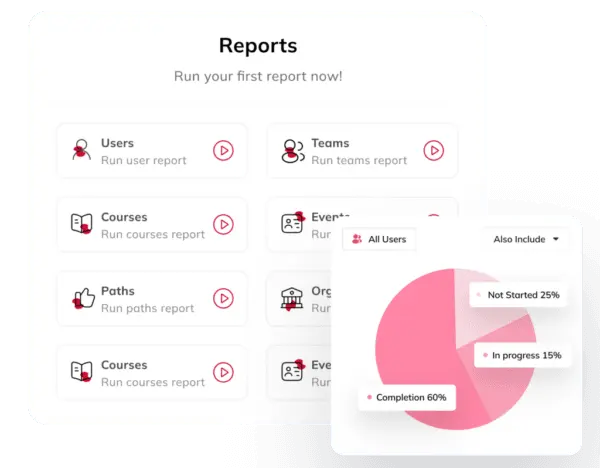
- Large library of various types of courses available in the marketplace
- Supports SCORM and Tin Can unlike some of the Docebo alternatives
- Great integration capabilities
- Helpful technical support
- Ability to conduct large tests with a large number of participants
- Cloud-based platform that helps save and store training materials
Cons:
- Limited communication of smaller updates or patches
- Limited information available on specific pricing details
- Some users have reported the need for better communication of updates
Verdict – Auzmor Learn vs Docebo: Which software is better?
When comparing Auzmor Learn vs Docebo, several factors must be taken into account. Auzmor Learn, with a rating of 4.8/5 stars from 145 reviews on G2, is lauded as a “simple yet powerful employee training software" providing a centralized perspective for organizations. Conversely, Docebo, holding a 4.4/5 stars rating with 413 reviews on G2, is acclaimed as a “robust and feature-rich learning management system" supporting flexible and scalable eLearning. Based on our analysis for this Auzmor Learn vs Docebo guide, both can be deemed as the best corporate training LMS. Each software has its own strengths and weaknesses, so this will boil down to the specific needs of a company to see what software will fit them.
Auzmor Learn vs Docebo: FAQ
Auzmor Learn
Does Auzmor have an Open API?
Yes, Auzmor has an Open API. This allows users to integrate any third-party software to their system that has an Open API as well, including web-conferencing tools.
Does Auzmor provide pre-built content?
Yes, Auzmor provides access to over 70,000 pre-built courses. With Auzmor's blended learning software, users can easily plug and play pre-made content or leverage Auzmor's built-in authoring tool to create engaging and interactive courses for learners.
What types of integrations does Auzmor have?
Auzmor Learn offers integrations for Single Sign-On (SSO), Human Resource Information Systems (HRIS), Customer Relationship Management (CRM) software, Webhooks, Performance Management Systems, and various other solutions. This provides a streamlined experience for its users.
Can Auzmor support SSO?
Yes, Auzmor supports SSO (Single Sign-On) for team members to easily log in via LDAP, AZURE AD, OKTA, GSuite, and SAML. This feature allows users to access Auzmor Learn with their existing credentials. Additionally, Auzmor Learn can be integrated with over 350 services and applications through ApiX-Drive.
Docebo
Is Docebo a LXP or LMS?
Docebo is an AI-powered platform that combines the functionalities of a Learning Management System (LMS) and a Learning Experience Platform (LXP). It provides a flexible and scalable eLearning solution. This prioritizes employee engagement and personalized learning experiences, while also facilitating the delivery and management of training content.
What is Docebo learning suite?
Docebo Learning Suite is designed to enable enterprises around the world to tackle any learning challenge and create a true learning culture within their organization. It is equipped with the necessary tools and resources that allow users to deliver more personalized and scalable learning programs to several internal and external learners, as well as blended audiences.
How many courses does Docebo have?
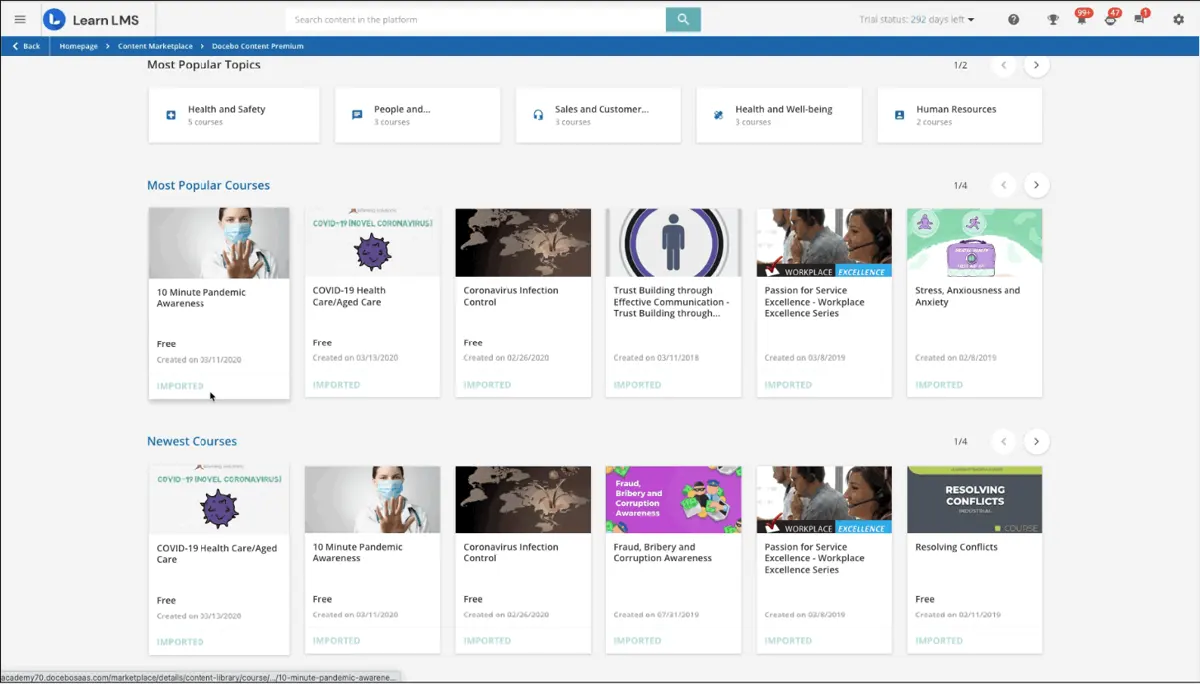
Docebo's Learning Suite includes the Docebo Content Library, which offers over 60,000 courses of pre-made e-learning content optimized for desktop and mobile devices.
Is Docebo a SaaS company?
Yes, Docebo is a SaaS (Software as a Service) company that specializes in learning management systems. Its product, Docebo Learn LMS, operates as a cloud-hosted software as a service platform as well as being third-party compatible.
Other Things You Should Know About Auzmor Learn vs Docebo
Yes, Auzmor has an Open API. This allows users to integrate any third-party software to their system that has an Open API as well, including web-conferencing tools.
Yes, Auzmor provides access to over 70,000 pre-built courses. With Auzmor's blended learning software, users can easily plug and play pre-made content or leverage Auzmor's built-in authoring tool to create engaging and interactive courses for learners.
Auzmor Learn offers integrations for Single Sign-On (SSO), Human Resource Information Systems (HRIS), Customer Relationship Management (CRM) software, Webhooks, Performance Management Systems, and various other solutions. This provides a streamlined experience for its users.
Yes, Auzmor supports SSO (Single Sign-On) for team members to easily log in via LDAP, AZURE AD, OKTA, GSuite, and SAML. This feature allows users to access Auzmor Learn with their existing credentials. Additionally, Auzmor Learn can be integrated with over 350 services and applications through ApiX-Drive.
Docebo is an AI-powered platform that combines the functionalities of a Learning Management System (LMS) and a Learning Experience Platform (LXP). It provides a flexible and scalable eLearning solution. This prioritizes employee engagement and personalized learning experiences, while also facilitating the delivery and management of training content.
Docebo Learning Suite is designed to enable enterprises around the world to tackle any learning challenge and create a true learning culture within their organization. It is equipped with the necessary tools and resources that allow users to deliver more personalized and scalable learning programs to several internal and external learners, as well as blended audiences.
Docebo's Learning Suite includes the Docebo Content Library, which offers over 60,000 courses of pre-made e-learning content optimized for desktop and mobile devices.
Yes, Docebo is a SaaS (Software as a Service) company that specializes in learning management systems. Its product, Docebo Learn LMS, operates as a cloud-hosted software as a service platform as well as being third-party compatible.