
Litmos vs TalentLMS – 2027 Comparison

Co-Founder and Chief Data Scientist
Litmos vs TalentLMS Comparison Table of Contents
- What is Litmos?
- Who is Litmos for?
- Key Benefits of Litmos
- What is TalentLMS?
- Who is TalentLMS for?
- Key Benefits of TalentLMS
- Who are Litmos and TalentLMS best for?
- Litmos vs TalentLMS Feature Comparison
- Litmos vs TalentLMS Pricing
- Litmos Pros and Cons
- TalentLMS Pros and Cons
- What is the quality of customer support offered by Litmos and TalentLMS?
- Strategies for Selecting the Right LMS Solution
- Verdict – Litmos vs TalentLMS: Which software is better?
- How can businesses measure the effectiveness of Litmos or TalentLMS in their training programs?
What is Litmos?
Litmos is a comprehensive corporate learning platform that allows users to create dynamic SCORM content directly within the LMS. It supports collaboration, centralization, and distribution and is suitable for beginners and expert instructional designers. The platform also provides up-to-date and relevant ready-to-access courses covering compliance, leadership, management, communication, social skills, and more.
Primary users of Litmos are usually within the technology, non-profit, and healthcare industries. It also offers many of its services for employee, contractor, and operations training. Training can be accessed through Litmos 24/7, online or offline. Additionally, Litmos offers support for over 35 languages, allowing users to choose their preferred language.
Litmos is a scalable solution that grows as the business expands to include more learners, be they clients or employees. It caters best to the needs of medium businesses and large enterprises. It also secures instructional content through encryption, private certification, and GDPR compliance. Litmos integrates with any system either through built-in connectors or through open APIs.
Featured LMS Software Providers

$4.08 per user per month
(billed annually)
30 days
Yes
Editor's Take
iSpring LMS is a user-friendly learning management system (LMS) tailored for businesses and educators to deliver eLearning content efficiently. It offers features like course creation, quizzes, learning paths, and progress tracking. iSpring LMS supports various content types, including video lectures and interactive modules, and integrates with the iSpring Suite authoring tool for seamless content development. Pros include a straightforward interface, mobile-friendly access, and powerful reporting tools. However, customization options can be limited, and pricing may be high for smaller organizations. It is ideal for corporate training, employee development, and onboarding, providing a reliable platform for scalable eLearning.
Expert Score
In evaluating SaaS software, a comprehensive and structured methodology ensures a fair and accurate comparison across key metrics. This approach focuses on the most critical aspects that affect user experience, functionality, and business value. The following metrics—general features, cost, customer service, integrations, and mobile support—are evaluated to provide a holistic view of each software solution’s strengths and weaknesses. These metrics are selected based on their direct impact on software usability, scalability, and long-term effectiveness for businesses.
1. General Features - scoring weight 40%
This metric evaluates the core functionalities and tools the software offers. It involves assessing the comprehensiveness of the features, their relevance to the target users, and the ease of use. This is important because robust and well-designed features determine the software's overall utility and efficiency in solving user problems.
2. Cost - scoring weight 15%
Cost analysis focuses on pricing models, value for money, and scalability. It's crucial to evaluate whether the software’s features justify its price, considering different plans for small and large organizations. This is vital for businesses to ensure they invest in cost-effective solutions that fit their budget.
3. Customer Service - scoring weight 15%
This evaluates the responsiveness, quality, and availability of customer support, including channels like chat, email, or phone. Good customer service is essential for troubleshooting and ensuring smooth software usage, which reduces downtime and frustration for users.
4. Integrations - scoring weight 15%
This examines how well the software integrates with third-party tools (e.g., CRM, payment systems, collaboration apps). Seamless integrations are key for creating a unified workflow and enhancing productivity by connecting multiple systems, which is crucial for operational efficiency.
5. Mobile Support - scoring weight 15%
Mobile support assesses the software’s functionality and performance on mobile devices, including apps and mobile web versions. With increasing remote work and on-the-go usage, strong mobile support is critical to ensure users can access and utilize the software effectively, regardless of location.

Free; $89 per month
(billed annually)
Demo available
Yes
Editor's Take
TalentLMS is a cloud-based learning management system designed for businesses of all sizes to deliver effective training programs. Key features include course management, quizzes, gamification, and reporting tools. The platform supports a variety of content types, including video and presentations, and integrates with popular tools like Zoom and Salesforce. Pros include an intuitive interface, customizable branding, and a free tier for small teams. However, advanced reporting and customization options are limited in lower-tier plans. TalentLMS is ideal for corporate training, employee onboarding, and compliance programs, offering scalability and flexibility to suit different learning needs.
Expert Score
In evaluating SaaS software, a comprehensive and structured methodology ensures a fair and accurate comparison across key metrics. This approach focuses on the most critical aspects that affect user experience, functionality, and business value. The following metrics—general features, cost, customer service, integrations, and mobile support—are evaluated to provide a holistic view of each software solution’s strengths and weaknesses. These metrics are selected based on their direct impact on software usability, scalability, and long-term effectiveness for businesses.
1. General Features - scoring weight 40%
This metric evaluates the core functionalities and tools the software offers. It involves assessing the comprehensiveness of the features, their relevance to the target users, and the ease of use. This is important because robust and well-designed features determine the software’s overall utility and efficiency in solving user problems.
2. Cost - scoring weight 15%
Cost analysis focuses on pricing models, value for money, and scalability. It’s crucial to evaluate whether the software’s features justify its price, considering different plans for small and large organizations. This is vital for businesses to ensure they invest in cost-effective solutions that fit their budget.
3. Customer Service - scoring weight 15%
This evaluates the responsiveness, quality, and availability of customer support, including channels like chat, email, or phone. Good customer service is essential for troubleshooting and ensuring smooth software usage, which reduces downtime and frustration for users.
4. Integrations - scoring weight 15%
This examines how well the software integrates with third-party tools (e.g., CRM, payment systems, collaboration apps). Seamless integrations are key for creating a unified workflow and enhancing productivity by connecting multiple systems, which is crucial for operational efficiency.
5. Mobile Support - scoring weight 15%
Mobile support assesses the software’s functionality and performance on mobile devices, including apps and mobile web versions. With increasing remote work and on-the-go usage, strong mobile support is critical to ensure users can access and utilize the software effectively, regardless of location.

Custom
14 days
Course creation, customizable learning paths, automated assessments
Editor's Take
SkyPrep is an intuitive Learning Management System (LMS) designed to streamline online training and onboarding for businesses, educational institutions, and non-profits. Known for its user-friendly interface, SkyPrep makes it easy for administrators to create, manage, and deliver training content while providing learners with a seamless, engaging experience. Key features include course creation tools, customizable learning paths, automated assessments, and reporting capabilities, enabling organizations to tailor training programs to individual or group needs.
One of SkyPrep’s strengths is its ability to support a range of media, including videos, presentations, and quizzes, making it versatile for various training formats. Its analytics and reporting tools offer valuable insights into learner progress, course completion rates, and knowledge gaps, empowering administrators to refine training content and improve learning outcomes.
The platform also integrates with popular software like Google Workspace, Salesforce, and Zoom, enhancing collaboration and accessibility for remote teams. With features like automated notifications, compliance tracking, and gamification, SkyPrep helps organizations keep learners engaged while ensuring that critical training requirements are met.
SkyPrep offers scalable pricing plans to fit small teams, growing businesses, and large enterprises, making it a cost-effective solution for organizations looking to simplify training and boost team performance. Overall, SkyPrep is an effective LMS choice for organizations that prioritize ease of use, customizability, and a comprehensive suite of learning management tools.
Expert Score
In evaluating SaaS software, a comprehensive and structured methodology ensures a fair and accurate comparison across key metrics. This approach focuses on the most critical aspects that affect user experience, functionality, and business value. The following metrics—general features, cost, customer service, integrations, and mobile support—are evaluated to provide a holistic view of each software solution’s strengths and weaknesses. These metrics are selected based on their direct impact on software usability, scalability, and long-term effectiveness for businesses.
1. General Features - scoring weight 40%
This metric evaluates the core functionalities and tools the software offers. It involves assessing the comprehensiveness of the features, their relevance to the target users, and the ease of use. This is important because robust and well-designed features determine the software’s overall utility and efficiency in solving user problems.
2. Cost - scoring weight 15%
Cost analysis focuses on pricing models, value for money, and scalability. It’s crucial to evaluate whether the software’s features justify its price, considering different plans for small and large organizations. This is vital for businesses to ensure they invest in cost-effective solutions that fit their budget.
3. Customer Service - scoring weight 15%
This evaluates the responsiveness, quality, and availability of customer support, including channels like chat, email, or phone. Good customer service is essential for troubleshooting and ensuring smooth software usage, which reduces downtime and frustration for users.
4. Integrations - scoring weight 15%
This examines how well the software integrates with third-party tools (e.g., CRM, payment systems, collaboration apps). Seamless integrations are key for creating a unified workflow and enhancing productivity by connecting multiple systems, which is crucial for operational efficiency.
5. Mobile Support - scoring weight 15%
Mobile support assesses the software’s functionality and performance on mobile devices, including apps and mobile web versions. With increasing remote work and on-the-go usage, strong mobile support is critical to ensure users can access and utilize the software effectively, regardless of location.

Editor's Take
Absorb is a comprehensive learning management system designed to deliver, track, and manage online training for businesses of all sizes. Known for its modern, user-friendly interface, Absorb offers a flexible solution for employee training, compliance, and certification programs. The platform supports a wide range of learning formats, including eLearning, instructor-led training, and blended learning, making it adaptable to different training needs.
Key features include a robust course builder, automated reporting and analytics, mobile accessibility, and advanced integrations with third-party systems like HR and CRM software. Absorb also offers a highly customizable interface, allowing businesses to tailor the platform to reflect their branding and specific workflows.
With its scalability, ease of use, and strong focus on learner engagement and tracking, Absorb is an ideal solution for organizations looking to enhance their learning and development initiatives while maintaining control and flexibility over their training programs.
Expert Score
In evaluating SaaS software, a comprehensive and structured methodology ensures a fair and accurate comparison across key metrics. This approach focuses on the most critical aspects that affect user experience, functionality, and business value. The following metrics—general features, cost, customer service, integrations, and mobile support—are evaluated to provide a holistic view of each software solution’s strengths and weaknesses. These metrics are selected based on their direct impact on software usability, scalability, and long-term effectiveness for businesses.
1. General Features - scoring weight 40%
This metric evaluates the core functionalities and tools the software offers. It involves assessing the comprehensiveness of the features, their relevance to the target users, and the ease of use. This is important because robust and well-designed features determine the software’s overall utility and efficiency in solving user problems.
2. Cost - scoring weight 15%
Cost analysis focuses on pricing models, value for money, and scalability. It’s crucial to evaluate whether the software’s features justify its price, considering different plans for small and large organizations. This is vital for businesses to ensure they invest in cost-effective solutions that fit their budget.
3. Customer Service - scoring weight 15%
This evaluates the responsiveness, quality, and availability of customer support, including channels like chat, email, or phone. Good customer service is essential for troubleshooting and ensuring smooth software usage, which reduces downtime and frustration for users.
4. Integrations - scoring weight 15%
This examines how well the software integrates with third-party tools (e.g., CRM, payment systems, collaboration apps). Seamless integrations are key for creating a unified workflow and enhancing productivity by connecting multiple systems, which is crucial for operational efficiency.
5. Mobile Support - scoring weight 15%
Mobile support assesses the software’s functionality and performance on mobile devices, including apps and mobile web versions. With increasing remote work and on-the-go usage, strong mobile support is critical to ensure users can access and utilize the software effectively, regardless of location.

$8 per user per month
30 days
Yes
Editor's Take
360Learning is an AI-driven enterprise LMS that closes skills gaps by capturing internal expertise with collaborative learning Academies. Legacy systems force L&D teams to choose between scale and relevance. 360Learning eliminates this trade-off. Using agentic AI, it transforms the expertise that runs your business into scalable learning for your entire organization—upskilling employees, customers, and partners from one platform.
The platform merges enterprise LMS and LXP capabilities, including agentic automation, adaptive coaching, a multimodal AI content builder, and the market’s #1 rated mobile app. Its ecosystem of 50+ partners includes an SAP Silver Partnership and Workday Design Partnership, ensuring learning connects to your broader business strategy.
Over 2,500 companies, including Heineken, Equinox, Michelin, Merlin, and Cisco, trust 360Learning as their enterprise LMS. Rated #1 AI LMS by eLearning Industry and backed by dedicated implementation, support, and services teams, 360Learning helps L&D become a growth lever, not a cost center.
360Learning, founded in 2013, has raised $240 million and operates teams across North America and Europe.
Expert Score
In evaluating SaaS software, a comprehensive and structured methodology ensures a fair and accurate comparison across key metrics. This approach focuses on the most critical aspects that affect user experience, functionality, and business value. The following metrics—general features, cost, customer service, integrations, and mobile support—are evaluated to provide a holistic view of each software solution’s strengths and weaknesses. These metrics are selected based on their direct impact on software usability, scalability, and long-term effectiveness for businesses.
1. General Features - scoring weight 40%
This metric evaluates the core functionalities and tools the software offers. It involves assessing the comprehensiveness of the features, their relevance to the target users, and the ease of use. This is important because robust and well-designed features determine the software's overall utility and efficiency in solving user problems.
2. Cost - scoring weight 15%
Cost analysis focuses on pricing models, value for money, and scalability. It's crucial to evaluate whether the software’s features justify its price, considering different plans for small and large organizations. This is vital for businesses to ensure they invest in cost-effective solutions that fit their budget.
3. Customer Service - scoring weight 15%
This evaluates the responsiveness, quality, and availability of customer support, including channels like chat, email, or phone. Good customer service is essential for troubleshooting and ensuring smooth software usage, which reduces downtime and frustration for users.
4. Integrations - scoring weight 15%
This examines how well the software integrates with third-party tools (e.g., CRM, payment systems, collaboration apps). Seamless integrations are key for creating a unified workflow and enhancing productivity by connecting multiple systems, which is crucial for operational efficiency.
5. Mobile Support - scoring weight 15%
Mobile support assesses the software’s functionality and performance on mobile devices, including apps and mobile web versions. With increasing remote work and on-the-go usage, strong mobile support is critical to ensure users can access and utilize the software effectively, regardless of location.
Who is Litmos for?
Litmos serves users in niche and specialized industries best as the flexibility of the platform enables users to create exactly the kind of content that will meet their needs. Examples of specialized educational content include HIPAA-compliant training courses for healthcare professionals and video-based modules for learners in manufacturing, retail, or automotive, among other industries.
Aside from content authoring, Litmos also meets specific security needs for users using sensitive and confidential information. Industries often within Litmos’ target market include those in computer software, IT and services, healthcare, and security.
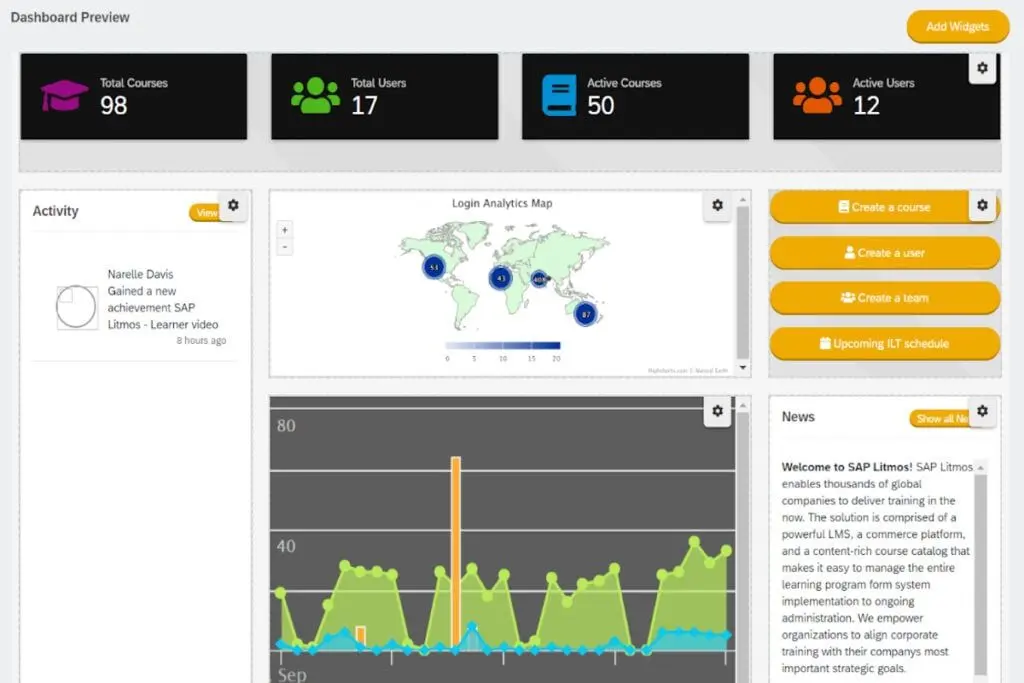
Key Benefits of Litmos
In reviewing Litmos vs TalentLMS, our research team has identified the following benefits for Litmos:
- Accessibility. Litmos is easy to use for both beginners and expert instructional designers. It provides off-the-shelf content, SCORM support, and AI-powered video assessments.
- Cloud-Based and Scalable. The platform can be accessed anytime and anywhere, with or without internet connection. It can also adapt to a company's growth as it supports additional tenants and users.
- Learner Engagement. Litmos provides tools designed to engage learners through assessments, gamification, and custom learning paths.
- Off-the-Shelf Content. Litmos’ ready-made content encompasses various topics, including IT skills, project management, and diversity and inclusion, to name a few.
- Open API. The platform supports custom integrations that enable users to create the ecosystem that serves them best. It also connects with popular platforms like Dropbox, Microsoft Teams, and PayPal.
What is TalentLMS?
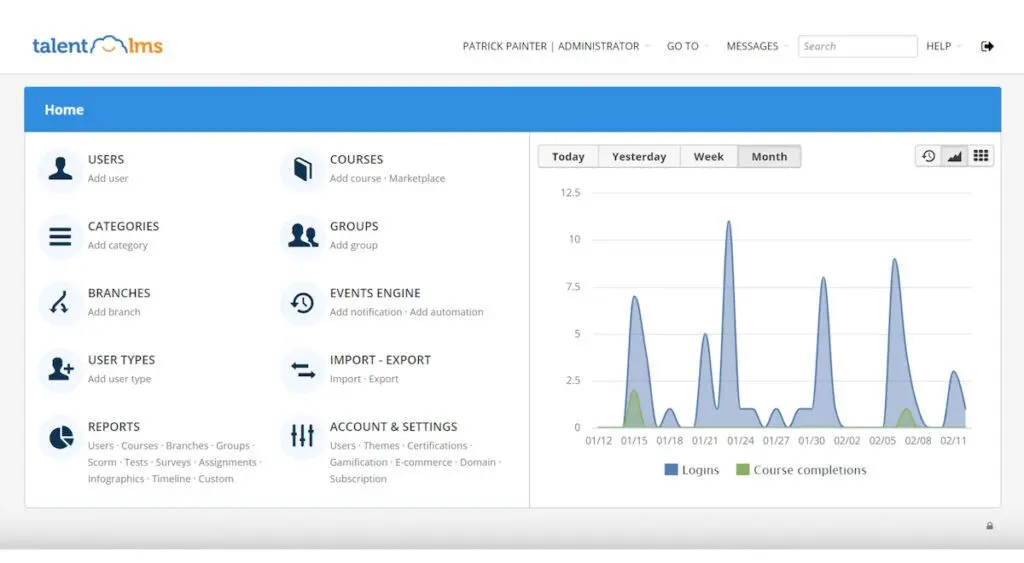
TalentLMS is a beginner-friendly LMS for launching training programs for new hires and internal employees. Its user-friendly interface allows users to add various media types like videos, presentations, and documents to training courses via drag-and-drop. Users can create interactive content using SCORM, xAPI, or cmi5 files, and conduct online or in-person training sessions.
Primary users of TalentLMS include the financial, retail, and hospitality industries. It is often used for employee, onboarding, and remote training, among others. It offers quizzes, tests, assignments, and surveys that can be utilized to assess learners and learning material, with custom certificates to recognize achievements. Like Litmos, TalentLMS offers learner engagement tools, including video conferences, discussions, and messaging.
Learners have easy access to courses on desktop, mobile, or tablet. It is scalable and supports organizations with multiple teams through unlimited custom sub-accounts that can be managed from a centralized location.
Who is TalentLMS for?
As one of the best SaaS LMS providers, TalentLMS is a popular option for beginners in instructional design, small and medium businesses, and those looking for an easy-to-use drag-and-drop UI. It is particularly well-suited for those seeking an affordable LMS to enhance staff learning and training. The platform offers access to ready-made courses covering essential corporate topics like HR, sales, and leadership, making it highly beneficial for in-house training.
Additionally, small businesses can take advantage of a free starting plan for up to five users. Industries that benefit from TalentLMS include e-learning, education management, IT and services, computer software, and professional training and coaching.
Key Benefits of TalentLMS
Our Litmos vs TalentLMS review team has identified the following benefits for TalentLMS:
- Affordability. The entry cost for TalentLMS is affordable for small businesses as it starts as a free package for organizations with less than five users. This makes for a cost-effective solution, especially for those just starting.
- Organization and Centralization. TalentLMS offers a repository where users can upload files and courses, reuse them for easy program building, and share them for collaboration.
- Ease–of-Use. The platform’s drag-and-drop interface makes for an easy-to-use solution that is beginner-friendly. It also flattens the learning curve and enables users to focus on the quality of content.
- Communication. Users can connect with learners and instructors through video conferences. TalentLMS also provides space for discussions and supports sending messages.
- Analytics and Reports. TalentLMS generates easily understandable analytics and reports through simple data visualization and dynamic dashboards that provide real-time insight into programs and learners.
Who are Litmos and TalentLMS best for?
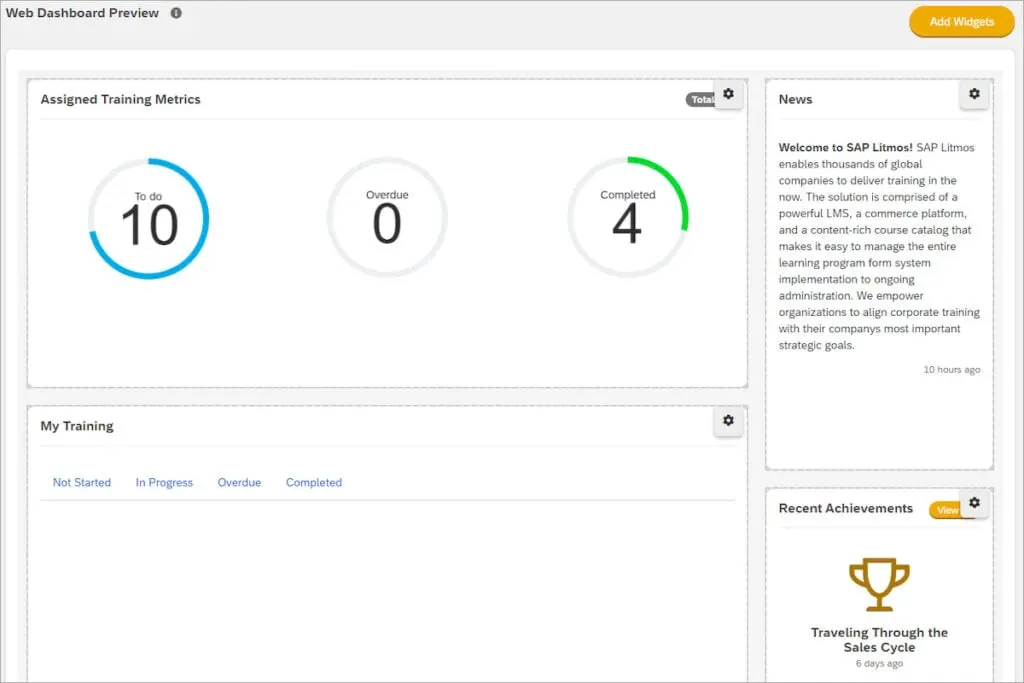
To provide a more in-depth comparison, this Litmos vs TalentLMS guide identified different scenarios, use cases, and industries that might benefit from one employee training system over the other. Here are some things to keep in mind when deciding which LMS to get.
Niche and Specialized Industries
For users in niche and specialized industries, Litmos has the edge. Litmos’ API integration enables users to create a specialized ecosystem that connects the platform to systems these industries already use. This benefit is especially notable for those in software development, IT and security, and healthcare.
In-House Training
For in-house training, TalentLMS benefits L&D departments more. TalentLMS caters better to trainers and L&D staff who seek to create educational content for internal employees, whether in-person or remote. In our Litmos vs TalentLMS comparison, we have found that TalentLMS' ready-made courses for general organizational training, upskilling, and re-skilling are more useful and comprehensive. It also allows for tailored content per department or team.
Practical Skills Training
For those looking to launch practical training, Litmos is the better option. Litmos enables learners to upload video assessments, which may be useful for demonstrating practical skills learned from the course. Examples include sales pitches, healthcare practices, and manufacturing assembly.
New and Small Businesses
For business owners just starting, TalentLMS stands as a more cost-effective solution. Though both systems are scalable, TalentLMS provides a free package that can provide an LMS solution for small businesses. It also offers tier-based enterprise pricing packages, which allow users to upgrade based on growth. In comparing Litmos vs TalentLMS based on affordability, TalentLMS edges out the competition.
Litmos vs. TalentLMS Feature Comparison
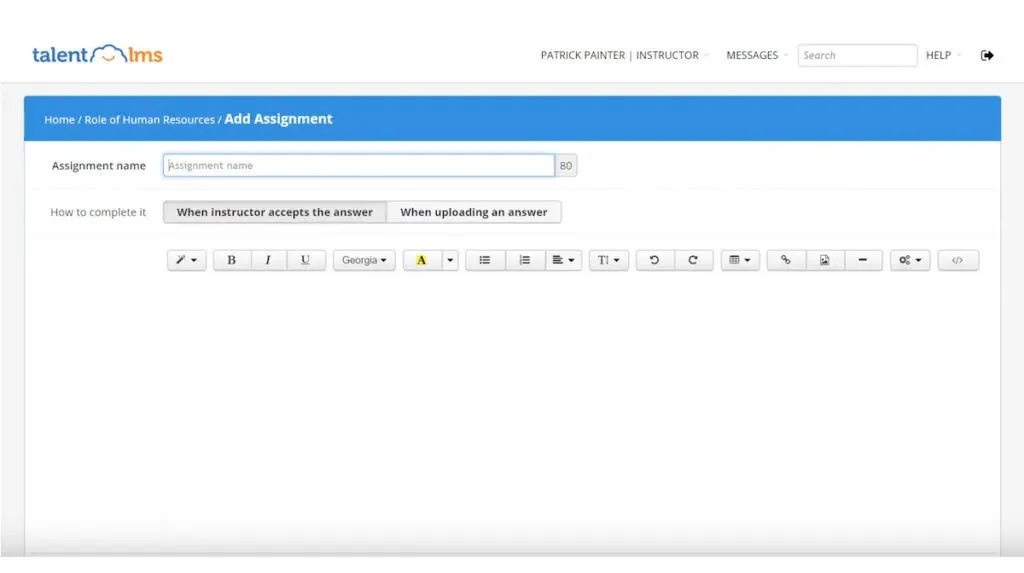
As LMS systems, Litmos and TalentLMS offer similar features that can help those looking for a solution to learning and development. This Litmos vs TalentLMS guide compares their major features, including content authoring, learner engagement, task automation, ecommerce capabilities, reporting and analytics, and integrations.
Content Authoring
Litmos and TalentLMS enable users to create instructional content. Both support SCORM content for interactive courses, but TalentLMS provides additional support for xAPI and cmi5 files. Other similarities include ready-made courses, tests and assessments, and support for instructor-led training. Content can be delivered through any device for accessibility, and both platforms support collaboration. Litmos’ courses can be created in over 35 languages, while TalentLMS offers language localization.
Learner Engagement
In terms of learner engagement, both Litmos and TalentLMS enable gamification to improve the learning experience through leaderboards, badges, and awards. Both systems also support custom learning paths to maximize individual skill levels. Learners can also engage through discussions and feedback. That said, TalentLMS provides the additional capability of video conferencing for courses launched online.
Task Automation
One of the most coveted features of LMS is its ability to automate tasks for easier and more efficient training management. In this regard, both Litmos and TalentLMS automate enrollment and task assignments. TalentLMS offers the added benefit of removing courses, deactivating inactive accounts, and sending emails. Litmos, on the other hand, supports CRM workflows to manage training and courses offered to clients.
eCommerce Capabilities
Litmos and TalentLMS enable L&D departments to monetize training courses and add a revenue path for the organization. Courses can be customized to reflect the organization’s branding. Litmos allows users to create an online storefront through Shopify, while TalentLMS supports subscriptions, payment processing, and invoicing. Both platforms offer Salesforce integration.
Reporting and Analytics
Generating reports on courses and learners enables L&D staff to identify areas for improvement and maximize data for decisions. Both Litmos and TalentLMS offer reporting tools that allow users to create custom reports and get insights from dynamic dashboards. Both systems can visualize performance through charts. Litmos specializes in reports on training impact, while TalentLMS prioritizes easy visualization through infographics, activity logs, and training matrixes.
Integrations
The best learning management system will enable users to create an efficient ecosystem through integrations. Litmos and TalentLMS offer out-of-the-box integrations with popular systems used in organizations, including ecommerce, HR, and SSO platforms. Litmos’ open API enables users to create a tailored ecosystem that serves their specific needs. On the other hand, TalentLMS provides connectors for more than 1000 applications through Zapier as well as a list of integrations with legacy systems.
Litmos vs TalentLMS Pricing
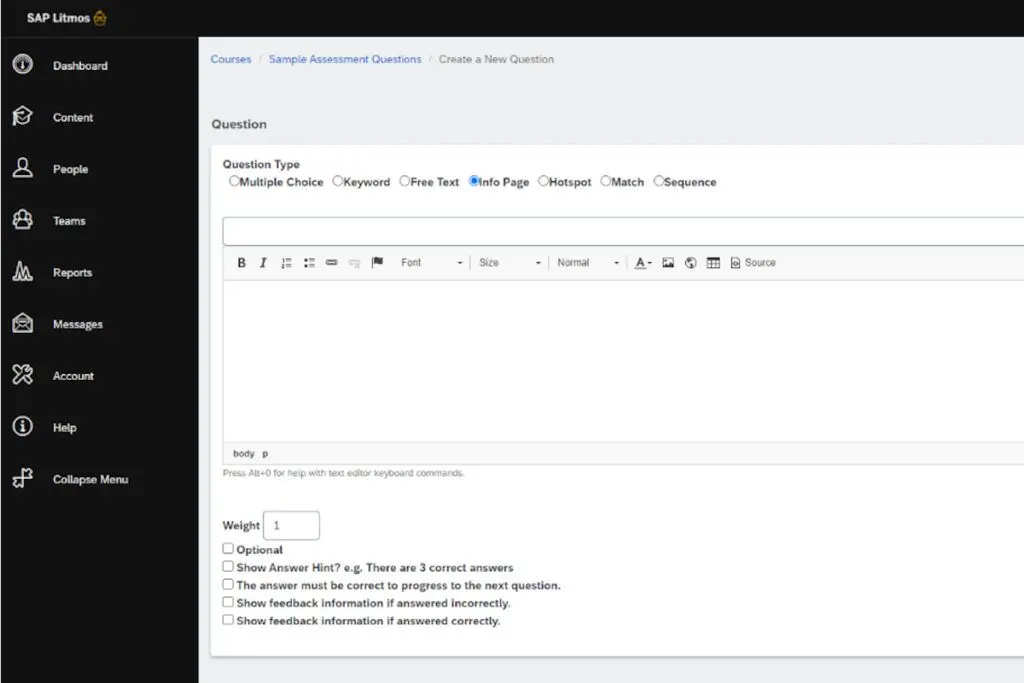
When considering Litmos vs TalentLMS, pricing plays a crucial role. Litmos may be challenging to evaluate as it offers quote-based enterprise pricing packages. In contrast, TalentLMS provides transparent pricing tiers. Additionally, TalentLMS offers a free-forever plan for small businesses with up to five users, which includes features like unlimited storage, webinar and Salesforce integrations, ecommerce tools, gamification, customer user permissions, white labeling, and a native mobile app.
Litmos Pricing Tiers
- Foundation Suite - Quote-Based. Users from small businesses with under 100 learners can opt for this package, which includes automated onboarding, security and accessibility features, reporting, core implementation, and foundation training content.
- Premier Suite - Quote-Based. Prospective users from medium and high-growth businesses can upgrade to this package, which includes all of Foundation Suite’s features plus custom branding, API integration, content authoring, premier implementation, and platinum training content.
- Platinum Suite - Quote-Based. Global companies are encouraged to go for the Platinum Suite. This package offers all features discussed plus AI video assessments, gamification, SMTP, SSL custom domain, platinum implementation, and custom roles and permissions.
- Add-Ons. Litmos has add-ons to improve platform value with content collections, more services, a Salesforce connector, and additional tenants.
TalentLMS Pricing Tiers
- Starter Plan – $89/month. This package is for businesses with up to four users. It includes unlimited courses, email support, and a custom homepage.
- Basic Plan – $189/month. For companies with up to 100 users and one branch, this package offers everything in Starter Plan plus SSO support and an SSL custom domain.
- Plus Plan – $369/month. Organizations with up to 500 users and three branches can opt for this package. It adds custom reports to the list of features available.
- Premium Plan – $569/month. TalentLMS’s premium plan offers support for up to 1,000 users and 15 branches. It offers everything in the previous plans, plus an account manager, automation, and live chat support.
- Enterprise Plan - Quote-Based. As the highest tier in TalentLMS’s packages, this plan offers a flexible user limit and support for unlimited branches and all available features.
Litmos Pros and Cons
Pros:
- Versatile content authoring that caters to both beginners and experts in instructional design
- Training content in niches and specialized industries
- Support for online, in-person, mobile, and social learning
- Offers video assessments for practical skills
- Adaptable platform and open API integration for a tailored ecosystem
Cons:
- eCommerce tools can have glitches
- Additional support costs more
- No free plan
- No transparent pricing
TalentLMS Pros and Cons
Pros:
- Easy to use drag-and-drop interface
- Full library of general educational content for organizations
- The free plan already includes unlimited courses, unlimited storage, and support
- Option to upgrade all plans to include unlimited users
- Data visualizations are easy to understand and informative
Cons:
- The location of tools can be buried in multiple tabs and windows
- Limitations on video files can be restricting or slow
- Content styling options are limited unlike other TalentLMS alternatives
- Prices are offered only in USD, which makes it more expensive for international users
What is the quality of customer support offered by Litmos and TalentLMS?
Both platforms provide multi-channel customer support that includes onboarding resources, technical troubleshooting, and continuous training assistance. Litmos is noted for dedicated account managers and tailored support for enterprise users, which helps streamline complex integrations and customized training initiatives. In contrast, TalentLMS emphasizes accessible live chat, email support, and a comprehensive resource library geared toward smaller organizations and rapid deployment. Additionally, both systems can integrate with a webinar platform to facilitate live training sessions and support webinars, adding flexibility to their support structures. Evaluating response times, self-service options, and community engagement may prove essential in aligning LMS support with organizational needs.
Strategies for Selecting the Right LMS Solution
Choosing the right learning management system (LMS) can significantly influence the success of a company’s training and development programs. While Litmos and TalentLMS offer robust features, selecting the right platform requires careful analysis of an organization’s specific needs and priorities. Below are some strategies to help businesses make an informed choice:
- Assess Organizational Training Objectives
Identify the primary goals of your training program. Are you looking to enhance compliance training, provide onboarding resources, or upskill employees in specific competencies? Platforms like Litmos excel in niche and highly specialized industries, while TalentLMS offers more versatility for general corporate and in-house training needs.
- Consider Scalability and Growth
Businesses should evaluate the scalability of LMS platforms to keep up with organizational growth. Litmos supports global operations with multi-language courses, making it suitable for enterprises with diverse teams. On the other hand, TalentLMS offers tiered pricing plans that allow small businesses to initially use a free plan and scale as their needs evolve.
- Analyze Features in Line with Industry Standards
Depending on your industry, certain features may hold more weight. For instance, healthcare organizations that need HIPAA-compliant content can benefit from Litmos’ secure course management. Conversely, TalentLMS is highly adaptable for industries like retail and hospitality, simplifying training with drag-and-drop course creation and real-time learner engagement tools.
- Evaluate Reporting and Analytics Requirements
Actionable insights are critical to track performance and training ROI. Both platforms offer reporting tools, but TalentLMS stands out for its intuitive visual dashboards and straightforward training matrices, while Litmos tailors its reports to emphasize training impact.
- Leverage Comparisons of Popular LMS Solutions
Conduct thorough research and comparisons of various learning management systems to get valuable insights into each platform’s features, strengths, and ideal use cases.
By aligning your training objectives, scalability needs, industry focus, and analytical requirements with the right platform, businesses can effectively implement an LMS that drives measurable improvements and employee engagement.
Verdict – Litmos vs TalentLMS: Which software is better?
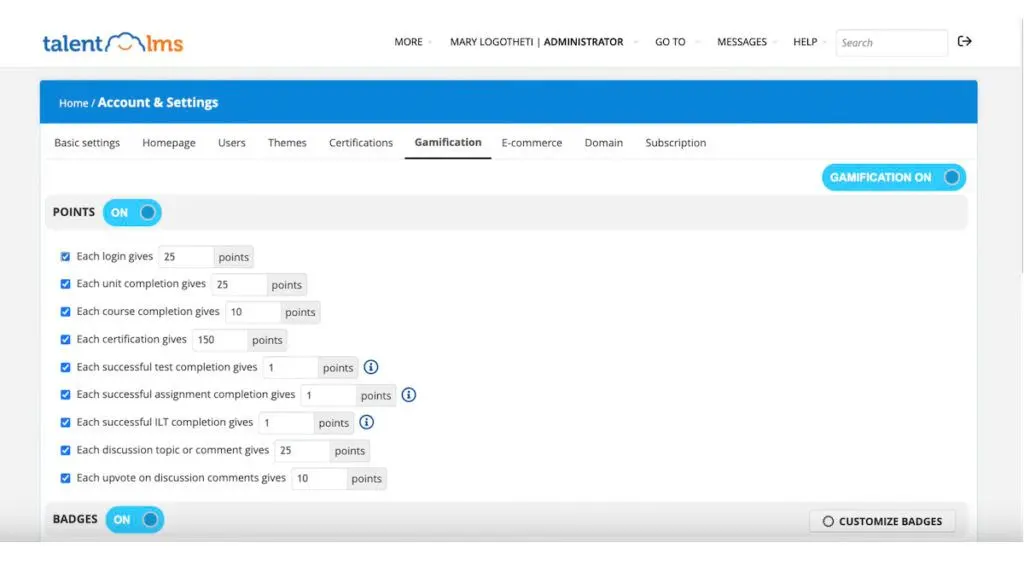
Our review team has analyzed user reviews, features, pricing, and other information to provide deeper insight into both systems, their features, pricing, advantages, and disadvantages. In this comprehensive Litmos vs TalentLMS comparison, users may find their preferences leaning towards one platform over the other. TalentLMS emerges as the superior choice, offering extensive capabilities at a lower cost, even in its free plan. Its user-friendly interface makes it ideal for beginners, providing full courses on common topics for onboarding, HR, and compliance training.
That said, Litmos still holds value, especially for experienced instructional designers and L&D professionals in niche industries. Its design and tools cater to skilled LMS users, enabling automation and integration. As such, in deciding between Litmos vs TalentLMS, users should prioritize their preferred features and factors accordingly.
How can businesses measure the effectiveness of Litmos or TalentLMS in their training programs?
To maximize the value of an LMS, it’s essential for businesses to evaluate its impact on their training programs and overall business goals. Here are several strategies to assess the effectiveness of Litmos or TalentLMS:
- Track Completion Rates: Analyze the percentage of learners who complete courses. High completion rates can indicate engaging and accessible content, while low rates may signal a need for improvements in course structure or content delivery.
- Assess Knowledge Retention: Use post-training assessments, quizzes, or follow-up evaluations to gauge how well employees retain information over time. For deeper insights, compare pre-training and post-training test scores to measure improvement.
- Analyze Employee Performance Metrics: Evaluate if there’s a noticeable improvement in employees' job performance after training. For example, compare productivity, customer satisfaction scores, or error rates before and after training.
- Monitor Learner Engagement: Engagement tools like gamification, discussions, and feedback sessions are valuable features of both platforms. Assess learner interaction by tracking logins, course participation, and engagement with interactive elements.
- Evaluate Training ROI: Calculate the return on investment by comparing the costs of implementing the LMS with measurable business outcomes, such as reduced time to competence, lower employee turnover, or increased sales.
- Gather Learner Feedback: Collect qualitative feedback from employees about the relevance and usability of the training. Surveys and feedback forms can provide insights into what learners find helpful or challenging.
- Use Built-in Analytics: Leverage the reporting and analytics tools in Litmos and TalentLMS to identify trends, such as frequently accessed modules or areas where learners struggle. Both platforms offer dashboards for visual insights, making it easier to understand training impact at a glance.
Key Insights
- Comprehensive Corporate Learning Platforms: Both Litmos and TalentLMS offer robust learning management systems (LMS) catering to different user needs. Litmos excels in specialized training for industries like healthcare and IT, while TalentLMS is more suited for general corporate training, including onboarding and compliance.
- User-Friendly Interfaces: TalentLMS is known for its beginner-friendly, drag-and-drop interface, making it ideal for small to medium businesses looking for an easy-to-use LMS. In contrast, Litmos offers a more versatile content authoring experience suitable for both beginners and experienced instructional designers.
- Flexible and Scalable Solutions: Both platforms are cloud-based and scalable, accommodating the growth of businesses by supporting additional tenants and users. TalentLMS offers a free plan for small businesses, making it a cost-effective solution for startups, while Litmos provides quote-based pricing for more tailored enterprise solutions.
- Integration Capabilities: Litmos and TalentLMS integrate with popular systems to enhance their functionality. Litmos supports open API for custom integrations and connects with platforms like Shopify and Salesforce. TalentLMS offers connectors through Zapier, supporting integration with over 1000 applications.
- Engagement and Automation: Both LMS platforms provide tools to engage learners through gamification, custom learning paths, and assessments. They also offer automation features to streamline training management, with TalentLMS focusing on removing courses and deactivating inactive accounts, and Litmos supporting CRM workflows.
- Content and Analytics: Litmos offers ready-made content across various topics and supports video assessments, making it suitable for practical skills training. TalentLMS provides extensive content libraries for general corporate training and emphasizes data visualization through easy-to-understand analytics and reports.
Other Things You Should Know About Litmos vs TalentLMS
SAP Litmos is a comprehensive corporate LMS used for various learning activities, including content creation, delivery, and management. It enables online training, progress tracking, and performance assessment. It also ensures compliance with industry regulations.
No. Francisco Partners, an American technology investment firm, purchased Litmos from SAP in 2022.
TalentLMS helps organizations launch training programs for new hires and internal employees. It allows users to create interactive courses with various media types. It also analyzes data to provide actionable reports. The platform offers assessment tools, learner engagement features, and easy course access on multiple devices.
TalentLMS’s current CEO is Thanos Papangelis, the co-founder of the platform alongside Dimitris Tsingos.
TalentLMS offers transparent pricing tiers, starting with a free plan for small businesses with up to five users. Paid plans range from $89 to $569 per month, depending on the number of users and features. In contrast, Litmos offers quote-based enterprise pricing packages, making it harder to evaluate costs directly.
Litmos is particularly beneficial for industries requiring specialized training, such as healthcare, IT, and security. Its ability to create HIPAA-compliant training courses and support for video assessments makes it ideal for these sectors.
Both platforms support SCORM content, but TalentLMS also supports xAPI and cmi5 files, offering more flexibility. Litmos excels in providing training content in over 35 languages and caters to more niche and specialized industries, while TalentLMS focuses on ease of use with a drag-and-drop interface and general corporate training content.
TalentLMS is more suitable for small businesses due to its affordable pricing, including a free plan for up to five users. Its user-friendly interface and extensive content library make it an ideal choice for startups and small enterprises looking for an easy-to-use LMS solution.


