
TalentLMS vs Tovuti LMS – 2027 Comparison

Co-Founder and Chief Data Scientist
TalentLMS vs Tovuti LMS Table of Contents
- What is TalentLMS?
- Who is TalentLMS for?
- Key Benefits of TalentLMS
- What is Tovuti LMS?
- Who is Tovuti LMS for?
- Key Benefits of Tovuti LMS
- Who are TalentLMS and Tovuti LMS best for?
- TalentLMS vs Tovuti LMS Feature Comparison
- TalentLMS vs Tovuti LMS Pricing
- TalentLMS Pros and Cons
- Tovuti LMS Pros and Cons
- Verdict – TalentLMS vs Tovuti LMS: Which software is better?
- What are the top considerations for selecting the right LMS for your organization?
- Importance of LMS in Educational Settings
- How can integrating LMS with employee monitoring tools enhance training outcomes?
What is TalentLMS?
TalentLMS is fully customizable, scalable, and flexible. It is a good choice for teams that want to embrace training, appreciate a wide range of features, and need expert guidance and step-by-step support.
Our team at Research.com has looked into TalentLMS, including its benefits and features, especially as it compares to Tovuti LMS. With this TalentLMS vs Tovuti LMS comparative review, our team hopes to help you make an informed decision as to which LMS best suits your organization's needs.
Featured LMS Software Providers

$4.08 per user per month
(billed annually)
30 days
Yes
Editor's Take
iSpring LMS is a user-friendly learning management system (LMS) tailored for businesses and educators to deliver eLearning content efficiently. It offers features like course creation, quizzes, learning paths, and progress tracking. iSpring LMS supports various content types, including video lectures and interactive modules, and integrates with the iSpring Suite authoring tool for seamless content development. Pros include a straightforward interface, mobile-friendly access, and powerful reporting tools. However, customization options can be limited, and pricing may be high for smaller organizations. It is ideal for corporate training, employee development, and onboarding, providing a reliable platform for scalable eLearning.
Expert Score
In evaluating SaaS software, a comprehensive and structured methodology ensures a fair and accurate comparison across key metrics. This approach focuses on the most critical aspects that affect user experience, functionality, and business value. The following metrics—general features, cost, customer service, integrations, and mobile support—are evaluated to provide a holistic view of each software solution’s strengths and weaknesses. These metrics are selected based on their direct impact on software usability, scalability, and long-term effectiveness for businesses.
1. General Features - scoring weight 40%
This metric evaluates the core functionalities and tools the software offers. It involves assessing the comprehensiveness of the features, their relevance to the target users, and the ease of use. This is important because robust and well-designed features determine the software's overall utility and efficiency in solving user problems.
2. Cost - scoring weight 15%
Cost analysis focuses on pricing models, value for money, and scalability. It's crucial to evaluate whether the software’s features justify its price, considering different plans for small and large organizations. This is vital for businesses to ensure they invest in cost-effective solutions that fit their budget.
3. Customer Service - scoring weight 15%
This evaluates the responsiveness, quality, and availability of customer support, including channels like chat, email, or phone. Good customer service is essential for troubleshooting and ensuring smooth software usage, which reduces downtime and frustration for users.
4. Integrations - scoring weight 15%
This examines how well the software integrates with third-party tools (e.g., CRM, payment systems, collaboration apps). Seamless integrations are key for creating a unified workflow and enhancing productivity by connecting multiple systems, which is crucial for operational efficiency.
5. Mobile Support - scoring weight 15%
Mobile support assesses the software’s functionality and performance on mobile devices, including apps and mobile web versions. With increasing remote work and on-the-go usage, strong mobile support is critical to ensure users can access and utilize the software effectively, regardless of location.

Free; $89 per month
(billed annually)
Demo available
Yes
Editor's Take
TalentLMS is a cloud-based learning management system designed for businesses of all sizes to deliver effective training programs. Key features include course management, quizzes, gamification, and reporting tools. The platform supports a variety of content types, including video and presentations, and integrates with popular tools like Zoom and Salesforce. Pros include an intuitive interface, customizable branding, and a free tier for small teams. However, advanced reporting and customization options are limited in lower-tier plans. TalentLMS is ideal for corporate training, employee onboarding, and compliance programs, offering scalability and flexibility to suit different learning needs.
Expert Score
In evaluating SaaS software, a comprehensive and structured methodology ensures a fair and accurate comparison across key metrics. This approach focuses on the most critical aspects that affect user experience, functionality, and business value. The following metrics—general features, cost, customer service, integrations, and mobile support—are evaluated to provide a holistic view of each software solution’s strengths and weaknesses. These metrics are selected based on their direct impact on software usability, scalability, and long-term effectiveness for businesses.
1. General Features - scoring weight 40%
This metric evaluates the core functionalities and tools the software offers. It involves assessing the comprehensiveness of the features, their relevance to the target users, and the ease of use. This is important because robust and well-designed features determine the software’s overall utility and efficiency in solving user problems.
2. Cost - scoring weight 15%
Cost analysis focuses on pricing models, value for money, and scalability. It’s crucial to evaluate whether the software’s features justify its price, considering different plans for small and large organizations. This is vital for businesses to ensure they invest in cost-effective solutions that fit their budget.
3. Customer Service - scoring weight 15%
This evaluates the responsiveness, quality, and availability of customer support, including channels like chat, email, or phone. Good customer service is essential for troubleshooting and ensuring smooth software usage, which reduces downtime and frustration for users.
4. Integrations - scoring weight 15%
This examines how well the software integrates with third-party tools (e.g., CRM, payment systems, collaboration apps). Seamless integrations are key for creating a unified workflow and enhancing productivity by connecting multiple systems, which is crucial for operational efficiency.
5. Mobile Support - scoring weight 15%
Mobile support assesses the software’s functionality and performance on mobile devices, including apps and mobile web versions. With increasing remote work and on-the-go usage, strong mobile support is critical to ensure users can access and utilize the software effectively, regardless of location.

Custom
14 days
Course creation, customizable learning paths, automated assessments
Editor's Take
SkyPrep is an intuitive Learning Management System (LMS) designed to streamline online training and onboarding for businesses, educational institutions, and non-profits. Known for its user-friendly interface, SkyPrep makes it easy for administrators to create, manage, and deliver training content while providing learners with a seamless, engaging experience. Key features include course creation tools, customizable learning paths, automated assessments, and reporting capabilities, enabling organizations to tailor training programs to individual or group needs.
One of SkyPrep’s strengths is its ability to support a range of media, including videos, presentations, and quizzes, making it versatile for various training formats. Its analytics and reporting tools offer valuable insights into learner progress, course completion rates, and knowledge gaps, empowering administrators to refine training content and improve learning outcomes.
The platform also integrates with popular software like Google Workspace, Salesforce, and Zoom, enhancing collaboration and accessibility for remote teams. With features like automated notifications, compliance tracking, and gamification, SkyPrep helps organizations keep learners engaged while ensuring that critical training requirements are met.
SkyPrep offers scalable pricing plans to fit small teams, growing businesses, and large enterprises, making it a cost-effective solution for organizations looking to simplify training and boost team performance. Overall, SkyPrep is an effective LMS choice for organizations that prioritize ease of use, customizability, and a comprehensive suite of learning management tools.
Expert Score
In evaluating SaaS software, a comprehensive and structured methodology ensures a fair and accurate comparison across key metrics. This approach focuses on the most critical aspects that affect user experience, functionality, and business value. The following metrics—general features, cost, customer service, integrations, and mobile support—are evaluated to provide a holistic view of each software solution’s strengths and weaknesses. These metrics are selected based on their direct impact on software usability, scalability, and long-term effectiveness for businesses.
1. General Features - scoring weight 40%
This metric evaluates the core functionalities and tools the software offers. It involves assessing the comprehensiveness of the features, their relevance to the target users, and the ease of use. This is important because robust and well-designed features determine the software’s overall utility and efficiency in solving user problems.
2. Cost - scoring weight 15%
Cost analysis focuses on pricing models, value for money, and scalability. It’s crucial to evaluate whether the software’s features justify its price, considering different plans for small and large organizations. This is vital for businesses to ensure they invest in cost-effective solutions that fit their budget.
3. Customer Service - scoring weight 15%
This evaluates the responsiveness, quality, and availability of customer support, including channels like chat, email, or phone. Good customer service is essential for troubleshooting and ensuring smooth software usage, which reduces downtime and frustration for users.
4. Integrations - scoring weight 15%
This examines how well the software integrates with third-party tools (e.g., CRM, payment systems, collaboration apps). Seamless integrations are key for creating a unified workflow and enhancing productivity by connecting multiple systems, which is crucial for operational efficiency.
5. Mobile Support - scoring weight 15%
Mobile support assesses the software’s functionality and performance on mobile devices, including apps and mobile web versions. With increasing remote work and on-the-go usage, strong mobile support is critical to ensure users can access and utilize the software effectively, regardless of location.

Editor's Take
Absorb is a comprehensive learning management system designed to deliver, track, and manage online training for businesses of all sizes. Known for its modern, user-friendly interface, Absorb offers a flexible solution for employee training, compliance, and certification programs. The platform supports a wide range of learning formats, including eLearning, instructor-led training, and blended learning, making it adaptable to different training needs.
Key features include a robust course builder, automated reporting and analytics, mobile accessibility, and advanced integrations with third-party systems like HR and CRM software. Absorb also offers a highly customizable interface, allowing businesses to tailor the platform to reflect their branding and specific workflows.
With its scalability, ease of use, and strong focus on learner engagement and tracking, Absorb is an ideal solution for organizations looking to enhance their learning and development initiatives while maintaining control and flexibility over their training programs.
Expert Score
In evaluating SaaS software, a comprehensive and structured methodology ensures a fair and accurate comparison across key metrics. This approach focuses on the most critical aspects that affect user experience, functionality, and business value. The following metrics—general features, cost, customer service, integrations, and mobile support—are evaluated to provide a holistic view of each software solution’s strengths and weaknesses. These metrics are selected based on their direct impact on software usability, scalability, and long-term effectiveness for businesses.
1. General Features - scoring weight 40%
This metric evaluates the core functionalities and tools the software offers. It involves assessing the comprehensiveness of the features, their relevance to the target users, and the ease of use. This is important because robust and well-designed features determine the software’s overall utility and efficiency in solving user problems.
2. Cost - scoring weight 15%
Cost analysis focuses on pricing models, value for money, and scalability. It’s crucial to evaluate whether the software’s features justify its price, considering different plans for small and large organizations. This is vital for businesses to ensure they invest in cost-effective solutions that fit their budget.
3. Customer Service - scoring weight 15%
This evaluates the responsiveness, quality, and availability of customer support, including channels like chat, email, or phone. Good customer service is essential for troubleshooting and ensuring smooth software usage, which reduces downtime and frustration for users.
4. Integrations - scoring weight 15%
This examines how well the software integrates with third-party tools (e.g., CRM, payment systems, collaboration apps). Seamless integrations are key for creating a unified workflow and enhancing productivity by connecting multiple systems, which is crucial for operational efficiency.
5. Mobile Support - scoring weight 15%
Mobile support assesses the software’s functionality and performance on mobile devices, including apps and mobile web versions. With increasing remote work and on-the-go usage, strong mobile support is critical to ensure users can access and utilize the software effectively, regardless of location.

$8 per user per month
30 days
Yes
Editor's Take
360Learning is an AI-driven enterprise LMS that closes skills gaps by capturing internal expertise with collaborative learning Academies. Legacy systems force L&D teams to choose between scale and relevance. 360Learning eliminates this trade-off. Using agentic AI, it transforms the expertise that runs your business into scalable learning for your entire organization—upskilling employees, customers, and partners from one platform.
The platform merges enterprise LMS and LXP capabilities, including agentic automation, adaptive coaching, a multimodal AI content builder, and the market’s #1 rated mobile app. Its ecosystem of 50+ partners includes an SAP Silver Partnership and Workday Design Partnership, ensuring learning connects to your broader business strategy.
Over 2,500 companies, including Heineken, Equinox, Michelin, Merlin, and Cisco, trust 360Learning as their enterprise LMS. Rated #1 AI LMS by eLearning Industry and backed by dedicated implementation, support, and services teams, 360Learning helps L&D become a growth lever, not a cost center.
360Learning, founded in 2013, has raised $240 million and operates teams across North America and Europe.
Expert Score
In evaluating SaaS software, a comprehensive and structured methodology ensures a fair and accurate comparison across key metrics. This approach focuses on the most critical aspects that affect user experience, functionality, and business value. The following metrics—general features, cost, customer service, integrations, and mobile support—are evaluated to provide a holistic view of each software solution’s strengths and weaknesses. These metrics are selected based on their direct impact on software usability, scalability, and long-term effectiveness for businesses.
1. General Features - scoring weight 40%
This metric evaluates the core functionalities and tools the software offers. It involves assessing the comprehensiveness of the features, their relevance to the target users, and the ease of use. This is important because robust and well-designed features determine the software's overall utility and efficiency in solving user problems.
2. Cost - scoring weight 15%
Cost analysis focuses on pricing models, value for money, and scalability. It's crucial to evaluate whether the software’s features justify its price, considering different plans for small and large organizations. This is vital for businesses to ensure they invest in cost-effective solutions that fit their budget.
3. Customer Service - scoring weight 15%
This evaluates the responsiveness, quality, and availability of customer support, including channels like chat, email, or phone. Good customer service is essential for troubleshooting and ensuring smooth software usage, which reduces downtime and frustration for users.
4. Integrations - scoring weight 15%
This examines how well the software integrates with third-party tools (e.g., CRM, payment systems, collaboration apps). Seamless integrations are key for creating a unified workflow and enhancing productivity by connecting multiple systems, which is crucial for operational efficiency.
5. Mobile Support - scoring weight 15%
Mobile support assesses the software’s functionality and performance on mobile devices, including apps and mobile web versions. With increasing remote work and on-the-go usage, strong mobile support is critical to ensure users can access and utilize the software effectively, regardless of location.
Who is TalentLMS for?
Thanks to its scalability, TalentLMS can be used by organizations of all sizes and from a wide range of industries, including businesses, educational institutions, government agencies, and nonprofits.
Organizations can use TalentLMS for a variety of purposes, including:
- Employee training. TalentLMS can be used to train employees on new skills, update their knowledge, or comply with regulations.
- Compliance training. TalentLMS can be used to train employees on compliance regulations, such as those related to health and safety, data privacy, or financial reporting.
- Onboarding. TalentLMS can be used to onboard new employees by providing them with the information they need to get started.
- Product training. TalentLMS can be used to train employees on new products or features.
- General education. TalentLMS can be used to provide employees with general education, including those on leadership, communication, or problem-solving.
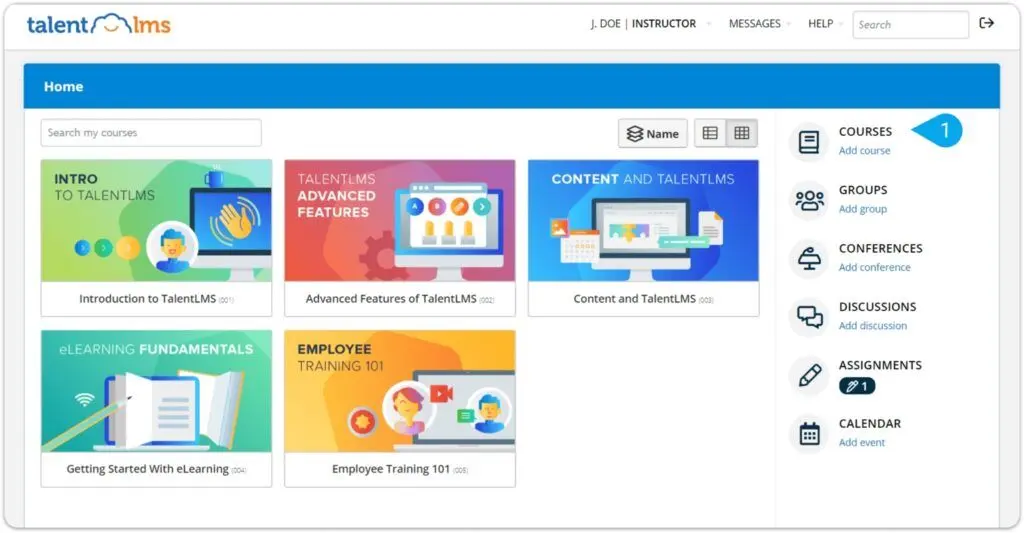
Key Benefits of TalentLMS
The key benefits of using TalentLMS include:
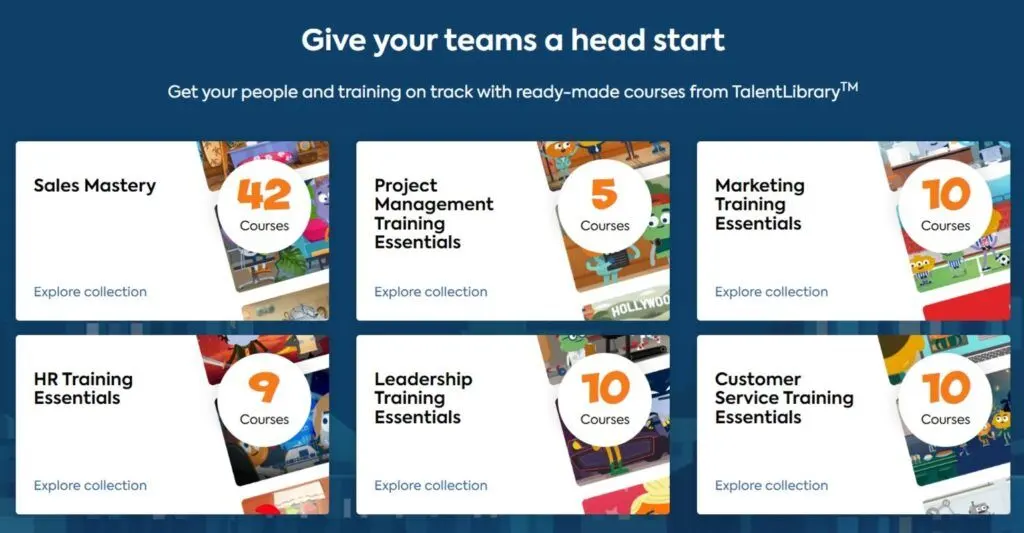
- Access to ready-made training courses from its TalentLibrary.
- Ability to add tests or quizzes and host live sessions easily.
- Easy management of training courses.
- Ability to organize your training so that learners stay on track.
- Ability to customize its training hub by adding a homepage, designing preferred details, and localizing languages for learners.
- Access to gamification features and communication tools to motivate learners, ensure a great learning experience, encourage engagement and interaction, and stay connected with the rest of the team.
- Ability to automate tasks, analyze results through reports, and create sub-accounts.
- Access to reduced training costs and save money otherwise spent on travel, accommodation, and other training expenses.
- Ability to improve regulatory compliance and avoid fines and other penalties.
What is Tovuti LMS?
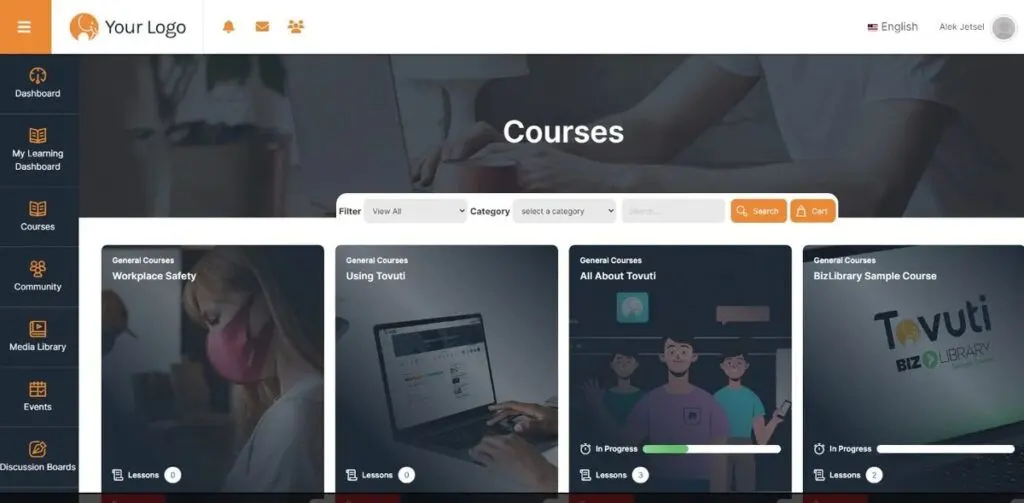
Tovuti LMS is an innovative LMS designed to help organizations create, distribute, and track online training courses and educational content. Tovuti LMS allows organizations to manage and monitor these e-learning initiatives.
Even through various iterations and upgrades, Tovuti LMS strives to be a user-friendly and adaptive people-first platform that integrates technology, data, and content to create an effective, engaging, and comprehensive learning experience for users from across the globe.
If you look at the bigger picture, you can see that choosing between TalentLMS vs Tovuti LMS is a difficult task as they generally share many functionalities and user goals. That is why looking into their specifics and examining user reviews are very important.
Who is Tovuti LMS for?
Tovuti LMS is designed for businesses and organizations of all types and sizes, including nonprofits, government agencies, and educational institutions that are looking for a platform to deliver effective training. The platform is a good option for companies in various industries, whether it be finance, consulting, healthcare, hospitality, manufacturing, human resources, retail, or technology, to name a few. Tovuti LMS can also be used by individuals to create and deliver online courses.
Organizations can use Tovuti LMS to train their employees and partners on new skills, update their knowledge, or comply with regulations. More specifically, the platform is a good solution for the following purposes:
- Employee onboarding
- Blended learning
- Employee training
- Customer training
- Compliance training
- Partner training
- Sales training
- Social learning
- Mobile learning
- E-commerce
- Direct sales
- Extended enterprise
Key Benefits of Tovuti LMS
The key benefits of using Tovuti LMS include:
- Access to a wide range of features that can help your organization improve your training programs and achieve your business goals, including course creation, delivery, tracking, reporting, and analytics.
- Access to courses and learning materials on the go, thanks to the LMS platform being mobile-friendly.
- Ability to create, customize, and deliver courses that are engaging and interactive.
- Ability to integrate with your existing systems and processes, as well as other applications like Slack, Salesforce, and Google Drive.
- Ability to increase user engagement that can lead to better learning outcomes through gamification and interactive features.
- Ability to track learners' progress and to improve content for better knowledge retention through Tovuti LMS' reporting features.
- Access to reduced training costs and save money otherwise spent on travel, accommodation, and other training expenses.
- Ability to improve regulatory compliance and avoid fines and other penalties.
In the TalentLMS vs Tovuti LMS battle of benefits, you can see how it’s a very close fight. Both platforms offer pretty much the same expected conveniences and benefits of LMS to users.
Who are TalentLMS and Tovuti LMS best for?
Next in this TalentLMS vs Tovuti LMS faceoff is their target users. Both TalentLMS and Tovuti LMS are good, reliable platforms for various industries that need online training and educational content. But based on the overview of user ratings and reviews, one is preferred over the other in terms of the following use cases, groups, and industries:
Use Cases
- TalentLMS is a good choice for organizations that require a platform for employee training and onboarding.
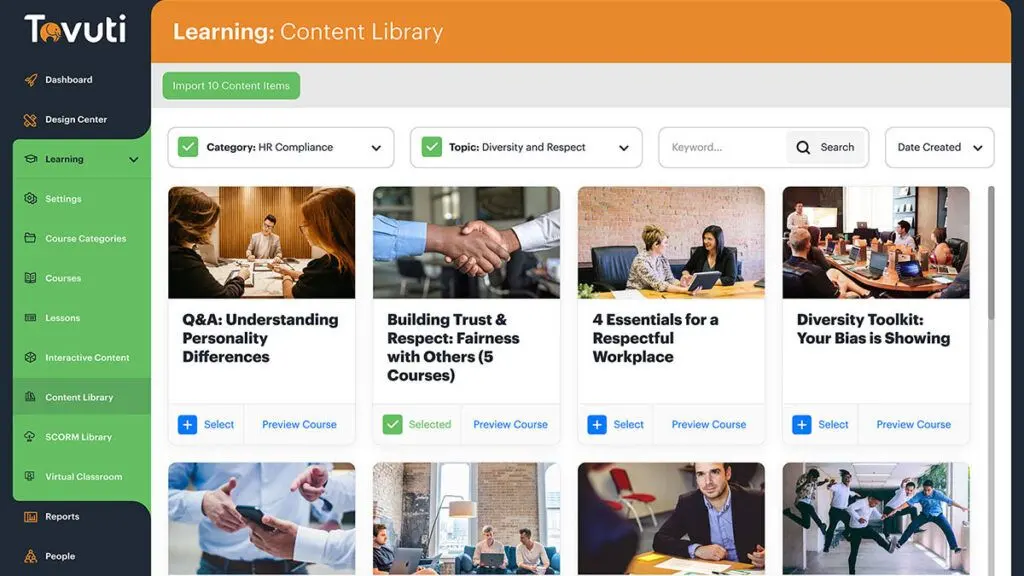
- Tovuti LMS is a good choice for organizations that require a platform for compliance training and general education.
Training
- TalentLMS' strengths in training include documentation, online tutorials, and webinars.
- Tovuti LMS' strengths in training include documentation, in-person training, live online tutorials, and webinars.
Customers
- TalentLMS' top customers are large enterprises with more than 10,000 employees, nonprofits, public administrations, and small and medium businesses.
- Tovuti LMS' top customers are academic institutions, large enterprises with more than 10,000 employees, nonprofits, public administrations, and small and medium businesses.
Groups
- TalentLMS is a good choice for small businesses that need a cost-effective platform for training their employees and for nonprofits that need a platform for training their volunteers and staff.
- Tovuti LMS is a good choice for large enterprises that need a scalable and customizable platform for training their employees and for educational institutions that need a platform for delivering online courses.
Industries
- TalentLMS is a good choice for technology companies that need a platform for training their employees on new technologies and for financial organizations that need a platform for training their employees on financial regulations.
- Tovuti LMS is a good choice for healthcare organizations that need a platform for training their employees on compliance regulations and for retail organizations that need a platform for training their employees on customer service.
Just by looking at these, you can see that it really isn’t about TalentLMS vs Tovuti LMS. Each LMS has its own strengths and is preferred by a certain group of people. So it is more a matter of knowing what you require and which LMS learning management system is better at meeting these needs.
TalentLMS vs Tovuti LMS Feature Comparison
As with any comparison between any two software, deciding between TalentLMS vs Tovuti LMS relies heavily on each of their features and offerings.
TalentLMS' and Tovuti LMS' main features include:
Course Authoring
TalentLMS has a comprehensive course authoring feature with tools and functions like course builder, assessments and quizzes, instructor-led training, premade questions, customized learning paths, and video simulations or video coaching features.
Tovuti's course authoring feature includes a course builder, role-based templates, assessments and quizzes, and instructor-led training.
Course Delivery
TalentLMS has a course delivery feature that boasts 24/7 availability and tools like learning paths or the sequencing of classes that need to be taken in a specific order. It also has communication and notifications tools, as well as assignment scheduling.
Tovuti LMS' course delivery feature is also available 24/7 and offers learning paths, communications and notifications, and assignment scheduling.
Course Management
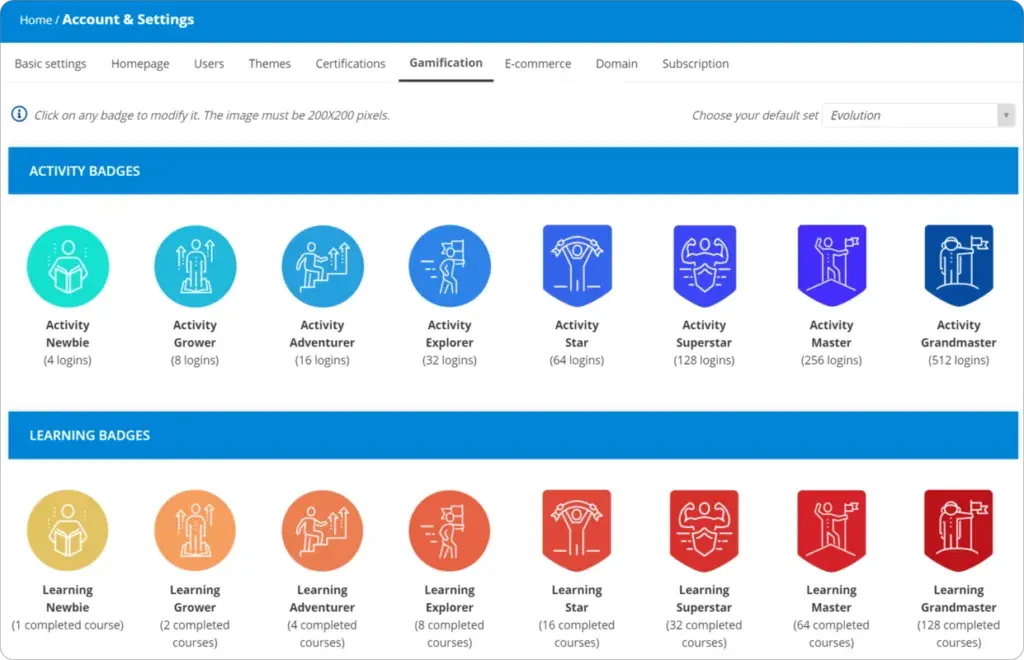
TalentLMS has a course management feature that offers gamification, where learners are motivated through tracking points, badges, and achievements. It also has varied user types and privileges, certifications, industry compliance, assessments, custom certifications, manager portals, and a feedback system. Managers can access course listing on the customization dashboard.
Tovuti LMS' course management feature also has gamification, varied user types, certifications, industry compliance, and manager access on the customization dashboard.
LMS Marketplace
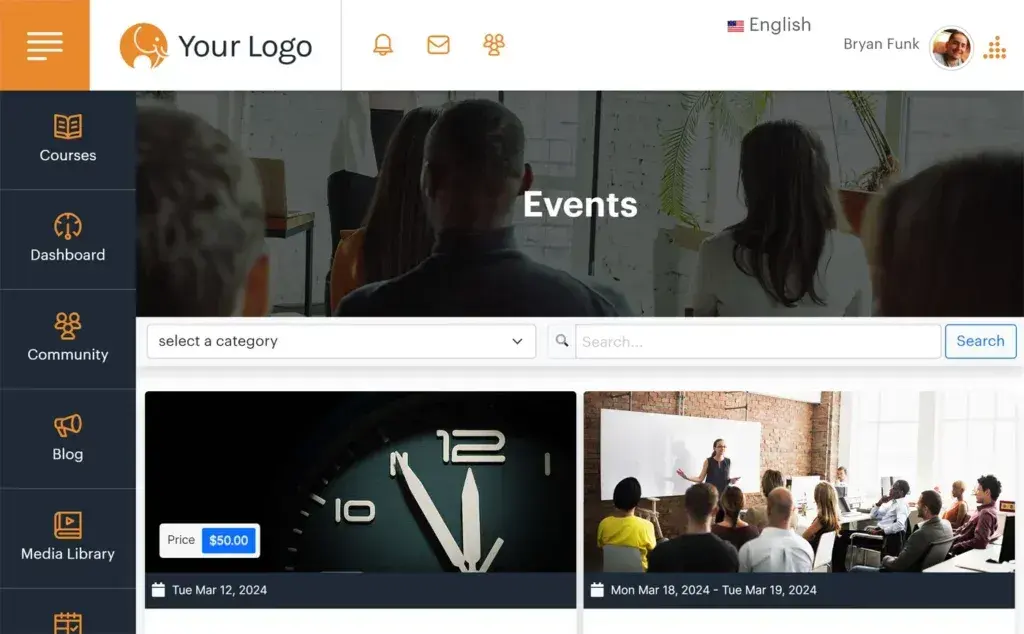
TalentLMS has e-commerce, which enables users to sell their courses and receive compensation for them. Customers can, therefore, purchase and take the courses via the online marketplace. Users can also sell and manage subscriptions to their courses.
Tovuti LMS also has similar e-commerce, course marketplace, and subscription offerings.
Interface
TalentLMS allows users to customize their accounts with their own homepage branding, personalized URL, and more. It also provides multiple language choices.
Tovuti LMS likewise has a white labeling offering that allows for customization and a multilingual feature for a global reach.
Other Features
TalentLMS offers tight integration, data and analytics, reporting analysis, mobility, onboarding, process automation, training and eLearning features, and content libraries with pre-created content on standard topics, among many others.
Tovuti LMS' other features include integration, content sharing (video streaming, session recording, and file sharing), collaboration (survey tools, whiteboard, and participation controls, live chat, mobility, content libraries, performance monitoring, reporting of business metrics and progress, interoperability, assessment delivery, grading and reporting, training and eLearning, process automation, and reporting analysis.
TalentLMS vs Tovuti LMS Pricing
This TalentLMS vs Tovuti LMS comparison guide won’t be complete without looking into their pricing plans to help you decide which one is more affordable or gives you better value for your money.
The pricing plans for TalentLMS and Tovuti LMS both have five categories. Both offer free trial options for users who are not yet ready to commit to a subscription.
TalentLMS Pricing
- Free – $0.00 Up to 5 users Up to 10 courses Unlimited email support
- Starter – Starting at $69 per month Up to 40 users Unlimited courses Unlimited email support
- Basic – Starting at $149 per month Up to 100 users Unlimited courses Unlimited email support Single Sign-On support 1 Branch Custom domain + SSL
- Plus – Starting at $279 per month Up to 500 users Unlimited courses Unlimited email support Single Sign-On support Custom reports Automations Success Manager Custom domain + SSL 3 Branches
- Premium – Starting at $459 per month Up to 1000 users Unlimited courses Priority email support Live chat support Single Sign-On support Custom reports Automations Success Manager Custom domain + SSL 15 Branches
Tovuti LMS Pricing
- Tovuti Pro – up to 50 Users $775.00Per Month
- Tovuti Pro – Up to 250 Users $945.00Per Month
- Tovuti Pro – Up to 500 Users $1,325.00Per Month
- Tovuti Pro – Up to 1,500 Users $1,925.00Per Month
- Tovuti Enterprise – More than 1,500 Users Contact Tovuti
All pricing editions come with:
- White Labeling
- Integrated Content Library
- Charge for Courses
- SCORM Importer
- Zapier and API
- Subscriptions
TalentLMS Pros and Cons
Pros:
- Is easy to use for both instructors and learners.
- Feature-rich, with tools for course creation, delivery, tracking, reporting and analytics.
- Scalable, as it can be used by organizations of any size.
- Affordable, with a variety of pricing plans to fit the needs of different organizations.
- Integrates with a variety of other applications, such as Salesforce, Slack, and Google Drive.
Cons:
- Does not offer as many customization options as some of the TalentLMS alternatives.
- Customer support is not as responsive as some other LMS platforms.
- Reporting features are not as advanced as some other LMS platforms.
- The mobile app is not as user-friendly as some other LMS platforms.
Tovuti LMS Pros and Cons
Pros:
- Offers a wide range of customization options, making it a good choice for organizations that need a platform that can be tailored to their specific needs.
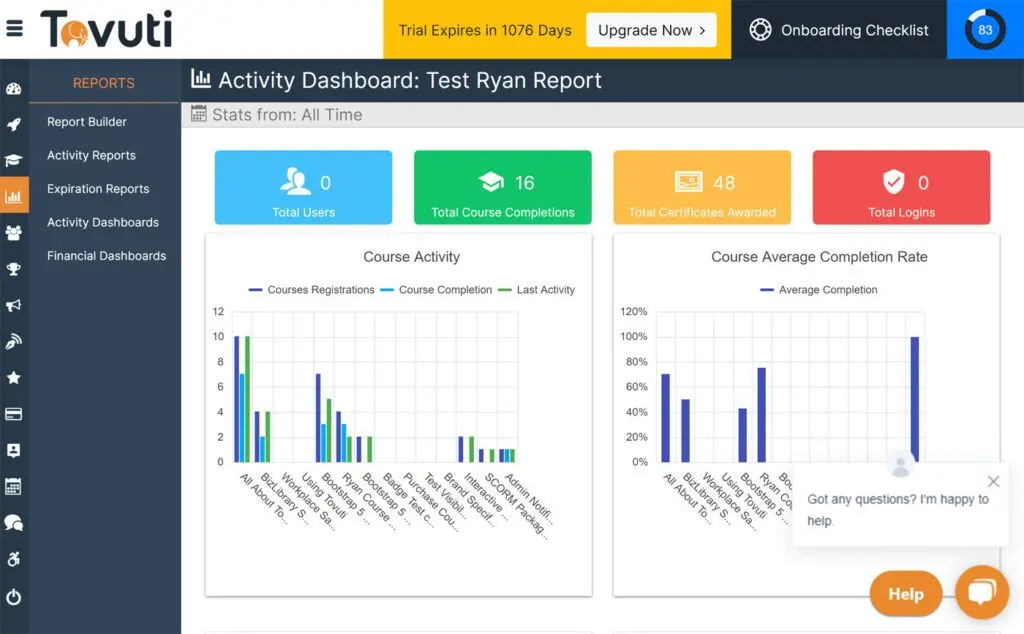
- Has advanced reporting features that can help organizations track the progress of their learners and the effectiveness of their training programs.
- Its mobile app is user-friendly and allows learners to access their courses and learning materials on the go.
- Integrates with a wide range of other applications, making it easy to connect the platform with other systems and processes.
- Scalable, as it can be used by organizations of any size.
- Customer support is responsive.
Cons:
- Is significantly more expensive than other Tovuti LMS alternatives.
- Can have a steep learning curve, making it difficult for some users to get started.
Verdict – TalentLMS vs Tovuti LMS: Which software is better?
All in all, the fight between TalentLMS and Tovuti LMS is pretty neck and neck. In some TalentLMS vs Tovuti LMS comparison guides, TalentLMS got higher average user ratings than Tovulti LMS, while in others, it’s the other way around.
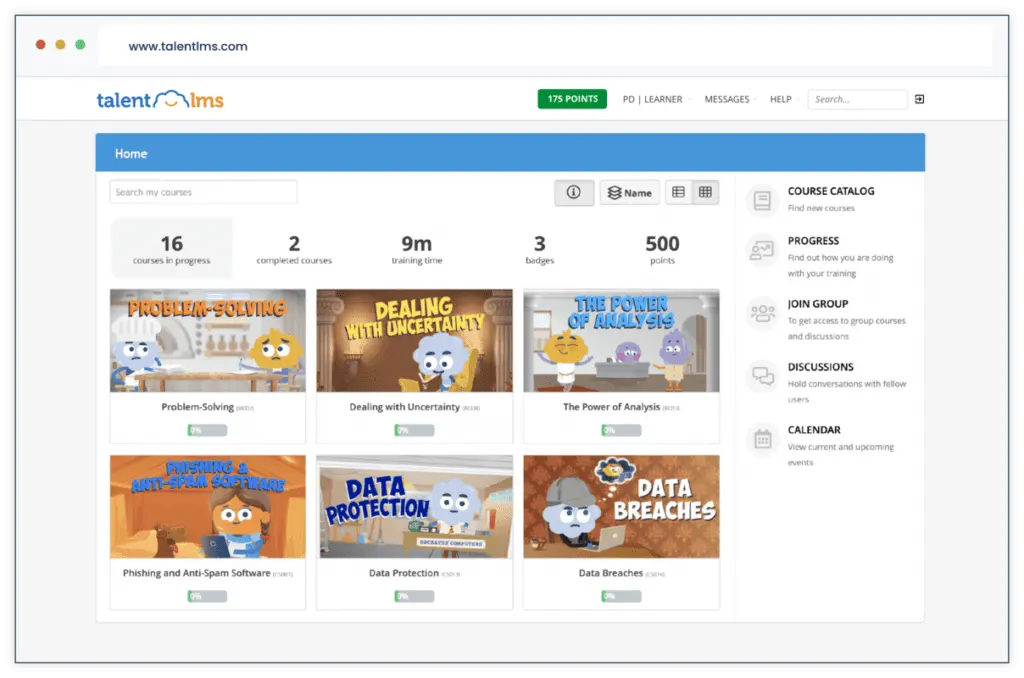
When it comes to ease of use, TalentLMS is designed to be user-friendly, which makes it easy for both instructors and learners. The platform has a drag-and-drop course builder, a user-friendly interface, and a mobile app, among other great features. This makes it a good employee training LMS for corporates.
Tovulti LMS is also designed to be user-friendly. However, it may be a better choice for organizations that require a more customizable platform. While the platform also has an easy-to-use interface, a drag-and-drop course builder, and a mobile app, it offers more customization options than TalentLMS, including the ability of users to change its look and feel so it is consistent with their branding.
In terms of features, TalentLMS offers a wide range, including course creation, delivery, tracking, reporting, analytics, gamification, social learning, and integrations. And while Tovuti offers the same things, it also offers features for managing multiple users and roles and for tracking learner progress and compliance. As such, Tovuti may be a better choice for organizations that need a more robust platform for onboarding or compliance training.
As for scalability, both TalentLMS and Tovuti LMS are scalable platforms that can benefit organizations of any size. However, the difference is that TalentLMS can support up to 100,000 learners and 10,000 courses whereas Tovuti LMS can support one million learners and 100,000 courses.
When it comes to LMS costs, both have a variety of pricing plans to cater to the needs of different organizations. However, TalentLMS is more affordable and more accommodating to a small number of users, with a free plan for up to five users. There is also a big discrepancy between TalentLMS' Starter plan, which starts at $69 per month for up to 40 users, and Tovuti's Pro plan for up to 50 users, which is $775 per month.
In terms of integrations, TalentLMS and Tovuti both integrate with a variety of other applications, including Slack, Google Drive, and Salesforce. But Tovuti's range of integrations is wider, making it a better choice for organizations that need a more robust platform for integrations.
In some TalentLMS vs Tovuti LMS reviews, the former has higher ratings for areas like usefulness, usability, and customer experience.
The varying reviews and ratings for TalentLMS vs Tovuti LMS prove that customer preference can be very subjective and customer experience can significantly differ. These, however, will still depend on your organization's specific LMS platform needs. The first platform may meet only a couple of your needs while the second platform may meet six of them. For another organization, the same first platform may meet all of its needs while the second platform may not meet any of them at all.
What are the top considerations for selecting the right LMS for your organization?
When choosing between TalentLMS, Tovuti LMS, or any other LMS platform, it’s crucial to consider specific factors that align with your organization’s unique needs and goals. Here are some of the most important considerations for selecting the best LMS for your team:
User Experience and Interface
- Ease of Use: Look for a platform with an intuitive design that makes course creation, learner management, and navigation seamless for all users.
- Customizable Branding: Platforms like Tovuti LMS allow more extensive branding, ideal for businesses aiming for a cohesive user experience aligned with their identity.
- Mobile Accessibility: Consider if the LMS has a responsive mobile app that allows learners to access content on-the-go without losing functionality.
Scalability and Flexibility
- Growth Potential: If your organization anticipates rapid growth, select an LMS that can scale with your expanding needs, such as TalentLMS or Tovuti LMS, which can support thousands of users.
- Flexible Pricing Plans: Look for platforms that provide a range of subscription plans suitable for different organization sizes, allowing you to increase usage as your team grows.
Content Management and Delivery Options
- Course Authoring Tools: Choose an LMS with robust course-building capabilities, including quizzes, assessments, and interactive features, to deliver engaging learning experiences.
- Content Library Access: Consider whether the platform provides pre-made courses or allows integration with third-party libraries to streamline content delivery.
- Customizable Learning Paths: Platforms that support custom learning paths, like TalentLMS, enable you to structure courses according to specific roles or objectives.
Reporting and Analytics
- Data and Insights: Advanced analytics, such as those in Tovuti LMS, allow you to track learner progress, identify knowledge gaps, and measure training effectiveness.
- Compliance Tracking: For organizations with regulatory requirements, robust tracking and reporting are essential to ensure compliance with industry standards.
Integration with Other Systems
- Existing System Compatibility: Choose an LMS that integrates seamlessly with your organization’s current tools, such as HR software, communication apps, and file-sharing platforms.
- API Access: Ensure the platform provides API capabilities if your organization requires more custom or complex integrations.
Importance of LMS in Educational Settings
When selecting between TalentLMS and Tovuti LMS, understanding the broader scope of how a Learning Management System (LMS) impacts education can significantly guide your decision-making process. In educational settings, an LMS plays a pivotal role in organizing, delivering, and managing learning content while enhancing engagement and accessibility for both students and educators.
A key aspect worth considering is how features like gamification, robust analytics, and course customization can be utilized for improving learning outcomes. For instance, both TalentLMS and Tovuti LMS offer collaborative tools—essential for fostering interactive learning in classrooms or corporate settings. However, the depth and usability of these features can vary, impacting the effectiveness of your programs.
Moreover, LMS platforms serve as a bridge between traditional and digital learning paradigms. Whether you are managing K-12 education, vocational training, or professional development courses, understanding "what is LMS in education" can help you identify the solutions that best address your organizational or academic needs. To learn more about the critical role of LMS in education, you can explore detailed insights here: what is LMS in education.
Ultimately, define your institution's specific requirements for scalability, accessibility, reporting features, and user support. Aligning these needs with the strengths of TalentLMS or Tovuti LMS can ensure the selection of an education-focused LMS tailored for long-term success.
Key Insights
- Scalability and Flexibility:
- TalentLMS is designed to scale, accommodating organizations of all sizes across various industries, including businesses, educational institutions, government agencies, and nonprofits. Tovuti LMS also offers scalability, supporting up to one million learners and 100,000 courses, making it suitable for larger organizations.
- Feature-Rich Platforms:
- Both TalentLMS and Tovuti LMS offer extensive features for course creation, delivery, tracking, reporting, and analytics. They also support gamification, social learning, and mobile learning, enhancing the overall learning experience.
- Customization Options:
- Tovuti LMS provides more customization options, allowing users to tailor the platform's look and feel to match their branding. This makes it ideal for organizations that need a highly customizable LMS. TalentLMS offers customization through homepage branding, personalized URLs, and multilingual support.
- Integration Capabilities:
- Both platforms integrate with various applications such as Slack, Salesforce, and Google Drive. Tovuti LMS, however, offers a wider range of integrations, making it a better choice for organizations needing robust integration capabilities.
- Cost-Effective Solutions:
- TalentLMS is more affordable, with a free plan for up to five users and a variety of pricing plans catering to different organizational needs. Tovuti LMS is significantly more expensive, with its lowest plan starting at $775 per month for up to 50 users.
- User-Friendly Interfaces:
- TalentLMS and Tovuti LMS both feature user-friendly interfaces and drag-and-drop course builders, making them easy to use for both instructors and learners. TalentLMS is particularly praised for its ease of use, while Tovuti offers more advanced reporting and customization features.
- Mobile Accessibility:
- Both platforms offer mobile apps, allowing learners to access courses and learning materials on the go. Tovuti's mobile app is noted for its user-friendliness and accessibility.
How can integrating LMS with employee monitoring tools enhance training outcomes?
Integrating LMS platforms with external productivity and oversight tools can lead to more precise tracking of training activities and user engagement. By leveraging such integrations, organizations can gain valuable insights into how employees interact with training content, thereby facilitating timely interventions and course adjustments. Utilizing best employee monitoring software helps in aligning learning initiatives with performance metrics, ensuring training programs are both effective and compliant with organizational standards.
Other Things You Should Know About TalentLMS vs Tovuti LMS
TalentLMS helps organizations create, deliver, and manage their online training and education programs. It simplifies the development, deployment, and management of educational content through a wide variety of features on its platform, including course creation, tracking, reporting, and gamification.
TalentLMS is used by organizations of all sizes across various industries, including businesses, educational institutions, government agencies, and nonprofits. It is particularly suited for employee training, compliance training, onboarding, product training, and general education.
Yes, TalentLMS is affordable for small businesses, offering a free plan for up to five users and various pricing plans starting at $69 per month for up to 40 users. This makes it accessible for small businesses with limited budgets.
Yes, Tovuti LMS has a native mobile application that is also mobile responsive. Users can download Tovuti's native app via the Apple and Google app stores, allowing them to access courses and learning materials from anywhere at any time.
Yes, Tovuti LMS is considered a good LMS, particularly for its advanced customization options, comprehensive feature set, and user-friendly mobile app. It is praised for effective content creation, detailed reporting, and seamless integration capabilities.
The main differences lie in their customization options, scalability, pricing, and integration capabilities. Tovuti LMS offers more customization and a wider range of integrations but is significantly more expensive. TalentLMS is more affordable, user-friendly, and better suited for small to medium-sized organizations.
Tovuti LMS is beneficial for various industries, including finance, healthcare, hospitality, manufacturing, human resources, retail, and technology. It is particularly suited for compliance training, onboarding, blended learning, and mobile learning.
Yes, TalentLMS can support large enterprises, with the capability to manage up to 100,000 learners and 10,000 courses. Its scalability and extensive feature set make it suitable for large organizations with diverse training needs.
Tovuti LMS offers several pricing plans, starting at $775 per month for up to 50 users and going up to $1,925 per month for up to 1,500 users. For organizations with more than 1,500 users, Tovuti offers custom enterprise pricing.
Both LMS platforms are suitable for compliance training, but Tovuti LMS may be a better choice due to its advanced reporting features, customization options, and the ability to manage multiple users and roles effectively.


