SAP Sales Cloud vs Sugar Sell – 2027 Comparison

Co-Founder and Chief Data Scientist
SAP Sales Cloud vs Sugar Sell Comparison Table of Contents
- What is SAP Sales Cloud?
- Who is SAP Sales Cloud for?
- Key Benefits of SAP Sales Cloud
- What is Sugar Sell?
- Who is Sugar Sell for?
- Key Benefits of Sugar Sell
- Who are SAP Sales Cloud and Sugar Sell best for?
- SAP Sales Cloud vs Sugar Sell Feature Comparison
- SAP Sales Cloud vs Sugar Sell Pricing
- SAP Sales Cloud Pros and Cons
- Sugar Sell Pros and Cons
- How can CRM data be effectively safeguarded?
- Enhanced Financial Management Features in CRM Software
- How can businesses maximize ROI when using SAP Sales Cloud or Sugar Sell?
- Verdict – SAP Sales Cloud vs Sugar Sell: Which software is better?
What is SAP Sales Cloud?
SAP Sales Cloud is a dynamic sales CRM solution known for its sales automation software. It is designed to meet the needs of both enterprises and SMEs, with a clear mission to fast-track the buying process and elevate overall sales performance. The platform facilitates customer-centric sales engagements by providing a holistic 360-degree view of customers and their interactions.
Leveraging the power of Artificial Intelligence (AI), SAP Sales Cloud enhances forecast accuracy, identifies potential risks, and offers valuable recommendations to boost win rates. SAP Sales Cloud enables real-time exploration of the customer journey, providing users with the flexibility and tools to carry out an intelligent sales approach. The product also integrates with other business software products, ranging from an inventory management application to a productivity solution.
The platform stands out for its commitment to driving sales efficiency and effectiveness. Its AI-powered capabilities streamline the sales process and provide predictive insights that empower sales teams to make informed decisions. The platform's integration with various business software enhances its versatility, making it a comprehensive solution for diverse business needs. By offering a complete view of the customer journey, SAP Sales Cloud ensures businesses stay customer-focused and agile in their sales approach. This focus on intelligent sales and customer engagement makes SAP Sales Cloud a go-to choice for companies aiming for growth and improved sales performance.
Featured CRM Software Products

$9 to $150/user/month
Yes, up to 2 users
E-signature software, call transcription, conversation routing
Editor's Take
HubSpot CRM is a powerful customer relationship management platform designed to help businesses manage their sales, marketing, and customer service efforts in one centralized place. Its user-friendly interface allows teams to track leads, monitor customer interactions, and automate sales pipelines. With built-in tools for email marketing, contact management, and analytics, HubSpot CRM provides deep insights into customer behavior and sales performance. The platform also supports seamless collaboration between marketing and sales teams through real-time updates and integrations with tools like Gmail, Outlook, and Slack. Additionally, its automation features help reduce manual tasks, enabling teams to focus on building relationships and closing deals. HubSpot CRM is scalable, making it ideal for businesses of all sizes, from startups to large enterprises.
Expert Score
In evaluating SaaS software, a comprehensive and structured methodology ensures a fair and accurate comparison across key metrics. This approach focuses on the most critical aspects that affect user experience, functionality, and business value. The following metrics—general features, cost, customer service, integrations, and mobile support—are evaluated to provide a holistic view of each software solution’s strengths and weaknesses. These metrics are selected based on their direct impact on software usability, scalability, and long-term effectiveness for businesses.
1. General Features - scoring weight 40%
This metric evaluates the core functionalities and tools the software offers. It involves assessing the comprehensiveness of the features, their relevance to the target users, and the ease of use. This is important because robust and well-designed features determine the software's overall utility and efficiency in solving user problems.
2. Cost - scoring weight 15%
Cost analysis focuses on pricing models, value for money, and scalability. It's crucial to evaluate whether the software’s features justify its price, considering different plans for small and large organizations. This is vital for businesses to ensure they invest in cost-effective solutions that fit their budget.
3. Customer Service - scoring weight 15%
This evaluates the responsiveness, quality, and availability of customer support, including channels like chat, email, or phone. Good customer service is essential for troubleshooting and ensuring smooth software usage, which reduces downtime and frustration for users.
4. Integrations - scoring weight 15%
This examines how well the software integrates with third-party tools (e.g., CRM, payment systems, collaboration apps). Seamless integrations are key for creating a unified workflow and enhancing productivity by connecting multiple systems, which is crucial for operational efficiency.
5. Mobile Support - scoring weight 15%
Mobile support assesses the software’s functionality and performance on mobile devices, including apps and mobile web versions. With increasing remote work and on-the-go usage, strong mobile support is critical to ensure users can access and utilize the software effectively, regardless of location.

$25 per user per month
14 days
marketing automation, sales automation, no code customization
Editor's Take
CRM Creatio is a comprehensive customer relationship management (CRM) solution designed to streamline and enhance business processes across sales, marketing, and customer service functions. Known for its low-code platform, Creatio allows businesses to customize and automate workflows without requiring extensive technical expertise. This adaptability makes it particularly appealing to organizations seeking to align the software with their specific needs.
The platform's marketing module provides tools for multi-channel campaign management, lead generation, and personalized customer engagement. Its sales module offers functionality for pipeline management, opportunity tracking, and analytics to help teams close deals more efficiently. Additionally, the customer service module supports case management, service level agreement (SLA) monitoring, and omnichannel communication, enabling businesses to provide exceptional customer support.
Creatio stands out with its intuitive interface, robust analytics, and AI-powered tools that provide actionable insights. The low-code development tools allow non-technical users to create applications and automate processes, reducing the dependency on IT teams. Integration capabilities with other software platforms and APIs enhance its utility, making it a versatile choice for businesses of all sizes.
Overall, CRM Creatio is a powerful solution that combines user-friendly design with advanced customization and automation features. Its adaptability and low-code foundation position it as a strong contender for organizations looking to optimize customer relationship management processes while maintaining flexibility for growth and innovation.
Expert Score
In evaluating SaaS software, a comprehensive and structured methodology ensures a fair and accurate comparison across key metrics. This approach focuses on the most critical aspects that affect user experience, functionality, and business value. The following metrics—general features, cost, customer service, integrations, and mobile support—are evaluated to provide a holistic view of each software solution’s strengths and weaknesses. These metrics are selected based on their direct impact on software usability, scalability, and long-term effectiveness for businesses.
1. General Features - scoring weight 40%
This metric evaluates the core functionalities and tools the software offers. It involves assessing the comprehensiveness of the features, their relevance to the target users, and the ease of use. This is important because robust and well-designed features determine the software's overall utility and efficiency in solving user problems.
2. Cost - scoring weight 15%
Cost analysis focuses on pricing models, value for money, and scalability. It's crucial to evaluate whether the software’s features justify its price, considering different plans for small and large organizations. This is vital for businesses to ensure they invest in cost-effective solutions that fit their budget.
3. Customer Service - scoring weight 15%
This evaluates the responsiveness, quality, and availability of customer support, including channels like chat, email, or phone. Good customer service is essential for troubleshooting and ensuring smooth software usage, which reduces downtime and frustration for users.
4. Integrations - scoring weight 15%
This examines how well the software integrates with third-party tools (e.g., CRM, payment systems, collaboration apps). Seamless integrations are key for creating a unified workflow and enhancing productivity by connecting multiple systems, which is crucial for operational efficiency.
5. Mobile Support - scoring weight 15%
Mobile support assesses the software’s functionality and performance on mobile devices, including apps and mobile web versions. With increasing remote work and on-the-go usage, strong mobile support is critical to ensure users can access and utilize the software effectively, regardless of location.

$8/per user/per month
Yes
customizable dashboards, automated follow-ups, advanced analytics
Editor's Take
monday.com Sales CRM is a customizable platform designed to streamline sales processes, enhance team collaboration, and improve pipeline visibility. Its intuitive interface enables users to manage leads, track deals, and automate repetitive tasks with ease. The CRM integrates seamlessly with popular tools like Gmail, Slack, and HubSpot, ensuring a centralized workflow. Features like customizable dashboards, automated follow-ups, and advanced analytics help sales teams stay organized and focused on closing deals. With scalability in mind, monday.com caters to businesses of all sizes, offering flexible pricing plans and robust customer support. It’s an excellent choice for teams seeking efficiency and adaptability.
Expert Score
In evaluating SaaS software, a comprehensive and structured methodology ensures a fair and accurate comparison across key metrics. This approach focuses on the most critical aspects that affect user experience, functionality, and business value. The following metrics—general features, cost, customer service, integrations, and mobile support—are evaluated to provide a holistic view of each software solution’s strengths and weaknesses. These metrics are selected based on their direct impact on software usability, scalability, and long-term effectiveness for businesses.
1. General Features - scoring weight 40%
This metric evaluates the core functionalities and tools the software offers. It involves assessing the comprehensiveness of the features, their relevance to the target users, and the ease of use. This is important because robust and well-designed features determine the software’s overall utility and efficiency in solving user problems.
2. Cost - scoring weight 15%
Cost analysis focuses on pricing models, value for money, and scalability. It’s crucial to evaluate whether the software’s features justify its price, considering different plans for small and large organizations. This is vital for businesses to ensure they invest in cost-effective solutions that fit their budget.
3. Customer Service - scoring weight 15%
This evaluates the responsiveness, quality, and availability of customer support, including channels like chat, email, or phone. Good customer service is essential for troubleshooting and ensuring smooth software usage, which reduces downtime and frustration for users.
4. Integrations - scoring weight 15%
This examines how well the software integrates with third-party tools (e.g., CRM, payment systems, collaboration apps). Seamless integrations are key for creating a unified workflow and enhancing productivity by connecting multiple systems, which is crucial for operational efficiency.
5. Mobile Support - scoring weight 15%
Mobile support assesses the software’s functionality and performance on mobile devices, including apps and mobile web versions. With increasing remote work and on-the-go usage, strong mobile support is critical to ensure users can access and utilize the software effectively, regardless of location.

$7 per user per month billed annually
15 days
lead generation, sales pipeline management, workflow automation
Editor's Take
Zoho CRM is a flexible and comprehensive customer relationship management platform designed to help businesses manage and grow their customer relationships effectively. With tools for lead generation, sales pipeline management, workflow automation, and analytics, Zoho CRM is suitable for businesses of all sizes across a variety of industries.
Zoho CRM enables teams to streamline sales processes by capturing leads from multiple channels, tracking interactions, and managing every stage of the sales cycle. The platform offers customizable dashboards and reports, providing insights into sales performance and customer behaviors to help make data-driven decisions. With powerful automation features, Zoho CRM allows businesses to set up workflows for routine tasks like follow-ups, lead scoring, and email notifications, reducing manual work and enhancing productivity. The platform integrates with popular tools, including the Zoho suite, Microsoft 365, and G Suite, enabling a seamless connection across teams.
For businesses aiming to improve customer engagement, close deals faster, and enhance team collaboration, Zoho CRM delivers a scalable, user-friendly solution to drive sales and customer satisfaction.
Expert Score
In evaluating SaaS software, a comprehensive and structured methodology ensures a fair and accurate comparison across key metrics. This approach focuses on the most critical aspects that affect user experience, functionality, and business value. The following metrics—general features, cost, customer service, integrations, and mobile support—are evaluated to provide a holistic view of each software solution’s strengths and weaknesses. These metrics are selected based on their direct impact on software usability, scalability, and long-term effectiveness for businesses.
1. General Features - scoring weight 40%
This metric evaluates the core functionalities and tools the software offers. It involves assessing the comprehensiveness of the features, their relevance to the target users, and the ease of use. This is important because robust and well-designed features determine the software's overall utility and efficiency in solving user problems.
2. Cost - scoring weight 15%
Cost analysis focuses on pricing models, value for money, and scalability. It's crucial to evaluate whether the software’s features justify its price, considering different plans for small and large organizations. This is vital for businesses to ensure they invest in cost-effective solutions that fit their budget.
3. Customer Service - scoring weight 15%
This evaluates the responsiveness, quality, and availability of customer support, including channels like chat, email, or phone. Good customer service is essential for troubleshooting and ensuring smooth software usage, which reduces downtime and frustration for users.
4. Integrations - scoring weight 15%
This examines how well the software integrates with third-party tools (e.g., CRM, payment systems, collaboration apps). Seamless integrations are key for creating a unified workflow and enhancing productivity by connecting multiple systems, which is crucial for operational efficiency.
5. Mobile Support - scoring weight 15%
Mobile support assesses the software’s functionality and performance on mobile devices, including apps and mobile web versions. With increasing remote work and on-the-go usage, strong mobile support is critical to ensure users can access and utilize the software effectively, regardless of location.

By quote
Yes
Lead Management, Contact Management, Workflow Automation
Editor's Take
Salesforce CRM is a leading customer relationship management platform known for its robust functionality, scalability, and extensive customization options, making it suitable for businesses of all sizes, from startups to large enterprises. Built to streamline sales, marketing, customer service, and analytics, Salesforce CRM empowers teams to manage customer interactions, optimize workflows, and drive growth from a single, cloud-based platform.
Salesforce CRM provides a complete view of customer data, enabling teams to track interactions, manage leads, and automate tasks throughout the sales pipeline. With powerful tools for reporting and analytics, Salesforce offers insights into sales performance, customer trends, and campaign effectiveness, allowing teams to make data-driven decisions. The platform’s automation capabilities reduce manual workloads with customizable workflows, automated follow-ups, and lead scoring, ensuring a smooth customer journey. Integrations with thousands of third-party applications, along with its own suite of services, make Salesforce a highly adaptable solution for businesses looking to connect their CRM with other tools.
For organizations focused on enhancing customer engagement, improving team efficiency, and scaling their operations, Salesforce CRM delivers a powerful and versatile solution tailored to support long-term business growth.
Expert Score
In evaluating SaaS software, a comprehensive and structured methodology ensures a fair and accurate comparison across key metrics. This approach focuses on the most critical aspects that affect user experience, functionality, and business value. The following metrics—general features, cost, customer service, integrations, and mobile support—are evaluated to provide a holistic view of each software solution’s strengths and weaknesses. These metrics are selected based on their direct impact on software usability, scalability, and long-term effectiveness for businesses.
1. General Features - scoring weight 40%
This metric evaluates the core functionalities and tools the software offers. It involves assessing the comprehensiveness of the features, their relevance to the target users, and the ease of use. This is important because robust and well-designed features determine the software's overall utility and efficiency in solving user problems.
2. Cost - scoring weight 15%
Cost analysis focuses on pricing models, value for money, and scalability. It's crucial to evaluate whether the software’s features justify its price, considering different plans for small and large organizations. This is vital for businesses to ensure they invest in cost-effective solutions that fit their budget.
3. Customer Service - scoring weight 15%
This evaluates the responsiveness, quality, and availability of customer support, including channels like chat, email, or phone. Good customer service is essential for troubleshooting and ensuring smooth software usage, which reduces downtime and frustration for users.
4. Integrations - scoring weight 15%
This examines how well the software integrates with third-party tools (e.g., CRM, payment systems, collaboration apps). Seamless integrations are key for creating a unified workflow and enhancing productivity by connecting multiple systems, which is crucial for operational efficiency.
5. Mobile Support - scoring weight 15%
Mobile support assesses the software’s functionality and performance on mobile devices, including apps and mobile web versions. With increasing remote work and on-the-go usage, strong mobile support is critical to ensure users can access and utilize the software effectively, regardless of location.

$7/user/month
15 days
Pipeline Management, Email Integration, Task Tracking
Editor's Take
Bigin is a lightweight CRM by Zoho, tailored for small businesses and startups to manage sales pipelines efficiently. It provides tools for deal tracking, email integration, and task management, ensuring a simple yet effective approach to sales. The platform offers customizable pipelines, real-time notifications, and seamless integrations with other Zoho apps. Its user-friendly design makes it accessible for teams with minimal CRM experience, helping them streamline sales processes without complexity.
Expert Score
In evaluating SaaS software, a comprehensive and structured methodology ensures a fair and accurate comparison across key metrics. This approach focuses on the most critical aspects that affect user experience, functionality, and business value. The following metrics—general features, cost, customer service, integrations, and mobile support—are evaluated to provide a holistic view of each software solution’s strengths and weaknesses. These metrics are selected based on their direct impact on software usability, scalability, and long-term effectiveness for businesses.
1. General Features - scoring weight 40%
This metric evaluates the core functionalities and tools the software offers. It involves assessing the comprehensiveness of the features, their relevance to the target users, and the ease of use. This is important because robust and well-designed features determine the software's overall utility and efficiency in solving user problems.
2. Cost - scoring weight 15%
Cost analysis focuses on pricing models, value for money, and scalability. It's crucial to evaluate whether the software’s features justify its price, considering different plans for small and large organizations. This is vital for businesses to ensure they invest in cost-effective solutions that fit their budget.
3. Customer Service - scoring weight 15%
This evaluates the responsiveness, quality, and availability of customer support, including channels like chat, email, or phone. Good customer service is essential for troubleshooting and ensuring smooth software usage, which reduces downtime and frustration for users.
4. Integrations - scoring weight 15%
This examines how well the software integrates with third-party tools (e.g., CRM, payment systems, collaboration apps). Seamless integrations are key for creating a unified workflow and enhancing productivity by connecting multiple systems, which is crucial for operational efficiency.
5. Mobile Support - scoring weight 15%
Mobile support assesses the software’s functionality and performance on mobile devices, including apps and mobile web versions. With increasing remote work and on-the-go usage, strong mobile support is critical to ensure users can access and utilize the software effectively, regardless of location.
Who is SAP Sales Cloud for?
SAP Sales Cloud caters to both large enterprises and small to medium-sized businesses (SMEs). It provides a robust solution to empower sales teams to efficiently close deals in the contemporary and intricate selling landscape. The software proves particularly advantageous for sales professionals seeking to engage in meaningful customer interactions and consistently make a positive impact. Whether your company is a sizable corporation or a smaller business entity, SAP Sales Cloud offers a fitting option for enhancing sales processes and cultivating stronger customer relationships. Notable organizations using the platform include Yamaha, Virgin, and Kodak.
Key Benefits of SAP Sales Cloud
- Boosted Revenue and Win Rates: With its AI capabilities, SAP Sales Cloud can help increase your revenue and win rates by providing intelligent selling recommendations.
- Enhanced Customer Engagement: SAP Sales Cloud allows you to effectively engage with customers across various digital sales channels, enhancing customer relationships and satisfaction.
- Improved Sales Outcomes: By providing actionable sales analytics, SAP Sales Cloud enables you to understand each customer better and use these insights to improve your sales outcomes.
- Increased Sales Efficiency: Through scalable sales automation, SAP Sales Cloud can boost your sales efficiency, improve your win rates, and drive revenue.
What is Sugar Sell?
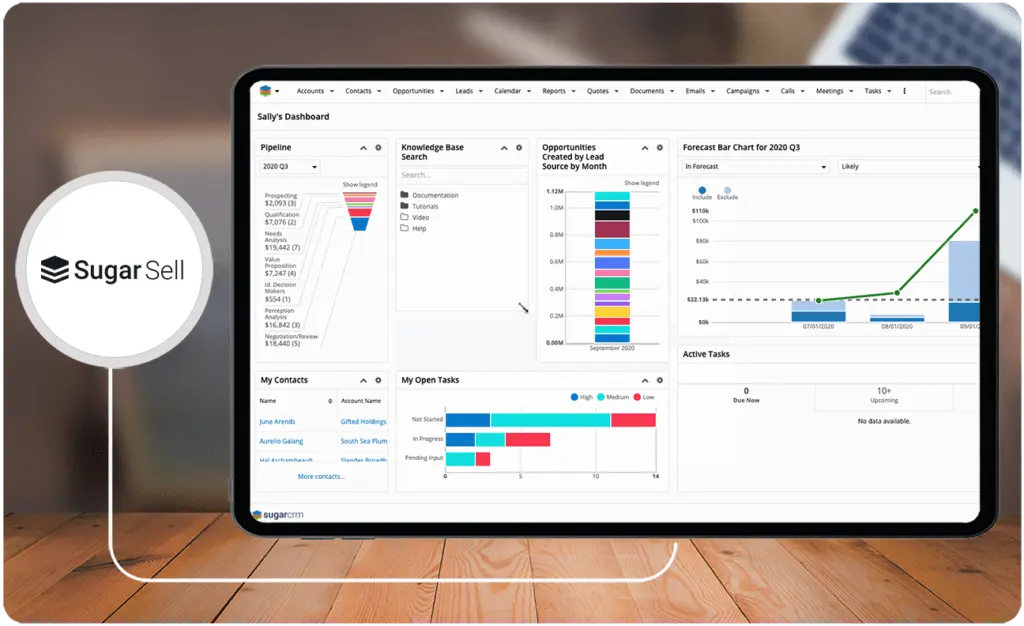
Sugar Sell, a product by SugarCRM, is a powerful sales automation solution designed to empower sales teams. Its primary focus is boosting revenue, improving efficiency, and creating meaningful purchasing experiences. By automating essential sales processes and providing personalized dashboards and reports, Sugar Sell enhances visibility and efficiency with analytics and data-driven insights. Key features include smart guides and playbooks for accelerated sales cycles, AI-powered lead conversion, and personalized dashboards for a clear view of customer interactions.
In addition to its robust features, Sugar Sell is known for its adaptability and user-friendly design. The platform is customizable to fit the unique needs of each business, ensuring a seamless fit into existing workflows. Its intuitive interface simplifies navigation, making it easy for teams to leverage its full potential. With Sugar Sell, businesses can expect a CRM solution that drives sales performance and enhances user experience, making it a valuable tool in today's competitive marketplace.
Who is Sugar Sell for?
Sugar Sell is a very flexible solution used by various businesses across different industries, from pharmaceuticals to logistics. It proves useful for sales teams seeking to enhance revenue, improve operational efficiency, and provide meaningful customer experiences. The platform's adaptability to diverse business requirements positions it as a valuable tool for sales, management, and leadership professionals. Organizational users include Paytime, Sofia University, and Agfa.
Key Benefits of Sugar Sell
- Streamlined Sales Cycle: Sugar Sell expedites the sales cycle and enhances the likelihood of success by concentrating on the appropriate leads and opportunities.
- Advanced Forecasting Abilities: Through AI-powered lead conversion and predictions for closing opportunities, Sugar Sell elevates forecasting effectiveness.
- Enhanced Sales Productivity: Sugar Sell reveals concealed revenue possibilities, automates renewal processes, and aligns with established business practices, increasing sales productivity.
- Optimized Customer Communications: Sugar Sell seamlessly integrates omnichannel customer communications with sentiment analysis into your sales console, facilitating improved customer interactions.
Who are SAP Sales Cloud and Sugar Sell best for?
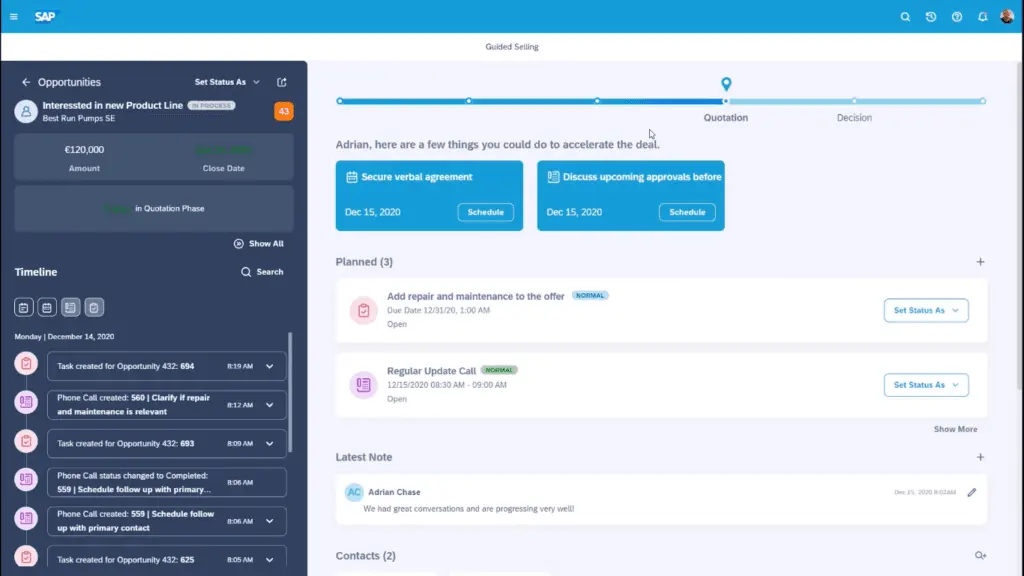
When we did our SAP Sales Cloud vs Sugar Sell research, we found that while both are robust CRM solutions that aim to streamline sales processes and enhance customer relationships, each possesses distinct strengths that cater to specific use cases, groups, or industries. The same can be said for SAP Sales Cloud alternatives.
SAP Sales Cloud
- Large Enterprises: SAP Sales Cloud is well-suited for large enterprises with intricate sales processes, offering comprehensive capabilities for effective customer interactions.
- B2B Selling: It benefits businesses engaged in business-to-business (B2B) selling, facilitating lead capture, qualification, and conversion into opportunities.
- Field Sales and Trade Scenarios: In field sales and trade scenarios, SAP Sales Cloud aids in planning visits and activities, providing a 360-degree view of customer information.
Sugar Sell
- Small to Medium-sized Businesses: While it is designed for organizations of all sizes, our SAP Sales Cloud vs Sugar Sell comparison shows that its super user-friendly approach is ideal for small to medium-sized businesses.
- Sales Teams: Suited for sales teams aiming at revenue growth, efficiency enhancement, and meaningful customer experiences, Sugar Sell provides tools for lead and opportunity management, pipeline oversight, forecasting, and deal closure.
- Businesses Seeking AI Capabilities: Sugar Sell is notable for businesses seeking AI integration in sales processes, utilizing AI for accelerated deals through lead conversion, Ideal Customer Profile (ICP) insights, and opportunity-close predictions.
- Businesses Needing Omnichannel Communications: Sugar Sell seamlessly incorporates omnichannel customer communications with sentiment analysis into the sales console, which benefits businesses requiring quick access to customer details during conversations.
SAP Sales Cloud vs Sugar Sell Feature Comparison
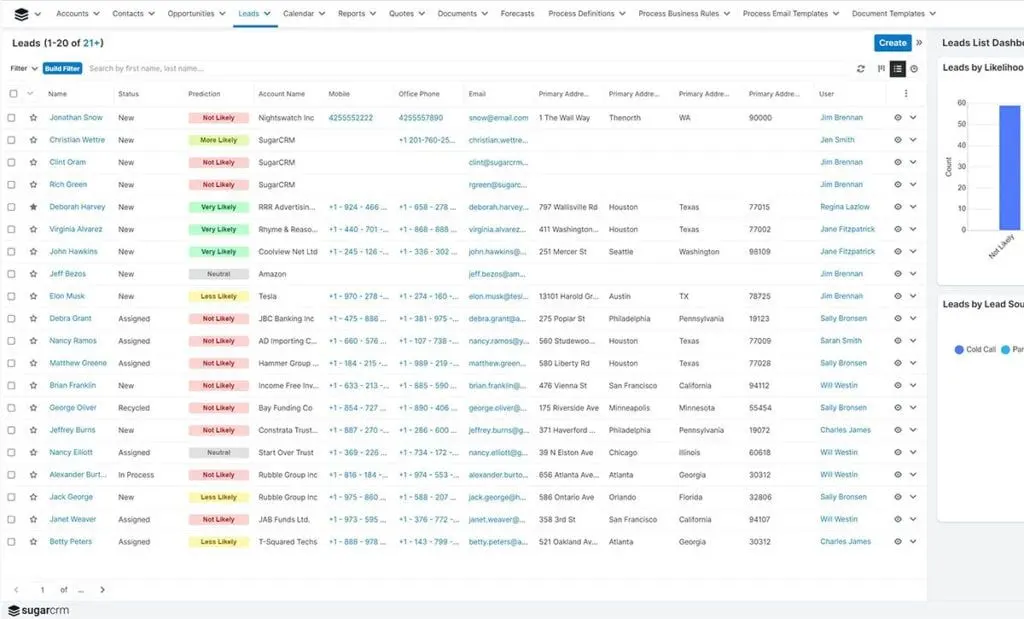
A SAP Sales Cloud vs Sugar Sell comparison would not be complete without looking at how their main features stack against each other. Below, we will discuss five main sales CRM features and functionalities that can be the difference makers in making your SAP Sales Cloud vs Sugar Sell decision.
Sales Force Automation
Both platforms offer comprehensive sales force automation, but the specific features may differ. For instance, SAP Sales Cloud provides a 360-degree view of customers and interactions, while Sugar Sell consolidates customer data into a central location for enhanced visibility into conversations and actions.
Customer Understanding
SAP Sales Cloud offers a 360-degree view of every customer and interaction, fostering customer-centric sales engagements. In contrast, Sugar Sell integrates omnichannel customer communications with sentiment analysis into the sales console, facilitating improved communication with customers.
Artificial Intelligence (AI) Capabilities
SAP Sales Cloud utilizes AI to enhance forecast accuracy and increase win rates through continuous correlation analysis. Sugar Sell uses AI to expedite deals, covering lead conversion, Ideal Customer Profile (ICP), and opportunity-close predictions. These AI capabilities offer intelligent recommendations and insights, enriching sales processes.
Integration Capabilities
Both platforms support integration with other systems, with variations in specifics. SAP Sales Cloud operates on the SAP C/4HANA platform and integrates with legacy offerings like SAP S/4HANA. The SAP Integration Suite also enables users to integrate with other applications, both cloud-based and on-premise tools. Of course, it integrates with other SAP products, such as those for property management maintenance software.
On the other hand, Sugar Sell offers diverse social and business data integration using Sugar Hint, an add-on relationship intelligence tool. It also has native integrations for popular solutions like HubSpot and Acuity Scheduling, a go-to appointment scheduling app for many companies. When making the SAP Sales Cloud vs Sugar Sell decision, the choice may hinge on the specific integration needs of an organization trying to build a unified software stack for seamless data flow across different platforms.
Ease of Use
In our SAP Sales Cloud vs Sugar Sell review, we found that the former is recognized for being more user-friendly, with a simpler setup and administration compared to the latter. This ease of use extends across various features such as contact and account management, opportunity and pipeline management, and task/activity management, contributing to swift team adoption and increased productivity.
SAP Sales Cloud vs Sugar Sell Pricing
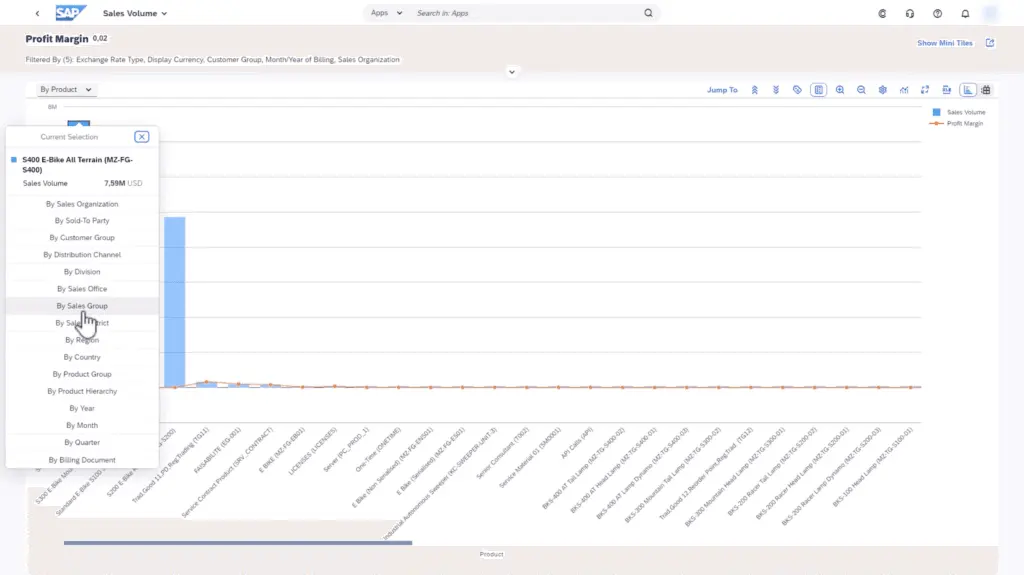
While doing our SAP Sales Cloud vs Sugar Sell research, we found that both companies approach pricing a little differently. SAP Sales Cloud is offered via three plans, starting from the core solution and moving up to add-ons. All of these are quote-based, but the actual pricing is based on the number of users. Sugar Sell, on the other hand, is offered in a more straightforward manner—three plans billed per user with minimum user counts. Details are below:
SAP Sales Cloud Pricing
Core Solution – By quote
- Customer Understanding
- Mobile sales CRM and automation
- Digital Selling
- Unified Sales Platform
- Buyer Insights and Analytics
Core Solution + Intelligent Sales – By quote
- SAP Sales Cloud core solution
- Embedded Intelligence and AI
- Intelligent Forecasting
- Dynamic Pipeline Visualization
- Guided Selling
- Relationship Data and Analysis
Core Solution + Dynamic Visit Planning – By quote
- SAP Sales Cloud core solution
- Visit Schedule Optimization
- Prioritized visits with data-driven signals
- Data-driven visit logistics management
- Real-time visit plan controls
Sugar Sell Pricing Plans
Sell Essential – $49/user/month (billed annually)
- Account and Contact Management
- Lead and Opportunity Management
- Basic workflows
- Activity management
- Reporting and analytics
- Basic support
- 3 users minimum; 5 users maximum
Sell Advanced – $85/user/month (billed annually)
- Everything in Sell Essential
- Advanced workflows
- Omnichannel communications
- Pipeline management and analytics
- Forecasting
- Mobility
- Intelligent Lead and Opportunity Prioritization
- Standard support
- Mail and Calendar Integration
- Third-party integrations
- 3 users minimum
Sell Premier – $135/user/month (billed annually)
- Everything in Sell Advanced
- Guided selling
- Enhanced forecasting
- Geo mapping
- Data enrichment and news feed
- 2x storage capacity
- Enhanced support
SAP Sales Cloud Pros and Cons
Pros
- Enhanced Forecast Accuracy. SAP Sales Cloud excels in improving forecast accuracy, providing a valuable asset for businesses.
- AI-Driven Recommendations. The platform leverages AI features to offer insightful recommendations for optimization, drawing on user feedback.
- Holistic Customer Perspective. SAP Sales Cloud presents an individual yet comprehensive view of each customer, facilitating a unified understanding.
Cons
- Potential Costliness. SAP Sales Cloud can pose a significant expense, potentially acting as a barrier for some businesses.
- Software Complexity. The platform is intricate, making navigation challenging for certain users.
- May Need Trained Personnel. The complexity of SAP Sales Cloud necessitates highly trained staff for effective utilization.
Sugar Sell Pros and Cons
Pros
- Collaborative CRM: Sugar Sell operates as a collaborative CRM with easy-to-use team management software tools, enabling users to monitor activities, track customer journeys, and automate workflows as needed.
- Customizable: Sugar Sell is highly adaptable to fit the unique requirements of your business.
- Sales Forecasting: Through Sugar Sell’s quote management, you can streamline the sales cycle, accelerate deal velocity, and enhance the visibility and predictability of your overall business.
Cons
- Reporting Challenges: Some users express dissatisfaction with the reporting features, including forecasts and pipelines.
- Limited Administration Tools: Certain administration tools, such as security models and account merges, have limitations.
- Training Requirement: Training may be necessary, particularly for mastering reporting features.
How can CRM data be effectively safeguarded?
Ensuring data integrity and rapid recovery is paramount for any CRM system managing sensitive customer information. Both SAP Sales Cloud and Sugar Sell should be complemented with stringent security protocols that include data encryption, regular vulnerability assessments, and robust disaster recovery planning. Organizations are advised to integrate reliable third-party data protection services, which not only secure real-time transaction data but also ensure continuity in case of unexpected disruptions. For enhanced data resilience, consider implementing comprehensive backup solutions that automate regular backups and offer quick restoration capabilities.
Enhanced Financial Management Features in CRM Software
Effective integration of financial management solutions in your CRM can drastically improve operational efficiency, especially for businesses that manage a high volume of transactions. While SAP Sales Cloud and Sugar Sell offer robust CRM functionalities, neither platform specializes in features like invoicing, expense tracking, or payment management out of the box without additional integrations.
For businesses seeking to consolidate these functions, adopting dedicated invoicing software alongside your CRM system is essential. Such tools enable seamless invoice creation, accurate tracking of payments, and financial reporting, reducing administrative burdens and enhancing cash flow management. If you're exploring solutions to fill this gap, this comprehensive list of the best invoicing software can guide your decision-making process.
Incorporating specialized financial tools not only streamlines sales and accounting workflows but also supports better alignment across departments, ensuring that your sales efforts directly translate into financial gains. By integrating targeted solutions with your CRM, organizations can set a solid foundation for growth while maintaining control over their financial operations.
How can businesses maximize ROI when using SAP Sales Cloud or Sugar Sell?
To make the most of SAP Sales Cloud or Sugar Sell and maximize return on investment (ROI), businesses should employ a few strategic approaches:
- Leverage AI-Driven Insights: Both platforms provide AI capabilities. Businesses can boost sales efficiency by using these insights to focus on high-potential leads, predict deal closure probabilities, and streamline sales pipelines.
- Regularly Review Analytics: Both platforms offer analytics tools that track sales performance, customer engagement, and lead conversion. Establishing a routine to review these metrics can reveal areas for improvement, allowing teams to adjust strategies in real-time and optimize results.
- Customize Integrations: Ensure seamless integration with other business applications, such as ERP, marketing, and customer support tools. This integration facilitates a unified flow of data across departments, making information readily accessible and improving cross-functional alignment.
- Train Sales Teams Thoroughly: Effective training for SAP Sales Cloud and Sugar Sell maximizes their utility. Consider frequent training refreshers to ensure sales staff fully understand and leverage each platform's features, driving productivity.
By implementing these strategies, businesses can enhance customer engagement, streamline workflows, and maximize ROI with their chosen CRM solution.
Verdict – SAP Sales Cloud vs Sugar Sell: Which software is better?
The SAP Sales Cloud vs Sugar Sell decision can be tricky, especially for those just thinking of getting a CRM solution. But, as mentioned, we have found in our SAP Sales Cloud vs Sugar Sell research that there are areas where one product may excel over the other depending on use cases and contexts. For instance, one may find that SAP Sales Cloud excels in complex sales processes, making it ideal for large enterprises. On the other hand, Sugar Sell, with its collaborative CRM and high customizability, may cater better to small to medium-sized businesses.
So, for large enterprises navigating intricate sales, SAP Sales Cloud shines, while Sugar Sell is an adaptable choice for businesses prioritizing flexibility. However, to make sure you make the right choice, a detailed and preferably first-hand evaluation of the products and their functionalities is recommended. So, our research team advises that those interested in SAP Sales Cloud vs Sugar Sell comparisons should take advantage of free trials or demos for hands-on insights into which product fits their organizational needs, preferences, and budget. If these do not tick all the boxes for you, you can compare these with Sugar Sell alternatives.
Key Insights
- Target Users: SAP Sales Cloud caters to both large enterprises and SMEs, while Sugar Sell is versatile, fitting various business sizes but particularly beneficial for small to medium-sized businesses.
- AI Integration: Both platforms leverage AI to enhance sales processes, with SAP Sales Cloud focusing on forecast accuracy and win rates, and Sugar Sell using AI for lead conversion and sales predictions.
- Customization and Flexibility: Sugar Sell stands out for its high customizability and user-friendly design, making it easy to fit into existing workflows. SAP Sales Cloud offers robust integration capabilities, especially with other SAP products.
- Sales Automation and Efficiency: SAP Sales Cloud excels in providing a 360-degree view of customers and interactions, enhancing customer-centric sales engagements. Sugar Sell boosts sales productivity through features like smart guides, playbooks, and omnichannel communication.
- Pricing Structure: SAP Sales Cloud offers quote-based pricing with add-on options, while Sugar Sell has clear tiered pricing plans, making it easier for businesses to understand costs upfront.
- User Experience: Sugar Sell is noted for its ease of use and simple setup, while SAP Sales Cloud's complexity may require more training and experienced personnel to navigate effectively.
Other Things You Should Know About SAP Sales Cloud – Sugar Sell Comparison
SAP Sales Cloud enhances revenue and win rates through AI capabilities, improves customer engagement across digital sales channels, and increases sales efficiency with scalable sales automation.
SAP Sales Cloud is ideal for large enterprises and SMEs looking for comprehensive sales automation solutions. It is especially beneficial for B2B selling and field sales scenarios, providing a 360-degree view of customer information.
Sugar Sell offers high customizability, AI-driven lead conversion, and advanced forecasting capabilities. It integrates omnichannel customer communications and is known for its user-friendly design, making it suitable for small to medium-sized businesses.
Sugar Sell is generally more suited for small to medium-sized businesses due to its adaptability, user-friendly interface, and clear tiered pricing structure.
SAP Sales Cloud uses AI to improve forecast accuracy, provide intelligent selling recommendations, and enhance win rates. Sugar Sell employs AI for lead conversion, predictive insights, and optimizing sales processes.
Yes, both SAP Sales Cloud and Sugar Sell offer robust integration capabilities. SAP Sales Cloud integrates seamlessly with other SAP products and various business applications. Sugar Sell supports integration with popular solutions like HubSpot and Acuity Scheduling.
SAP Sales Cloud offers quote-based pricing with three tiers: Core Solution, Core Solution + Intelligent Sales, and Core Solution + Dynamic Visit Planning. Each plan's cost varies based on the number of users and additional features.
SAP Sales Cloud's complexity may necessitate training, especially for utilizing advanced features. Sugar Sell, while user-friendly, may also require some training for mastering reporting and automation tools.
Both platforms offer robust sales automation features. SAP Sales Cloud focuses on providing a comprehensive view of customer interactions and intelligent sales recommendations, while Sugar Sell excels in streamlining sales cycles with tools like smart guides and playbooks.
Yes, both SAP Sales Cloud and Sugar Sell offer free trials. Prospective users are encouraged to take advantage of these trials to evaluate the platforms' functionalities and determine which best suits their needs.