
SAP Sales Cloud vs Salesforce Sales Cloud – 2027 Comparison

Co-Founder and Chief Data Scientist
SAP Sales Cloud vs Salesforce Sales Cloud Comparison Table of Contents
- What is SAP Sales Cloud?
- Who is SAP Sales Cloud for?
- Key Benefits of SAP Sales Cloud
- What is Salesforce Sales Cloud?
- Who is Salesforce Sales Cloud for?
- Key Benefits of Salesforce Sales Cloud
- Who are SAP Sales Cloud and Salesforce Sales Cloud best for?
- SAP Sales Cloud vs Salesforce Sales Cloud Feature Comparison
- SAP Sales Cloud vs Salesforce Sales Cloud Pricing
- How do SAP and Salesforce compare for business management needs?
- Use Cases Beyond CRM for SAP and Salesforce Sales Clouds
- Is the Implementation and Support Process Comprehensive?
- SAP Sales Cloud Pros and Cons
- Salesforce Sales Cloud Pros and Cons
- Verdict – SAP Sales Cloud vs Salesforce Sales Cloud: Which software is better?
What is SAP Sales Cloud?
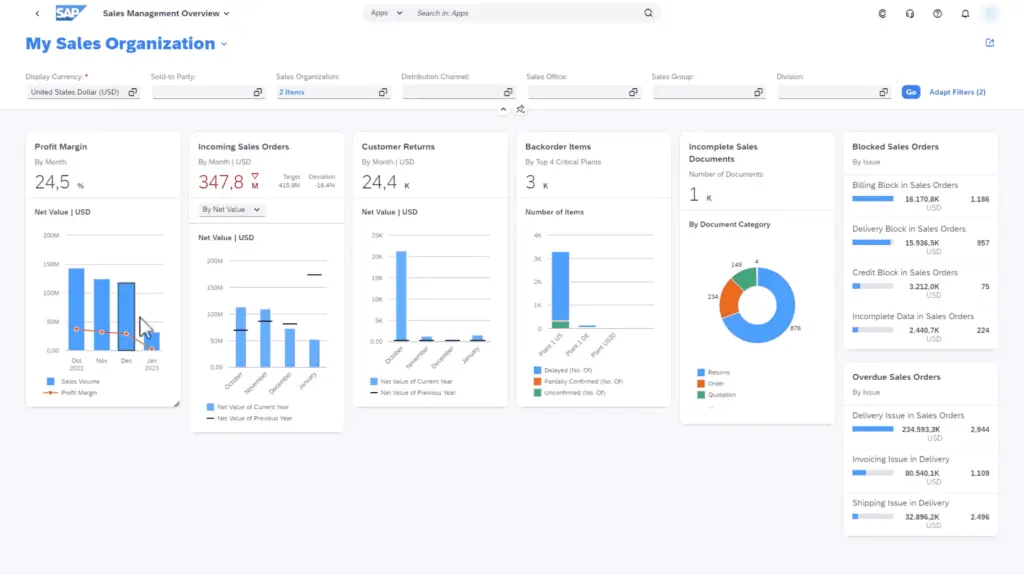
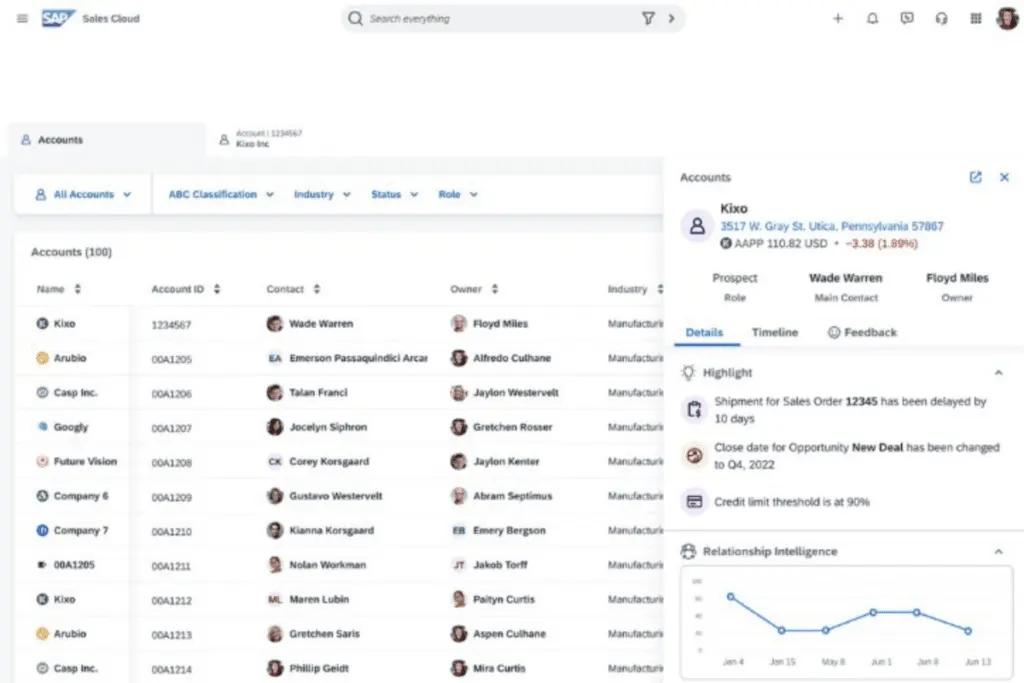
SAP Sales Cloud is an intelligent CRM solution that drives profit and improves customer relationships through in-depth data analysis and streamlined intelligent selling. The platform provides a range of features like guided selling and intelligent forecasting, which empower sellers through step-by-step instructions and real-time insights to identify forecast volatility. It also offers pipeline management tools that evaluate the health of projects and ensure that users can proactively address issues and changes.
Aside from the extensive use of data and analytics, SAP Sales Cloud also caters to sales teams through omnichannel communication support, dynamic sales journeys, and comprehensive contact records. Automation tools also enhance productivity by enabling sales representatives to focus more on the sales process and less on administrative and manual tasks.
Featured CRM Software Products

$9 to $150/user/month
Yes, up to 2 users
E-signature software, call transcription, conversation routing
Editor's Take
HubSpot CRM is a powerful customer relationship management platform designed to help businesses manage their sales, marketing, and customer service efforts in one centralized place. Its user-friendly interface allows teams to track leads, monitor customer interactions, and automate sales pipelines. With built-in tools for email marketing, contact management, and analytics, HubSpot CRM provides deep insights into customer behavior and sales performance. The platform also supports seamless collaboration between marketing and sales teams through real-time updates and integrations with tools like Gmail, Outlook, and Slack. Additionally, its automation features help reduce manual tasks, enabling teams to focus on building relationships and closing deals. HubSpot CRM is scalable, making it ideal for businesses of all sizes, from startups to large enterprises.
Expert Score
In evaluating SaaS software, a comprehensive and structured methodology ensures a fair and accurate comparison across key metrics. This approach focuses on the most critical aspects that affect user experience, functionality, and business value. The following metrics—general features, cost, customer service, integrations, and mobile support—are evaluated to provide a holistic view of each software solution’s strengths and weaknesses. These metrics are selected based on their direct impact on software usability, scalability, and long-term effectiveness for businesses.
1. General Features - scoring weight 40%
This metric evaluates the core functionalities and tools the software offers. It involves assessing the comprehensiveness of the features, their relevance to the target users, and the ease of use. This is important because robust and well-designed features determine the software's overall utility and efficiency in solving user problems.
2. Cost - scoring weight 15%
Cost analysis focuses on pricing models, value for money, and scalability. It's crucial to evaluate whether the software’s features justify its price, considering different plans for small and large organizations. This is vital for businesses to ensure they invest in cost-effective solutions that fit their budget.
3. Customer Service - scoring weight 15%
This evaluates the responsiveness, quality, and availability of customer support, including channels like chat, email, or phone. Good customer service is essential for troubleshooting and ensuring smooth software usage, which reduces downtime and frustration for users.
4. Integrations - scoring weight 15%
This examines how well the software integrates with third-party tools (e.g., CRM, payment systems, collaboration apps). Seamless integrations are key for creating a unified workflow and enhancing productivity by connecting multiple systems, which is crucial for operational efficiency.
5. Mobile Support - scoring weight 15%
Mobile support assesses the software’s functionality and performance on mobile devices, including apps and mobile web versions. With increasing remote work and on-the-go usage, strong mobile support is critical to ensure users can access and utilize the software effectively, regardless of location.

Custom
No
Sales automation, customer service, marketing
Editor's Take
NetSuite CRM is a comprehensive customer relationship management solution designed to support businesses in managing their entire customer lifecycle. It offers a full suite of tools for sales automation, customer service, marketing, and partner management, helping teams improve efficiency and build stronger customer relationships. With real-time visibility into customer interactions, NetSuite CRM enables businesses to track leads, manage opportunities, and forecast sales accurately. Its built-in analytics and reporting features provide deep insights into sales performance and customer behavior. NetSuite CRM integrates seamlessly with NetSuite’s enterprise resource planning (ERP) system, offering a unified platform for managing business operations. This scalability and flexibility make it ideal for growing businesses and enterprises seeking an all-in-one solution for customer relationship management.
Expert Score
In evaluating SaaS software, a comprehensive and structured methodology ensures a fair and accurate comparison across key metrics. This approach focuses on the most critical aspects that affect user experience, functionality, and business value. The following metrics—general features, cost, customer service, integrations, and mobile support—are evaluated to provide a holistic view of each software solution’s strengths and weaknesses. These metrics are selected based on their direct impact on software usability, scalability, and long-term effectiveness for businesses.
1. General Features - scoring weight 40%
This metric evaluates the core functionalities and tools the software offers. It involves assessing the comprehensiveness of the features, their relevance to the target users, and the ease of use. This is important because robust and well-designed features determine the software's overall utility and efficiency in solving user problems.
2. Cost - scoring weight 15%
Cost analysis focuses on pricing models, value for money, and scalability. It's crucial to evaluate whether the software’s features justify its price, considering different plans for small and large organizations. This is vital for businesses to ensure they invest in cost-effective solutions that fit their budget.
3. Customer Service - scoring weight 15%
This evaluates the responsiveness, quality, and availability of customer support, including channels like chat, email, or phone. Good customer service is essential for troubleshooting and ensuring smooth software usage, which reduces downtime and frustration for users.
4. Integrations - scoring weight 15%
This examines how well the software integrates with third-party tools (e.g., CRM, payment systems, collaboration apps). Seamless integrations are key for creating a unified workflow and enhancing productivity by connecting multiple systems, which is crucial for operational efficiency.
5. Mobile Support - scoring weight 15%
Mobile support assesses the software’s functionality and performance on mobile devices, including apps and mobile web versions. With increasing remote work and on-the-go usage, strong mobile support is critical to ensure users can access and utilize the software effectively, regardless of location.

$25 per user per month
14 days
marketing automation, sales automation, no code customization
Editor's Take
CRM Creatio is a comprehensive customer relationship management (CRM) solution designed to streamline and enhance business processes across sales, marketing, and customer service functions. Known for its low-code platform, Creatio allows businesses to customize and automate workflows without requiring extensive technical expertise. This adaptability makes it particularly appealing to organizations seeking to align the software with their specific needs.
The platform's marketing module provides tools for multi-channel campaign management, lead generation, and personalized customer engagement. Its sales module offers functionality for pipeline management, opportunity tracking, and analytics to help teams close deals more efficiently. Additionally, the customer service module supports case management, service level agreement (SLA) monitoring, and omnichannel communication, enabling businesses to provide exceptional customer support.
Creatio stands out with its intuitive interface, robust analytics, and AI-powered tools that provide actionable insights. The low-code development tools allow non-technical users to create applications and automate processes, reducing the dependency on IT teams. Integration capabilities with other software platforms and APIs enhance its utility, making it a versatile choice for businesses of all sizes.
Overall, CRM Creatio is a powerful solution that combines user-friendly design with advanced customization and automation features. Its adaptability and low-code foundation position it as a strong contender for organizations looking to optimize customer relationship management processes while maintaining flexibility for growth and innovation.
Expert Score
In evaluating SaaS software, a comprehensive and structured methodology ensures a fair and accurate comparison across key metrics. This approach focuses on the most critical aspects that affect user experience, functionality, and business value. The following metrics—general features, cost, customer service, integrations, and mobile support—are evaluated to provide a holistic view of each software solution’s strengths and weaknesses. These metrics are selected based on their direct impact on software usability, scalability, and long-term effectiveness for businesses.
1. General Features - scoring weight 40%
This metric evaluates the core functionalities and tools the software offers. It involves assessing the comprehensiveness of the features, their relevance to the target users, and the ease of use. This is important because robust and well-designed features determine the software's overall utility and efficiency in solving user problems.
2. Cost - scoring weight 15%
Cost analysis focuses on pricing models, value for money, and scalability. It's crucial to evaluate whether the software’s features justify its price, considering different plans for small and large organizations. This is vital for businesses to ensure they invest in cost-effective solutions that fit their budget.
3. Customer Service - scoring weight 15%
This evaluates the responsiveness, quality, and availability of customer support, including channels like chat, email, or phone. Good customer service is essential for troubleshooting and ensuring smooth software usage, which reduces downtime and frustration for users.
4. Integrations - scoring weight 15%
This examines how well the software integrates with third-party tools (e.g., CRM, payment systems, collaboration apps). Seamless integrations are key for creating a unified workflow and enhancing productivity by connecting multiple systems, which is crucial for operational efficiency.
5. Mobile Support - scoring weight 15%
Mobile support assesses the software’s functionality and performance on mobile devices, including apps and mobile web versions. With increasing remote work and on-the-go usage, strong mobile support is critical to ensure users can access and utilize the software effectively, regardless of location.

$8/per user/per month
Yes
customizable dashboards, automated follow-ups, advanced analytics
Editor's Take
monday.com Sales CRM is a customizable platform designed to streamline sales processes, enhance team collaboration, and improve pipeline visibility. Its intuitive interface enables users to manage leads, track deals, and automate repetitive tasks with ease. The CRM integrates seamlessly with popular tools like Gmail, Slack, and HubSpot, ensuring a centralized workflow. Features like customizable dashboards, automated follow-ups, and advanced analytics help sales teams stay organized and focused on closing deals. With scalability in mind, monday.com caters to businesses of all sizes, offering flexible pricing plans and robust customer support. It’s an excellent choice for teams seeking efficiency and adaptability.
Expert Score
In evaluating SaaS software, a comprehensive and structured methodology ensures a fair and accurate comparison across key metrics. This approach focuses on the most critical aspects that affect user experience, functionality, and business value. The following metrics—general features, cost, customer service, integrations, and mobile support—are evaluated to provide a holistic view of each software solution’s strengths and weaknesses. These metrics are selected based on their direct impact on software usability, scalability, and long-term effectiveness for businesses.
1. General Features - scoring weight 40%
This metric evaluates the core functionalities and tools the software offers. It involves assessing the comprehensiveness of the features, their relevance to the target users, and the ease of use. This is important because robust and well-designed features determine the software’s overall utility and efficiency in solving user problems.
2. Cost - scoring weight 15%
Cost analysis focuses on pricing models, value for money, and scalability. It’s crucial to evaluate whether the software’s features justify its price, considering different plans for small and large organizations. This is vital for businesses to ensure they invest in cost-effective solutions that fit their budget.
3. Customer Service - scoring weight 15%
This evaluates the responsiveness, quality, and availability of customer support, including channels like chat, email, or phone. Good customer service is essential for troubleshooting and ensuring smooth software usage, which reduces downtime and frustration for users.
4. Integrations - scoring weight 15%
This examines how well the software integrates with third-party tools (e.g., CRM, payment systems, collaboration apps). Seamless integrations are key for creating a unified workflow and enhancing productivity by connecting multiple systems, which is crucial for operational efficiency.
5. Mobile Support - scoring weight 15%
Mobile support assesses the software’s functionality and performance on mobile devices, including apps and mobile web versions. With increasing remote work and on-the-go usage, strong mobile support is critical to ensure users can access and utilize the software effectively, regardless of location.

$7 per user per month billed annually
15 days
lead generation, sales pipeline management, workflow automation
Editor's Take
Zoho CRM is a flexible and comprehensive customer relationship management platform designed to help businesses manage and grow their customer relationships effectively. With tools for lead generation, sales pipeline management, workflow automation, and analytics, Zoho CRM is suitable for businesses of all sizes across a variety of industries.
Zoho CRM enables teams to streamline sales processes by capturing leads from multiple channels, tracking interactions, and managing every stage of the sales cycle. The platform offers customizable dashboards and reports, providing insights into sales performance and customer behaviors to help make data-driven decisions. With powerful automation features, Zoho CRM allows businesses to set up workflows for routine tasks like follow-ups, lead scoring, and email notifications, reducing manual work and enhancing productivity. The platform integrates with popular tools, including the Zoho suite, Microsoft 365, and G Suite, enabling a seamless connection across teams.
For businesses aiming to improve customer engagement, close deals faster, and enhance team collaboration, Zoho CRM delivers a scalable, user-friendly solution to drive sales and customer satisfaction.
Expert Score
In evaluating SaaS software, a comprehensive and structured methodology ensures a fair and accurate comparison across key metrics. This approach focuses on the most critical aspects that affect user experience, functionality, and business value. The following metrics—general features, cost, customer service, integrations, and mobile support—are evaluated to provide a holistic view of each software solution’s strengths and weaknesses. These metrics are selected based on their direct impact on software usability, scalability, and long-term effectiveness for businesses.
1. General Features - scoring weight 40%
This metric evaluates the core functionalities and tools the software offers. It involves assessing the comprehensiveness of the features, their relevance to the target users, and the ease of use. This is important because robust and well-designed features determine the software's overall utility and efficiency in solving user problems.
2. Cost - scoring weight 15%
Cost analysis focuses on pricing models, value for money, and scalability. It's crucial to evaluate whether the software’s features justify its price, considering different plans for small and large organizations. This is vital for businesses to ensure they invest in cost-effective solutions that fit their budget.
3. Customer Service - scoring weight 15%
This evaluates the responsiveness, quality, and availability of customer support, including channels like chat, email, or phone. Good customer service is essential for troubleshooting and ensuring smooth software usage, which reduces downtime and frustration for users.
4. Integrations - scoring weight 15%
This examines how well the software integrates with third-party tools (e.g., CRM, payment systems, collaboration apps). Seamless integrations are key for creating a unified workflow and enhancing productivity by connecting multiple systems, which is crucial for operational efficiency.
5. Mobile Support - scoring weight 15%
Mobile support assesses the software’s functionality and performance on mobile devices, including apps and mobile web versions. With increasing remote work and on-the-go usage, strong mobile support is critical to ensure users can access and utilize the software effectively, regardless of location.

By quote
Yes
Lead Management, Contact Management, Workflow Automation
Editor's Take
Salesforce CRM is a leading customer relationship management platform known for its robust functionality, scalability, and extensive customization options, making it suitable for businesses of all sizes, from startups to large enterprises. Built to streamline sales, marketing, customer service, and analytics, Salesforce CRM empowers teams to manage customer interactions, optimize workflows, and drive growth from a single, cloud-based platform.
Salesforce CRM provides a complete view of customer data, enabling teams to track interactions, manage leads, and automate tasks throughout the sales pipeline. With powerful tools for reporting and analytics, Salesforce offers insights into sales performance, customer trends, and campaign effectiveness, allowing teams to make data-driven decisions. The platform’s automation capabilities reduce manual workloads with customizable workflows, automated follow-ups, and lead scoring, ensuring a smooth customer journey. Integrations with thousands of third-party applications, along with its own suite of services, make Salesforce a highly adaptable solution for businesses looking to connect their CRM with other tools.
For organizations focused on enhancing customer engagement, improving team efficiency, and scaling their operations, Salesforce CRM delivers a powerful and versatile solution tailored to support long-term business growth.
Expert Score
In evaluating SaaS software, a comprehensive and structured methodology ensures a fair and accurate comparison across key metrics. This approach focuses on the most critical aspects that affect user experience, functionality, and business value. The following metrics—general features, cost, customer service, integrations, and mobile support—are evaluated to provide a holistic view of each software solution’s strengths and weaknesses. These metrics are selected based on their direct impact on software usability, scalability, and long-term effectiveness for businesses.
1. General Features - scoring weight 40%
This metric evaluates the core functionalities and tools the software offers. It involves assessing the comprehensiveness of the features, their relevance to the target users, and the ease of use. This is important because robust and well-designed features determine the software's overall utility and efficiency in solving user problems.
2. Cost - scoring weight 15%
Cost analysis focuses on pricing models, value for money, and scalability. It's crucial to evaluate whether the software’s features justify its price, considering different plans for small and large organizations. This is vital for businesses to ensure they invest in cost-effective solutions that fit their budget.
3. Customer Service - scoring weight 15%
This evaluates the responsiveness, quality, and availability of customer support, including channels like chat, email, or phone. Good customer service is essential for troubleshooting and ensuring smooth software usage, which reduces downtime and frustration for users.
4. Integrations - scoring weight 15%
This examines how well the software integrates with third-party tools (e.g., CRM, payment systems, collaboration apps). Seamless integrations are key for creating a unified workflow and enhancing productivity by connecting multiple systems, which is crucial for operational efficiency.
5. Mobile Support - scoring weight 15%
Mobile support assesses the software’s functionality and performance on mobile devices, including apps and mobile web versions. With increasing remote work and on-the-go usage, strong mobile support is critical to ensure users can access and utilize the software effectively, regardless of location.
Who is SAP Sales Cloud for?
To provide in-depth insight into this SAP Sales Cloud vs Salesforce comparison, our review team has identified the primary users of each platform. For SAP Sales Cloud, the primary users are sales professionals who prioritize leveraging data for their CRM tasks. This includes individuals and teams responsible for managing and executing sales strategies, from engaging customers across digital channels to optimizing field sales and retail execution.
Key Benefits of SAP Sales Cloud
Given the primary capabilities and users of SAP Sales Cloud, a potential user’s next consideration might be its key benefits. Our review team has also identified these benefits for this SAP Sales Cloud vs Salesforce comparison. Here are the details:
- Insights and Analytics. SAP Sales Cloud generates insights and provides recommendations to help sales teams drive profit. It utilizes analytics that forecast and evaluate pipeline health, ensuring that representatives have real-time information and visualizations to make better business decisions.
- Sales Automation. Aside from analyzing and visualizing data, SAP Sales Cloud automates manual and time-consuming tasks like capturing interactions and scripting calls. It also integrates with existing systems to centralize processes and data on leads, opportunities, and ERPs. These tools can increase efficiency and productivity in a way similar to the capabilities of business process improvement software.
- Customer Management. SAP Sales Cloud allows users to create sales journeys for customers to personalize and improve through experience. These journeys offer intelligent recommendations while keeping track of interactions, collaborative notes, and other relevant information. As such, representatives can provide tailored customer experiences, improving relationship quality.
- Field and Retail Use Cases. Users with field and retail sellers can leverage SAP Cloud Sales tools designed for planning, prioritizing, and optimizing visits. It recommends visit strategies based on factors like working hours and starting points. It also analyzes locations so users can access recommended routes to save time and effort.
What is Salesforce Sales Cloud?
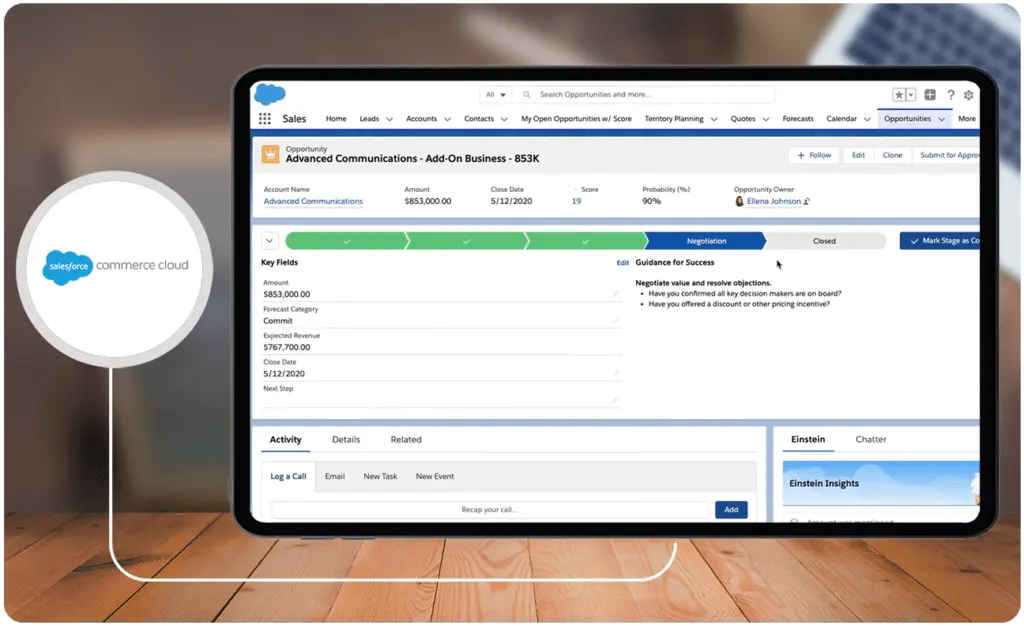
Salesforce Sales Cloud stands out with a distinctive focus on automation, streamlining the sales process for enhanced efficiency and effectiveness. By automatically capturing diverse engagement activities like emails and events directly within the CRM, the platform establishes a centralized hub for managing activity data related to leads, contacts, accounts, and opportunities. Sellers benefit from the intuitive drag-and-drop simplicity for automating complex sales processes, optimizing territory assignments, and expediting deal closures through synchronized quotes and streamlined contract approval workflows.
Additionally, Salesforce Sales Cloud guides sellers through the sales process, delivering deal-specific insights and unifying opportunity and account data for a cohesive customer profile. With a robust emphasis on real-time, accurate forecasting, customizable metrics, and AI assistance, the platform facilitates growth, fosters collaboration, and ensures better business decisions.
Who is Salesforce Sales Cloud for?
While SAP Sales Cloud may be better suited for data-driven teams, Salesforce Sales Cloud caters to users who prioritize productivity and efficiency. As such, the ideal users would include sales representatives and other customer-facing personnel. Salesforce Sales Cloud is also suitable for businesses of various sizes and industries, offering scalability to adapt to the evolving needs of small and large enterprises.
Key Benefits of Salesforce Sales Cloud
To complete this SAP Sales Cloud vs Salesforce comparison, our review team has identified the key benefits of Salesforce Sales Cloud. Here are the details on each:
- Process Automation. Salesforce Sales Cloud simplifies process automation through a drag-and-drop interface that can trigger actions like sending emails and making introductory calls. It also automates territory assignments and account coverages for representative efficiency and quotation and contract approvals for process improvements.
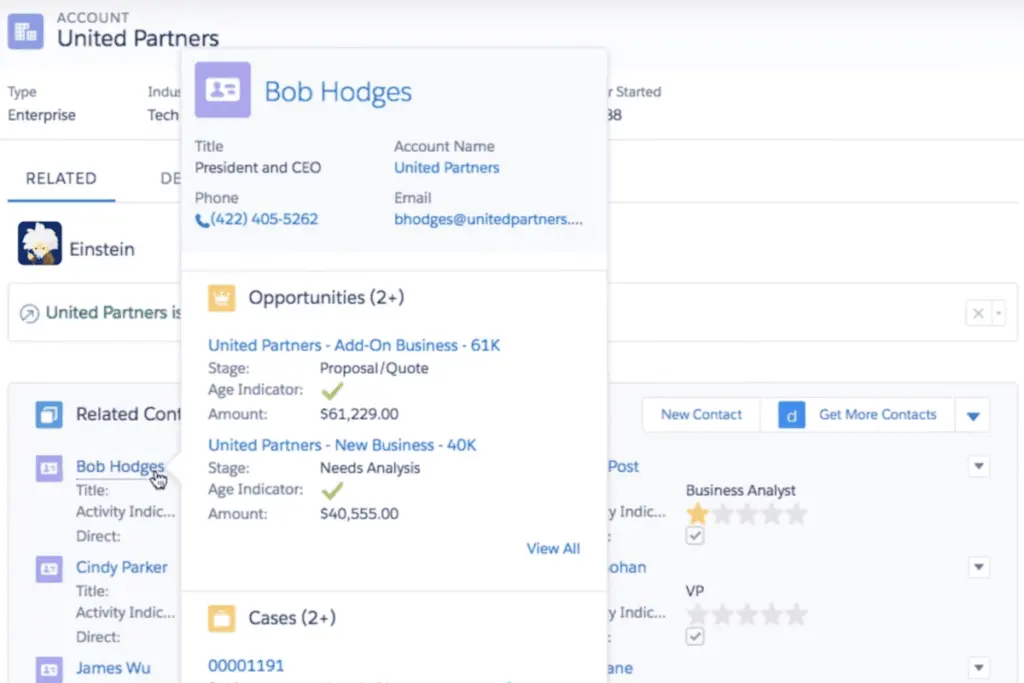
- Centralization. As one of the best in our CRM software list, Salesforce Sales Cloud ensures that all data is available within the system. As such, it allows users to track activities, monitor leads from different channels, and offer insights for various accounts. Customer records also provide analytic information like opportunities and even expected revenue.
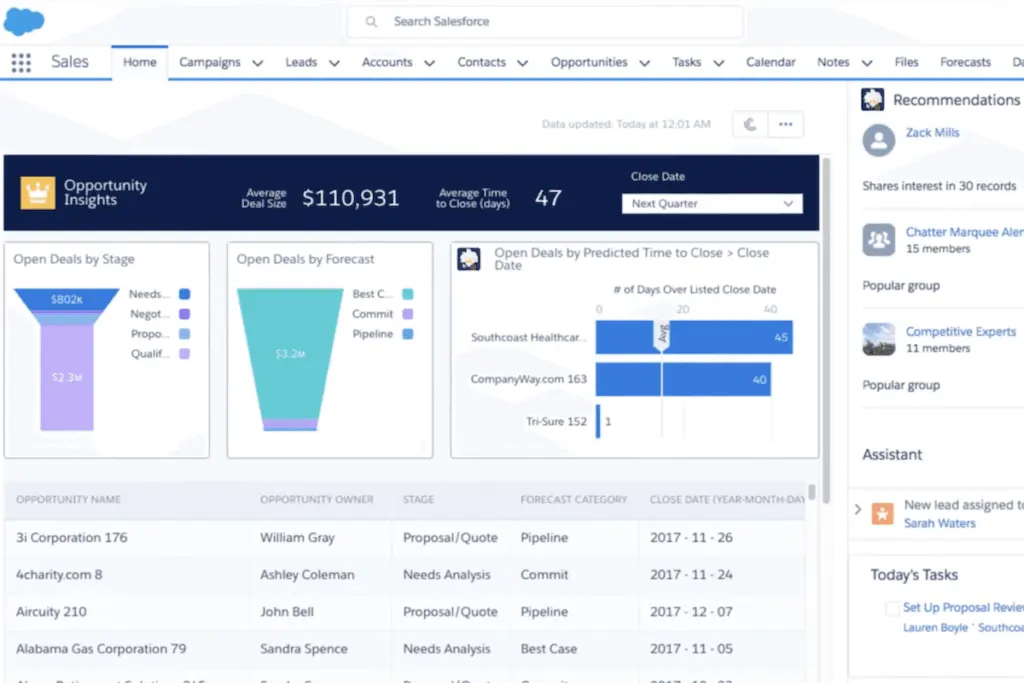
- Pipeline Management. Salesforce Sales Cloud consolidates all data collected or imported through a single view of the pipeline, designed to monitor and visualize all changes and insights. It also provides dashboards based on personalized metrics like lead volume and conversion rates. These pipelines and dashboards allow users to get all the information they need at a glance.
- Artificial Intelligence. To leverage data and provide actionable analytics, Salesforce Sales Clouds utilizes AI. It creates forecasts based on current performance and identified metrics. It can also identify opportunities per customer to further enrich interactions and engagement strategies. Additionally, the platform enables teams to collaborate for better productivity.
Who are SAP Sales Cloud and Salesforce Sales Cloud best for?
Based on the capabilities and benefits of both platforms, our review team has identified the different use cases that may inform what type of use can take advantage of either SAP Sales Cloud or Salesforce Sales Cloud. As such, here are the ideal use cases for SAP Sales Cloud vs Salesforce:
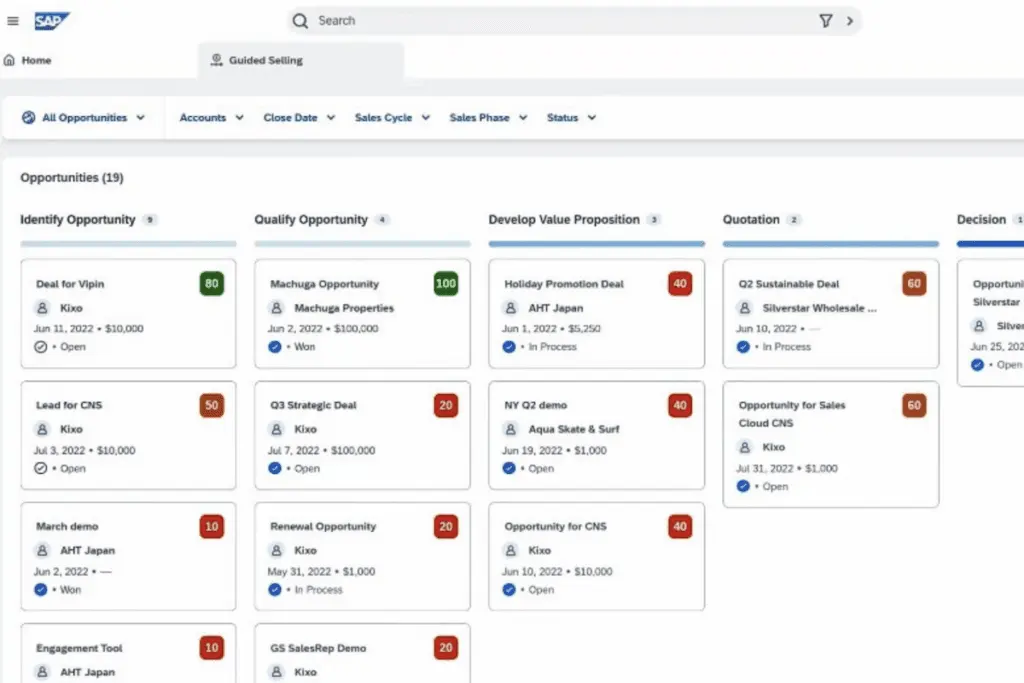
- Data and Research. In terms of generating actionable analytics based on data and research, SAP Sales Cloud may be a better option. Insights are integrated with pipelines, ensuring users can access prescriptive actions and relevant forecasts based on case analyses. Moreover, the platform can visualize changes within the pipeline and provide recommendations based on customer journeys.
- Field Sellers. Companies with field sellers may also find more benefits with SAP Sales Cloud than Salesforce as it provides tools specifically designed for this purpose. It allows users to plan visits, get recommended routes, and generate recommendations. Retail locations can also get similar insights to achieve predetermined KPIs.
- Productivity and Efficiency. Those looking to increase their productivity and efficiency may benefit more from Salesforce Sales Cloud. It automates workflows and processes to reduce manual tasks and ensure internal alignment toward sales goals. Representatives can also create to-do lists based on automated processes. All information can be accessed through the mobile app for easy reference.
- Quote-to-Cash. Salesforce Sales Cloud supports not only CRM processes but also quote-to-cash activities to further increase conversions, which is why it may be the better option for those who want a quote-to-cash solution. It allows users to create quotes based on customizable templates. It also automates the contract approval process to ensure stellar client experiences.
SAP Sales Cloud vs Salesforce Sales Cloud Feature Comparison
To provide a head-to-head comparison, our review team has evaluated both platforms based on the key features of a CRM system. Such features in this SAP Sales Cloud vs Salesforce comparison include pipeline and lead management, contact management, automation tools, and actionable analytics.
Pipeline and Lead Management
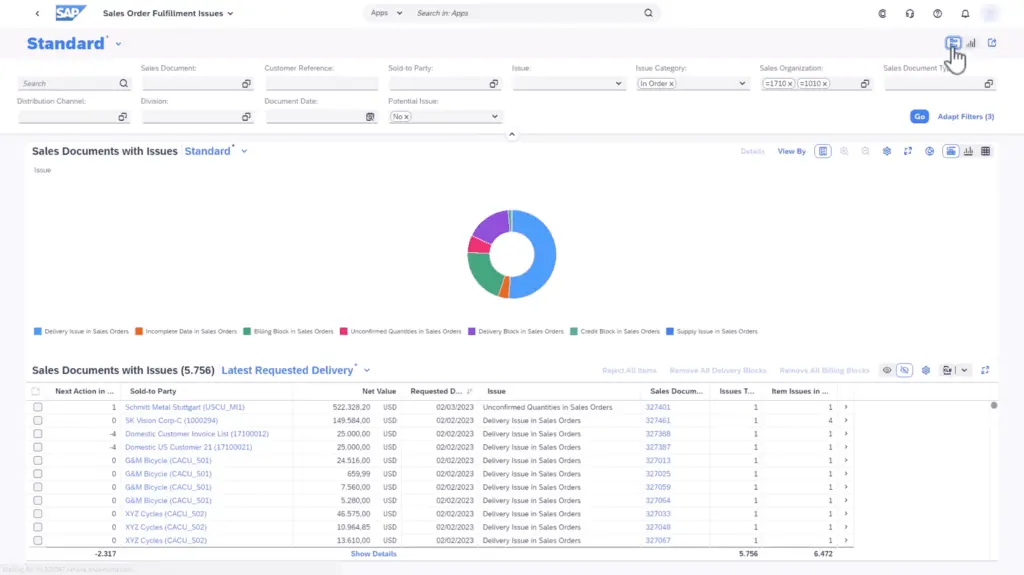
Managing pipelines, leads, and accounts ensures that sales representatives are well-informed on the next steps, sales cycles, and business performance. SAP Sales Cloud’s pipeline manager allows users to gain insights into the pipeline's health by utilizing real-time data presented through intuitive visualizations, AI analysis, and deep analytics. It also provides step-by-step insights to empower representatives. On the other hand, Salesforce Sales Cloud also offers a consolidated pipeline with built-in charts and AI assistance. Additionally, it excels in identifying lead prioritizations so that representatives can leverage opportunities and increase conversions.
Contact Management
In terms of contact management, this SAP Sales Cloud vs Salesforce comparison found that there are significant differences between both platforms. Though both provide a 360-degree view of each contact and enable personalized experiences, SAP Sales Cloud enables omnichannel engagement through digital selling tools. Salesforce Sales Cloud focuses more on automating the process and offers sales engagement tools as additional related products. As such, those who want to enrich engagements while leveraging Salesforce may have to rely on other sales tools for businesses.
Automation Tools
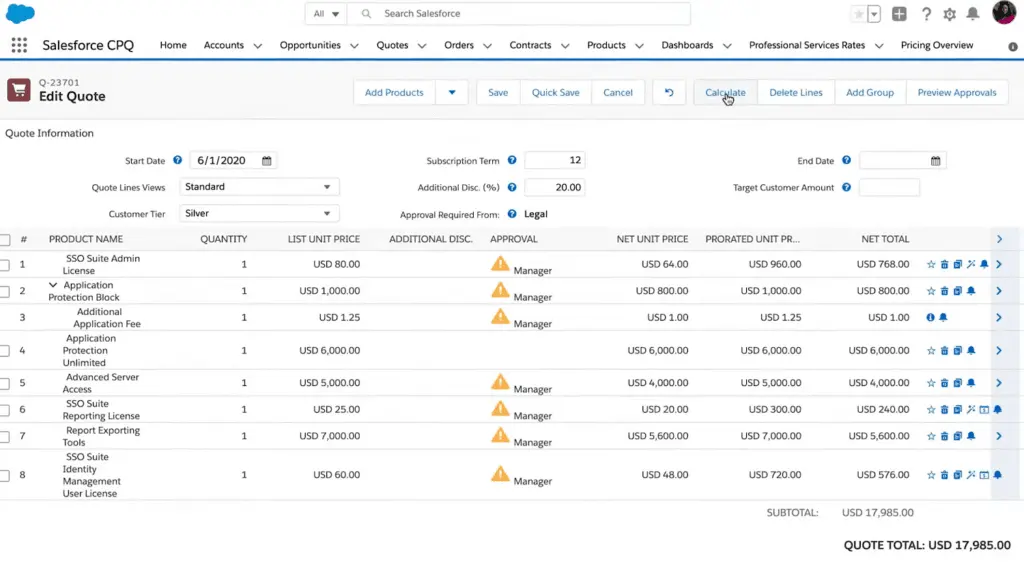
In conducting this SAP Sales Cloud vs Salesforce comparison, we have identified automation as one of the key strengths of CRM platforms. To this end, we found that SAP Sales Cloud automates tracking and recording engagements through interactions or calls. It also connects processes across systems through integrations. On the other hand, Salesforce Sales Cloud may have more extensive automation tools as it allows users to create workflows for sales processes and quote-to-cash activities on par with the platforms on this accounting software list. The drag-and-drop UI may also be more beneficial for beginners.
Actionable Analytics
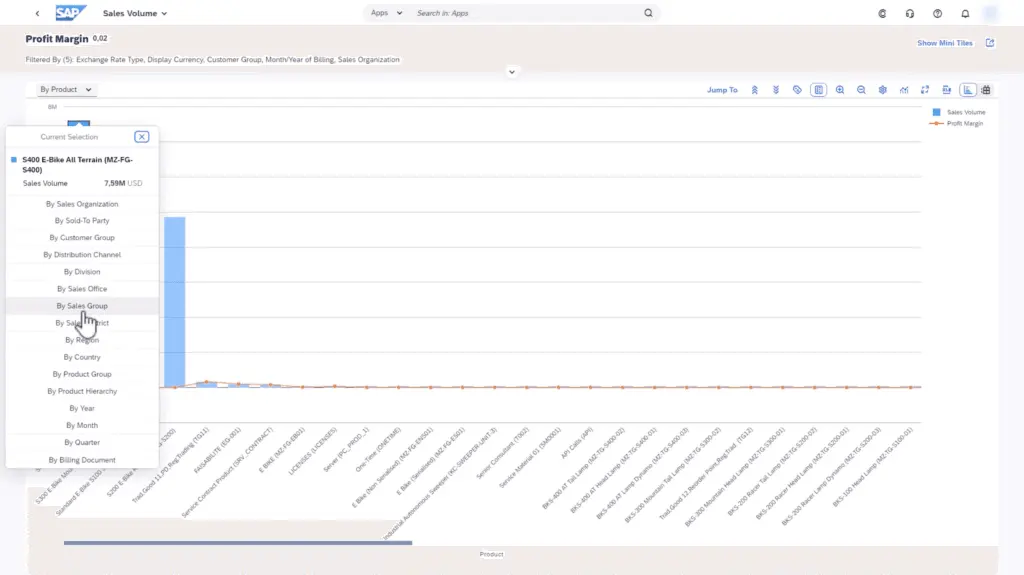
Leveraging data and insights enables sales representatives to make better decisions and increase conversions. In this regard, SAP Sales Cloud stands above the competition with its guided selling, intelligent forecasting, and pipeline flow management, which provides data visualizations and actionable recommendations. Salesforce Sales Cloud also generates actionable analytics through its related products, Sales AI and Sales Analytics, which may provide more insight into sales data. That said, Salesforce Sales Cloud does provide ample information through reports, dashboards, account insights, and forecasts, which may be more than enough for those looking for a CRM solution.
SAP Sales Cloud vs Salesforce Sales Cloud Pricing
Aside from features and capabilities, the decision on which CRM platform to get may come down to the pricing. As such, our SAP Sales Cloud vs Salesforce guide also discusses the pricing and tiers for both platforms.
SAP Sales Cloud offers three quote-based plans. All versions are deployed through the cloud, and users can pay for the subscription on a monthly or annual basis. Additionally, the platform’s pricing is based on the number of users, which can offer a more cost-effective solution. Here are the packages:
- SAP Sales Cloud
- SAP Sales Cloud with Intelligent Sales Add-On
- SAP Sales Cloud with Dynamic Visit Planning Add-On
On the other hand, Salesforce Sales Cloud provides a more transparent pricing plan for their packages. Each tier may have more features that suit different types of users. For instance, the Starter plan can appeal to small businesses with a simple CRM suite, while the Unlimited+ plan may have the full feature set necessary for more advanced sales teams. Additionally, all packages are billed annually. Here are the details:
- Starter – $25/user/month
- Professional – $80/user/month
- Enterprise – $165/user/month
- Unlimited – $330/user/month
- Unlimited+ – $500/user/month
How do SAP and Salesforce compare for business management needs?
When choosing between SAP and Salesforce, businesses should consider the unique strengths and primary focuses of each platform, as they cater to distinct areas within enterprise management and customer relationship processes. This section provides a comparative analysis to help businesses understand how SAP and Salesforce differ in core functionalities, integrations, scalability, and industry-specific applications.
Primary Focus and Expertise
- SAP: SAP is a comprehensive enterprise resource planning (ERP) system with a focus on managing a wide range of internal business processes, such as finance, human resources, supply chain, and procurement. SAP's ERP modules allow businesses to streamline operations across various departments, making it suitable for companies that need a holistic solution for enterprise management.
- Salesforce: Salesforce is a customer relationship management (CRM) platform designed to enhance customer interactions, sales processes, and marketing strategies. Its primary focus is on customer data management, lead generation, sales pipeline tracking, and customer support automation, making it ideal for businesses that prioritize customer engagement.
Customization and Flexibility
- SAP: Known for its extensive customization options, SAP can be adapted to fit complex business requirements, particularly for larger organizations with intricate workflows. However, customization can be resource-intensive and may require dedicated IT support.
- Salesforce: Salesforce offers flexibility through its AppExchange ecosystem, where users can integrate third-party apps and customize workflows using the Salesforce Lightning platform. This makes Salesforce adaptable for various business sizes, especially in scaling CRM functions without needing extensive internal resources.
Industry-Specific Solutions
- SAP: SAP has robust industry-specific modules, tailored to sectors like manufacturing, retail, healthcare, and energy. Its ability to handle industry-complex business models provides a significant advantage for companies needing highly specialized processes.
- Salesforce: Although Salesforce’s focus is broader in its CRM and customer engagement applications, it offers industry-specific solutions through various "Clouds," like Financial Services Cloud, Health Cloud, and Government Cloud. These industry clouds enhance Salesforce’s capabilities in specific sectors but generally focus on customer-facing processes.
Integration Capabilities
- SAP: SAP is traditionally known for its integration with other SAP products, creating a seamless experience for businesses already using SAP modules. It also integrates well with other major ERPs and data solutions, although third-party integration can sometimes require additional middleware.
- Salesforce: Salesforce has extensive third-party integration support through its AppExchange marketplace and APIs, which allow businesses to connect a variety of tools, including marketing automation, e-commerce, and analytics platforms. It is particularly valuable for companies looking to expand customer-focused applications.
Scalability and Suitability
- SAP: SAP is highly scalable and is typically suited for mid-sized to large enterprises with complex business needs, especially those looking to centralize multiple aspects of their operations in one platform.
- Salesforce: Salesforce’s modular structure and cloud-based design make it scalable for businesses of all sizes, from small businesses to large corporations, focusing primarily on scaling customer engagement and sales operations.
Cost Considerations
- SAP: SAP can be cost-prohibitive for smaller businesses due to its license fees, implementation, and ongoing maintenance costs. However, it provides a robust return on investment for companies needing a fully integrated ERP.
- Salesforce: Salesforce operates on a subscription model, with pricing based on user count and feature access. It’s often more accessible to smaller businesses due to its flexible, tiered pricing and can be scaled up as the company grows.
Use Cases Beyond CRM for SAP and Salesforce Sales Clouds
While SAP Sales Cloud and Salesforce Sales Cloud excel as CRM platforms, their utility extends well beyond customer relationship management. Both solutions offer features and integrations that support various non-core functions within organizations, maximizing their value in enterprise ecosystems.
For instance, SAP Sales Cloud's robust integration capabilities make it an ideal choice for businesses seeking to connect their CRM efforts with procurement, inventory, and supply chain management systems. This interoperability is particularly valuable for industries such as retail and manufacturing, where seamless coordination between sales and operational workflows is critical. Companies can explore complementary digital tools like procurement software to further simplify and optimize these interconnected processes.
Salesforce Sales Cloud, on the other hand, goes beyond CRM by offering a suite of add-ons aimed at supporting marketing automation, customer service management, and even e-commerce ventures. Its flexibility and scalability make it a preferred choice for organizations looking to centralize multiple customer-linked functions under a single platform.
Beyond these extended use cases, both platforms allow users to leverage AI-driven analytics, which not only improve customer engagement strategies but also offer actionable insights across business touchpoints. As businesses evolve, understanding these broader applications can reveal opportunities to streamline operations and generate value across departments.
By exploring these external use cases, organizations can make more informed decisions on the platform that caters to their specific industry demands and long-term operational goals.
Is the Implementation and Support Process Comprehensive?
Both platforms offer tailored onboarding processes, yet their implementation and support models differ significantly. SAP Sales Cloud typically integrates seamlessly within broader enterprise ecosystems, emphasizing structured deployment and progressive training. Salesforce Sales Cloud, on the other hand, often leverages a vast partner network and extensive consultancy services, which can be beneficial for organizations with diverse operational needs. Additionally, both solutions provide dedicated customer support and continuous training modules to ensure user adoption and system optimization. An effective integration strategy, including connections with external solutions like HRIS platforms, can further streamline business processes by consolidating core operational data, ensuring a smooth transition and rapid return on investment.
SAP Sales Cloud Pros and Cons
Though no system is perfect, potential CRM software users may choose a system with advantages that serve their specific needs and disadvantages that may be acceptable or solvable. Our review team has created this SAP Sales Cloud vs Salesforce guide with this in mind. Here are the pros and cons of SAP Sales Cloud:
Pros
- Management Tools. SAP Sales Cloud provides comprehensive management tools for opportunities, leads and prospects, and customer information, which enable more informed engagement strategies and customer interactions.
- Actionable Analytics. Based on integrated data, SAP Sales Cloud’s reports provide actionable analytics and insights to guide representatives throughout their interactions and communications.
- Customization and Integrations. SAP Sales Cloud allows for robust customization of reports and seamless integration with other sales tools, enhancing adaptability and efficiency.
Cons
- Mobile App. The mobile app is criticized for being clunky and slow, as well as causing challenges in access. These problems can impact user experiences and on-the-go efficiency.
- User Interface. SAP Sales Cloud’s UI may need design updates to improve navigation, filtering, and overall accuracy.
- Learning Curve. Due to the extensive capabilities of SAP Sales Cloud, some may need more learning materials and knowledge base documents to navigate the platform effectively.
Salesforce Sales Cloud Pros and Cons
Like SAP Sales Cloud, Salesforce’s offering also has pros and cons. Keep these in mind when you examine Salesforce Sales Cloud alternatives thoughtfully to make an educated decision on the most fitting platform for your organization. Here are the details:
Pros
- Automation and Configuration. Salesforce Sales Cloud excels in providing automation and configuration capabilities, enabling businesses to streamline processes without the need for extensive coding.
- Ease of Use. The platform offers an intuitive and user-friendly interface, making it easy for users to navigate and customize as per their business requirements and key performance metrics.
- Sales Management. Salesforce Sales Cloud ensures a smooth customer experience by providing management tools from prospecting to generating quotations.
Cons
- Additional Products. To unlock its full potential, Salesforce Sales Cloud offers additional products. That means that at its base form, the system may not be as comprehensive as necessary, especially for medium and large enterprises.
- Data Visibility. Some users may find Salesforce Sales Cloud’s UI confusing, especially in creating reports, customizing fields, and setting up criteria.
- Customer Support. Users have reported occasional frustrations with customer support, citing challenges in obtaining timely and effective assistance. Support can also overlook details in support tickets.
Verdict - SAP Sales Cloud vs Salesforce Sales Cloud: Which is better?
Given the details of SAP Sales Cloud vs Salesforce, it has become clear that both platforms provide individual advantages that may cater to different users. That said, if we are to ask, “SAP vs Salesforce, which is better?” then we would be more likely to recommend SAP Sales Cloud.
Though Salesforce Sales Cloud shines when it comes to automation and ease of use, its limitations as a base platform can lead to additional costs. SAP Cloud Sales provides the necessary features of a CRM platform at the lowest pricing tier, though users may have to upgrade if they wish to access more advanced analytics and visit planning tools. Take a discerning approach by reviewing different SAP Sales Cloud alternatives to select the software that suits your institution best.
Key Insights
- Market Growth: The market for CRM solutions like SAP Sales Cloud and Salesforce Sales Cloud is expanding rapidly, driven by the increasing need for intelligent selling, automation, and improved customer relationships.
- Data Utilization: Both SAP Sales Cloud and Salesforce Sales Cloud emphasize the use of data analytics to drive sales strategies and decision-making. SAP focuses more on generating actionable insights and intelligent forecasting, while Salesforce excels in automating and streamlining sales processes.
- Automation and Productivity: Salesforce Sales Cloud offers extensive automation tools, making it ideal for teams looking to enhance productivity and efficiency. SAP Sales Cloud also provides automation but places a stronger emphasis on data-driven insights and customer journey personalization.
- Target Users: SAP Sales Cloud is suited for data-driven teams, field sellers, and retail-focused organizations. Salesforce Sales Cloud caters to a broader range of businesses, from small to large enterprises, prioritizing ease of use and process automation.
- Feature Comparison: Both platforms offer robust features for pipeline and lead management, contact management, automation tools, and actionable analytics. SAP Sales Cloud stands out in guided selling and intelligent forecasting, while Salesforce excels in process automation and customizable metrics.
- Pricing: SAP Sales Cloud offers quote-based pricing tailored to the number of users, while Salesforce Sales Cloud provides transparent pricing tiers, making it accessible to various business sizes.
- User Experience: SAP Sales Cloud may have a steeper learning curve and a less intuitive UI, while Salesforce Sales Cloud is known for its user-friendly interface and easy configuration.
Other Things You Should Know About SAP Sales Cloud vs Salesforce Sales Cloud
The better platform depends on your specific needs. Data-based, retail, and field sellers may prefer SAP Sales Cloud for its data-driven insights and field tools. Teams focused on improving productivity through automation might benefit more from Salesforce Sales Cloud.
No, Sales Cloud is one of Salesforce’s products. Salesforce offers a range of other products, including Sales Engagement and Service Cloud, among others.
SAP Sales Cloud is a CRM platform that offers intelligent selling tools, pipeline management, and process automation to help users enhance and maintain customer experiences.
SAP and Salesforce are competitors in the SaaS industry, each offering comprehensive CRM solutions with different strengths and focuses.
Key benefits include in-depth data analysis and insights, sales automation, personalized customer management, and tools specifically designed for field and retail sales.
Key benefits include robust process automation, centralized data management, comprehensive pipeline management, and AI-driven actionable analytics.
SAP Sales Cloud automates manual tasks and integrates with existing systems to centralize data. Salesforce Sales Cloud offers extensive automation tools for workflows, sales processes, and quote-to-cash activities with a user-friendly drag-and-drop interface.
Industries such as retail, field sales, and organizations that require detailed data analysis and intelligent selling tools benefit most from SAP Sales Cloud.
A wide range of industries, from small to large enterprises, benefit from Salesforce Sales Cloud, especially those looking for a platform that enhances productivity through automation and offers robust CRM functionalities.
SAP Sales Cloud offers quote-based pricing tailored to user needs, while Salesforce Sales Cloud has transparent tiered pricing, making it accessible to different business sizes and needs.


