
Close vs Pipedrive – 2026 Comparison

Co-Founder and Chief Data Scientist
- What is Close?
- Who is Close for?
- Key Benefits of Close
- What is Pipedrive?
- Who is Pipedrive for?
- Key Benefits of Pipedrive
- Who are Close and Pipedrive best for?
- Close vs Pipedrive Feature Comparison
- Close vs Pipedrive Pricing
- Close Pros and Cons
- Pipedrive Pros and Cons
- Advanced Integrations for Streamlined Workflows
- How do Close and Pipedrive integrate with external billing software?
- What security features do Close and Pipedrive offer to protect data?
- Verdict – Close vs Pipedrive: Which software is better?
Who is Close for?
Close CRM is a CRM (Customer Relationship Management) software platform that is good for startups and small to medium-sized businesses (SMBs) that already have a sales process in place. It is ideal for sales teams of less than 100 people - it does state on its official website that it is not designed for much larger organizations because they can benefit more from other software platforms. Being cloud-based and easy to use and possessing many features, Close is an attractive platform for smaller business organizations that do not need complicated software customizations to perform their basic business functions.
Featured CRM Software Products

$9 to $150/user/month
Yes, up to 2 users
E-signature software, call transcription, conversation routing
Editor's Take
HubSpot CRM is a powerful customer relationship management platform designed to help businesses manage their sales, marketing, and customer service efforts in one centralized place. Its user-friendly interface allows teams to track leads, monitor customer interactions, and automate sales pipelines. With built-in tools for email marketing, contact management, and analytics, HubSpot CRM provides deep insights into customer behavior and sales performance. The platform also supports seamless collaboration between marketing and sales teams through real-time updates and integrations with tools like Gmail, Outlook, and Slack. Additionally, its automation features help reduce manual tasks, enabling teams to focus on building relationships and closing deals. HubSpot CRM is scalable, making it ideal for businesses of all sizes, from startups to large enterprises.
Expert Score
In evaluating SaaS software, a comprehensive and structured methodology ensures a fair and accurate comparison across key metrics. This approach focuses on the most critical aspects that affect user experience, functionality, and business value. The following metrics—general features, cost, customer service, integrations, and mobile support—are evaluated to provide a holistic view of each software solution’s strengths and weaknesses. These metrics are selected based on their direct impact on software usability, scalability, and long-term effectiveness for businesses.
1. General Features - scoring weight 40%
This metric evaluates the core functionalities and tools the software offers. It involves assessing the comprehensiveness of the features, their relevance to the target users, and the ease of use. This is important because robust and well-designed features determine the software's overall utility and efficiency in solving user problems.
2. Cost - scoring weight 15%
Cost analysis focuses on pricing models, value for money, and scalability. It's crucial to evaluate whether the software’s features justify its price, considering different plans for small and large organizations. This is vital for businesses to ensure they invest in cost-effective solutions that fit their budget.
3. Customer Service - scoring weight 15%
This evaluates the responsiveness, quality, and availability of customer support, including channels like chat, email, or phone. Good customer service is essential for troubleshooting and ensuring smooth software usage, which reduces downtime and frustration for users.
4. Integrations - scoring weight 15%
This examines how well the software integrates with third-party tools (e.g., CRM, payment systems, collaboration apps). Seamless integrations are key for creating a unified workflow and enhancing productivity by connecting multiple systems, which is crucial for operational efficiency.
5. Mobile Support - scoring weight 15%
Mobile support assesses the software’s functionality and performance on mobile devices, including apps and mobile web versions. With increasing remote work and on-the-go usage, strong mobile support is critical to ensure users can access and utilize the software effectively, regardless of location.

Custom
No
Sales automation, customer service, marketing
Editor's Take
NetSuite CRM is a comprehensive customer relationship management solution designed to support businesses in managing their entire customer lifecycle. It offers a full suite of tools for sales automation, customer service, marketing, and partner management, helping teams improve efficiency and build stronger customer relationships. With real-time visibility into customer interactions, NetSuite CRM enables businesses to track leads, manage opportunities, and forecast sales accurately. Its built-in analytics and reporting features provide deep insights into sales performance and customer behavior. NetSuite CRM integrates seamlessly with NetSuite’s enterprise resource planning (ERP) system, offering a unified platform for managing business operations. This scalability and flexibility make it ideal for growing businesses and enterprises seeking an all-in-one solution for customer relationship management.
Expert Score
In evaluating SaaS software, a comprehensive and structured methodology ensures a fair and accurate comparison across key metrics. This approach focuses on the most critical aspects that affect user experience, functionality, and business value. The following metrics—general features, cost, customer service, integrations, and mobile support—are evaluated to provide a holistic view of each software solution’s strengths and weaknesses. These metrics are selected based on their direct impact on software usability, scalability, and long-term effectiveness for businesses.
1. General Features - scoring weight 40%
This metric evaluates the core functionalities and tools the software offers. It involves assessing the comprehensiveness of the features, their relevance to the target users, and the ease of use. This is important because robust and well-designed features determine the software's overall utility and efficiency in solving user problems.
2. Cost - scoring weight 15%
Cost analysis focuses on pricing models, value for money, and scalability. It's crucial to evaluate whether the software’s features justify its price, considering different plans for small and large organizations. This is vital for businesses to ensure they invest in cost-effective solutions that fit their budget.
3. Customer Service - scoring weight 15%
This evaluates the responsiveness, quality, and availability of customer support, including channels like chat, email, or phone. Good customer service is essential for troubleshooting and ensuring smooth software usage, which reduces downtime and frustration for users.
4. Integrations - scoring weight 15%
This examines how well the software integrates with third-party tools (e.g., CRM, payment systems, collaboration apps). Seamless integrations are key for creating a unified workflow and enhancing productivity by connecting multiple systems, which is crucial for operational efficiency.
5. Mobile Support - scoring weight 15%
Mobile support assesses the software’s functionality and performance on mobile devices, including apps and mobile web versions. With increasing remote work and on-the-go usage, strong mobile support is critical to ensure users can access and utilize the software effectively, regardless of location.

$25 per user per month
14 days
marketing automation, sales automation, no code customization
Editor's Take
CRM Creatio is a comprehensive customer relationship management (CRM) solution designed to streamline and enhance business processes across sales, marketing, and customer service functions. Known for its low-code platform, Creatio allows businesses to customize and automate workflows without requiring extensive technical expertise. This adaptability makes it particularly appealing to organizations seeking to align the software with their specific needs.
The platform's marketing module provides tools for multi-channel campaign management, lead generation, and personalized customer engagement. Its sales module offers functionality for pipeline management, opportunity tracking, and analytics to help teams close deals more efficiently. Additionally, the customer service module supports case management, service level agreement (SLA) monitoring, and omnichannel communication, enabling businesses to provide exceptional customer support.
Creatio stands out with its intuitive interface, robust analytics, and AI-powered tools that provide actionable insights. The low-code development tools allow non-technical users to create applications and automate processes, reducing the dependency on IT teams. Integration capabilities with other software platforms and APIs enhance its utility, making it a versatile choice for businesses of all sizes.
Overall, CRM Creatio is a powerful solution that combines user-friendly design with advanced customization and automation features. Its adaptability and low-code foundation position it as a strong contender for organizations looking to optimize customer relationship management processes while maintaining flexibility for growth and innovation.
Expert Score
In evaluating SaaS software, a comprehensive and structured methodology ensures a fair and accurate comparison across key metrics. This approach focuses on the most critical aspects that affect user experience, functionality, and business value. The following metrics—general features, cost, customer service, integrations, and mobile support—are evaluated to provide a holistic view of each software solution’s strengths and weaknesses. These metrics are selected based on their direct impact on software usability, scalability, and long-term effectiveness for businesses.
1. General Features - scoring weight 40%
This metric evaluates the core functionalities and tools the software offers. It involves assessing the comprehensiveness of the features, their relevance to the target users, and the ease of use. This is important because robust and well-designed features determine the software's overall utility and efficiency in solving user problems.
2. Cost - scoring weight 15%
Cost analysis focuses on pricing models, value for money, and scalability. It's crucial to evaluate whether the software’s features justify its price, considering different plans for small and large organizations. This is vital for businesses to ensure they invest in cost-effective solutions that fit their budget.
3. Customer Service - scoring weight 15%
This evaluates the responsiveness, quality, and availability of customer support, including channels like chat, email, or phone. Good customer service is essential for troubleshooting and ensuring smooth software usage, which reduces downtime and frustration for users.
4. Integrations - scoring weight 15%
This examines how well the software integrates with third-party tools (e.g., CRM, payment systems, collaboration apps). Seamless integrations are key for creating a unified workflow and enhancing productivity by connecting multiple systems, which is crucial for operational efficiency.
5. Mobile Support - scoring weight 15%
Mobile support assesses the software’s functionality and performance on mobile devices, including apps and mobile web versions. With increasing remote work and on-the-go usage, strong mobile support is critical to ensure users can access and utilize the software effectively, regardless of location.

$8/per user/per month
Yes
customizable dashboards, automated follow-ups, advanced analytics
Editor's Take
monday.com Sales CRM is a customizable platform designed to streamline sales processes, enhance team collaboration, and improve pipeline visibility. Its intuitive interface enables users to manage leads, track deals, and automate repetitive tasks with ease. The CRM integrates seamlessly with popular tools like Gmail, Slack, and HubSpot, ensuring a centralized workflow. Features like customizable dashboards, automated follow-ups, and advanced analytics help sales teams stay organized and focused on closing deals. With scalability in mind, monday.com caters to businesses of all sizes, offering flexible pricing plans and robust customer support. It’s an excellent choice for teams seeking efficiency and adaptability.
Expert Score
In evaluating SaaS software, a comprehensive and structured methodology ensures a fair and accurate comparison across key metrics. This approach focuses on the most critical aspects that affect user experience, functionality, and business value. The following metrics—general features, cost, customer service, integrations, and mobile support—are evaluated to provide a holistic view of each software solution’s strengths and weaknesses. These metrics are selected based on their direct impact on software usability, scalability, and long-term effectiveness for businesses.
1. General Features - scoring weight 40%
This metric evaluates the core functionalities and tools the software offers. It involves assessing the comprehensiveness of the features, their relevance to the target users, and the ease of use. This is important because robust and well-designed features determine the software’s overall utility and efficiency in solving user problems.
2. Cost - scoring weight 15%
Cost analysis focuses on pricing models, value for money, and scalability. It’s crucial to evaluate whether the software’s features justify its price, considering different plans for small and large organizations. This is vital for businesses to ensure they invest in cost-effective solutions that fit their budget.
3. Customer Service - scoring weight 15%
This evaluates the responsiveness, quality, and availability of customer support, including channels like chat, email, or phone. Good customer service is essential for troubleshooting and ensuring smooth software usage, which reduces downtime and frustration for users.
4. Integrations - scoring weight 15%
This examines how well the software integrates with third-party tools (e.g., CRM, payment systems, collaboration apps). Seamless integrations are key for creating a unified workflow and enhancing productivity by connecting multiple systems, which is crucial for operational efficiency.
5. Mobile Support - scoring weight 15%
Mobile support assesses the software’s functionality and performance on mobile devices, including apps and mobile web versions. With increasing remote work and on-the-go usage, strong mobile support is critical to ensure users can access and utilize the software effectively, regardless of location.

$7 per user per month billed annually
15 days
lead generation, sales pipeline management, workflow automation
Editor's Take
Zoho CRM is a flexible and comprehensive customer relationship management platform designed to help businesses manage and grow their customer relationships effectively. With tools for lead generation, sales pipeline management, workflow automation, and analytics, Zoho CRM is suitable for businesses of all sizes across a variety of industries.
Zoho CRM enables teams to streamline sales processes by capturing leads from multiple channels, tracking interactions, and managing every stage of the sales cycle. The platform offers customizable dashboards and reports, providing insights into sales performance and customer behaviors to help make data-driven decisions. With powerful automation features, Zoho CRM allows businesses to set up workflows for routine tasks like follow-ups, lead scoring, and email notifications, reducing manual work and enhancing productivity. The platform integrates with popular tools, including the Zoho suite, Microsoft 365, and G Suite, enabling a seamless connection across teams.
For businesses aiming to improve customer engagement, close deals faster, and enhance team collaboration, Zoho CRM delivers a scalable, user-friendly solution to drive sales and customer satisfaction.
Expert Score
In evaluating SaaS software, a comprehensive and structured methodology ensures a fair and accurate comparison across key metrics. This approach focuses on the most critical aspects that affect user experience, functionality, and business value. The following metrics—general features, cost, customer service, integrations, and mobile support—are evaluated to provide a holistic view of each software solution’s strengths and weaknesses. These metrics are selected based on their direct impact on software usability, scalability, and long-term effectiveness for businesses.
1. General Features - scoring weight 40%
This metric evaluates the core functionalities and tools the software offers. It involves assessing the comprehensiveness of the features, their relevance to the target users, and the ease of use. This is important because robust and well-designed features determine the software's overall utility and efficiency in solving user problems.
2. Cost - scoring weight 15%
Cost analysis focuses on pricing models, value for money, and scalability. It's crucial to evaluate whether the software’s features justify its price, considering different plans for small and large organizations. This is vital for businesses to ensure they invest in cost-effective solutions that fit their budget.
3. Customer Service - scoring weight 15%
This evaluates the responsiveness, quality, and availability of customer support, including channels like chat, email, or phone. Good customer service is essential for troubleshooting and ensuring smooth software usage, which reduces downtime and frustration for users.
4. Integrations - scoring weight 15%
This examines how well the software integrates with third-party tools (e.g., CRM, payment systems, collaboration apps). Seamless integrations are key for creating a unified workflow and enhancing productivity by connecting multiple systems, which is crucial for operational efficiency.
5. Mobile Support - scoring weight 15%
Mobile support assesses the software’s functionality and performance on mobile devices, including apps and mobile web versions. With increasing remote work and on-the-go usage, strong mobile support is critical to ensure users can access and utilize the software effectively, regardless of location.

By quote
Yes
Lead Management, Contact Management, Workflow Automation
Editor's Take
Salesforce CRM is a leading customer relationship management platform known for its robust functionality, scalability, and extensive customization options, making it suitable for businesses of all sizes, from startups to large enterprises. Built to streamline sales, marketing, customer service, and analytics, Salesforce CRM empowers teams to manage customer interactions, optimize workflows, and drive growth from a single, cloud-based platform.
Salesforce CRM provides a complete view of customer data, enabling teams to track interactions, manage leads, and automate tasks throughout the sales pipeline. With powerful tools for reporting and analytics, Salesforce offers insights into sales performance, customer trends, and campaign effectiveness, allowing teams to make data-driven decisions. The platform’s automation capabilities reduce manual workloads with customizable workflows, automated follow-ups, and lead scoring, ensuring a smooth customer journey. Integrations with thousands of third-party applications, along with its own suite of services, make Salesforce a highly adaptable solution for businesses looking to connect their CRM with other tools.
For organizations focused on enhancing customer engagement, improving team efficiency, and scaling their operations, Salesforce CRM delivers a powerful and versatile solution tailored to support long-term business growth.
Expert Score
In evaluating SaaS software, a comprehensive and structured methodology ensures a fair and accurate comparison across key metrics. This approach focuses on the most critical aspects that affect user experience, functionality, and business value. The following metrics—general features, cost, customer service, integrations, and mobile support—are evaluated to provide a holistic view of each software solution’s strengths and weaknesses. These metrics are selected based on their direct impact on software usability, scalability, and long-term effectiveness for businesses.
1. General Features - scoring weight 40%
This metric evaluates the core functionalities and tools the software offers. It involves assessing the comprehensiveness of the features, their relevance to the target users, and the ease of use. This is important because robust and well-designed features determine the software's overall utility and efficiency in solving user problems.
2. Cost - scoring weight 15%
Cost analysis focuses on pricing models, value for money, and scalability. It's crucial to evaluate whether the software’s features justify its price, considering different plans for small and large organizations. This is vital for businesses to ensure they invest in cost-effective solutions that fit their budget.
3. Customer Service - scoring weight 15%
This evaluates the responsiveness, quality, and availability of customer support, including channels like chat, email, or phone. Good customer service is essential for troubleshooting and ensuring smooth software usage, which reduces downtime and frustration for users.
4. Integrations - scoring weight 15%
This examines how well the software integrates with third-party tools (e.g., CRM, payment systems, collaboration apps). Seamless integrations are key for creating a unified workflow and enhancing productivity by connecting multiple systems, which is crucial for operational efficiency.
5. Mobile Support - scoring weight 15%
Mobile support assesses the software’s functionality and performance on mobile devices, including apps and mobile web versions. With increasing remote work and on-the-go usage, strong mobile support is critical to ensure users can access and utilize the software effectively, regardless of location.
Key Benefits of Close
- Fast onboarding and adoption ratings in CRM
- Free data migrations for all customers
- Free tech support for all customers
- Improved sales team productivity
- Quick querying of large lead lists
- Simplified tech of CRM + Email + Global Calling + SMS + Video
- Straightforward and transparent pricing
What is Pipedrive?

Pipedrive is a CRM (Customer Relationship Management) software platform designed to assist businesses in managing their sales process and tracking deals. The platform features a visual pipeline interface that simplifies the creation, organization, prioritization, and planning of sales deals. Additionally, it provides tools for contact management, activity tracking, sales reporting, and lead generation through a program called LeadBooster.
Who is Pipedrive for?
Pipedrive is intended for businesses of all sizes, from small to medium enterprises to large corporations. It is used by many companies across all industries, attesting to its popularity and capabilities.
Key Benefits of Pipedrive
- Activity reminders
- Centralized documentation
- Contact history management
- Customizable email campaigns
- Customizable pipeline
- Lead segmentation
- Reporting and dashboards
- Revenue forecasting
- Single source of truth for sales and marketing
- Team collaboration
- Web forms
Who are Close and Pipedrive best for?
Close
- Best for startups and SMBs
- For companies who prefer not to have a contract with the CRM platform provider
- For companies who need a dedicated success team without paying extra
- For companies that do high volume outreach by email, voice, or SMS
- For companies that prefer an all-in-one system over disparate tools
- For companies that want territory management features
Pipedrive
- For small to large organizations
- For companies that need various separate tools from different vendors
- For companies willing to pay for top customer support
Close vs Pipedrive Feature Comparison
Built-in AI
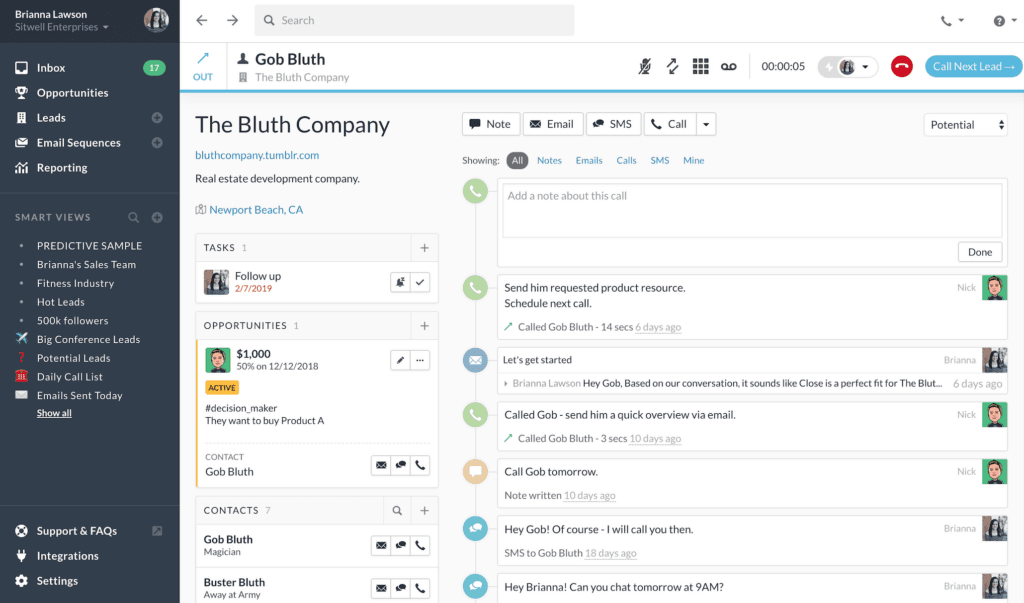
In Close vs Pipedrive comparisons, AI integration is the first question usually asked. Close CRM integrates AI in various aspects of its operations. The AI-powered Prediction Builder tool predicts customer churn, lifetime value, and other key business metrics. AI-enabled chatbots are customizable and automate customer support tasks across multiple digital platforms. AI is also leveraged to identify potential leads and opportunities, taking into account historical deals and sentiment analysis.
As for Pipedrive CRM, it features an AI component known as the Sales Assistant, which is designed to streamline your sales process and increase deal closures. The Sales Assistant employs algorithms developed by sales experts to analyze your activities and identify the most effective ways to enhance your workflow. It keeps you updated with notifications about changes to your account settings and progress reports. It also offers advice from an automated sales expert. Pipedrive’s algorithms function like machine learning applications, importing and analyzing large amounts of your sales data. The Sales Assistant responds to your Pipedrive activity with quick tips and useful data to optimize your workflow.
Customer support
Close CRM is recognized for its superior support during the sales process, with users noting that they receive necessary information promptly, avoiding long waits. However, some users have voiced concerns about the availability of the customer success manager (CSM) after the contract is signed, which they feel could potentially hinder the success of their migration project. There have also been reports of issues with the API and a lack of technical support. As a result, the customer support of Close CRM has received various reviews, from positive to negative.
On the other hand, Pipedrive CRM has earned widespread praise for its top-notch customer support. Users appreciate the platform’s user-friendly nature, which makes setup and operation straightforward. Users have also commended the excellent communication maintained throughout the process. There is a steeper learning curve in Pipedrive CRM, but it is generally considered a good option for those new to CRM systems. Overall, Pipedrive CRM's customer support has received predominantly positive feedback.
Note that although customer support is virtually free in Close CRM and paid in Pipedrive CRM, the quality and topics of support may still vary widely on a case-by-case basis in any Close vs Pipedrive comparison.
Automation features
Close CRM and Pipedrive CRM offer automation features to enhance sales team performance and simplify workflows, but with Close vs Pipedrive, each takes a unique approach. Close CRM, designed for simplicity and user-friendliness, is ideal for sales professionals prioritizing time and efficiency. It offers multi-channel sales outreach, task automation, and an AI-powered call assistant for transcribing and summarizing phone calls. This feature can also be synced with document control software to eliminate the use of paper even more.
Pipedrive CRM, on the other hand, emphasizes control and flexibility, allowing users to create custom automation workflows. It offers automated workflows, deal progression automation, customer retention automation, and pre-built workflow templates. Automation can be very beneficial for payroll management software as well.
As this Close vs Pipedrive comparison by Research.com's team of experts shows, the choice between Close CRM and Pipedrive CRM depends on your specific business needs and preferences. If simplicity and ease of use are key, Close CRM is a great choice. However, for more detailed control and workflow customization, Pipedrive CRM is preferable.
Reporting and analytics
Both Close CRM and Pipedrive CRM offer robust reporting and analytics features, but their approach and capabilities differ. Close vs Pipedrive has unique use cases as well.
Close CRM's reporting and analytics suite is designed to enhance sales rep performance, offering a Pipeline view for accurate sales forecasting and funnel health analysis, helping to swiftly address potential issues. Opportunity funnel reports help identify and fix inefficiencies in your sales funnel. Two-way data sync allows for easy data management across your tech stack.
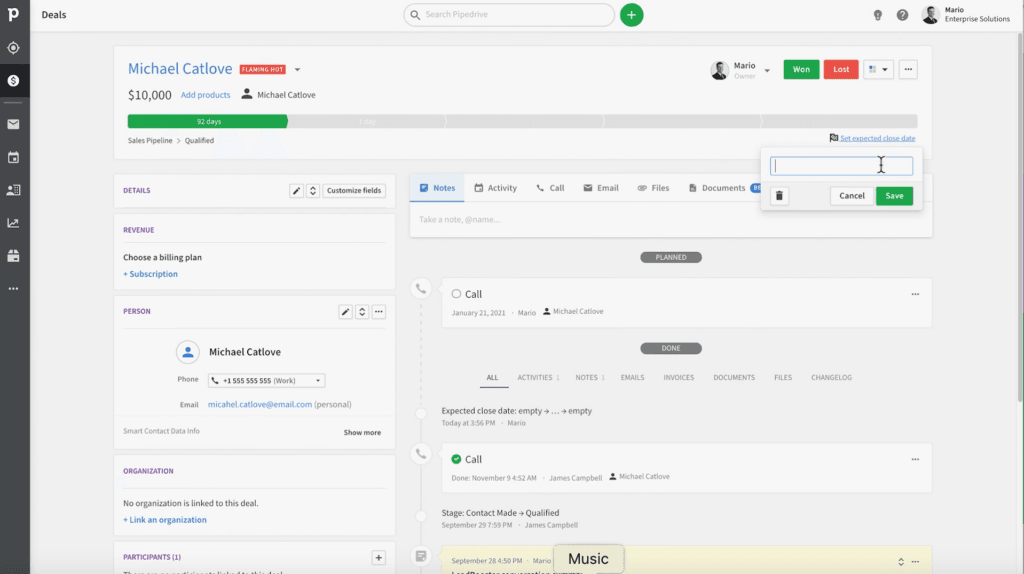
On the other hand, Pipedrive CRM's Insights feature helps sales reps identify successful patterns and optimize workflows and marketing campaigns. Its customizable sales reports can be tailored to track business-specific metrics set up by your company. The interactive insights dashboards visualize these metrics and reports through charts, graphs, and interactive tables. A goals feature helps track and maintain team focus and sets the path for success. Real-time sales performance monitoring shows a comprehensive performance overview, enabling informed decision-making and revenue forecasting.
Close CRM, as well as Close alternatives, is a great choice if you value data-driven insights for sales success. However, If you prefer more customizable reporting and interactive dashboards, Pipedrive CRM is the better option in a Close vs Pipedrive comparison.

Integrations
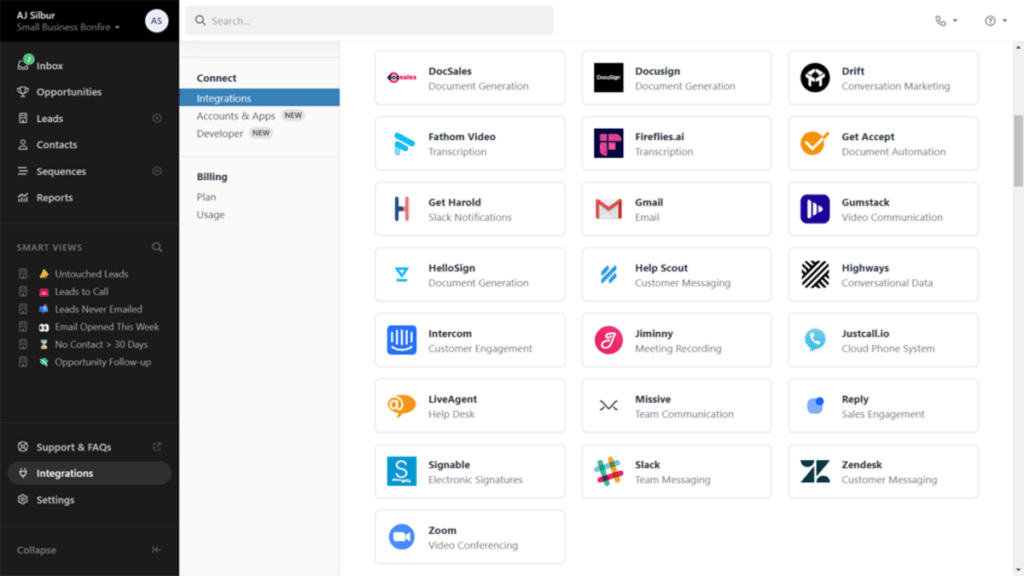
Close CRM has around 100 app integrations, and it provides one-click integration links for seamless compatibility with any tool in your tech stack. Its Integration Link gives you additional lead information and an OAuth provider for seamless native integrations. Its powerful API allows for creating custom integrations.
On the other hand, Pipedrive CRM's Marketplace offers over 400 ready-to-use CRM integrations that connect with popular customer support, lead generation, and marketing tools. It also provides an open API for integrating tools not already on their Marketplace, allowing various task automations.
Some popular integrations for Close CRM include Zapier, Mailchimp, Trello, QuickBooks, and Help Scout, while Pipedrive CRM has Zapier, Talkdesk, PandaDoc, Slack, and QuickBooks as integrations. There are many more, and it is best to consult their websites for more detailed information about Close vs Pipedrive apps.
Close vs Pipedrive Pricing
Both Close and Pipedrive offer free trials, and the choice between Close vs Pipedrive depends on your actual needs.
Close vs Pipedrive pricing details are as follows; your company may benefit most if you know your exact requirements.
Close CRM offers three pricing plans: Startup ($49/user/month), Professional ($299/month), and Enterprise ($699/month), each billed annually. The Startup Plan includes lead storage, 5 workflows, email/calendar sync, Zapier integration, and a Power Dialer. The Professional Plan adds increased leads, contacts, custom fields, email templates, multiple pipelines, and 25 workflows. The Enterprise Plan includes all Professional features plus custom objects (Beta), 100 workflows, call coaching, predictive dialer, and custom roles & visibility permissions. All plans include built-in calling, email, & SMS functionality, data import/export, task management, pipeline view, calendar sync, meeting reminders, API access, mobile app, custom fields, and custom activities.
Pipedrive CRM provides five pricing tiers: Essential, Advanced, Professional, Power, and Enterprise. These plans vary in cost from $12.50 to $74.90 per user each month. The Essential plan, the most economical, is tailored for small businesses. The Advanced plan offers additional features like email sync and automations, making it suitable for companies requiring more capabilities. The Professional plan, the most favored, caters to businesses needing increased customization and reporting. The Power plan is intended for larger teams, offering project planning, phone support, and scalable control of account permissions and visibilities. The Enterprise plan, the priciest, includes unlimited open deals, custom fields, and insights reports, along with enhanced security preferences and twice the number of automations per user.
Close Pros and Cons
Pros
- All-in-one solution
- Free support from a dedicated success team
- High volume outreach and lead generation
- Territory management feature streamlines sales and marketing teams
Cons
- May be too slow for large corporations
- Quality of customer support may vary
- Small and agile business model may not suit large businesses
- Successful integrations with 3rd party software may vary
- Fewer app integrations
Advanced Integrations for Streamlined Workflows
To maximize the benefits of CRM platforms, leveraging integrations with specialized tools is essential for productivity and efficiency. One noteworthy category of complementary software is electronic signature software, which facilitates seamless contract signing and accelerates deal closures—a key requirement for sales-focused teams using Close or Pipedrive. Solutions like these integrate effortlessly with both CRMs, enabling sales representatives to streamline customer interactions and eliminate delays associated with traditional documentation processes.
For instance, Pipedrive's extensive Marketplace houses numerous ready-to-use integrations that include electronic signature software, allowing businesses to automate workflows related to contract management or approval processes. Similarly, Close enables flexible connections through its API, ensuring compatibility with third-party tools for signing documents digitally.
By integrating CRMs with electronic signature software, companies can enhance productivity, reduce manual errors, and provide a smoother customer experience during the final stages of the sales cycle. This integration also supports environmental sustainability by reducing paper use, aligning with modern business trends.
How do Close and Pipedrive integrate with external billing software?
Both CRM platforms offer open APIs that facilitate seamless integration with third-party applications, including those designed for managing invoicing and payments. By connecting with billing software, businesses can automate the synchronization of customer transactions and subscription details directly within their CRM environment. This integration not only minimizes manual data entry but also provides real-time financial reporting and supports compliance, enhancing overall operational efficiency.
Pipedrive Pros and Cons
Pros
- Better 3rd party integration
- Better quality customer support for large companies
- Faster large-volume task performance
- More app integrations
- Visual pipeline management
Cons
- Extra costs for customer support
- Live chat or extended support hours lacking
- Mobile app functionality could be improved
- Multi-track sales paths are tricky to set up
- Multiple overlapping calendars view lacking
- Reporting and analytics features could be more robust
What security features do Close and Pipedrive offer to protect data?
When comparing Close and Pipedrive, it’s essential to consider the security features each CRM provides to protect sensitive customer and business data. Robust security measures are vital for any CRM, as they ensure data integrity, compliance, and user trust. Here’s a breakdown of the security measures offered by each platform:
Close Security Features
- Data Encryption: Close employs data encryption both in transit and at rest to safeguard customer data from unauthorized access.
- Two-Factor Authentication (2FA): This optional security feature adds an additional layer of protection, requiring users to verify their identity through a secondary device or app.
- Access Control: Close allows customizable user roles and permissions, so businesses can control which team members can view or edit sensitive data.
- Compliance Standards: Close adheres to major industry standards, such as GDPR, ensuring data protection and regulatory compliance for customers.
- IP Whitelisting: Close offers IP whitelisting, allowing businesses to restrict access to the CRM from specific IP addresses for added security.
Pipedrive Security Features
- Data Encryption: Pipedrive also offers data encryption at rest and in transit, protecting customer data from interception or unauthorized access.
- Single Sign-On (SSO): For enhanced security and convenience, Pipedrive supports SSO integration with popular identity providers.
- Role-Based Permissions: With customizable access permissions, businesses using Pipedrive can assign specific roles to users, ensuring that only authorized personnel can access sensitive information.
- Audit Logs: Pipedrive’s audit logs provide detailed records of user activities, allowing businesses to monitor access and changes to data within the platform.
- GDPR Compliance: Pipedrive is GDPR-compliant, helping businesses meet EU data protection standards.
Close provides comprehensive security features, including IP whitelisting and two-factor authentication, which enhance data protection for smaller sales teams. Pipedrive offers robust security with SSO, role-based permissions, and audit logs, making it ideal for larger teams needing additional security monitoring.
Verdict – Close vs Pipedrive: Which software is better?
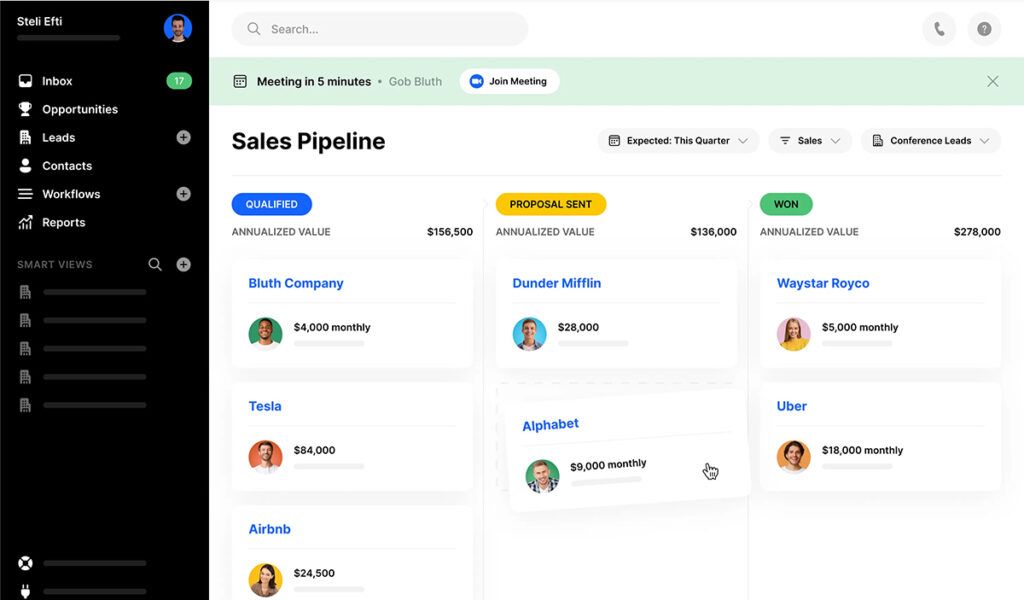
The decision on which of Close vs Pipedrive is better falls on user test cases and requirements. Still, if you want a general-purpose multi-functional platform for sales and marketing and you are a small business or startup, Close is definitely the better choice. You would likely have simpler business needs and fewer integrations with third-party apps.
But if you need more robust AI, reporting and analytical, and a more visual pipeline interface, then Pipedrive or Pipedrive alternatives are for you. A much wider variety of apps and third-party integrations is available for Pipedrive users, and typically, this diversity of apps is what larger companies need to scale up quickly and accurately as the business expands. Which specific Close vs Pipedrive AI features you will need are also important to consider.
Key Insights
- Target Audience:
- Close: Best suited for startups and SMBs with sales teams under 100 members. It is ideal for companies that prefer an all-in-one CRM solution over disparate tools and need a dedicated success team without additional costs.
- Pipedrive: Suitable for businesses of all sizes, including large corporations. It is popular across various industries and offers extensive customization and integration capabilities, making it adaptable to diverse business needs.
- Key Features:
- Close: Offers fast onboarding, free data migrations and tech support, high productivity tools, and multi-channel sales outreach. It includes features like AI-powered call summaries, email, SMS, and video integration.
- Pipedrive: Provides a visual pipeline interface, AI-driven sales assistant, customizable email campaigns, activity reminders, and robust integration with over 400 third-party applications. It emphasizes flexibility and control in creating custom automation workflows.
- Customer Support:
- Close: Generally praised for its support during the sales process, though some users have reported post-contract support issues.
- Pipedrive: Known for excellent customer support and communication, though it has a steeper learning curve.
- Automation and Analytics:
- Close: Focuses on simplifying workflows with multi-channel outreach and AI-powered tools for lead identification and call summaries.
- Pipedrive: Offers detailed control with customizable automation workflows, interactive insights dashboards, and real-time sales performance monitoring.
- Pricing:
- Close: Offers three pricing plans—Startup ($49/user/month), Professional ($299/month), and Enterprise ($699/month)—with features scaling from basic lead storage and workflows to advanced predictive dialers and custom roles.
- Pipedrive: Provides five pricing tiers ranging from $12.50 to $74.90 per user per month, each offering varying levels of customization, email sync, automation, and project planning capabilities.
Other Things You Should Know About Close – Pipedrive Comparison
Close CRM differentiates itself by targeting small and medium-sized businesses with sales teams of fewer than 100 members. It offers a user-friendly interface that integrates CRM, email, global calling, SMS, and video into a single platform, which simplifies workflows and enhances productivity. Additionally, Close CRM provides free data migrations, making it a cost-effective choice for businesses seeking simplicity and affordability.
Yes, Pipedrive is one of the most popular CRM platforms designed to help businesses manage their sales process and track deals. It emphasizes activity-based selling, offering features like a visual pipeline interface, contact and activity management, sales reporting, and lead generation tools. Pipedrive's open API and automation capabilities further enhance its functionality, making it suitable for businesses of all sizes.
Close CRM offers a robust solution for sales teams, enhancing efficiency, customer retention, and productivity. Its intuitive interface, seamless integration capabilities, transparent pricing, and rapid onboarding process make it a compelling choice for businesses. Key benefits include advanced email, call, and SMS features, which help accelerate lead progression through the sales cycle, and synchronized email and calendar functions that streamline daily workflows.
Pipedrive stands out for its intuitive design, ease of use, affordability, and robust feature set. It offers more features than competitors like Airtable and Close CRM and is more customizable than platforms like Monday. Pipedrive’s email marketing add-on, Pipedrive Campaigns, unifies sales and marketing data, improving marketing ROI. Overall, it provides an affordable, feature-rich, and easy-to-use CRM solution suitable for businesses of all sizes.


