Best Restaurant POS Systems for Multi-Location and Chain Restaurants

Co-Founder and Chief Data Scientist
Running one restaurant poses a number of challenges. Running five, ten, or fifteen? That’s when the job can be particularly daunting.
You’ve got more staff, more orders, and more locations to manage. Things move much faster in this dynamic, and it’s easy to lose track of what’s going on.
That’s why you need the right tools in place.
Investing in a good restaurant POS system, one that’s designed for handling more than one location and can scale with you, can help you stay in control.
But, with so many different options to choose from, it’s not always easy to know which POS software for multiple locations to go for. After all, you’re a restaurant expert, not a technology professional.
This guide will give you all the answers you need to make an informed decision. We’ll run you through all the essentials, from what features to look for, how to choose the right one, and how the right setup can make your life a lot easier.
Why Multi-Location Restaurants Need Specialised POS Systems
Now, the first thing we want to make clear to you is that, because you run multiple locations, you can’t just use any old POS system.
What works for a single-site restaurant or small food truck business, or ghost kitchen won’t cut it when you’ve got multiple venues to keep in line.
You need restaurants point of sale software that’s packed with features to help you scale.
Key features of a multi-location POS
So, what should a good multi-location POS system actually do? Here’s what to look for:
- Centralized management: One dashboard to manage all your locations
- Real-time reporting: Live data on sales and performance for every restaurant.
- Restaurant inventory software: Showing you ingredient levels across all kitchens.
- User permissions: Settings that control who can access what at each site.
- Customizable menus by location: Ability to tailor menus for each restaurant individually.
- Cloud-based access: Online platform accessible from anywhere.
- Integrated staff management: Tools for scheduling and tracking staff work hours.
- Unified customer data: Central storage of loyalty and order information.
- Built-in integrations: Connections to delivery, reservation, and
Why it works for restaurants
Here’s why these features matter for your restaurant chain:
- Update menus and prices across all locations in one go.
- See sales and inventory live to make quick decisions.
- Track ingredients to cut waste and avoid running out.
- Control staff access to keep things secure.
- Customize menus by location to suit local tastes.
- Access your system anytime, from anywhere.
- Manage staff schedules and hours easily.
- Keep customer data synced for a smooth experience everywhere.
- Connect with delivery apps and accounting tools to save time.
These features keep your business running smooth and growing strong.
Benefits of using a muti-store POS system
Using a POS system designed for multiple locations brings real advantages:
- Serve customers faster: Orders get to the kitchen quickly and accurately, helping your team work together smoothly. That means faster service, more satisfied customers, and quicker table turnover. In fact, restaurants that upgraded to advanced POS tech saw customer
- Easy for customers and staff: The top restaurant POS systems are simple to use and set up. They can even suggest extras automatically, helping your staff boost sales without extra effort.
- Works with all payment options: It connects easily with every major payment method, loyalty programs, online stores, and delivery apps. This means you don’t miss out on any sales, no matter how customers pay or order.
- See sales and performance live: You get real-time updates on every sale. Custom dashboards show you exactly how each location is doing, so you can keep track from anywhere.
- Cut costs and reduce waste: More locations mean more overheads and even more waste. The best POS systems help you manage stock, orders, recipes, and deliveries in one place. This means less things in the trash and smarter spending, saving you money on operations.
What is a Restaurant POS System?
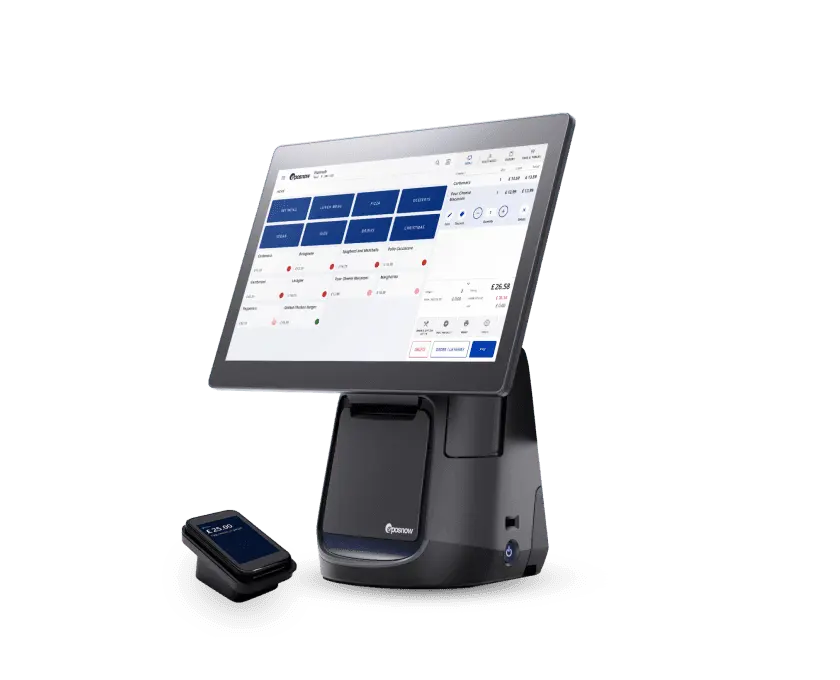
A restaurant POS system is the technology that helps take orders, process payments, and manage daily operations in a restaurant.
There are two main types of restaurant POS systems:
- Legacy systems: These are traditional setups that store all data locally on servers inside the restaurant. They usually need a big upfront investment in restaurant hardware and can be harder to update or access remotely.
- Cloud-based systems: These store data online (in the cloud), so you can access them from any device with internet.
If you have more than one restaurant location we recommend that you always opt for the second, cloud-based option. They’re much more flexible, easier to scale, and usually cost less upfront. They also update and back up automatically.
How to Choose the Right POS System for Your Restaurant Chain
Picking the right POS system can feel overwhelming. But it’s one of the most important decisions for your restaurant’s success. Here’s what to think about:
Think about your specific needs
Every restaurant chain is different. This means they’ll have different requirements, different priorities. For example, a quick-service chain like KFC or McDonald’s will likely need a POS system that can handle fast order processing, support drive-thru operations, and easily connect with delivery apps. Speed and accuracy are the main priorities in this case.
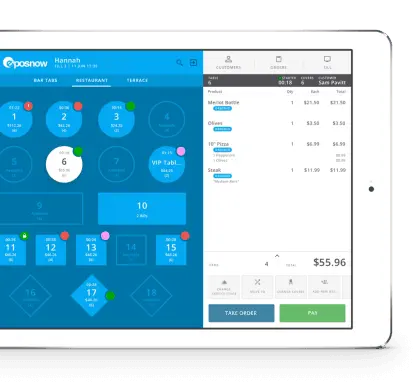
On the other hand, a fine dining restaurant chain, like Bagatelle or Nobu, will need a POS system that focuses on those small and important details. Things like detailed table management, customized orders, a smooth handling of special requests, will be what they’ll look for.
Make a list of the features you really need. Do you want to track inventory in real-time across all locations? Maybe you want easy ways to create and update menus quickly? Do you need to connect with popular food delivery apps because a lot of your income comes from takeaway orders?
Knowing exactly what your restaurants require will help you avoid paying for features you don’t need, and make sure you get the important ones.
TIP: If you’re just getting started with a new restaurant concept, don’t overlook branding. A strong name makes a lasting impression, and luckily, you don’t need to spend hours brainstorming. There are some great tools out there, like AI-powered free restaurants name generators, to help you come up with catchy, creative names in minutes.
2. Look for Scalability
Your restaurant chain is growing, and your POS system has to keep up with those growth strategies. Scalability means the system can easily handle more locations, more customers, and more staff as you add new restaurants.
When you open a new location, you don’t want to buy and set up a brand-new system from scratch every time. A scalable POS lets you add new restaurants into the same system, so everything stays connected and easy to manage.
Also, as your business grows, you’ll have more orders to process, more employees to schedule, and a lot more data to track -like sales, inventory, and customer info. The best POS systems will handle all that easily without slowing down or crashing.
How can you know if the system is built for scalability, you ask?
- Ask the provider if their system supports multiple locations and if adding new restaurants is easy. Good providers will have clear answers and examples.
- Look for cloud-based systems as they’re usually more scalable because they store data online and let you connect new locations without extra hardware.
- See if other businesses like yours have grown using their system. Reviews and case studies are a good place to find this info.
- Many POS providers offer demos. Use this to see how easy it is to add locations or manage multiple sites from one dashboard.
3. Choose User-Friendly
Your POS system is the tool that your team will use every single day. If the system is hard to understand or difficult to use, it will slow down your whole operation.
Imagine your server is rushing to take a big table’s order during a busy dinner rush. If the POS is confusing, it could take longer to enter the order or lead to mistakes. That’ll mean unhappy customers and stressed staff.
A user-friendly POS has clear, simple screens that make it easy to find what you need quickly. The buttons should be easy to tap or click, and the menus should be straightforward, without confusing jargon or complicated steps.
It should also take your team minutes to learn the system and new hires shouldn’t find the tech training overwhelming. When you demo the tool, think about how a new started will feel using it.
So, when you’re looking for a POS, ask for a demo or trial. Let your team try it out. See if it feels natural and easy. If it’s simple and intuitive, you’re on the right track. Your staff will thank you, and your restaurant will run better every day.
4. Check Integration Options
Your POS system has to work well with other tools your restaurant uses every day. This is called integration, it means your POS can connect and share information smoothly with other software.
For example, think about your accounting software. It keeps track of all your money, your sales, expenses, taxes and helps you manage your finances. If your POS can send sales data directly to your accounting software, you don’t have to enter numbers twice.
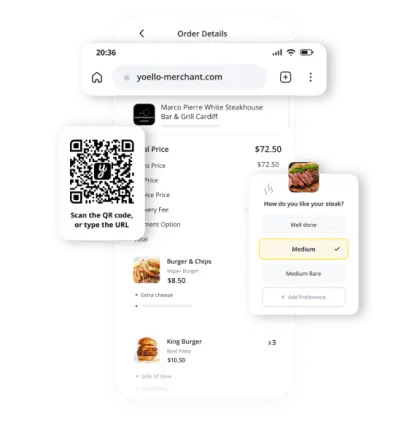
Online ordering platforms are another example and they’re huge now. Many customers want to order from their phones or computers. If your restaurant EPOS connects with these platforms, orders go straight into your system and kitchen, without someone typing them in by hand. That means fewer errors and faster service.
Restaurants that integrated their POS with online ordering platforms saw an average 30% bump in revenue, which makes sense. Orders come through faster, go straight to the kitchen, and fewer mistakes means happier (repeat) customers.
Before you choose a POS, check which restaurant software it works with. Ask your team what tools they already use or want to use in the future. A POS that ‘plays nice’ with other systems will save you headaches and help your restaurants run smoothly.
5. Budget Wisely
We completely understand that, when you’re running a business, keeping costs low is extremely important. Because of this, it’s easy to be drawn to the cheapest POS system on the market, especially if the upfront price looks good. But, the cheapest option isn’t always the most affordable long-term.
Some POS systems charge a low setup fee but hit you with high monthly subscription costs. Others might seem like a bargain until you realize you need to pay extra for important features like staff scheduling, reporting tools, or support. Then there’s the hardware. Do you need special tablets or printers? Will you need to buy new gear if you expand? All of this adds up.
That’s why it’s important to look at the total cost over time. Think about:
- Setup costs: What does it cost to get started?
- Monthly fees: Are they fixed, or do they change based on usage or number of locations?
- Add-ons and extras: Do features like loyalty programs or integrations cost extra?
- Hardware: Do you need to buy it? Lease it? Upgrade it regularly?
- Support and updates: Is customer support included? Are updates free?
You want a system that fits your current budget and can grow with your business without becoming a money pit. The key is finding the right balance, a system that’s affordable but still reliable, feature-rich, and easy to use.
Spending a little more now on a solid, scalable POS could actually save you money (and stress) in the long run.
The Role of Restaurant Management Software in Scaling Operations

As your restaurant chain grows, things get harder to manage.
Restaurant management software helps keep everything in one place, so you can see how each location is doing, check your stock, update menus, and manage staff.
Everything updates in real time, and it works the same across all your restaurants.
Plus, when you open a new location, you can just add it to the system.
Cloud-Based vs On-Premise POS Systems for Hospitality
Here’s a quick table for the pros and cons of each solution:
| Feature | Cloud-based POS | On-premise POS |
| Data access | Access anywhere, anytime via internet | Only accessible on-site |
| Updates | Automatic software updates | Manual updates required |
| Hardware requirements | Minimal (often works on tablets or iPads) | Requires dedicated servers and hardware |
| Internet dependence | Needs internet, but many work offline and sync later | Doesn’t rely on internet |
| Scalability | Easy to add new locations and users | More complex and expensive to scale |
| Set-up costs | Lower upfront costs | Higher upfront hardware and installation costs |
| Monthly costs | Subscription-based (ongoing monthly fees) | One-time cost, but may need expensive upgrades or support |
| Security | Data stored in the cloud with regular backups | Data stored locally, may be at risk if servers fail |
| Integration | Easily connects with online ordering, delivery apps, and accounting software | Limited integration; often requires custom solutions |
Over 65% of restaurant POS software is cloud-based. It’s clear that most restaurants are moving away from old-school legacy systems in favour of flexible, scalable tech that grows with them.
So, What is the Best Restaurant POS System?
The best restaurant POS system depends on your business needs. Whether you're running a fast-paced quick-service chain or a growing group of fine dining spots, your system should help you save time, reduce errors, and stay in control as you expand.
A great multi-store POS system should be:
- Easy to use for your staff (even on the busiest shifts)
- Flexible enough to grow with you (you shouldn't need separate Bar point of sale systems to run your business)
- Packed with the right features, like real-time reporting, stock tracking, and staff scheduling
- Able to connect with the tools you already use
- Affordable for the long term
Whether you’re managing two sites or twenty, Epos Now’s cloud-based POS system is built to scale with your business. It gives you full control over every location, lets your teams work faster and smarter, and keeps your data safe and accessible from anywhere.
What kind of reports can I see?
You can view real-time sales, staff performance, best-selling items, and even profit margins, all from one screen. Custom reports help you stay in control of your business without needing a spreadsheet. It’s no wonder 86% of restaurants now use POS data to shape their loyalty offers, discounts, and marketing strategies.
Other Things You Should Know About The Best Restaurant POS Systems for Multi-Location and Chain Restaurants
When you run more than one restaurant, you need a system that can manage them all in one place. A multi-location POS helps you stay organized, see performance across all venues, and make decisions faster, without jumping between different systems.
Yes! With a good multi-store POS, you can update prices, items, or specials for all your locations (or just one) from one dashboard.
Mostly, yes, but many cloud-based POS systems also have offline mode, which means you can still take orders and payments even if your Wi-Fi goes down. It’ll sync back up once the connection’s restored.
Not if you choose a user-friendly system. The best POS systems are simple to learn, with clear buttons, fast workflows, and helpful support videos. That means less training time and fewer mistakes.
Absolutely - a good POS will show you exactly what you have at each location, what’s running low, and what needs reordering, helping you reduce waste and avoid running out of ingredients.