ActiveCampaign for Sales vs Pipedrive – 2027 Comparison

Co-Founder and Chief Data Scientist
ActiveCampaign for Sales vs Pipedrive Table of Contents
- What is ActiveCampaign for Sales?
- Who is ActiveCampaign for Sales for?
- Key benefits of ActiveCampaign for Sales?
- What is Pipedrive?
- Who is Pipedrive for?
- Key Benefits of Pipedrive
- Who are ActiveCampaign for Sales and Pipedrive best for?
- Common Scenarios for ActiveCampaign for Sales and Pipedrive
- ActiveCampaign for Sales vs Pipedrive Pricing
- ActiveCampaign for Sales Pros and Cons
- Can these CRMs integrate with specialized construction software?
- Pipedrive Pros and Cons
- How Industry-Specific Needs Influence Your Choice
- Verdict – ActiveCampaign for Sales vs Pipedrive: Which software is better?
What is ActiveCampaign for Sales?
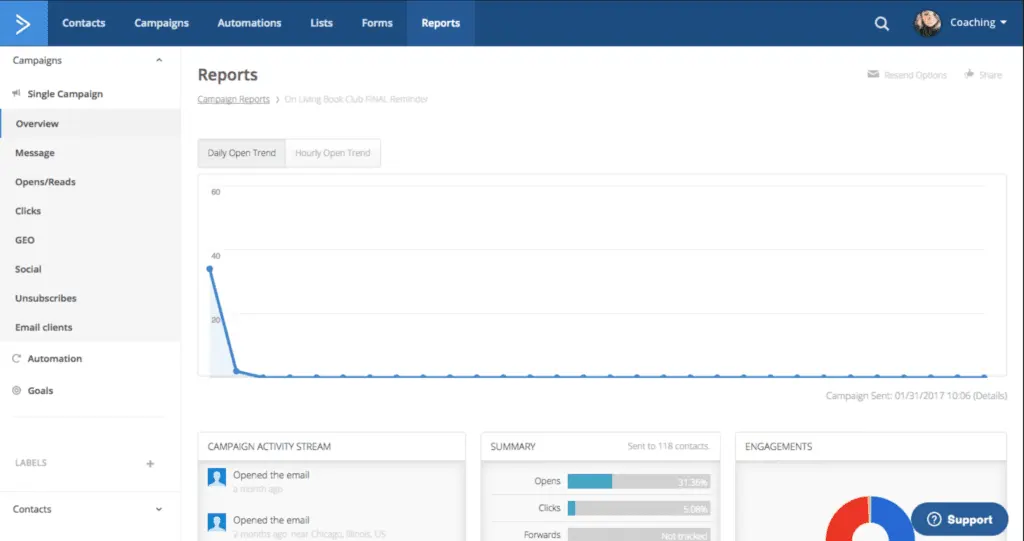
ActiveCampaign for Sales is built for sales teams that want to have a single software that can help them improve strategies for capturing, qualifying, and engaging leads and optimize the entire sales process through automation. Its core features include lead scoring, sales pipelines, sales engagement, sales automation, and a customer relationship management (CRM) platform.
ActiveCampaign for Sales is considered one of the best software for sales reps due to its user-friendly interface and automation features for contact management, tracking tasks, monitoring pipelines and deals, and scoring leads. Some salespeople may find it takes them longer to learn all the features and tools, but once they become more familiar with the system, they will be pleasantly surprised at how much time they can save and how much more efficient and successful they can be in selling. ActiveCampaign advertises that it helps its customers meet today’s quota and surpass tomorrow’s goals, and many businesses attest to achieving this outcome with the help of this software product.
Featured CRM Software Products

$9 to $150/user/month
Yes, up to 2 users
E-signature software, call transcription, conversation routing
Editor's Take
HubSpot CRM is a powerful customer relationship management platform designed to help businesses manage their sales, marketing, and customer service efforts in one centralized place. Its user-friendly interface allows teams to track leads, monitor customer interactions, and automate sales pipelines. With built-in tools for email marketing, contact management, and analytics, HubSpot CRM provides deep insights into customer behavior and sales performance. The platform also supports seamless collaboration between marketing and sales teams through real-time updates and integrations with tools like Gmail, Outlook, and Slack. Additionally, its automation features help reduce manual tasks, enabling teams to focus on building relationships and closing deals. HubSpot CRM is scalable, making it ideal for businesses of all sizes, from startups to large enterprises.
Expert Score
In evaluating SaaS software, a comprehensive and structured methodology ensures a fair and accurate comparison across key metrics. This approach focuses on the most critical aspects that affect user experience, functionality, and business value. The following metrics—general features, cost, customer service, integrations, and mobile support—are evaluated to provide a holistic view of each software solution’s strengths and weaknesses. These metrics are selected based on their direct impact on software usability, scalability, and long-term effectiveness for businesses.
1. General Features - scoring weight 40%
This metric evaluates the core functionalities and tools the software offers. It involves assessing the comprehensiveness of the features, their relevance to the target users, and the ease of use. This is important because robust and well-designed features determine the software's overall utility and efficiency in solving user problems.
2. Cost - scoring weight 15%
Cost analysis focuses on pricing models, value for money, and scalability. It's crucial to evaluate whether the software’s features justify its price, considering different plans for small and large organizations. This is vital for businesses to ensure they invest in cost-effective solutions that fit their budget.
3. Customer Service - scoring weight 15%
This evaluates the responsiveness, quality, and availability of customer support, including channels like chat, email, or phone. Good customer service is essential for troubleshooting and ensuring smooth software usage, which reduces downtime and frustration for users.
4. Integrations - scoring weight 15%
This examines how well the software integrates with third-party tools (e.g., CRM, payment systems, collaboration apps). Seamless integrations are key for creating a unified workflow and enhancing productivity by connecting multiple systems, which is crucial for operational efficiency.
5. Mobile Support - scoring weight 15%
Mobile support assesses the software’s functionality and performance on mobile devices, including apps and mobile web versions. With increasing remote work and on-the-go usage, strong mobile support is critical to ensure users can access and utilize the software effectively, regardless of location.

Custom
No
Sales automation, customer service, marketing
Editor's Take
NetSuite CRM is a comprehensive customer relationship management solution designed to support businesses in managing their entire customer lifecycle. It offers a full suite of tools for sales automation, customer service, marketing, and partner management, helping teams improve efficiency and build stronger customer relationships. With real-time visibility into customer interactions, NetSuite CRM enables businesses to track leads, manage opportunities, and forecast sales accurately. Its built-in analytics and reporting features provide deep insights into sales performance and customer behavior. NetSuite CRM integrates seamlessly with NetSuite’s enterprise resource planning (ERP) system, offering a unified platform for managing business operations. This scalability and flexibility make it ideal for growing businesses and enterprises seeking an all-in-one solution for customer relationship management.
Expert Score
In evaluating SaaS software, a comprehensive and structured methodology ensures a fair and accurate comparison across key metrics. This approach focuses on the most critical aspects that affect user experience, functionality, and business value. The following metrics—general features, cost, customer service, integrations, and mobile support—are evaluated to provide a holistic view of each software solution’s strengths and weaknesses. These metrics are selected based on their direct impact on software usability, scalability, and long-term effectiveness for businesses.
1. General Features - scoring weight 40%
This metric evaluates the core functionalities and tools the software offers. It involves assessing the comprehensiveness of the features, their relevance to the target users, and the ease of use. This is important because robust and well-designed features determine the software's overall utility and efficiency in solving user problems.
2. Cost - scoring weight 15%
Cost analysis focuses on pricing models, value for money, and scalability. It's crucial to evaluate whether the software’s features justify its price, considering different plans for small and large organizations. This is vital for businesses to ensure they invest in cost-effective solutions that fit their budget.
3. Customer Service - scoring weight 15%
This evaluates the responsiveness, quality, and availability of customer support, including channels like chat, email, or phone. Good customer service is essential for troubleshooting and ensuring smooth software usage, which reduces downtime and frustration for users.
4. Integrations - scoring weight 15%
This examines how well the software integrates with third-party tools (e.g., CRM, payment systems, collaboration apps). Seamless integrations are key for creating a unified workflow and enhancing productivity by connecting multiple systems, which is crucial for operational efficiency.
5. Mobile Support - scoring weight 15%
Mobile support assesses the software’s functionality and performance on mobile devices, including apps and mobile web versions. With increasing remote work and on-the-go usage, strong mobile support is critical to ensure users can access and utilize the software effectively, regardless of location.

$25 per user per month
14 days
marketing automation, sales automation, no code customization
Editor's Take
CRM Creatio is a comprehensive customer relationship management (CRM) solution designed to streamline and enhance business processes across sales, marketing, and customer service functions. Known for its low-code platform, Creatio allows businesses to customize and automate workflows without requiring extensive technical expertise. This adaptability makes it particularly appealing to organizations seeking to align the software with their specific needs.
The platform's marketing module provides tools for multi-channel campaign management, lead generation, and personalized customer engagement. Its sales module offers functionality for pipeline management, opportunity tracking, and analytics to help teams close deals more efficiently. Additionally, the customer service module supports case management, service level agreement (SLA) monitoring, and omnichannel communication, enabling businesses to provide exceptional customer support.
Creatio stands out with its intuitive interface, robust analytics, and AI-powered tools that provide actionable insights. The low-code development tools allow non-technical users to create applications and automate processes, reducing the dependency on IT teams. Integration capabilities with other software platforms and APIs enhance its utility, making it a versatile choice for businesses of all sizes.
Overall, CRM Creatio is a powerful solution that combines user-friendly design with advanced customization and automation features. Its adaptability and low-code foundation position it as a strong contender for organizations looking to optimize customer relationship management processes while maintaining flexibility for growth and innovation.
Expert Score
In evaluating SaaS software, a comprehensive and structured methodology ensures a fair and accurate comparison across key metrics. This approach focuses on the most critical aspects that affect user experience, functionality, and business value. The following metrics—general features, cost, customer service, integrations, and mobile support—are evaluated to provide a holistic view of each software solution’s strengths and weaknesses. These metrics are selected based on their direct impact on software usability, scalability, and long-term effectiveness for businesses.
1. General Features - scoring weight 40%
This metric evaluates the core functionalities and tools the software offers. It involves assessing the comprehensiveness of the features, their relevance to the target users, and the ease of use. This is important because robust and well-designed features determine the software's overall utility and efficiency in solving user problems.
2. Cost - scoring weight 15%
Cost analysis focuses on pricing models, value for money, and scalability. It's crucial to evaluate whether the software’s features justify its price, considering different plans for small and large organizations. This is vital for businesses to ensure they invest in cost-effective solutions that fit their budget.
3. Customer Service - scoring weight 15%
This evaluates the responsiveness, quality, and availability of customer support, including channels like chat, email, or phone. Good customer service is essential for troubleshooting and ensuring smooth software usage, which reduces downtime and frustration for users.
4. Integrations - scoring weight 15%
This examines how well the software integrates with third-party tools (e.g., CRM, payment systems, collaboration apps). Seamless integrations are key for creating a unified workflow and enhancing productivity by connecting multiple systems, which is crucial for operational efficiency.
5. Mobile Support - scoring weight 15%
Mobile support assesses the software’s functionality and performance on mobile devices, including apps and mobile web versions. With increasing remote work and on-the-go usage, strong mobile support is critical to ensure users can access and utilize the software effectively, regardless of location.

$8/per user/per month
Yes
customizable dashboards, automated follow-ups, advanced analytics
Editor's Take
monday.com Sales CRM is a customizable platform designed to streamline sales processes, enhance team collaboration, and improve pipeline visibility. Its intuitive interface enables users to manage leads, track deals, and automate repetitive tasks with ease. The CRM integrates seamlessly with popular tools like Gmail, Slack, and HubSpot, ensuring a centralized workflow. Features like customizable dashboards, automated follow-ups, and advanced analytics help sales teams stay organized and focused on closing deals. With scalability in mind, monday.com caters to businesses of all sizes, offering flexible pricing plans and robust customer support. It’s an excellent choice for teams seeking efficiency and adaptability.
Expert Score
In evaluating SaaS software, a comprehensive and structured methodology ensures a fair and accurate comparison across key metrics. This approach focuses on the most critical aspects that affect user experience, functionality, and business value. The following metrics—general features, cost, customer service, integrations, and mobile support—are evaluated to provide a holistic view of each software solution’s strengths and weaknesses. These metrics are selected based on their direct impact on software usability, scalability, and long-term effectiveness for businesses.
1. General Features - scoring weight 40%
This metric evaluates the core functionalities and tools the software offers. It involves assessing the comprehensiveness of the features, their relevance to the target users, and the ease of use. This is important because robust and well-designed features determine the software’s overall utility and efficiency in solving user problems.
2. Cost - scoring weight 15%
Cost analysis focuses on pricing models, value for money, and scalability. It’s crucial to evaluate whether the software’s features justify its price, considering different plans for small and large organizations. This is vital for businesses to ensure they invest in cost-effective solutions that fit their budget.
3. Customer Service - scoring weight 15%
This evaluates the responsiveness, quality, and availability of customer support, including channels like chat, email, or phone. Good customer service is essential for troubleshooting and ensuring smooth software usage, which reduces downtime and frustration for users.
4. Integrations - scoring weight 15%
This examines how well the software integrates with third-party tools (e.g., CRM, payment systems, collaboration apps). Seamless integrations are key for creating a unified workflow and enhancing productivity by connecting multiple systems, which is crucial for operational efficiency.
5. Mobile Support - scoring weight 15%
Mobile support assesses the software’s functionality and performance on mobile devices, including apps and mobile web versions. With increasing remote work and on-the-go usage, strong mobile support is critical to ensure users can access and utilize the software effectively, regardless of location.

$7 per user per month billed annually
15 days
lead generation, sales pipeline management, workflow automation
Editor's Take
Zoho CRM is a flexible and comprehensive customer relationship management platform designed to help businesses manage and grow their customer relationships effectively. With tools for lead generation, sales pipeline management, workflow automation, and analytics, Zoho CRM is suitable for businesses of all sizes across a variety of industries.
Zoho CRM enables teams to streamline sales processes by capturing leads from multiple channels, tracking interactions, and managing every stage of the sales cycle. The platform offers customizable dashboards and reports, providing insights into sales performance and customer behaviors to help make data-driven decisions. With powerful automation features, Zoho CRM allows businesses to set up workflows for routine tasks like follow-ups, lead scoring, and email notifications, reducing manual work and enhancing productivity. The platform integrates with popular tools, including the Zoho suite, Microsoft 365, and G Suite, enabling a seamless connection across teams.
For businesses aiming to improve customer engagement, close deals faster, and enhance team collaboration, Zoho CRM delivers a scalable, user-friendly solution to drive sales and customer satisfaction.
Expert Score
In evaluating SaaS software, a comprehensive and structured methodology ensures a fair and accurate comparison across key metrics. This approach focuses on the most critical aspects that affect user experience, functionality, and business value. The following metrics—general features, cost, customer service, integrations, and mobile support—are evaluated to provide a holistic view of each software solution’s strengths and weaknesses. These metrics are selected based on their direct impact on software usability, scalability, and long-term effectiveness for businesses.
1. General Features - scoring weight 40%
This metric evaluates the core functionalities and tools the software offers. It involves assessing the comprehensiveness of the features, their relevance to the target users, and the ease of use. This is important because robust and well-designed features determine the software's overall utility and efficiency in solving user problems.
2. Cost - scoring weight 15%
Cost analysis focuses on pricing models, value for money, and scalability. It's crucial to evaluate whether the software’s features justify its price, considering different plans for small and large organizations. This is vital for businesses to ensure they invest in cost-effective solutions that fit their budget.
3. Customer Service - scoring weight 15%
This evaluates the responsiveness, quality, and availability of customer support, including channels like chat, email, or phone. Good customer service is essential for troubleshooting and ensuring smooth software usage, which reduces downtime and frustration for users.
4. Integrations - scoring weight 15%
This examines how well the software integrates with third-party tools (e.g., CRM, payment systems, collaboration apps). Seamless integrations are key for creating a unified workflow and enhancing productivity by connecting multiple systems, which is crucial for operational efficiency.
5. Mobile Support - scoring weight 15%
Mobile support assesses the software’s functionality and performance on mobile devices, including apps and mobile web versions. With increasing remote work and on-the-go usage, strong mobile support is critical to ensure users can access and utilize the software effectively, regardless of location.

By quote
Yes
Lead Management, Contact Management, Workflow Automation
Editor's Take
Salesforce CRM is a leading customer relationship management platform known for its robust functionality, scalability, and extensive customization options, making it suitable for businesses of all sizes, from startups to large enterprises. Built to streamline sales, marketing, customer service, and analytics, Salesforce CRM empowers teams to manage customer interactions, optimize workflows, and drive growth from a single, cloud-based platform.
Salesforce CRM provides a complete view of customer data, enabling teams to track interactions, manage leads, and automate tasks throughout the sales pipeline. With powerful tools for reporting and analytics, Salesforce offers insights into sales performance, customer trends, and campaign effectiveness, allowing teams to make data-driven decisions. The platform’s automation capabilities reduce manual workloads with customizable workflows, automated follow-ups, and lead scoring, ensuring a smooth customer journey. Integrations with thousands of third-party applications, along with its own suite of services, make Salesforce a highly adaptable solution for businesses looking to connect their CRM with other tools.
For organizations focused on enhancing customer engagement, improving team efficiency, and scaling their operations, Salesforce CRM delivers a powerful and versatile solution tailored to support long-term business growth.
Expert Score
In evaluating SaaS software, a comprehensive and structured methodology ensures a fair and accurate comparison across key metrics. This approach focuses on the most critical aspects that affect user experience, functionality, and business value. The following metrics—general features, cost, customer service, integrations, and mobile support—are evaluated to provide a holistic view of each software solution’s strengths and weaknesses. These metrics are selected based on their direct impact on software usability, scalability, and long-term effectiveness for businesses.
1. General Features - scoring weight 40%
This metric evaluates the core functionalities and tools the software offers. It involves assessing the comprehensiveness of the features, their relevance to the target users, and the ease of use. This is important because robust and well-designed features determine the software's overall utility and efficiency in solving user problems.
2. Cost - scoring weight 15%
Cost analysis focuses on pricing models, value for money, and scalability. It's crucial to evaluate whether the software’s features justify its price, considering different plans for small and large organizations. This is vital for businesses to ensure they invest in cost-effective solutions that fit their budget.
3. Customer Service - scoring weight 15%
This evaluates the responsiveness, quality, and availability of customer support, including channels like chat, email, or phone. Good customer service is essential for troubleshooting and ensuring smooth software usage, which reduces downtime and frustration for users.
4. Integrations - scoring weight 15%
This examines how well the software integrates with third-party tools (e.g., CRM, payment systems, collaboration apps). Seamless integrations are key for creating a unified workflow and enhancing productivity by connecting multiple systems, which is crucial for operational efficiency.
5. Mobile Support - scoring weight 15%
Mobile support assesses the software’s functionality and performance on mobile devices, including apps and mobile web versions. With increasing remote work and on-the-go usage, strong mobile support is critical to ensure users can access and utilize the software effectively, regardless of location.
Who is ActiveCampaign for Sales for?
When considering whether you should go with ActiveCampaign for Sales vs Pipedrive, it is beneficial to check how scalable a sales software is and whether it was designed intentionally for smaller or larger teams. This can make choosing which product best fits your selling needs and budget easier. As previously mentioned, Activecampaign for Sales was built for sales teams, especially those that want a platform that can grow with their needs and improve their productivity without needing to hire more agents. It is for businesses and sellers who want to maximize their resources and increase sales while efficiently allocating resources.
Many companies that use ActiveCampaign for Sales belong to industries such as marketing and advertising, information and technology, professional training and coaching, computer software, retail, financial services, real estate, e-learning, hospital and health care, and health, wellness, and fitness. Moreover, most of these organizations are small-sized businesses with one to 50 employees. However, several hundred companies with 500 up to 5,000 employees also use ActiveCampaign.
Key benefits of ActiveCampaign for Sales?
- With more than 900 app integrations, organizations can further improve workflows, business processes, and the collaboration and sharing of data between teams.
- Hundreds of automation capabilities allow you to customize pipelines, automate emails and SMS, and minimize repetitive and manual tasks.
- Saves agents time from doing admin work to focus on acquiring leads, closing more deals, and increasing sales.
- Keeps track of customer data and preferences so sales teams can provide a more personalized experience.
- Helps in tracking sales and performance so organizations can identify processes, strategies, and skills requiring improvement.
What is Pipedrive?
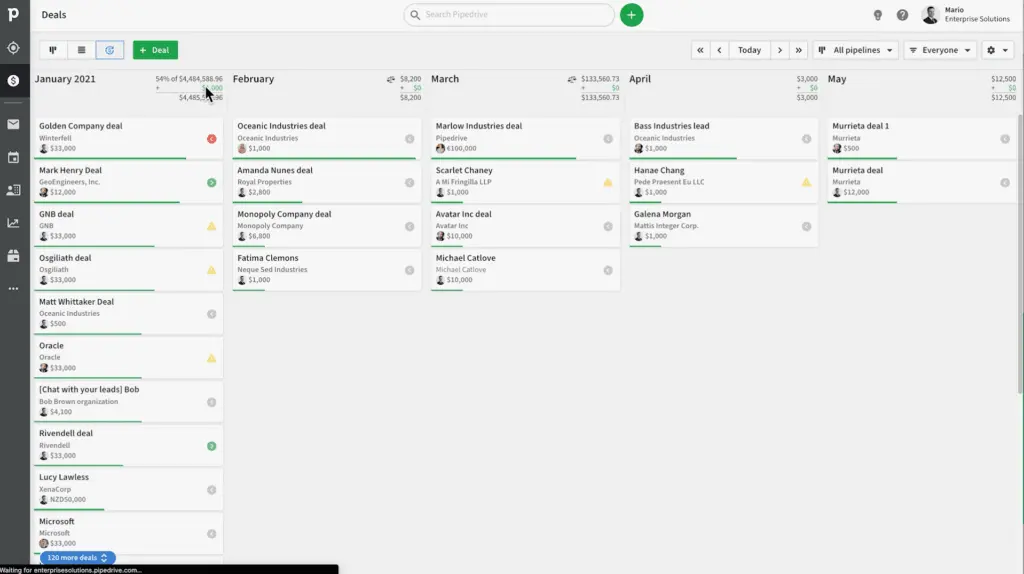
Anyone researching for software sales teams will likely come across Pipedrive on lists of top recommendations. This software is designed to help small and medium-sized businesses (SMBs) grow and was built by salespeople for salespeople. In conversations about choosing between ActiveCampaign for Sales vs Pipedrive, many sales agents say they opt for the latter due to its user-friendliness and ability to store data in a centralized system and visualize entire sales processes.
With Pipedrive tools, you can create the stages of your sales funnel or use existing pipeline templates, manually add deals or import them from your CRM or spreadsheets, receive automatic alerts and updates whenever a deal moves down the tunnel, automate admin work and other routine tasks, segment leads, gather reports, forecast sales, and more. These features are designed to help salespeople eliminate time-consuming and repetitive tasks so they can prioritize customers and deals.
Who is Pipedrive for?
Pipedrive advertises that more than 100,000 companies currently use the software. Many of those on the Pipedrive client list are small businesses and smaller sales teams. However, business operations, salespeople, sales managers, lead managers, project managers, contact managers, business owners, and financial advisors from different organization types and company sizes use Pipedrive as their sales software and CRM. These include startups as well as small, medium, and large enterprises that want to streamline their operations and processes and gain insight into current projects, sales efforts, and productivity.
Through our research for this ActiveCampaign for Sales vs Pipedrive guide, we discovered that Pipedrive has successfully gained the trust of businesses belonging to various industries, including automotive sales, banking, business-to-business (B2B), business-to-consumer (B2C), call centers, construction, event management, government, higher education, healthcare, hospitality, insurance, logistics and transport, manufacturing, marketing, media, non-profits, real estate, recruitment, retail, and travel. Big-name companies like Panasonic, Netsuite, and Cisco reportedly use Pipedrive as their sales CRM.
Key benefits of Pipedrive?
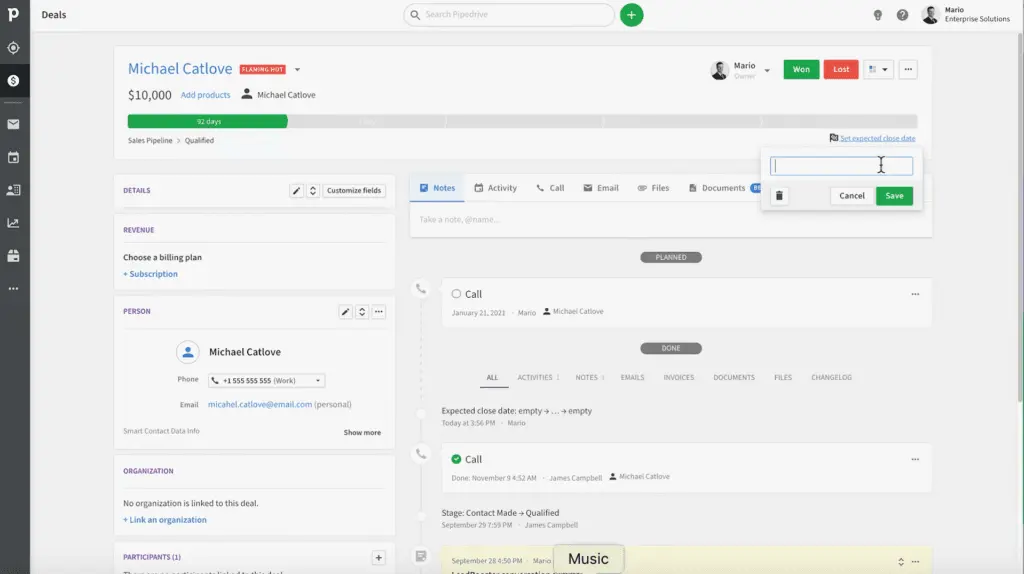
- Offers an intuitive CRM software that tracks communications and automates follow-ups.
- Lets you jump on deals at the right time, manage leads as your business grows, and nurture customer relationships for the long term.
- Helps businesses get organized, collaborate on deals, stay on top of projects and leads, and manage company data in a single platform for a more streamlined operation.
- Tracks how well you reach goals with detailed reporting on key activities and sales.
- Shows automatic calculations when deals are updated and forecasts revenue and sales volume based on pipelines.
Who are ActiveCampaign for Sales and Pipedrive best for?
Regarding popularity, it can be more challenging to determine the leader when gauging ActiveCampaign for Sales vs Pipedrive. This is because although both are considered top CRM platforms for sales and marketing, they each specialize in different industries and needs.
ActiveCampaign for Sales is better for:
- Businesses that want to improve results across all channels with the help of sales and marketing automation, CRM, and email campaigns.
- Organizations of all sizes looking for reasonably priced, powerful, and user-friendly sales software.
- Companies from different industries need tracking metrics and customizable reporting dashboards.
Pipedrive is better for:
- Teams looking for a more intuitive and visual interface that is easy to set up and implement.
- Salespeople who require robust yet affordable and easy-to-use tools for lead scoring, win probability, and deal management.
- Companies that want a sales CRM that syncs with marketing and campaign management systems for more streamlined collaboration between teams.
Common Scenarios for ActiveCampaign for Sales and Pipedrive
When deciding between ActiveCampaign for Sales and Pipedrive, understanding common use cases can clarify which platform will be more effective for your team. Here’s a breakdown of situations where each excels:
When ActiveCampaign for Sales is Ideal:
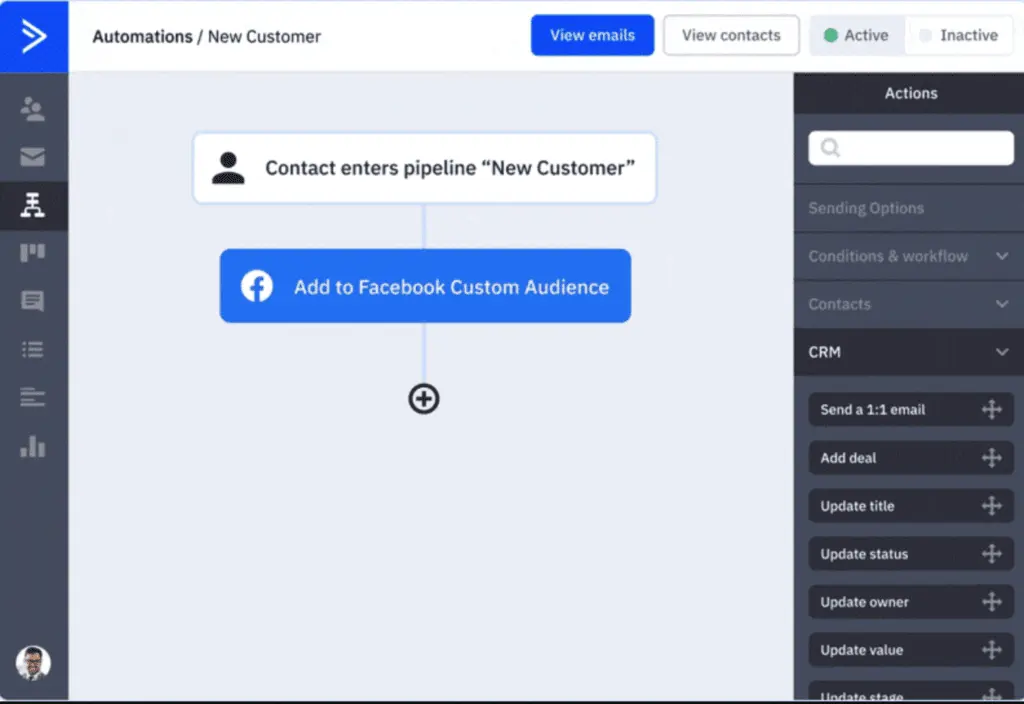
- Omnichannel Marketing and Sales Teams: If your team needs a unified platform to manage both sales and marketing automation, ActiveCampaign for Sales provides robust options for email marketing, sales automation, and customer engagement.
- Lead-Nurturing Heavy Environments: If you rely heavily on nurturing leads through targeted, multi-touch campaigns, ActiveCampaign’s automation workflows and customizable segmentation can help personalize these interactions at scale.
- Integrating with E-Commerce Platforms: For businesses that integrate sales efforts with e-commerce, ActiveCampaign’s connections with Shopify, Magento, and Square can streamline order tracking, lead scoring, and re-engagement.
When Pipedrive is Ideal:
- Sales Teams Needing Visual Sales Pipelines: Pipedrive’s visual approach to pipeline management helps teams track deals easily, prioritize leads, and monitor progress without requiring complex setups.
- Smaller Teams Focusing on Sales Efficiency: If you’re a small business or startup needing affordable, user-friendly sales tools to organize client interactions, Pipedrive’s interface and AI assistant can speed up lead tracking, follow-ups, and forecasting.
- Industries with Defined Sales Cycles: For industries like real estate, recruitment, or B2B sales, where pipeline stages are well-defined, Pipedrive’s customizable pipelines and reporting provide clear insights on deal status and revenue forecasts.
ActiveCampaign for Sales vs Pipedrive Pricing
In this section of our ActiveCampaign for Sales vs Pipedrive comparison, our research team looked deeper into how both software products fare for specific features. Hopefully, This will help you assess which one better suits your current sales team and business needs.
CRM and Sales Automation
ActiveCampaign for Sales is a CRM built with automation capabilities. Updating deals, creating tasks, nurturing and segmenting leads, sending notifications to your salespeople for follow-ups, and tracking metrics are some of the tasks you can automate. You can also manage your contacts in a central platform and create notes directly within each deal and contact record so everyone in your team stays on the same page. This allows organizations to provide a more personalized journey to their clients. For those exploring options, it's worth considering ActiveCampaign for Sales alternatives to find the best fit for your business needs.
Pipedrive is also a CRM with sales automation features. It has an AI-powered sales assistant that provides personalized tips and recommends app integrations and Pipedrive features to help you with repetitive administrative tasks. Pipedrive’s automation helps create deals when you add new contacts, build workflows, transfer ownership to another sales rep when deals reach new stages, and schedule calls or send follow-up emails to leads. You can set up automated workflows or use Pipedrive’s pre-made workflow automation templates.
Marketing Automation
As for comparing the marketing automation capabilities of ActiveCampaign for Sales vs Pipedrive, the former currently has more to offer. Pipedrive has Campaigns, an email marketing software with customizable layouts and tracking, filtering, and analytics features. However, if you want more marketing automation capabilities, you need to add integrations with apps like Zapier. Meanwhile, ActiveCampaign has its own marketing automation software, and its sales platform already has hundreds of automation and integrations that enable salespeople to combine sales and marketing tasks more easily.
Integrations
In the integrations category, our research reveals that Pipedrive can currently connect with more than 400 tools, including Google Meet, Mailchimp, Dealbot for Slack, Microsoft Teams, and Surfe. You can also build apps for your company and other Pipedrive users through the application programming interface (API) available with the Pipedrive Sandbox Account.
Meanwhile, ActiveCampaign works with over 900 app integrations, including Facebook, WordPress, Zapier, Google Analytics, and Postmark. It also connects with third-party ecommerce management platform products like Shopify, Square, and Magento. SaaS companies and developers that want to build custom apps can use the ActiveCampaign API, App Studio, or Deep Data tools.
User Interface and Ease of Use
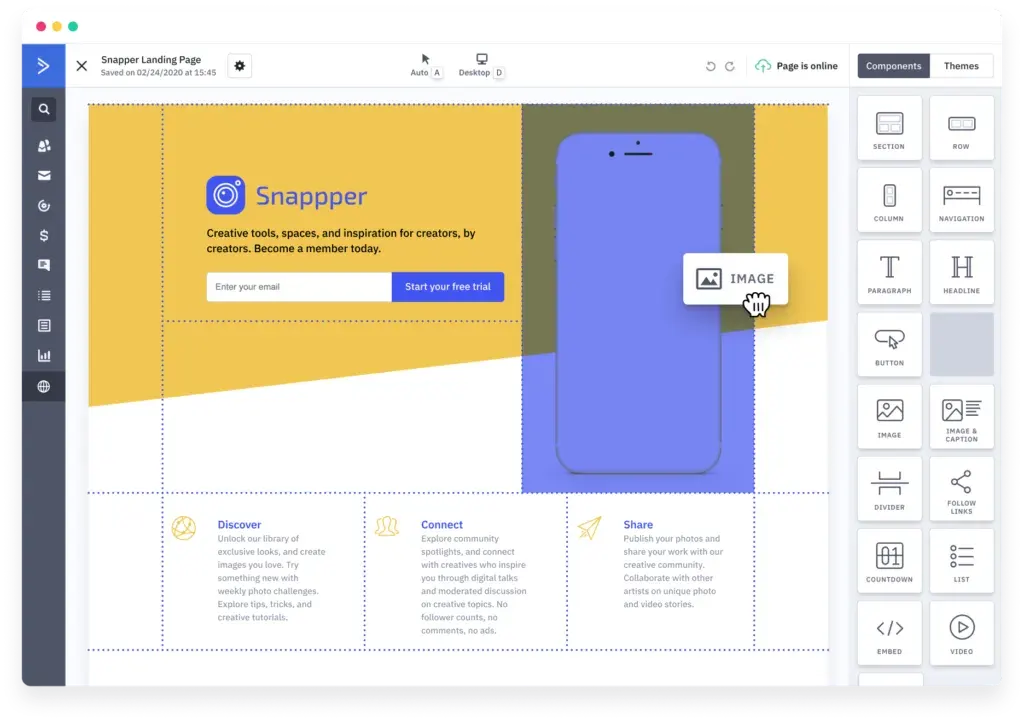
Whether ActiveCampaign for Sales vs Pipedrive is more user-friendly tends to receive different answers depending on individual user experiences. Both software products score high for ease of use, but first-time CRM users may take more time to learn the interface and tools. ActiveCampaign can also be easier to set up since it allows for more integrations and automation capabilities. Pipedrive, on the other hand, was built with a simpler interface and as a more visual platform, making it easier for teams to manage their sales processes and deals. You can also customize your pipelines, but you cannot do that much with branding.
Reporting and Analytics
ActiveCampaign for Sales has the Win Probability feature, which allows you to quickly identify and forecast which prospects have higher chances of leading to deals. Through this and the help of data-driven insights, you can better align sales and marketing efforts and take quick action to avoid losing leads.
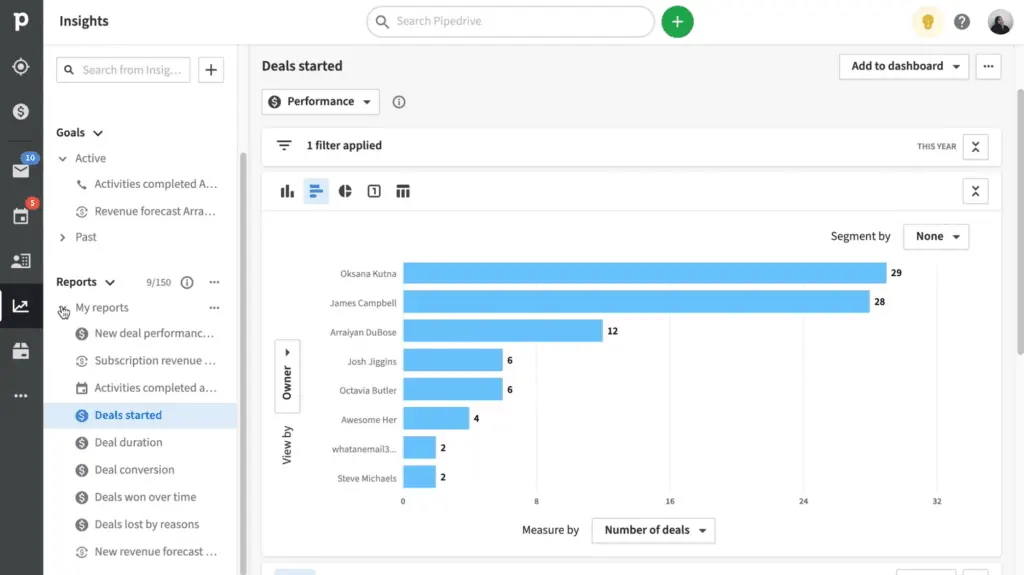
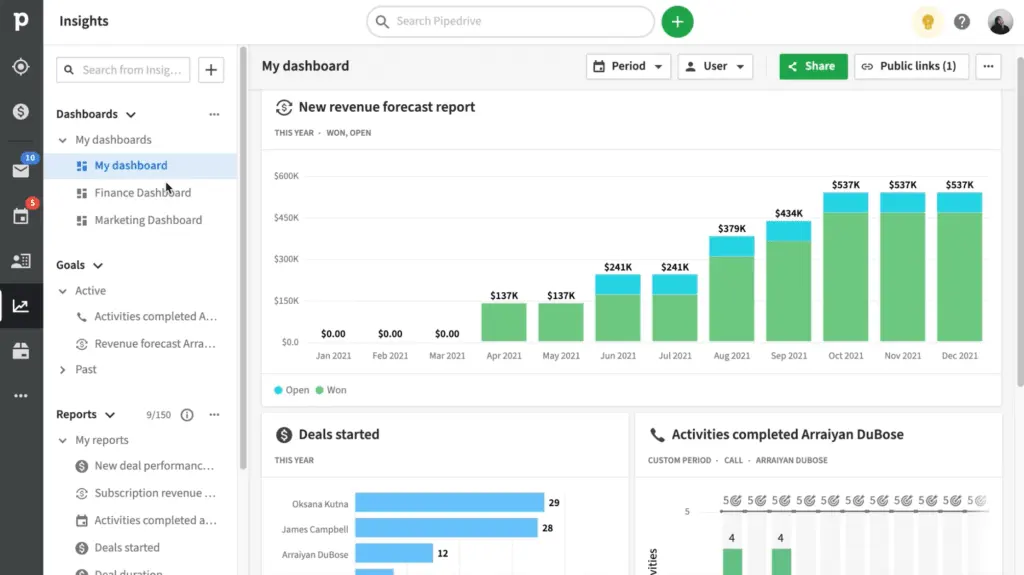
Pipedrive has the Insights feature, an interactive dashboard where you can see visual reports and identify winning strategies, react to bottlenecks in real-time, and track your team’s performance. You can customize reports with your metrics and use filters to get a clearer picture of your data. Pipeline’s insights include revenue forecasts, deal tracking, and leads reporting. Businesses can use this as a benchmark when evaluating Pipedrive alternatives.
ActiveCampaign for Sales vs Pipedrive Pricing
Cost is one of the biggest concerns when comparing ActiveCampaign for Sales vs Pipedrive. Both do not offer free plans, yet they have affordable entry-level paid versions and allow potential users to test their software features through free trials. Each sales CRM also has different tiers for paid plans, with each package targeted for a varying number of users and sizes of sales teams. Every tier also offers a set of features, with the lower levels usually providing the most basic out-of-the-box features and the higher levels including the basics plus more advanced capabilities. Organizations can scale up and obtain more flexibility with their plans according to their current needs and their company’s growth.
ActiveCampaign for Sales paid plans are billed either monthly or annually and per the number of user seats, and you can add certain features for an additional fee. Clients can also customize the paid plan of their choice by getting in touch with ActiveCampaign representatives. Meanwhile, Pipedrive has paid plans billed annually but priced per user, per month. Pipedrive customers who subscribe to the different plan tiers can also opt for additional features to expand the software's functionality further.
ActiveCampaign for Sales Pros and Cons
ActiveCampaign for Sales Pros
- Provides various venues and methods for customer support.
- Makes it easier to track appointments, notes, and emails for different customers from one place.
- You can easily automate more tasks and focus more on selling and converting.
ActiveCampaign for Sales Cons
Can these CRMs integrate with specialized construction software?
Both ActiveCampaign for Sales and Pipedrive offer extensive integration capabilities that allow users to tailor their systems to specific industry requirements. Companies in the construction sector, for example, may benefit from connecting their sales CRM to dedicated construction software to streamline project communication, contract management, and scheduling. By exploring available APIs and integration marketplaces, businesses can ensure that their CRM solution aligns with unique operational workflows and enhances overall productivity without disrupting existing processes.
Pipedrive Pros and Cons
Pipedrive Pros
- An unlimited number of customizable pipelines.
- All plan types include a virtual AI sales assistant.
- Offers affordable per-user plans and 14-day free trials for all tiers.
Pipedrive Cons
- Certain essential features, like user visibility, permissions, and phone support, are available only for higher-priced plans.
- There is room for improvement in its advanced automation and reporting capabilities.
- Integration with other business tools can be challenging.
How Industry-Specific Needs Influence Your Choice
Both ActiveCampaign for Sales and Pipedrive cater to various industries, but understanding how they align with specific verticals can substantially influence your decision. For example, ActiveCampaign's advanced marketing automation and CRM features are particularly beneficial for sectors like e-commerce and professional training, where personalized customer journeys and marketing alignment are paramount. On the other hand, Pipedrive's visual sales pipelines and ease of use make it a strong candidate for industries such as real estate and recruitment, where managing numerous client touchpoints and deals is critical.
When evaluating software for your business, it's important to consider the unique challenges and regulatory nuances of your industry as well. For organizations looking to integrate these CRMs with broader operational tools, leveraging solutions that also enhance procurement efficiency might be worth exploring. Tools like specialized procurement systems can optimize vendor management and simplify organizational workflows, complementing the core offerings of sales-focused CRMs.
Ultimately, detailing your industry requirements and ensuring alignment with the software's strengths can significantly enhance your team's productivity and long-term ROI. This makes active research into integrations and add-ons a crucial step when selecting between the two platforms.
Verdict – ActiveCampaign for Sales vs Pipedrive: Which software is better?
So, who comes out on top in our ActiveCampaign for Sales vs Pipedrive review? The answer depends on what you are looking for in sales software. If you want a product that has a more comprehensive sales and marketing automation tools list, you can go with the former. On the other hand, if what you need is a simple and intuitive interface so you can easily build customizable sales pipelines, then the latter may suit you better.
As for meeting overall business needs, ActiveCampaign scores a bit higher because it has better marketing tools and flexibility for integrations, more advanced automation, more customizations, and more venues for customer support. When it comes to ease of admin, both software products are on the same level.
Meanwhile, Pipedrive takes the lead when talking about how user-friendly the CRM and software are if you are only looking for a CRM for sales processes. If you want more marketing automation, ActiveCampaign can also be easy to use once you get the hang of its various tools and automation capabilities. Ultimately, every software product has a learning curve. How quickly you learn the system typically depends on how familiar your team members are with using sales CRMs and how fast you implement the new solution.
Key Insights
- Comprehensive Automation: ActiveCampaign for Sales offers extensive automation capabilities, including lead scoring, sales pipelines, and sales engagement tools. This helps streamline tasks and focus on high-priority leads.
- Scalability and Integration: With over 900 app integrations, ActiveCampaign for Sales supports scalability and enhances workflows, making it suitable for small to large businesses across various industries.
- User-Friendly Interface: Both ActiveCampaign for Sales and Pipedrive are known for their intuitive interfaces. ActiveCampaign's ease of use helps sales teams quickly adapt and maximize productivity.
- Advanced Reporting Tools: ActiveCampaign for Sales provides advanced reporting and analytics, including customizable dashboards and tracking metrics, allowing businesses to monitor performance and identify areas for improvement.
- Focus on Sales and Marketing: ActiveCampaign for Sales integrates sales and marketing functions, providing a holistic approach to customer relationship management and automation.
- Industry Versatility: Pipedrive is used by over 100,000 companies across diverse industries, emphasizing its adaptability and robust CRM capabilities for managing sales processes.
- Visual Sales Pipelines: Pipedrive offers visual and customizable sales pipelines, making it easy for sales teams to track and manage deals, prioritize leads, and forecast sales.
- Affordable Pricing: Both ActiveCampaign for Sales and Pipedrive offer competitive pricing plans, making them accessible to small and medium-sized businesses looking to optimize their sales processes.
Other Things You Should Know About ActiveCampaign for Sales – Pipedrive Comparison
ActiveCampaign is best for businesses that need a comprehensive platform for sales, marketing automation, customer relationship management (CRM), e-commerce, and transactional messaging. It excels in automating processes, tracking sales, and integrating various tools to improve productivity and revenue growth.
Pipedrive is best for small to medium-sized businesses looking for an affordable and intuitive sales platform and CRM. It is ideal for sales teams that need to streamline their sales processes, manage leads and deals, and forecast sales effectively.
Yes, ActiveCampaign can be used as a CRM. It offers robust CRM functionalities that enable businesses to create personalized customer journeys, automate sales and marketing processes, and improve collaboration among sales, marketing, and customer service teams.
Pipedrive is primarily focused on sales CRM but offers a marketing add-on called Campaigns. This email marketing software integrates with Pipedrive CRM, allowing businesses to create, send, and analyze email campaigns effectively.
ActiveCampaign for Sales improves productivity by automating repetitive tasks, tracking customer data and interactions, and providing tools for personalized customer engagement. This allows sales teams to focus on acquiring leads, closing deals, and increasing sales.
Pipedrive is versatile and benefits industries such as automotive sales, banking, B2B, B2C, call centers, construction, event management, healthcare, hospitality, insurance, logistics, manufacturing, marketing, media, non-profits, real estate, recruitment, retail, and travel.
ActiveCampaign for Sales supports integration with over 900 apps, including Facebook, WordPress, Zapier, Google Analytics, Shopify, Square, and Magento. This extensive integration capability helps businesses enhance workflows, data sharing, and collaboration across teams.
ActiveCampaign for Sales offers customized pricing plans based on user seats and features, with options for monthly or annual billing. Pipedrive offers five pricing tiers: Essential ($15/user/month), Advanced ($29/user/month), Professional ($59/user/month), Power ($69.90/user/month), and Enterprise ($99/user/month). Each plan includes a set of features tailored to different business needs.