
Salesforce Sales Cloud vs monday sales CRM – 2026 Comparison

Co-Founder and Chief Data Scientist
Salesforce Sales Cloud vs monday Sales CRM Table of Contents
- What is Salesforce Sales Cloud?
- Who is Salesforce Sales Cloud for?
- Key Benefits of Salesforce Sales Cloud
- What is monday Sales CRM?
- Who is monday Sales CRM for?
- Key Benefits of monday Sales CRM
- Who are Salesforce Sales Cloud and monday Sales CRM best for?
- Salesforce Sales Cloud vs monday Sales CRM Feature Comparison
- Salesforce Sales Cloud vs monday Sales CRM Pricing
- Salesforce Sales Cloud Pros and Cons
- monday Sales CRM Pros and Cons
- How Contract Management Enhances CRM Functionality
- How do data security and compliance measures compare?
What is Salesforce Sales Cloud?
Based on analysis done by experts at Research.com, Salesforce Sales Cloud stands out as a comprehensive cloud-based CRM solution. Designed to boost sales productivity and customer engagement, it integrates a suite of advanced tools for lead and opportunity management, sales forecasting, and customizable dashboards. Catering to a broad range of business sizes, Salesforce Sales Cloud is renowned for its scalability and extensive integration capabilities.
This platform is a significant contributor to Salesforce’s robust market presence, with Sales Cloud alone accounting for a substantial portion of Salesforce’s annual revenue of $37.9 billion (Salesforce, 2025). For businesses exploring top CRM solutions, understanding Salesforce Sales Cloud’s functionalities is vital when compared with other platforms like monday Sales CRM.
Featured CRM Software Products

$9 to $150/user/month
Yes, up to 2 users
E-signature software, call transcription, conversation routing
Editor's Take
HubSpot CRM is a powerful customer relationship management platform designed to help businesses manage their sales, marketing, and customer service efforts in one centralized place. Its user-friendly interface allows teams to track leads, monitor customer interactions, and automate sales pipelines. With built-in tools for email marketing, contact management, and analytics, HubSpot CRM provides deep insights into customer behavior and sales performance. The platform also supports seamless collaboration between marketing and sales teams through real-time updates and integrations with tools like Gmail, Outlook, and Slack. Additionally, its automation features help reduce manual tasks, enabling teams to focus on building relationships and closing deals. HubSpot CRM is scalable, making it ideal for businesses of all sizes, from startups to large enterprises.
Expert Score
In evaluating SaaS software, a comprehensive and structured methodology ensures a fair and accurate comparison across key metrics. This approach focuses on the most critical aspects that affect user experience, functionality, and business value. The following metrics—general features, cost, customer service, integrations, and mobile support—are evaluated to provide a holistic view of each software solution’s strengths and weaknesses. These metrics are selected based on their direct impact on software usability, scalability, and long-term effectiveness for businesses.
1. General Features - scoring weight 40%
This metric evaluates the core functionalities and tools the software offers. It involves assessing the comprehensiveness of the features, their relevance to the target users, and the ease of use. This is important because robust and well-designed features determine the software's overall utility and efficiency in solving user problems.
2. Cost - scoring weight 15%
Cost analysis focuses on pricing models, value for money, and scalability. It's crucial to evaluate whether the software’s features justify its price, considering different plans for small and large organizations. This is vital for businesses to ensure they invest in cost-effective solutions that fit their budget.
3. Customer Service - scoring weight 15%
This evaluates the responsiveness, quality, and availability of customer support, including channels like chat, email, or phone. Good customer service is essential for troubleshooting and ensuring smooth software usage, which reduces downtime and frustration for users.
4. Integrations - scoring weight 15%
This examines how well the software integrates with third-party tools (e.g., CRM, payment systems, collaboration apps). Seamless integrations are key for creating a unified workflow and enhancing productivity by connecting multiple systems, which is crucial for operational efficiency.
5. Mobile Support - scoring weight 15%
Mobile support assesses the software’s functionality and performance on mobile devices, including apps and mobile web versions. With increasing remote work and on-the-go usage, strong mobile support is critical to ensure users can access and utilize the software effectively, regardless of location.

Custom
No
Sales automation, customer service, marketing
Editor's Take
NetSuite CRM is a comprehensive customer relationship management solution designed to support businesses in managing their entire customer lifecycle. It offers a full suite of tools for sales automation, customer service, marketing, and partner management, helping teams improve efficiency and build stronger customer relationships. With real-time visibility into customer interactions, NetSuite CRM enables businesses to track leads, manage opportunities, and forecast sales accurately. Its built-in analytics and reporting features provide deep insights into sales performance and customer behavior. NetSuite CRM integrates seamlessly with NetSuite’s enterprise resource planning (ERP) system, offering a unified platform for managing business operations. This scalability and flexibility make it ideal for growing businesses and enterprises seeking an all-in-one solution for customer relationship management.
Expert Score
In evaluating SaaS software, a comprehensive and structured methodology ensures a fair and accurate comparison across key metrics. This approach focuses on the most critical aspects that affect user experience, functionality, and business value. The following metrics—general features, cost, customer service, integrations, and mobile support—are evaluated to provide a holistic view of each software solution’s strengths and weaknesses. These metrics are selected based on their direct impact on software usability, scalability, and long-term effectiveness for businesses.
1. General Features - scoring weight 40%
This metric evaluates the core functionalities and tools the software offers. It involves assessing the comprehensiveness of the features, their relevance to the target users, and the ease of use. This is important because robust and well-designed features determine the software's overall utility and efficiency in solving user problems.
2. Cost - scoring weight 15%
Cost analysis focuses on pricing models, value for money, and scalability. It's crucial to evaluate whether the software’s features justify its price, considering different plans for small and large organizations. This is vital for businesses to ensure they invest in cost-effective solutions that fit their budget.
3. Customer Service - scoring weight 15%
This evaluates the responsiveness, quality, and availability of customer support, including channels like chat, email, or phone. Good customer service is essential for troubleshooting and ensuring smooth software usage, which reduces downtime and frustration for users.
4. Integrations - scoring weight 15%
This examines how well the software integrates with third-party tools (e.g., CRM, payment systems, collaboration apps). Seamless integrations are key for creating a unified workflow and enhancing productivity by connecting multiple systems, which is crucial for operational efficiency.
5. Mobile Support - scoring weight 15%
Mobile support assesses the software’s functionality and performance on mobile devices, including apps and mobile web versions. With increasing remote work and on-the-go usage, strong mobile support is critical to ensure users can access and utilize the software effectively, regardless of location.

$25 per user per month
14 days
marketing automation, sales automation, no code customization
Editor's Take
CRM Creatio is a comprehensive customer relationship management (CRM) solution designed to streamline and enhance business processes across sales, marketing, and customer service functions. Known for its low-code platform, Creatio allows businesses to customize and automate workflows without requiring extensive technical expertise. This adaptability makes it particularly appealing to organizations seeking to align the software with their specific needs.
The platform's marketing module provides tools for multi-channel campaign management, lead generation, and personalized customer engagement. Its sales module offers functionality for pipeline management, opportunity tracking, and analytics to help teams close deals more efficiently. Additionally, the customer service module supports case management, service level agreement (SLA) monitoring, and omnichannel communication, enabling businesses to provide exceptional customer support.
Creatio stands out with its intuitive interface, robust analytics, and AI-powered tools that provide actionable insights. The low-code development tools allow non-technical users to create applications and automate processes, reducing the dependency on IT teams. Integration capabilities with other software platforms and APIs enhance its utility, making it a versatile choice for businesses of all sizes.
Overall, CRM Creatio is a powerful solution that combines user-friendly design with advanced customization and automation features. Its adaptability and low-code foundation position it as a strong contender for organizations looking to optimize customer relationship management processes while maintaining flexibility for growth and innovation.
Expert Score
In evaluating SaaS software, a comprehensive and structured methodology ensures a fair and accurate comparison across key metrics. This approach focuses on the most critical aspects that affect user experience, functionality, and business value. The following metrics—general features, cost, customer service, integrations, and mobile support—are evaluated to provide a holistic view of each software solution’s strengths and weaknesses. These metrics are selected based on their direct impact on software usability, scalability, and long-term effectiveness for businesses.
1. General Features - scoring weight 40%
This metric evaluates the core functionalities and tools the software offers. It involves assessing the comprehensiveness of the features, their relevance to the target users, and the ease of use. This is important because robust and well-designed features determine the software's overall utility and efficiency in solving user problems.
2. Cost - scoring weight 15%
Cost analysis focuses on pricing models, value for money, and scalability. It's crucial to evaluate whether the software’s features justify its price, considering different plans for small and large organizations. This is vital for businesses to ensure they invest in cost-effective solutions that fit their budget.
3. Customer Service - scoring weight 15%
This evaluates the responsiveness, quality, and availability of customer support, including channels like chat, email, or phone. Good customer service is essential for troubleshooting and ensuring smooth software usage, which reduces downtime and frustration for users.
4. Integrations - scoring weight 15%
This examines how well the software integrates with third-party tools (e.g., CRM, payment systems, collaboration apps). Seamless integrations are key for creating a unified workflow and enhancing productivity by connecting multiple systems, which is crucial for operational efficiency.
5. Mobile Support - scoring weight 15%
Mobile support assesses the software’s functionality and performance on mobile devices, including apps and mobile web versions. With increasing remote work and on-the-go usage, strong mobile support is critical to ensure users can access and utilize the software effectively, regardless of location.

$8/per user/per month
Yes
customizable dashboards, automated follow-ups, advanced analytics
Editor's Take
monday.com Sales CRM is a customizable platform designed to streamline sales processes, enhance team collaboration, and improve pipeline visibility. Its intuitive interface enables users to manage leads, track deals, and automate repetitive tasks with ease. The CRM integrates seamlessly with popular tools like Gmail, Slack, and HubSpot, ensuring a centralized workflow. Features like customizable dashboards, automated follow-ups, and advanced analytics help sales teams stay organized and focused on closing deals. With scalability in mind, monday.com caters to businesses of all sizes, offering flexible pricing plans and robust customer support. It’s an excellent choice for teams seeking efficiency and adaptability.
Expert Score
In evaluating SaaS software, a comprehensive and structured methodology ensures a fair and accurate comparison across key metrics. This approach focuses on the most critical aspects that affect user experience, functionality, and business value. The following metrics—general features, cost, customer service, integrations, and mobile support—are evaluated to provide a holistic view of each software solution’s strengths and weaknesses. These metrics are selected based on their direct impact on software usability, scalability, and long-term effectiveness for businesses.
1. General Features - scoring weight 40%
This metric evaluates the core functionalities and tools the software offers. It involves assessing the comprehensiveness of the features, their relevance to the target users, and the ease of use. This is important because robust and well-designed features determine the software’s overall utility and efficiency in solving user problems.
2. Cost - scoring weight 15%
Cost analysis focuses on pricing models, value for money, and scalability. It’s crucial to evaluate whether the software’s features justify its price, considering different plans for small and large organizations. This is vital for businesses to ensure they invest in cost-effective solutions that fit their budget.
3. Customer Service - scoring weight 15%
This evaluates the responsiveness, quality, and availability of customer support, including channels like chat, email, or phone. Good customer service is essential for troubleshooting and ensuring smooth software usage, which reduces downtime and frustration for users.
4. Integrations - scoring weight 15%
This examines how well the software integrates with third-party tools (e.g., CRM, payment systems, collaboration apps). Seamless integrations are key for creating a unified workflow and enhancing productivity by connecting multiple systems, which is crucial for operational efficiency.
5. Mobile Support - scoring weight 15%
Mobile support assesses the software’s functionality and performance on mobile devices, including apps and mobile web versions. With increasing remote work and on-the-go usage, strong mobile support is critical to ensure users can access and utilize the software effectively, regardless of location.

$7 per user per month billed annually
15 days
lead generation, sales pipeline management, workflow automation
Editor's Take
Zoho CRM is a flexible and comprehensive customer relationship management platform designed to help businesses manage and grow their customer relationships effectively. With tools for lead generation, sales pipeline management, workflow automation, and analytics, Zoho CRM is suitable for businesses of all sizes across a variety of industries.
Zoho CRM enables teams to streamline sales processes by capturing leads from multiple channels, tracking interactions, and managing every stage of the sales cycle. The platform offers customizable dashboards and reports, providing insights into sales performance and customer behaviors to help make data-driven decisions. With powerful automation features, Zoho CRM allows businesses to set up workflows for routine tasks like follow-ups, lead scoring, and email notifications, reducing manual work and enhancing productivity. The platform integrates with popular tools, including the Zoho suite, Microsoft 365, and G Suite, enabling a seamless connection across teams.
For businesses aiming to improve customer engagement, close deals faster, and enhance team collaboration, Zoho CRM delivers a scalable, user-friendly solution to drive sales and customer satisfaction.
Expert Score
In evaluating SaaS software, a comprehensive and structured methodology ensures a fair and accurate comparison across key metrics. This approach focuses on the most critical aspects that affect user experience, functionality, and business value. The following metrics—general features, cost, customer service, integrations, and mobile support—are evaluated to provide a holistic view of each software solution’s strengths and weaknesses. These metrics are selected based on their direct impact on software usability, scalability, and long-term effectiveness for businesses.
1. General Features - scoring weight 40%
This metric evaluates the core functionalities and tools the software offers. It involves assessing the comprehensiveness of the features, their relevance to the target users, and the ease of use. This is important because robust and well-designed features determine the software's overall utility and efficiency in solving user problems.
2. Cost - scoring weight 15%
Cost analysis focuses on pricing models, value for money, and scalability. It's crucial to evaluate whether the software’s features justify its price, considering different plans for small and large organizations. This is vital for businesses to ensure they invest in cost-effective solutions that fit their budget.
3. Customer Service - scoring weight 15%
This evaluates the responsiveness, quality, and availability of customer support, including channels like chat, email, or phone. Good customer service is essential for troubleshooting and ensuring smooth software usage, which reduces downtime and frustration for users.
4. Integrations - scoring weight 15%
This examines how well the software integrates with third-party tools (e.g., CRM, payment systems, collaboration apps). Seamless integrations are key for creating a unified workflow and enhancing productivity by connecting multiple systems, which is crucial for operational efficiency.
5. Mobile Support - scoring weight 15%
Mobile support assesses the software’s functionality and performance on mobile devices, including apps and mobile web versions. With increasing remote work and on-the-go usage, strong mobile support is critical to ensure users can access and utilize the software effectively, regardless of location.

By quote
Yes
Lead Management, Contact Management, Workflow Automation
Editor's Take
Salesforce CRM is a leading customer relationship management platform known for its robust functionality, scalability, and extensive customization options, making it suitable for businesses of all sizes, from startups to large enterprises. Built to streamline sales, marketing, customer service, and analytics, Salesforce CRM empowers teams to manage customer interactions, optimize workflows, and drive growth from a single, cloud-based platform.
Salesforce CRM provides a complete view of customer data, enabling teams to track interactions, manage leads, and automate tasks throughout the sales pipeline. With powerful tools for reporting and analytics, Salesforce offers insights into sales performance, customer trends, and campaign effectiveness, allowing teams to make data-driven decisions. The platform’s automation capabilities reduce manual workloads with customizable workflows, automated follow-ups, and lead scoring, ensuring a smooth customer journey. Integrations with thousands of third-party applications, along with its own suite of services, make Salesforce a highly adaptable solution for businesses looking to connect their CRM with other tools.
For organizations focused on enhancing customer engagement, improving team efficiency, and scaling their operations, Salesforce CRM delivers a powerful and versatile solution tailored to support long-term business growth.
Expert Score
In evaluating SaaS software, a comprehensive and structured methodology ensures a fair and accurate comparison across key metrics. This approach focuses on the most critical aspects that affect user experience, functionality, and business value. The following metrics—general features, cost, customer service, integrations, and mobile support—are evaluated to provide a holistic view of each software solution’s strengths and weaknesses. These metrics are selected based on their direct impact on software usability, scalability, and long-term effectiveness for businesses.
1. General Features - scoring weight 40%
This metric evaluates the core functionalities and tools the software offers. It involves assessing the comprehensiveness of the features, their relevance to the target users, and the ease of use. This is important because robust and well-designed features determine the software's overall utility and efficiency in solving user problems.
2. Cost - scoring weight 15%
Cost analysis focuses on pricing models, value for money, and scalability. It's crucial to evaluate whether the software’s features justify its price, considering different plans for small and large organizations. This is vital for businesses to ensure they invest in cost-effective solutions that fit their budget.
3. Customer Service - scoring weight 15%
This evaluates the responsiveness, quality, and availability of customer support, including channels like chat, email, or phone. Good customer service is essential for troubleshooting and ensuring smooth software usage, which reduces downtime and frustration for users.
4. Integrations - scoring weight 15%
This examines how well the software integrates with third-party tools (e.g., CRM, payment systems, collaboration apps). Seamless integrations are key for creating a unified workflow and enhancing productivity by connecting multiple systems, which is crucial for operational efficiency.
5. Mobile Support - scoring weight 15%
Mobile support assesses the software’s functionality and performance on mobile devices, including apps and mobile web versions. With increasing remote work and on-the-go usage, strong mobile support is critical to ensure users can access and utilize the software effectively, regardless of location.
Who is Salesforce Sales Cloud for?
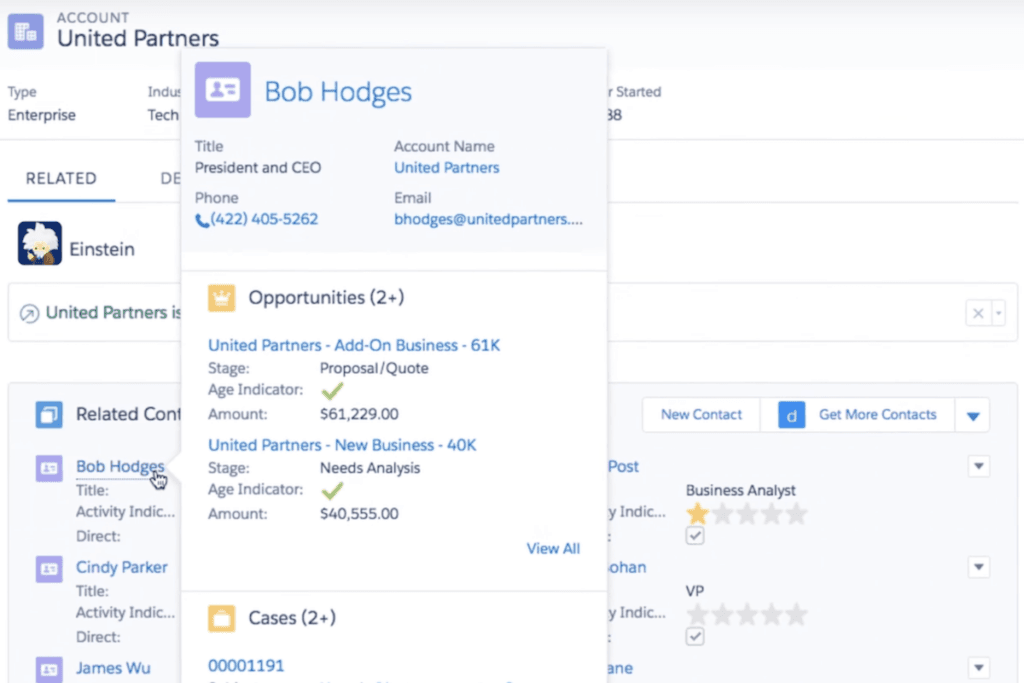
Salesforce Sales Cloud is designed for diverse users, encompassing various industries and business needs. Primarily, it caters to sales professionals and teams, providing tools that streamline the sales process, from lead generation to closing deals. Sales Cloud’s advanced analytics and customizable features also make it ideal for managers and executives who require data-driven insights for strategic decision-making.
The platform is versatile enough to serve multiple industries, including healthcare, finance, retail, and technology. Its scalability allows it to meet the demands of both small businesses and large enterprises. Salesforce’s global adoption is evident, serving over 150,000 companies worldwide, including startups and roughly 90% of Fortune 500 companies (Yankovskaya, 2025). This broad user base showcases Salesforce Sales Cloud’s ability to adapt to various business sizes and sector-specific needs, making it a comprehensive solution in the CRM market.
Key Benefits of Salesforce Sales Cloud
Salesforce Sales Cloud distinguishes itself from other CRM solutions with the following advantages:
- Enhanced Sales Productivity: Streamlines sales processes, increasing efficiency.
- Comprehensive Analytics and Reporting: Delivers valuable insights into sales activities and customer data.
- Customization and Scalability: Tailors to the unique needs of businesses of all sizes.
- Robust Integration: Seamlessly connects with a multitude of other business tools.
- Mobile Accessibility: Empowers teams with mobile capabilities, which is crucial, as 65% of companies using a mobile CRM meet their sales quotas (Kixie, 2024).
What is monday Sales CRM?
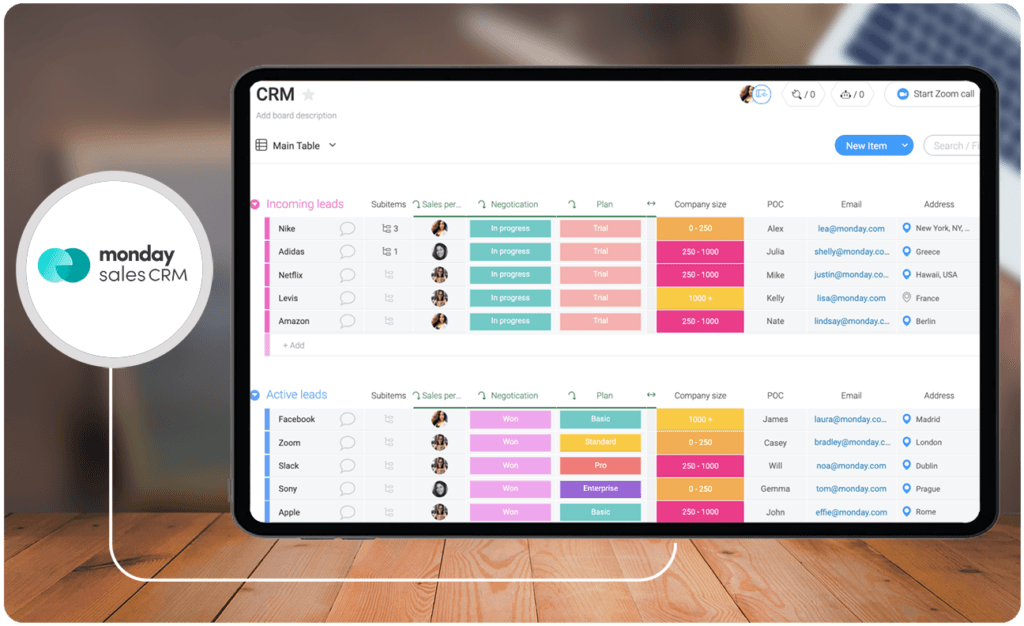
monday Sales CRM is a versatile and user-friendly CRM solution. monday Sales CRM simplifies sales processes and improves teamwork with its simple interface. This platform integrates lead tracking, pipeline visualization, and task management for sales management.
monday Sales CRM is designed to work across many industries and offers flexibility and customization to meet business needs. It competes in the CRM market by improving sales efficiency and customer interactions. Its focus on usability and collaboration makes it an easy choice for teams looking to optimize sales operations without the complexity of CRM systems.
monday Sales CRM works with other top customer service solutions. Indeed, CRM usage statistics demonstrate a growing trend in CRM adoption, underscoring the growing importance of effective CRM tools like monday Sales CRM (El-Hage, 2026).
Who is monday Sales CRM for?
monday Sales CRM caters to a diverse user base, ranging from small startups to larger enterprises. Teams looking for a CRM with a simple, intuitive interface and adaptable features particularly favor it. monday Sales CRM meets the needs of various sectors, including marketing, project management, and customer support, by offering tools for task management, lead tracking, and sales pipeline management.
Its user-friendly design makes it accessible to non-technical users, simplifying CRM adoption across different industries. The platform’s focus on enhancing team collaboration and efficiency resonates with businesses prioritizing a streamlined sales management approach. With 91% of businesses with more than 10 employees now using a CRM (El Hage, 2026), monday Sales CRM emerges as a practical solution for companies seeking an easy-to-use yet effective CRM tool.
Key Benefits of monday Sales CRM
monday sales CRM stands out among CRM solutions for distinct advantages that make it an attractive option in a market where 47% of CRM users say their system has improved customer satisfaction (El-Hage, 2026).
- Intuitive User Experience: Designed for ease of use, enabling quick adoption across teams
- High Customizability: Adapts to diverse business requirements with flexible customization options
- Effective Collaboration Tools: Enhances team coordination and communication
- Comprehensive Task and Project Management: Integrates sales, marketing, and project management functionalities
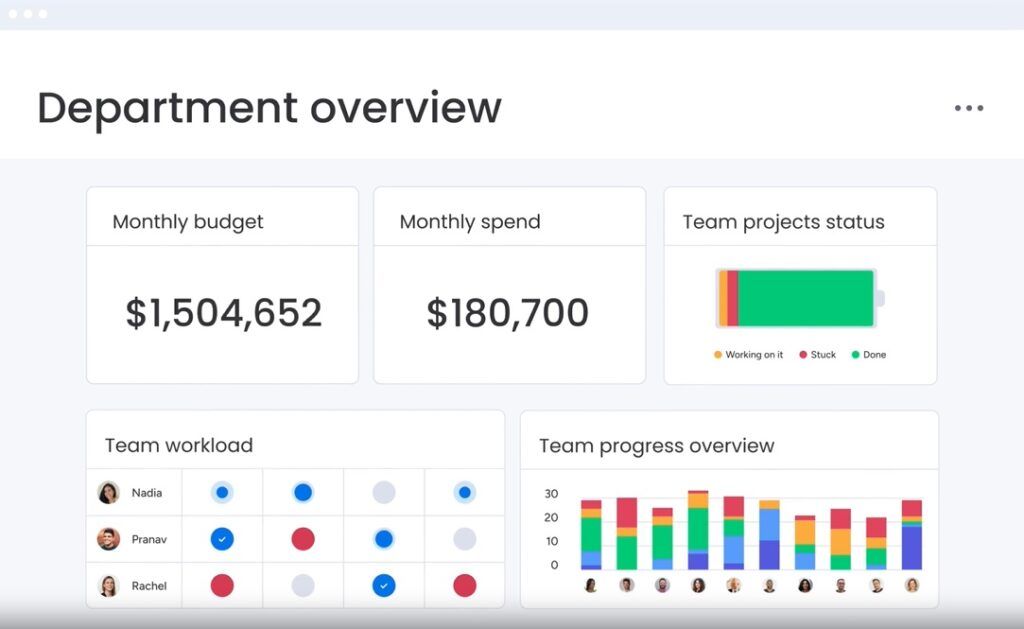
- Real-time Insights and Reporting: Offers up-to-date analytics for informed decision-making
Who are Salesforce Sales Cloud and monday Sales CRM best for?
With CRM systems contributing to a 29% increase in sales and 42% increase in forecast accuracy (El-Hage, 2026), selecting between Salesforce Sales Cloud and monday Sales CRM becomes a crucial decision based on specific business requirements and goals. For a better Salesforce Sales Cloud vs monday Sales CRM comparison, let us look into distinct use cases for these solutions:
Salesforce Sales Cloud:
- Larger enterprises requiring a comprehensive and scalable CRM solution
- Industries with complex sales processes and diverse CRM needs
- Businesses seeking extensive integration with other systems, including BPM companies
- Companies needing advanced analytics and customization capabilities
Monday Sales CRM:
- Small to medium-sized businesses looking for a user-friendly CRM platform
- Teams requiring a CRM with strong project management and collaboration tools
- Organizations that prefer a straightforward CRM with easy setup and customization
- Businesses in need of a CRM that provides clear, real-time insights into sales and customer interactions

Salesforce Sales Cloud vs monday Sales CRM Feature Comparison
Each CRM platform offers unique strengths and capabilities, catering to different user preferences, business sizes, and functional requirements. Looking into the Salesforce Sales Cloud vs monday sales CRM platform features would be the best way to make informed decisions. It also helps to examine Salesforce Sales Cloud alternatives during your decision-making journey.
User Interface
Salesforce Sales Cloud’s interface is complex and feature-rich, ideal for larger organizations with varied CRM needs. It offers a multitude of functionalities, but this can be overwhelming for smaller teams. In contrast, Monday Sales CRM is celebrated for its intuitive, straightforward design, prioritizing ease of use and quick setup, making it a favorite among smaller businesses and teams who value simplicity and efficiency in their CRM tool.
Customization
Salesforce Sales Cloud stands out with its extensive customization options, perfectly catering to the intricate business processes of large-scale enterprises. This adaptability allows for a high degree of tailoring to specific business needs. Monday Sales CRM, while not as extensive in customization capabilities, offers a more direct and user-friendly customization experience, making it an ideal choice for businesses seeking essential customization without complexity.
Analytics and Reporting
Salesforce Sales Cloud excels with its comprehensive analytics and reporting features, providing detailed insights for larger businesses to make informed decisions. This robust capability is crucial for complex sales strategies and customer data analysis. On the other hand, Monday Sales CRM focuses on delivering essential analytics in a more accessible format, ensuring smaller teams can easily interpret and utilize data without extensive analytics training.
Integration Capabilities
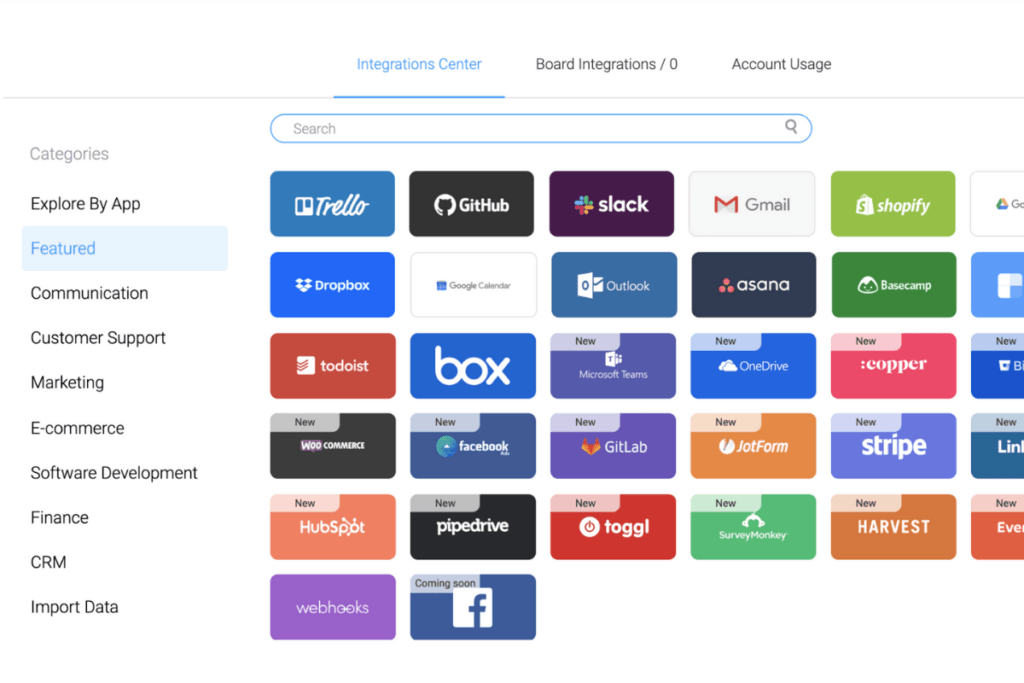
As for Salesforce Sales Cloud vs Monday Sales CRM integration, the former offers various integration options suitable for complex and varied business processes, particularly for larger enterprises with multifaceted systems. In contrast, Monday Sales CRM provides essential integration features that are more tailored to the needs of small and medium-sized businesses, focusing on simplicity and the most critical integrations without overwhelming users with too many options. Though it has strong integration capabilities, you might still want to evaluate monday Sales CRM alternatives.
Scalability
Salesforce Sales Cloud is designed for scalability, efficiently adapting to the expanding needs of large enterprises. Its architecture supports growing customer databases and complex sales processes, making it a robust solution for businesses experiencing rapid growth. Monday Sales CRM, while scalable, is more aligned with the growth trajectories of smaller businesses and startups. Its scalability is designed to support gradual growth, providing smaller teams with the necessary tools to expand their operations without the complexities of a large-scale CRM system.
Salesforce Sales Cloud vs monday Sales CRM Pricing
Salesforce Sales Cloud vs Monday Sales CRM pricing shows that monday Sales CRM seems more budget-friendly, particularly for smaller businesses or teams. However, it is still best to look into the packages of these two solutions.
Salesforce Sales Cloud Pricing:
- Essentials Plan: $25/user/month (billed annually), Basic CRM features for small sales teams
- Professional Plan: $75/user/month, Complete CRM for any size team
- Enterprise Plan: $150/user/month, Advanced customization and features
- Unlimited Plan: $300/user/month, Comprehensive CRM features with maximum support and customization
Monday Sales CRM Pricing:
- Basic Plan: $8/seat/month, Fundamental CRM features
- Standard Plan: $10/seat/month, Additional features for growing teams
- Pro Plan: $16/seat/month, Advanced CRM capabilities
- Enterprise Plan: Pricing upon request, Full CRM functionality with all advanced features
Salesforce Sales Cloud Pros and Cons
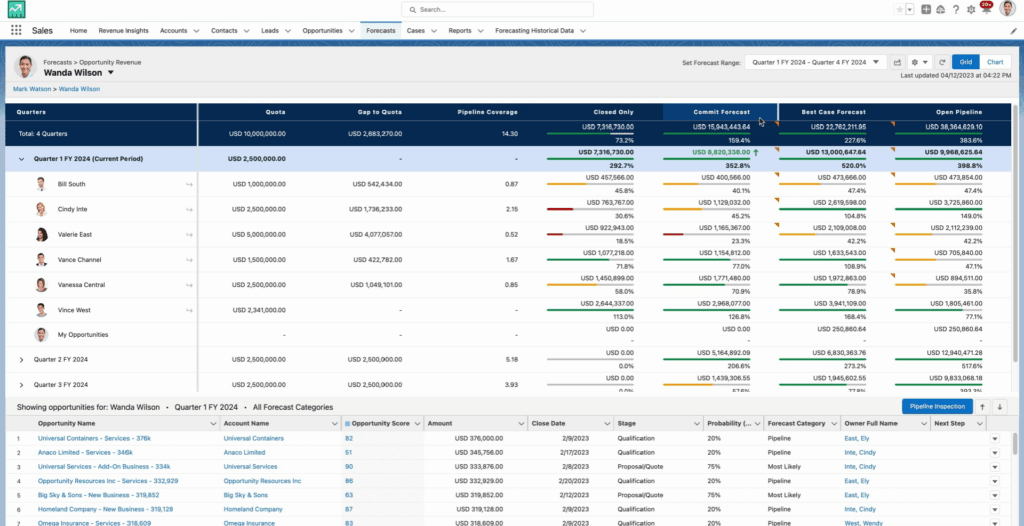
Salesforce Sales Cloud is a leading CRM platform on the market, offering a range of features and functionalities. Here’s a quick summary of its strengths and limitations:
Pros
- Extensive customization options are available to fit specific business needs
- Comprehensive analytics and reporting capabilities for data-driven decision-making
- Scalable solutions that grow with the business
- A wide range of integration options with other software and applications
- Advanced features for sales management and forecasting
Cons
- Can be complex and overwhelming for smaller businesses or beginners
- Higher pricing than other CRM solutions might be a constraint for small businesses
- Requires a certain level of training to fully leverage its extensive features
monday Sales CRM Pros and Cons
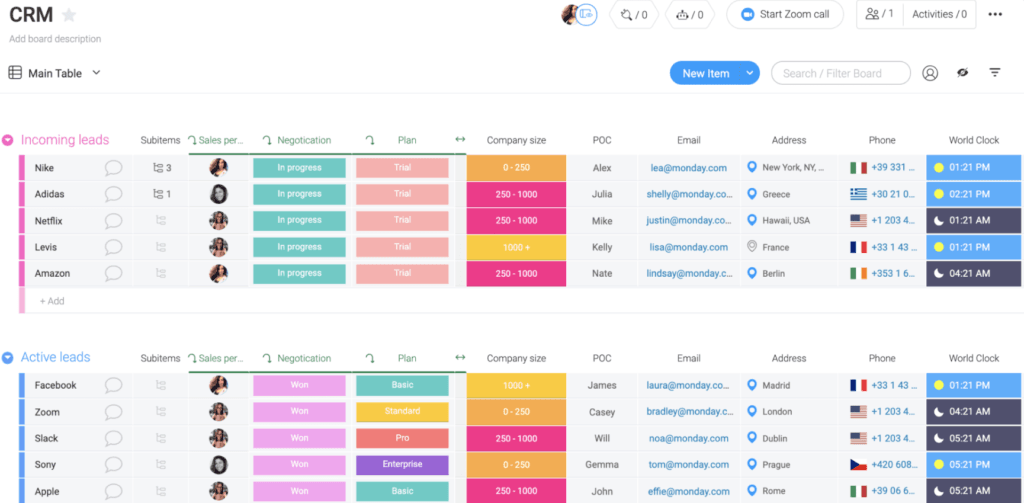
Monday Sales CRM has emerged as a popular CRM tool, especially for its user-friendly design and straightforward functionality. Here’s an overview of its advantages and limitations:
Pros
- Intuitive and user-friendly interface, ideal for beginners and smaller teams
- More affordable pricing structure compared to many other CRM tools
- Customization options that are straightforward and easy to implement
- Good integration capabilities with other tools and applications
- Suitable for small to medium-sized businesses due to its simplicity and effectiveness
Cons
- Limited advanced features compared to more robust CRM systems like Salesforce Sales Cloud
- May not be as scalable for very large enterprises or complex sales processes
- The simplicity of features might not suffice for businesses with complex CRM needs
How Contract Management Enhances CRM Functionality
While CRM platforms like Salesforce Sales Cloud and monday Sales CRM effectively manage sales pipelines and customer relationships, integrating robust contract management solutions can significantly enhance their functionality. Contracts are a critical part of the sales cycle, and having a seamless way to draft, review, and execute agreements can improve efficiency and reduce business risks.
Both Salesforce Sales Cloud and monday Sales CRM can benefit from contract management integration by enabling sales teams to automate repetitive contract-related tasks, reducing errors, and speeding up deal closures. For instance, the ability to track contract statuses directly within the CRM system bridges the gap between sales and legal teams, fostering better collaboration.
Businesses seeking specialized tools to complement their CRM systems should consider exploring the best contract management solutions to streamline this essential aspect of their sales processes. These integrations can help improve compliance, enhance customer trust, and drive quicker resolutions—all key factors for sustained business growth.
Verdict Salesforce Sales Cloud vs monday Sales CRM: Which software is better?
This Salesforce Sales Cloud vs monday Sales CRM comparison shows that each platform has unique strengths and target audiences. Both garnered positive user ratings, with the former getting 4.3 out of 5 and the latter achieving a remarkable rating of 4.7 out of 5.
However, note before deciding which tool to use Salesforce Sales Cloud is ideal for large enterprises and complex sales processes due to its extensive feature set. It offers extensive customization, advanced analytics, and robust integration for organizations needing a scalable and comprehensive CRM solution.
In contrast, monday Sales CRM simplifies CRM tasks for small and medium-sized businesses with its intuitive interface. Its simplicity and essential CRM features make it a good choice for businesses seeking an easy-to-use but powerful CRM tool.
Ultimately, integrating with online time tracking software can further enhance the efficiency of either CRM platform, depending on the company’s operational needs.
How do data security and compliance measures compare?
Both platforms implement industry-standard security practices, yet they differ in scope and approach. Salesforce Sales Cloud is engineered for enterprise-level demands, offering advanced encryption, multi-factor authentication, and comprehensive compliance with frameworks such as GDPR and SOC 2. In contrast, monday Sales CRM emphasizes streamlined security solutions that suit smaller operations while maintaining essential safeguards, including access controls and regular data backups. Evaluating each system’s alignment with existing security policies and infrastructure is key to mitigating risks, particularly when integrated with other tools like meeting software.
References:
- Salesforce (2025). Salesforce Announces Fourth Quarter Fiscal 2025 Results. Salesforce
- El-Hage, G. (2026). CRM Statistics 2026: 80+ Facts and Data. Wave
- Kixie (2024). 22 Eye-Opening CRM Statistics You Should Know for 2024. Kixie
- Yankovskaya, N. (2025). Salesforce Statistics 2025: All the Facts You Need to Know. Enway
Other Things You Should Know About Salesforce Sales Cloud – monday sales CRM Comparison
The choice between Monday and Salesforce depends on the specific needs of a business. Salesforce is ideal for larger enterprises with complex CRM needs, while Monday is better suited for smaller businesses seeking simplicity and ease of use.
Yes, Monday Sales CRM is a cloud-based platform offering online accessibility and collaboration features.
Salesforce Sales Cloud is a part of Salesforce’s CRM solutions, focusing specifically on enhancing sales processes and customer relationships.
Whether Monday is the best CRM depends on user requirements. It’s highly regarded for its user-friendly interface and is well-suited for small to medium-sized businesses looking for an accessible CRM tool.


