Close vs HubSpot Sales Hub – 2027 Comparison

Co-Founder and Chief Data Scientist
Close vs HubSpot Sales Hub Comparison Table of Contents
- What is Close?
- Who is Close for?
- Key Benefits of Close
- What is HubSpot Sales Hub?
- Who is HubSpot Sales Hub for?
- Key Benefits of HubSpot Sales Hub
- Who are Close and HubSpot Sales Hub best for?
- Close vs HubSpot Sales Hub Feature Comparison
- Close vs HubSpot Sales Hub Pricing
- Close Pros and Cons
- HubSpot Sales Hub Pros and Cons
- How do Close and HubSpot Sales Hub support remote sales teams and virtual collaboration?
- Verdict – Close vs HubSpot Sales Hub: Which software is better?
- Billing and Financial Integration Considerations
What is Close?
Close is a dynamic and user-friendly customer relationship management (CRM) platform designed to meet the needs of startups and small to mid-sized businesses. It stands out for its emphasis on streamlining sales processes, making it an ideal solution for teams conducting high-volume outreach. The platform excels in efficient sales communication with its built-in Power Dialer, ensuring sales representatives can easily connect with prospects and customers.
Close CRM goes beyond traditional CRM functionalities by incorporating automation tools like email sequences, workflows, and call automation. These features increase sales productivity by automating routine tasks, enabling sales teams to focus on building relationships and closing deals. Close CRM offers a tailored and efficient solution for businesses aiming to streamline their sales processes, improve lead management, and drive overall revenue growth.
Featured CRM Software Products

$9 to $150/user/month
Yes, up to 2 users
E-signature software, call transcription, conversation routing
Editor's Take
HubSpot CRM is a powerful customer relationship management platform designed to help businesses manage their sales, marketing, and customer service efforts in one centralized place. Its user-friendly interface allows teams to track leads, monitor customer interactions, and automate sales pipelines. With built-in tools for email marketing, contact management, and analytics, HubSpot CRM provides deep insights into customer behavior and sales performance. The platform also supports seamless collaboration between marketing and sales teams through real-time updates and integrations with tools like Gmail, Outlook, and Slack. Additionally, its automation features help reduce manual tasks, enabling teams to focus on building relationships and closing deals. HubSpot CRM is scalable, making it ideal for businesses of all sizes, from startups to large enterprises.
Expert Score
In evaluating SaaS software, a comprehensive and structured methodology ensures a fair and accurate comparison across key metrics. This approach focuses on the most critical aspects that affect user experience, functionality, and business value. The following metrics—general features, cost, customer service, integrations, and mobile support—are evaluated to provide a holistic view of each software solution’s strengths and weaknesses. These metrics are selected based on their direct impact on software usability, scalability, and long-term effectiveness for businesses.
1. General Features - scoring weight 40%
This metric evaluates the core functionalities and tools the software offers. It involves assessing the comprehensiveness of the features, their relevance to the target users, and the ease of use. This is important because robust and well-designed features determine the software's overall utility and efficiency in solving user problems.
2. Cost - scoring weight 15%
Cost analysis focuses on pricing models, value for money, and scalability. It's crucial to evaluate whether the software’s features justify its price, considering different plans for small and large organizations. This is vital for businesses to ensure they invest in cost-effective solutions that fit their budget.
3. Customer Service - scoring weight 15%
This evaluates the responsiveness, quality, and availability of customer support, including channels like chat, email, or phone. Good customer service is essential for troubleshooting and ensuring smooth software usage, which reduces downtime and frustration for users.
4. Integrations - scoring weight 15%
This examines how well the software integrates with third-party tools (e.g., CRM, payment systems, collaboration apps). Seamless integrations are key for creating a unified workflow and enhancing productivity by connecting multiple systems, which is crucial for operational efficiency.
5. Mobile Support - scoring weight 15%
Mobile support assesses the software’s functionality and performance on mobile devices, including apps and mobile web versions. With increasing remote work and on-the-go usage, strong mobile support is critical to ensure users can access and utilize the software effectively, regardless of location.

$25 per user per month
14 days
marketing automation, sales automation, no code customization
Editor's Take
CRM Creatio is a comprehensive customer relationship management (CRM) solution designed to streamline and enhance business processes across sales, marketing, and customer service functions. Known for its low-code platform, Creatio allows businesses to customize and automate workflows without requiring extensive technical expertise. This adaptability makes it particularly appealing to organizations seeking to align the software with their specific needs.
The platform's marketing module provides tools for multi-channel campaign management, lead generation, and personalized customer engagement. Its sales module offers functionality for pipeline management, opportunity tracking, and analytics to help teams close deals more efficiently. Additionally, the customer service module supports case management, service level agreement (SLA) monitoring, and omnichannel communication, enabling businesses to provide exceptional customer support.
Creatio stands out with its intuitive interface, robust analytics, and AI-powered tools that provide actionable insights. The low-code development tools allow non-technical users to create applications and automate processes, reducing the dependency on IT teams. Integration capabilities with other software platforms and APIs enhance its utility, making it a versatile choice for businesses of all sizes.
Overall, CRM Creatio is a powerful solution that combines user-friendly design with advanced customization and automation features. Its adaptability and low-code foundation position it as a strong contender for organizations looking to optimize customer relationship management processes while maintaining flexibility for growth and innovation.
Expert Score
In evaluating SaaS software, a comprehensive and structured methodology ensures a fair and accurate comparison across key metrics. This approach focuses on the most critical aspects that affect user experience, functionality, and business value. The following metrics—general features, cost, customer service, integrations, and mobile support—are evaluated to provide a holistic view of each software solution’s strengths and weaknesses. These metrics are selected based on their direct impact on software usability, scalability, and long-term effectiveness for businesses.
1. General Features - scoring weight 40%
This metric evaluates the core functionalities and tools the software offers. It involves assessing the comprehensiveness of the features, their relevance to the target users, and the ease of use. This is important because robust and well-designed features determine the software's overall utility and efficiency in solving user problems.
2. Cost - scoring weight 15%
Cost analysis focuses on pricing models, value for money, and scalability. It's crucial to evaluate whether the software’s features justify its price, considering different plans for small and large organizations. This is vital for businesses to ensure they invest in cost-effective solutions that fit their budget.
3. Customer Service - scoring weight 15%
This evaluates the responsiveness, quality, and availability of customer support, including channels like chat, email, or phone. Good customer service is essential for troubleshooting and ensuring smooth software usage, which reduces downtime and frustration for users.
4. Integrations - scoring weight 15%
This examines how well the software integrates with third-party tools (e.g., CRM, payment systems, collaboration apps). Seamless integrations are key for creating a unified workflow and enhancing productivity by connecting multiple systems, which is crucial for operational efficiency.
5. Mobile Support - scoring weight 15%
Mobile support assesses the software’s functionality and performance on mobile devices, including apps and mobile web versions. With increasing remote work and on-the-go usage, strong mobile support is critical to ensure users can access and utilize the software effectively, regardless of location.

$8/per user/per month
Yes
customizable dashboards, automated follow-ups, advanced analytics
Editor's Take
monday.com Sales CRM is a customizable platform designed to streamline sales processes, enhance team collaboration, and improve pipeline visibility. Its intuitive interface enables users to manage leads, track deals, and automate repetitive tasks with ease. The CRM integrates seamlessly with popular tools like Gmail, Slack, and HubSpot, ensuring a centralized workflow. Features like customizable dashboards, automated follow-ups, and advanced analytics help sales teams stay organized and focused on closing deals. With scalability in mind, monday.com caters to businesses of all sizes, offering flexible pricing plans and robust customer support. It’s an excellent choice for teams seeking efficiency and adaptability.
Expert Score
In evaluating SaaS software, a comprehensive and structured methodology ensures a fair and accurate comparison across key metrics. This approach focuses on the most critical aspects that affect user experience, functionality, and business value. The following metrics—general features, cost, customer service, integrations, and mobile support—are evaluated to provide a holistic view of each software solution’s strengths and weaknesses. These metrics are selected based on their direct impact on software usability, scalability, and long-term effectiveness for businesses.
1. General Features - scoring weight 40%
This metric evaluates the core functionalities and tools the software offers. It involves assessing the comprehensiveness of the features, their relevance to the target users, and the ease of use. This is important because robust and well-designed features determine the software’s overall utility and efficiency in solving user problems.
2. Cost - scoring weight 15%
Cost analysis focuses on pricing models, value for money, and scalability. It’s crucial to evaluate whether the software’s features justify its price, considering different plans for small and large organizations. This is vital for businesses to ensure they invest in cost-effective solutions that fit their budget.
3. Customer Service - scoring weight 15%
This evaluates the responsiveness, quality, and availability of customer support, including channels like chat, email, or phone. Good customer service is essential for troubleshooting and ensuring smooth software usage, which reduces downtime and frustration for users.
4. Integrations - scoring weight 15%
This examines how well the software integrates with third-party tools (e.g., CRM, payment systems, collaboration apps). Seamless integrations are key for creating a unified workflow and enhancing productivity by connecting multiple systems, which is crucial for operational efficiency.
5. Mobile Support - scoring weight 15%
Mobile support assesses the software’s functionality and performance on mobile devices, including apps and mobile web versions. With increasing remote work and on-the-go usage, strong mobile support is critical to ensure users can access and utilize the software effectively, regardless of location.

$7 per user per month billed annually
15 days
lead generation, sales pipeline management, workflow automation
Editor's Take
Zoho CRM is a flexible and comprehensive customer relationship management platform designed to help businesses manage and grow their customer relationships effectively. With tools for lead generation, sales pipeline management, workflow automation, and analytics, Zoho CRM is suitable for businesses of all sizes across a variety of industries.
Zoho CRM enables teams to streamline sales processes by capturing leads from multiple channels, tracking interactions, and managing every stage of the sales cycle. The platform offers customizable dashboards and reports, providing insights into sales performance and customer behaviors to help make data-driven decisions. With powerful automation features, Zoho CRM allows businesses to set up workflows for routine tasks like follow-ups, lead scoring, and email notifications, reducing manual work and enhancing productivity. The platform integrates with popular tools, including the Zoho suite, Microsoft 365, and G Suite, enabling a seamless connection across teams.
For businesses aiming to improve customer engagement, close deals faster, and enhance team collaboration, Zoho CRM delivers a scalable, user-friendly solution to drive sales and customer satisfaction.
Expert Score
In evaluating SaaS software, a comprehensive and structured methodology ensures a fair and accurate comparison across key metrics. This approach focuses on the most critical aspects that affect user experience, functionality, and business value. The following metrics—general features, cost, customer service, integrations, and mobile support—are evaluated to provide a holistic view of each software solution’s strengths and weaknesses. These metrics are selected based on their direct impact on software usability, scalability, and long-term effectiveness for businesses.
1. General Features - scoring weight 40%
This metric evaluates the core functionalities and tools the software offers. It involves assessing the comprehensiveness of the features, their relevance to the target users, and the ease of use. This is important because robust and well-designed features determine the software's overall utility and efficiency in solving user problems.
2. Cost - scoring weight 15%
Cost analysis focuses on pricing models, value for money, and scalability. It's crucial to evaluate whether the software’s features justify its price, considering different plans for small and large organizations. This is vital for businesses to ensure they invest in cost-effective solutions that fit their budget.
3. Customer Service - scoring weight 15%
This evaluates the responsiveness, quality, and availability of customer support, including channels like chat, email, or phone. Good customer service is essential for troubleshooting and ensuring smooth software usage, which reduces downtime and frustration for users.
4. Integrations - scoring weight 15%
This examines how well the software integrates with third-party tools (e.g., CRM, payment systems, collaboration apps). Seamless integrations are key for creating a unified workflow and enhancing productivity by connecting multiple systems, which is crucial for operational efficiency.
5. Mobile Support - scoring weight 15%
Mobile support assesses the software’s functionality and performance on mobile devices, including apps and mobile web versions. With increasing remote work and on-the-go usage, strong mobile support is critical to ensure users can access and utilize the software effectively, regardless of location.

By quote
Yes
Lead Management, Contact Management, Workflow Automation
Editor's Take
Salesforce CRM is a leading customer relationship management platform known for its robust functionality, scalability, and extensive customization options, making it suitable for businesses of all sizes, from startups to large enterprises. Built to streamline sales, marketing, customer service, and analytics, Salesforce CRM empowers teams to manage customer interactions, optimize workflows, and drive growth from a single, cloud-based platform.
Salesforce CRM provides a complete view of customer data, enabling teams to track interactions, manage leads, and automate tasks throughout the sales pipeline. With powerful tools for reporting and analytics, Salesforce offers insights into sales performance, customer trends, and campaign effectiveness, allowing teams to make data-driven decisions. The platform’s automation capabilities reduce manual workloads with customizable workflows, automated follow-ups, and lead scoring, ensuring a smooth customer journey. Integrations with thousands of third-party applications, along with its own suite of services, make Salesforce a highly adaptable solution for businesses looking to connect their CRM with other tools.
For organizations focused on enhancing customer engagement, improving team efficiency, and scaling their operations, Salesforce CRM delivers a powerful and versatile solution tailored to support long-term business growth.
Expert Score
In evaluating SaaS software, a comprehensive and structured methodology ensures a fair and accurate comparison across key metrics. This approach focuses on the most critical aspects that affect user experience, functionality, and business value. The following metrics—general features, cost, customer service, integrations, and mobile support—are evaluated to provide a holistic view of each software solution’s strengths and weaknesses. These metrics are selected based on their direct impact on software usability, scalability, and long-term effectiveness for businesses.
1. General Features - scoring weight 40%
This metric evaluates the core functionalities and tools the software offers. It involves assessing the comprehensiveness of the features, their relevance to the target users, and the ease of use. This is important because robust and well-designed features determine the software's overall utility and efficiency in solving user problems.
2. Cost - scoring weight 15%
Cost analysis focuses on pricing models, value for money, and scalability. It's crucial to evaluate whether the software’s features justify its price, considering different plans for small and large organizations. This is vital for businesses to ensure they invest in cost-effective solutions that fit their budget.
3. Customer Service - scoring weight 15%
This evaluates the responsiveness, quality, and availability of customer support, including channels like chat, email, or phone. Good customer service is essential for troubleshooting and ensuring smooth software usage, which reduces downtime and frustration for users.
4. Integrations - scoring weight 15%
This examines how well the software integrates with third-party tools (e.g., CRM, payment systems, collaboration apps). Seamless integrations are key for creating a unified workflow and enhancing productivity by connecting multiple systems, which is crucial for operational efficiency.
5. Mobile Support - scoring weight 15%
Mobile support assesses the software’s functionality and performance on mobile devices, including apps and mobile web versions. With increasing remote work and on-the-go usage, strong mobile support is critical to ensure users can access and utilize the software effectively, regardless of location.

$7/user/month
15 days
Pipeline Management, Email Integration, Task Tracking
Editor's Take
Bigin is a lightweight CRM by Zoho, tailored for small businesses and startups to manage sales pipelines efficiently. It provides tools for deal tracking, email integration, and task management, ensuring a simple yet effective approach to sales. The platform offers customizable pipelines, real-time notifications, and seamless integrations with other Zoho apps. Its user-friendly design makes it accessible for teams with minimal CRM experience, helping them streamline sales processes without complexity.
Expert Score
In evaluating SaaS software, a comprehensive and structured methodology ensures a fair and accurate comparison across key metrics. This approach focuses on the most critical aspects that affect user experience, functionality, and business value. The following metrics—general features, cost, customer service, integrations, and mobile support—are evaluated to provide a holistic view of each software solution’s strengths and weaknesses. These metrics are selected based on their direct impact on software usability, scalability, and long-term effectiveness for businesses.
1. General Features - scoring weight 40%
This metric evaluates the core functionalities and tools the software offers. It involves assessing the comprehensiveness of the features, their relevance to the target users, and the ease of use. This is important because robust and well-designed features determine the software's overall utility and efficiency in solving user problems.
2. Cost - scoring weight 15%
Cost analysis focuses on pricing models, value for money, and scalability. It's crucial to evaluate whether the software’s features justify its price, considering different plans for small and large organizations. This is vital for businesses to ensure they invest in cost-effective solutions that fit their budget.
3. Customer Service - scoring weight 15%
This evaluates the responsiveness, quality, and availability of customer support, including channels like chat, email, or phone. Good customer service is essential for troubleshooting and ensuring smooth software usage, which reduces downtime and frustration for users.
4. Integrations - scoring weight 15%
This examines how well the software integrates with third-party tools (e.g., CRM, payment systems, collaboration apps). Seamless integrations are key for creating a unified workflow and enhancing productivity by connecting multiple systems, which is crucial for operational efficiency.
5. Mobile Support - scoring weight 15%
Mobile support assesses the software’s functionality and performance on mobile devices, including apps and mobile web versions. With increasing remote work and on-the-go usage, strong mobile support is critical to ensure users can access and utilize the software effectively, regardless of location.
Who is Close for?
Close CRM is tailored for startups and small to mid-sized businesses, especially those with high-volume outreach sales teams. Ideal for industries across the board, it is trusted by rapidly growing teams and excels in boosting sales productivity, automating processes, and significantly increasing follow-up rates. Close CRM is a robust foundation for innovative businesses aiming to keep their sales teams efficient and small while achieving substantial growth. If you are looking to take the platform with you when you scale up some more, it might be a good idea to look into Close alternatives.
Key Benefits of Close
- Highly Efficient Sales Calls: Close has powerful calling features, including a built-in power dialer, ensuring your sales team can make a high volume of efficient sales calls.
- User-Friendly Interface: Known for its ease of use, Close provides a simple and intuitive platform, focusing on core activities such as calling and deal tracking in a navigable format.
- Focused Sales Approach: With a serious emphasis on sales and deal closing, Close offers a suite of tools and functionalities empowering sales teams to expand their networks, win more leads, convert prospects into customers, and foster lasting relationships.
- Increased Sales Productivity: The product's sales productivity tools contribute to the success of startups and small businesses by facilitating faster deal closures, helping them achieve more in less time.
- Automated Workflows: Featuring automation tools like email sequences, workflows, and call automation, Close enables your sales team to enhance productivity by automating routine tasks and processes.
What is HubSpot Sales Hub?
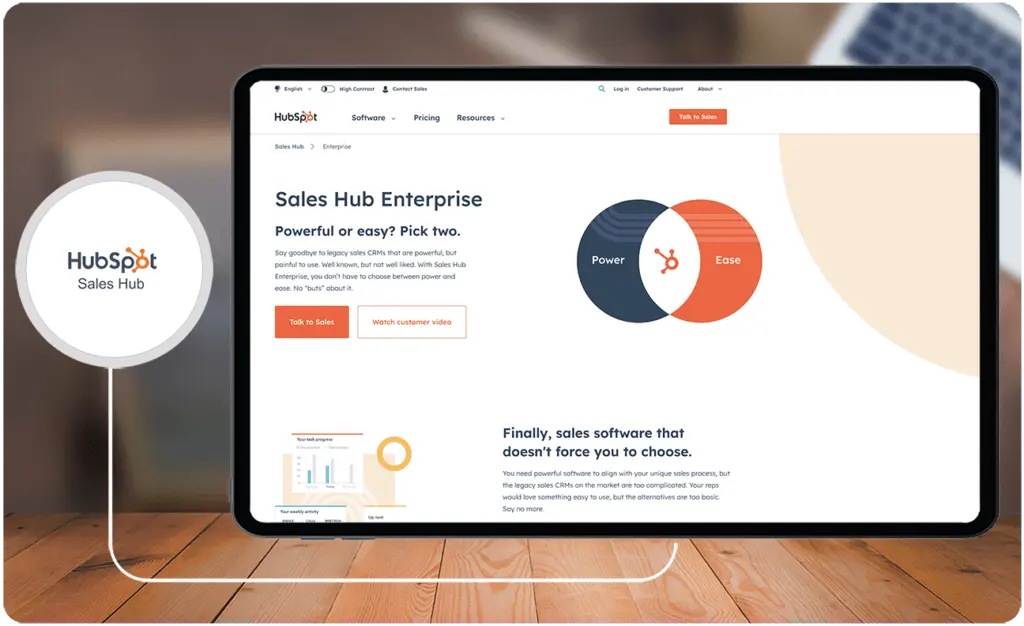
HubSpot Sales Hub is a comprehensive and versatile sales management platform designed to cater to a broad spectrum of users, ranging from small startups to large enterprises. It is an integrated solution for lead follow-up, sales closing, and sales team management teams. What makes HubSpot Sales Hub stand out is its ability to centralize databases, providing quick cross-team access to information and facilitating efficient information management across the entire organization.
Automation is a key highlight of HubSpot Sales Hub, ensuring sales teams can save time on manual tasks such as logging emails, calls, meetings, and interactions. This information is automatically collected and aggregated within the system, contributing to a more streamlined and efficient sales process. Overall, HubSpot Sales Hub is a versatile solution for businesses seeking to enhance their sales processes, optimize lead management, and drive substantial revenue growth. It can be daunting to use with little training so if your team wants something they can grasp easily, you might consider HubSpot Sales Hub alternatives.
Who is HubSpot Sales Hub for?
HubSpot Sales Hub caters to startups, medium-sized firms, and large enterprises, proving beneficial for lead follow-up, sales closure, and team management across diverse industries. It is widely used in B2B and B2C sectors, including software, finance, consumer goods, healthcare, and media. The platform facilitates tasks such as requesting introductions, post-conference networking, and cold outreach, making it a versatile solution for businesses seeking streamlined sales processes and revenue growth.
Key Benefits of HubSpot Sales Hub
- Efficient Data Management: HubSpot Sales Hub ensures swift access and seamless management of information with a centralized database, promoting efficient collaboration across teams.
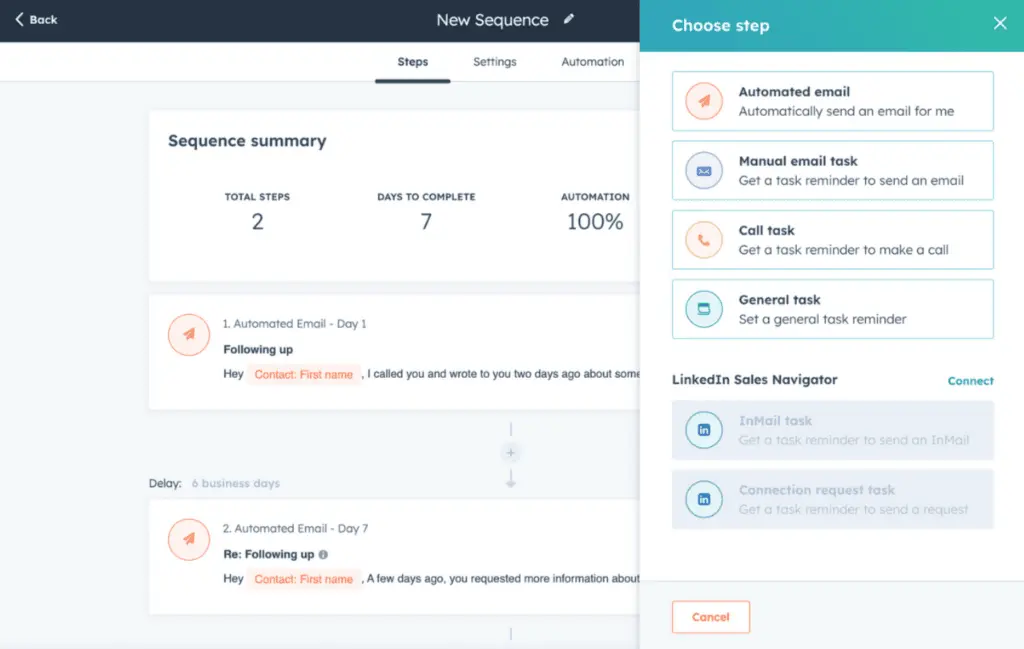
- Enhanced Outreach and Documentation: Boost prospect engagement with automated meeting and call logging, email templates, and advanced sequencing, streamlining communication and documentation efforts.
- In-depth Business Analysis: Gain valuable insights into business performance through HubSpot Sales Hub's extensive library of custom and out-of-the-box reports, fostering informed decision-making.
- Data-driven Intelligence: Leverage analytics and artificial intelligence tools for predictive lead scoring, empowering your team with data-driven strategies.
- Time-saving Automation: Automate the collection and aggregation of essential data, such as emails, calls, meetings, and interactions, freeing up valuable time for your team.
Who are Close and HubSpot Sales Hub best for?
While both companies are two of the best CRM software providers around, they do not necessarily cater to the same range of businesses or operations with the same functions. HubSpot Sales Hub, built on the HubSpot Free offering, includes a more comprehensive set of business management tools—from operations to sales and marketing. On the other hand, Close is designed specifically for sales, as its name suggests. Since it is a straightforward sales CRM offering, it is a leaner platform with specialized tools such as its Power Dialer for call-heavy sales teams.
Where Close Excels More
- Close provides a native Power Dialer perfect for call-heavy sales operations.
- For sales teams that prefer a straightforward sales CRM, Close can be a better choice, given it is a lean, standalone, easy-to-use sales CRM platform with no added baggage of features.
- Being a lean sales CRM, Close is reported to align better with the needs of sales operations.
Where HubSpot Excels More
- Because it is a comprehensive business platform, the product suits businesses that wish to integrate different functions, such as tying marketing closely to sales. As such, for more complex operations, the Close vs HubSpot Sales Hub question is a no-brainer.
- The product has more robust analytics and reporting solutions, making it a go-to platform for businesses that value data-heavy decision-making processing.
- HubSpot offers more native integrations with other third-party apps. This allows it to provide better omnichannel sales engagement and smoother interoperability with virtually any digital ecosystem. It integrates with popular tools, such as the best accounting software for small business offerings out there.
Close vs HubSpot Sales Hub Feature Comparison
With help from the Research.com expert review team, we present the Close vs HubSpot Sales Hub comparison of features. Below are five main sales CRM areas where you can compare both software solutions to determine which fits your needs.
Contact Management
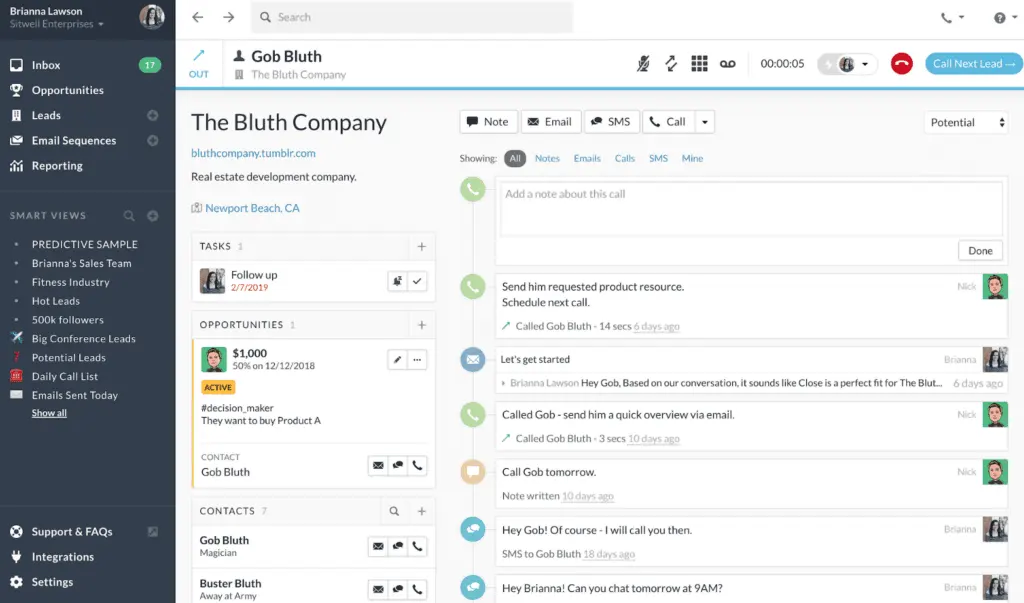
Each platform allows for storing and organizing contact data in a centralized location. Close allows users to create contact records, log sales activities, and view previous interactions. It provides a unified view of customer interactions across multiple channels, aiding sales reps in making tracking and workflow management efficient. HubSpot also offers contact management features enabling the creation of contact records, logging of sales activities, and reviewing previous interactions. When it comes to functionality, both platforms look to offer the same capabilities. As such, Close vs HubSpot Sales Hub looks to be a tie in this regard.
Lead Management
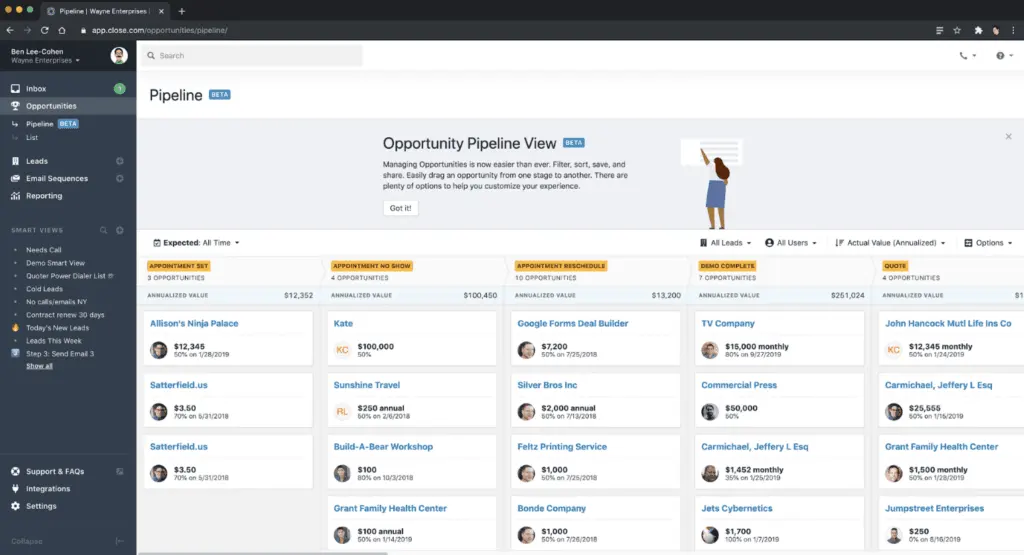
Both solutions are known for providing users with easy-to-use tools for analyzing, qualifying, tracking, and nurturing leads to convert into customers. The functionalities are virtually the same, but, of course, the UIs are different. Being a leaner platform, Close looks to provide a simpler and more intuitive lead management tool. It also boasts a built-in Power Dialer. As such, it is preferred by salespeople who have to make calls regularly, making it a no-brainer answer to the Close vs HubSpot Sales Hub question.
Pipeline Management
Pipeline management features help users streamline tasks and provide actionable insights across the customer journey. And both platforms have great pipeline management solutions, allowing users to customize their workflows. The features are about the same. However, HubSpot Sales Hub supports more deal pipelines per account. So, it is a toss-up between the two when it comes to Close vs HubSpot Sales Hub software features for pipeline management.
Omnichannel Sales Engagement
Through native features and integrations, it is ideal that CRM solutions integrate with third-party platforms to engage customers and prospects across different channels. While both have email integrations essential to sales, HubSpot Sales Hub offers true omnichannel sales engagement through its long list of integrations, including those for popular social media platforms like Facebook. Close, however, excels more in telephony, having an easy-to-use Power Dialer handy. It also integrates with Zapier, allowing it to work seamlessly with other products. Unfortunately, compared to HubSpot, its set of integrations is very limited, limiting its native omnichannel communications capabilities. Hence, when it comes to Close vs HubSpot Sales Hub in terms of omnichannel engagement, HubSpot looks to be far superior.
Automation
When it comes to Close vs HubSpot Sales Hub automation capabilities, the latter is the clear winner just by the number of workflows supported. Close’s Enterprise plan supports five (5) users for $749 per month billed monthly but only includes 100 workflows. HubSpot Sales Hub’s mid-tier Professional plan, which also helps five (5) users at $500 per month billed monthly, offers up to 300 fully customizable workflows for a fraction of Close’s price. As such, many consider the platform to have superior sales automation capabilities.
Close vs HubSpot Sales Hub Pricing
When it comes to Close vs HubSpot Sales Hub pricing, both offer tiered plans with, more or less, the same pricing schemes—per user and user bundles. Overall, considering features, HubSpot Sales Hub looks to offer more for each plan, including free tools for marketing and other business functions. In fact, offers one of the best customer service software products as well. However, you need to commit annually for all plans, even if you choose the monthly billing. Close, on the other hand, offers more straightforward sales CRM tools. Close vs HubSpot Sales Hub pricing plans are below:
Close Pricing Plans
Essentials – $35 per user per month (billed annually)
- Unlimited contacts & leads
- Multiple pipelines
- Advanced lead & activity filters
- Built-in email, calling & SMS
- Centralized inbox & task list
Solo - $9 per user per month (billed annually)
- Everything in Essential
- Limited to 1 user
- Limited to 10k leads
Growth – $99 per user per month (billed annually)
- Everything in Essentials plan
- Automated workflows
- Power Dialer
- AI Email Assistant
- Custom Activities
Scale – $139 per user per month (billed annually)
- Everything in Growth
- Role-based access & permissions
- Lead visibility rules
- Predictive Dialer
- Unlimited call recording
HubSpot Sales Hub Pricing Plans
Free Tools – $0 (free forever)
- Free Marketing tools
- Free Sales tools
- Free Service tools
- Free CMS tools
- Free Operations tools
- Free Commerce tools
Starter – $15/user/month billed monthly or $9/user/month billed yearly ($108/user)
- Includes free tools with increased limits
- Additional features: Repeating tasks and task queues
- Multiple currencies support
- GoalsConversation routing
- Simple automation
- HubSpot-provided phone numbers
- Repeating tasks and task queues
- Multiple currencies support
- Goals
- Conversation routing
- Simple automation
- HubSpot-provided phone numbers
Professional – $100/user/month billed monthly or $90/user/month billed annually ($1,080/user)
- Sequences
- Forecasting
- Coaching playlists
- Prospecting workspace
- ABM tools and automation
- Call transcription and coaching
- Forecasting
- Sequences
- Coaching playlists
- Prospecting workspace
- ABM tools and automation
- Call transcription and coaching
Enterprise – $150/user/month billed $1800/user every year
- Recurring revenue tracking
- Custom objects
- Advanced permissions
- Predictive lead scoring
- Lead form routing
- Conversation intelligence
- Recurring revenue tracking
- Custom objects
- Advanced permissions
- Predictive lead scoring
- Lead form routing
- Conversation intelligence
Close Pros and Cons
Pros
- Effective Calling Tools: Close is well-endowed with calling features, including a built-in power dialer, facilitating consistent high-volume sales calls.
- Straightforward Interface: Close is designed for easy learning and usage, focusing on core activities like calling and deal tracking in a straightforward, easy-to-navigate format.
- Sales-Centric Approach: With a strong emphasis on sales and deal closure, Close provides various tools for sales teams to expand networks, win leads, convert prospects into customers, and nurture enduring relationships.
Cons
- Limited HTML Email Support: Close encounters challenges with HTML emails.
- Feature Gaps: Some features found in other CRMs are missing in Close, especially considering its pricing.
- Restricted Analytics Access: Analytics typically reside in the system's backend, limiting client access to information about their interactions with the company.
HubSpot Sales Hub Pros and Cons
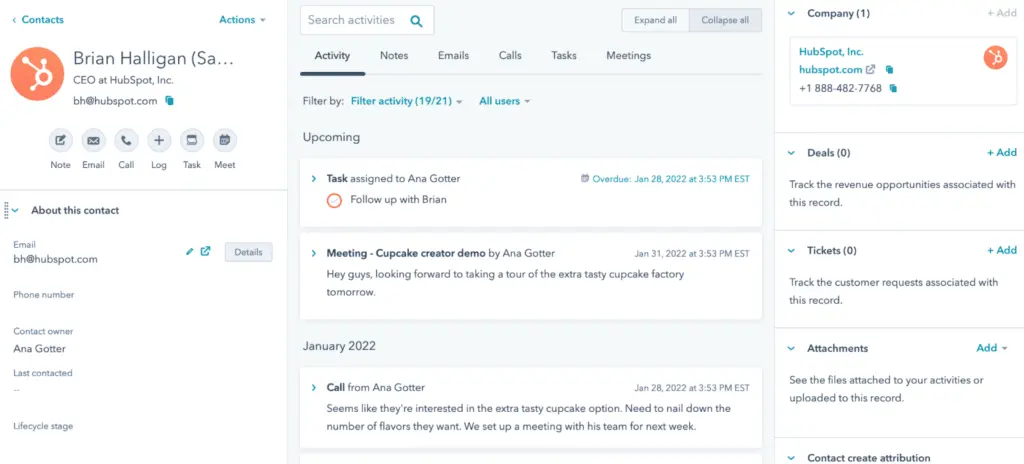
Pros
- Unified Platform: HubSpot Sales Hub is an integrated marketing, sales, and customer support solution.
- Automation Capabilities: It provides robust workflows and automation features.
- User-Friendly Design: The platform is known for its user-friendly interface and easy navigation.
Cons
- Cost Concerns: HubSpot can become costly relatively quickly.
- Annual Billing Contracts: HubSpot default contracts are billed annually.
- Lead Capture Improvement: There is room for improvement in enhancing the tool's effectiveness in capturing leads.
How do Close and HubSpot Sales Hub support remote sales teams and virtual collaboration?
With the shift toward remote work and virtual sales operations, CRM platforms that support remote collaboration are increasingly valuable. Both Close and HubSpot Sales Hub offer features designed to help sales teams stay connected, manage leads, and track sales performance from any location. Here’s how each platform supports remote sales teams:
- Cloud-Based Access for Remote Teams
- Close: As a cloud-based CRM, Close allows team members to access sales data and communication tools from any internet-connected device. The platform’s intuitive interface enables remote sales reps to quickly locate client information, track interactions, and update deals in real-time, fostering efficient remote workflows.
- HubSpot Sales Hub: HubSpot’s cloud infrastructure provides easy, centralized access to CRM data, enabling cross-functional teams (sales, marketing, and customer support) to collaborate seamlessly. Remote teams can use the platform to access shared databases and resources, eliminating the need for on-premises software and facilitating continuous workflow across departments.
- Built-In Communication and Collaboration Tools
- Close: With its Power Dialer and call features, Close makes it easy for remote teams to conduct high-volume outbound calls directly from the platform. The built-in email sequences and task assignments also help remote teams manage leads and sales processes without switching between multiple tools.
- HubSpot Sales Hub: HubSpot supports extensive internal and external communication with tools like automated email tracking, meeting scheduling, and shared team inboxes. It also integrates natively with HubSpot Marketing and Service Hubs, allowing sales, marketing, and support teams to work in sync for a unified customer experience.
- Real-Time Data and Reporting for Remote Oversight
- Close: The platform provides instant updates on sales activities and performance metrics, allowing sales managers to monitor team progress and coach remotely. Reports can be generated quickly, helping managers track KPIs and individual performance in real time.
- HubSpot Sales Hub: HubSpot’s detailed reporting and analytics dashboards offer comprehensive insights into sales activities, pipeline health, and performance metrics. These insights are accessible remotely, allowing managers to make informed decisions and provide guidance to team members regardless of location.
- Integration with Remote Work Tools
- Close: Close integrates with tools like Zoom and Slack through Zapier, enabling remote teams to conduct video meetings, share information, and maintain communication within the platforms they already use.
- HubSpot Sales Hub: HubSpot’s extensive integrations with tools like Zoom, Microsoft Teams, and Slack enhance its virtual collaboration capabilities. Teams can seamlessly schedule meetings, collaborate in real time, and share updates directly within these tools, making it a strong choice for businesses with complex remote operations.
Verdict – Close vs HubSpot Sales Hub: Which software is better?
Making the Close vs HubSpot Sales Hub decision relies on the unique needs of your business. Close is praised for its user-friendly interface, straightforward setup, and efficient administration, making it a suitable option for those prioritizing ease of use. Meanwhile, HubSpot Sales Hub is recognized for its excellent ongoing product support, emphasizing its proficiency in assisting over an extended period. It is also a go-to choice for operations that favor data-heavy decision-making. Its analytics and reporting package rivals the functionality of standalone business intelligence software tools. Ultimately, the choice should align with the specific requirements and preferences of your business.
Billing and Financial Integration Considerations
When comparing Close and HubSpot Sales Hub, it’s essential to discuss how each platform integrates with financial processes, an often overlooked yet critical component of the sales workflow. Efficient billing and invoicing are key to streamlining operations, eliminating manual errors, and ensuring timely revenue collection.
Close CRM integrates with a variety of third-party tools to bridge the gap between sales activities and financial processes. By automating tasks like quotes, invoices, and payment tracking through its supported plug-ins, Close helps sales teams focus on revenue-generating tasks rather than administrative burdens. However, it may require additional third-party software for more complex financial needs.
HubSpot Sales Hub, on the other hand, excels in its native integration ecosystem, offering direct alignment between sales and finance. Its platform can connect with finance-focused applications, allowing businesses to sync invoicing, subscription management, and payment processing seamlessly. This level of consistency ensures that transitioning from deal closure to billing happens without delays or discrepancies.
For businesses seeking a dedicated solution to manage invoicing and billing effectively, it is worthwhile to consider specialized invoice software tools. This ensures that the integration between sales platforms and financial processes remains smooth, scalable, and tailored to meet business-specific requirements. Such solutions can alleviate manual efforts and bolster the efficiency of financial operations.
How do these platforms ensure data security and regulatory compliance?
Both CRMs implement robust security measures to maintain the integrity of sensitive customer data. Close provides secure data storage, role-based access controls, and detailed audit logs to monitor data activity, ensuring that only authorized users can access critical information. HubSpot Sales Hub leverages advanced encryption protocols, real-time threat monitoring, and adherence to regulatory frameworks such as GDPR to foster a trusted environment. Additionally, both platforms support integrations with third-party security tools, allowing businesses to customize their data protection strategies. Implementing solutions like the best asset tracking software can further strengthen overall IT security and asset oversight.
Key Insights
- Target Audience: Close CRM is tailored for startups and small to mid-sized businesses focusing on high-volume outreach, while HubSpot Sales Hub caters to a broad spectrum of users, from small startups to large enterprises.
- Specialized Features: Close CRM stands out with its built-in Power Dialer for efficient sales calls and a user-friendly interface focused on core sales activities. HubSpot Sales Hub offers a more comprehensive set of tools, including marketing, sales, and customer service functionalities.
- Automation and Productivity: Both platforms emphasize automation to increase sales productivity. Close CRM automates routine tasks with email sequences, workflows, and call automation, while HubSpot Sales Hub offers robust workflows and advanced sequencing to save time on manual tasks.
- Integration and Scalability: HubSpot Sales Hub provides extensive native integrations with third-party apps, making it suitable for complex operations. Close CRM, while having limited integrations, excels in telephony and ease of use.
- Pricing Considerations: Close offers more straightforward and budget-friendly pricing for small teams, whereas HubSpot Sales Hub's plans are more comprehensive but can become expensive, especially for larger teams.
Other Things You Should Know About Close - HubSpot Sales Hub Comparison
HubSpot Marketing Hub is designed for marketing efforts, offering tools for content creation, email marketing, and analytics to attract and engage customers. In contrast, HubSpot Sales Hub focuses on optimizing sales processes, providing features for lead management, sales automation, and analytics to enhance sales team efficiency in closing deals.
HubSpot Sales Hub is used to streamline and enhance sales processes, offering tools for lead management, sales automation, and analytics. It helps sales teams attract, engage, and close deals efficiently while facilitating collaboration between sales and marketing teams.
Yes, Close integrates seamlessly with HubSpot, allowing for streamlined sales workflows and increased revenue. This integration automates data exchange, combines Close's calling features with HubSpot's marketing automation, and eliminates manual data entry.
The six Hubs in HubSpot are:
- Marketing Hub: Tools for social media management and email marketing to attract potential customers.
- Sales Hub: CRM and sales automation tools to convert leads into customers.
- Service Hub: Support tools and feedback management to build customer loyalty.
- CMS Hub: Website management with an easy builder and blogging features.
- Operations Hub: Automation tools and connections to streamline business operations.
- Commerce Hub: Facilitates online sales with shopping cart and payment processing features.
Close CRM is best suited for startups and small to mid-sized businesses with high-volume outreach sales teams. It is ideal for industries that require efficient sales communication and automation to boost productivity and drive revenue growth.
Key benefits of Close CRM include highly efficient sales calls with a built-in Power Dialer, a user-friendly interface, a focused sales approach, increased sales productivity through automation, and streamlined workflows.
Key benefits of HubSpot Sales Hub include efficient data management with a centralized database, enhanced outreach and documentation with automated logging and email templates, in-depth business analysis with custom and out-of-the-box reports, data-driven intelligence with predictive lead scoring, and time-saving automation.
Close CRM is a lean, sales-focused platform with specialized tools like the Power Dialer, making it ideal for sales-heavy operations. HubSpot Sales Hub offers a broader range of business management tools, integrating marketing, sales, and customer service functionalities, making it suitable for more complex operations.
Close CRM offers tiered pricing plans starting at $59 per user per month for the Startup plan, with more features available in the Professional and Enterprise plans. HubSpot Sales Hub offers a free plan and paid plans starting at $9 per month for the Starter plan, with more comprehensive features available in the Professional and Enterprise plans. HubSpot's plans may become expensive, especially for larger teams.