Copper vs Freshsales – 2027 Comparison

Co-Founder and Chief Data Scientist
Copper vs Freshsales Comparison Table of Contents
- What is Copper?
- Who is Copper for?
- Key benefits of Copper?
- What is Freshsales?
- Who is Freshsales for?
- Key Benefits of Freshsales
- Who are Copper and Freshsales best for?
- Copper vs Freshsales Feature Comparison
- Copper vs Freshsales Pricing
- Copper Pros and Cons
- Freshsales Pros and Cons
- How do these CRMs integrate with employee monitoring tools?
- What level of customer support do Copper and Freshsales provide?
- Use Cases: Enhancing Collaborative Sales Effort
What is Copper?
Copper is a CRM designed to streamline sales processes and foster stronger customer connections. Its seamless integration with Gmail and other Workspace apps allows users to manage their entire sales pipeline within their familiar environment, eliminating the need to switch between platforms. With an intuitive design and built-in customization features, Copper is easy to learn and adopt team-wide.
Featured CRM Software Products

$9 to $150/user/month
Yes, up to 2 users
E-signature software, call transcription, conversation routing
Editor's Take
HubSpot CRM is a powerful customer relationship management platform designed to help businesses manage their sales, marketing, and customer service efforts in one centralized place. Its user-friendly interface allows teams to track leads, monitor customer interactions, and automate sales pipelines. With built-in tools for email marketing, contact management, and analytics, HubSpot CRM provides deep insights into customer behavior and sales performance. The platform also supports seamless collaboration between marketing and sales teams through real-time updates and integrations with tools like Gmail, Outlook, and Slack. Additionally, its automation features help reduce manual tasks, enabling teams to focus on building relationships and closing deals. HubSpot CRM is scalable, making it ideal for businesses of all sizes, from startups to large enterprises.
Expert Score
In evaluating SaaS software, a comprehensive and structured methodology ensures a fair and accurate comparison across key metrics. This approach focuses on the most critical aspects that affect user experience, functionality, and business value. The following metrics—general features, cost, customer service, integrations, and mobile support—are evaluated to provide a holistic view of each software solution’s strengths and weaknesses. These metrics are selected based on their direct impact on software usability, scalability, and long-term effectiveness for businesses.
1. General Features - scoring weight 40%
This metric evaluates the core functionalities and tools the software offers. It involves assessing the comprehensiveness of the features, their relevance to the target users, and the ease of use. This is important because robust and well-designed features determine the software's overall utility and efficiency in solving user problems.
2. Cost - scoring weight 15%
Cost analysis focuses on pricing models, value for money, and scalability. It's crucial to evaluate whether the software’s features justify its price, considering different plans for small and large organizations. This is vital for businesses to ensure they invest in cost-effective solutions that fit their budget.
3. Customer Service - scoring weight 15%
This evaluates the responsiveness, quality, and availability of customer support, including channels like chat, email, or phone. Good customer service is essential for troubleshooting and ensuring smooth software usage, which reduces downtime and frustration for users.
4. Integrations - scoring weight 15%
This examines how well the software integrates with third-party tools (e.g., CRM, payment systems, collaboration apps). Seamless integrations are key for creating a unified workflow and enhancing productivity by connecting multiple systems, which is crucial for operational efficiency.
5. Mobile Support - scoring weight 15%
Mobile support assesses the software’s functionality and performance on mobile devices, including apps and mobile web versions. With increasing remote work and on-the-go usage, strong mobile support is critical to ensure users can access and utilize the software effectively, regardless of location.

$25 per user per month
14 days
marketing automation, sales automation, no code customization
Editor's Take
CRM Creatio is a comprehensive customer relationship management (CRM) solution designed to streamline and enhance business processes across sales, marketing, and customer service functions. Known for its low-code platform, Creatio allows businesses to customize and automate workflows without requiring extensive technical expertise. This adaptability makes it particularly appealing to organizations seeking to align the software with their specific needs.
The platform's marketing module provides tools for multi-channel campaign management, lead generation, and personalized customer engagement. Its sales module offers functionality for pipeline management, opportunity tracking, and analytics to help teams close deals more efficiently. Additionally, the customer service module supports case management, service level agreement (SLA) monitoring, and omnichannel communication, enabling businesses to provide exceptional customer support.
Creatio stands out with its intuitive interface, robust analytics, and AI-powered tools that provide actionable insights. The low-code development tools allow non-technical users to create applications and automate processes, reducing the dependency on IT teams. Integration capabilities with other software platforms and APIs enhance its utility, making it a versatile choice for businesses of all sizes.
Overall, CRM Creatio is a powerful solution that combines user-friendly design with advanced customization and automation features. Its adaptability and low-code foundation position it as a strong contender for organizations looking to optimize customer relationship management processes while maintaining flexibility for growth and innovation.
Expert Score
In evaluating SaaS software, a comprehensive and structured methodology ensures a fair and accurate comparison across key metrics. This approach focuses on the most critical aspects that affect user experience, functionality, and business value. The following metrics—general features, cost, customer service, integrations, and mobile support—are evaluated to provide a holistic view of each software solution’s strengths and weaknesses. These metrics are selected based on their direct impact on software usability, scalability, and long-term effectiveness for businesses.
1. General Features - scoring weight 40%
This metric evaluates the core functionalities and tools the software offers. It involves assessing the comprehensiveness of the features, their relevance to the target users, and the ease of use. This is important because robust and well-designed features determine the software's overall utility and efficiency in solving user problems.
2. Cost - scoring weight 15%
Cost analysis focuses on pricing models, value for money, and scalability. It's crucial to evaluate whether the software’s features justify its price, considering different plans for small and large organizations. This is vital for businesses to ensure they invest in cost-effective solutions that fit their budget.
3. Customer Service - scoring weight 15%
This evaluates the responsiveness, quality, and availability of customer support, including channels like chat, email, or phone. Good customer service is essential for troubleshooting and ensuring smooth software usage, which reduces downtime and frustration for users.
4. Integrations - scoring weight 15%
This examines how well the software integrates with third-party tools (e.g., CRM, payment systems, collaboration apps). Seamless integrations are key for creating a unified workflow and enhancing productivity by connecting multiple systems, which is crucial for operational efficiency.
5. Mobile Support - scoring weight 15%
Mobile support assesses the software’s functionality and performance on mobile devices, including apps and mobile web versions. With increasing remote work and on-the-go usage, strong mobile support is critical to ensure users can access and utilize the software effectively, regardless of location.

$8/per user/per month
Yes
customizable dashboards, automated follow-ups, advanced analytics
Editor's Take
monday.com Sales CRM is a customizable platform designed to streamline sales processes, enhance team collaboration, and improve pipeline visibility. Its intuitive interface enables users to manage leads, track deals, and automate repetitive tasks with ease. The CRM integrates seamlessly with popular tools like Gmail, Slack, and HubSpot, ensuring a centralized workflow. Features like customizable dashboards, automated follow-ups, and advanced analytics help sales teams stay organized and focused on closing deals. With scalability in mind, monday.com caters to businesses of all sizes, offering flexible pricing plans and robust customer support. It’s an excellent choice for teams seeking efficiency and adaptability.
Expert Score
In evaluating SaaS software, a comprehensive and structured methodology ensures a fair and accurate comparison across key metrics. This approach focuses on the most critical aspects that affect user experience, functionality, and business value. The following metrics—general features, cost, customer service, integrations, and mobile support—are evaluated to provide a holistic view of each software solution’s strengths and weaknesses. These metrics are selected based on their direct impact on software usability, scalability, and long-term effectiveness for businesses.
1. General Features - scoring weight 40%
This metric evaluates the core functionalities and tools the software offers. It involves assessing the comprehensiveness of the features, their relevance to the target users, and the ease of use. This is important because robust and well-designed features determine the software’s overall utility and efficiency in solving user problems.
2. Cost - scoring weight 15%
Cost analysis focuses on pricing models, value for money, and scalability. It’s crucial to evaluate whether the software’s features justify its price, considering different plans for small and large organizations. This is vital for businesses to ensure they invest in cost-effective solutions that fit their budget.
3. Customer Service - scoring weight 15%
This evaluates the responsiveness, quality, and availability of customer support, including channels like chat, email, or phone. Good customer service is essential for troubleshooting and ensuring smooth software usage, which reduces downtime and frustration for users.
4. Integrations - scoring weight 15%
This examines how well the software integrates with third-party tools (e.g., CRM, payment systems, collaboration apps). Seamless integrations are key for creating a unified workflow and enhancing productivity by connecting multiple systems, which is crucial for operational efficiency.
5. Mobile Support - scoring weight 15%
Mobile support assesses the software’s functionality and performance on mobile devices, including apps and mobile web versions. With increasing remote work and on-the-go usage, strong mobile support is critical to ensure users can access and utilize the software effectively, regardless of location.

$7 per user per month billed annually
15 days
lead generation, sales pipeline management, workflow automation
Editor's Take
Zoho CRM is a flexible and comprehensive customer relationship management platform designed to help businesses manage and grow their customer relationships effectively. With tools for lead generation, sales pipeline management, workflow automation, and analytics, Zoho CRM is suitable for businesses of all sizes across a variety of industries.
Zoho CRM enables teams to streamline sales processes by capturing leads from multiple channels, tracking interactions, and managing every stage of the sales cycle. The platform offers customizable dashboards and reports, providing insights into sales performance and customer behaviors to help make data-driven decisions. With powerful automation features, Zoho CRM allows businesses to set up workflows for routine tasks like follow-ups, lead scoring, and email notifications, reducing manual work and enhancing productivity. The platform integrates with popular tools, including the Zoho suite, Microsoft 365, and G Suite, enabling a seamless connection across teams.
For businesses aiming to improve customer engagement, close deals faster, and enhance team collaboration, Zoho CRM delivers a scalable, user-friendly solution to drive sales and customer satisfaction.
Expert Score
In evaluating SaaS software, a comprehensive and structured methodology ensures a fair and accurate comparison across key metrics. This approach focuses on the most critical aspects that affect user experience, functionality, and business value. The following metrics—general features, cost, customer service, integrations, and mobile support—are evaluated to provide a holistic view of each software solution’s strengths and weaknesses. These metrics are selected based on their direct impact on software usability, scalability, and long-term effectiveness for businesses.
1. General Features - scoring weight 40%
This metric evaluates the core functionalities and tools the software offers. It involves assessing the comprehensiveness of the features, their relevance to the target users, and the ease of use. This is important because robust and well-designed features determine the software's overall utility and efficiency in solving user problems.
2. Cost - scoring weight 15%
Cost analysis focuses on pricing models, value for money, and scalability. It's crucial to evaluate whether the software’s features justify its price, considering different plans for small and large organizations. This is vital for businesses to ensure they invest in cost-effective solutions that fit their budget.
3. Customer Service - scoring weight 15%
This evaluates the responsiveness, quality, and availability of customer support, including channels like chat, email, or phone. Good customer service is essential for troubleshooting and ensuring smooth software usage, which reduces downtime and frustration for users.
4. Integrations - scoring weight 15%
This examines how well the software integrates with third-party tools (e.g., CRM, payment systems, collaboration apps). Seamless integrations are key for creating a unified workflow and enhancing productivity by connecting multiple systems, which is crucial for operational efficiency.
5. Mobile Support - scoring weight 15%
Mobile support assesses the software’s functionality and performance on mobile devices, including apps and mobile web versions. With increasing remote work and on-the-go usage, strong mobile support is critical to ensure users can access and utilize the software effectively, regardless of location.

By quote
Yes
Lead Management, Contact Management, Workflow Automation
Editor's Take
Salesforce CRM is a leading customer relationship management platform known for its robust functionality, scalability, and extensive customization options, making it suitable for businesses of all sizes, from startups to large enterprises. Built to streamline sales, marketing, customer service, and analytics, Salesforce CRM empowers teams to manage customer interactions, optimize workflows, and drive growth from a single, cloud-based platform.
Salesforce CRM provides a complete view of customer data, enabling teams to track interactions, manage leads, and automate tasks throughout the sales pipeline. With powerful tools for reporting and analytics, Salesforce offers insights into sales performance, customer trends, and campaign effectiveness, allowing teams to make data-driven decisions. The platform’s automation capabilities reduce manual workloads with customizable workflows, automated follow-ups, and lead scoring, ensuring a smooth customer journey. Integrations with thousands of third-party applications, along with its own suite of services, make Salesforce a highly adaptable solution for businesses looking to connect their CRM with other tools.
For organizations focused on enhancing customer engagement, improving team efficiency, and scaling their operations, Salesforce CRM delivers a powerful and versatile solution tailored to support long-term business growth.
Expert Score
In evaluating SaaS software, a comprehensive and structured methodology ensures a fair and accurate comparison across key metrics. This approach focuses on the most critical aspects that affect user experience, functionality, and business value. The following metrics—general features, cost, customer service, integrations, and mobile support—are evaluated to provide a holistic view of each software solution’s strengths and weaknesses. These metrics are selected based on their direct impact on software usability, scalability, and long-term effectiveness for businesses.
1. General Features - scoring weight 40%
This metric evaluates the core functionalities and tools the software offers. It involves assessing the comprehensiveness of the features, their relevance to the target users, and the ease of use. This is important because robust and well-designed features determine the software's overall utility and efficiency in solving user problems.
2. Cost - scoring weight 15%
Cost analysis focuses on pricing models, value for money, and scalability. It's crucial to evaluate whether the software’s features justify its price, considering different plans for small and large organizations. This is vital for businesses to ensure they invest in cost-effective solutions that fit their budget.
3. Customer Service - scoring weight 15%
This evaluates the responsiveness, quality, and availability of customer support, including channels like chat, email, or phone. Good customer service is essential for troubleshooting and ensuring smooth software usage, which reduces downtime and frustration for users.
4. Integrations - scoring weight 15%
This examines how well the software integrates with third-party tools (e.g., CRM, payment systems, collaboration apps). Seamless integrations are key for creating a unified workflow and enhancing productivity by connecting multiple systems, which is crucial for operational efficiency.
5. Mobile Support - scoring weight 15%
Mobile support assesses the software’s functionality and performance on mobile devices, including apps and mobile web versions. With increasing remote work and on-the-go usage, strong mobile support is critical to ensure users can access and utilize the software effectively, regardless of location.

$7/user/month
15 days
Pipeline Management, Email Integration, Task Tracking
Editor's Take
Bigin is a lightweight CRM by Zoho, tailored for small businesses and startups to manage sales pipelines efficiently. It provides tools for deal tracking, email integration, and task management, ensuring a simple yet effective approach to sales. The platform offers customizable pipelines, real-time notifications, and seamless integrations with other Zoho apps. Its user-friendly design makes it accessible for teams with minimal CRM experience, helping them streamline sales processes without complexity.
Expert Score
In evaluating SaaS software, a comprehensive and structured methodology ensures a fair and accurate comparison across key metrics. This approach focuses on the most critical aspects that affect user experience, functionality, and business value. The following metrics—general features, cost, customer service, integrations, and mobile support—are evaluated to provide a holistic view of each software solution’s strengths and weaknesses. These metrics are selected based on their direct impact on software usability, scalability, and long-term effectiveness for businesses.
1. General Features - scoring weight 40%
This metric evaluates the core functionalities and tools the software offers. It involves assessing the comprehensiveness of the features, their relevance to the target users, and the ease of use. This is important because robust and well-designed features determine the software's overall utility and efficiency in solving user problems.
2. Cost - scoring weight 15%
Cost analysis focuses on pricing models, value for money, and scalability. It's crucial to evaluate whether the software’s features justify its price, considering different plans for small and large organizations. This is vital for businesses to ensure they invest in cost-effective solutions that fit their budget.
3. Customer Service - scoring weight 15%
This evaluates the responsiveness, quality, and availability of customer support, including channels like chat, email, or phone. Good customer service is essential for troubleshooting and ensuring smooth software usage, which reduces downtime and frustration for users.
4. Integrations - scoring weight 15%
This examines how well the software integrates with third-party tools (e.g., CRM, payment systems, collaboration apps). Seamless integrations are key for creating a unified workflow and enhancing productivity by connecting multiple systems, which is crucial for operational efficiency.
5. Mobile Support - scoring weight 15%
Mobile support assesses the software’s functionality and performance on mobile devices, including apps and mobile web versions. With increasing remote work and on-the-go usage, strong mobile support is critical to ensure users can access and utilize the software effectively, regardless of location.
Who is Copper for?
Copper is ideal for small and medium-sized businesses seeking a simple CRM to streamline their operations. A simple interface and minimal learning curve make it a good option for teams unfamiliar with CRM software. Copper also seamlessly integrates with Google Workspace, including Gmail, Calendar, and other familiar tools, making it a natural extension of existing workflows. However, the best Copper CRM comparison should acknowledge that it offers fewer third-party integrations than other popular CRM systems.
Key benefits of Copper?
- Seamless Integration with Google Workspace. Copper offers seamless integration with tools many teams already use, including Gmail, Google Calendar, and Google Drive. This integration allows users to access and manage CRM data directly from their Google Workspace applications, helping streamline workflows and eliminating the need for manual data entry.
- Contextual Customer Relationship Management. Copper enables contextual customer relationship management. It automatically captures and organizes customer interactions from emails, meetings, and other sources, aggregating relevant data on its platform. Its visual pipeline management system also contributes to its efficacy as a relationship management tool. Users can see every customer's journey at a glance and personalize their interactions.
- Easy-to-Use with Minimal Setup. Known for its intuitive interface, Copper requires minimal training for users to get started. The simple setup and onboarding process also helps facilitate quick adoption and use.
What is Freshsales?
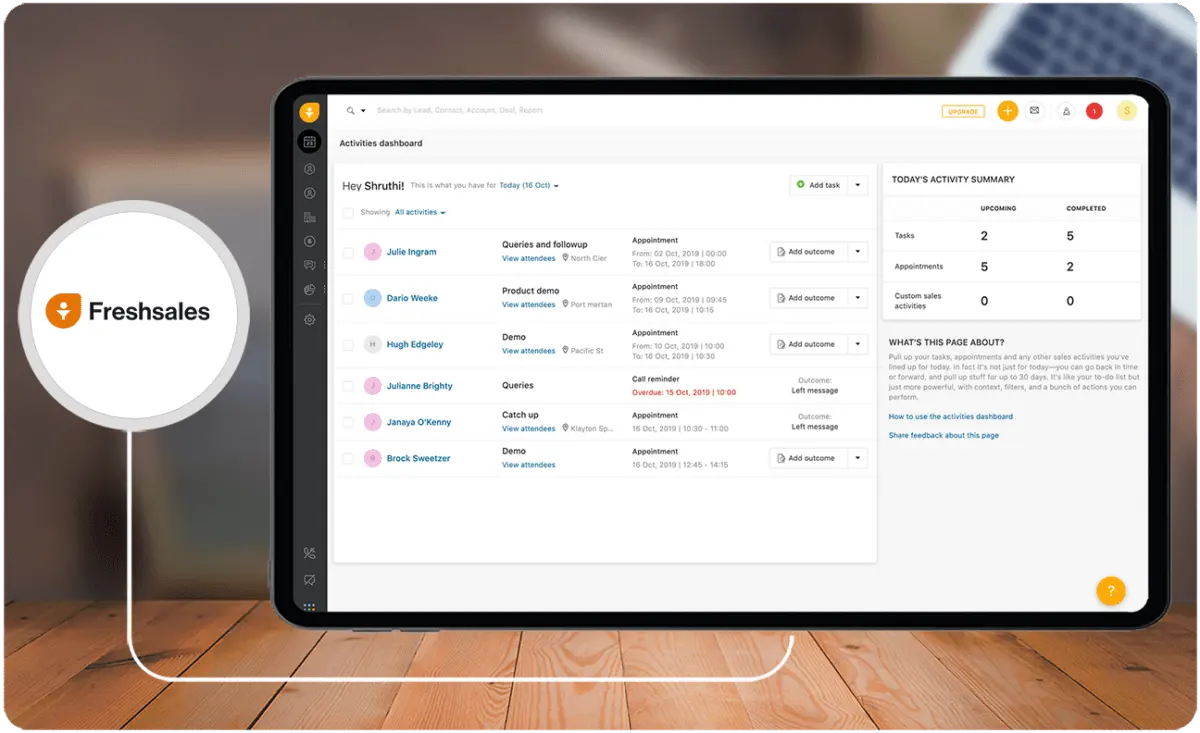
Freshsales bridges the gap between marketing and sales, making it easy for users to nurture leads from first contact to purchase. The platform offers much of the same functionality that leading CRMs do, including workflow automation, website activity tracking, and lead scoring with AI. With built-in communication tools, users can send and track calls, emails, chats, and SMS, ensuring no opportunity slips through the cracks.
Who is Freshsales for?
Well-rated for its ease of use and broad feature set, Freshsales can benefit businesses at all stages of growth. It also offers a free plan for up to three users, which makes it a better option for solopreneurs and small businesses than Copper. Freshsales is also suitable for teams that prioritize integrations with their current technology stack, with support for third-party applications like Slack and Mailchimp.
Key benefits of Freshsales?
- Extensive Integrations. While Freshsales can work as a standalone solution, it naturally integrates with other products from the Freshworks CRM to provide a unified view of customer data for sales, marketing, and support teams. It can also be used alongside other Freshworks tools like Freshteam, an ATS for recruiting agencies. Freshsales users can extend the platform’s functionality by integrating with third-party business tools, which helps to speed up sync data syncing and streamline workflows.
- Advanced Analytics Tools. Freshsales provides robust analytics tools to help businesses conduct email marketing campaigns, manage and successfully convert leads, close deals, automate workflows, and effortlessly track quotes and invoices.
- AI-Powered Insights. Freshsales includes a feature called Freddy AI, which provides sales teams with insights into the best deals to go after and what actions to take. Freshsales also offers forecasting capabilities, which use AI to predict revenue and provide insights into sales performance.
- Capacity to Scale. The Freshsales platform is easy to deploy and manage and can be customized to fit the specific needs of each business. With multiple licensing plans, it can scale to accommodate more users, data, and integrations. Considering scalability, the latter wins in a Copper and Freshsales comparison.
Who are Copper and Freshsales best for?
The right CRM depends on the specific requirements of your business. Copper and Freshsales are both easy to use with great entry-level plans. However, their distinct features and licensing models make them ideal for different types of businesses, which we must consider in a Copper and Freshsales comparison. You can consider these factors when looking at Copper alternatives.
Copper CRM is best for:
- Global enterprise companies and Google Workspace users
- Relationship makers who want to manage every relationship type, including leads, accounts, partners, creatives, agents, investors, brokers, and more
- Startups and small to midsize businesses that are looking to grow and scale globally
Freshsales CRM is best for:
- Teams looking for a simple, user-friendly, and affordable CRM solution
- Organizations looking for a highly customizable platform that integrates with different business apps for each department
Copper vs Freshsales Feature Comparison
To help you decide on a CRM, this Copper and Freshsales comparison examines the strengths and limitations of each platform's features.
Contact and Lead Management
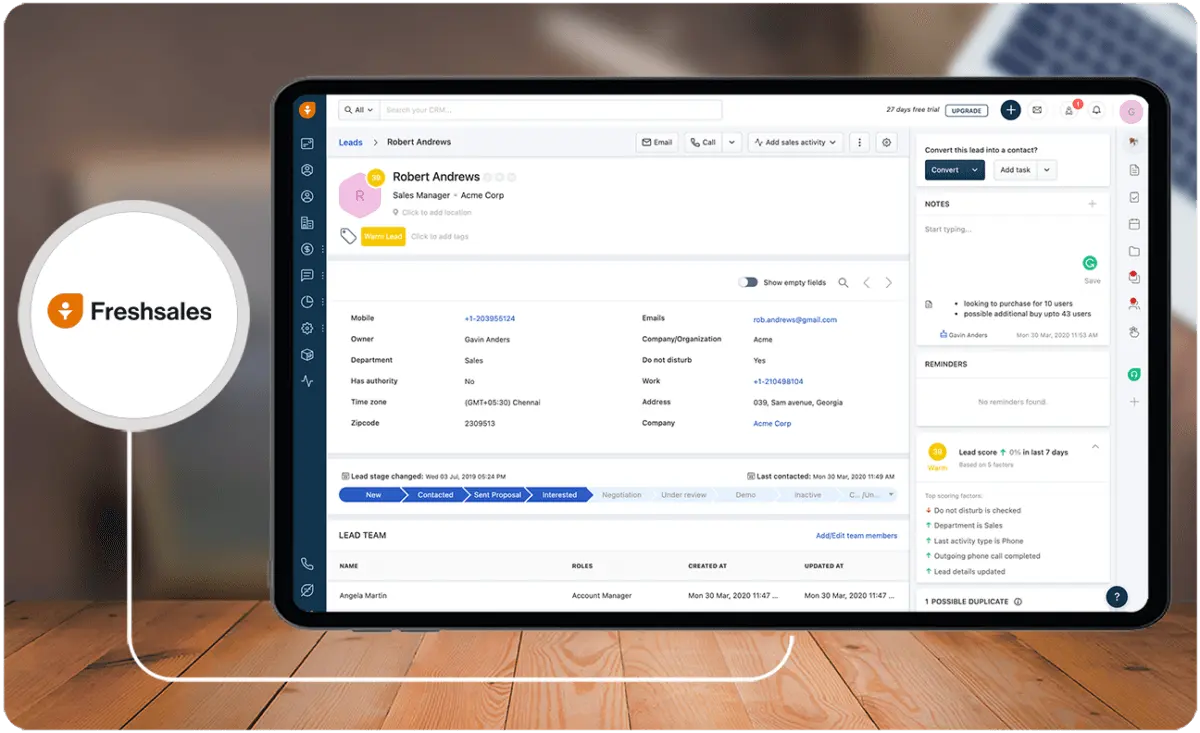
Copper offers intuitive contact and deal management within the Gmail inbox, with pre-built dashboards for sales opportunities and data organization. Freshsales counters with AI-powered lead scoring and website activity tracking, helping prioritize outreach efforts. While both CRMs excel in contact and lead management, the latter edges the former out in a Copper and Freshsales comparison. You can use these to weigh in your decision-making, especially if you are looking at Freshsales alternatives as well.
Workflow Automation
Copper is focused on simplicity, offering pre-built automation for common tasks like follow-ups and email sequences. Freshsales enables greater customization with its Freddy AI assistant, which can automate complex workflows based on specific triggers and conditions.
Deal Tracking
Copper's visual pipeline makes it easy to see how deals are progressing, with customizable stages and drag-and-drop functionality. Freshsales takes it further with AI-powered insights, predicting deal closure probability and suggesting optimal sales strategies. For deal tracking, the latter outdoes the former Copper and Freshsales comparison.
Reporting and Analytics
Copper provides basic reports on sales performance and deal status, and can integrate with other tools for more robust reporting and analytics. Meanwhile, Freshsales provides users with customizable dashboards, advanced filtering options, and real-time data insights out of the box, enabling deeper analysis.
Marketing Tools
Copper's strength lies in its tight integration with Google products like Gmail and Sheets, which can help simplify marketing automation. However, its competitor takes the lead in this Copper and Freshsales comparison, providing seamless integration with more email providers, third-party marketing app integrations, and powerful built-in email marketing tools for a more comprehensive marketing suite.
Integrations
Both platforms offer integrations with popular business apps. Copper is notable for its seamless connection with Google Workspace and other productivity tools, while Freshsales has a wide range of integrations, including marketing automation tools, collaboration tools, and social media platforms. The latter wins in a Copper and Freshsales comparison; however, those looking for a CRM to integrate with a long list of HRM systems and less popular business apps may find other CRMs a better fit.
Copper vs Freshsales Pricing
A Copper and Freshsales comparison reveals a significant price difference between the platforms. Freshsales is more accessible, offering a free plan and more pricing options.
Copper CRM pricing begins at $25 per monthly user, which is higher for an entry-level CRM. The basic plan is a lightweight solution that quickly integrates with Google Workspace, while the highest-tier Business plan augments Copper’s basic functionality with unlimited contacts, marketing tools, and customization.
- Basic: $25 per user/month
- Professional: $59 per user/month
- Business: $119 per user/month
Freshsales offers a free plan with built-in chat, email, and phone capabilities for up to three users. It also has more licensing tiers than Copper, allowing businesses to add features and users gradually as they scale. The most expensive plan is Enterprise, priced at $69 per monthly user, which includes advanced customization capabilities, governance, and controls.
- Free: $0 for up to three users
- Growth: $15 per user/month
- Pro: $39 per user/month
- Enterprise: $69 per user/month
Copper Pros and Cons
The Copper and Freshsales comparison should cover the benefits and potential drawbacks of choosing either software. This section provides a quick overview of the pros and cons of each.
Pros of Copper
- Simple, intuitive CRM platform
- Organizes all data in one place and features pre-built dashboards that keep users abreast of customers, interactions, and deals
- Customizable fields and pipelines
- Accessible via mobile app
- Offers a 14-day free trial
Cons of Copper
- Limited integration with third-party platforms
- Basic analytics tools compared to other CRMs
Freshsales Pros and Cons
Pros of Freshsales
- Robust sales force automation features
- Integrated omnichannel communications, including email, phone, chat, and telephony
- Extensive customization options and integrations
- Comes with a mobile app
- Free to try for 21 days
Cons of Freshsales
- Less tech-savvy users may find the interface overwhelming
- May require more time for initial setup and training
How do these CRMs integrate with employee monitoring tools?
Both CRM solutions offer flexibility to connect with external tools, enabling enhanced oversight of workforce productivity without compromising core functionality. By integrating with the best employee monitoring software, companies can align CRM insights with detailed employee performance data for more informed operational decisions. This integration facilitates real-time performance tracking and data-driven resource allocation, ultimately supporting proactive sales and productivity management.
What level of customer support do Copper and Freshsales provide?
When selecting a CRM platform, customer support can be a critical factor, particularly for teams new to CRM software or with limited technical resources. Here’s an overview of the customer support offerings for Copper and Freshsales, highlighting the types of assistance each provides and their responsiveness.
Copper Customer Support
- Support Channels: Copper offers support through email, live chat, and an online help center. Live chat provides real-time responses during business hours, while the help center includes articles, tutorials, and FAQs.
- Onboarding and Training: Copper offers onboarding sessions to help new users get started and integrates training directly into the platform, making it accessible for beginners.
- Dedicated Account Manager: Available with higher-tier plans, Copper provides dedicated account managers who assist with personalized setup, troubleshooting, and strategic guidance to enhance CRM usage.
- Community Forum: Copper also has a user community forum where users can discuss issues, share solutions, and access insights from other users, enhancing learning and collaboration.
Freshsales Customer Support
- 24/5 Support Channels: Freshsales offers email, phone, and chat support 24/5. This continuous availability, except on weekends, makes it convenient for teams operating in different time zones.
- Self-Service Resources: Freshsales has an extensive knowledge base with guides, video tutorials, and a blog that provides updates and best practices.
- Onboarding and Training: Freshsales includes onboarding support and a dedicated success manager for Enterprise-level customers to assist with personalized training, customizations, and account management.
- Freddy AI Assistance: For instant answers to common questions, Freddy AI can provide automated guidance, helping users navigate features and workflows directly within the Freshsales platform.
Use Cases: Enhancing Collaborative Sales Efforts
In today's collaborative work environments, CRM tools increasingly need to support team-oriented workflows beyond basic customer relationship management. For businesses where team collaboration is central to the sales process, integrating CRM platforms with effective communication tools can lead to significant productivity boosts. Both Copper and Freshsales offer features to support team collaboration; however, their approaches differ.
Copper’s deep integration with Google Workspace shines in teams already using Gmail, Google Calendar, and Google Drive. Its shared contact functionality and real-time updates help ensure all team members have up-to-date customer information. However, limited third-party integrations may pose challenges for teams relying on non-Google tools for collaboration.
Conversely, Freshsales extends its functionality with seamless integrations with popular third-party apps like Slack and Outlook, alongside built-in tools for in-app chats, emails, and SMS communication. This makes it particularly effective for teams that manage multiple customer touchpoints while using diverse business platforms. Teams engaged in hybrid or remote working environments may find Freshsales' broad connectivity more adaptable.
For teams needing additional virtual meeting capabilities to align their collaborative sales efforts, exploring the best video conferencing software can provide complementary solutions. Combining CRM tools with robust video conferencing platforms can enhance coordination, especially for businesses managing distributed or global teams.
Verdict - Copper vs Freshsales: Which software is better?
Whether either of these CRMs is the ideal software for your business depends on your business needs. As our Copper and Freshsales comparison has highlighted, Freshsales offers out-of-the-box CRM tools and functionalities, while Copper is preferable for integration with Google Workspace applications. Businesses using Google Workspace may find Copper a good fit. However, if your teams prefer a more customizable and versatile CRM solution, Freshsales seems to be the better choice.
Key Insights
- Integration Capabilities:
- Copper: Seamlessly integrates with Google Workspace, making it an ideal choice for businesses already using Gmail, Google Calendar, and Google Drive.
- Freshsales: Integrates with various third-party applications, including marketing automation tools, collaboration tools, and social media platforms, providing a more versatile integration environment.
- User Experience:
- Copper: Known for its simple and intuitive interface, making it easy for teams to adopt with minimal training.
- Freshsales: Offers a comprehensive set of features with a slightly steeper learning curve but provides extensive customization options and scalability.
- Key Features:
- Copper: Focuses on contextual customer relationship management with visual pipeline management, pre-built dashboards, and automation for common tasks.
- Freshsales: Provides AI-powered lead scoring, advanced analytics, customizable workflows, and integrated communication tools (email, phone, chat, and SMS).
- Pricing:
- Copper: Higher entry-level pricing starting at $25 per user/month with limited integration options and basic analytics tools.
- Freshsales: Offers a free plan for up to three users and more flexible pricing tiers starting at $15 per user/month, making it more accessible for smaller businesses and scalable for growing teams.
Other Things You Should Know About Copper – Freshsales Comparison
Copper is a customer relationship management (CRM) system designed to streamline sales processes and foster stronger customer connections, with seamless integration into Google Workspace apps like Gmail and Google Calendar.
Copper is ideal for small and medium-sized businesses, particularly those already using Google Workspace, seeking a simple and intuitive CRM solution to manage customer relationships and streamline sales processes.
Key benefits include seamless integration with Google Workspace, contextual customer relationship management with visual pipeline management, and an easy-to-use interface that requires minimal setup and training.
Freshsales is a comprehensive CRM platform designed to enhance sales processes and customer relationships with features like workflow automation, AI-powered lead scoring, and integrated communication tools.
Freshsales is suitable for businesses of all sizes that need a versatile and scalable CRM solution. It is particularly beneficial for teams looking for extensive integrations, advanced analytics, and AI-powered insights.
Key benefits include extensive integration capabilities, advanced analytics tools, AI-powered insights for sales strategies, and robust sales force automation features.
Copper offers intuitive contact and deal management within the Gmail inbox with pre-built dashboards, while Freshsales provides AI-powered lead scoring and website activity tracking for more effective lead management.
Copper's pricing starts at $25 per user/month, with higher tiers offering more features. Freshsales offers a free plan for up to three users, with paid plans starting at $15 per user/month and scaling up to $69 per user/month for the Enterprise plan.
Freshsales offers more extensive integrations with a wide range of third-party applications, making it more versatile. Copper excels in integration with Google Workspace but has fewer third-party integration options.
Copper is known for its simple and intuitive interface, making it easier for beginners to adopt with minimal training. Freshsales, while feature-rich, may require more time for initial setup and training due to its extensive customization options.