
Zendesk Review 2027: Pricing, Features, Pros & Cons, Ratings & More

Co-Founder and Chief Data Scientist

Zendesk: Top Customer Success Software
5 / 5
Featured Customer Success Software Alternatives for Zendesk

$25/user/month
30 days
Case Management, AI Insights, Omni-Channel Routing
Editor's Take
Salesforce Service Cloud is a leading customer service solution built to enhance productivity and customer experiences. Equipped with AI-driven tools, it enables agents to deliver personalized service by analyzing data in real-time. Businesses can manage cases, track customer interactions, and provide omnichannel support through a unified platform. With customizable workflows and seamless integrations with other Salesforce products, Service Cloud supports organizations in streamlining operations and reducing resolution times. Its scalability makes it suitable for businesses of all sizes, ensuring efficient service management.
Expert Score
In evaluating SaaS software, a comprehensive and structured methodology ensures a fair and accurate comparison across key metrics. This approach focuses on the most critical aspects that affect user experience, functionality, and business value. The following metrics—general features, cost, customer service, integrations, and mobile support—are evaluated to provide a holistic view of each software solution’s strengths and weaknesses. These metrics are selected based on their direct impact on software usability, scalability, and long-term effectiveness for businesses.
1. General Features - scoring weight 40%
This metric evaluates the core functionalities and tools the software offers. It involves assessing the comprehensiveness of the features, their relevance to the target users, and the ease of use. This is important because robust and well-designed features determine the software’s overall utility and efficiency in solving user problems.
2. Cost - scoring weight 15%
Cost analysis focuses on pricing models, value for money, and scalability. It’s crucial to evaluate whether the software’s features justify its price, considering different plans for small and large organizations. This is vital for businesses to ensure they invest in cost-effective solutions that fit their budget.
3. Customer Service - scoring weight 15%
This evaluates the responsiveness, quality, and availability of customer support, including channels like chat, email, or phone. Good customer service is essential for troubleshooting and ensuring smooth software usage, which reduces downtime and frustration for users.
4. Integrations - scoring weight 15%
This examines how well the software integrates with third-party tools (e.g., CRM, payment systems, collaboration apps). Seamless integrations are key for creating a unified workflow and enhancing productivity by connecting multiple systems, which is crucial for operational efficiency.
5. Mobile Support - scoring weight 15%
Mobile support assesses the software’s functionality and performance on mobile devices, including apps and mobile web versions. With increasing remote work and on-the-go usage, strong mobile support is critical to ensure users can access and utilize the software effectively, regardless of location.

Custom
30 days
Automated review requests, sentiment analysis, analytics
Editor's Take
Birdeye is a comprehensive reputation management and customer experience platform that helps businesses manage online reviews, improve customer engagement, and drive growth. Designed for businesses of all sizes, Birdeye consolidates online reviews from major platforms like Google, Facebook, and Yelp into a single dashboard, allowing businesses to monitor and respond to customer feedback efficiently. This streamlined approach helps companies build a positive online reputation, enhance customer loyalty, and attract new customers.
Key features of Birdeye include automated review requests, sentiment analysis, and detailed analytics, giving businesses insights into customer satisfaction and areas for improvement. The platform also offers tools for managing social media, messaging, and surveys, enabling businesses to engage with customers across multiple channels. Additionally, Birdeye’s messaging functionality provides real-time chat and text messaging, improving communication and providing timely responses to customer inquiries.
Birdeye integrates with over 3,000 business applications, including CRM and POS systems, making it easy to sync customer data and automate feedback collection. For multi-location businesses, Birdeye offers location-based insights, allowing centralized management with the flexibility to tailor strategies for individual locations.
With a range of pricing plans and scalable features, Birdeye is a powerful tool for businesses looking to improve their online presence, foster customer trust, and enhance the overall customer experience.
Expert Score
In evaluating SaaS software, a comprehensive and structured methodology ensures a fair and accurate comparison across key metrics. This approach focuses on the most critical aspects that affect user experience, functionality, and business value. The following metrics—general features, cost, customer service, integrations, and mobile support—are evaluated to provide a holistic view of each software solution’s strengths and weaknesses. These metrics are selected based on their direct impact on software usability, scalability, and long-term effectiveness for businesses.
1. General Features - scoring weight 40%
This metric evaluates the core functionalities and tools the software offers. It involves assessing the comprehensiveness of the features, their relevance to the target users, and the ease of use. This is important because robust and well-designed features determine the software’s overall utility and efficiency in solving user problems.
2. Cost - scoring weight 15%
Cost analysis focuses on pricing models, value for money, and scalability. It’s crucial to evaluate whether the software’s features justify its price, considering different plans for small and large organizations. This is vital for businesses to ensure they invest in cost-effective solutions that fit their budget.
3. Customer Service - scoring weight 15%
This evaluates the responsiveness, quality, and availability of customer support, including channels like chat, email, or phone. Good customer service is essential for troubleshooting and ensuring smooth software usage, which reduces downtime and frustration for users.
4. Integrations - scoring weight 15%
This examines how well the software integrates with third-party tools (e.g., CRM, payment systems, collaboration apps). Seamless integrations are key for creating a unified workflow and enhancing productivity by connecting multiple systems, which is crucial for operational efficiency.
5. Mobile Support - scoring weight 15%
Mobile support assesses the software’s functionality and performance on mobile devices, including apps and mobile web versions. With increasing remote work and on-the-go usage, strong mobile support is critical to ensure users can access and utilize the software effectively, regardless of location.

By quote
No
Omnichannel routing, workforce optimization, AI automation
Editor's Take
NICE inContact CXone is a cloud-based customer experience platform designed to streamline contact center operations. It offers an all-in-one solution for managing customer interactions across multiple channels, including voice, chat, email, social media, and SMS. The platform combines tools for omnichannel routing, workforce optimization, and analytics to enhance both agent performance and customer satisfaction.
CXone includes advanced features like AI-powered chatbots, real-time reporting, and workforce management tools, which help businesses optimize their contact center operations and reduce costs. It also provides powerful integrations with CRM systems, enabling a unified view of customer data. With its scalable infrastructure, CXone supports businesses of all sizes, from small teams to large enterprises, offering flexibility and robust security.
The platform's comprehensive analytics suite delivers actionable insights into key performance metrics, allowing businesses to monitor and improve their service levels. Additionally, CXone includes automation capabilities, such as automatic call distribution (ACD) and interactive voice response (IVR), to streamline workflows and improve efficiency. Overall, NICE inContact CXone is a powerful solution for businesses looking to enhance their customer service and provide a seamless, multichannel customer experience.
Expert Score
In evaluating SaaS software, a comprehensive and structured methodology ensures a fair and accurate comparison across key metrics. This approach focuses on the most critical aspects that affect user experience, functionality, and business value. The following metrics—general features, cost, customer service, integrations, and mobile support—are evaluated to provide a holistic view of each software solution’s strengths and weaknesses. These metrics are selected based on their direct impact on software usability, scalability, and long-term effectiveness for businesses.
1. General Features - scoring weight 40%
This metric evaluates the core functionalities and tools the software offers. It involves assessing the comprehensiveness of the features, their relevance to the target users, and the ease of use. This is important because robust and well-designed features determine the software's overall utility and efficiency in solving user problems.
2. Cost - scoring weight 15%
Cost analysis focuses on pricing models, value for money, and scalability. It's crucial to evaluate whether the software’s features justify its price, considering different plans for small and large organizations. This is vital for businesses to ensure they invest in cost-effective solutions that fit their budget.
3. Customer Service - scoring weight 15%
This evaluates the responsiveness, quality, and availability of customer support, including channels like chat, email, or phone. Good customer service is essential for troubleshooting and ensuring smooth software usage, which reduces downtime and frustration for users.
4. Integrations - scoring weight 15%
This examines how well the software integrates with third-party tools (e.g., CRM, payment systems, collaboration apps). Seamless integrations are key for creating a unified workflow and enhancing productivity by connecting multiple systems, which is crucial for operational efficiency.
5. Mobile Support - scoring weight 15%
Mobile support assesses the software’s functionality and performance on mobile devices, including apps and mobile web versions. With increasing remote work and on-the-go usage, strong mobile support is critical to ensure users can access and utilize the software effectively, regardless of location.
Zendesk Review
What is Zendesk?
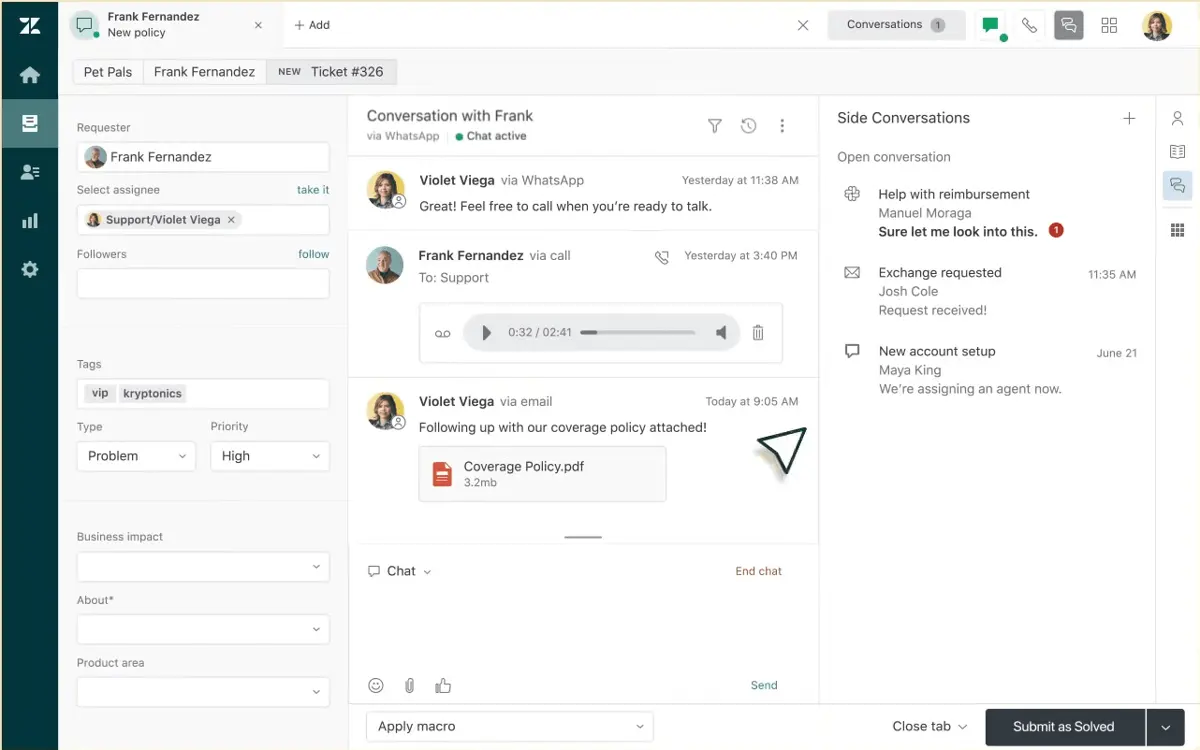
Zendesk is a customer service and engagement platform that helps businesses streamline support operations. Its key features include ticketing systems, self-service tools, and messaging and live chat assistance. In addition, it utilizes AI-powered tools that simplify workflows, manage inquiries, and manage workspaces, making it easier for businesses to handle customer interactions. With these advanced tools, Zendesk puts seamless customer experiences at the heart of its services. In this Zendesk review, we’ll explore more of its features and discuss how they help businesses scale their support operations.
What’s new in Zendesk?
In the Zendesk updates for November and December 2024, several new features have been introduced to improve functionality and user experience. This includes the following:
- Role Conditions: Zendesk has added conditions based on roles, like agents, and administrators, and personalized roles, when implementing contextual workspaces, allowing for a more detailed and tailored workspace setup.
- Refreshed Admin Pages: With enhanced UI, admin accounts can gain clearer explanations of pages and access to links and relevant resources.
- Better Exploration: The Explore dashboard has been revamped to offer more personalization on dashboard layouts.
- Agent Copilot: This suite is the newly improved version of Zendesk's existing AI-driven tools. It suggests intelligent steps and insightful commands to boost efficiency.
- Multiple Conversations: This update enables admins to have multiple conversations simultaneously, ensuring that customers receive timely responses across all channels.
As detailed in this Zendesk review, these improvements are designed to further streamline workflows and enhance the customer service experience.
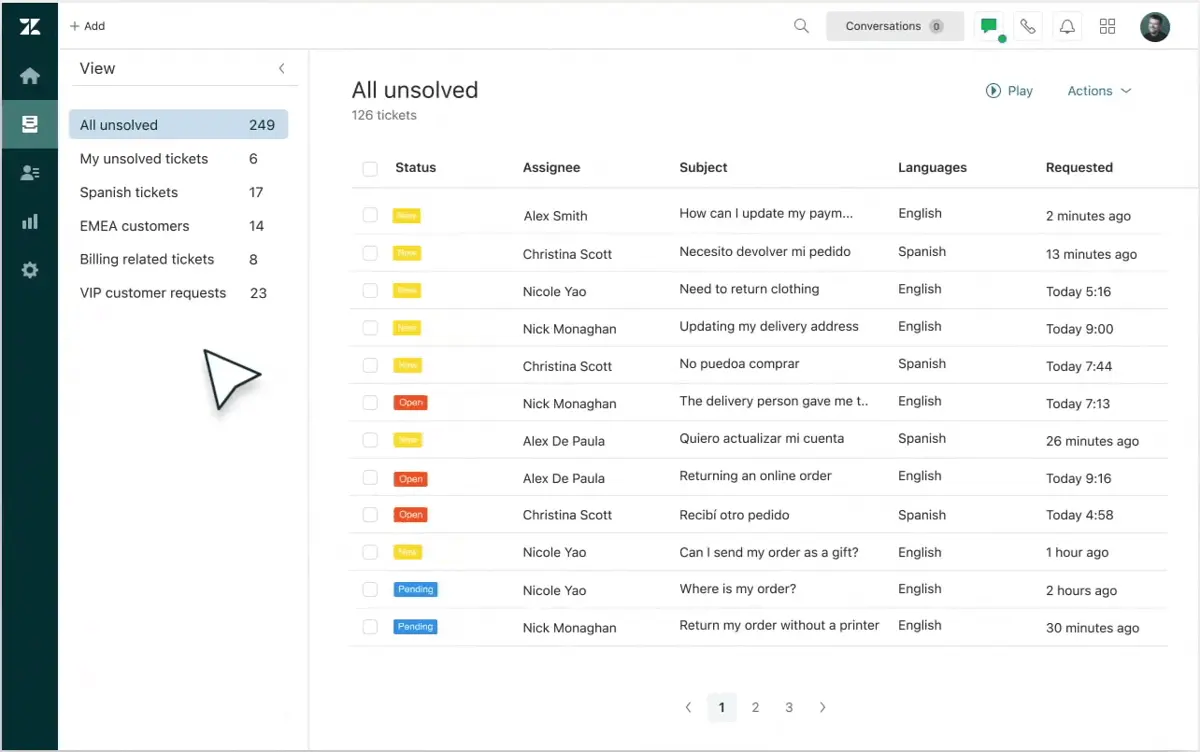
What sets Zendesk apart?
Zendesk mainly stands out for its intuitive design, advanced automation, and omnichannel support, all of which simplify customer service management for businesses of all sizes. Its combination of built-in AI tools and customizable workflows also aids teams in delivering quick and accurate customer assistance.
Can Zendesk Integrate Effectively with VOIP Systems?
Zendesk offers robust integrations that enable seamless connectivity between its customer service platform and voice communication solutions. This capability facilitates centralized management of phone-based interactions alongside email, chat, and social media support. When combined with a specialized VOiP provider, businesses can automate call logs, trigger support tickets from incoming calls, and benefit from enhanced reporting on call-related metrics. These integrations help optimize agent performance and ensure that customers receive swift, cohesive support across all channels.
How to Choose the Right Customer Service Platform
Choosing the right customer service platform is critical to ensuring seamless and efficient customer interactions. While Zendesk remains one of the most popular options, understanding your business-specific needs can guide your decision. Begin by evaluating the complexity of your support operations, such as the volume of tickets and the number of communication channels your team manages. Companies with multi-channel requirements may prioritize solutions like Zendesk or other robust options, while businesses with simpler processes might benefit from lighter tools.
Additionally, compare platforms based on integration capabilities, as seamless connectivity with your current CRM or marketing platforms can streamline workflows. Scalability is another important factor to consider—your chosen platform should grow with your business, especially if you're scaling operations. Lastly, seek out tools that offer actionable insights through analytics, enabling you to make data-driven decisions to improve customer engagement.
For a comprehensive analysis of the top solutions in the market, check out this curated list of the best customer support software tools. This guide provides detailed insights, helping businesses identify software tailored to their needs. Balancing functionality, cost, and adaptability will ultimately ensure a smoother customer service experience for both your team and your clients.
Featured Customer Success Software Products
$25/user/month
30 days
Case Management, AI Insights, Omni-Channel Routing
Editor's Take
Salesforce Service Cloud is a leading customer service solution built to enhance productivity and customer experiences. Equipped with AI-driven tools, it enables agents to deliver personalized service by analyzing data in real-time. Businesses can manage cases, track customer interactions, and provide omnichannel support through a unified platform. With customizable workflows and seamless integrations with other Salesforce products, Service Cloud supports organizations in streamlining operations and reducing resolution times. Its scalability makes it suitable for businesses of all sizes, ensuring efficient service management.
Expert Score
In evaluating SaaS software, a comprehensive and structured methodology ensures a fair and accurate comparison across key metrics. This approach focuses on the most critical aspects that affect user experience, functionality, and business value. The following metrics—general features, cost, customer service, integrations, and mobile support—are evaluated to provide a holistic view of each software solution’s strengths and weaknesses. These metrics are selected based on their direct impact on software usability, scalability, and long-term effectiveness for businesses.
1. General Features - scoring weight 40%
This metric evaluates the core functionalities and tools the software offers. It involves assessing the comprehensiveness of the features, their relevance to the target users, and the ease of use. This is important because robust and well-designed features determine the software’s overall utility and efficiency in solving user problems.
2. Cost - scoring weight 15%
Cost analysis focuses on pricing models, value for money, and scalability. It’s crucial to evaluate whether the software’s features justify its price, considering different plans for small and large organizations. This is vital for businesses to ensure they invest in cost-effective solutions that fit their budget.
3. Customer Service - scoring weight 15%
This evaluates the responsiveness, quality, and availability of customer support, including channels like chat, email, or phone. Good customer service is essential for troubleshooting and ensuring smooth software usage, which reduces downtime and frustration for users.
4. Integrations - scoring weight 15%
This examines how well the software integrates with third-party tools (e.g., CRM, payment systems, collaboration apps). Seamless integrations are key for creating a unified workflow and enhancing productivity by connecting multiple systems, which is crucial for operational efficiency.
5. Mobile Support - scoring weight 15%
Mobile support assesses the software’s functionality and performance on mobile devices, including apps and mobile web versions. With increasing remote work and on-the-go usage, strong mobile support is critical to ensure users can access and utilize the software effectively, regardless of location.
Custom
30 days
Automated review requests, sentiment analysis, analytics
Editor's Take
Birdeye is a comprehensive reputation management and customer experience platform that helps businesses manage online reviews, improve customer engagement, and drive growth. Designed for businesses of all sizes, Birdeye consolidates online reviews from major platforms like Google, Facebook, and Yelp into a single dashboard, allowing businesses to monitor and respond to customer feedback efficiently. This streamlined approach helps companies build a positive online reputation, enhance customer loyalty, and attract new customers.
Key features of Birdeye include automated review requests, sentiment analysis, and detailed analytics, giving businesses insights into customer satisfaction and areas for improvement. The platform also offers tools for managing social media, messaging, and surveys, enabling businesses to engage with customers across multiple channels. Additionally, Birdeye’s messaging functionality provides real-time chat and text messaging, improving communication and providing timely responses to customer inquiries.
Birdeye integrates with over 3,000 business applications, including CRM and POS systems, making it easy to sync customer data and automate feedback collection. For multi-location businesses, Birdeye offers location-based insights, allowing centralized management with the flexibility to tailor strategies for individual locations.
With a range of pricing plans and scalable features, Birdeye is a powerful tool for businesses looking to improve their online presence, foster customer trust, and enhance the overall customer experience.
Expert Score
In evaluating SaaS software, a comprehensive and structured methodology ensures a fair and accurate comparison across key metrics. This approach focuses on the most critical aspects that affect user experience, functionality, and business value. The following metrics—general features, cost, customer service, integrations, and mobile support—are evaluated to provide a holistic view of each software solution’s strengths and weaknesses. These metrics are selected based on their direct impact on software usability, scalability, and long-term effectiveness for businesses.
1. General Features - scoring weight 40%
This metric evaluates the core functionalities and tools the software offers. It involves assessing the comprehensiveness of the features, their relevance to the target users, and the ease of use. This is important because robust and well-designed features determine the software’s overall utility and efficiency in solving user problems.
2. Cost - scoring weight 15%
Cost analysis focuses on pricing models, value for money, and scalability. It’s crucial to evaluate whether the software’s features justify its price, considering different plans for small and large organizations. This is vital for businesses to ensure they invest in cost-effective solutions that fit their budget.
3. Customer Service - scoring weight 15%
This evaluates the responsiveness, quality, and availability of customer support, including channels like chat, email, or phone. Good customer service is essential for troubleshooting and ensuring smooth software usage, which reduces downtime and frustration for users.
4. Integrations - scoring weight 15%
This examines how well the software integrates with third-party tools (e.g., CRM, payment systems, collaboration apps). Seamless integrations are key for creating a unified workflow and enhancing productivity by connecting multiple systems, which is crucial for operational efficiency.
5. Mobile Support - scoring weight 15%
Mobile support assesses the software’s functionality and performance on mobile devices, including apps and mobile web versions. With increasing remote work and on-the-go usage, strong mobile support is critical to ensure users can access and utilize the software effectively, regardless of location.
By quote
No
Omnichannel routing, workforce optimization, AI automation
Editor's Take
NICE inContact CXone is a cloud-based customer experience platform designed to streamline contact center operations. It offers an all-in-one solution for managing customer interactions across multiple channels, including voice, chat, email, social media, and SMS. The platform combines tools for omnichannel routing, workforce optimization, and analytics to enhance both agent performance and customer satisfaction.
CXone includes advanced features like AI-powered chatbots, real-time reporting, and workforce management tools, which help businesses optimize their contact center operations and reduce costs. It also provides powerful integrations with CRM systems, enabling a unified view of customer data. With its scalable infrastructure, CXone supports businesses of all sizes, from small teams to large enterprises, offering flexibility and robust security.
The platform's comprehensive analytics suite delivers actionable insights into key performance metrics, allowing businesses to monitor and improve their service levels. Additionally, CXone includes automation capabilities, such as automatic call distribution (ACD) and interactive voice response (IVR), to streamline workflows and improve efficiency. Overall, NICE inContact CXone is a powerful solution for businesses looking to enhance their customer service and provide a seamless, multichannel customer experience.
Expert Score
In evaluating SaaS software, a comprehensive and structured methodology ensures a fair and accurate comparison across key metrics. This approach focuses on the most critical aspects that affect user experience, functionality, and business value. The following metrics—general features, cost, customer service, integrations, and mobile support—are evaluated to provide a holistic view of each software solution’s strengths and weaknesses. These metrics are selected based on their direct impact on software usability, scalability, and long-term effectiveness for businesses.
1. General Features - scoring weight 40%
This metric evaluates the core functionalities and tools the software offers. It involves assessing the comprehensiveness of the features, their relevance to the target users, and the ease of use. This is important because robust and well-designed features determine the software's overall utility and efficiency in solving user problems.
2. Cost - scoring weight 15%
Cost analysis focuses on pricing models, value for money, and scalability. It's crucial to evaluate whether the software’s features justify its price, considering different plans for small and large organizations. This is vital for businesses to ensure they invest in cost-effective solutions that fit their budget.
3. Customer Service - scoring weight 15%
This evaluates the responsiveness, quality, and availability of customer support, including channels like chat, email, or phone. Good customer service is essential for troubleshooting and ensuring smooth software usage, which reduces downtime and frustration for users.
4. Integrations - scoring weight 15%
This examines how well the software integrates with third-party tools (e.g., CRM, payment systems, collaboration apps). Seamless integrations are key for creating a unified workflow and enhancing productivity by connecting multiple systems, which is crucial for operational efficiency.
5. Mobile Support - scoring weight 15%
Mobile support assesses the software’s functionality and performance on mobile devices, including apps and mobile web versions. With increasing remote work and on-the-go usage, strong mobile support is critical to ensure users can access and utilize the software effectively, regardless of location.

$34 per month paid annually
Free plan available
conditional logic, customizable notifications, analytics
Editor's Take
Jotform is a versatile, user-friendly online form builder designed to help businesses, educators, and individuals create custom forms, surveys, and workflows without coding. Known for its drag-and-drop interface and vast library of templates, Jotform enables users to build everything from simple contact forms to complex data collection tools, streamlining tasks such as customer feedback, event registrations, and payment collection.
Jotform’s flexibility is enhanced by its integration capabilities with popular tools like Google Drive, PayPal, and Salesforce, making data transfer seamless and automating key workflows. With features like conditional logic, customizable notifications, and powerful analytics, Jotform allows users to tailor forms to their specific needs and gain valuable insights from responses. Its mobile-friendly design and robust security options make Jotform an ideal solution for businesses and teams looking to improve data collection and simplify workflows in an accessible, scalable platform.
Expert Score
In evaluating SaaS software, a comprehensive and structured methodology ensures a fair and accurate comparison across key metrics. This approach focuses on the most critical aspects that affect user experience, functionality, and business value. The following metrics—general features, cost, customer service, integrations, and mobile support—are evaluated to provide a holistic view of each software solution’s strengths and weaknesses. These metrics are selected based on their direct impact on software usability, scalability, and long-term effectiveness for businesses.
1. General Features - scoring weight 40%
This metric evaluates the core functionalities and tools the software offers. It involves assessing the comprehensiveness of the features, their relevance to the target users, and the ease of use. This is important because robust and well-designed features determine the software’s overall utility and efficiency in solving user problems.
2. Cost - scoring weight 15%
Cost analysis focuses on pricing models, value for money, and scalability. It’s crucial to evaluate whether the software’s features justify its price, considering different plans for small and large organizations. This is vital for businesses to ensure they invest in cost-effective solutions that fit their budget.
3. Customer Service - scoring weight 15%
This evaluates the responsiveness, quality, and availability of customer support, including channels like chat, email, or phone. Good customer service is essential for troubleshooting and ensuring smooth software usage, which reduces downtime and frustration for users.
4. Integrations - scoring weight 15%
This examines how well the software integrates with third-party tools (e.g., CRM, payment systems, collaboration apps). Seamless integrations are key for creating a unified workflow and enhancing productivity by connecting multiple systems, which is crucial for operational efficiency.
5. Mobile Support - scoring weight 15%
Mobile support assesses the software’s functionality and performance on mobile devices, including apps and mobile web versions. With increasing remote work and on-the-go usage, strong mobile support is critical to ensure users can access and utilize the software effectively, regardless of location.

Custom
14 days
Survey builder, logic & branching, analytics
Editor's Take
SurveySparrow is an advanced online survey and feedback platform designed to help businesses gather, analyze, and act on customer and employee insights. It offers a wide range of tools for creating and distributing surveys, making it easy to collect data across various touchpoints, such as websites, email campaigns, mobile apps, and social media. The platform is known for its user-friendly interface and focus on delivering engaging and conversational survey experiences.
SurveySparrow’s standout feature is its conversational surveys, which provide a more interactive and engaging experience for respondents. Unlike traditional surveys, these conversational surveys use a chat-like interface, improving response rates and providing a more natural way to collect feedback. The platform also supports multi-channel surveys, allowing businesses to reach respondents wherever they are most active.
SurveySparrow includes a powerful survey builder with a wide range of question types, including multiple-choice, rating scales, and open-ended questions. Users can also leverage advanced features like logic and branching to create dynamic, personalized surveys that guide respondents through customized paths based on their answers.
With real-time reporting and analytics, SurveySparrow enables businesses to instantly analyze survey responses, track trends, and gain actionable insights. The platform’s visual dashboards allow users to generate reports and visualize data through charts, graphs, and tables, simplifying the decision-making process.
SurveySparrow also offers advanced integration capabilities, connecting with popular tools such as CRM systems, email marketing platforms, and analytics tools. This helps businesses streamline their workflows and centralize data for more effective analysis.
Expert Score
In evaluating SaaS software, a comprehensive and structured methodology ensures a fair and accurate comparison across key metrics. This approach focuses on the most critical aspects that affect user experience, functionality, and business value. The following metrics—general features, cost, customer service, integrations, and mobile support—are evaluated to provide a holistic view of each software solution’s strengths and weaknesses. These metrics are selected based on their direct impact on software usability, scalability, and long-term effectiveness for businesses.
1. General Features - scoring weight 40%
This metric evaluates the core functionalities and tools the software offers. It involves assessing the comprehensiveness of the features, their relevance to the target users, and the ease of use. This is important because robust and well-designed features determine the software’s overall utility and efficiency in solving user problems.
2. Cost - scoring weight 15%
Cost analysis focuses on pricing models, value for money, and scalability. It’s crucial to evaluate whether the software’s features justify its price, considering different plans for small and large organizations. This is vital for businesses to ensure they invest in cost-effective solutions that fit their budget.
3. Customer Service - scoring weight 15%
This evaluates the responsiveness, quality, and availability of customer support, including channels like chat, email, or phone. Good customer service is essential for troubleshooting and ensuring smooth software usage, which reduces downtime and frustration for users.
4. Integrations - scoring weight 15%
This examines how well the software integrates with third-party tools (e.g., CRM, payment systems, collaboration apps). Seamless integrations are key for creating a unified workflow and enhancing productivity by connecting multiple systems, which is crucial for operational efficiency.
5. Mobile Support - scoring weight 15%
Mobile support assesses the software’s functionality and performance on mobile devices, including apps and mobile web versions. With increasing remote work and on-the-go usage, strong mobile support is critical to ensure users can access and utilize the software effectively, regardless of location.
How much does Zendesk cost?
Zendesk: Top Customer Success Software
5 / 5
The Zendesk pricing is tiered yet flexible, allowing users to select the right features and support levels based on their requirements. In addition to these plans, users can purchase add-ons billed annually per agent per month. Lastly, all plans include free trials, and small businesses have the option to build their own plans starting at $19/month.
Suite Team - $55/agent/month
- Ticketing system
- Email, chat, voice, social messaging, and others
- Help center
- AI agents
- Analytics dashboards
- Apps and integrations
- Macros
- Customizable triggers and automations
- Online support from Zendesk, including digital onboarding and resources
- Eligible for workforce management and QA add-ons
Suite Growth - $89/agent/month
- Everything in Team
- Multiple ticket forms
- Light Agents
- Service level agreements
- Customer satisfaction ratings
- Multilingual content
- Self-service portal for customers
- Editable business hours
Suite Professional - $115/agent/month
- Everything in Growth
- Personalized and live analytics tools
- Side conversations panel
- Skills-based agent routing
- Community forums
- Data location options
- HIPAA-enabled
- Access to Sunshine Conversations (built-in messaging platform)
- Eligible for Advanced AI-add on
Suite Enterprise - By quotation
- Everything in Professional
- Sandbox
- AI-powered Content Cues
- Content blocks
- Custom agent roles
- Contextual workspaces
- Eligible for Advanced AI and Advanced Data Privacy and Protection add-ons
Zendesk Pros
- Easy-to-Use Features: Zendesk's intuitive interface simplifies customer support processes, which makes it accessible even for users with limited technical expertise. Many Zendesk reviews also praise it for its straightforward design, which helps teams navigate tools on any device easily.
- Efficient Tools: Zendesk streamlines repetitive tasks with its workflow management tools, saving time and boosting team productivity. Moreover, its AI-driven suggestions and ticket prioritization enable more accurate issue resolution.
- Seamless Communication: Zendesk integrates multiple communication channels, which allow teams to manage customer interactions from email, social media, live chat software, and more in one unified platform. This ensures a consistent and efficient customer experience across all touchpoints.
Zendesk Cons
- Relatively Steep Learning Curves: With its wide range of customization options, some Zendesk review comments cite that it can be challenging to grasp all the features right away. This can lead to delayed implementation and underuse of its full capabilities.
- High Costs: While Zendesk provides budget-friendly pricing options for smaller businesses, the cost of add-ons or upgrades can be expensive. As businesses expand and require additional features, they often need to move to a higher pricing tier, which may deter some users due to the increased expense.
- Mixed Satisfaction Levels: Users generally express mixed reactions when it comes to the vendor's customer service. While many users cited that their concerns were well-managed and addressed promptly, others encountered difficulty accessing support systems, especially in more complicated issues.
In this Zendesk review, the platform’s standout features—its intuitive design, powerful automation, and seamless omnichannel support—clearly set it apart from competitors. These tools make Zendesk a top choice for businesses looking to enhance efficiency and deliver exceptional customer experiences.
Zendesk Core Features
Zendesk: Top Customer Success Software
5 / 5
This section of our Zendesk review breaks down its core features, which form the backbone of its powerful platform, helping businesses streamline customer interactions, boost team efficiency, and enhance overall support quality.
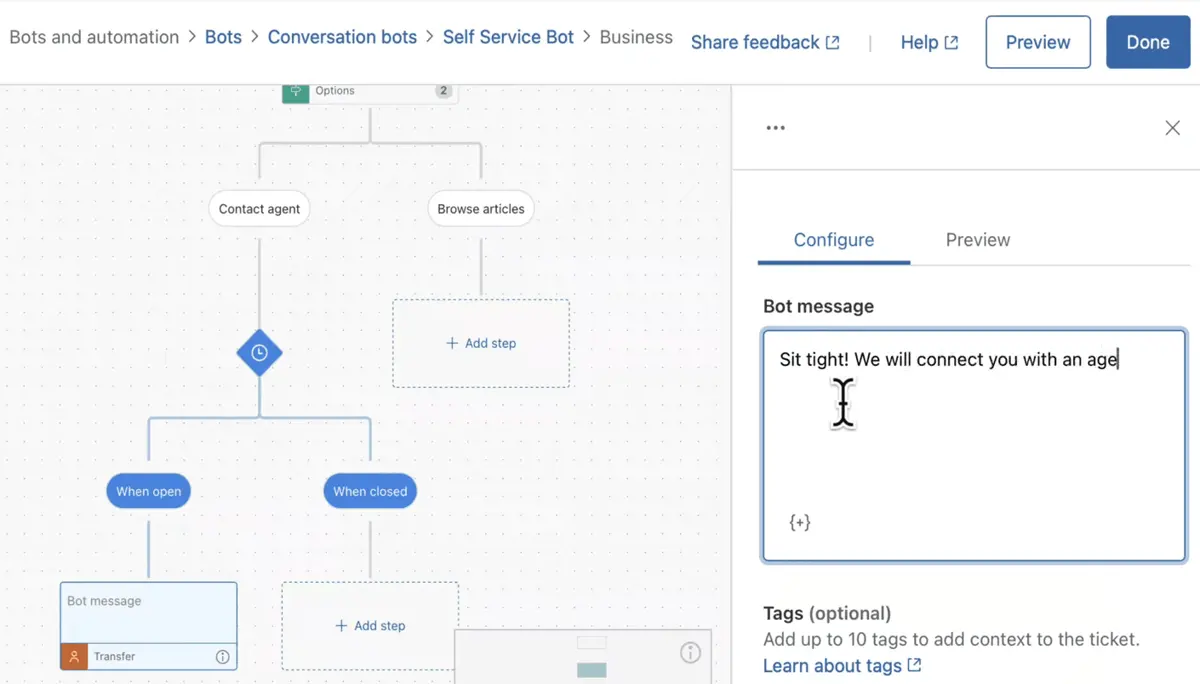
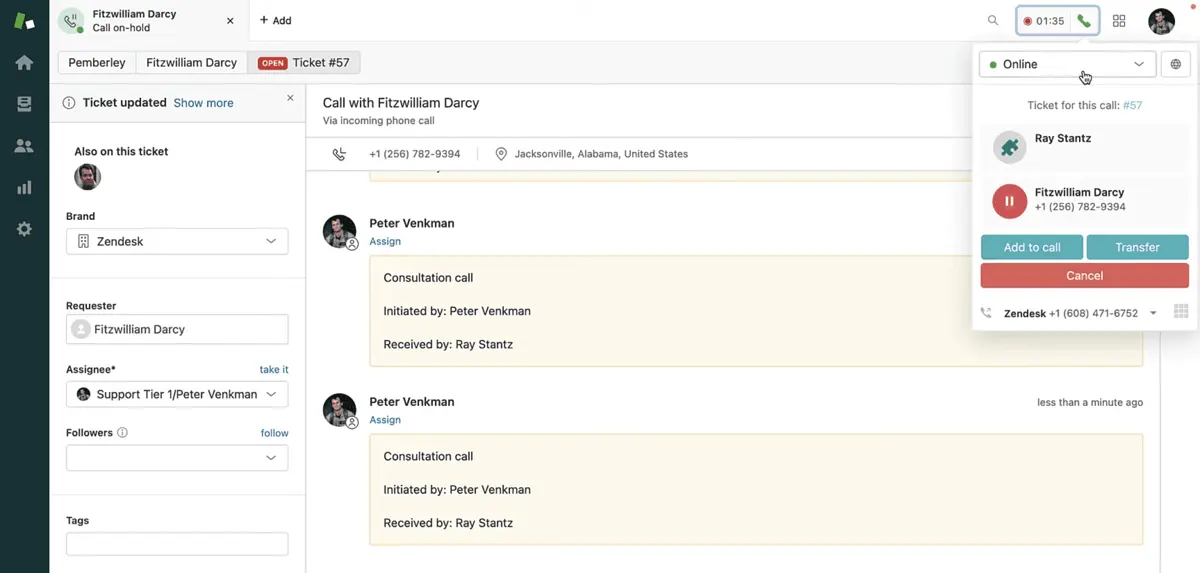
- Flawless Communication: Zendesk consolidates tickets and messages from various platforms, including texts, calls, emails, and social media, into a centralized hub. This setup allows agents to address multiple inquiries in seconds. Requests are organized and tagged based on response status, reducing delays and preventing duplicate interactions. Moreover, Zendesk offers 24/7 messaging channels powered by bots to manage straightforward tasks. Its proactive messaging capabilities also enable outbound notifications and group messages, ensuring smooth and consistent communication.
- Intelligent Tools: Automation plays a big part in Zendesk's cohesive systems. Users can create automated workflows to manage inquiries efficiently. Through macros and Zendesk integrations, agents can quickly deliver solutions, even when the information comes from third-party sources. The AI copilot also enhances interactions by suggesting replies and actions that support agents in real time. Lastly, Zendesk AI adds a personalized touch to customer responses, both through chats and voice calls.
- Organized Workspaces: One of the top Zendesk features, Agent Workspaces eliminates time-consuming tab switching when interacting with customers and teams. The workspace consolidates essential information, such as assignees, order details, customer profiles, and interaction histories, into a single, organized view. Agents can seamlessly choose the messaging platform to send responses directly from within the workspace. Side conversations also allow for effortless collaboration with others, all within the same interface, without making the workspace feel cluttered.
- Engaged Teams: Zendesk's Workforce Management (WFM) predicts inbound volumes, helping you determine the number of agents needed to handle expected inquiries. While third-party scheduling software may come in handy, Zendesk's WFM automatically assigns schedules, saving time otherwise spent on manual planning. Agent activities are also monitored through detailed breakdowns, which ensures accurate billing. Lastly, the platform provides customizable views with live insights that teams and managers can easily share to stay aligned.
Benefits of Using Zendesk
Zendesk offers a wide range of benefits that empower businesses to deliver exceptional customer experiences while improving team efficiency. In this section of our Zendesk review, we'll explore some of these top benefits.
Secure Channels
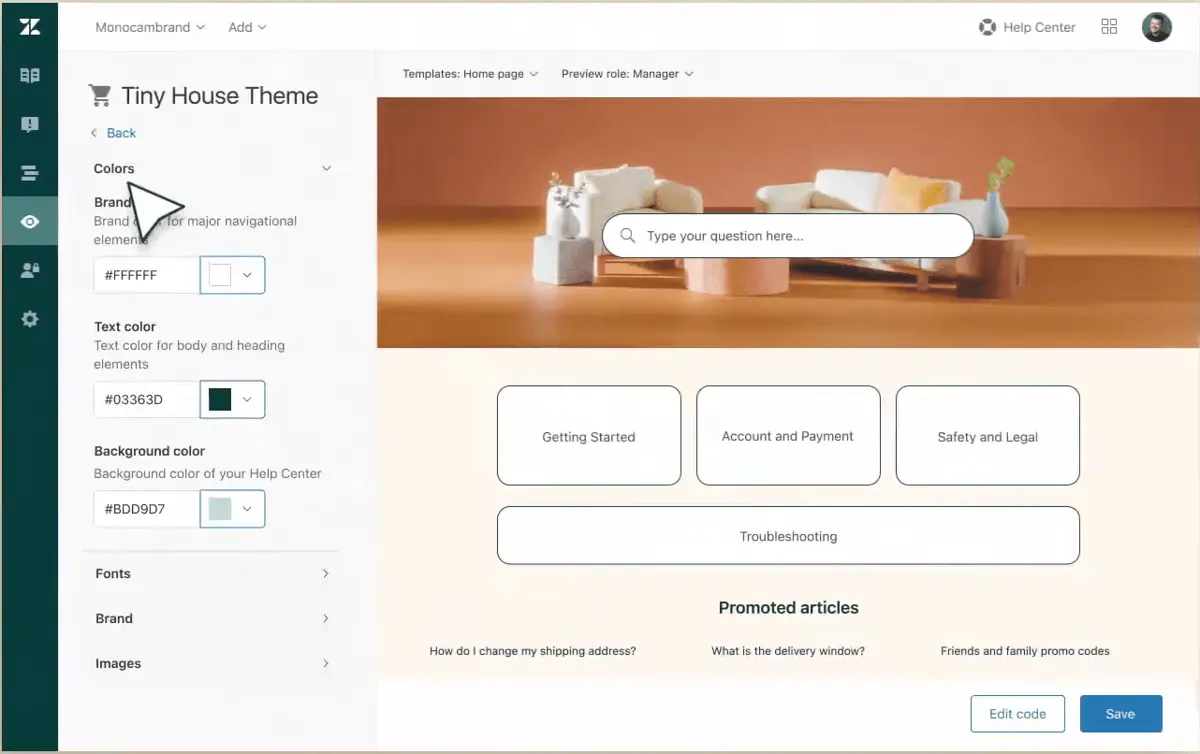
Data security is crucial in customer interactions, and Zendesk prioritizes this with robust security features. It uses redaction tools and customer-controlled encryption keys to ensure that sensitive information is only accessible to authorized agents. Additionally, role-based access limits data visibility, ensuring users only see what’s necessary for their tasks. Custom retention policies also allow you to eliminate unnecessary data. Finally, Zendesk enables you to track and secure data interactions, providing insights into who accessed data, when, and from where.
Helpful Resources
Zendesk has its own extensive knowledge management system that supports agents, employees, and customers. Its generative and semantic search tools enable quick results, while content from your own articles, external blogs, and other resources ensures comprehensive answers. Customers using the self-service portal can also access community discussions, guiding them to the information they need. Overall, this extensive resource hub makes it easier to find relevant information quickly.
Insightful Analytics
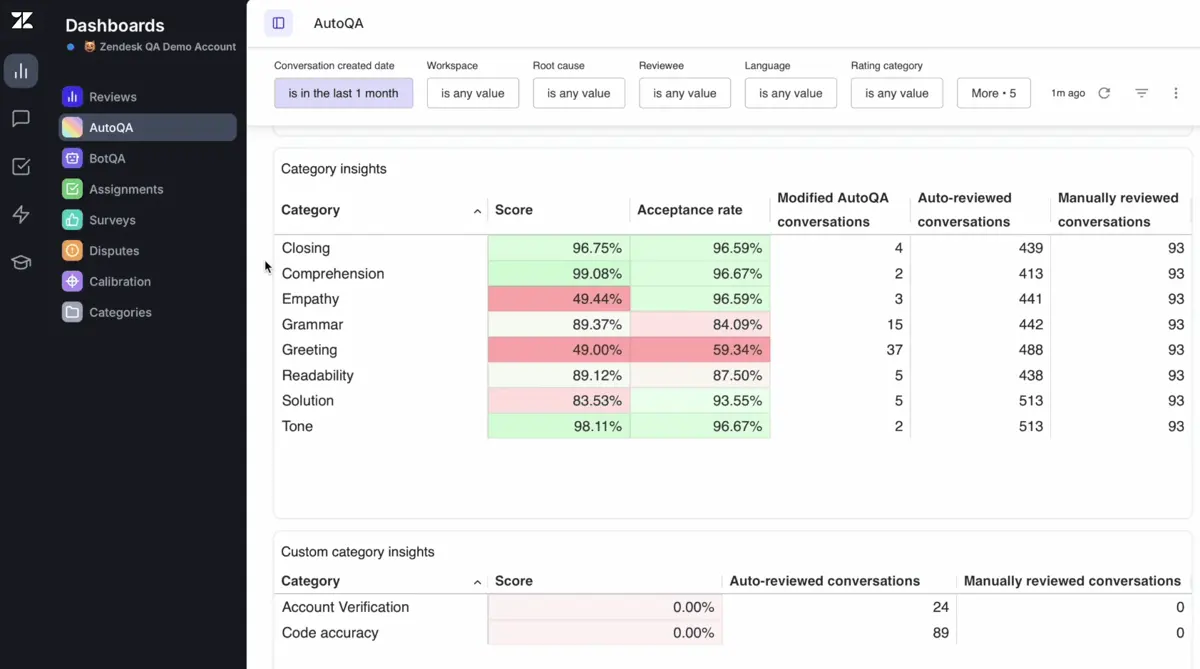
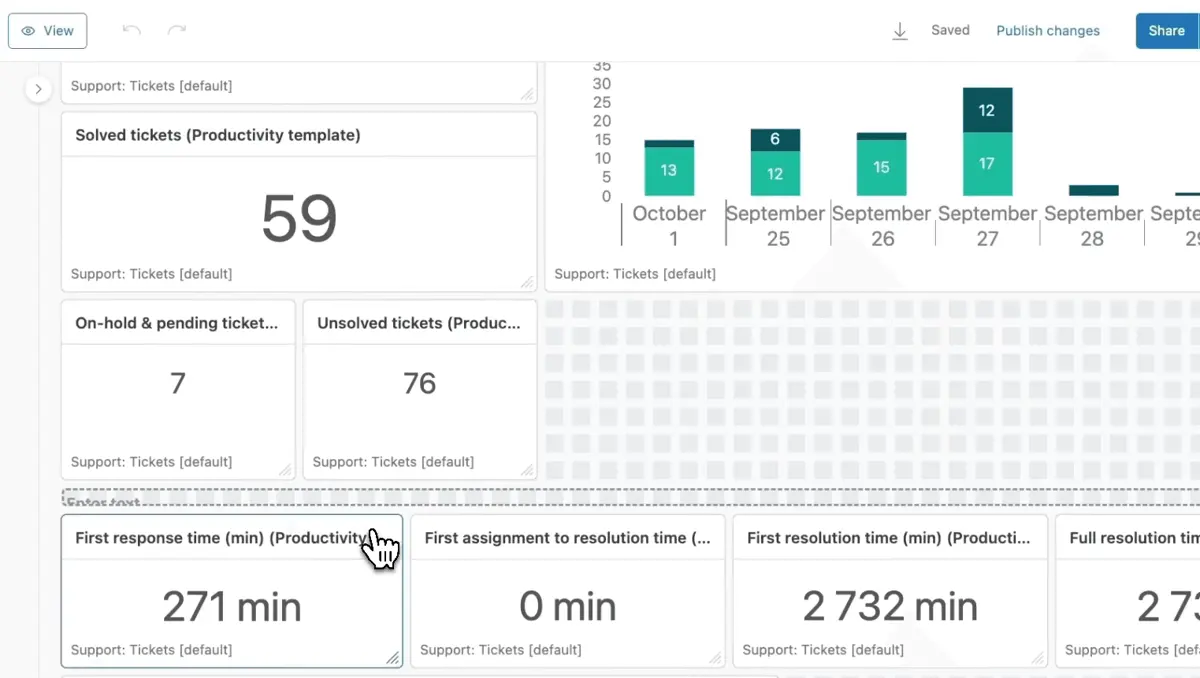
Zendesk evaluates a range of interactions, including response times, popular communication channels, knowledge base gaps, and unresolved tickets. Its powerful analytics tools transform data into easy-to-understand visuals and statistics for your team. You can also create customizable reports to refine your insights. All these insights help you adjust strategies and mitigate foreseeable bottlenecks.
Enhanced QA
Customer service improves with high-quality support, and Zendesk plays a key role in achieving this through its quality assurance services. For example, users can filter tickets by keywords to identify interactions that require human intervention. Zendesk also offers coaching tools for managers, such as quizzes and coaching sessions, to enhance team performance. With AI analyzing these interactions, teams can focus more on providing solutions.
What business types use Zendesk?
In our Zendesk review, we aim to help you choose the right product for your needs by first understanding its target audience. Zendesk caters to companies of all sizes, with solutions designed for startups, small businesses, medium-sized companies, and large enterprises.
Its features are versatile and serve various industries, including the following:
- Retail
- Financial services
- Education
- Government
- Transportation
- Manufacturing
- Software
- Healthcare
- Telecommunications
- Media
With such wide-ranging applications, Zendesk is a valuable platform that can simplify and enhance daily operations across different sectors.
Best 5 alternatives to Zendesk
SurveySparrow
4.6 / 5
SurveySparrow is presented as a survey software solution that promises to streamline the process of gathering and analyzing feedback in an interactive, user-friendly manner. Though the source material does not supply a detailed overview, it suggests that the platform has been designed to meet the needs of organizations looking for a modern approach to survey management. Its framework implies a commitment to enhancing user engagement and delivering flexible survey experiences that can adapt to various industry demands. For prospective customers exploring survey software, SurveySparrow appears to offer a compelling option worth further consideration.
Jotform
4.8 / 5
Jotform stands out as a versatile online form builder software that caters to both individuals and organizations seeking efficient solutions for creating customized forms without needing coding skills. Its intuitive drag-and-drop interface, combined with a vast library of pre-designed templates, enables users to quickly produce professional-quality forms for various applications such as surveys, registrations, and payments. The platform’s strong integration capabilities with popular third-party tools streamline data management and automate workflows, while features like conditional logic personalize the user experience by adapting forms based on input. Additionally, Jotform prioritizes security with SSL encryption and offers collaborative tools and notification systems, making it a comprehensive choice that is accessible even to small users through its free plan.
Birdeye
4.9 / 5
Birdeye is presented as a solution in the online reputation management software space, positioned to serve businesses that prioritize maintaining a strong digital image. Although the source overview provided is incomplete, the product’s categorization hints at capabilities designed to support the management of online brand presence. The brief description suggests that Birdeye is intended to help companies navigate the challenges of digital reputation, offering a potential asset for those seeking to refine their online interactions. For prospective customers evaluating reputation management platforms, Birdeye emerges as a candidate warranting further investigation to determine its fit with their strategic objectives.
NICE inContact CXone
4.5 / 5
NICE inContact CXone stands out as a versatile cloud-based contact center platform that integrates multiple functionalities into one cohesive system. It streamlines customer interactions across various channels—such as voice, chat, email, and social media—ensuring that customers are connected with the most suitable agents quickly and efficiently. The platform supports flexible operations by enabling rapid agent deployment from any location, which is especially beneficial for remote or distributed teams. Additionally, CXone’s embedded AI and analytics tools help enhance customer experience while optimizing workforce performance and reducing costs associated with traditional contact center infrastructure.
Salesforce Service Cloud
4.6 / 5
Salesforce Service Cloud positions itself as a dynamic help desk solution designed to enhance how companies manage customer support, offering an ecosystem that streamlines interactions and resolution processes. Its architecture emphasizes an integrated framework aimed at improving response efficiency while accommodating the varied needs of modern service teams. The platform is built to be scalable and adaptable, making it a compelling option for businesses seeking a comprehensive tool that consolidates support functions into one cohesive system. Prospective customers interested in help desk software will find that its design promises to simplify service management, helping to transform customer challenges into opportunities for lasting engagement.
Frequently Asked Questions (FAQs)
In 2026, Zendesk offers key benefits such as robust customer support ticketing, seamless multichannel communication, AI-driven automation, and in-depth analytics. It's designed to enhance customer satisfaction and improve team efficiency, making it an invaluable tool for businesses of all sizes.
Yes, Zendesk is highly reputable in the customer service and support industry. It has earned the trust of businesses worldwide for its robust features, user-friendly interface, and reliable performance. With a commitment to innovation, strong security protocols, and positive user reviews, Zendesk continues to stand out as a dependable and widely recognized platform for customer engagement and support.
Zendesk remains a valuable tool in 2026 for businesses seeking robust customer support solutions. With a range of features including ticketing, analytics, and automation, Zendesk offers strong support capabilities that can improve efficiency and customer satisfaction, making it worth considering for many organizations.


