
Yaware Review 2027: Pricing, Features, Pros & Cons, Ratings & More

Co-Founder and Chief Data Scientist

Yaware: Top Time Tracking Software
4 / 5
Yaware Review
What is Yaware?
Yaware is a powerful time-tracking and productivity software that helps businesses optimize performance. It automatically tracks time, software usage, and Internet activity to improve efficiency and resource management.
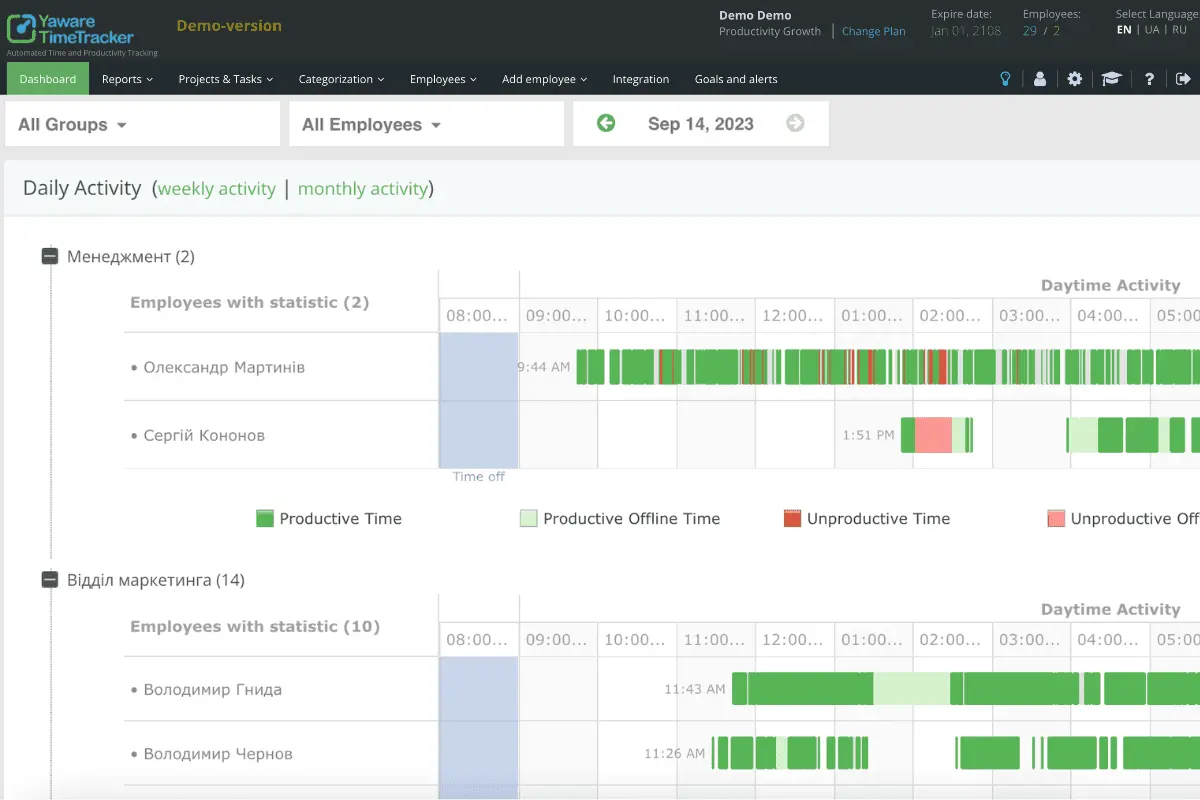
Yaware’s intuitive apps provide real-time insights with easy-to-use dashboards that are accessible anytime and anywhere. It controls overtime, manages flexitime, and offers screenshot captures for detailed analysis. Yaware integrations with CRM systems also allow managers to monitor projects and evaluate time spent on tasks.
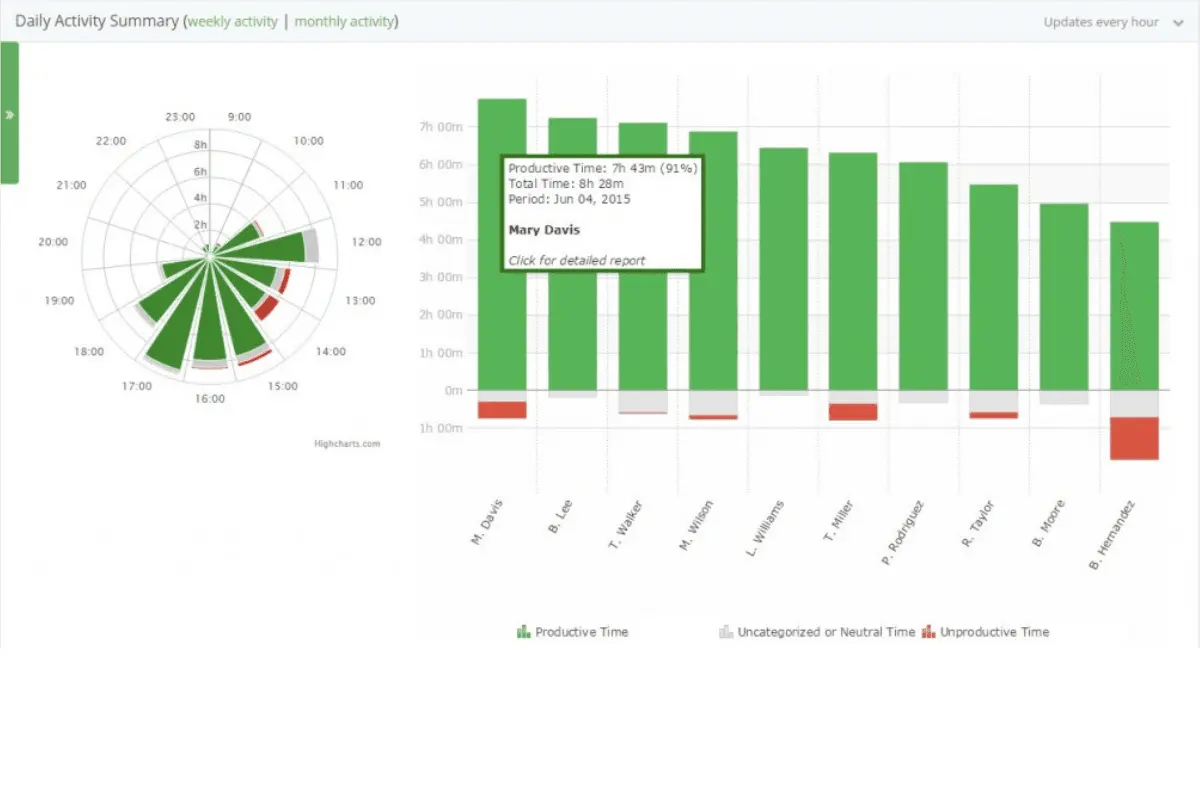
Yaware offers actionable insights through detailed reports and empowers managers to identify the most productive employees and those needing additional support. Overall, Yaware saves time, streamlines processes, and enhances team performance for a productive and balanced work environment.
How much does Yaware cost?
Yaware: Top Time Tracking Software
4 / 5
Yaware pricing is flexible and tailored to the number of users, with each license representing one employee. Businesses can choose between monthly and annual Yaware pricing plans. However, those opting for a yearly subscription can get a discount of up to 20%. While doing this Yaware review, we also learned that it offers a 14-day free trial for teams to explore the full functionality before committing. Local taxes may apply based on regional laws.
Automated Timesheets - $3.2
- Productivity reports
- Violation control
- Time tracking
- Automated timesheet
Conscious Leader - $8
- Focus mode
- Automated timesheet
- Screen screenshots
- Activity report
- AI Mentor
- Webcam snapshots
- Offline activity
Productivity Growth - $10
- Task tracking
- Productivity Analysis
- Project control
- Jira integration
- Project budget management
Enterprise Local Version - From 50+ annual licenses
- Full feature access
- Custom security standards
- Data stored on your serve
- Free updates with license
- Long-term purchase discounts
Yaware Pros
- Highly Customizable. Yaware offers a high level of flexibility so businesses can tailor it to their specific needs. This includes adjusting tracking intervals, setting up specific reports, and customizing which tasks or projects to track for improved monitoring.
- Detailed Reporting and Analytics. Yaware provides businesses with detailed reports and comprehensive analytics that make it easy to assess team productivity. It offers insights into time spent on tasks, applications, and projects.
- Ease of Use. While researching for this Yaware review, we saw that despite its feature-rich functionality, Yaware TimeTracker is intuitive and user-friendly. The interface is straightforward so it is easy for both employees and managers to navigate, set up, and generate useful data without extensive training.
- Improves Accountability. Yaware provides a combination of automatic time tracking, screenshot monitoring, and activity tracking to help promote a culture of accountability within teams.
- Enhanced Productivity Management. Yaware's performance analysis tools allow managers to track productivity levels and identify inefficiencies. With access to detailed time reports and performance data, businesses can make adjustments to workflows and task distribution to optimize productivity.
Yaware Cons
- Occasional Syncing Issues. There are occasional syncing problems where time entries or task data may not be updated in real time. This can lead to discrepancies in reporting and requires manual intervention to ensure accurate data capture.
- Resource-Heavy on Some Systems. The Yaware client can be resource-intensive, particularly on systems with lower processing power. This software can cause performance lags or slow down the system, particularly during periods of heavy tracking.
- Limited API Functionality. Our analysis for this Yaware review also shares that the platform’s API capabilities are somewhat limited, especially in terms of integrating with other third-party systems. This can be a drawback for businesses that rely on complex workflows and require deep integration with other tools.
Yaware Core Features
Yaware: Top Time Tracking Software
4 / 5
Yaware features are comprehensive and designed to enhance workplace productivity and accountability. From time and productivity tracking to detailed reporting and integration with third-party tools, this Yaware review highlights how the platform provides a well-rounded solution for businesses looking to monitor and improve employee performance.
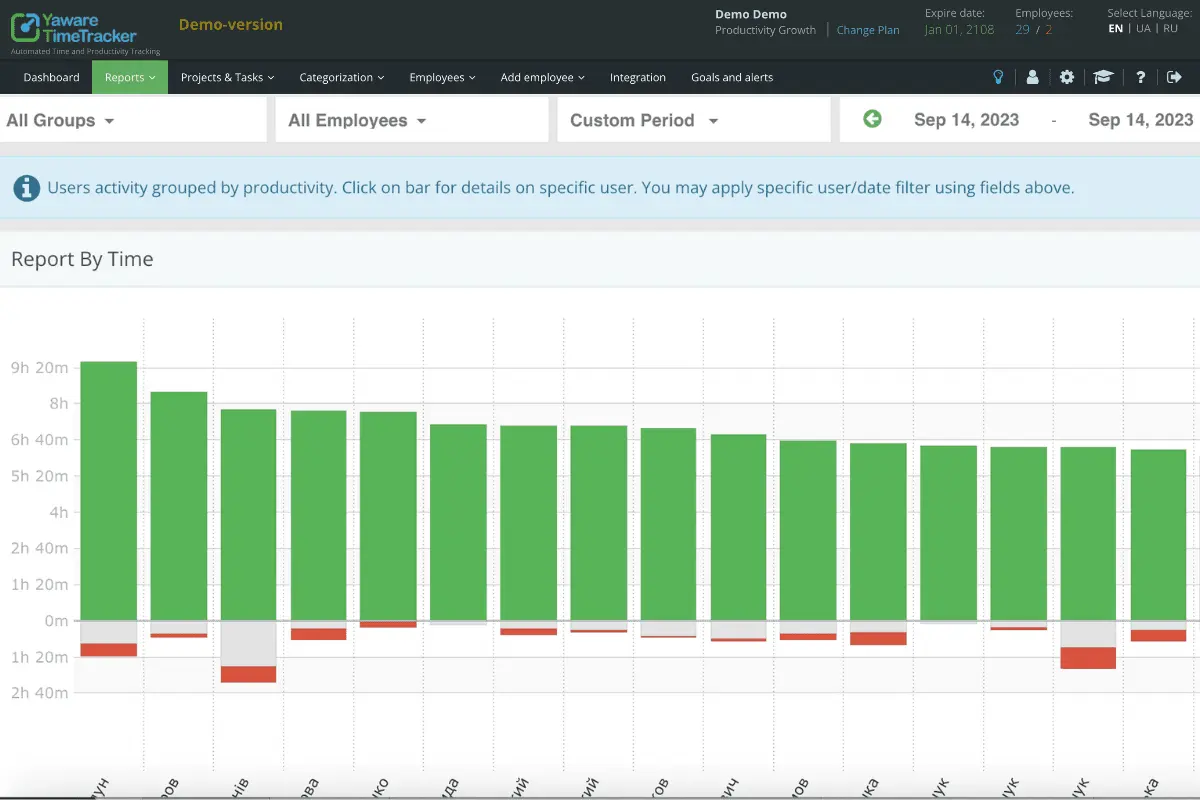
- Time and Productivity Tracking. Yaware automatically logs how much time employees spend on tasks and projects. It shows which activities are productive or not to help teams improve work habits. Managers can use the reports to spot underperformance and make smarter decisions about task assignments.
- Internet and Software Use Monitoring. Yaware monitors and logs all Internet and software activities during work hours. Managers can review detailed reports that categorize employee usage into productive or non-productive activities to pinpoint time-wasting behaviors.
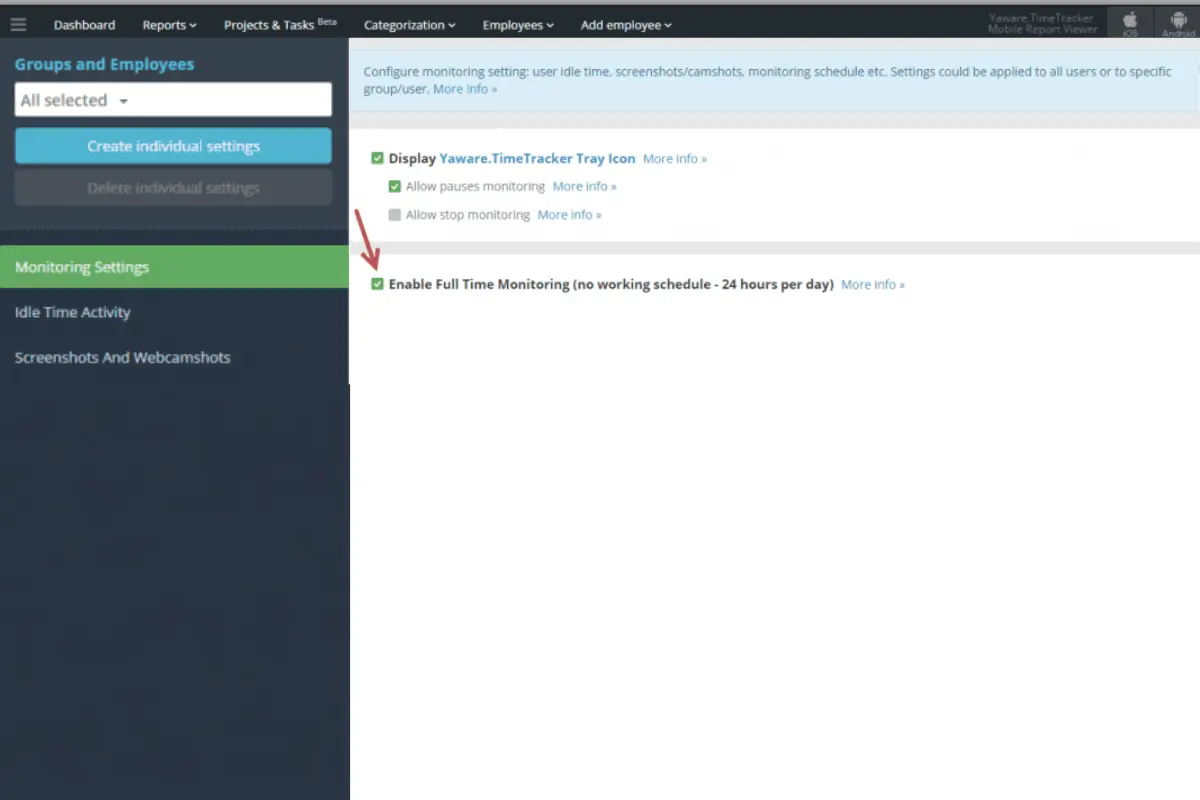
- Offline Employee Activity. Yaware tracks employee activity even when offline so no data is lost. Once reconnected to the Internet, offline work is automatically synchronized to maintain a complete record.
- Screen and Webcam Captures. Yaware periodically captures screenshots of employees' desktop screens for visual confirmation of their work activity. Webcam integration adds an extra layer of accountability, transparency, and fewer distractions.
- Violation Control (Employee Discipline). Yaware lets businesses set rules to detect violations like excessive idle time or unauthorized website use. When a violation occurs, the system flags it so managers can address issues proactively.
- Instant Email and Mobile Alerts. Yaware sends real-time alerts via email and mobile notifications when activities like inactivity or policy violations occur. Managers can customize alerts to focus on specific activities so they stay informed and can address issues quickly.
- Employee Grouping by Departments and Manager Assignment. Yaware allows managers to group employees by department so it is easier to track performance within specific teams. Each department can be assigned a manager to help delegate tasks efficiently.
- Different Access Levels for Managers and Executives. Yaware provides customizable access levels to ensure sensitive data is protected. As noted in this Yaware review, managers can access detailed task reports, while executives can view high-level summaries.
- Hidden and Overt Monitoring. Yaware offers hidden and overt monitoring options so businesses can choose the most appropriate method. Hidden monitoring runs in the background without notifying employees, while overt monitoring is visible to encourage accountability.
- Project and Task Management. Yaware links time tracking directly to tasks and projects for detailed reports on time spent. This helps managers assess project progress, allocate resources efficiently, and ensure deadlines are met.
- Automated Time Tracking Sheet. Yaware automatically generates time tracking sheets without requiring manual input. This feature streamlines payroll and billing processes by providing accurate, up-to-date reports of hours worked.
- Connector for Google Data Studio. Yaware integrates with Google Data Studio so businesses can visualize time-tracking data through customizable dashboards. This integration provides actionable insights that aid managers in understanding performance trends and making data-driven decisions.
- Integration with CRM Systems. Yaware integrates seamlessly with CRM systems to track time spent on customer-related activities. This integration enhances workflow efficiency by allowing employees to log time directly within the CRM.
- Productivity Analysis. Yaware offers in-depth reports on employee performance, including time spent on tasks, project completion rates, and software usage. Managers can identify underperforming areas and optimize team output.
Benefits of Using Yaware
Yaware helps businesses improve efficiency, reduce wasted time, and gain insights into employee productivity. Our Yaware review highlights how the software tracks work patterns to streamline workflows and boost team performance. Here are more Yaware benefits users can expect:
Boosts Employee Productivity Through Time Tracking
Yaware automatically records employees' working hours to eliminate the need for manual input. This ensures accuracy in tracking time spent on tasks, like when an employee works on a project, providing managers with valuable data on task efficiency. By having clear time logs, managers can identify any productivity gaps and allocate resources more effectively to maintain high performance.
Improves Project Management and Resource Allocation
Yaware allows managers to track time spent on individual tasks and projects for detailed insights into team progress. For instance, if a project falls behind schedule, data from the software can help managers reallocate resources, such as shifting staff to high-priority tasks. This ability to adjust workflows dynamically ensures that deadlines are met and resources are used optimally.
Reduces Wasted Time with Application Monitoring
With Yaware’s ability to monitor employee use of applications and websites, managers can identify potential distractions. Say an employee frequently accesses social media sites during work hours, the software can flag this behavior and managers can address inefficiencies. By reducing non-work-related activities, Yaware helps ensure employees stay focused on their tasks, leading to better productivity.
Encourages Self-Accountability and Motivation
In our analysis for this Yaware review, we found that the platform’s self-tracking capabilities let employees monitor their time and activities. This way, they can stay accountable for their productivity. By visually tracking how much time is spent on various tasks, employees are motivated to stay focused and hit deadlines without constant oversight. This sense of control and self-awareness leads to improved time management and goal completion.
Justify Costs to Clients with Transparent Time Reports
Yaware generates detailed time reports that break down how time is spent on specific projects and tasks. An agency can use these reports to show a client exactly how many hours were dedicated to various campaign activities for transparency. This helps justify project costs and enhances client trust by clearly demonstrating the value provided for their investment.
Streamlines Time and Attendance Management
Yaware simplifies time and attendance tracking by automatically logging overtime and flexitime work by employees. If an employee works additional hours, the system ensures that these are logged accurately for reduced payroll discrepancies. This automation saves time for HR teams and ensures employees are paid correctly for all their work.
Enhances Team Collaboration and Communication
By providing insights into how time is spent across different teams, our Yaware review analysis proves the platform helps foster better collaboration. If one team is lagging on a shared project, managers can use the software’s data to reassign tasks or provide support. This helps create a more synchronized effort and ensures that the project progresses smoothly across all teams involved.
Increases Accountability in Remote Teams
For remote teams, Yaware’s automatic time tracking and screenshot monitoring assure that employees are staying productive. This is particularly beneficial for businesses that work with freelancers or remote workers, as it ensures their efforts align with set expectations. The software fosters trust and accountability, even when employees are working away from the office.
Enhances Employee Engagement with Activity Monitoring
Yaware tracks employee activity levels to gauge overall engagement and performance across teams. If an employee’s activity drops, managers can use this data to intervene by offering new challenges or support. This helps maintain high motivation levels and ensures that employees stay engaged, which directly impacts productivity and job satisfaction.
Maintain Compliance with Company Policies
Yaware helps ensure employees follow company policies, such as adhering to scheduled work hours and avoiding unauthorized activities. In our Yaware review research, we discovered that the software can flag patterns like missed deadlines or frequent non-work-related breaks so it is easier for managers to enforce compliance. This capability helps maintain a productive work environment and ensures that employees stay focused on their responsibilities.
What business types use Yaware?
Yaware is ideal for medium to large businesses across various industries that require detailed employee monitoring and time management. Its features are particularly beneficial for businesses in sectors such as IT, marketing agencies, customer service, and consulting, where tracking time spent on tasks and projects is crucial for client billing, productivity analysis, and resource allocation. Yaware is ideal for businesses with remote teams or flexible work schedules. Its tracking capabilities ensure accountability and performance measurement even outside traditional office settings.
However, similar to other Yaware reviews, we also discovered that the platform may not be the best fit for small businesses or industries that don’t require extensive time-tracking capabilities. Startups or companies with a small, highly collaborative workforce may find Yaware's detailed tracking too intrusive or unnecessary. Similarly, industries with low labor intensity may not find value in the software’s comprehensive time and productivity features. This includes sectors where employee output isn't directly tied to time spent on tasks, such as creative arts or certain non-profit sectors. These industries may prefer a more flexible approach to performance measurement that doesn’t rely heavily on detailed time tracking.
Best 5 alternatives to Yaware

Paylocity
4.5 / 5
Paylocity presents itself as a solution tailored toward addressing the essential operations of human resources management for modern businesses. The platform is positioned to streamline key administrative functions while supporting the broad spectrum of workforce-related tasks that organizations face. Its design is intended to enhance efficiency and simplify everyday HR processes, making it a candidate worth considering for companies in search of comprehensive core HR software. Although the detailed elements of its offering remain unspecified in the source, the overall framework suggests a focus on operational effectiveness and adaptability in the evolving HR landscape.

ClickUp
4.55 / 5
ClickUp is introduced as a project management solution crafted to simplify team coordination and streamline workflow processes. The available overview hints at a platform that brings together various elements of project management into an integrated interface, potentially supporting task organization and team collaboration. Although the details remain minimal, the initial impression is that ClickUp may offer a flexible framework adaptable to different project needs, aligning well with customers looking for an all-in-one project management tool. This brief insight lays the groundwork for a deeper exploration of how ClickUp might serve as a strategic resource for modern teams.

ConnectWise PSA
4.1 / 5
ConnectWise PSA is presented as a professional services automation solution engineered to streamline service delivery for organizations of varying sizes. This software offers a unified platform designed to support essential business operations, aiming to reduce administrative burdens while promoting operational efficiency. With its dynamic and adaptable design, ConnectWise PSA aspires to simplify complex workflows and optimize service management. For prospective users exploring professional services automation tools, this solution presents a noteworthy option that emphasizes ease of use and integrated process management.

Wrike
4.15 / 5
Wrike emerges in the realm of project collaboration software as a solution designed with teams in mind, promising an environment that supports streamlined coordination and efficient project management. Although the available source details remain sparse, Wrike's brief positioning hints at an underlying framework aimed at optimizing collaborative workflows for varying project scales. Its general profile suggests that it caters to teams seeking a central hub for managing project tasks and enhancing communication. For prospective customers exploring project collaboration options, Wrike presents itself as a candidate worthy of further investigation to clarify its full range of capabilities.

monday
5 / 5
Monday.com is a highly adaptable platform designed to streamline work and project management for teams of various sizes. Its user-friendly, visually organized interface, enhanced by color-coded elements, allows users to navigate effortlessly without needing technical skills. With over 200 ready-made templates and a straightforward drag-and-drop system, teams can quickly set up workflows and begin managing tasks efficiently. Additionally, its powerful dashboard builder and no-code automation tools help users visualize data clearly and eliminate repetitive processes, boosting overall productivity.
Frequently Asked Questions (FAQs)
Yes, Yaware offers customizable settings to align with various business workflows, roles, and productivity goals. You can adjust monitoring levels, reporting formats, and tracking parameters to suit different operational requirements.
Yaware 2026 offers a user-friendly interface that allows managers to tailor settings for various departments or teams easily. It provides customizable dashboards and analytics, allowing each team to focus on relevant productivity metrics without technical complexity.
In 2026, Yaware offers features such as automated time tracking, productivity analysis, and customizable reporting. Its user-friendly dashboard allows seamless integration with various platforms, providing insights into team performance and enabling businesses to enhance efficiency and operational transparency.
Yaware uses encrypted data storage and strict access controls to protect employee information. Only authorized personnel can access activity data, and businesses can configure transparency settings based on local privacy laws and internal policies.


