Salonist Review 2027: Pricing, Features, Pros & Cons, Ratings & More

Co-Founder and Chief Data Scientist

Salonist: Top Appointment Scheduling Software
4.35 / 5
Featured Appointment Scheduling Software Alternatives for Salonist

$9 to $150/user/month
Yes, up to 2 users
E-signature software, call transcription, conversation routing
Editor's Take
HubSpot CRM is a powerful customer relationship management platform designed to help businesses manage their sales, marketing, and customer service efforts in one centralized place. Its user-friendly interface allows teams to track leads, monitor customer interactions, and automate sales pipelines. With built-in tools for email marketing, contact management, and analytics, HubSpot CRM provides deep insights into customer behavior and sales performance. The platform also supports seamless collaboration between marketing and sales teams through real-time updates and integrations with tools like Gmail, Outlook, and Slack. Additionally, its automation features help reduce manual tasks, enabling teams to focus on building relationships and closing deals. HubSpot CRM is scalable, making it ideal for businesses of all sizes, from startups to large enterprises.
Expert Score
In evaluating SaaS software, a comprehensive and structured methodology ensures a fair and accurate comparison across key metrics. This approach focuses on the most critical aspects that affect user experience, functionality, and business value. The following metrics—general features, cost, customer service, integrations, and mobile support—are evaluated to provide a holistic view of each software solution’s strengths and weaknesses. These metrics are selected based on their direct impact on software usability, scalability, and long-term effectiveness for businesses.
1. General Features - scoring weight 40%
This metric evaluates the core functionalities and tools the software offers. It involves assessing the comprehensiveness of the features, their relevance to the target users, and the ease of use. This is important because robust and well-designed features determine the software's overall utility and efficiency in solving user problems.
2. Cost - scoring weight 15%
Cost analysis focuses on pricing models, value for money, and scalability. It's crucial to evaluate whether the software’s features justify its price, considering different plans for small and large organizations. This is vital for businesses to ensure they invest in cost-effective solutions that fit their budget.
3. Customer Service - scoring weight 15%
This evaluates the responsiveness, quality, and availability of customer support, including channels like chat, email, or phone. Good customer service is essential for troubleshooting and ensuring smooth software usage, which reduces downtime and frustration for users.
4. Integrations - scoring weight 15%
This examines how well the software integrates with third-party tools (e.g., CRM, payment systems, collaboration apps). Seamless integrations are key for creating a unified workflow and enhancing productivity by connecting multiple systems, which is crucial for operational efficiency.
5. Mobile Support - scoring weight 15%
Mobile support assesses the software’s functionality and performance on mobile devices, including apps and mobile web versions. With increasing remote work and on-the-go usage, strong mobile support is critical to ensure users can access and utilize the software effectively, regardless of location.

$9 per seat per month
Zoom, Google Docs, Salesforce, Slack and more
Document collaboration and comments
Editor's Take
monday.com is a Work Operating System (Work OS) that enables teams to plan, organize, and manage tasks efficiently. Known for its customizable interface, it allows users to tailor workflows to suit specific needs, whether for task management or complex projects. The software’s automation features help reduce manual work by automating repetitive tasks based on set triggers. monday.com also fosters team collaboration through real-time updates, file sharing, and discussion threads, making it easier for teams to stay aligned and productive. Additionally, it integrates with popular tools like Slack, Google Drive, and Zoom to streamline operations across platforms.
Expert Score
In evaluating SaaS software, a comprehensive and structured methodology ensures a fair and accurate comparison across key metrics. This approach focuses on the most critical aspects that affect user experience, functionality, and business value. The following metrics—general features, cost, customer service, integrations, and mobile support—are evaluated to provide a holistic view of each software solution’s strengths and weaknesses. These metrics are selected based on their direct impact on software usability, scalability, and long-term effectiveness for businesses.
1. General Features - scoring weight 40%
This metric evaluates the core functionalities and tools the software offers. It involves assessing the comprehensiveness of the features, their relevance to the target users, and the ease of use. This is important because robust and well-designed features determine the software's overall utility and efficiency in solving user problems.
2. Cost - scoring weight 15%
Cost analysis focuses on pricing models, value for money, and scalability. It's crucial to evaluate whether the software’s features justify its price, considering different plans for small and large organizations. This is vital for businesses to ensure they invest in cost-effective solutions that fit their budget.
3. Customer Service - scoring weight 15%
This evaluates the responsiveness, quality, and availability of customer support, including channels like chat, email, or phone. Good customer service is essential for troubleshooting and ensuring smooth software usage, which reduces downtime and frustration for users.
4. Integrations - scoring weight 15%
This examines how well the software integrates with third-party tools (e.g., CRM, payment systems, collaboration apps). Seamless integrations are key for creating a unified workflow and enhancing productivity by connecting multiple systems, which is crucial for operational efficiency.
5. Mobile Support - scoring weight 15%
Mobile support assesses the software’s functionality and performance on mobile devices, including apps and mobile web versions. With increasing remote work and on-the-go usage, strong mobile support is critical to ensure users can access and utilize the software effectively, regardless of location.
Salonist Review
What is Salonist?
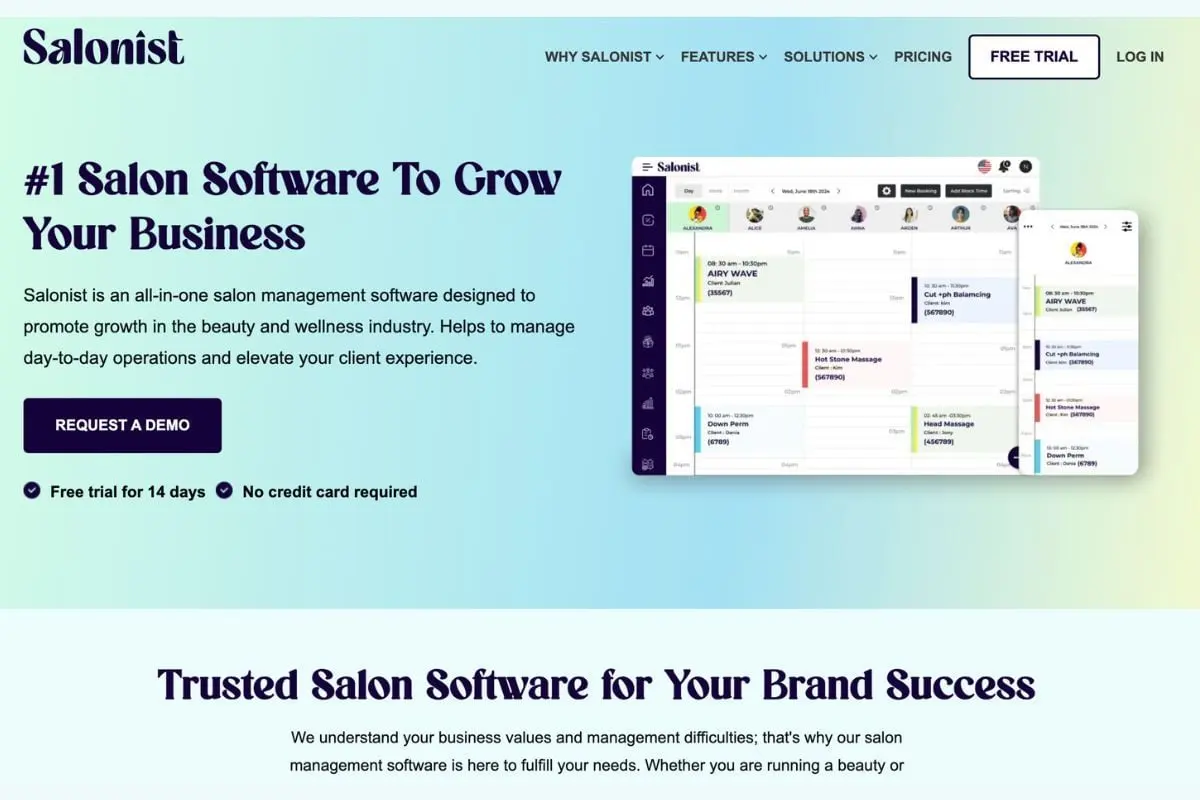
Salonist is a booking and scheduling software designed for beauty and wellness professionals to manage their operations efficiently. It caters to a wide range of businesses, including salons, spas, and wellness centers, offering tools to streamline daily tasks and improve client experiences. According to the company, Salonist is used by more than 15,000 businesses across over 60 countries.
The platform provides features for booking appointments, processing payments, and maintaining detailed customer records. With its automation capabilities, Salonist also supports marketing efforts, loyalty program management, and inventory tracking for beauty products. Feature availability varies by subscription plan, with more advanced marketing, integrations, and multi-location management tools reserved for higher tiers.
Salonist integrates with social media platforms like Facebook and Instagram, allowing businesses to connect appointment booking links to their social media profiles. It also supports website booking widgets and mobile booking applications.
Salonist offers AI-related features, including an AI Smart Advisor, AI marketing automation, and an AI receptionist. These tools serve different purposes and are not all included in the standard subscription plans.
What’s new in Salonist?
Salonist announced several product additions in 2026, including AI-assisted customer communication, business reporting tools, payment features, and review management integrations.
- AI Receptionist. Salonist announced an AI receptionist designed to answer customer calls and handle appointment bookings outside normal business hours. The company's pricing page identifies AI receptionist services as optional add-ons, with pricing based on usage.
- Google Reviews Integration. Salonist announced an integration that allows businesses to display Google customer reviews on their Salonist marketplace listings. Business owners can also access Google reviews within their Salonist accounts.
- Digital Wallet. Salonist announced Digital Wallet functionality for managing prepaid customer balances. Customers can add funds to their accounts and use their available balances for future services or purchases. Separately, optional digital wallet cards are available for Apple Wallet and Google Wallet.
- Saloni AI Smart Advisor. Salonist introduced Saloni AI, a feature designed to answer questions about business information such as appointments, customer activity, revenue, and staff performance. The current pricing matrix lists AI Smart Advisor functionality under the Expert plan.
- QuickBooks Integration. Salonist also announced a QuickBooks integration in September 2026 to connect sales information with accounting workflows. Its current pricing matrix places QuickBooks integration in the Expert tier.
These announcements expand Salonist's available capabilities, although the company has not published independently verified performance results establishing how much these additions improve revenue, appointment attendance, or administrative efficiency.
Featured Appointment Scheduling Software Products
$9 to $150/user/month
Yes, up to 2 users
E-signature software, call transcription, conversation routing
Editor's Take
HubSpot CRM is a powerful customer relationship management platform designed to help businesses manage their sales, marketing, and customer service efforts in one centralized place. Its user-friendly interface allows teams to track leads, monitor customer interactions, and automate sales pipelines. With built-in tools for email marketing, contact management, and analytics, HubSpot CRM provides deep insights into customer behavior and sales performance. The platform also supports seamless collaboration between marketing and sales teams through real-time updates and integrations with tools like Gmail, Outlook, and Slack. Additionally, its automation features help reduce manual tasks, enabling teams to focus on building relationships and closing deals. HubSpot CRM is scalable, making it ideal for businesses of all sizes, from startups to large enterprises.
Expert Score
In evaluating SaaS software, a comprehensive and structured methodology ensures a fair and accurate comparison across key metrics. This approach focuses on the most critical aspects that affect user experience, functionality, and business value. The following metrics—general features, cost, customer service, integrations, and mobile support—are evaluated to provide a holistic view of each software solution’s strengths and weaknesses. These metrics are selected based on their direct impact on software usability, scalability, and long-term effectiveness for businesses.
1. General Features - scoring weight 40%
This metric evaluates the core functionalities and tools the software offers. It involves assessing the comprehensiveness of the features, their relevance to the target users, and the ease of use. This is important because robust and well-designed features determine the software's overall utility and efficiency in solving user problems.
2. Cost - scoring weight 15%
Cost analysis focuses on pricing models, value for money, and scalability. It's crucial to evaluate whether the software’s features justify its price, considering different plans for small and large organizations. This is vital for businesses to ensure they invest in cost-effective solutions that fit their budget.
3. Customer Service - scoring weight 15%
This evaluates the responsiveness, quality, and availability of customer support, including channels like chat, email, or phone. Good customer service is essential for troubleshooting and ensuring smooth software usage, which reduces downtime and frustration for users.
4. Integrations - scoring weight 15%
This examines how well the software integrates with third-party tools (e.g., CRM, payment systems, collaboration apps). Seamless integrations are key for creating a unified workflow and enhancing productivity by connecting multiple systems, which is crucial for operational efficiency.
5. Mobile Support - scoring weight 15%
Mobile support assesses the software’s functionality and performance on mobile devices, including apps and mobile web versions. With increasing remote work and on-the-go usage, strong mobile support is critical to ensure users can access and utilize the software effectively, regardless of location.
$9 per seat per month
Zoom, Google Docs, Salesforce, Slack and more
Document collaboration and comments
Editor's Take
monday.com is a Work Operating System (Work OS) that enables teams to plan, organize, and manage tasks efficiently. Known for its customizable interface, it allows users to tailor workflows to suit specific needs, whether for task management or complex projects. The software’s automation features help reduce manual work by automating repetitive tasks based on set triggers. monday.com also fosters team collaboration through real-time updates, file sharing, and discussion threads, making it easier for teams to stay aligned and productive. Additionally, it integrates with popular tools like Slack, Google Drive, and Zoom to streamline operations across platforms.
Expert Score
In evaluating SaaS software, a comprehensive and structured methodology ensures a fair and accurate comparison across key metrics. This approach focuses on the most critical aspects that affect user experience, functionality, and business value. The following metrics—general features, cost, customer service, integrations, and mobile support—are evaluated to provide a holistic view of each software solution’s strengths and weaknesses. These metrics are selected based on their direct impact on software usability, scalability, and long-term effectiveness for businesses.
1. General Features - scoring weight 40%
This metric evaluates the core functionalities and tools the software offers. It involves assessing the comprehensiveness of the features, their relevance to the target users, and the ease of use. This is important because robust and well-designed features determine the software's overall utility and efficiency in solving user problems.
2. Cost - scoring weight 15%
Cost analysis focuses on pricing models, value for money, and scalability. It's crucial to evaluate whether the software’s features justify its price, considering different plans for small and large organizations. This is vital for businesses to ensure they invest in cost-effective solutions that fit their budget.
3. Customer Service - scoring weight 15%
This evaluates the responsiveness, quality, and availability of customer support, including channels like chat, email, or phone. Good customer service is essential for troubleshooting and ensuring smooth software usage, which reduces downtime and frustration for users.
4. Integrations - scoring weight 15%
This examines how well the software integrates with third-party tools (e.g., CRM, payment systems, collaboration apps). Seamless integrations are key for creating a unified workflow and enhancing productivity by connecting multiple systems, which is crucial for operational efficiency.
5. Mobile Support - scoring weight 15%
Mobile support assesses the software’s functionality and performance on mobile devices, including apps and mobile web versions. With increasing remote work and on-the-go usage, strong mobile support is critical to ensure users can access and utilize the software effectively, regardless of location.
How much does Salonist cost?
Salonist: Top Appointment Scheduling Software
4.35 / 5
Marketplace Listing — Free
Includes:
- Up to 50 appointments per month
- Online booking
- Calendar and scheduling
- Staff shift management
- Salonist marketplace listing
- Staff reports
Essential — $590 annually or $59 monthly
Includes the free plan's features, plus:
- Unlimited appointments
- Point of Sale (POS)
- Customer history management
- Website booking integration
- Automated service reminders
- Sales and appointment reports
- Retail product and package management
- Expense management
- Staff sales commissions and tips management
- Membership and e-wallet management
- Mobile POS
- Unlimited email notifications
- Standard data import
Advance — $1,090 annually or $109 monthly
Includes Essential's features, plus:
- Social media booking integration
- Rewards and loyalty points
- Email and SMS marketing campaigns
- WhatsApp and SMS notifications
- Gift cards and membership subscriptions
- Inventory and warehouse management
- Purchase orders and barcode label printing
- Room calendar
- Staff timesheets
- Stripe, PayPal, Mailchimp, and other supported integrations
- Advanced data import and personalized onboarding
Expert — $1,790 annually or $179 monthly
Includes Advance's features, plus:
- Multi-branch management reporting
- Google Calendar and QuickBooks integrations
- Waitlist management
- Consultation and consent forms
- Before-and-after photos
- Document management
- Cash register
- Dedicated account manager
- Rebooking reminders
- Service usage inventory control
- AI marketing automation and AI Smart Advisor
- Custom integrations and API access
- Multi-location inventory pooling
All plans include unlimited staff accounts. Salonist also advertises no setup fees and no long-term subscription contracts. Businesses operating multiple locations may require a custom quote.
Salonist offers a seven-day free trial without requiring credit card information. After the trial, customers can choose a paid subscription or use the limited free Marketplace Listing plan.
Additional charges can apply. Salonist lists a 15% one-time commission for new customers acquired through its marketplace. Payment-processing fees are charged separately by payment providers. Optional products, including the AI receptionist, digital wallet cards, and certain branded mobile applications, may also incur additional charges.
Businesses should confirm the final price, applicable taxes, add-ons, and payment-processing fees before subscribing.
What sets Salonist apart?
Salonist is a booking and scheduling software designed for beauty and wellness professionals, offering a range of features to streamline operations for salons, spas, and similar businesses.
One distinguishing aspect of Salonist's pricing is that it does not charge subscription fees per staff member. Its free marketplace tier also provides an entry point for businesses with relatively low booking volumes.
However, the subscription price does not necessarily represent the total cost of ownership. Social booking, marketing campaigns, advanced inventory controls, and multi-location reporting require higher subscription tiers.
Salonist Pros
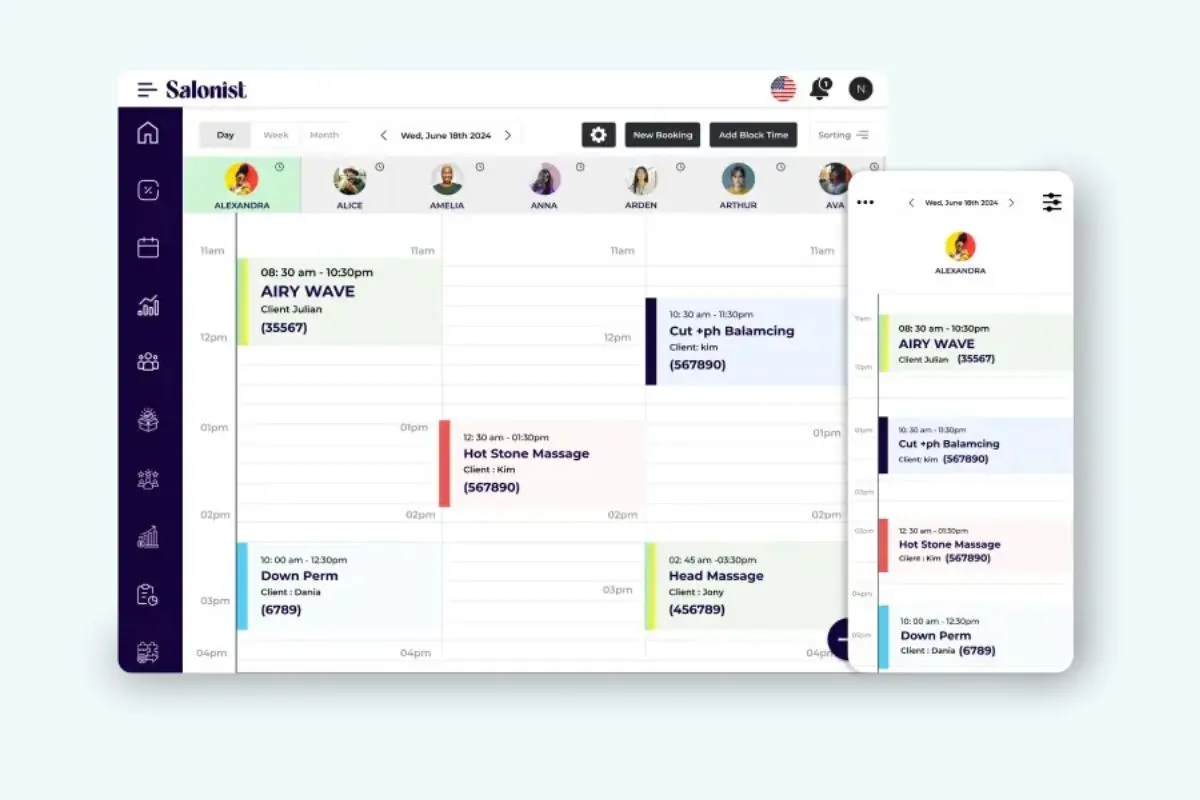
- Comprehensive Booking Management. Salonist simplifies appointment scheduling with features for online booking through social media platforms like Facebook and Instagram, and salon websites. The platform also supports calendar management, automated reminders, and customer booking applications. Social booking integration requires Advance or Expert.
- Centralized Operations. Salonist combines appointment scheduling, customer records, POS, staff management, and business reporting in one platform. This can reduce the need to maintain separate systems for basic administrative tasks.
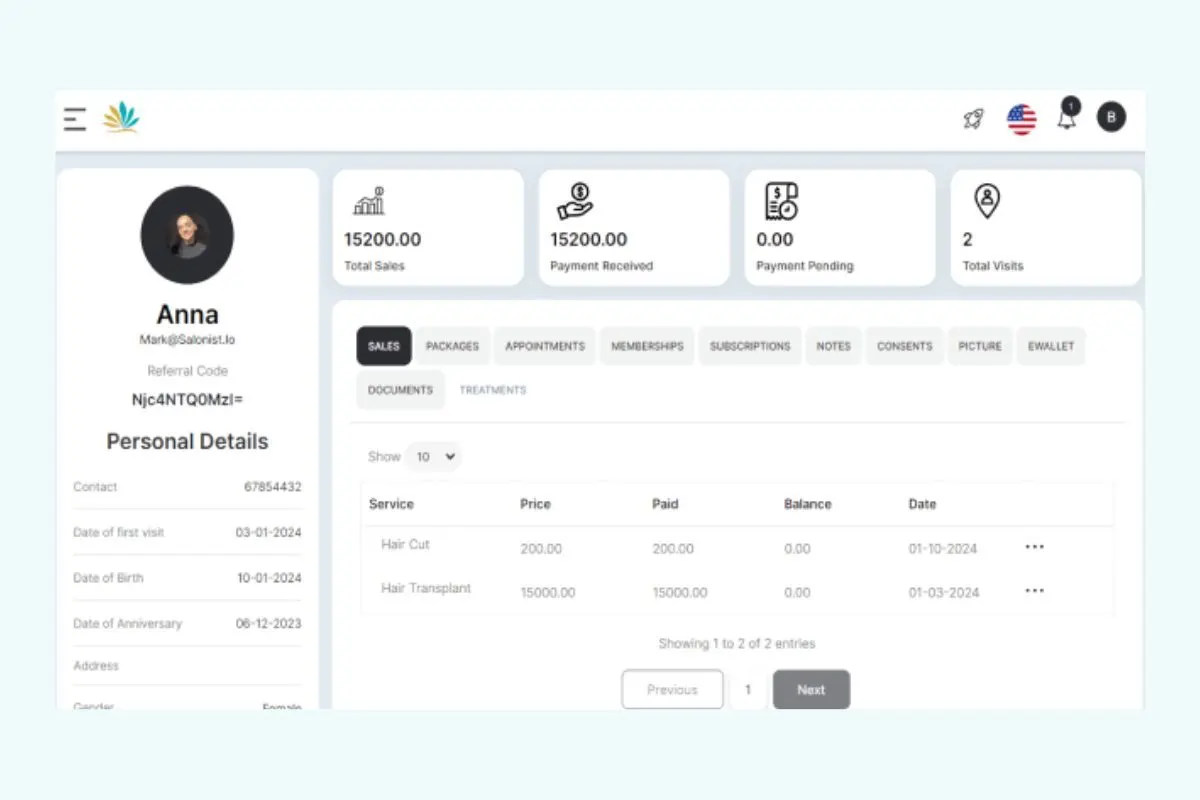
- Customer Relationship Management (CRM). Salonist provides tools for maintaining detailed client records, including service history, preferences, and contact information. Higher subscription tiers provide additional tools such as customer surveys, appointment notes, documents, and consultation forms.
- Marketing Automation. Salonist includes automation tools for email and SMS campaigns, enabling targeted marketing efforts. These campaigns are available from the Advance tier, while AI marketing automation is listed under Expert.
- Inventory Tracking. The platform offers tools to monitor and manage beauty product inventory, including alerts for low stock levels. Advanced inventory management, warehouse controls, purchase orders, and barcode labeling are available in higher subscription tiers.
- Loyalty and Membership Tools. Salonist supports memberships, packages, rewards points, gift cards, and customer e-wallets. These functions give businesses several ways to structure repeat-visit incentives, although individual features have different plan requirements.
- Unlimited Staff Accounts. Salonist includes unlimited staff accounts across its subscription plans, potentially making its subscription structure more predictable for businesses adding employees.
Salonist Cons
- Limited Free Plan. Salonist's free Marketplace Listing plan is capped at 50 appointments per month. Businesses requiring unlimited appointments, POS functionality, or automated service reminders must select a paid subscription.
- Advanced Features Require Higher Plans. Social booking, loyalty rewards, and marketing campaigns begin with Advance, while multi-branch reporting, consultation forms, Google Calendar integration, and several AI capabilities are restricted to Expert.
- Additional Costs for Certain Services. Although Salonist advertises flat-rate subscriptions, optional AI services, payment processing, hardware, and marketplace-acquired customers can introduce additional costs.
- Mixed Customer Support Feedback. Customer experiences with support are not uniformly positive. Some Capterra reviewers praise the platform's functionality and staff assistance, while others report slow responses or difficulty resolving technical problems. Capterra lists Salonist's customer service rating at 4.3 out of 5.
- Mobile App Feedback. The Salonist Partner Android application had a 2.8/5 rating from 105 reviews on Google Play in the information available during this review. This rating concerns the Android business application rather than every component of the Salonist platform, but it is relevant to businesses relying on mobile workflows.
- Cloud-Based Access. Salonist operates primarily through cloud-based services, making reliable internet access important for online booking, account management, and synchronization. Businesses requiring offline operations should confirm which workflows, if any, remain available without connectivity.
Overall, Salonist covers a broad range of salon and spa management functions. Its suitability depends on the subscription tier required, integration needs, and the business's tolerance for additional service costs.
Salonist Core Features
Salonist: Top Appointment Scheduling Software
4.35 / 5
Salonist provides a collection of operational tools for beauty and wellness businesses. Its principal capabilities include the following:
- Appointment Scheduling and Online Booking. Businesses can manage appointments through calendars, schedule staff, and accept online bookings. Website integration is available in Essential, while social media booking integration starts with Advance. Automated service reminders begin with Essential.
- Customer Management. Salonist stores customer records and service information. Depending on the selected plan, businesses can also manage appointment histories, notes, surveys, documents, and before-and-after images.
- Point of Sale and Payments. The platform includes POS functionality from Essential and supports payment integrations such as Stripe and PayPal from Advance. Additional gateways and certain payment terminal integrations are available in Expert. Supported payment methods depend on the selected provider and region.
- Inventory Management. Salonist supports retail product tracking, stock alerts, purchase orders, barcode labels, and warehouse management. The availability of these functions depends on the subscription tier.
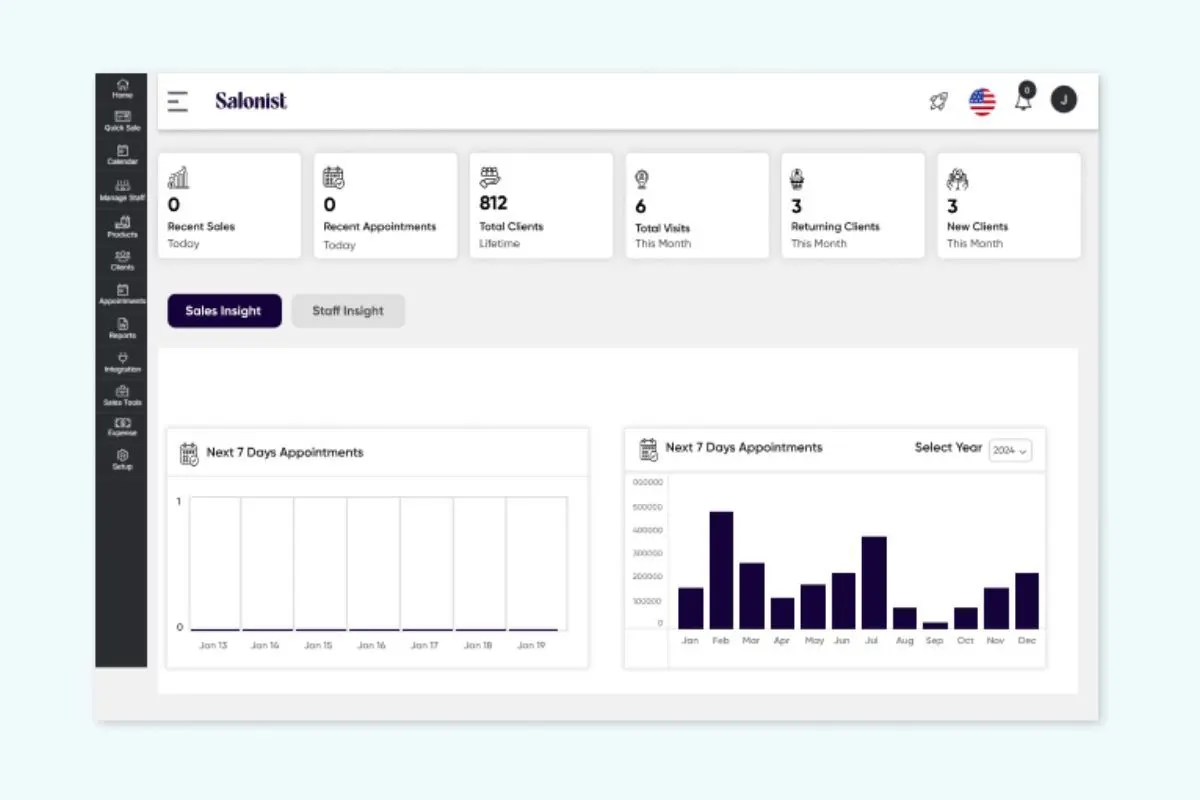
- Reporting and Analytics. Businesses can access reports covering sales, appointments, staff performance, and other operational data. Multi-branch reporting is available on Expert.
- Employee Management. Salonist includes staff scheduling, shift management, commission tracking, and performance reporting. Higher tiers add time tracking and more detailed staff-related controls.
- Marketing and Customer Retention. Marketing functionality includes email and SMS campaigns, coupons, loyalty rewards, gift cards, and membership subscriptions. Standard campaigns require Advance, while AI marketing automation is included in Expert.
- Multi-Location Management. Salonist provides multi-branch reporting and inventory pooling through Expert. Businesses with several locations should confirm pricing and account configuration requirements with the vendor.
- Third-Party Integrations. Salonist advertises more than 40 integrations spanning payment providers, messaging services, accounting systems, websites, and e-commerce platforms. These include Stripe, PayPal, Mailchimp, QuickBooks, Google Calendar, Shopify, and WhatsApp-related services. Integrations have different plan requirements.
- Mobile Access. Salonist offers mobile applications for customer booking and business-related activities. The customer booking application is available on Android and iOS, while the Salonist Partner application provides business-oriented functionality.
- Forms and Customization. Expert includes consultation and consent forms, document management, and branding-related functionality. Businesses requiring specialized clinical records or regulated workflows should assess whether these tools meet their specific requirements.
Benefits of Using Salonist
Salonist is a booking and scheduling platform designed for beauty and wellness professionals. Below are the key benefits associated with its functionalities.
- Reward and Loyalty Program. Salonist provides tools to create and manage loyalty programs, allowing businesses to reward repeat clients with discounts, points, or other incentives. Rewards and loyalty points are available from Advance, while basic membership and package functionality starts with Essential.
- Inventory Management. The platform includes inventory tracking features, enabling businesses to monitor stock levels of beauty products and receive alerts for low inventory. More advanced tools, including purchase orders, warehouse controls, and barcode labels, are available in Advance and Expert.
- Analytics Services. Salonist offers analytics tools to track business performance, providing insights into appointment trends, revenue, and customer preferences. The available reporting tools depend on the subscription plan, with multi-branch analysis reserved for Expert.
- Appointment Management. With Salonist, businesses can streamline appointment scheduling, rescheduling, and cancellations. Automatic reminders are available in paid plans and may help businesses manage missed appointments. However, Salonist does not provide independently verified no-show reduction statistics for these features.
- Marketing Automation. Salonist includes features for automated email and SMS campaigns. Businesses can use these tools to promote services, share updates, or engage with customers. Marketing campaigns are available in Advance and Expert, with additional AI marketing features in Expert.
- Point of Sale. The platform supports integrated payment processing, allowing businesses to handle transactions efficiently. POS features begin with Essential, while payment gateway integrations and accepted payment methods vary by provider, subscription tier, and location.
- Locations and Branch Management. For businesses with multiple locations, Salonist offers centralized management tools. Its Expert plan includes multi-branch reporting and multi-location inventory pooling. Custom pricing may apply to groups operating several locations.
- Forms. Salonist enables businesses to create customizable forms for client intake, consent, or feedback. Consultation and consent forms are listed under Expert. Availability of these forms does not, by itself, establish compliance with medical or data protection regulations.
- Customer Management. The platform maintains detailed client records, including service history and preferences. Additional customer history, survey, and document management functions are available according to plan.
- Online Booking. Salonist allows clients to book appointments online via the business's website or social media platforms. The free plan supports limited online bookings, while unlimited appointments and social booking integration require paid tiers.
- Employee Management. Salonist includes tools to manage employee schedules, track performance, and allocate resources effectively. Its plans also support staff reporting and, at higher tiers, timesheets and additional management permissions.
Together, these features give businesses tools to handle routine administrative processes within one system. The value of these capabilities depends on how closely they match each business's service mix, workflows, and budget.
What business types use Salonist?
Salonist is a booking and scheduling platform tailored for beauty and wellness businesses, offering tools to streamline operations and improve client management.
- Hair Salons. Hair salons can use Salonist to organize appointments, manage staff schedules, track client records, and process retail sales.
- Spas and Wellness Centers. Spas can use appointment calendars, membership programs, customer records, and automated communications to coordinate services and recurring visits.
- Multi-Location Salon Businesses. Salonist supports businesses operating multiple branches through centralized reporting and inventory-related tools. These advanced functions are available in Expert.
- Barbershops. Barbershops can manage appointment slots, staff availability, payment records, and product sales through Salonist's booking and POS tools.
- Beauty and Aesthetic Clinics. Salonist provides consultation forms, client documentation, and appointment management features that may be useful to aesthetic clinics. Businesses handling medical or sensitive personal information must independently verify their regulatory and data protection requirements.
- Nail Salons. Nail salons can use Salonist for online appointments, staff management, customer loyalty programs, and retail inventory tracking.
- Freelancers and Mobile Beauty Professionals. Independent makeup artists, hairstylists, and mobile service providers can use online booking and mobile-accessible tools to manage appointments while working across locations.
- Massage and Therapy Studios. Massage and wellness studios can use automated appointment reminders, customer records, packages, and membership tools to manage recurring services.
Salonist also advertises solutions for businesses such as tattoo studios, bridal salons, and pet grooming providers. Businesses with specialized operating requirements should evaluate the relevant product features during the trial period.
Best 3 alternatives to Salonist

Jotform
4.8 / 5
Jotform stands out as a versatile online form builder software that caters to both individuals and organizations seeking efficient solutions for creating customized forms without needing coding skills. Its intuitive drag-and-drop interface, combined with a vast library of pre-designed templates, enables users to quickly produce professional-quality forms for various applications such as surveys, registrations, and payments. The platform’s strong integration capabilities with popular third-party tools streamline data management and automate workflows, while features like conditional logic personalize the user experience by adapting forms based on input. Additionally, Jotform prioritizes security with SSL encryption and offers collaborative tools and notification systems, making it a comprehensive choice that is accessible even to small users through its free plan.
monday
5 / 5
Monday.com is a highly adaptable platform designed to streamline work and project management for teams of various sizes. Its user-friendly, visually organized interface, enhanced by color-coded elements, allows users to navigate effortlessly without needing technical skills. With over 200 ready-made templates and a straightforward drag-and-drop system, teams can quickly set up workflows and begin managing tasks efficiently. Additionally, its powerful dashboard builder and no-code automation tools help users visualize data clearly and eliminate repetitive processes, boosting overall productivity.
HubSpot CRM
5 / 5
HubSpot CRM is a cloud-based customer relationship management platform designed to help businesses manage and analyze customer interactions throughout the sales and marketing lifecycle. It provides tools for contact and lead management, email tracking, pipeline management, marketing automation, and performance analytics. The system is known for its user-friendly interface and seamless integration with other HubSpot tools, making it particularly popular among small to medium-sized businesses. HubSpot CRM is available in a free version with basic features, while more advanced capabilities—such as sales forecasting, custom reporting, and AI-powered insights—are accessible through paid tiers. The platform emphasizes ease of use, scalability, and centralized data, enabling teams to align their sales, marketing, and customer service efforts more effectively.
Frequently Asked Questions (FAQs)
Salonist includes marketing tools such as email and SMS campaigns, enabling businesses to reach and engage their clientele. Email and SMS campaigns are available from the Advance plan. Expert adds AI marketing automation and additional customer engagement functionality.
Salonist states that it uses HTTPS connections, account authentication controls, cloud backups, and staff access permissions to protect business information. However, these vendor-described measures should not be treated as independent proof of security certification or regulatory compliance. Businesses handling sensitive client records should request current security documentation and evaluate the applicable privacy requirements before adopting the platform.
Yes. Salonist offers customer booking applications for Android and iOS and business-focused mobile functionality. The customer application supports appointment discovery and management, while business users have access to operational tools through the Salonist platform. Mobile functionality and user experiences may differ between applications and devices.
Salonist integrates with popular payment gateways like Stripe, PayPal, and others to support a variety of payment methods. The platform also lists Razorpay and several regional payment providers. Stripe and PayPal integrations are available from Advance, while certain additional gateways and terminal-related options require Expert. Processing charges, payment methods, and regional availability depend on the provider.
Yes, Salonist helps businesses track customer information by creating detailed profiles that include appointment history, preferences, and feedback. Customer history management starts with Essential, while additional functions such as surveys, notes, and documents are available on higher plans.
Yes, Salonist allows businesses to customize their service offerings by adding various service types, durations, and pricing. This flexibility helps businesses tailor their offerings to meet the unique needs of their customers.
According to its pricing page, Salonist charges a 15% one-time commission on the first visit of a new customer acquired through its marketplace. It does not list a marketplace acquisition commission for customers booking through a business's own direct booking links or website widgets. Payment-processing fees are separate.
Yes. Salonist lists AI marketing automation and an AI Smart Advisor under Expert. It also offers AI receptionist and WhatsApp AI agent services as optional add-ons. The company has not published independently verified performance metrics demonstrating the effectiveness of these capabilities.