
Revli Review 2027: Pricing, Features, Pros and Cons, Ratings and More

Revli: Top Sales Software
4 / 5
Featured Sales Software Alternatives for Revli

$69 per month
Demo available
Online ordering, delivery management, inventory tracking
Editor's Take
Toast is an all-in-one point of sale (POS) and restaurant management platform designed specifically for the foodservice industry. It offers a comprehensive suite of tools to help restaurants streamline operations, from order taking and payment processing to inventory management, staff scheduling, and customer engagement. Toast’s cloud-based platform supports both front-of-house and back-of-house operations, making it easy for restaurant owners to manage everything from one central system.
Key features include customizable POS hardware, online ordering, delivery management, inventory tracking, and real-time reporting and analytics. Toast also offers tools for loyalty programs, marketing, and customer feedback, helping restaurants build stronger relationships with their customers. The platform integrates seamlessly with third-party delivery services and accounting software, enhancing efficiency and profitability.
For restaurants looking to improve operational efficiency, enhance customer experiences, and grow their business, Toast provides an intuitive, all-in-one solution tailored to the unique needs of the foodservice industry.
Expert Score
In evaluating SaaS software, a comprehensive and structured methodology ensures a fair and accurate comparison across key metrics. This approach focuses on the most critical aspects that affect user experience, functionality, and business value. The following metrics—general features, cost, customer service, integrations, and mobile support—are evaluated to provide a holistic view of each software solution’s strengths and weaknesses. These metrics are selected based on their direct impact on software usability, scalability, and long-term effectiveness for businesses.
1. General Features - scoring weight 40%
This metric evaluates the core functionalities and tools the software offers. It involves assessing the comprehensiveness of the features, their relevance to the target users, and the ease of use. This is important because robust and well-designed features determine the software’s overall utility and efficiency in solving user problems.
2. Cost - scoring weight 15%
Cost analysis focuses on pricing models, value for money, and scalability. It’s crucial to evaluate whether the software’s features justify its price, considering different plans for small and large organizations. This is vital for businesses to ensure they invest in cost-effective solutions that fit their budget.
3. Customer Service - scoring weight 15%
This evaluates the responsiveness, quality, and availability of customer support, including channels like chat, email, or phone. Good customer service is essential for troubleshooting and ensuring smooth software usage, which reduces downtime and frustration for users.
4. Integrations - scoring weight 15%
This examines how well the software integrates with third-party tools (e.g., CRM, payment systems, collaboration apps). Seamless integrations are key for creating a unified workflow and enhancing productivity by connecting multiple systems, which is crucial for operational efficiency.
5. Mobile Support - scoring weight 15%
Mobile support assesses the software’s functionality and performance on mobile devices, including apps and mobile web versions. With increasing remote work and on-the-go usage, strong mobile support is critical to ensure users can access and utilize the software effectively, regardless of location.

$8/per user/per month
Yes
customizable dashboards, automated follow-ups, advanced analytics
Editor's Take
monday.com Sales CRM is a customizable platform designed to streamline sales processes, enhance team collaboration, and improve pipeline visibility. Its intuitive interface enables users to manage leads, track deals, and automate repetitive tasks with ease. The CRM integrates seamlessly with popular tools like Gmail, Slack, and HubSpot, ensuring a centralized workflow. Features like customizable dashboards, automated follow-ups, and advanced analytics help sales teams stay organized and focused on closing deals. With scalability in mind, monday.com caters to businesses of all sizes, offering flexible pricing plans and robust customer support. It’s an excellent choice for teams seeking efficiency and adaptability.
Expert Score
In evaluating SaaS software, a comprehensive and structured methodology ensures a fair and accurate comparison across key metrics. This approach focuses on the most critical aspects that affect user experience, functionality, and business value. The following metrics—general features, cost, customer service, integrations, and mobile support—are evaluated to provide a holistic view of each software solution’s strengths and weaknesses. These metrics are selected based on their direct impact on software usability, scalability, and long-term effectiveness for businesses.
1. General Features - scoring weight 40%
This metric evaluates the core functionalities and tools the software offers. It involves assessing the comprehensiveness of the features, their relevance to the target users, and the ease of use. This is important because robust and well-designed features determine the software’s overall utility and efficiency in solving user problems.
2. Cost - scoring weight 15%
Cost analysis focuses on pricing models, value for money, and scalability. It’s crucial to evaluate whether the software’s features justify its price, considering different plans for small and large organizations. This is vital for businesses to ensure they invest in cost-effective solutions that fit their budget.
3. Customer Service - scoring weight 15%
This evaluates the responsiveness, quality, and availability of customer support, including channels like chat, email, or phone. Good customer service is essential for troubleshooting and ensuring smooth software usage, which reduces downtime and frustration for users.
4. Integrations - scoring weight 15%
This examines how well the software integrates with third-party tools (e.g., CRM, payment systems, collaboration apps). Seamless integrations are key for creating a unified workflow and enhancing productivity by connecting multiple systems, which is crucial for operational efficiency.
5. Mobile Support - scoring weight 15%
Mobile support assesses the software’s functionality and performance on mobile devices, including apps and mobile web versions. With increasing remote work and on-the-go usage, strong mobile support is critical to ensure users can access and utilize the software effectively, regardless of location.

$9 to $150 per user per month
Yes, for up to two users
E-signature software, call transcription, conversation routing
Editor's Take
Expert Score
In evaluating SaaS software, a comprehensive and structured methodology ensures a fair and accurate comparison across key metrics. This approach focuses on the most critical aspects that affect user experience, functionality, and business value. The following metrics—general features, cost, customer service, integrations, and mobile support—are evaluated to provide a holistic view of each software solution’s strengths and weaknesses. These metrics are selected based on their direct impact on software usability, scalability, and long-term effectiveness for businesses.
1. General Features - scoring weight 40%
This metric evaluates the core functionalities and tools the software offers. It involves assessing the comprehensiveness of the features, their relevance to the target users, and the ease of use. This is important because robust and well-designed features determine the software’s overall utility and efficiency in solving user problems.
2. Cost - scoring weight 15%
Cost analysis focuses on pricing models, value for money, and scalability. It’s crucial to evaluate whether the software’s features justify its price, considering different plans for small and large organizations. This is vital for businesses to ensure they invest in cost-effective solutions that fit their budget.
3. Customer Service - scoring weight 15%
This evaluates the responsiveness, quality, and availability of customer support, including channels like chat, email, or phone. Good customer service is essential for troubleshooting and ensuring smooth software usage, which reduces downtime and frustration for users.
4. Integrations - scoring weight 15%
This examines how well the software integrates with third-party tools (e.g., CRM, payment systems, collaboration apps). Seamless integrations are key for creating a unified workflow and enhancing productivity by connecting multiple systems, which is crucial for operational efficiency.
5. Mobile Support - scoring weight 15%
Mobile support assesses the software’s functionality and performance on mobile devices, including apps and mobile web versions. With increasing remote work and on-the-go usage, strong mobile support is critical to ensure users can access and utilize the software effectively, regardless of location.
Revli Review
What is Revli?
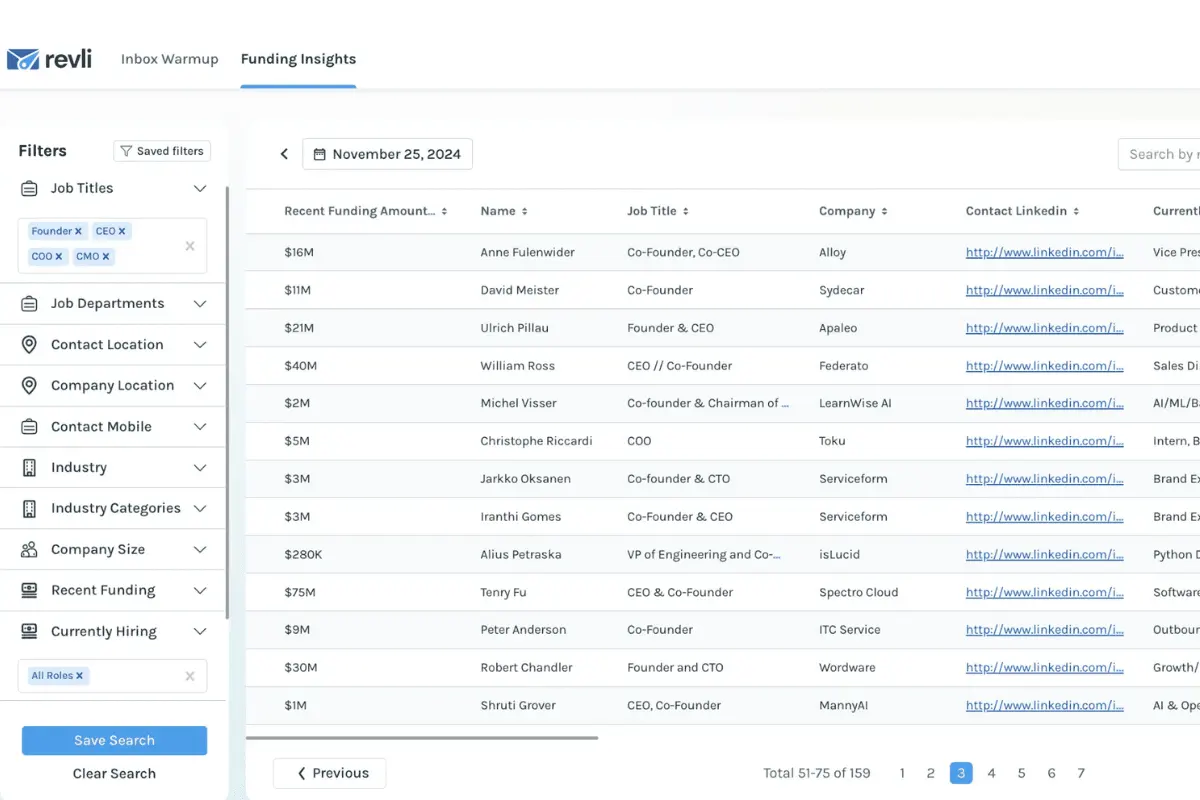
Revli is a cloud-based sales platform that helps businesses identify growth opportunities by delivering weekly reports and insights on newly funded startups. It provides accurate, verified funding data, company profiles, and key decision-maker contact details to generate high-quality leads.
Revli’s Funding Insights includes detailed information on funding amounts, stages, investors, and industries. It allows users to filter data by location, funding size, industry, and job title for targeted prospecting. Overall, Revli is an effective sales prospecting tool that offers timely, hand-curated reports that are updated every Monday so users have the most current data available.
Featured Sales Software Products
$69 per month
Demo available
Online ordering, delivery management, inventory tracking
Editor's Take
Toast is an all-in-one point of sale (POS) and restaurant management platform designed specifically for the foodservice industry. It offers a comprehensive suite of tools to help restaurants streamline operations, from order taking and payment processing to inventory management, staff scheduling, and customer engagement. Toast’s cloud-based platform supports both front-of-house and back-of-house operations, making it easy for restaurant owners to manage everything from one central system.
Key features include customizable POS hardware, online ordering, delivery management, inventory tracking, and real-time reporting and analytics. Toast also offers tools for loyalty programs, marketing, and customer feedback, helping restaurants build stronger relationships with their customers. The platform integrates seamlessly with third-party delivery services and accounting software, enhancing efficiency and profitability.
For restaurants looking to improve operational efficiency, enhance customer experiences, and grow their business, Toast provides an intuitive, all-in-one solution tailored to the unique needs of the foodservice industry.
Expert Score
In evaluating SaaS software, a comprehensive and structured methodology ensures a fair and accurate comparison across key metrics. This approach focuses on the most critical aspects that affect user experience, functionality, and business value. The following metrics—general features, cost, customer service, integrations, and mobile support—are evaluated to provide a holistic view of each software solution’s strengths and weaknesses. These metrics are selected based on their direct impact on software usability, scalability, and long-term effectiveness for businesses.
1. General Features - scoring weight 40%
This metric evaluates the core functionalities and tools the software offers. It involves assessing the comprehensiveness of the features, their relevance to the target users, and the ease of use. This is important because robust and well-designed features determine the software’s overall utility and efficiency in solving user problems.
2. Cost - scoring weight 15%
Cost analysis focuses on pricing models, value for money, and scalability. It’s crucial to evaluate whether the software’s features justify its price, considering different plans for small and large organizations. This is vital for businesses to ensure they invest in cost-effective solutions that fit their budget.
3. Customer Service - scoring weight 15%
This evaluates the responsiveness, quality, and availability of customer support, including channels like chat, email, or phone. Good customer service is essential for troubleshooting and ensuring smooth software usage, which reduces downtime and frustration for users.
4. Integrations - scoring weight 15%
This examines how well the software integrates with third-party tools (e.g., CRM, payment systems, collaboration apps). Seamless integrations are key for creating a unified workflow and enhancing productivity by connecting multiple systems, which is crucial for operational efficiency.
5. Mobile Support - scoring weight 15%
Mobile support assesses the software’s functionality and performance on mobile devices, including apps and mobile web versions. With increasing remote work and on-the-go usage, strong mobile support is critical to ensure users can access and utilize the software effectively, regardless of location.
$8/per user/per month
Yes
customizable dashboards, automated follow-ups, advanced analytics
Editor's Take
monday.com Sales CRM is a customizable platform designed to streamline sales processes, enhance team collaboration, and improve pipeline visibility. Its intuitive interface enables users to manage leads, track deals, and automate repetitive tasks with ease. The CRM integrates seamlessly with popular tools like Gmail, Slack, and HubSpot, ensuring a centralized workflow. Features like customizable dashboards, automated follow-ups, and advanced analytics help sales teams stay organized and focused on closing deals. With scalability in mind, monday.com caters to businesses of all sizes, offering flexible pricing plans and robust customer support. It’s an excellent choice for teams seeking efficiency and adaptability.
Expert Score
In evaluating SaaS software, a comprehensive and structured methodology ensures a fair and accurate comparison across key metrics. This approach focuses on the most critical aspects that affect user experience, functionality, and business value. The following metrics—general features, cost, customer service, integrations, and mobile support—are evaluated to provide a holistic view of each software solution’s strengths and weaknesses. These metrics are selected based on their direct impact on software usability, scalability, and long-term effectiveness for businesses.
1. General Features - scoring weight 40%
This metric evaluates the core functionalities and tools the software offers. It involves assessing the comprehensiveness of the features, their relevance to the target users, and the ease of use. This is important because robust and well-designed features determine the software’s overall utility and efficiency in solving user problems.
2. Cost - scoring weight 15%
Cost analysis focuses on pricing models, value for money, and scalability. It’s crucial to evaluate whether the software’s features justify its price, considering different plans for small and large organizations. This is vital for businesses to ensure they invest in cost-effective solutions that fit their budget.
3. Customer Service - scoring weight 15%
This evaluates the responsiveness, quality, and availability of customer support, including channels like chat, email, or phone. Good customer service is essential for troubleshooting and ensuring smooth software usage, which reduces downtime and frustration for users.
4. Integrations - scoring weight 15%
This examines how well the software integrates with third-party tools (e.g., CRM, payment systems, collaboration apps). Seamless integrations are key for creating a unified workflow and enhancing productivity by connecting multiple systems, which is crucial for operational efficiency.
5. Mobile Support - scoring weight 15%
Mobile support assesses the software’s functionality and performance on mobile devices, including apps and mobile web versions. With increasing remote work and on-the-go usage, strong mobile support is critical to ensure users can access and utilize the software effectively, regardless of location.
$9 to $150 per user per month
Yes, for up to two users
E-signature software, call transcription, conversation routing
Editor's Take
Expert Score
In evaluating SaaS software, a comprehensive and structured methodology ensures a fair and accurate comparison across key metrics. This approach focuses on the most critical aspects that affect user experience, functionality, and business value. The following metrics—general features, cost, customer service, integrations, and mobile support—are evaluated to provide a holistic view of each software solution’s strengths and weaknesses. These metrics are selected based on their direct impact on software usability, scalability, and long-term effectiveness for businesses.
1. General Features - scoring weight 40%
This metric evaluates the core functionalities and tools the software offers. It involves assessing the comprehensiveness of the features, their relevance to the target users, and the ease of use. This is important because robust and well-designed features determine the software’s overall utility and efficiency in solving user problems.
2. Cost - scoring weight 15%
Cost analysis focuses on pricing models, value for money, and scalability. It’s crucial to evaluate whether the software’s features justify its price, considering different plans for small and large organizations. This is vital for businesses to ensure they invest in cost-effective solutions that fit their budget.
3. Customer Service - scoring weight 15%
This evaluates the responsiveness, quality, and availability of customer support, including channels like chat, email, or phone. Good customer service is essential for troubleshooting and ensuring smooth software usage, which reduces downtime and frustration for users.
4. Integrations - scoring weight 15%
This examines how well the software integrates with third-party tools (e.g., CRM, payment systems, collaboration apps). Seamless integrations are key for creating a unified workflow and enhancing productivity by connecting multiple systems, which is crucial for operational efficiency.
5. Mobile Support - scoring weight 15%
Mobile support assesses the software’s functionality and performance on mobile devices, including apps and mobile web versions. With increasing remote work and on-the-go usage, strong mobile support is critical to ensure users can access and utilize the software effectively, regardless of location.

$7 per user per month billed annually
15 days
lead generation, sales pipeline management, workflow automation
Editor's Take
Zoho CRM is a flexible and comprehensive customer relationship management platform designed to help businesses manage and grow their customer relationships effectively. With tools for lead generation, sales pipeline management, workflow automation, and analytics, Zoho CRM is suitable for businesses of all sizes across a variety of industries.
Zoho CRM enables teams to streamline sales processes by capturing leads from multiple channels, tracking interactions, and managing every stage of the sales cycle. The platform offers customizable dashboards and reports, providing insights into sales performance and customer behaviors to help make data-driven decisions. With powerful automation features, Zoho CRM allows businesses to set up workflows for routine tasks like follow-ups, lead scoring, and email notifications, reducing manual work and enhancing productivity. The platform integrates with popular tools, including the Zoho suite, Microsoft 365, and G Suite, enabling a seamless connection across teams.
For businesses aiming to improve customer engagement, close deals faster, and enhance team collaboration, Zoho CRM delivers a scalable, user-friendly solution to drive sales and customer satisfaction.
Expert Score
In evaluating SaaS software, a comprehensive and structured methodology ensures a fair and accurate comparison across key metrics. This approach focuses on the most critical aspects that affect user experience, functionality, and business value. The following metrics—general features, cost, customer service, integrations, and mobile support—are evaluated to provide a holistic view of each software solution’s strengths and weaknesses. These metrics are selected based on their direct impact on software usability, scalability, and long-term effectiveness for businesses.
1. General Features - scoring weight 40%
This metric evaluates the core functionalities and tools the software offers. It involves assessing the comprehensiveness of the features, their relevance to the target users, and the ease of use. This is important because robust and well-designed features determine the software's overall utility and efficiency in solving user problems.
2. Cost - scoring weight 15%
Cost analysis focuses on pricing models, value for money, and scalability. It's crucial to evaluate whether the software’s features justify its price, considering different plans for small and large organizations. This is vital for businesses to ensure they invest in cost-effective solutions that fit their budget.
3. Customer Service - scoring weight 15%
This evaluates the responsiveness, quality, and availability of customer support, including channels like chat, email, or phone. Good customer service is essential for troubleshooting and ensuring smooth software usage, which reduces downtime and frustration for users.
4. Integrations - scoring weight 15%
This examines how well the software integrates with third-party tools (e.g., CRM, payment systems, collaboration apps). Seamless integrations are key for creating a unified workflow and enhancing productivity by connecting multiple systems, which is crucial for operational efficiency.
5. Mobile Support - scoring weight 15%
Mobile support assesses the software’s functionality and performance on mobile devices, including apps and mobile web versions. With increasing remote work and on-the-go usage, strong mobile support is critical to ensure users can access and utilize the software effectively, regardless of location.

$7/user/month
15 days
Pipeline Management, Email Integration, Task Tracking
Editor's Take
Bigin is a lightweight CRM by Zoho, tailored for small businesses and startups to manage sales pipelines efficiently. It provides tools for deal tracking, email integration, and task management, ensuring a simple yet effective approach to sales. The platform offers customizable pipelines, real-time notifications, and seamless integrations with other Zoho apps. Its user-friendly design makes it accessible for teams with minimal CRM experience, helping them streamline sales processes without complexity.
Expert Score
In evaluating SaaS software, a comprehensive and structured methodology ensures a fair and accurate comparison across key metrics. This approach focuses on the most critical aspects that affect user experience, functionality, and business value. The following metrics—general features, cost, customer service, integrations, and mobile support—are evaluated to provide a holistic view of each software solution’s strengths and weaknesses. These metrics are selected based on their direct impact on software usability, scalability, and long-term effectiveness for businesses.
1. General Features - scoring weight 40%
This metric evaluates the core functionalities and tools the software offers. It involves assessing the comprehensiveness of the features, their relevance to the target users, and the ease of use. This is important because robust and well-designed features determine the software's overall utility and efficiency in solving user problems.
2. Cost - scoring weight 15%
Cost analysis focuses on pricing models, value for money, and scalability. It's crucial to evaluate whether the software’s features justify its price, considering different plans for small and large organizations. This is vital for businesses to ensure they invest in cost-effective solutions that fit their budget.
3. Customer Service - scoring weight 15%
This evaluates the responsiveness, quality, and availability of customer support, including channels like chat, email, or phone. Good customer service is essential for troubleshooting and ensuring smooth software usage, which reduces downtime and frustration for users.
4. Integrations - scoring weight 15%
This examines how well the software integrates with third-party tools (e.g., CRM, payment systems, collaboration apps). Seamless integrations are key for creating a unified workflow and enhancing productivity by connecting multiple systems, which is crucial for operational efficiency.
5. Mobile Support - scoring weight 15%
Mobile support assesses the software’s functionality and performance on mobile devices, including apps and mobile web versions. With increasing remote work and on-the-go usage, strong mobile support is critical to ensure users can access and utilize the software effectively, regardless of location.
How much does Revli cost?
Revli: Top Sales Software
4 / 5
In this part of our Revli review, we itemized the rates and inclusions of the different Revli pricing plans. Revli pricing options are monthly billing or annual billing with 30% savings. They also offer a free trial plan for those who want to check out its features before committing to a plan.
Funding Insights
7-Day Trial - $0/month
- Unlock 10 Recently Funded Startups
- Preview of recently funded startup
- See Hiring Data, Revenue, and Investors
- Use Basic Filtering and Location Search
- Access Company and Contact Details
Growth - $99/month
- Instant access to the last 4 weeks of reports
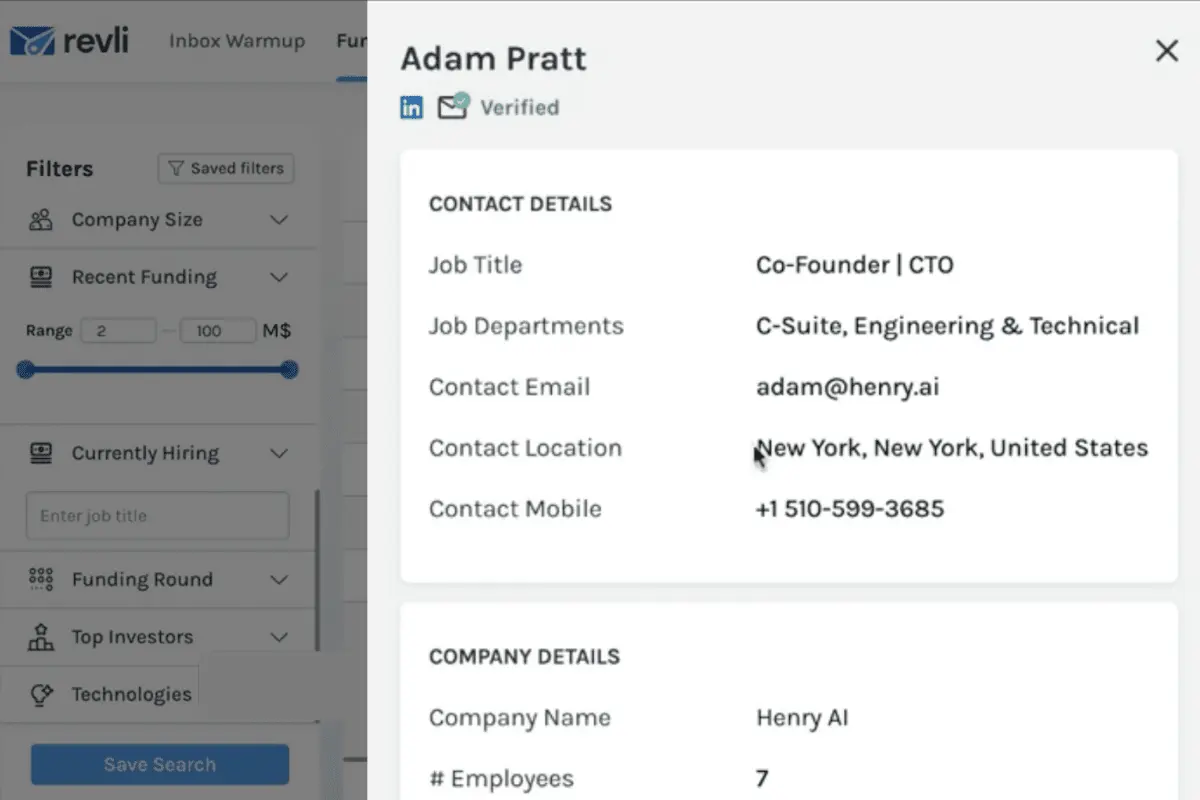
- Founder and C-Suite Contact Info
- 2500+ new leads/month with full contact details
- 150+ New Funded Startups/week
- Verified Contact Emails and LinkedIn
- Industry and Location Data
- Recent Funding Amount and Details
- 750+ New leads/week
- Decision-Maker Contact Info
- Live Chat Support and Help Center
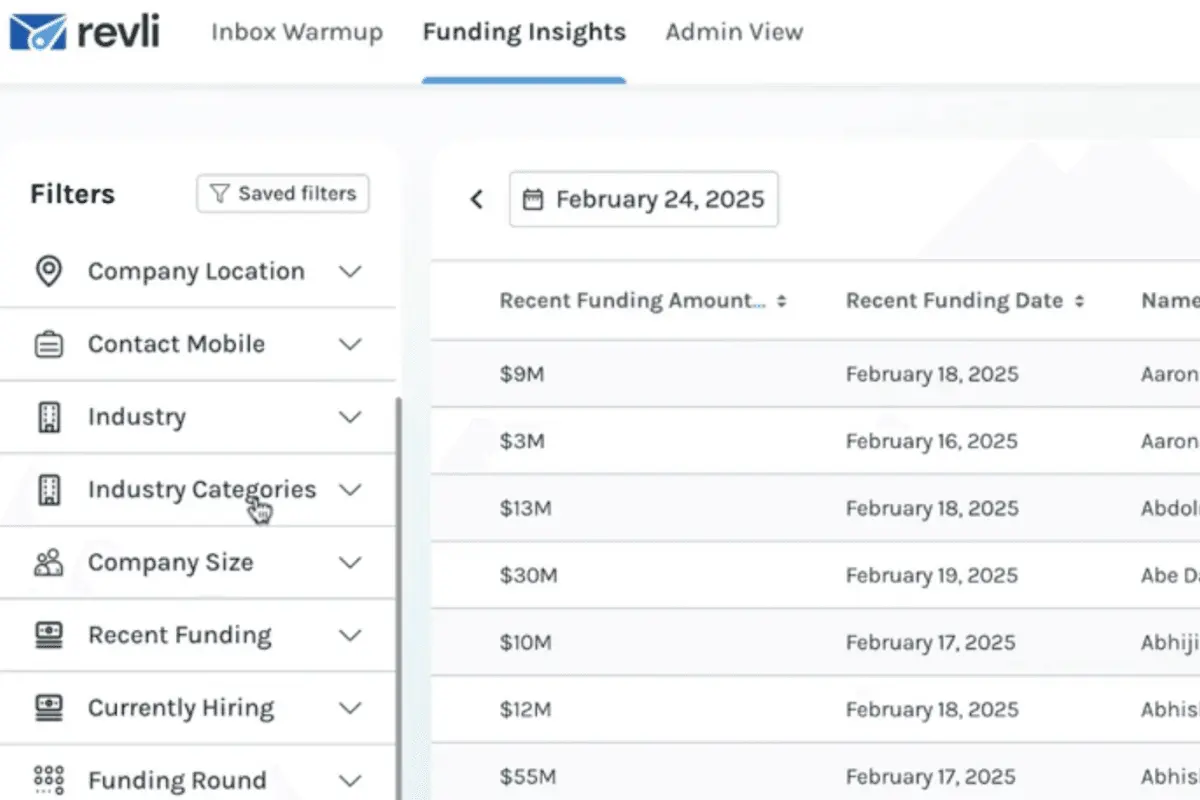
- Company and Contact Filters
- Investor Data
Pro - $179/month
- Everything in Growth+
- Verified Mobile Numbers
- Unlimited CSV Exports
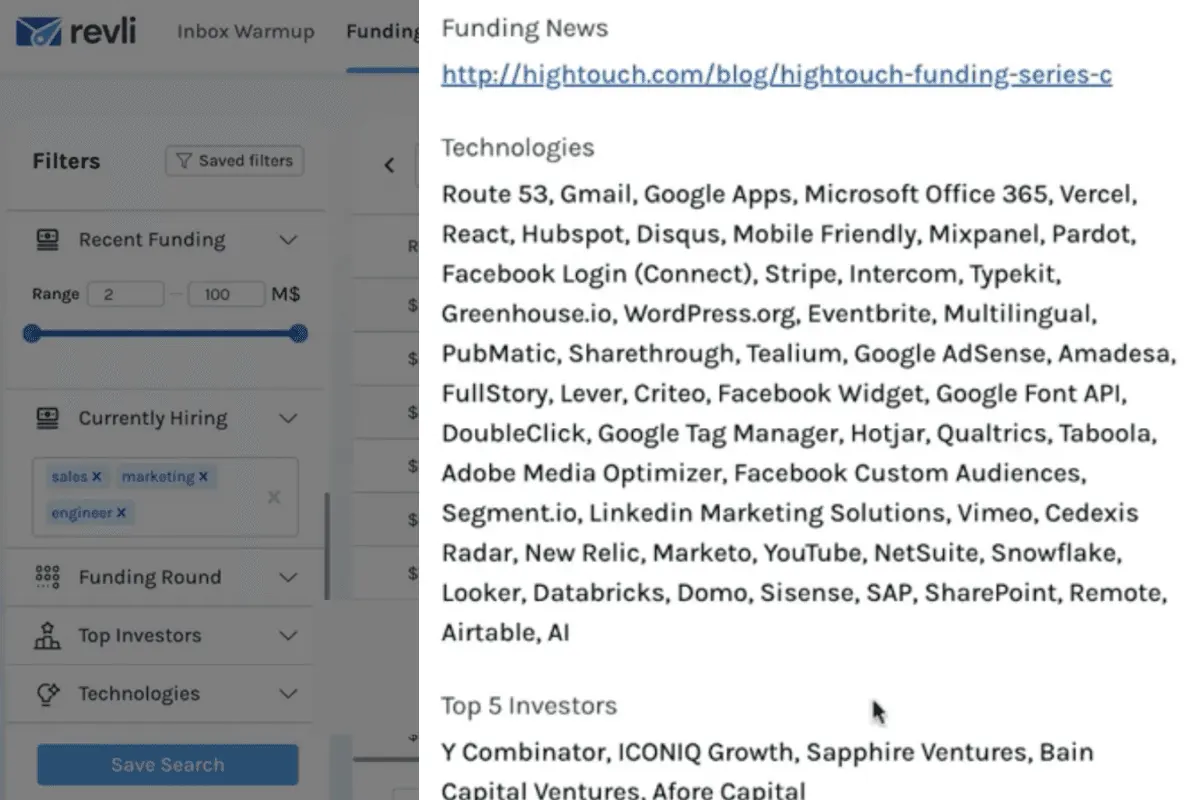
- Currently Hiring Filter
- 250+ New Active Job Posts/Week
- Top Investors Filter
- Tech Stack and Funding Round Filters
Revli Pros
- Accurate and Verified Data. In our research for this Revli review, we learned that the platform’s data is triple-verified to ensure its accuracy and reliability. By gathering data from credible sources such as legal filings and press releases, Revli guarantees that users can confidently act on the information they receive.
- Time-Saving Automation. With weekly curated reports and customizable lead lists, Revli saves businesses time by automating the lead generation process. Users no longer need to sift through endless sources of information to find high-quality prospects, as Revli delivers them straight to their inbox.
- Customizable Search Filters. Our investigation for this Revli review also suggests that the platform’s advanced filtering options refine leads by industry, funding stage, location, and other criteria. This level of customization helps users zero in on their ideal prospects so it is easier to target and convert high-value leads.
- Streamlined CRM Integration. Revli integrates with CRM tools, allowing users to directly import lead lists into their existing systems to eliminate manual data entry.
- Affordable and Flexible Pricing. Revli offers cost-effective pricing plans, with the option to choose between monthly or annual subscriptions.
Revli Cons
- Limited Scope for Non-Tech Businesses. Revli primarily focuses on startups in the tech industry, so businesses in other sectors may find fewer leads relevant to their needs. While it offers some variety, the database might not be as valuable for those outside of the tech or funding-driven sectors.
- No Macro Insights on Industries. While analyzing for this Revli review, we found that although Revli offers great access to funding data, it doesn’t provide broader industry or market trends analysis. Businesses seeking deeper insights into the performance and growth potential of specific industries might need to use other tools in conjunction with Revli.
- Lack of Advanced Reporting Features. Revli offers basic reporting tools, but more advanced features like custom reporting dashboards or detailed analytics are not included. Businesses requiring complex reports and data visualizations might find the platform’s capabilities lacking for in-depth analysis.
Revli Core Features
Revli: Top Sales Software
4 / 5
In this Revli review, we will share the Revli features that make it an attractive tool for sales teams and business development professionals. Besides weighing Revli pros and cons, getting familiar with the core features that can streamline your prospecting process and improve outreach is equally important.
- Funding Data. Revli gives users direct access to real-time funding data to easily track newly funded startups. It monitors legal filings, press releases, and news articles for accurate, relevant funding information.
- Market Research. Our Revli review highlights that the platform provides affordable, high-quality market insights that help businesses identify emerging opportunities without the hefty price tag of traditional market research firms. Users can access weekly reports, saving valuable time and resources that would otherwise be spent on manual research.
- Sales Prospecting. Revli simplifies the sales process by offering curated lists of recently funded startups, complete with verified contact details.
- Contact Details. Each startup listed on Revli includes verified contact details for key decision-makers such as founders and investors. This ensures that sales teams can reach the right people directly, increasing the chances of meaningful connections and business deals.
- Lead Lists. Revli allows users to filter leads based on specific criteria like funding stage, industry, location, and job title.
- Weekly Updated Reports. Revli’s platform delivers fresh, updated reports every week so users can have the most up-to-date information on funding rounds. In doing this Revli review, we encountered that with weekly updates, users can stay ahead of the competition and identify new opportunities in real time.
- Startup Profiles. Each startup profile includes detailed information such as funding amount, stage, key investors, industry, and more.
- Global Reach. Revli’s database includes startups from various regions around the world, such as the USA, Europe, and Asia.
- Industry Filters. Revli offers robust filtering options for users to focus on specific industries, such as technology, healthcare, and fintech.
Benefits of Using Revli
This Revli review highlights the benefits of using the platform, from improving lead generation to enhancing sales efficiency. By leveraging Revli's powerful features, businesses can access valuable insights that accelerate growth and drive high-quality leads.
Real-Time Access to New Opportunities
Revli’s weekly funding reports provide businesses with fresh data on startups that have secured funding for immediate action. A venture capital firm can use this real-time data to engage with startups in their growth phase before competitors. This can help position them for early investments that may have higher return potential.
Targeted Lead Generation
With Revli's advanced filtering options, businesses can precisely target leads based on industry, funding stage, and location. A SaaS company can focus outreach on Series A-funded tech startups in the Midwest so that the leads match their ideal customer profile and are more likely to convert into valuable clients.
Improved Prospecting Efficiency
Our research for this Revli review shares that the platform offers verified contact details and comprehensive company profiles to eliminate the need for time-intensive research. A sales team at a B2B software company can quickly find and reach out to key decision-makers, like CTOs at newly funded tech startups. This can improve productivity and significantly shorten the sales cycle.
Increased Sales Conversions
By leveraging Revli insights into newly funded startups, businesses can target prospects with the resources to invest in services. A digital marketing agency can identify startups that recently raised Series B funding and are likely to allocate a budget to scale their marketing efforts. This way, there will be higher conversion rates.
Enhanced CRM Integration
Revli integrates seamlessly with CRM systems so that lead data flows directly into sales pipelines without manual entry. A sales team using HubSpot can have Revli's leads automatically imported to save time and reduce human error. They can do all this while ensuring that no opportunity is overlooked or duplicated.
Global Lead Access
Revli provides businesses with access to a global database of startups, expanding their lead generation reach beyond local markets. A global accelerator looking to invest in early-stage tech companies can use Revli to identify promising startups in Europe and Asia. This can broaden their investment opportunities to a wider international pool.
Accurate Decision-Making Data
With triple-verified funding data, Revli ensures businesses make decisions based on the most accurate, up-to-date information available. A mergers and acquisitions (M&A) firm can rely on Revli’s verified data to assess which newly funded startups are primed for acquisition. This aids in minimizing risks and maximizing strategic alignment.
Customizable Outreach Strategies
Revli's ability to customize lead lists based on filters like job titles and company size enables businesses to tailor their outreach efforts precisely. A recruitment agency can filter leads to find HR directors at newly funded startups in the healthcare industry. This way, the hiring pitch reaches the right people at the right time.
Reduced Lead Saturation
We also learned in doing this Revli review that the platform limits the number of users per industry so that businesses can target fresh leads without worrying about oversaturation. A CRM provider using Revli can reach out to new SaaS startups without competing with multiple businesses for the same leads. This results in higher engagement rates and a more exclusive prospect pool
What business types use Revli?
Revli is ideal for small to medium-sized businesses (SMBs) and startups looking to scale quickly by targeting high-value leads. Its comprehensive database of newly funded startups makes it a suitable choice for sales teams, venture capital firms, digital marketing agencies, recruitment firms, and SaaS providers. Industries that thrive with Revli include tech, SaaS, healthcare, fintech, and any other sectors that experience a high volume of early-stage funding. These businesses can leverage Revli’s targeted lead generation and real-time access to fresh funding data to quickly identify and engage with startups poised for growth. This can also maximize their chances of securing profitable partnerships or clients.
However, similar to other Revli reviews, we discovered that the platform might not be the best choice for large enterprises with established market penetration and a more extensive lead generation infrastructure. Companies that already have robust, in-house research and business development teams may not need the real-time startup funding insights that Revli offers. Furthermore, industries focused on long-term, stable partnerships, such as manufacturing or government contracts, may find Revli's focus on startups and early-stage funding less applicable to their business needs.
Best 5 alternatives to Revli
HubSpot Sales Hub
4.5 / 5
HubSpot Sales Hub revolutionizes the way organizations manage their sales pipelines by automating critical tasks—like updating deal stages, scheduling follow-ups, and triggering notifications—which frees sales teams to focus on high-impact strategic initiatives. This platform’s sophisticated automation capabilities, including behavioral triggers and A/B testing, empower teams to send personalized communications at the optimal moment, thereby significantly enhancing conversion rates. In addition to these dynamic personalization features, HubSpot Sales Hub boosts overall productivity by automating lead prioritization and follow-up processes, ensuring that sales representatives concentrate on the most promising leads. Finally, its robust analytics, seamless integrations with other HubSpot tools and third-party applications, and an intuitively designed interface make it an attractive solution for those seeking to optimize their sales efforts without the steep learning curve.

ConnectWise PSA
4.1 / 5
ConnectWise PSA is presented as a professional services automation solution engineered to streamline service delivery for organizations of varying sizes. This software offers a unified platform designed to support essential business operations, aiming to reduce administrative burdens while promoting operational efficiency. With its dynamic and adaptable design, ConnectWise PSA aspires to simplify complex workflows and optimize service management. For prospective users exploring professional services automation tools, this solution presents a noteworthy option that emphasizes ease of use and integrated process management.
monday sales CRM
4.45 / 5
Monday Sales CRM stands out for its exceptional adaptability, allowing users to customize dashboards, columns, and sales workflows to perfectly suit their distinct business requirements. This level of flexibility is ideal for companies with unique processes or niche operations, enabling them to modify the platform effortlessly without needing advanced technical skills. Additionally, the CRM offers automation features that streamline repetitive tasks like follow-up reminders and status updates, thereby minimizing manual workload and lowering the chance of mistakes. Coupled with integrated communication tools and AI-powered capabilities for email composition and data analysis, monday ensures teams remain coordinated and equipped to make data-driven decisions.
Toast
4.15 / 5
Toast is a restaurant POS solution designed to streamline operations by integrating various aspects of service management into a single, efficient platform. Its intuitive design and multifaceted functionality work together to support restaurant workflows, from order management to payment processing, ensuring that every transaction is smooth and every customer interaction is optimized. With its flexible features, Toast positions itself as a robust contender in the restaurant technology space, appealing to businesses looking to enhance both operational flow and guest satisfaction.

Pipedrive
4.3 / 5
Pipedrive stands out as a versatile CRM solution designed to simplify and optimize sales workflows by automating routine tasks like lead distribution, follow-up scheduling, and deal tracking. Its high level of customization allows businesses to shape sales pipelines and data fields to suit their specific needs, accommodating a wide range of industries and company sizes. By consolidating customer information and communications through integrations with common email and calendar tools, Pipedrive enhances team collaboration and reduces the hassle of juggling multiple platforms. Furthermore, the platform’s clear visual pipeline offers sales teams an intuitive way to oversee deal progress and quickly spot any obstacles in the sales process.
Frequently Asked Questions (FAQs)
"Triple-verified" data in Revli means that the information provided has undergone a three-step verification process to ensure its accuracy and reliability. This typically involves cross-referencing multiple independent sources, internal audits, and expert evaluations to provide users with trustworthy data.
Revli's triple-verified data ensures accuracy and reliability by cross-referencing information from multiple trusted sources. This process minimizes discrepancies and enhances the quality of the data provided, which is crucial for users who rely on Revli for business decisions in 2026.
Yes, Revli is fully GDPR compliant and takes user data privacy seriously. They follow strict protocols for data handling, consent, and transparency to protect both customers and the contacts listed on their platform.


