
Chekkit Review 2027: Pricing, Features, Pros & Cons, Ratings & More

Co-Founder and Chief Data Scientist

Chekkit: Top Communication Software
4.75 / 5
Featured Communication Software Alternatives for Chekkit

$9 per user per month billed annually
14 days
live webinars, automating registration, pools
Editor's Take
Zoho Webinar is a versatile platform designed to help businesses host, manage, and engage in interactive webinars with ease. Part of the Zoho suite, Zoho Webinar provides tools for creating live webinars, automating registration, and engaging participants through Q&A, polls, and chat features, making it ideal for marketing, training, and customer engagement events.
The platform’s intuitive interface simplifies the process of setting up and promoting webinars, while built-in analytics give insights into attendee engagement, helping teams understand participant behavior and improve future events. Zoho Webinar also includes features like automated email reminders, customizable registration pages, and post-webinar reports, making it a comprehensive tool for managing end-to-end webinar experiences. Seamless integration with Zoho CRM, Zoho Campaigns, and other Zoho tools allows users to streamline workflows and maximize lead generation opportunities. For organizations looking to expand their outreach and connect with audiences remotely, Zoho Webinar offers a reliable, scalable solution with all the features needed for engaging virtual events.
Expert Score
In evaluating SaaS software, a comprehensive and structured methodology ensures a fair and accurate comparison across key metrics. This approach focuses on the most critical aspects that affect user experience, functionality, and business value. The following metrics—general features, cost, customer service, integrations, and mobile support—are evaluated to provide a holistic view of each software solution’s strengths and weaknesses. These metrics are selected based on their direct impact on software usability, scalability, and long-term effectiveness for businesses.
1. General Features - scoring weight 40%
This metric evaluates the core functionalities and tools the software offers. It involves assessing the comprehensiveness of the features, their relevance to the target users, and the ease of use. This is important because robust and well-designed features determine the software’s overall utility and efficiency in solving user problems.
2. Cost - scoring weight 15%
Cost analysis focuses on pricing models, value for money, and scalability. It’s crucial to evaluate whether the software’s features justify its price, considering different plans for small and large organizations. This is vital for businesses to ensure they invest in cost-effective solutions that fit their budget.
3. Customer Service - scoring weight 15%
This evaluates the responsiveness, quality, and availability of customer support, including channels like chat, email, or phone. Good customer service is essential for troubleshooting and ensuring smooth software usage, which reduces downtime and frustration for users.
4. Integrations - scoring weight 15%
This examines how well the software integrates with third-party tools (e.g., CRM, payment systems, collaboration apps). Seamless integrations are key for creating a unified workflow and enhancing productivity by connecting multiple systems, which is crucial for operational efficiency.
5. Mobile Support - scoring weight 15%
Mobile support assesses the software’s functionality and performance on mobile devices, including apps and mobile web versions. With increasing remote work and on-the-go usage, strong mobile support is critical to ensure users can access and utilize the software effectively, regardless of location.

$9 per seat per month
Zoom, Google Docs, Salesforce, Slack and more
Document collaboration and comments
Editor's Take
monday.com is a Work Operating System (Work OS) that enables teams to plan, organize, and manage tasks efficiently. Known for its customizable interface, it allows users to tailor workflows to suit specific needs, whether for task management or complex projects. The software’s automation features help reduce manual work by automating repetitive tasks based on set triggers. monday.com also fosters team collaboration through real-time updates, file sharing, and discussion threads, making it easier for teams to stay aligned and productive. Additionally, it integrates with popular tools like Slack, Google Drive, and Zoom to streamline operations across platforms.
Expert Score
In evaluating SaaS software, a comprehensive and structured methodology ensures a fair and accurate comparison across key metrics. This approach focuses on the most critical aspects that affect user experience, functionality, and business value. The following metrics—general features, cost, customer service, integrations, and mobile support—are evaluated to provide a holistic view of each software solution’s strengths and weaknesses. These metrics are selected based on their direct impact on software usability, scalability, and long-term effectiveness for businesses.
1. General Features - scoring weight 40%
This metric evaluates the core functionalities and tools the software offers. It involves assessing the comprehensiveness of the features, their relevance to the target users, and the ease of use. This is important because robust and well-designed features determine the software's overall utility and efficiency in solving user problems.
2. Cost - scoring weight 15%
Cost analysis focuses on pricing models, value for money, and scalability. It's crucial to evaluate whether the software’s features justify its price, considering different plans for small and large organizations. This is vital for businesses to ensure they invest in cost-effective solutions that fit their budget.
3. Customer Service - scoring weight 15%
This evaluates the responsiveness, quality, and availability of customer support, including channels like chat, email, or phone. Good customer service is essential for troubleshooting and ensuring smooth software usage, which reduces downtime and frustration for users.
4. Integrations - scoring weight 15%
This examines how well the software integrates with third-party tools (e.g., CRM, payment systems, collaboration apps). Seamless integrations are key for creating a unified workflow and enhancing productivity by connecting multiple systems, which is crucial for operational efficiency.
5. Mobile Support - scoring weight 15%
Mobile support assesses the software’s functionality and performance on mobile devices, including apps and mobile web versions. With increasing remote work and on-the-go usage, strong mobile support is critical to ensure users can access and utilize the software effectively, regardless of location.

$10 per user per month
Google Drive, Slack, Salesforce, and QuickBooks
Request forms and @mentions
Editor's Take
Wrike is a project management platform designed to help teams streamline their workflows and boost productivity. It offers a flexible, user-friendly interface that allows users to manage tasks, track progress, and collaborate on projects in real time. With its customizable dashboards and detailed reporting tools, Wrike provides clear visibility into project timelines and team performance. The platform also supports automation, enabling teams to automate repetitive tasks and reduce manual efforts. Collaboration is enhanced through features like task comments, file sharing, and integrations with tools such as Slack, Microsoft Teams, and Google Workspace. Wrike’s scalability makes it suitable for teams of any size, from small businesses to large enterprises.
Expert Score
In evaluating SaaS software, a comprehensive and structured methodology ensures a fair and accurate comparison across key metrics. This approach focuses on the most critical aspects that affect user experience, functionality, and business value. The following metrics—general features, cost, customer service, integrations, and mobile support—are evaluated to provide a holistic view of each software solution’s strengths and weaknesses. These metrics are selected based on their direct impact on software usability, scalability, and long-term effectiveness for businesses.
1. General Features - scoring weight 40%
This metric evaluates the core functionalities and tools the software offers. It involves assessing the comprehensiveness of the features, their relevance to the target users, and the ease of use. This is important because robust and well-designed features determine the software’s overall utility and efficiency in solving user problems.
2. Cost - scoring weight 15%
Cost analysis focuses on pricing models, value for money, and scalability. It’s crucial to evaluate whether the software’s features justify its price, considering different plans for small and large organizations. This is vital for businesses to ensure they invest in cost-effective solutions that fit their budget.
3. Customer Service - scoring weight 15%
This evaluates the responsiveness, quality, and availability of customer support, including channels like chat, email, or phone. Good customer service is essential for troubleshooting and ensuring smooth software usage, which reduces downtime and frustration for users.
4. Integrations - scoring weight 15%
This examines how well the software integrates with third-party tools (e.g., CRM, payment systems, collaboration apps). Seamless integrations are key for creating a unified workflow and enhancing productivity by connecting multiple systems, which is crucial for operational efficiency.
5. Mobile Support - scoring weight 15%
Mobile support assesses the software’s functionality and performance on mobile devices, including apps and mobile web versions. With increasing remote work and on-the-go usage, strong mobile support is critical to ensure users can access and utilize the software effectively, regardless of location.
Chekkit Review
What is Chekkit?
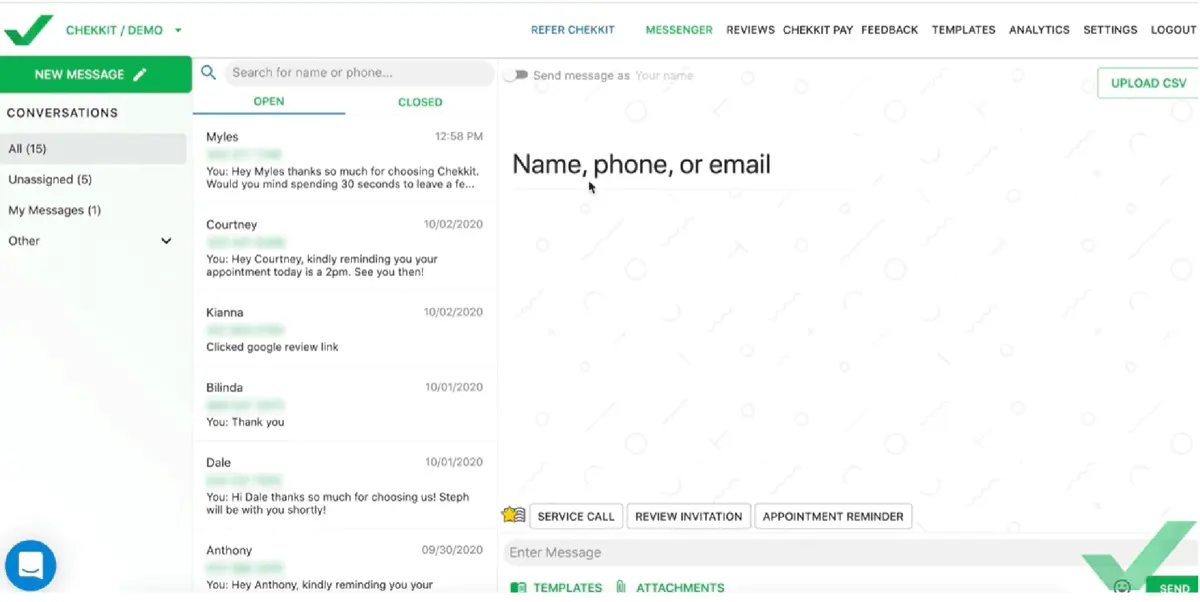
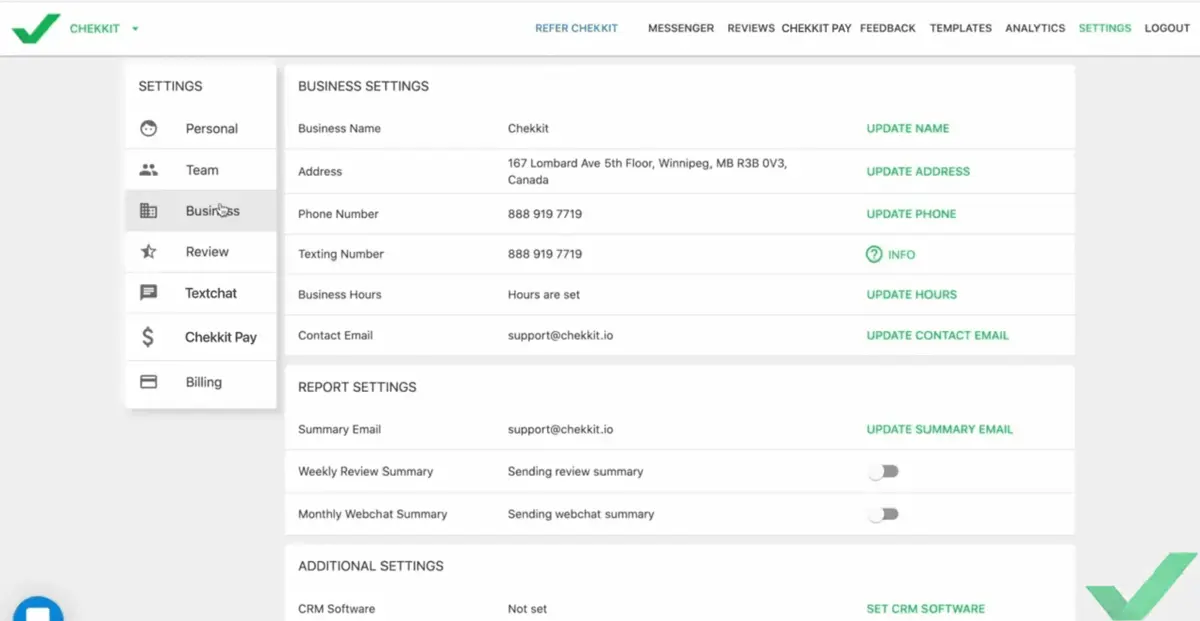
Chekkit is a business messaging platform designed to help companies connect with customers, generate leads, and improve online reputation. It offers business texting, review management, and AI-powered automation to streamline communication and customer engagement.
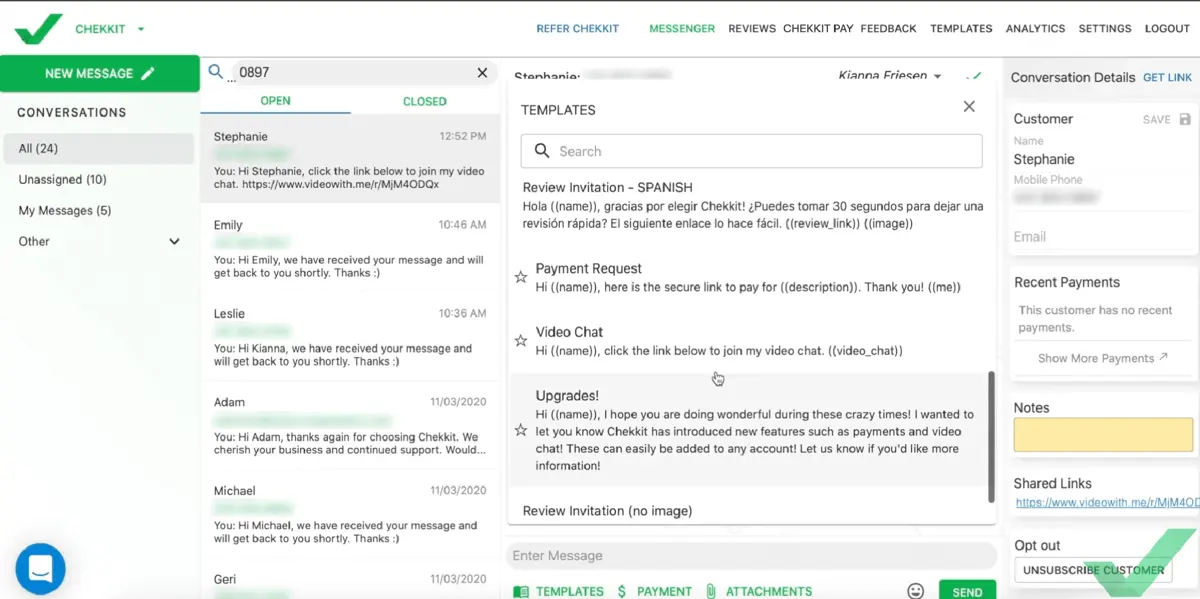
Chekkit enables businesses to centralize conversations with an all-in-one inbox, handle text chat, manage online reviews, and even process payments through Chekkit Pay. With user-friendly tools and seamless Chekkit integrations, the platform helps businesses enhance customer interactions, boost sales, and maintain a strong digital presence.
What's new in Chekkit?
As of conducting our Chekkit review, the platform has recently introduced several significant updates to enhance its functionality and user experience. In response to U.S. carrier regulations, Chekkit has adjusted its text messaging system. To prevent service disruptions, the platform now assigns temporary toll-free texting numbers to users, ensuring seamless communication. Once the primary numbers receive approval, businesses can revert to their original numbers or continue using the toll-free options if preferred.
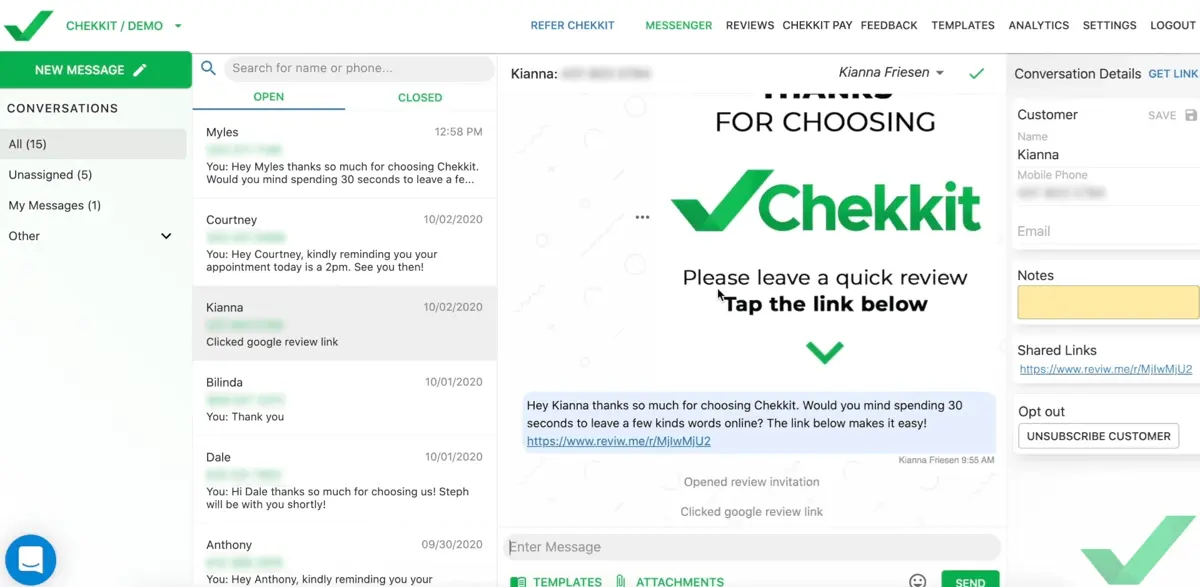
Moreover, while researching for our Chekkit review, our team has noticed that the platform has enhanced its feedback form with a responsive design, improving usability across various devices. This update ensures that customers can provide feedback effortlessly, contributing to more accurate and comprehensive insights for businesses. Moreover, Chekkit has upgraded to partner status with Zapier, expanding its integration capabilities. This partnership allows users to automate workflows by connecting Chekkit with numerous other applications, streamlining operations, and enhancing productivity.
These updates during our Chekkit review reflect the platform's commitment to continuous improvement and adaptability to regulatory changes, ensuring that businesses can maintain effective communication and operational efficiency.
Featured Communication Software Products
$9 per user per month billed annually
14 days
live webinars, automating registration, pools
Editor's Take
Zoho Webinar is a versatile platform designed to help businesses host, manage, and engage in interactive webinars with ease. Part of the Zoho suite, Zoho Webinar provides tools for creating live webinars, automating registration, and engaging participants through Q&A, polls, and chat features, making it ideal for marketing, training, and customer engagement events.
The platform’s intuitive interface simplifies the process of setting up and promoting webinars, while built-in analytics give insights into attendee engagement, helping teams understand participant behavior and improve future events. Zoho Webinar also includes features like automated email reminders, customizable registration pages, and post-webinar reports, making it a comprehensive tool for managing end-to-end webinar experiences. Seamless integration with Zoho CRM, Zoho Campaigns, and other Zoho tools allows users to streamline workflows and maximize lead generation opportunities. For organizations looking to expand their outreach and connect with audiences remotely, Zoho Webinar offers a reliable, scalable solution with all the features needed for engaging virtual events.
Expert Score
In evaluating SaaS software, a comprehensive and structured methodology ensures a fair and accurate comparison across key metrics. This approach focuses on the most critical aspects that affect user experience, functionality, and business value. The following metrics—general features, cost, customer service, integrations, and mobile support—are evaluated to provide a holistic view of each software solution’s strengths and weaknesses. These metrics are selected based on their direct impact on software usability, scalability, and long-term effectiveness for businesses.
1. General Features - scoring weight 40%
This metric evaluates the core functionalities and tools the software offers. It involves assessing the comprehensiveness of the features, their relevance to the target users, and the ease of use. This is important because robust and well-designed features determine the software’s overall utility and efficiency in solving user problems.
2. Cost - scoring weight 15%
Cost analysis focuses on pricing models, value for money, and scalability. It’s crucial to evaluate whether the software’s features justify its price, considering different plans for small and large organizations. This is vital for businesses to ensure they invest in cost-effective solutions that fit their budget.
3. Customer Service - scoring weight 15%
This evaluates the responsiveness, quality, and availability of customer support, including channels like chat, email, or phone. Good customer service is essential for troubleshooting and ensuring smooth software usage, which reduces downtime and frustration for users.
4. Integrations - scoring weight 15%
This examines how well the software integrates with third-party tools (e.g., CRM, payment systems, collaboration apps). Seamless integrations are key for creating a unified workflow and enhancing productivity by connecting multiple systems, which is crucial for operational efficiency.
5. Mobile Support - scoring weight 15%
Mobile support assesses the software’s functionality and performance on mobile devices, including apps and mobile web versions. With increasing remote work and on-the-go usage, strong mobile support is critical to ensure users can access and utilize the software effectively, regardless of location.
$9 per seat per month
Zoom, Google Docs, Salesforce, Slack and more
Document collaboration and comments
Editor's Take
monday.com is a Work Operating System (Work OS) that enables teams to plan, organize, and manage tasks efficiently. Known for its customizable interface, it allows users to tailor workflows to suit specific needs, whether for task management or complex projects. The software’s automation features help reduce manual work by automating repetitive tasks based on set triggers. monday.com also fosters team collaboration through real-time updates, file sharing, and discussion threads, making it easier for teams to stay aligned and productive. Additionally, it integrates with popular tools like Slack, Google Drive, and Zoom to streamline operations across platforms.
Expert Score
In evaluating SaaS software, a comprehensive and structured methodology ensures a fair and accurate comparison across key metrics. This approach focuses on the most critical aspects that affect user experience, functionality, and business value. The following metrics—general features, cost, customer service, integrations, and mobile support—are evaluated to provide a holistic view of each software solution’s strengths and weaknesses. These metrics are selected based on their direct impact on software usability, scalability, and long-term effectiveness for businesses.
1. General Features - scoring weight 40%
This metric evaluates the core functionalities and tools the software offers. It involves assessing the comprehensiveness of the features, their relevance to the target users, and the ease of use. This is important because robust and well-designed features determine the software's overall utility and efficiency in solving user problems.
2. Cost - scoring weight 15%
Cost analysis focuses on pricing models, value for money, and scalability. It's crucial to evaluate whether the software’s features justify its price, considering different plans for small and large organizations. This is vital for businesses to ensure they invest in cost-effective solutions that fit their budget.
3. Customer Service - scoring weight 15%
This evaluates the responsiveness, quality, and availability of customer support, including channels like chat, email, or phone. Good customer service is essential for troubleshooting and ensuring smooth software usage, which reduces downtime and frustration for users.
4. Integrations - scoring weight 15%
This examines how well the software integrates with third-party tools (e.g., CRM, payment systems, collaboration apps). Seamless integrations are key for creating a unified workflow and enhancing productivity by connecting multiple systems, which is crucial for operational efficiency.
5. Mobile Support - scoring weight 15%
Mobile support assesses the software’s functionality and performance on mobile devices, including apps and mobile web versions. With increasing remote work and on-the-go usage, strong mobile support is critical to ensure users can access and utilize the software effectively, regardless of location.
$10 per user per month
Google Drive, Slack, Salesforce, and QuickBooks
Request forms and @mentions
Editor's Take
Wrike is a project management platform designed to help teams streamline their workflows and boost productivity. It offers a flexible, user-friendly interface that allows users to manage tasks, track progress, and collaborate on projects in real time. With its customizable dashboards and detailed reporting tools, Wrike provides clear visibility into project timelines and team performance. The platform also supports automation, enabling teams to automate repetitive tasks and reduce manual efforts. Collaboration is enhanced through features like task comments, file sharing, and integrations with tools such as Slack, Microsoft Teams, and Google Workspace. Wrike’s scalability makes it suitable for teams of any size, from small businesses to large enterprises.
Expert Score
In evaluating SaaS software, a comprehensive and structured methodology ensures a fair and accurate comparison across key metrics. This approach focuses on the most critical aspects that affect user experience, functionality, and business value. The following metrics—general features, cost, customer service, integrations, and mobile support—are evaluated to provide a holistic view of each software solution’s strengths and weaknesses. These metrics are selected based on their direct impact on software usability, scalability, and long-term effectiveness for businesses.
1. General Features - scoring weight 40%
This metric evaluates the core functionalities and tools the software offers. It involves assessing the comprehensiveness of the features, their relevance to the target users, and the ease of use. This is important because robust and well-designed features determine the software’s overall utility and efficiency in solving user problems.
2. Cost - scoring weight 15%
Cost analysis focuses on pricing models, value for money, and scalability. It’s crucial to evaluate whether the software’s features justify its price, considering different plans for small and large organizations. This is vital for businesses to ensure they invest in cost-effective solutions that fit their budget.
3. Customer Service - scoring weight 15%
This evaluates the responsiveness, quality, and availability of customer support, including channels like chat, email, or phone. Good customer service is essential for troubleshooting and ensuring smooth software usage, which reduces downtime and frustration for users.
4. Integrations - scoring weight 15%
This examines how well the software integrates with third-party tools (e.g., CRM, payment systems, collaboration apps). Seamless integrations are key for creating a unified workflow and enhancing productivity by connecting multiple systems, which is crucial for operational efficiency.
5. Mobile Support - scoring weight 15%
Mobile support assesses the software’s functionality and performance on mobile devices, including apps and mobile web versions. With increasing remote work and on-the-go usage, strong mobile support is critical to ensure users can access and utilize the software effectively, regardless of location.
How much does Chekkit cost?
Chekkit: Top Communication Software
4.75 / 5
Chekkit pricing plans provide business messaging and reputation management solutions with two subscription options. Chekkit pricing is structured on a monthly or annual basis, offering flexibility for businesses of all sizes.
Business Plan - $149/month
- Unlimited members and contacts
- Unified Messaging Inbox
- Review Management
- Text Chat Support
- Group Messaging
- Appointment Scheduler
- Departmental Organization
- Marketing Campaigns
- AI-Powered Assistance (Chekkit AI)
- Mobile Application Access
- Landline Texting Capability
- Video Conferencing
- Embedded Review Widget
- Third-Party Integrations
Business Pro Plan - $229/month
- Everything in the Business Plan
- Chekkit Pay
What Sets Chekkit Apart
Chekkit distinguishes itself in the market with its comprehensive suite of features designed to enhance customer engagement and streamline business communications. Our Chekkit review team has learned that its all-in-one platform integrates various tools that cater to the diverse needs of modern businesses, setting it apart from competitors. Here are some Chekkit pros and cons:
Chekkit Pros
- Comprehensive Communication Tools: Integrates multiple messaging platforms into one inbox, simplifying customer interactions.
- AI Integration: Automates responses and streamlines communication, reducing manual workload.
- Flexible Pricing: Offers plans suitable for businesses of all sizes, with no long-term contracts and discounts for annual billing.
- User-Friendly Interface: Designed for ease of use, allowing businesses to quickly adapt and utilize the platform effectively.
Chekkit Cons
- Learning Curve: Some users may require time to fully explore and utilize all features effectively.
- Feature Overlap: Businesses already using similar tools may find redundancy in certain functionalities.
Chekkit Core Features
Chekkit: Top Communication Software
4.75 / 5
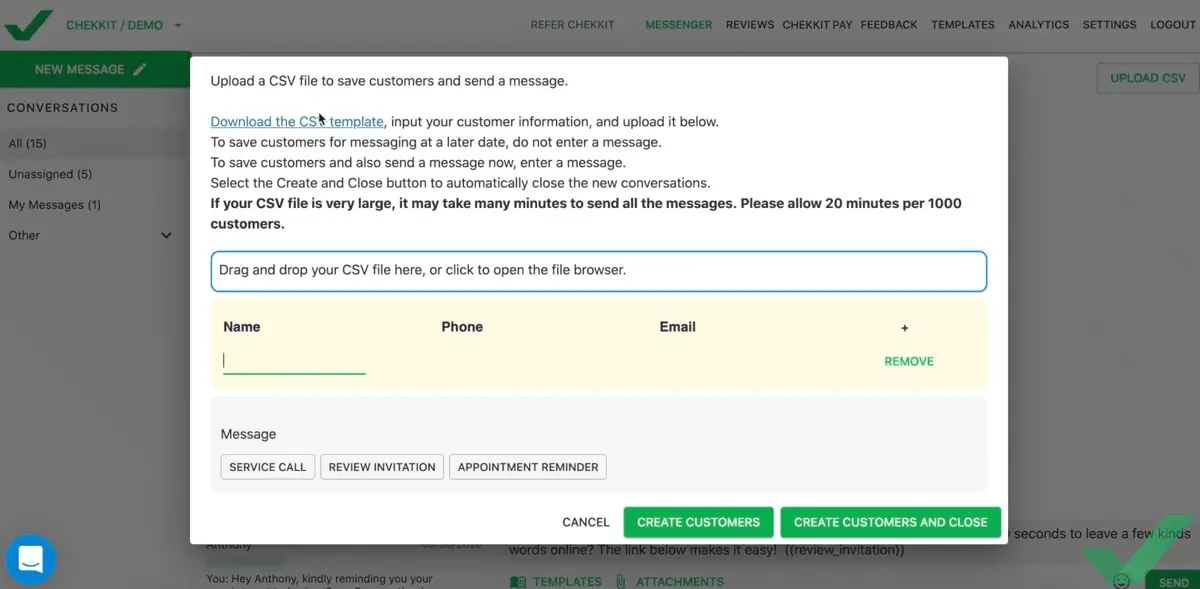
Chekkit features make it a valuable tool for businesses aiming to enhance customer engagement and streamline their communication processes.
- All-in-One Inbox: Consolidates messages from multiple channels—including SMS, Google, Facebook, Instagram, and website chat—into a single, easy-to-manage interface.
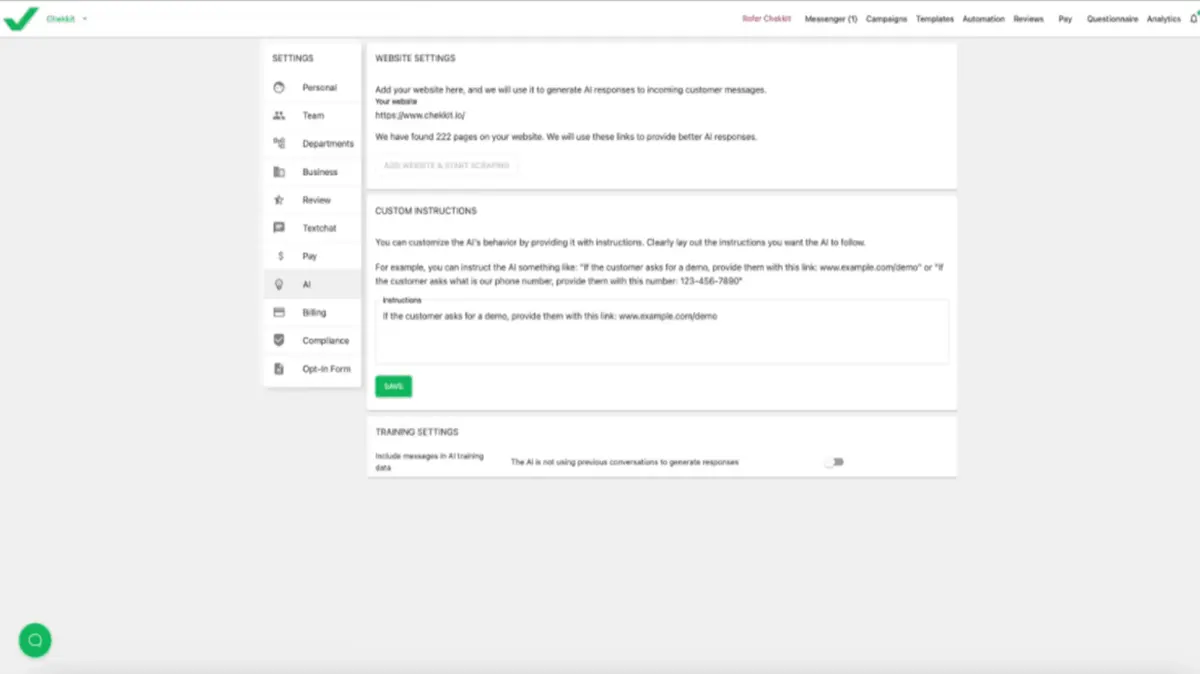
- Chekkit AI: Utilizes artificial intelligence to provide suggested replies, automate review responses, and generate answers to frequently asked questions, enhancing efficiency and responsiveness.
- Chekkit Pay: Offers a seamless invoicing and payment system with fraud protection, allowing businesses to collect payments via text message and shorten payment cycles.
- Textable Landline: Enables businesses to send and receive text messages using their existing landline numbers, providing convenience for both the business and its customers.
Benefits of Using Chekkit
Along with other Chekkit reviews, these are the key benefits often highlighted about the platform:
Centralized Communication
Chekkit’s all-in-one inbox consolidates messages from multiple channels into a single, easy-to-manage platform. This allows businesses to streamline customer interactions, ensuring that no messages go unnoticed and reducing response times.
Enhanced Customer Engagement
With tools like automated responses, AI-powered messaging, and textable landlines, Chekkit helps businesses maintain strong customer relationships. Personalized and timely responses improve customer satisfaction, fostering loyalty and repeat business.
Efficient Payment Processing
Chekkit Pay enables businesses to send invoices and collect payments through text messages. With built-in fraud protection and a simple payment process, businesses can reduce delays in payments and improve cash flow.
Improved Online Reputation
Chekkit review management tools allow businesses to monitor, request, and respond to reviews on Google and Facebook. This proactive approach to online reputation management helps businesses build trust and attract more customers.
AI-Powered Automation
Chekkit AI assists with suggested replies, automated review responses, and frequently asked question (FAQ) handling, reducing manual workload and ensuring fast, accurate customer support. This automation allows teams to focus on more critical business operations.
Increased Team Collaboration
With unlimited team members per account, Chekkit makes it easy for businesses to collaborate internally. Features like group chat, department-based communication, and message routing improve coordination among staff, leading to better customer service.
Scalability for Businesses of All Sizes
Chekkit’s flexible pricing and feature set make it suitable for businesses of all sizes. Whether a small local shop or a large enterprise, the software provides essential tools for improving communication and engagement.
What business types use Chekkit?
Chekkit is ideal for small and medium-sized businesses that rely on direct customer engagement, including local service providers, healthcare professionals, real estate agencies, and retail businesses. It excels in reputation management, AI-powered messaging, and appointment scheduling, making it a great choice for service-oriented industries. Multi-location businesses can also benefit from its centralized inbox and Chekkit review tools. However, large enterprises with complex CRM needs, high-volume e-commerce operations, or strict compliance requirements may find more specialized solutions better suited to their needs.
Best 5 alternatives to Chekkit
Wrike
4.15 / 5
Wrike emerges in the realm of project collaboration software as a solution designed with teams in mind, promising an environment that supports streamlined coordination and efficient project management. Although the available source details remain sparse, Wrike's brief positioning hints at an underlying framework aimed at optimizing collaborative workflows for varying project scales. Its general profile suggests that it caters to teams seeking a central hub for managing project tasks and enhancing communication. For prospective customers exploring project collaboration options, Wrike presents itself as a candidate worthy of further investigation to clarify its full range of capabilities.

Glip
5 / 5
Glip stands out as a versatile collaboration platform designed to streamline teamwork through its all-in-one approach, merging messaging, task management, calendars, file sharing, and video conferencing within a single application. Its generous free plan supports unlimited chat, storage, and guest users, along with 500 minutes of shared video calls, making it an attractive choice for organizations of varying sizes without upfront costs. The platform’s real-time communication capabilities ensure team members can connect seamlessly from any device, promoting productivity across remote or distributed groups. For those needing more sophisticated options, the affordable Standard plan enhances video conferencing time and administrative controls, catering to more complex business requirements.

Connecteam
4.55 / 5
Connecteam is positioned as a comprehensive solution within the realm of workforce management software, designed to address common challenges in managing modern teams. Its overview hints at a platform that integrates multiple operational functions into one cohesive system, aiming to simplify the complexities of scheduling, communication, and task coordination. The description, though broad in its scope, suggests that Connecteam has been crafted to support organizations in optimizing their workflows without overwhelming them with unnecessary details. For those in search of a flexible and robust tool to streamline team management, Connecteam appears as a promising candidate worth exploring.
monday
5 / 5
Monday.com is a highly adaptable platform designed to streamline work and project management for teams of various sizes. Its user-friendly, visually organized interface, enhanced by color-coded elements, allows users to navigate effortlessly without needing technical skills. With over 200 ready-made templates and a straightforward drag-and-drop system, teams can quickly set up workflows and begin managing tasks efficiently. Additionally, its powerful dashboard builder and no-code automation tools help users visualize data clearly and eliminate repetitive processes, boosting overall productivity.
RingCentral
5 / 5
RingCentral stands out for its remarkable flexibility and mobility, enabling users to place calls, join video conferences, and send messages from any internet-connected device. This cloud-based solution is especially valuable for remote workers and those frequently on the move, as it allows seamless transitions between communication platforms without interruption. Security is another cornerstone of RingCentral, offering strong protections that safeguard sensitive business interactions and ensure compliance. Additionally, its web app enhances convenience by allowing instant access to meetings and essential features directly through a browser, without the need for software installation.
Frequently Asked Questions (FAQs)
Chekkit is a trusted software provider offering tools for businesses, including review management, messaging services, and lead generation. However, while the website is legitimate, it's important to consult independent reviews and testimonials to gauge the reliability and effectiveness of their platform.
A Chekkit review typically refers to customer feedback collected and managed through Chekkit, a platform that helps businesses gather and showcase online reviews. Chekkit allows businesses to request, monitor, and respond to reviews from platforms like Google, Facebook, and other review sites. It also provides messaging tools to engage with customers via text, web chat, and social media.
To find Chekkit reviews online, visit their official website or explore third-party review platforms like G2 or Trustpilot. These sources provide user insights on Chekkit's features, pricing, and overall performance, offering a comprehensive understanding.
In 2026, Chekkit offers features like real-time messaging, review management, feedback collection, and customer interaction analytics. These tools assist businesses in engaging with customers, managing their online presence, and improving service quality by encouraging positive feedback and addressing concerns efficiently.


