
Bitrix24 Review 2027: Pricing, Features, Pros & Cons, Ratings & More

Co-Founder and Chief Data Scientist

Bitrix24: Top Collaboration Software
4.75 / 5
Bitrix24 Review
What is Bitrix24?
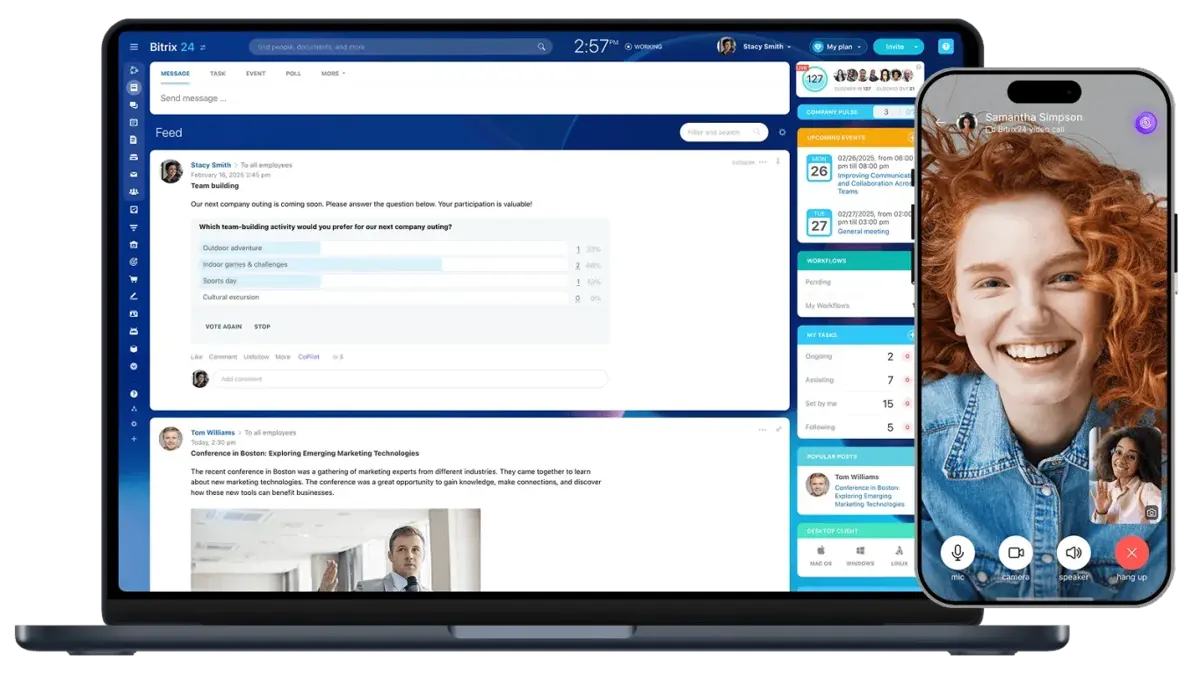
Credit: Bitrix24.com.
Designed as a unified digital workspace, Bitrix24 brings together customer relationship management (CRM), project management, team communication, workflow automation, human resources tools, document management, analytics, AI-powered assistance, and customer-facing services within a single platform. Rather than focusing on a single business function, the platform is designed to provide organizations with a unified environment for managing both internal operations and external customer interactions.
A Unified Business Operating Platform
The platform serves as a centralized ecosystem where teams can collaborate, manage projects, automate workflows, track sales activities, communicate with customers, store and share documents, monitor performance metrics, and coordinate day-to-day business operations. By combining multiple business functions into a single system, Bitrix24 helps organizations reduce the need for separate software applications while maintaining connected data and workflows across departments.
Bitrix24 supports a wide range of business activities through an extensive feature set. Its CRM capabilities help organizations manage leads, contacts, deals, customer communications, and sales pipelines. Project and work management tools include tasks, Gantt charts, Kanban boards, resource planning, and workflow automation. Team collaboration features provide chat, video conferencing, channels, workgroups, calendars, knowledge sharing, and social intranet functionality.
Recent Platform Enhancements
Recent platform enhancements have expanded Bitrix24 beyond traditional collaboration and CRM software. Features such as CoPilot AI assist users with content creation, task management, communication, and workflow productivity. Collabs provide dedicated workspaces for collaborating with external partners and clients, while Flows help organizations optimize workload distribution and process execution. Additional capabilities such as Channels, Boards, BI Builder, Online Booking, E-Signature, and Bitrix24 Drive further extend the platform's ability to support operational, administrative, and customer service functions from a single environment.
Supporting Multiple Departments
The platform is designed to support multiple departments across an organization. Sales teams can manage customer relationships and revenue pipelines; marketing teams can coordinate campaigns and lead-generation efforts; service teams can handle customer inquiries; HR departments can manage employee communication and workflows; and operations teams can automate business processes and reporting. This cross-functional approach enables organizations to work within a connected ecosystem rather than relying on isolated tools for different departments.
Mobile accessibility is also a core component of the platform, allowing users to access communication tools, CRM records, tasks, documents, approvals, and workflows from virtually anywhere. This helps distributed and hybrid teams stay connected while maintaining visibility into ongoing work and customer activities.
Deployment Flexibility
A key differentiator of Bitrix24 is its deployment flexibility. Organizations can choose between a cloud-based solution and an on-premises, self-hosted deployment, providing additional control for businesses with specific security, compliance, customization, or data governance requirements.
Overall, Bitrix24 positions itself as an integrated business platform rather than a standalone collaboration or project management tool. Its combination of CRM, communications, work management, automation, AI capabilities, analytics, and customer-facing services enables organizations to manage a broad range of business functions within a single, connected ecosystem.
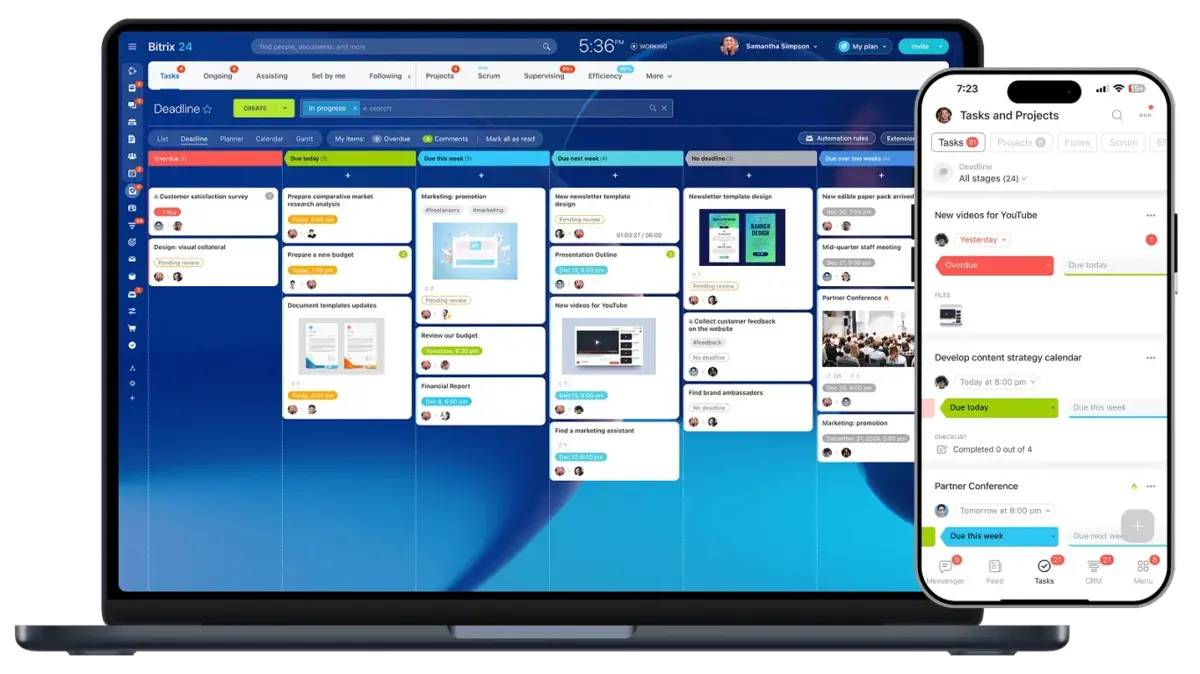
Credit: Bitrix24.com.
How Much Does Bitrix24 Cost
Bitrix24: Top Collaboration Software
4.75 / 5
Bitrix24 offers five cloud-based pricing tiers designed to support organizations at different stages of growth, from individuals and small teams to large enterprises. Plans are structured around user capacity, storage limits, automation capabilities, CRM functionality, AI-powered tools, analytics, and administrative controls, enabling businesses to expand their platform use as operational needs evolve.
Unlike software that charges separately for CRM, project management, communications, workflow automation, and employee management tools, Bitrix24 packages these capabilities within a single subscription. As organizations move through the pricing tiers, they gain access to increasingly advanced functionality, including sales and workflow automation, CoPilot AI, online booking, e-signature capabilities, BI Builder analytics, contact center tools, HR management features, and enterprise-grade administration controls.
One of the platform's distinguishing features is a free plan that lets organizations explore core CRM, collaboration, communication, and project management features before committing to a paid subscription. Higher-tier plans build on this foundation by expanding storage, increasing user capacity, unlocking advanced automation, and providing additional tools for sales, operations, customer service, and business intelligence.
The following sections break down each Bitrix24 plan, highlighting pricing, included features, and the types of organizations most likely to benefit from each tier.
Free Plan
Best for: Individuals, startups, and small teams exploring Bitrix24's unified business platform before committing to a paid subscription.
Bitrix24's Free plan provides access to a broad range of core business tools at no cost for up to two users. Rather than focusing on a single function, the plan gives organizations an opportunity to evaluate how CRM, project management, communication, and collaboration features work together within the platform's ecosystem.
Pricing: Free
Includes:
- 5 GB of storage
- CRM for managing deals and contacts
- Task management with Kanban and Gantt views
- Shared calendars
- Team chat and video calls
- Basic collaboration and work management tools
The Free plan is particularly useful for businesses that want to test Bitrix24's integrated approach to work management before upgrading. Teams can organize projects, communicate internally, manage customer relationships, and coordinate day-to-day activities without requiring multiple standalone applications.
While advanced capabilities such as sales automation, AI-powered tools, e-signature functionality, online booking, BI Builder, and expanded CRM automation are reserved for higher-tier plans, the Free plan offers enough functionality for small teams to evaluate the platform's core experience and determine whether the broader Bitrix24 ecosystem fits their operational needs.
Basic Plan
Best for: Solopreneurs, startups, and small businesses that need customer-facing sales tools alongside project management and team collaboration features.
Pricing: $69 per organization/month (billed monthly, includes 5 users); or $588 per year with annual billing ($49/month equivalent), saving $240 per year.
The Basic plan builds on the Free tier by introducing essential sales and customer management capabilities that help businesses move from simple collaboration to managing customer acquisition and ongoing client relationships within a single platform.
Everything in Free, plus:
- 24 GB of storage
- Sales pipelines
- Recurring deals
- Email integration
- Telephony capabilities
- Web form designer
- Website builder
For businesses beginning to formalize their sales processes, the Basic plan provides access to CRM tools for lead capture, pipeline management, customer communication, and sales tracking. Features such as telephony integration, web forms, and website creation help organizations connect customer-facing activities directly to their CRM workflows.
The Basic plan is well-suited for small teams that want to centralize communication, project management, and customer relationship management without investing in separate sales, marketing, and collaboration platforms. It serves as the entry point for organizations looking to use Bitrix24 as a unified business platform rather than solely a collaboration tool.
Standard Plan
Best for: Growing businesses that need advanced CRM capabilities, sales automation, and tools to support larger teams and expanding customer operations.
Pricing: $144 per organization/month (billed monthly, includes 50 users); or $1,188 per year with annual billing ($99/month equivalent), saving $540 per year.
The Standard plan expands Bitrix24 beyond core CRM and collaboration by introducing automation, payment processing, e-commerce capabilities, and enhanced sales management tools. It is designed for organizations scaling their customer-facing operations and needing more sophisticated processes for managing leads, sales, projects, and recurring work.
Everything in Basic, plus:
- 100 GB of storage
- AI-powered sales tools (CoPilot AI capabilities)
- Sales automation
- Unlimited leads
- Invoices and estimates
- Online payments
- WhatsApp marketing
- E-commerce capabilities
- Recurring tasks
- Unlimited projects
For businesses experiencing growth, the Standard plan provides a stronger foundation for managing customer journeys from lead generation through payment collection. Sales automation helps teams streamline repetitive CRM activities, while invoices, estimates, and online payment tools support more efficient revenue management. WhatsApp marketing and e-commerce functionality further extend the platform's customer engagement capabilities.
The increased user capacity and unlimited project support also make the Standard plan well-suited for organizations with multiple teams working across sales, operations, customer service, and project delivery. For many businesses, this tier marks the point at which Bitrix24 transitions from a collaboration and CRM solution into a broader operational platform that supports day-to-day business processes across departments.
Professional Plan
Best for: Scaling organizations that want to automate business processes, leverage AI-powered tools, and manage sales, operations, HR, and customer interactions from a single platform.
Pricing: $289 per organization/month (billed monthly, includes 100 users); or $2,388 per year with annual billing ($199/month equivalent), saving $1,080 per year.
The Professional plan introduces some of Bitrix24's most advanced business management capabilities, including AI-powered sales tools, workflow automation, analytics, HR functionality, and customer engagement features. It is designed for organizations that need to streamline processes across multiple departments while supporting larger teams and more complex operations.
Everything in Standard, plus:
- 1,024 GB of storage
- Call tracking
- Email marketing
- Workflow automation
- Ad automation
- Analytics and reporting tools
- Task automation
- Robotic Process Automation (RPA)
- E-Signature
- Online Booking
- Unlimited boards
- HR management tools
- Employee hours tracking
This tier marks a significant expansion of Bitrix24's automation capabilities. Organizations can automate sales, marketing, project management, and operational workflows while using AI-powered tools to improve productivity and customer engagement. Advanced analytics and reporting help teams gain greater visibility into performance, while workflow automation and RPA reduce manual work across business processes.
The Professional plan also unlocks several notable capabilities unavailable in lower tiers, including CoPilot AI, E-Signature, Online Booking, and advanced automation tools. Combined with email marketing, call tracking, and HR management features, these additions make the platform suitable for businesses seeking a unified system for managing customer relationships, employee operations, and organizational workflows.
For many growing organizations, the Professional plan represents the point at which Bitrix24 evolves into a comprehensive business operating platform, bringing together CRM, automation, communications, analytics, HR, and customer-facing services within a single environment.
Enterprise Plan
Best for: Large organizations that require enterprise-scale infrastructure, advanced security controls, centralized administration, and support for multiple business units or locations.
Pricing
- 250 users: $579/month; or $4,788/year ($399/month equivalent), saving $2,160/year
- 500 users: $919/month; or $7,548/year ($629/month equivalent), saving $3,480/year
- 1,000 users: $1,149/month; or $9,588/year ($799/month equivalent), saving $4,200/year
- 2,000 users: $2,299/month; or $19,188/year ($1,599/month equivalent), saving $8,400/year
- 3,000 users: $3,449/month; or $28,788/year ($2,399/month equivalent), saving $12,600/year
- 4,000 users: $4,599/month; or $38,388/year ($3,199/month equivalent), saving $16,800/year
- 5,000 users: $5,749/month; or $47,988/year ($3,999/month equivalent), saving $21,000/year
- 6,000 users: $6,899/month; or $57,588/year ($4,799/month equivalent), saving $25,200/year
- 7,000 users: $8,049/month; or $67,188/year ($5,599/month equivalent), saving $29,400/year
- 8,000 users: $9,199/month; or $76,788/year ($6,399/month equivalent), saving $33,600/year
- 9,000 users: $10,349/month; or $86,388/year ($7,199/month equivalent), saving $37,800/year
- 10,000 users: $11,499/month; or $95,988/year ($7,999/month equivalent), saving $42,000/year
The Enterprise plan builds on the Professional tier by adding infrastructure, governance, security, and scalability features designed for larger organizations operating across multiple teams, departments, locations, or subsidiaries.
Everything in Professional, plus:
- Enterprise user tiers ranging from 250 to 10,000 users
- Storage options from 3 TB to 100 TB
- Unlimited branch accounts
- Centralized management
- Distributed servers
- SOC-compliant AWS hosting
- High-performance cluster architecture
- API boost
- Encryption at rest
- Dynamic load balancing
- 99.95% SLA
- Active Directory integration
- Login history
- 30-day backup period
- Multi-level permissions
- Custom branding
- Priority customer support
The Enterprise plan is designed for organizations that need to deploy Bitrix24 across multiple departments, business units, or geographic locations while maintaining centralized oversight and governance. Features such as unlimited branch accounts, centralized management, Active Directory integration, and multi-level permissions help organizations manage users, security policies, and operational standards at scale.
Enterprise customers also benefit from infrastructure enhancements, including distributed servers, high-performance clusters, dynamic load balancing, encryption at rest, and a 99.95% service-level agreement. These capabilities are particularly valuable for organizations with demanding performance, compliance, security, or business continuity requirements.
Because the Enterprise tier includes all Professional plan functionality, organizations also retain access to advanced CRM capabilities, CoPilot AI tools, workflow automation, Robotic Process Automation (RPA), E-Signature, Online Booking, analytics and reporting tools, HR management features, and customer engagement capabilities. The additional investment is focused on enabling those capabilities to operate effectively across large, complex organizations.
For enterprises seeking a unified platform for CRM, communications, automation, project management, analytics, and business operations, this tier provides the scale, administrative controls, and infrastructure required to support organization-wide deployment.
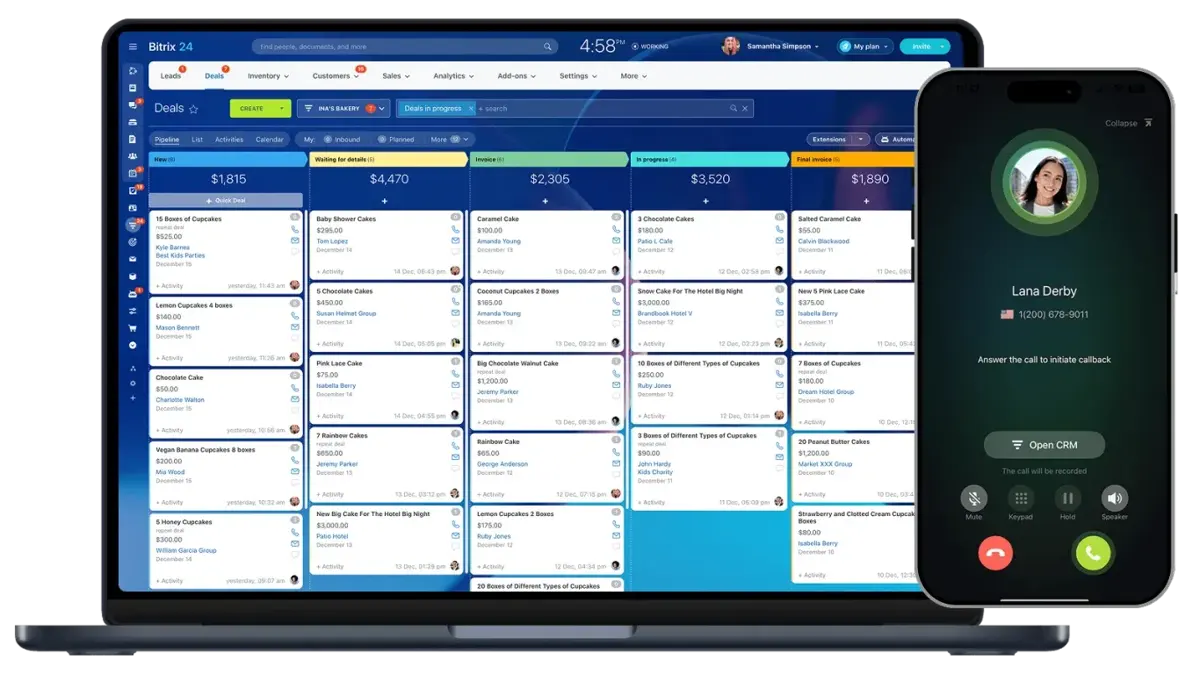
Credit: Bitrix24.com.
Overall, Bitrix24's pricing structure is designed to scale alongside business growth, starting with a free plan for small teams and extending to enterprise deployments supporting thousands of users. Each tier progressively expands CRM functionality, automation capabilities, analytics, customer engagement tools, AI-powered features, and administrative controls, allowing organizations to select a plan based on operational requirements rather than assembling multiple standalone products.
Businesses looking to consolidate CRM, collaboration, project management, workflow automation, communications, and customer-facing services within a single platform may find Bitrix24's tiered approach particularly compelling.
What Are the Pros of Bitrix24
Bitrix24's biggest strength is the breadth of functionality available within a single platform. While many competitors focus on one area, such as project management, team communication, or CRM, Bitrix24 combines these capabilities with workflow automation, AI-powered tools, HR management, analytics, customer engagement, scheduling, and document management. This allows organizations to centralize business operations, reduce software fragmentation, and connect teams, customers, and processes within a unified ecosystem.
The following advantages help explain why Bitrix24 is often considered more than a traditional collaboration platform and instead serves as a comprehensive business operating system for organizations of various sizes:
1. Comprehensive All-in-One Business Platform
Instead of managing separate subscriptions for CRM, project management, chat, HR, document storage, automation, and AI, Bitrix24 bundles them natively into a single, unified system where all tools work together seamlessly.
2. Flat Pricing That Grows With You
Unlike software that charges per user per month, Bitrix24 uses flat organizational pricing on most plans. A team of 50 pays one predictable monthly fee rather than multiplying costs by every seat.
3. Start Free and Scale Without Switching Platforms
The free plan supports core CRM, task management, chat, and video calls for small teams. As you grow, you upgrade within the same system, eliminating painful data migration and retraining.
4. On-Premises Deployment Available
Most modern software tools are cloud-only, but Bitrix24 offers a self-hosted option. Regulated industries gain full control over their data, security protocols, and compliance posture.
5. Built-In CRM Connected to Communication and Tasks
Sales conversations in chat or email attach directly to CRM records. Project tasks linked to clients remain visible to sales teams. Context follows work automatically across functions.
6. Reduces Software Fragmentation
Every additional tool creates another login, data silo, integration, and training burden. Bitrix24 consolidates five to ten separate subscriptions, reducing context-switching and IT overhead.
7. Mobile Productivity for Remote and Field Teams
Mobile apps provide full access to CRM, chat, tasks, approvals, and video calls. Salespeople at airports and technicians on site can update deals and approve requests from anywhere.
8. Free Tier Includes Functionality Others Paywall
Many competing platforms charge for Gantt charts, automations, and guest access. Bitrix24's free plan includes Kanban, Gantt, shared calendars, team chat, video calls, and CRM basics at no cost.
9. Automation and AI Embedded Without Extra Fees
Many platforms charge per automation run or for AI access. Bitrix24 includes workflow automation, RPA, and CoPilot AI within higher tiers without per-use or per-seat fees.
10. Integration Capabilities with Existing Systems
Bitrix24 integrates with email, calendars, telephony, WhatsApp, and third-party apps via API. This ensures seamless connectivity with existing systems rather than forcing an all-or-nothing migration.
11. Scales from Two Users to Ten Thousand
Few platforms serve both a two-person startup and a ten-thousand-employee enterprise on the same codebase. Tiered pricing adds capacity incrementally without forced migrations or platform changes.
Strong Alternative to Multiple Standalone Tools: Businesses evaluating collaboration software for small teams may find that Bitrix24 provides significantly broader functionality by combining collaboration, CRM, automation, analytics, and operational tools within a single platform.
What Are the Cons of Bitrix24
Although Bitrix24 offers an extensive range of business management, collaboration, CRM, automation, and analytics capabilities, there are a few considerations that prospective users should keep in mind.
- Learning Curve for New Users: Because Bitrix24 brings together numerous business functions within a single platform, new users may require some onboarding time to become familiar with the available tools, navigation structure, and workflows. This is a common consideration for extensive, deeply integrated platforms, especially as modern business software increasingly incorporates AI-driven and cross-functional capabilities that evolve rapidly. Organizations adopting multiple modules simultaneously may benefit from a phased rollout approach to ensure smoother adoption and effective use of the platform’s full capabilities.
- Some Advanced Features Require Higher-Tier Plans: Capabilities such as CoPilot AI, E-Signature, Online Booking, advanced workflow automation, and certain analytics features are available in higher subscription tiers. Businesses interested in these advanced tools may need to upgrade beyond the entry-level plans to access the full range of functionality.
What Are the Core Features of Bitrix24
Bitrix24: Top Collaboration Software
4.75 / 5
Bitrix24 replaces separate tools for CRM, project management, team chat, website building, HR, document management, and automation, all in one platform. Everything is connected. A chat becomes a task. A web form becomes a deal. A meeting becomes a follow-up.
1. CoPilot AI and AI Features
AI-powered assistance works across chat, tasks, CRM, and meetings to automate content generation, task assistance, customer intelligence, and workflow productivity. Configurable AI roles allow different departments to leverage AI support based on their specific operational needs.
- CoPilot Follow-up in meetings: Provides meeting review by evaluating communication efficiency, recording agreements, and supporting structured follow-ups
- CoPilot Site Builder: Creates a new site in a few clicks based on a short description, generating layout, text, images, and forms through CoPilot
- My Day: Planning and daily report with CoPilot assistance
- CoPilot in Flows: AI-powered assistance within workload distribution workflows
- AI in tasks through CoPilot: Smart task assistance and automation
- CRM AI tools: CoPilot-assisted call transcripts, auto field completion, CoPilot-assisted sales scripts, and speech analytics to improve service quality and sales performance
- AI calls: Intelligent call handling and analysis
- CoPilot in Sites: AI-generated text and images for websites
- AI-assisted mail: AI-powered email assistance
- AI-powered daily reports: Automated report generation
- CoPilot in projects: AI assistance within project management
- CoPilot agent in projects: Dedicated AI agent for project workflows
- CoPilot in Open Channels: AI-powered responses to customers in Open Channels
- CoPilot in Booking: AI assistance for appointment scheduling
- CoPilot in Check-in: AI support for employee check-in processes
- CoPilot in BI Builder: AI-powered business intelligence and analytics assistance
2. Collaboration (Communication + External Workspaces + Document Management)
Team communication and external client workspaces connect directly to your projects and CRM. Built-in messaging keeps conversations tied to the work they belong to. Document management centralizes secure storage, sharing, and collaboration within the same ecosystem.
- Messenger and Channels: Team chat and company-wide broadcasts in one feed
- Collabs: Secure workspaces for clients, contractors, vendors, and external partner
- Videoconferencing: Screen sharing, video calls, and virtual meetings without third-party software
- Knowledge base: Learning management system for training materials, employee onboarding, documentation, and internal wikis
- Calendars: Personal and shared calendars for teams, workgroups, and individuals. Event scheduling with automatic integration to tasks and meetings
- Open Channels: All customer messages (email, WhatsApp, chat widgets, social messaging) routed into one CRM-connected inbox
- Document management and file sharing: Centralizes business documents with secure storage, sharing, and collaboration
- Bitrix24 Drive integration: Cloud-based file storage and document access within the broader Bitrix24 ecosystem
- Mobile app: Full access to CRM, communications, tasks, documents, and approvals from anywhere
3. Tasks and Projects
Project management with automatic workload balancing, plus tasks that link directly to CRM deals so client work never loses context. Includes Gantt charts, Kanban boards, task dependencies, recurring tasks, resource planning, and project tracking.
- Kanban, Gantt, Calendar view: Visual boards for workflow management and timeline planning with drag and drop simplicity. Switch between views depending on your needs.
- Flows for workload management: Automatically distributes tasks based on team workload, execution speed, and capacity. Prevents burnout by balancing assignments across team members.
- CRM linked tasks: Create tasks directly from deals, contacts, or companies. Sales follow ups, delivery handoffs, and client communications stay attached to the customer record. No more disconnected task lists.
- Task collaboration tools: Task roles for accountability, mentions, checklists, file attachments, deadlines with reminders, mobile management, and full search and filter capabilities
- Task templates: Save any task as a reusable template. Launch standard processes like onboarding, client intake, or approval chains with one click.
- Task automation rules: Automate status changes, assignees, or notifications based on triggers. When a task is marked done, automatically notify the next person in the workflow.
- Time tracking and estimation: Log hours for billing and accountability. Set estimated versus actual time to improve future planning and project forecasting.
- Recurring tasks: Automate routine work on any schedule including daily, weekly, monthly, or custom intervals. Never forget a recurring deliverable again.
4. CRM (Customer Relationship Management)
Native CRM built into the platform, not an add-on. Manages leads, deals, contacts, companies, and sales pipelines with cross-pipeline automation. Built-in contact center functionality supports customer engagement across multiple channels from a single location.
- Leads, deals, and pipelines: Track every customer from first contact to closed sale
- Tunnels: Automatically move deals between pipelines based on rules. Unique to Bitrix24.
- Sales automation: Auto-send invoices, assign leads, route leads based on rules, trigger follow-ups, and manage pipeline tasks automatically
- Multiple Branch Management: Centralized oversight of regional branches with independent CRMs, tasks, and employee directories per branch, with complete data isolation
- Telephony integration: Business calling capabilities that connect directly with CRM workflows
- Email marketing tools: Manage and automate email campaigns within the platform
- Activity and calendar sync: Automatic logging of calls, emails, meetings, and tasks to the customer record. Two-way calendar sync for client appointments and follow ups
5. Sites and Stores
Website builder, e-commerce, and booking tools that feed leads directly into your CRM. Create websites, landing pages, and lead-capture forms without separate software. Appointment scheduling for service businesses connects booking, calendars, customer management, and communications in one workflow.
- CoPilot Site Builder: Generate a full website from a one-sentence description
- Web forms: Lead-capture forms that auto-populate CRM deals
- E-commerce functionality: Online store with payment processing and customer transactions
- Online Booking: Appointment scheduling, consultations, and service bookings directly within the platform
- Integrated scheduling tools: Connects booking, calendars, customer management, and communications
6. Automation + HR + Business Intelligence
Automate approvals, document signing, reporting, and repetitive tasks. Includes workflow automation, Robotic Process Automation (RPA), Smart Process Automation (SPA), native business intelligence dashboards, and complete HR management tools.
- Smart Process Automation (SPA) and RPA: Automate structured workflows and repetitive operational tasks across the business
- Advanced workflow automation: Tools for workflow automation, task automation, approvals, and business process management that reduce manual administrative work
- E-Signature: Legally binding document signing without separate software
- BI Builder: Native dashboards, reporting tools, and data visualization from your CRM and operations data
- Custom dashboards and reporting: Monitor sales, projects, operations, and business performance through configurable reports
- HR management features: Employee request automation (leave requests, approvals, internal service requests), attendance tracking, time tracking, and workforce administration
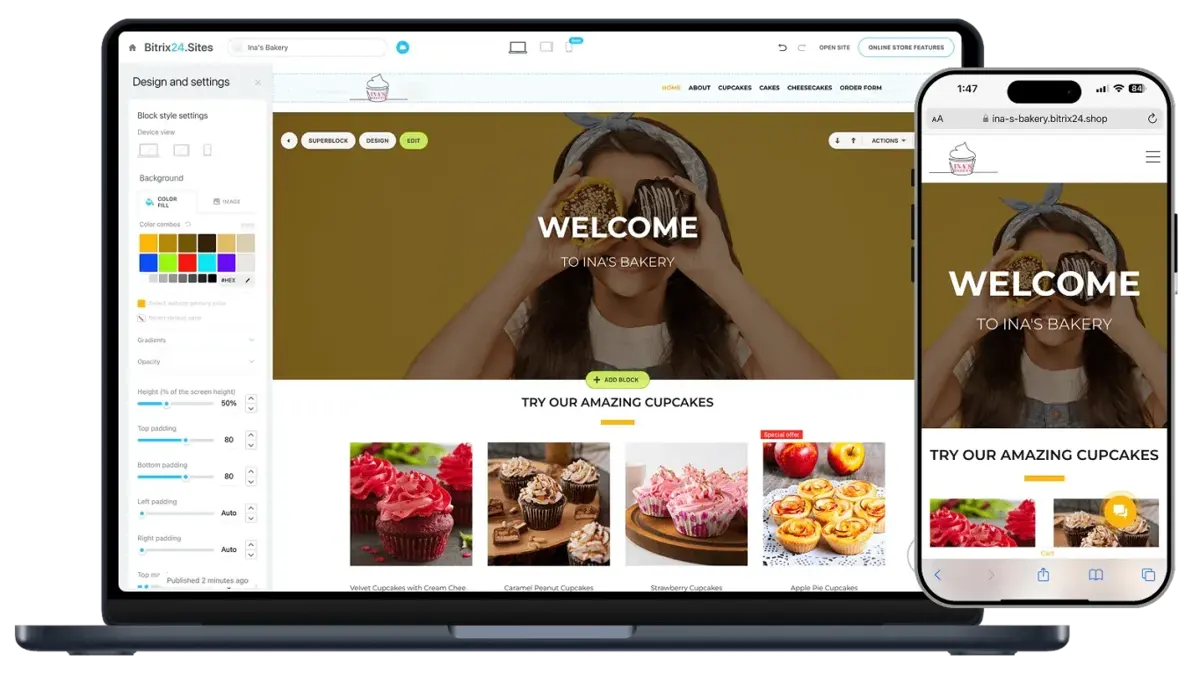
Credit: Bitrix24.com.
Bitrix24 also serves as free collaboration software for small teams, offering basic communication, task management, and CRM tools in its free plan, making it accessible to organizations starting to centralize their operations.
Benefits of Using Bitrix24
Bitrix24 delivers value beyond traditional collaboration software by combining communication, CRM, project management, workflow automation, and operational tools within a single platform. Its main strength lies in how these systems work together in one connected environment, enabling organizations to manage multiple business functions without relying on separate tools.
Operational Consolidation Across Tools
Bitrix24 reduces the need for multiple standalone systems by bringing communication, CRM, tasks, documents, and automation into one platform. This consolidation helps organizations simplify their software stack and maintain a single source of operational data across teams.
Reduced Software Costs Through Tool Replacement
By combining several categories of business software into one system, Bitrix24 can reduce the need for separate subscriptions for CRM, collaboration tools, and project management platforms. This makes it particularly valuable for organizations aiming to streamline recurring software expenses.
Improved Sales Visibility and Customer Context
With CRM connected directly to internal communication and task management, teams gain clearer visibility into customer interactions, deal progress, and related activities. This supports better coordination between sales and delivery teams working on shared accounts.
AI-Assisted Productivity Across Workflows
AI capabilities embedded across the platform support content creation, task assistance, communication support, and CRM-related activities. This helps reduce manual effort in day-to-day workflows and improves execution speed across teams.
Faster Approvals and Structured Work Execution
Built-in workflow tools help streamline approvals, task assignments, and internal routing. By standardizing how work moves through the system, organizations can reduce delays in routine business processes.
Automated Workflows for Routine Operations
Automation tools help handle repetitive processes such as notifications, task routing, onboarding steps, and internal workflow triggers. This allows teams to focus more on execution rather than administrative coordination.
Enhanced Employee Collaboration in One Workspace
Teams can collaborate through shared tasks, communication channels, documents, and project spaces within a single environment. This reduces fragmentation and keeps work context centralized across departments.
Unified Customer Management System
The integrated CRM allows organizations to manage leads, contacts, deals, and customer communication within the same system used for internal operations. This creates a more connected view of both customer-facing and delivery activities.
Mobile Workforce Support
With cloud access and mobile applications, Bitrix24 enables teams to manage tasks, communication, CRM updates, and approvals from mobile devices. This supports distributed and hybrid work environments.
Cross-Department Transparency and Visibility
Because CRM, communication, and project data are stored in one system, leadership teams gain broader visibility into operational activity across departments. This improves monitoring, coordination, and decision-making at scale.
Bitrix24 is most effective when used as a unified operating system for business functions rather than a standalone collaboration tool. Its value increases as more modules are adopted, enabling organizations to connect communication, CRM, automation, and project execution within a single ecosystem.
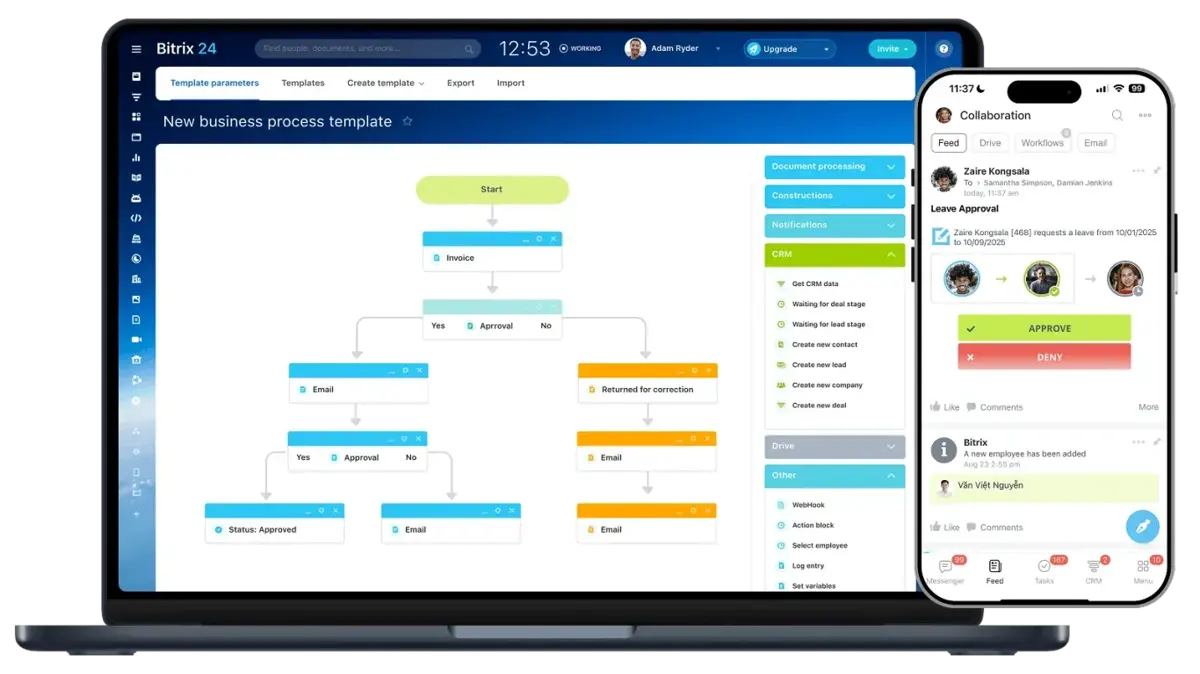
Credit: Bitrix24.com.
Our Expert Take on Bitrix24
Bitrix24 stands out as one of the most comprehensive all-in-one business management platforms available today. It is designed for organizations that want to consolidate CRM, collaboration, project management, workflow automation, HR functions, and customer communication into a single, connected ecosystem rather than relying on multiple standalone tools.
Its key strength lies in its breadth of functionality. Few platforms in the market bring together such a wide range of business operations, from sales and customer management to internal collaboration, task execution, automation, and analytics, within a unified system. This makes it particularly well-suited for businesses aiming to centralize operations and improve coordination across departments.
In terms of execution, Bitrix24 is strongest when used as a centralized operational hub where CRM data, team communication, and project workflows are closely interconnected. This level of integration enables organizations to manage both customer-facing and internal processes within a single environment, improving visibility and alignment across teams.
Rather than competing as a niche or single-function tool, Bitrix24 differentiates itself by replacing multiple software categories at once. Its value proposition centers on consolidation, scalability, and operational coverage, making it a strong choice for organizations looking to unify their business systems into a single platform.
Who Should Buy Bitrix24
Bitrix24 is designed for organizations that want to centralize multiple core business functions, such as CRM, collaboration, project management, automation, HR processes, and customer communication, into a single, connected system. Its value is especially strong in environments where different departments need shared visibility and coordinated workflows across tools.
- Small to mid-sized businesses consolidating multiple tools: Companies replacing separate apps for messaging, CRM, task tracking, and file management benefit from consolidating these functions into a single platform, reducing fragmentation across daily operations.
- Professional services firms: Agencies, consulting teams, and client-based service providers can manage projects, client communication, and billing workflows in one environment, keeping delivery and customer management closely aligned.
- Agencies (marketing, creative, digital, and PR): Teams handling multiple clients and campaigns can use shared workspaces, task management, CRM, and communication tools to coordinate deliverables and client interactions in a single system.
- Real estate organizations: Brokerages and property teams can organize leads, manage client pipelines, schedule appointments, and coordinate agents using integrated CRM and communication tools.
- Manufacturing and operations-heavy businesses: Companies managing structured workflows, internal approvals, and multi-step processes can use automation, task flows, and CRM-linked operations to streamline execution across departments.
- Construction and project-based industries: Teams working on timelines, subcontractors, and milestone-based delivery can benefit from task structures, workload tracking, and project coordination tools in one workspace.
- Healthcare administration and clinic operations: Administrative teams can manage scheduling, internal coordination, and customer communication workflows while maintaining structured operational processes.
- Education and training organizations: Schools, training centers, and academic programs can coordinate staff communication, scheduling, task tracking, and internal workflows within a unified system.
- Multi-location or franchise businesses: Organizations managing several branches or regional offices can centralize oversight while maintaining separate operational structures per location.
- Service-based businesses scaling operations: Businesses in repair, logistics, field services, and customer support can coordinate teams, manage requests, and track service workflows in one integrated system.
- Organizations prioritizing software consolidation: Enterprises aiming to reduce tool sprawl and unify business operations into a single platform will find Bitrix24 particularly aligned with long-term efficiency and cost consolidation goals.
Who Should Not Buy Bitrix24
Bitrix24 is less suited for organizations that prefer narrow, single-purpose tools or extremely lightweight workflows.
- Teams that only need basic communication or task tools: Organizations looking solely for messaging, video calls, or simple task tracking may find a full business platform unnecessary.
- Organizations that prioritize ultra-minimal workflows: Teams that operate with very simple processes and want the lowest possible feature depth may find the platform broader than required for day-to-day work.
Competitive Positioning
Bitrix24 positions itself differently from most tools in the collaboration and business software space by functioning as a unified ecosystem rather than a single-category product. Its competitive advantage lies in combining CRM, collaboration, automation, AI, HR workflows, e-signatures, BI tools, and scheduling capabilities into a single platform.
This positioning makes it particularly strong for organizations that prioritize consolidation and cross-department connectivity over standalone feature depth.
- Bitrix24 vs Speakap: Speakap focuses primarily on internal employee communication and frontline engagement. Bitrix24 extends far beyond internal messaging by integrating CRM, workflow automation, HR tools, AI features, e-signatures, BI Builder, and Online Booking into a single operational system. This broader functionality makes it better suited to end-to-end business management than to communication alone.
- Bitrix24 vs Slack / Microsoft Teams: Slack and Microsoft Teams are optimized for fast, streamlined communication and collaboration. Bitrix24 includes similar communication features but also extends to structured CRM management, automated workflows, AI assistance, HR processes, and analytics. The trade-off is a more complex interface in exchange for significantly broader operational capability.
- Bitrix24 vs Asana / ClickUp: Asana and ClickUp are highly specialized in task and project management, offering strong usability and deep project visualization. Bitrix24, while also offering task and project tools, differentiates itself by integrating CRM, sales automation, AI features, BI dashboards, e-signatures, and booking systems within a single environment.
- Bitrix24 vs HubSpot: HubSpot provides a highly refined CRM and marketing automation experience. Bitrix24 differentiates itself by embedding CRM directly into a broader operational platform that includes collaboration tools, HR workflows, AI capabilities, and project management, creating tighter alignment between customer management and internal execution.
- Bitrix24 vs Monday.com: Monday.com focuses strongly on structured work management and workflow visualization. Bitrix24 extends beyond project tracking by integrating customer-facing tools (CRM, contact center, booking systems), automation rules, AI assistance, and enterprise administration features into the same system.
- Bitrix24 vs Zoho One: Zoho One also offers an all-in-one ecosystem, but Bitrix24 emphasizes deeper real-time collaboration, embedded communication tools, and integrated AI capabilities across CRM, tasks, and workflows, creating a more unified day-to-day operating environment for teams.
For larger organizations evaluating more complex systems, this guide on collaboration software for enterprises can provide additional context when comparing enterprise-grade options.
What Business Types Use Bitrix24
Bitrix24 supports a broad range of industries because it serves as a unified business platform that combines CRM, collaboration, automation, AI capabilities, HR workflows, scheduling, and project management in a single environment. This makes it especially relevant for organizations that want to connect customer-facing processes with internal operations rather than managing them in separate systems.
Its strongest adoption tends to come from businesses that prioritize operational consolidation and cross-department visibility across sales, service delivery, and internal coordination.
1. Professional Services
Consulting firms, agencies, legal teams, accounting firms, and advisory groups use Bitrix24 to manage client relationships and service delivery within a single system.
Typical workflows include:
- CRM-based client and engagement tracking
- Project and task coordination for client deliverables
- Approval workflows for documents and outputs
- Team collaboration across multiple client accounts
- Time tracking linked to project execution and reporting
Evaluation: Particularly effective for linking CRM activity with delivery workflows, allowing client work and internal execution to stay connected in one environment.
2. IT and Software Development
Technology teams use Bitrix24 to coordinate development tasks, internal communication, and structured workflows across departments.
Common operational use cases:
- Task management using Kanban and structured project boards
- Workflow automation for repetitive development or operational steps
- Internal documentation and team coordination
- Cross-functional communication between technical and non-technical teams
Evaluation: Suitable for structured coordination, especially where teams want integrated communication and task management, though less specialized than dedicated engineering tools.
3. Marketing and Creative Agencies
Agencies use Bitrix24 to manage multiple clients, campaigns, and internal production workflows in one platform.
Typical use cases:
- CRM-driven lead and client management
- Campaign planning and task coordination
- Content review and approval workflows
- Internal collaboration across creative teams
- Client communication tracking within CRM
Evaluation: Strong for agencies that prioritize centralized client and project management across teams and accounts.
4. Construction and Engineering
Construction and engineering firms use Bitrix24 to coordinate office, field, and project teams, as well as project stakeholders.
Key workflows include:
- Project task scheduling and progress tracking
- Document management for plans, reports, and contracts
- Mobile collaboration for on-site updates
- Approval workflows for project stages and changes
- Coordination between contractors and internal teams
Evaluation: Useful for improving visibility across distributed project teams and stakeholders.
5. Real Estate
Real estate organizations use Bitrix24 to manage sales pipelines, client engagement, and internal coordination.
Common applications:
- CRM-based lead and property inquiry tracking
- Deal pipeline management for sales processes
- Client communication history centralized in CRM
- Agent coordination and task assignment
- Scheduling and follow-ups for property viewings
Evaluation: Strong fit for sales-driven workflows that require close alignment between client management and internal coordination.
6. Manufacturing and Operations-Heavy Businesses
Manufacturing and operations-focused organizations use Bitrix24 to coordinate structured internal processes across departments.
Supports:
- Workflow automation for operational processes
- Task routing across departments and teams
- Internal communication tied to operational execution
- Document management for procedures and records
- Cross-department coordination for production workflows
Evaluation: Effective for structured operational environments where consistency and coordination are key priorities.
7. Healthcare and Administrative Organizations
Healthcare administration teams and support organizations use Bitrix24 for internal coordination and operational management.
Common use cases:
- Staff task coordination and scheduling
- Internal communication across departments
- Document management for administrative records
- Approval workflows for internal processes
- Operational tracking and reporting
Evaluation: Flexible for administrative use, but organizations must evaluate requirements for governance and data handling depending on the regulatory context.
8. Education and Training Providers
Schools, training centers, and education organizations use Bitrix24 to manage administrative operations and internal coordination.
Supports:
- Staff communication and coordination
- Event and schedule planning
- Task and project tracking for operations
- Resource sharing and internal documentation
- Workflow automation for administrative processes
Evaluation: Best suited for institutional operations and coordination rather than academic delivery systems.
For small teams assessing whether this type of platform is the right fit, you may also refer to this guide on collaboration software for small business.
Best 5 alternatives to Bitrix24

monday
5 / 5
Monday.com is a highly adaptable platform designed to streamline work and project management for teams of various sizes. Its user-friendly, visually organized interface, enhanced by color-coded elements, allows users to navigate effortlessly without needing technical skills. With over 200 ready-made templates and a straightforward drag-and-drop system, teams can quickly set up workflows and begin managing tasks efficiently. Additionally, its powerful dashboard builder and no-code automation tools help users visualize data clearly and eliminate repetitive processes, boosting overall productivity.

GoTo Meeting
5 / 5
GoTo Meeting offers a highly intuitive interface that simplifies the process of starting or joining virtual meetings, making it accessible for both hosts and participants. Its robust platform supports crystal-clear audio and video quality, accommodating up to 250 attendees without compromising performance, which suits a variety of business sizes. The software includes useful features such as screen sharing, interactive drawing tools, and virtual whiteboards that enhance communication, alongside smart transcription and note-taking capabilities to boost meeting productivity. Additionally, GoTo Meeting prioritizes security through encrypted, password-protected sessions and ensures broad device compatibility, allowing seamless collaboration across smartphones, tablets, and desktops.

Microsoft Teams
4.35 / 5
Microsoft Teams offers a versatile hub for collaboration, seamlessly integrating essential Microsoft 365 tools such as Word, Excel, and SharePoint into one unified environment, thereby streamlining workflow processes and reducing the need for juggling multiple applications. Its robust communication capabilities—ranging from instant messaging and video calls to efficient file sharing—cater to real-time collaboration, effectively bridging the gap between remote and in-office teams. The platform also supports secure, real-time document co-authoring, ensuring that every team member accesses the most current version, which mitigates the risks of version control issues and confusion common in traditional email exchanges. Moreover, by consolidating various communication channels into a single space, Teams minimizes distractions while hosting large meetings and events, making it a compelling solution for organizations aiming to enhance productivity and coordination in modern work environments.

ClickUp
4.55 / 5
ClickUp is introduced as a project management solution crafted to simplify team coordination and streamline workflow processes. The available overview hints at a platform that brings together various elements of project management into an integrated interface, potentially supporting task organization and team collaboration. Although the details remain minimal, the initial impression is that ClickUp may offer a flexible framework adaptable to different project needs, aligning well with customers looking for an all-in-one project management tool. This brief insight lays the groundwork for a deeper exploration of how ClickUp might serve as a strategic resource for modern teams.

Speakap
4.6 / 5
Speakap delivers an integrated digital solution designed to streamline internal communication within organizations. The platform offers a centralized space for sharing updates, news, and essential resources, aimed at promoting a connected and engaged workforce. Its design emphasizes ease of use while supporting a dynamic exchange of ideas that can adapt to the evolving needs of modern businesses. Overall, Speakap positions itself as a compelling option for enterprises seeking to enhance collaboration and strengthen employee in-house networks.
Frequently Asked Questions (FAQs)
Yes. Bitrix24 includes built-in AI capabilities through CoPilot AI, which supports tasks such as content assistance, CRM interaction support, meeting follow-ups, sales guidance, and workflow assistance across different modules.
In 2026, Bitrix24 enhances team collaboration and communication through features like shared group tasks, instant messaging, video conferencing, and collaborative document editing. The platform's robust communication tools integrate seamlessly, enabling efficient project management and real-time team interaction, promoting a cohesive work environment.
Bitrix24 includes e-signature functionality that enables organizations to send, sign, and manage documents digitally within their business workflows.
Yes. Bitrix24 supports HR workflows, including employee requests, approvals, internal processes, and task-based HR automation.
Bitrix24 includes BI Builder, which enables organizations to create dashboards, reports, and visual analytics from business and CRM data.
Yes. Bitrix24 supports online booking features that let customers schedule appointments and services via structured booking tools.
Bitrix24 is available on mobile devices and supports access to CRM, tasks, communication tools, workflows, and collaboration features through its mobile application.
Bitrix24 Collabs are dedicated collaborative workspaces designed for structured teamwork with external participants or clients. Channels are communication streams used for organized updates, discussions, and team-wide information sharing within the platform.


