
EngageBay All-in-One Suite Review 2027: Pricing, Features, Pros & Cons, Ratings & More

Co-Founder and Chief Data Scientist

EngageBay: Top CRM Software
4.5 / 5
Featured CRM Software Alternatives for EngageBay

$9 to $150/user/month
Yes, up to 2 users
E-signature software, call transcription, conversation routing
Editor's Take
HubSpot CRM is a powerful customer relationship management platform designed to help businesses manage their sales, marketing, and customer service efforts in one centralized place. Its user-friendly interface allows teams to track leads, monitor customer interactions, and automate sales pipelines. With built-in tools for email marketing, contact management, and analytics, HubSpot CRM provides deep insights into customer behavior and sales performance. The platform also supports seamless collaboration between marketing and sales teams through real-time updates and integrations with tools like Gmail, Outlook, and Slack. Additionally, its automation features help reduce manual tasks, enabling teams to focus on building relationships and closing deals. HubSpot CRM is scalable, making it ideal for businesses of all sizes, from startups to large enterprises.
Expert Score
In evaluating SaaS software, a comprehensive and structured methodology ensures a fair and accurate comparison across key metrics. This approach focuses on the most critical aspects that affect user experience, functionality, and business value. The following metrics—general features, cost, customer service, integrations, and mobile support—are evaluated to provide a holistic view of each software solution’s strengths and weaknesses. These metrics are selected based on their direct impact on software usability, scalability, and long-term effectiveness for businesses.
1. General Features - scoring weight 40%
This metric evaluates the core functionalities and tools the software offers. It involves assessing the comprehensiveness of the features, their relevance to the target users, and the ease of use. This is important because robust and well-designed features determine the software's overall utility and efficiency in solving user problems.
2. Cost - scoring weight 15%
Cost analysis focuses on pricing models, value for money, and scalability. It's crucial to evaluate whether the software’s features justify its price, considering different plans for small and large organizations. This is vital for businesses to ensure they invest in cost-effective solutions that fit their budget.
3. Customer Service - scoring weight 15%
This evaluates the responsiveness, quality, and availability of customer support, including channels like chat, email, or phone. Good customer service is essential for troubleshooting and ensuring smooth software usage, which reduces downtime and frustration for users.
4. Integrations - scoring weight 15%
This examines how well the software integrates with third-party tools (e.g., CRM, payment systems, collaboration apps). Seamless integrations are key for creating a unified workflow and enhancing productivity by connecting multiple systems, which is crucial for operational efficiency.
5. Mobile Support - scoring weight 15%
Mobile support assesses the software’s functionality and performance on mobile devices, including apps and mobile web versions. With increasing remote work and on-the-go usage, strong mobile support is critical to ensure users can access and utilize the software effectively, regardless of location.

$25 per user per month
14 days
marketing automation, sales automation, no code customization
Editor's Take
CRM Creatio is a comprehensive customer relationship management (CRM) solution designed to streamline and enhance business processes across sales, marketing, and customer service functions. Known for its low-code platform, Creatio allows businesses to customize and automate workflows without requiring extensive technical expertise. This adaptability makes it particularly appealing to organizations seeking to align the software with their specific needs.
The platform's marketing module provides tools for multi-channel campaign management, lead generation, and personalized customer engagement. Its sales module offers functionality for pipeline management, opportunity tracking, and analytics to help teams close deals more efficiently. Additionally, the customer service module supports case management, service level agreement (SLA) monitoring, and omnichannel communication, enabling businesses to provide exceptional customer support.
Creatio stands out with its intuitive interface, robust analytics, and AI-powered tools that provide actionable insights. The low-code development tools allow non-technical users to create applications and automate processes, reducing the dependency on IT teams. Integration capabilities with other software platforms and APIs enhance its utility, making it a versatile choice for businesses of all sizes.
Overall, CRM Creatio is a powerful solution that combines user-friendly design with advanced customization and automation features. Its adaptability and low-code foundation position it as a strong contender for organizations looking to optimize customer relationship management processes while maintaining flexibility for growth and innovation.
Expert Score
In evaluating SaaS software, a comprehensive and structured methodology ensures a fair and accurate comparison across key metrics. This approach focuses on the most critical aspects that affect user experience, functionality, and business value. The following metrics—general features, cost, customer service, integrations, and mobile support—are evaluated to provide a holistic view of each software solution’s strengths and weaknesses. These metrics are selected based on their direct impact on software usability, scalability, and long-term effectiveness for businesses.
1. General Features - scoring weight 40%
This metric evaluates the core functionalities and tools the software offers. It involves assessing the comprehensiveness of the features, their relevance to the target users, and the ease of use. This is important because robust and well-designed features determine the software's overall utility and efficiency in solving user problems.
2. Cost - scoring weight 15%
Cost analysis focuses on pricing models, value for money, and scalability. It's crucial to evaluate whether the software’s features justify its price, considering different plans for small and large organizations. This is vital for businesses to ensure they invest in cost-effective solutions that fit their budget.
3. Customer Service - scoring weight 15%
This evaluates the responsiveness, quality, and availability of customer support, including channels like chat, email, or phone. Good customer service is essential for troubleshooting and ensuring smooth software usage, which reduces downtime and frustration for users.
4. Integrations - scoring weight 15%
This examines how well the software integrates with third-party tools (e.g., CRM, payment systems, collaboration apps). Seamless integrations are key for creating a unified workflow and enhancing productivity by connecting multiple systems, which is crucial for operational efficiency.
5. Mobile Support - scoring weight 15%
Mobile support assesses the software’s functionality and performance on mobile devices, including apps and mobile web versions. With increasing remote work and on-the-go usage, strong mobile support is critical to ensure users can access and utilize the software effectively, regardless of location.

$8/per user/per month
Yes
customizable dashboards, automated follow-ups, advanced analytics
Editor's Take
monday.com Sales CRM is a customizable platform designed to streamline sales processes, enhance team collaboration, and improve pipeline visibility. Its intuitive interface enables users to manage leads, track deals, and automate repetitive tasks with ease. The CRM integrates seamlessly with popular tools like Gmail, Slack, and HubSpot, ensuring a centralized workflow. Features like customizable dashboards, automated follow-ups, and advanced analytics help sales teams stay organized and focused on closing deals. With scalability in mind, monday.com caters to businesses of all sizes, offering flexible pricing plans and robust customer support. It’s an excellent choice for teams seeking efficiency and adaptability.
Expert Score
In evaluating SaaS software, a comprehensive and structured methodology ensures a fair and accurate comparison across key metrics. This approach focuses on the most critical aspects that affect user experience, functionality, and business value. The following metrics—general features, cost, customer service, integrations, and mobile support—are evaluated to provide a holistic view of each software solution’s strengths and weaknesses. These metrics are selected based on their direct impact on software usability, scalability, and long-term effectiveness for businesses.
1. General Features - scoring weight 40%
This metric evaluates the core functionalities and tools the software offers. It involves assessing the comprehensiveness of the features, their relevance to the target users, and the ease of use. This is important because robust and well-designed features determine the software’s overall utility and efficiency in solving user problems.
2. Cost - scoring weight 15%
Cost analysis focuses on pricing models, value for money, and scalability. It’s crucial to evaluate whether the software’s features justify its price, considering different plans for small and large organizations. This is vital for businesses to ensure they invest in cost-effective solutions that fit their budget.
3. Customer Service - scoring weight 15%
This evaluates the responsiveness, quality, and availability of customer support, including channels like chat, email, or phone. Good customer service is essential for troubleshooting and ensuring smooth software usage, which reduces downtime and frustration for users.
4. Integrations - scoring weight 15%
This examines how well the software integrates with third-party tools (e.g., CRM, payment systems, collaboration apps). Seamless integrations are key for creating a unified workflow and enhancing productivity by connecting multiple systems, which is crucial for operational efficiency.
5. Mobile Support - scoring weight 15%
Mobile support assesses the software’s functionality and performance on mobile devices, including apps and mobile web versions. With increasing remote work and on-the-go usage, strong mobile support is critical to ensure users can access and utilize the software effectively, regardless of location.
EngageBay Review
What is EngageBay All-in-One Suite?
EngageBay is a customer relationship management software that provides a database, sales platform, and several free tools and upgraded services to cater to a wide range of customers. This all-in-one software offers solutions in marketing automation, email tracking and validation, ticketing systems, live chatting, and more to ensure that businesses can streamline their operations and engage customers actively.
In this guide, our team at Research.com presents a comprehensive EngageBay All-in-One Suite review. We also discuss product updates, pricing plans, pros and cons, and benefits to help you explore the software’s features. Moreover, we include FAQs about the software and a list of five alternatives to ensure you have all the information you need to make informed choices.
What’s new in EngageBay All-in-One Suite?
In our EngageBay All-in-One Suite review, we will briefly tackle the latest changes to assist you in navigating the platform. As one of the best CRM tool providers on the market, EngageBay constantly updates its products to address evolving customer needs and keep up with the business and technology landscape.
One of the recent updates the vendor rolled out is its flexible web form builder. This free tool enables you to create forms that can integrate into your website. Users can display them as pop-ups, buttons, or QR scan codes. Moreover, you can customize the look of your forms—from logos to fonts—through easy drag-and-drop actions. With instant alerts and notifications, users can also work on each submission right away, ensuring that they stay on top of tasks.
Featured CRM Software Products
$9 to $150/user/month
Yes, up to 2 users
E-signature software, call transcription, conversation routing
Editor's Take
HubSpot CRM is a powerful customer relationship management platform designed to help businesses manage their sales, marketing, and customer service efforts in one centralized place. Its user-friendly interface allows teams to track leads, monitor customer interactions, and automate sales pipelines. With built-in tools for email marketing, contact management, and analytics, HubSpot CRM provides deep insights into customer behavior and sales performance. The platform also supports seamless collaboration between marketing and sales teams through real-time updates and integrations with tools like Gmail, Outlook, and Slack. Additionally, its automation features help reduce manual tasks, enabling teams to focus on building relationships and closing deals. HubSpot CRM is scalable, making it ideal for businesses of all sizes, from startups to large enterprises.
Expert Score
In evaluating SaaS software, a comprehensive and structured methodology ensures a fair and accurate comparison across key metrics. This approach focuses on the most critical aspects that affect user experience, functionality, and business value. The following metrics—general features, cost, customer service, integrations, and mobile support—are evaluated to provide a holistic view of each software solution’s strengths and weaknesses. These metrics are selected based on their direct impact on software usability, scalability, and long-term effectiveness for businesses.
1. General Features - scoring weight 40%
This metric evaluates the core functionalities and tools the software offers. It involves assessing the comprehensiveness of the features, their relevance to the target users, and the ease of use. This is important because robust and well-designed features determine the software's overall utility and efficiency in solving user problems.
2. Cost - scoring weight 15%
Cost analysis focuses on pricing models, value for money, and scalability. It's crucial to evaluate whether the software’s features justify its price, considering different plans for small and large organizations. This is vital for businesses to ensure they invest in cost-effective solutions that fit their budget.
3. Customer Service - scoring weight 15%
This evaluates the responsiveness, quality, and availability of customer support, including channels like chat, email, or phone. Good customer service is essential for troubleshooting and ensuring smooth software usage, which reduces downtime and frustration for users.
4. Integrations - scoring weight 15%
This examines how well the software integrates with third-party tools (e.g., CRM, payment systems, collaboration apps). Seamless integrations are key for creating a unified workflow and enhancing productivity by connecting multiple systems, which is crucial for operational efficiency.
5. Mobile Support - scoring weight 15%
Mobile support assesses the software’s functionality and performance on mobile devices, including apps and mobile web versions. With increasing remote work and on-the-go usage, strong mobile support is critical to ensure users can access and utilize the software effectively, regardless of location.
$25 per user per month
14 days
marketing automation, sales automation, no code customization
Editor's Take
CRM Creatio is a comprehensive customer relationship management (CRM) solution designed to streamline and enhance business processes across sales, marketing, and customer service functions. Known for its low-code platform, Creatio allows businesses to customize and automate workflows without requiring extensive technical expertise. This adaptability makes it particularly appealing to organizations seeking to align the software with their specific needs.
The platform's marketing module provides tools for multi-channel campaign management, lead generation, and personalized customer engagement. Its sales module offers functionality for pipeline management, opportunity tracking, and analytics to help teams close deals more efficiently. Additionally, the customer service module supports case management, service level agreement (SLA) monitoring, and omnichannel communication, enabling businesses to provide exceptional customer support.
Creatio stands out with its intuitive interface, robust analytics, and AI-powered tools that provide actionable insights. The low-code development tools allow non-technical users to create applications and automate processes, reducing the dependency on IT teams. Integration capabilities with other software platforms and APIs enhance its utility, making it a versatile choice for businesses of all sizes.
Overall, CRM Creatio is a powerful solution that combines user-friendly design with advanced customization and automation features. Its adaptability and low-code foundation position it as a strong contender for organizations looking to optimize customer relationship management processes while maintaining flexibility for growth and innovation.
Expert Score
In evaluating SaaS software, a comprehensive and structured methodology ensures a fair and accurate comparison across key metrics. This approach focuses on the most critical aspects that affect user experience, functionality, and business value. The following metrics—general features, cost, customer service, integrations, and mobile support—are evaluated to provide a holistic view of each software solution’s strengths and weaknesses. These metrics are selected based on their direct impact on software usability, scalability, and long-term effectiveness for businesses.
1. General Features - scoring weight 40%
This metric evaluates the core functionalities and tools the software offers. It involves assessing the comprehensiveness of the features, their relevance to the target users, and the ease of use. This is important because robust and well-designed features determine the software's overall utility and efficiency in solving user problems.
2. Cost - scoring weight 15%
Cost analysis focuses on pricing models, value for money, and scalability. It's crucial to evaluate whether the software’s features justify its price, considering different plans for small and large organizations. This is vital for businesses to ensure they invest in cost-effective solutions that fit their budget.
3. Customer Service - scoring weight 15%
This evaluates the responsiveness, quality, and availability of customer support, including channels like chat, email, or phone. Good customer service is essential for troubleshooting and ensuring smooth software usage, which reduces downtime and frustration for users.
4. Integrations - scoring weight 15%
This examines how well the software integrates with third-party tools (e.g., CRM, payment systems, collaboration apps). Seamless integrations are key for creating a unified workflow and enhancing productivity by connecting multiple systems, which is crucial for operational efficiency.
5. Mobile Support - scoring weight 15%
Mobile support assesses the software’s functionality and performance on mobile devices, including apps and mobile web versions. With increasing remote work and on-the-go usage, strong mobile support is critical to ensure users can access and utilize the software effectively, regardless of location.
$8/per user/per month
Yes
customizable dashboards, automated follow-ups, advanced analytics
Editor's Take
monday.com Sales CRM is a customizable platform designed to streamline sales processes, enhance team collaboration, and improve pipeline visibility. Its intuitive interface enables users to manage leads, track deals, and automate repetitive tasks with ease. The CRM integrates seamlessly with popular tools like Gmail, Slack, and HubSpot, ensuring a centralized workflow. Features like customizable dashboards, automated follow-ups, and advanced analytics help sales teams stay organized and focused on closing deals. With scalability in mind, monday.com caters to businesses of all sizes, offering flexible pricing plans and robust customer support. It’s an excellent choice for teams seeking efficiency and adaptability.
Expert Score
In evaluating SaaS software, a comprehensive and structured methodology ensures a fair and accurate comparison across key metrics. This approach focuses on the most critical aspects that affect user experience, functionality, and business value. The following metrics—general features, cost, customer service, integrations, and mobile support—are evaluated to provide a holistic view of each software solution’s strengths and weaknesses. These metrics are selected based on their direct impact on software usability, scalability, and long-term effectiveness for businesses.
1. General Features - scoring weight 40%
This metric evaluates the core functionalities and tools the software offers. It involves assessing the comprehensiveness of the features, their relevance to the target users, and the ease of use. This is important because robust and well-designed features determine the software’s overall utility and efficiency in solving user problems.
2. Cost - scoring weight 15%
Cost analysis focuses on pricing models, value for money, and scalability. It’s crucial to evaluate whether the software’s features justify its price, considering different plans for small and large organizations. This is vital for businesses to ensure they invest in cost-effective solutions that fit their budget.
3. Customer Service - scoring weight 15%
This evaluates the responsiveness, quality, and availability of customer support, including channels like chat, email, or phone. Good customer service is essential for troubleshooting and ensuring smooth software usage, which reduces downtime and frustration for users.
4. Integrations - scoring weight 15%
This examines how well the software integrates with third-party tools (e.g., CRM, payment systems, collaboration apps). Seamless integrations are key for creating a unified workflow and enhancing productivity by connecting multiple systems, which is crucial for operational efficiency.
5. Mobile Support - scoring weight 15%
Mobile support assesses the software’s functionality and performance on mobile devices, including apps and mobile web versions. With increasing remote work and on-the-go usage, strong mobile support is critical to ensure users can access and utilize the software effectively, regardless of location.

$7 per user per month billed annually
15 days
lead generation, sales pipeline management, workflow automation
Editor's Take
Zoho CRM is a flexible and comprehensive customer relationship management platform designed to help businesses manage and grow their customer relationships effectively. With tools for lead generation, sales pipeline management, workflow automation, and analytics, Zoho CRM is suitable for businesses of all sizes across a variety of industries.
Zoho CRM enables teams to streamline sales processes by capturing leads from multiple channels, tracking interactions, and managing every stage of the sales cycle. The platform offers customizable dashboards and reports, providing insights into sales performance and customer behaviors to help make data-driven decisions. With powerful automation features, Zoho CRM allows businesses to set up workflows for routine tasks like follow-ups, lead scoring, and email notifications, reducing manual work and enhancing productivity. The platform integrates with popular tools, including the Zoho suite, Microsoft 365, and G Suite, enabling a seamless connection across teams.
For businesses aiming to improve customer engagement, close deals faster, and enhance team collaboration, Zoho CRM delivers a scalable, user-friendly solution to drive sales and customer satisfaction.
Expert Score
In evaluating SaaS software, a comprehensive and structured methodology ensures a fair and accurate comparison across key metrics. This approach focuses on the most critical aspects that affect user experience, functionality, and business value. The following metrics—general features, cost, customer service, integrations, and mobile support—are evaluated to provide a holistic view of each software solution’s strengths and weaknesses. These metrics are selected based on their direct impact on software usability, scalability, and long-term effectiveness for businesses.
1. General Features - scoring weight 40%
This metric evaluates the core functionalities and tools the software offers. It involves assessing the comprehensiveness of the features, their relevance to the target users, and the ease of use. This is important because robust and well-designed features determine the software's overall utility and efficiency in solving user problems.
2. Cost - scoring weight 15%
Cost analysis focuses on pricing models, value for money, and scalability. It's crucial to evaluate whether the software’s features justify its price, considering different plans for small and large organizations. This is vital for businesses to ensure they invest in cost-effective solutions that fit their budget.
3. Customer Service - scoring weight 15%
This evaluates the responsiveness, quality, and availability of customer support, including channels like chat, email, or phone. Good customer service is essential for troubleshooting and ensuring smooth software usage, which reduces downtime and frustration for users.
4. Integrations - scoring weight 15%
This examines how well the software integrates with third-party tools (e.g., CRM, payment systems, collaboration apps). Seamless integrations are key for creating a unified workflow and enhancing productivity by connecting multiple systems, which is crucial for operational efficiency.
5. Mobile Support - scoring weight 15%
Mobile support assesses the software’s functionality and performance on mobile devices, including apps and mobile web versions. With increasing remote work and on-the-go usage, strong mobile support is critical to ensure users can access and utilize the software effectively, regardless of location.

By quote
Yes
Lead Management, Contact Management, Workflow Automation
Editor's Take
Salesforce CRM is a leading customer relationship management platform known for its robust functionality, scalability, and extensive customization options, making it suitable for businesses of all sizes, from startups to large enterprises. Built to streamline sales, marketing, customer service, and analytics, Salesforce CRM empowers teams to manage customer interactions, optimize workflows, and drive growth from a single, cloud-based platform.
Salesforce CRM provides a complete view of customer data, enabling teams to track interactions, manage leads, and automate tasks throughout the sales pipeline. With powerful tools for reporting and analytics, Salesforce offers insights into sales performance, customer trends, and campaign effectiveness, allowing teams to make data-driven decisions. The platform’s automation capabilities reduce manual workloads with customizable workflows, automated follow-ups, and lead scoring, ensuring a smooth customer journey. Integrations with thousands of third-party applications, along with its own suite of services, make Salesforce a highly adaptable solution for businesses looking to connect their CRM with other tools.
For organizations focused on enhancing customer engagement, improving team efficiency, and scaling their operations, Salesforce CRM delivers a powerful and versatile solution tailored to support long-term business growth.
Expert Score
In evaluating SaaS software, a comprehensive and structured methodology ensures a fair and accurate comparison across key metrics. This approach focuses on the most critical aspects that affect user experience, functionality, and business value. The following metrics—general features, cost, customer service, integrations, and mobile support—are evaluated to provide a holistic view of each software solution’s strengths and weaknesses. These metrics are selected based on their direct impact on software usability, scalability, and long-term effectiveness for businesses.
1. General Features - scoring weight 40%
This metric evaluates the core functionalities and tools the software offers. It involves assessing the comprehensiveness of the features, their relevance to the target users, and the ease of use. This is important because robust and well-designed features determine the software's overall utility and efficiency in solving user problems.
2. Cost - scoring weight 15%
Cost analysis focuses on pricing models, value for money, and scalability. It's crucial to evaluate whether the software’s features justify its price, considering different plans for small and large organizations. This is vital for businesses to ensure they invest in cost-effective solutions that fit their budget.
3. Customer Service - scoring weight 15%
This evaluates the responsiveness, quality, and availability of customer support, including channels like chat, email, or phone. Good customer service is essential for troubleshooting and ensuring smooth software usage, which reduces downtime and frustration for users.
4. Integrations - scoring weight 15%
This examines how well the software integrates with third-party tools (e.g., CRM, payment systems, collaboration apps). Seamless integrations are key for creating a unified workflow and enhancing productivity by connecting multiple systems, which is crucial for operational efficiency.
5. Mobile Support - scoring weight 15%
Mobile support assesses the software’s functionality and performance on mobile devices, including apps and mobile web versions. With increasing remote work and on-the-go usage, strong mobile support is critical to ensure users can access and utilize the software effectively, regardless of location.

$7/user/month
15 days
Pipeline Management, Email Integration, Task Tracking
Editor's Take
Bigin is a lightweight CRM by Zoho, tailored for small businesses and startups to manage sales pipelines efficiently. It provides tools for deal tracking, email integration, and task management, ensuring a simple yet effective approach to sales. The platform offers customizable pipelines, real-time notifications, and seamless integrations with other Zoho apps. Its user-friendly design makes it accessible for teams with minimal CRM experience, helping them streamline sales processes without complexity.
Expert Score
In evaluating SaaS software, a comprehensive and structured methodology ensures a fair and accurate comparison across key metrics. This approach focuses on the most critical aspects that affect user experience, functionality, and business value. The following metrics—general features, cost, customer service, integrations, and mobile support—are evaluated to provide a holistic view of each software solution’s strengths and weaknesses. These metrics are selected based on their direct impact on software usability, scalability, and long-term effectiveness for businesses.
1. General Features - scoring weight 40%
This metric evaluates the core functionalities and tools the software offers. It involves assessing the comprehensiveness of the features, their relevance to the target users, and the ease of use. This is important because robust and well-designed features determine the software's overall utility and efficiency in solving user problems.
2. Cost - scoring weight 15%
Cost analysis focuses on pricing models, value for money, and scalability. It's crucial to evaluate whether the software’s features justify its price, considering different plans for small and large organizations. This is vital for businesses to ensure they invest in cost-effective solutions that fit their budget.
3. Customer Service - scoring weight 15%
This evaluates the responsiveness, quality, and availability of customer support, including channels like chat, email, or phone. Good customer service is essential for troubleshooting and ensuring smooth software usage, which reduces downtime and frustration for users.
4. Integrations - scoring weight 15%
This examines how well the software integrates with third-party tools (e.g., CRM, payment systems, collaboration apps). Seamless integrations are key for creating a unified workflow and enhancing productivity by connecting multiple systems, which is crucial for operational efficiency.
5. Mobile Support - scoring weight 15%
Mobile support assesses the software’s functionality and performance on mobile devices, including apps and mobile web versions. With increasing remote work and on-the-go usage, strong mobile support is critical to ensure users can access and utilize the software effectively, regardless of location.
How much does the EngageBay All-in-One Suite cost?
EngageBay: Top CRM Software
4.5 / 5
Our team identifies the EngageBay All-in-One Suite pricing plans to aid you in determining the best scheme that fits your organization’s needs and budgets. The vendor has monthly pricing plans and discounted annual and biennial payment bundles. The vendor also has separate plans for the marketing and CRM & Sales Bay solutions.
The EngageBay All-in-One Suite pricing tiers are as follows:
Free
- 500 MB file storage, 250 contacts, and 1,000 branded emails
- Email tracking/scheduling, email and chat support, contact management
- Limited reporting dashboard, lead scoring, and landing page builder features
Basic – $14.99/user/month
- 1 GB file storage, 500 contacts, and 3,000 branded emails
- Video marketing, custom deal milestones, and tag management
- 15 credits of calling minutes, canned responses, and predictive lead scoring
Growth – $64.99/user/month
- 5 GB file storage, 5,000 contacts, and 25,000 branded emails
- Automation and workflows, A/B testing, and push notifications
- Free onboarding, SSO, multi-currency, and coded landing pages
Pro – 199.99/user/month
- 20 GB file storage, unlimited contacts, and 50,000 branded emails
- Expansive role management, call recordings, and custom reporting
- Web analytics, customer 360-degree view, and phone support
What sets EngageBay All-in-One Suite apart?
In this section, our team points out the EngageBay All-in-One Suite pros and cons to help you determine if it is the best solution for your team and company’s needs. EngageBay is one of the top CRM platforms in the market due to the following advantages:
Pros
- Responsive customer service. EngageBay’s timely customer services help users mitigate issues. From onboarding to addressing snags, it offers support every step of the way. Users can also access knowledge bases, video tutorials, and other resources to facilitate self-help and enhance their proficiency with the platform.
- Free tools. In most EngageBay All-in-One Suite review comments, the vendor’s free and inexpensive plans appeal positively to many customers. These cost-friendly options are ideal for startups or small businesses needing various essential tools without extra fees.
- Comprehensive platform. This one-stop-shop offers a wide range of services, making it easier to manage all operations in one centralized hub. From deal creation to lead management or employee engagement, there is a tool for every facet of your business. Moreover, its selection of integrations enables users to incorporate elements, whether it is a signature or an invoice program, seamlessly into various built-in solutions.
However, some existing users cite the following pain points when using the software:
Cons
- Steep learning curve. Not every client learns the same way, which is why some users cite difficulty learning the many features of EngageBay. Due to the overwhelming number of products and features, the vendor offers various resources and avenues for simple and supported learning.
- Certain limitations. Some EngageBay All-in-One Suite review testimonials note that the platform is lacking in some areas, including advanced analytics or increased contacts. While the company has already put solutions in place, users who only have basic access might not be able to reap the benefits of these features.
- Restrictive plans. EngageBay’s pricing structure provides scalability, allowing users to upgrade as their business evolves. However, these may not be effective for budget-conscious clients or customers who are slowly growing their bases.
EngageBay All-in-One Suite Core Features
EngageBay: Top CRM Software
4.5 / 5
Our team explains the top EngageBay All-in-One Suite features in this section to help you understand its major functionalities and determine whether these align with your company’s requirements.
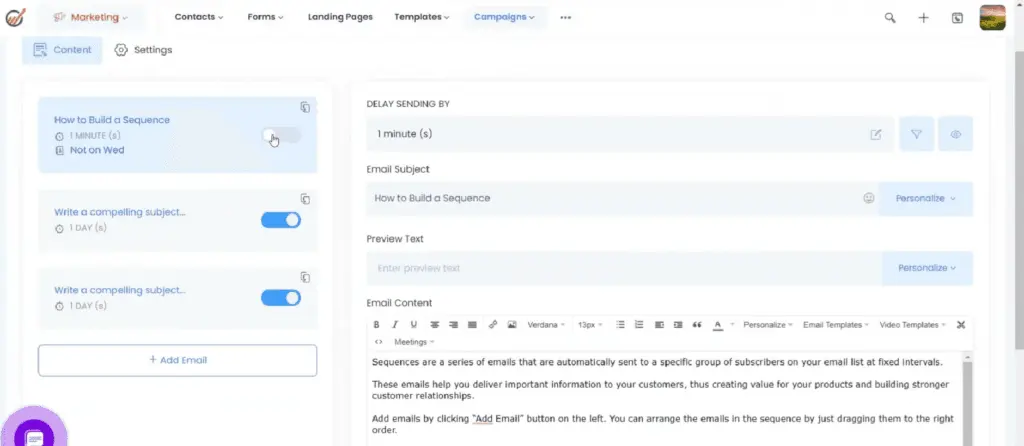
- Email sequences. Users can easily send templated messages in bulk through automated settings. You can also edit each piece of content through personalization controls. With advanced filters and workflow controls, you can calibrate the conditions on how and when emails get sent. Its preview option also enables you to check your emails before sending them. Email marketing performances are also tracked to help you improve campaigns and boost engagement.
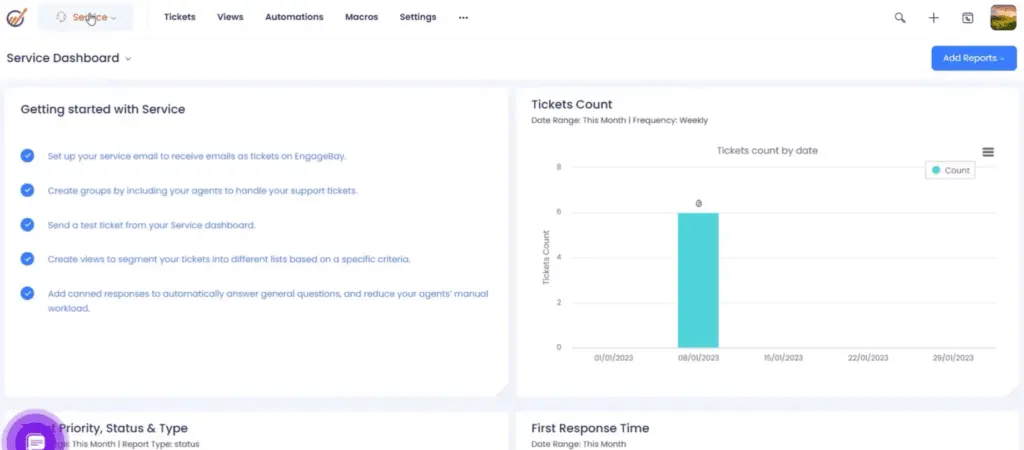
- Appointment and ticketing systems. EngageBay’s online appointment scheduling system includes one-on-one, group, or round-robin options for booking meetings. You can set how long each appointment is and customize business hours and time zones to ensure you can meet with any client. In addition, you can configure ticket email responses, statuses, and priorities with simple clicks. Its vast selection of views helps you filter tickets that need attention. Furthermore, you can edit macros through easy-to-navigate workflows that execute repetitive actions.
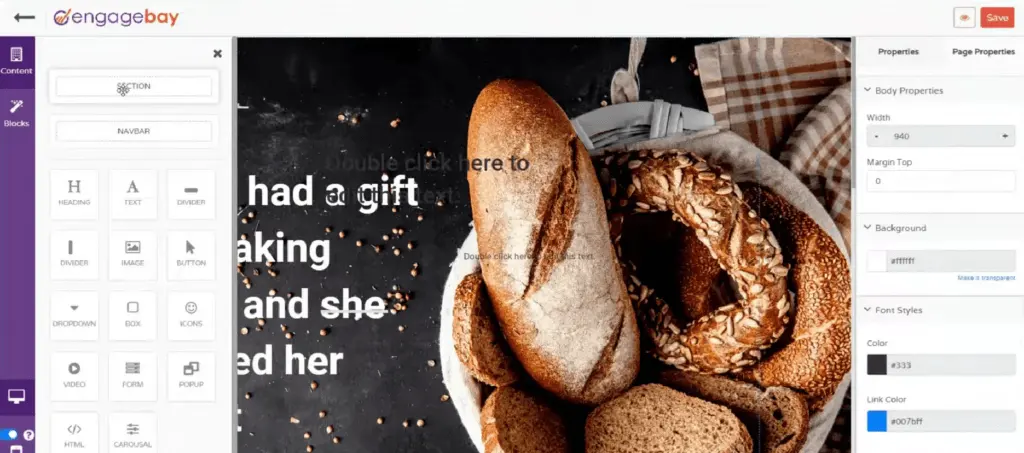
- Landing pages. One of the most highlighted features among EngageBay All-in-One Suite reviews is its versatile library of landing pages. Users can choose from ready-to-use templates, craft a new one, or build their own coded page. Its intuitive interface enables you to change blocks and elements of the landing page from a simple pane. It also offers a mobile version of the page to assist you in tweaking properties as needed. Aside from a preview button, it allows you to test two variants of a landing page to review conversion rates.
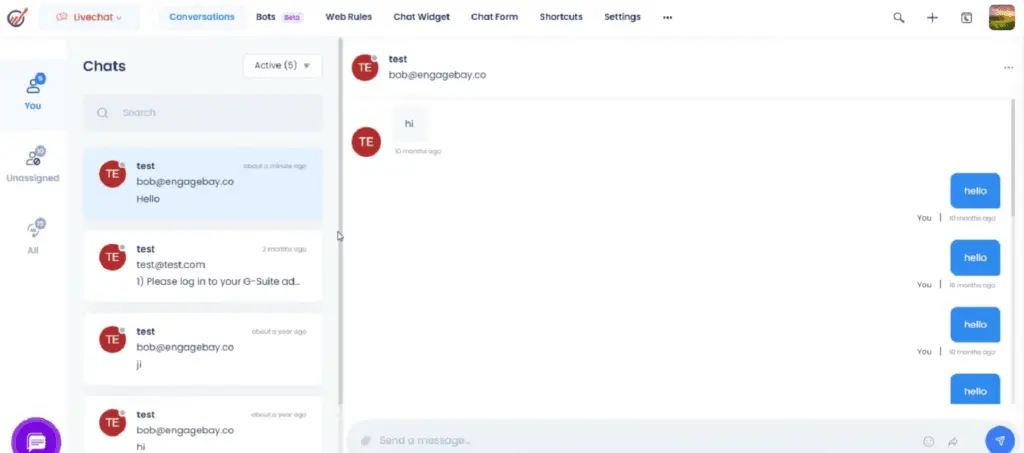
- Support and chatbots. Users will receive a notification as soon as a chat is initiated. You can also create shortcuts or auto-generated responses to save your agents' time and ensure no customer query goes unnoticed. Apart from that, EngageBay’s chatbots are easily configured through drag-and-drop, drop-down, and editable buttons. These solutions contribute to a streamlined and efficient customer support experience.
Expanding EngageBay Functionality with Third-Party Integrations
EngageBay’s ability to integrate with various third-party applications enhances its functionality, making it adaptable to the diverse needs of modern businesses. By connecting EngageBay with essential tools, users can streamline workflows, improve data accuracy, and enhance productivity. Below, we’ll explore how these integrations work and highlight key applications EngageBay supports.
- Seamless Data Synchronization: EngageBay integrates with applications like Zapier and QuickBooks, allowing users to sync data across platforms. This ensures that customer data, invoices, and transactions are consistent, reducing the risk of errors and redundant tasks.
- Enhanced Email Marketing: The platform supports integration with Mailchimp and other email marketing tools, enabling users to expand their email campaigns with advanced automation and segmentation.
- Payment Processing: By connecting with popular payment tools, EngageBay simplifies billing and payment processes, allowing businesses to generate and track invoices directly within the platform.
- CRM & Sales Automation: EngageBay’s integration with CRM applications ensures that sales data, contact information, and communication histories are consistently up-to-date, providing a comprehensive view of customer interactions.
- Custom Integrations via API: For businesses with specific integration needs, EngageBay’s API allows custom integrations, enabling companies to tailor the platform to meet unique operational requirements.
Maximizing EngageBay with Robust Sales Strategies
EngageBay’s versatility becomes especially impactful when aligned with robust sales management strategies. By combining EngageBay’s CRM and automation capabilities with tools like a dedicated sales commission software, businesses can significantly enhance their sales operations. Such software provides a structured approach to managing commissions, ensuring seamless tracking and incentivization for sales teams. This integration helps maintain transparency and boosts motivation through real-time updates and streamlined payments. Leveraging advanced tools and platforms together not only optimizes workflows but also scales revenue-driving efforts effectively. For a comprehensive view of the best software options in this category, visit this list of top-performing sales commission software. By coupling EngageBay with complementary solutions, companies can create a stronger, more cohesive strategy to meet their sales targets and streamline operations.
How does EngageBay All-in-One Suite enhance team collaboration?
EngageBay All-in-One Suite facilitates seamless internal collaboration through its centralized communication channels, automated workflows, and comprehensive integration capabilities. Its design empowers teams to consolidate real-time customer interactions and project updates into a single platform, minimizing information silos while improving cross-departmental transparency. Advanced integration options allow for synchronization with established productivity tools and collaborative software, enabling efficient task management and rapid information sharing. This interconnected functionality supports coordinated decision-making and accelerates project timelines without necessitating constant context switching between multiple applications.
Benefits of Using EngageBay All-in-One Suite
In this section of our EngageBay All-in-One Suite review, we will tackle the main benefits of using this software. These core advantages can potentially help draw in more clients who are searching for these key features in a comprehensive CRM solution.
User-Friendly Interface
Whether you are syncing EngageBay All-in-One Suite integrations or building profiles, the software’s overall interface is praised for its simple usability. For instance, right on the contact page, all the ways to interact with a client are listed on the menu header—from viewing past engagements to jotting down meeting notes, initiating calls, or editing workflows for that specific contact. Importing deals is also accomplished in just a few steps: Upload the file, double-check the fields, and save it in the database. Furthermore, getting stuck is no issue since its strong support channels are available to walk you through the proper steps, thus making platform navigation and mastery easy for any type of customer.
Unified Platform
EngageBay, as an all-encompassing software, minimizes the need to source separate instruments for various operational aspects. This eliminates the hassle of juggling multiple tools for different operational needs. In EngageBay, for example, teams needing helpdesk and live chat software can find solutions within the platform. Agents handling leads can immediately call them or broadcast texts seamlessly without leaving the page. Offering several solutions in one software simplifies the work ecosystem for users and encourages an integrated strategy for overseeing their business operations.
Customizable and Automated
Our EngageBay All-in-One Suite review covers several features, and the platform’s automation controls need special recognition. Adding tags, updating contacts, and sending push notifications are just some options users can automate in EngageBay's marketing system alone. In addition, you can select various ways to craft automated sequences, such as when sending emails, implementing scores on submitted forms, or following up on leads. You can also create one from scratch, allowing you to customize actions depending on your team's needs. From constructing intricate workflows to reducing the burden of repetitive tasks, this functionality is designed to save time and help streamline processes.
What business types use EngageBay All-in-One Suite?
In our EngageBay All-in-One Suite review, we identify the most common business types that the vendor assists. Because of its expansive solutions and integrations with various sales and top ecommerce platforms, almost every kind of company can make the most out of EngageBay. These include startups, small to medium-sized businesses, and enterprises from fields in marketing, consulting, media, web design, and medical organizations, demonstrating the versatility of EngageBay’s reach.
Key Insights
- Comprehensive CRM Solution: EngageBay All-in-One Suite provides a wide range of tools for marketing automation, sales, and customer service, making it a comprehensive solution for businesses of all sizes.
- User-Friendly Interface: The platform is praised for its intuitive and easy-to-navigate interface, which simplifies the user experience for both beginners and advanced users.
- Extensive Free Tools: EngageBay offers a variety of free tools and features, making it an attractive option for startups and small businesses with limited budgets.
- Advanced Automation: The software’s automation capabilities, such as email sequences, appointment scheduling, and workflow automation, help streamline operations and improve efficiency.
- Flexible Pricing Plans: EngageBay provides scalable pricing plans, including monthly, annual, and biennial options, catering to different business needs and budgets.
- Customization and Integration: The platform allows for extensive customization and integrates with various third-party applications, enhancing its functionality and flexibility.
- Responsive Customer Support: EngageBay is known for its timely and efficient customer support, offering various resources like video tutorials and knowledge bases to assist users.
Best 5 alternatives to EngageBay
Zoho CRM
5 / 5
Zoho CRM offers extensive customization options that enable businesses to adapt fields, page layouts, workflows, and automation rules to their specific needs, thereby enhancing lead management and streamlining the sales process from initial contact to deal closure. Its comprehensive suite supports sales, marketing, and customer support through features like detailed reporting, analytics, and an intuitive interface that facilitates easy navigation. The platform integrates AI-powered tools such as the Zia assistant, which provides predictive sales insights and helps personalize customer interactions using real-time behavioral data. Moreover, Zoho CRM’s competitive pricing—including a free tier for smaller teams—and its mobile and third-party app integrations make it a versatile choice for organizations aiming to improve collaboration and decision-making across diverse work environments.
monday sales CRM
4.45 / 5
Monday Sales CRM stands out for its exceptional adaptability, allowing users to customize dashboards, columns, and sales workflows to perfectly suit their distinct business requirements. This level of flexibility is ideal for companies with unique processes or niche operations, enabling them to modify the platform effortlessly without needing advanced technical skills. Additionally, the CRM offers automation features that streamline repetitive tasks like follow-up reminders and status updates, thereby minimizing manual workload and lowering the chance of mistakes. Coupled with integrated communication tools and AI-powered capabilities for email composition and data analysis, monday ensures teams remain coordinated and equipped to make data-driven decisions.
CRM Creatio
5 / 5
Creatio CRM stands out as a versatile and powerful customer relationship management platform, designed to accommodate both technical and non-technical users through its intuitive no-code development environment. This feature allows organizations to customize applications and automate workflows swiftly, reducing implementation time and overall costs by 37% compared to traditional CRM solutions. By automating routine tasks and providing a comprehensive 360-degree customer view, Creatio enhances team productivity and fosters more personalized client interactions. Additionally, its extensive integration options, strong security measures, and AI-driven automation equip businesses with actionable insights and predictive capabilities to optimize the entire customer journey.
HubSpot CRM
5 / 5
HubSpot CRM is a cloud-based customer relationship management platform designed to help businesses manage and analyze customer interactions throughout the sales and marketing lifecycle. It provides tools for contact and lead management, email tracking, pipeline management, marketing automation, and performance analytics. The system is known for its user-friendly interface and seamless integration with other HubSpot tools, making it particularly popular among small to medium-sized businesses. HubSpot CRM is available in a free version with basic features, while more advanced capabilities—such as sales forecasting, custom reporting, and AI-powered insights—are accessible through paid tiers. The platform emphasizes ease of use, scalability, and centralized data, enabling teams to align their sales, marketing, and customer service efforts more effectively.

Pipedrive
4.3 / 5
Pipedrive stands out as a versatile CRM solution designed to simplify and optimize sales workflows by automating routine tasks like lead distribution, follow-up scheduling, and deal tracking. Its high level of customization allows businesses to shape sales pipelines and data fields to suit their specific needs, accommodating a wide range of industries and company sizes. By consolidating customer information and communications through integrations with common email and calendar tools, Pipedrive enhances team collaboration and reduces the hassle of juggling multiple platforms. Furthermore, the platform’s clear visual pipeline offers sales teams an intuitive way to oversee deal progress and quickly spot any obstacles in the sales process.
Frequently Asked Questions (FAQs)
EngageBay All-in-One Suite includes features such as email marketing, marketing automation, CRM & sales automation, appointment scheduling, ticketing system, live chat, landing page builder, and web form creation. These tools are designed to streamline operations and improve customer engagement.
EngageBay integrates with various third-party applications, including popular tools like Zapier, Mailchimp, and QuickBooks. This allows users to connect EngageBay with other platforms they are already using, enhancing the overall functionality and creating a seamless workflow.
Yes, EngageBay is ideal for small businesses due to its affordable pricing plans, extensive free tools, and user-friendly interface. The platform’s scalability allows small businesses to start with basic features and upgrade as their needs grow.
EngageBay’s automation features help reduce manual tasks, streamline workflows, and improve efficiency. Automation tools such as email sequences, workflow automation, and appointment scheduling enable businesses to focus on strategic activities and enhance customer engagement.
Yes, EngageBay offers extensive customization options. Users can tailor the platform to meet their specific needs, from customizing email templates and landing pages to setting up automated workflows and personalized sequences.
EngageBay offers competitive pricing with flexible payment plans, including monthly, annual, and biennial options. Its free plan and affordable paid tiers make it a cost-effective solution compared to other CRM platforms that may charge higher fees for similar features.
Yes, EngageBay offers a free plan that includes essential features for up to 250 contacts and 1,000 branded emails. This allows users to test the platform and its capabilities before committing to a paid plan.
EngageBay offers a comprehensive customer support system including email, live chat, and phone support. They also provide a detailed knowledge base and tutorial videos to assist users in navigating the platform effectively, ensuring clients have the guidance they need to optimize their experience with the software.


